S3 object storage on ONTAP

NFS and SMB serve files. iSCSI and FC serve disks. Modern apps want a third thing: objects, stored and fetched over HTTP with the S3 API that Amazon made popular.

ONTAP can be that S3 server too, on the same cluster that already holds your shares and LUNs. In this deep dive you’ll build an S3 server, a user, a bucket and a bucket policy, then upload a file from a Linux client.

Where this page fits

Deep dive in NetApp ONTAP Storage Administration · Phase 2, Protocols and day-to-day administration · Before this: Lesson 34, Deduplication, compression and compaction · Next: ONTAP REST API and automation

TimeYou needBy the end you can
60 minutesThe practice shell (version 1.1 or later) and Lessons 16, 17 and 21Create an ONTAP S3 server, give an app its own keys and bucket, and fix the three most common S3 errors

What it is, in one line

ONTAP S3 turns an SVM into an S3-compatible object store, so apps can PUT and GET objects in buckets over HTTP or HTTPS.

In Simple Words

A cloakroom with tokens

At a wedding hall cloakroom you hand over a bag and get a token. Later you show the token and get the bag back. You never see the shelves, and you don’t care which shelf it sat on.

S3 works the same way. The app hands ONTAP an object and a name (the key). Later it asks for that name and gets the object back.

The access key and secret key are the app’s ID card, and the bucket policy is the list of who may use which cloakroom.

Engineer's View

What ONTAP S3 really is

ONTAP S3 runs as an object store server inside a data SVM. It answers the S3 REST API on a LIF whose service policy includes data-s3-server, over HTTPS (with a certificate) or plain HTTP. Each bucket is stored in a FlexGroup volume that ONTAP creates for you, named like fg_oss_....

S3 has its own users, separate from Windows or UNIX users. Each user gets an access key and a secret key, and every request is signed with them. Bucket policies and groups decide which user may list, read, write or delete.

Some release milestones: S3 SnapMirror (bucket replication) from ONTAP 9.10.1, object versioning from 9.11.1, and S3 Object Lock from 9.14.1. You can also present existing NAS data as an S3 bucket (a “NAS bucket”), so an app reads over S3 what users write over NFS or SMB.

How it works, step by step

1The pieces, from client to disk

An S3 request travels through five layers. If any one is missing, the request fails, and each failure has its own error.

LayerONTAP objectWhat breaks if it is wrong
NetworkA data LIF with the data-s3-server serviceThe client can’t connect at all
Servervserver object-store-serverNo S3 endpoint on the SVM
IdentityS3 user with access key and secret keyInvalidAccessKeyId or SignatureDoesNotMatch
PermissionBucket policy statements and groupsAccessDenied
StorageThe bucket and its FlexGroup volumeNoSuchBucket, or the bucket fills up
ONTAP S3 request layers: LIF, object store server, user, bucket policy, bucket, aggregates

2Users, keys and the root user

When you create the server, ONTAP also creates a root S3 user and shows its keys once. Treat root like the admin password: store it in a vault and don’t give it to apps.

Create one S3 user per application, and save its secret key the moment ONTAP prints it, because it is never shown again. If a key leaks, you regenerate it with vserver object-store-server user regenerate-keys.

3Bucket policies and groups

A new bucket only lets its owner in. A bucket policy adds statements: effect (allow or deny), actions such as GetObject or PutObject, the principal (user or group) and the resources (the bucket and the objects in it).

Groups collect users and attach a policy to all of them at once, for example a read-only group for a reporting team. Start narrow: give an app only the actions it really needs.

ONTAP S3 errors: could not connect, InvalidAccessKeyId, SignatureDoesNotMatch, AccessDenied

4HTTPS, NAS buckets, replication and tiering

In production, run S3 over HTTPS with a certificate the clients trust, and leave HTTP off. The lab uses HTTP so you don’t need a certificate authority.

Three more features matter at work. NAS buckets give S3 access to an existing NFS or SMB path. S3 SnapMirror copies a bucket to another cluster or to a cloud bucket for protection.

And a bucket on another ONTAP cluster can be the cloud tier for FabricPool (provider type ONTAP_S3), which you met in Lesson 46.

In System Manager: Storage › Storage VMs › select the SVM › Settings › S3 to create the server, then Storage › Buckets › + Add for buckets and permissions.

System Manager Buckets page showing bucket reports on svm1 with 100 GB capacity and user s3app
System Manager: Storage > Buckets lists the S3 buckets; the S3 server itself is under the SVM settings.

Hands-on lab: an S3 bucket for an app, from server to upload

Before you run any command, double-check it

Read every command twice before you press Enter. Check the target: the server name, the user, the disk or device name, the path and the sizes. These commands are for learning and were tested in our lab, not on your system. At work, run the read-only commands first, follow your change process, make sure a backup exists, and ask a second person to check anything that changes or deletes data. You run them at your own risk.

This lab uses the SaatVedha ONTAP practice shell, our own learning tool. It is not NetApp software: real ONTAP output looks like this but is not identical.

You need practice shell version 1.1 or later; version shows it. Your keys will be different from the ones below, because ONTAP makes new random keys each time. Use your own keys wherever these appear.

1Build the starting lab

Create setup-s3.txt with these four lines, then reset the lab and run it from your terminal:

storage aggregate create -aggregate aggr1_01 -node saat-cluster-01 -diskcount 8 -disktype SAS
storage aggregate create -aggregate aggr1_02 -node saat-cluster-02 -diskcount 8 -disktype SAS
vserver create -vserver svm1 -aggregate aggr1_01 -rootvolume-security-style unix
network interface create -vserver svm1 -lif svm1_nas1 -service-policy default-data-files -home-node saat-cluster-01 -home-port e0c -address 192.168.56.130 -netmask 255.255.255.0
python ontapsim.py -c "simctl reset"
python ontapsim.py --run setup-s3.txt

✅ Checkpoint: No line in the output starts with Error.

2Create the S3 server

Log in and create the server. In the lab we turn HTTP on and HTTPS off, because HTTPS needs a certificate.

vserver object-store-server create -vserver svm1 -object-store-server s3.saatvedha.lab -is-http-enabled true -is-https-enabled false
vserver object-store-server show

You should see something like this:

Warning: The root user of the object store server is created with these keys. Save them now; the secret key is not displayed again.
    User: root
    Access Key: 7BGBHJNUNEZKM6QYAR8F
    Secret Key: P32zcE2DpxSJC6tBHVq3JSh9mzaJ6Vm2QpYhjo6F
saat-cluster::> vserver object-store-server show
                          Vserver: svm1
         Object Store Server Name: s3.saatvedha.lab
             Administrative State: up
                     HTTP Enabled: true
           Listener Port For HTTP: 80
                    HTTPS Enabled: false
   Secure Listener Port For HTTPS: 443
Certificate for HTTPS Connections: -

✅ Checkpoint: Administrative State is up and HTTP Enabled is true.

3Give the SVM an S3 address

Add the data-s3-server service to the SVM’s data service policy, then create a LIF for S3 traffic on port e0d.

network interface service-policy add-service -vserver svm1 -policy default-data-files -service data-s3-server
network interface create -vserver svm1 -lif svm1_s3 -service-policy default-data-files -home-node saat-cluster-01 -home-port e0d -address 192.168.56.140 -netmask 255.255.255.0

Both commands print nothing when they work. Clients will use http://192.168.56.140 as the endpoint.

✅ Checkpoint: network interface show -vserver svm1 lists svm1_s3 at 192.168.56.140.

4Create a user for the app and a bucket

vserver object-store-server user create -vserver svm1 -user s3app
vserver object-store-server bucket create -vserver svm1 -bucket reports -size 100GB
vserver object-store-server bucket show
volume show -vserver svm1

You should see something like this:

Vserver: svm1
User: s3app
Access Key: QJ12XAHONC8Q8NNJK9GA
Secret Key: 4aCmAAyC2UV4z8EzwffpVegRSUBD98WjApqQKkuN
Warning: The secret key won't be displayed again. Save this key for future use.
saat-cluster::> vserver object-store-server bucket create -vserver svm1 -bucket reports -size 100GB
[Job 104] Job succeeded: Successful
saat-cluster::> vserver object-store-server bucket show
Vserver    Bucket         Type  Volume                 Size Encryption Role       NAS Path
---------- -------------- ----- ----------------- --------- ---------- ---------- --------
svm1       reports        s3    fg_oss_1730000021     100GB false      standalone -
saat-cluster::> volume show -vserver svm1
Vserver   Volume       Aggregate    State      Type       Size  Available Used%
--------- ------------ ------------ ---------- ---- ---------- ---------- -----
svm1      svm1_root    aggr1_01     online     RW          1GB    972.2MB    0%
          fg_oss_1730000021
svm1                   -            online     RW        100GB    94.97GB    0%
2 entries were displayed.

Copy the s3app access key and secret key into a text file now. Notice the new FlexGroup volume behind the bucket: its Aggregate column shows a dash because a FlexGroup spreads across aggregates.

✅ Checkpoint: The bucket reports exists and a fg_oss volume backs it.

5Allow the app into the bucket

vserver object-store-server bucket policy add-statement -vserver svm1 -bucket reports -effect allow -action GetObject,PutObject,DeleteObject,ListBucket -principal s3app -resource reports,reports/* -sid AppFullAccess
vserver object-store-server bucket policy statement show -vserver svm1 -bucket reports

You should see this:

Vserver  Bucket     Index Effect Action                                      Principal Resource
-------- ---------- ----- ------ ------------------------------------------- --------- -----------------
svm1     reports        1 allow  GetObject,PutObject,DeleteObject,ListBucket s3app     reports,reports/*

reports covers the bucket itself (needed for listing) and reports/* covers every object in it.

✅ Checkpoint: One allow statement for s3app.

6Upload from the Linux client

linux1 plays an app server with the AWS CLI. Give it the s3app keys, then copy a file into the bucket and list it.

simctl host linux1 aws configure QJ12XAHONC8Q8NNJK9GA 4aCmAAyC2UV4z8EzwffpVegRSUBD98WjApqQKkuN
simctl host linux1 aws s3 cp /var/log/app/sales-2026-11.csv s3://reports/sales/sales-2026-11.csv --endpoint-url http://192.168.56.140
simctl host linux1 aws s3 ls s3://reports --recursive --endpoint-url http://192.168.56.140

You should see this:

(aws configure: keys saved in ~/.aws/credentials, region us-east-1)
saat-cluster::> simctl host linux1 aws s3 cp /var/log/app/sales-2026-11.csv s3://reports/sales/sales-2026-11.csv --endpoint-url http://192.168.56.140
upload: /var/log/app/sales-2026-11.csv to s3://reports/sales/sales-2026-11.csv
saat-cluster::> simctl host linux1 aws s3 ls s3://reports --recursive --endpoint-url http://192.168.56.140
2026-11-07 08:35:05       1331 sales/sales-2026-11.csv

On a real VM the same commands run as aws configure and aws s3 cp ... --endpoint-url http://192.168.56.140; --endpoint-url sends the request to ONTAP instead of Amazon.

✅ Checkpoint: The object sales/sales-2026-11.csv is listed with its size.

Practice shell: ONTAP S3 bucket and an upload from linux1
The bucket, its FlexGroup volume and the first object, end to end.

Break It, Then Fix It

Three S3 errors cover most tickets. Cause each one on purpose, read the message, then fix it. Use the keys from your own lab.

1The LIF does not offer S3

network interface service-policy remove-service -vserver svm1 -policy default-data-files -service data-s3-server
simctl host linux1 aws s3 ls s3://reports --recursive --endpoint-url http://192.168.56.140

You’ll get this:

Could not connect to the endpoint URL: "http://192.168.56.140/"

“Could not connect” means nothing answered on that address and port. Check the service policy, then add the service back:

network interface service-policy show -vserver svm1 -policy default-data-files
network interface service-policy add-service -vserver svm1 -policy default-data-files -service data-s3-server

✅ Checkpoint: The listing works again.

2A new user with no permission

vserver object-store-server user create -vserver svm1 -user bi_reader
simctl host linux1 aws configure APH5SARRMVC9JEHDTYCY fTQoPX8F2KQmzfORF2UjAnpqf7T_0U_zKPXNs1TN
simctl host linux1 aws s3 ls s3://reports --recursive --endpoint-url http://192.168.56.140

You’ll get this:

An error occurred (AccessDenied) when calling the ListObjectsV2 operation: Access Denied

The keys are valid, so authentication worked; the bucket policy just doesn’t name this user. Give the reporting user read-only access:

vserver object-store-server bucket policy add-statement -vserver svm1 -bucket reports -effect allow -action GetObject,ListBucket -principal bi_reader -resource reports,reports/* -sid BiReadOnly
simctl host linux1 aws s3 ls s3://reports --recursive --endpoint-url http://192.168.56.140
simctl host linux1 aws s3 cp /var/log/app/sales-2026-11.csv s3://reports/sales/copy.csv --endpoint-url http://192.168.56.140
2026-11-07 08:35:05       1331 sales/sales-2026-11.csv
saat-cluster::> simctl host linux1 aws s3 cp /var/log/app/sales-2026-11.csv s3://reports/sales/copy.csv --endpoint-url http://192.168.56.140
upload failed: /var/log/app/sales-2026-11.csv to s3://reports/sales/copy.csv An error occurred (AccessDenied) when calling the PutObject operation: Access Denied

Listing now works and the upload is still refused. That is correct: read-only means read-only.

✅ Checkpoint: bi_reader can list but not upload.

3A secret key copied wrongly

simctl host linux1 aws configure APH5SARRMVC9JEHDTYCY fTQoPX8F2KQmzfORF2UjAnpqf7T_0U_zKPXNs1TNX
simctl host linux1 aws s3 ls s3://reports --recursive --endpoint-url http://192.168.56.140

You’ll get this:

An error occurred (SignatureDoesNotMatch) when calling the ListObjectsV2 operation: The request signature we calculated does not match the signature you provided. Check your key and signing method.

The access key was found, but the request was signed with the wrong secret. Configure the right secret again. If nobody saved it, regenerate the user’s keys and update the app.

✅ Checkpoint: With the correct secret, the listing works again.
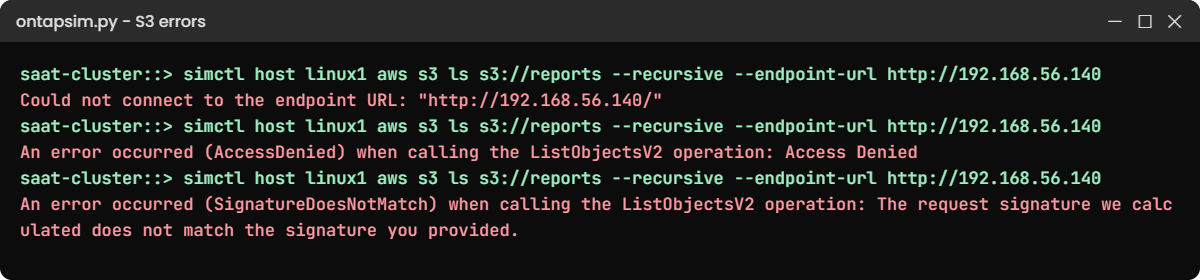
Practice shell: three ONTAP S3 errors
Three errors, three layers: network, permission and secret.

This happened at work

The root key in a public repository

An e-learning company in Gwalior moved its lecture videos from a cloud bucket to ONTAP S3 to cut monthly bills. To get the app working before a deadline, a developer pasted the S3 root user’s keys into the app’s config file.

Two weeks later a security scanner flagged those keys in a public Git repository. Root could read and delete every bucket on the SVM, including exam papers due the next week. The storage team regenerated the root keys within the hour and checked the audit trail; nothing had been touched.

The fix that stuck was boring: one S3 user per app, a bucket policy per bucket with only the actions the app needs, and secrets kept in a vault instead of config files. They also turned HTTP off and moved every client to HTTPS with a proper certificate.

Common mistakes and troubleshooting

MistakeWhat happensDo this instead
Giving apps the root S3 userOne leaked key exposes every bucketCreate one user per app and keep root in a vault
Forgetting data-s3-server on the LIFClients get “Could not connect”Add the service to the SVM data service policy, or use a dedicated S3 LIF
Losing the secret keyThe app can’t sign requestsSave it when ONTAP prints it; regenerate keys if it is lost
Policy resource without bucket/*Listing works but reads and writes fail, or the reverseName both the bucket and bucket/* in the statement
Running production over HTTPKeys and data cross the network in clear textInstall a trusted certificate and turn HTTP off

Interview questions

Click a question to open it. Each one is written the way an interviewer would ask it. Under it you will see why they ask it and one way you could answer, in your own words.

Fresher level

1. What is ONTAP S3?

Why they ask this: They want to know you can place object storage next to NAS and SAN.

How you might answer: It’s an S3-compatible object server that runs inside an ONTAP SVM. Apps use the S3 API over HTTPS to put and get objects in buckets, and each bucket is stored in a FlexGroup volume on the cluster.

2. What do an access key and a secret key do?

Why they ask this: They’re checking basic S3 security understanding.

How you might answer: The access key says who you are. The secret key signs each request, so ONTAP can check the request really came from that user and wasn’t changed on the way. The secret is never sent itself.

2–5 years experience

3. An app gets AccessDenied from an ONTAP bucket, but other apps work. How do you troubleshoot?

Why they ask this: They want a clear, layered approach.

How you might answer: AccessDenied means the keys were accepted, so I go straight to permissions. I check bucket policy statement show for that user and the action the app uses, and that the resource covers both the bucket and bucket/*. Then I check group membership if policies are attached to groups.

4. When would you choose ONTAP S3 over StorageGRID?

Why they ask this: They’re testing product judgement, not just commands.

How you might answer: ONTAP S3 suits small to medium object needs close to existing NAS data, like app uploads, backups of a few apps or NAS buckets. For very large, multi-site object stores with rich lifecycle policies I’d look at StorageGRID or a cloud object store.

Senior level

5. How would you protect S3 data on ONTAP against site loss and ransomware?

Why they ask this: They want to see you combine features into a design.

How you might answer: I’d replicate critical buckets with S3 SnapMirror to a second cluster or a cloud bucket, turn on versioning, and use Object Lock where the app supports it. On top of that I’d keep least-privilege users, HTTPS only, and audit logging, with the keys in a vault.

6. An app team wants S3 access to files that users already write over SMB. What would you propose?

Why they ask this: They’re checking awareness of multiprotocol options.

How you might answer: A NAS bucket: it presents the existing NAS path as an S3 bucket, so no data is copied. I’d check the release supports it, map S3 users to Windows identities so file permissions still apply, and test with the app before go-live.

Quick quiz

Q1. Which LIF service must be present for ONTAP S3?

  1. data-nfs
  2. data-s3-server
  3. data-iscsi
  4. management-https
Show answer

B — the LIF’s service policy must include data-s3-server.

Q2. What storage object holds an ONTAP S3 bucket?

  1. A qtree
  2. A LUN
  3. A FlexGroup volume
  4. The SVM root volume
Show answer

C — each bucket is backed by a FlexGroup volume ONTAP creates.

Q3. An app gets SignatureDoesNotMatch. What is the most likely cause?

  1. The bucket is full
  2. The secret key is wrong
  3. The LIF is down
  4. The bucket policy is missing
Show answer

B — the request was signed with a secret that doesn’t match the access key.

Q4. What should you give each application?

  1. The root user’s keys
  2. The cluster admin password
  3. Its own S3 user and a narrow bucket policy
  4. Read-write on every bucket
Show answer

C — one user per app with only the actions it needs.

Q5. Which ONTAP release added S3 SnapMirror?

  1. 9.6
  2. 9.8
  3. 9.10.1
  4. 9.14.1
Show answer

C — S3 SnapMirror arrived in ONTAP 9.10.1.

Quick recap

  • ONTAP S3 is an object server inside an SVM, reached on a LIF with data-s3-server.
  • Each bucket lives in a FlexGroup volume that ONTAP creates.
  • S3 users have an access key and a secret key; save the secret when it is shown.
  • Bucket policies decide who may list, read, write or delete.
  • Could not connect, AccessDenied and SignatureDoesNotMatch point to network, policy and secret problems.

Next

Deep dive: ONTAP REST API and automation → You’ll call the cluster’s REST API with curl and run an Ansible playbook against the practice shell.

Further reading: ONTAP S3

Want to go deeper into ONTAP S3? Read NetApp’s ONTAP S3 interoperability page for what each release supports, and Enable S3 protocol access to NAS data for NAS buckets. You can also see the full plan for this course on the NetApp ONTAP Storage Administration course page.

Scroll to Top

This website uses cookies

We use a few cookies to keep this site working. If you allow it, we also use Google Analytics to count visits so we can improve our lessons. You can accept all, deny the optional ones, or choose what to allow.