ONTAP CLI and System Manager basics
-
Phase 0: Start here
-
Phase 1: Architecture and foundation
-
Phase 2: Protocols and day-to-day administration
-
Phase 3: Data protection and enterprise integrations
-
Phase 4: Troubleshooting blueprint
-
Phase 5: Final project and career
Most of your working day on ONTAP will be spent in two places: the clustershell over SSH and System Manager in a browser. Engineers who are quick in both don’t type faster; they know how the CLI is organised and how to ask it exactly the question they need.
This lesson teaches the clustershell’s directory layout, the ? key, short forms, queries with wildcards, -fields and -instance, and privilege levels. You’ll also get a map of System Manager so you can find the same things with a mouse.
Where this lesson fits
Lesson 8 of 56 in NetApp ONTAP Storage Administration · Phase 1: Architecture and foundation · Before this: Lesson 7, cluster setup · Next: Lesson 9, boot process, vol0 and the Service Processor
| Time | You need | By the end you can |
|---|---|---|
| 45 minutes | The practice shell | Move around the CLI, filter output with queries and -fields, and find the matching page in System Manager |
What it is, in one line
The ONTAP clustershell is a tree of command directories (storage, network, volume, vserver and so on) that you can explore with ?, shorten, and query with parameters and wildcards; System Manager is the web GUI on the cluster management IP that does the same jobs with forms.
In Simple Words
A big department store
A department store has floors (clothes, kitchen, electronics), each floor has sections, and each section has shelves. If you know that, you can find anything, and a helper at each floor’s entrance will tell you what’s on that floor if you ask.
You can also skip the walking and ask at the main counter: “show me blue shirts, size 40, under 1,000 rupees”, and they bring only those. Both ways reach the same shirts.
The CLI is the store with floors and sections, ? is the helper, and a query with parameters is your exact request at the counter. System Manager is the same store with a catalogue and pictures.
Engineer's View
How an engineer describes it
Commands are grouped in directories: storage aggregate show is the show command in the storage aggregate directory. You can type a directory to enter it (the prompt changes to saat-cluster::storage aggregate>), use .. to go up and top to return. Any unique start of a word works, so net int show is network interface show, and ? lists what’s possible at any point.
Show commands take parameters as filters. A value can include wildcards (*), negation (!), ranges and comparisons such as >80, and lists with |. -fields prints only the columns you name, and -instance prints every field as a list. rows 0 stops paging.
Commands also have privilege levels: admin (the default), advanced (the prompt shows *>) and diagnostic. Use advanced only when a NetApp article or support tells you to. System Manager and Ansible or scripts use the ONTAP REST API under https://<cluster-mgmt-IP>/api/, so the GUI and CLI always see the same data.
How it works, step by step
1Explore with ?
Type ? at the prompt to list directories (ending in >) and commands. Type a directory name to go in, then ? again.
2Shorten what you type
Any unique prefix works: sto agg sh, vol sh, net int sh. If the prefix fits two words, you’ll get “Ambiguous command”, so add a letter.
3Ask for exactly what you need
Add parameters to filter (-owner saat-cluster-02 -type SSD), wildcards for patterns (-disk 1.0.1*), and -fields for just the columns you care about. It’s faster than scrolling, and it’s what you paste into change records.
4Raise privilege only when needed
set -privilege advanced opens up extra commands and fields. Go back with set -privilege admin as soon as you’re done.
5Find the same thing in System Manager
Browse to the cluster management IP and log in. The left menu groups pages much like the CLI does.
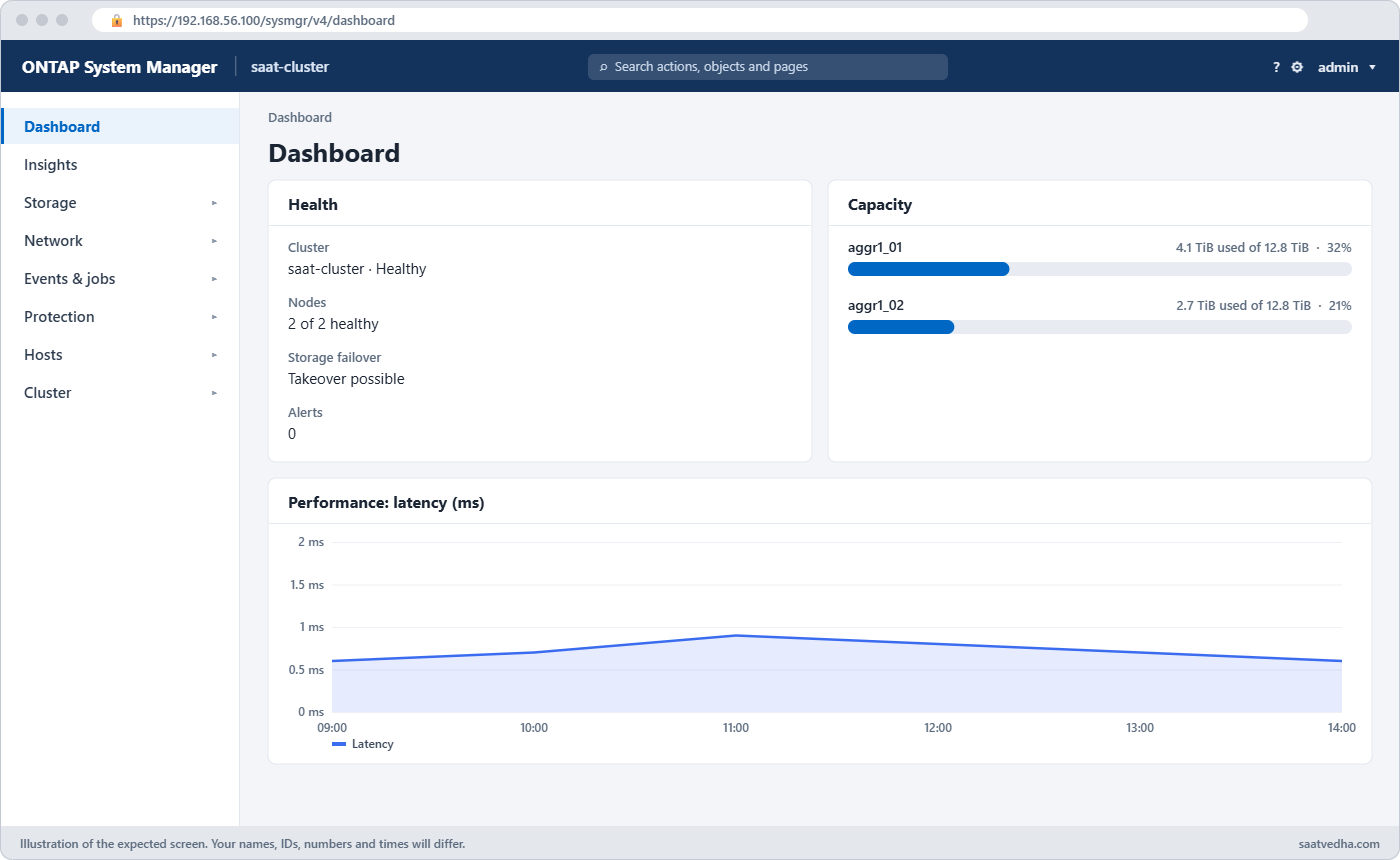
| System Manager menu | What you find there | Similar CLI |
|---|---|---|
| Dashboard | Health, capacity, performance at a glance | cluster show, storage aggregate show |
| Storage | Volumes, LUNs, shares, qtrees, quotas, Storage VMs, Tiers | volume, lun, vserver, storage aggregate |
| Network | Overview (interfaces, broadcast domains, IPspaces), Ethernet ports, FC ports | network interface, network port |
| Events & Jobs | Events, system alerts, jobs, audit logs | event log show, job show |
| Protection | Relationships, peers, policies | snapmirror, cluster peer |
| Hosts | SAN initiator groups, NVMe subsystems | lun igroup |
| Cluster | Overview, settings, disks, support | system node, storage disk |
Good to know: the three shells and moving around the tree
ONTAP has three command shells. The clustershell is where you spend nearly all your time and it manages the whole cluster. The nodeshell (system node run -node NODE) runs older per-node commands such as sysstat, and the systemshell is the operating system underneath, which you only enter when NetApp support asks you to.
Inside the clustershell you can step into a directory, for example type volume and the prompt changes. .. or up goes back one level, and top returns to the root of the tree.
When you type a command followed by ?, parameters shown inside square brackets are optional and the others are required. Required parameters can be typed in order without their names, but writing the names in full keeps change records readable.
Hands-on lab: move around the clustershell
Before you run any command, double-check it
Read every command twice before you press Enter. Check the target: the server name, the user, the disk or device name, the path and the sizes. These commands are for learning and were tested in our lab, not on your system. At work, run the read-only commands first, follow your change process, make sure a backup exists, and ask a second person to check anything that changes or deletes data. You run them at your own risk.
This lab uses the SaatVedha ONTAP practice shell, our own learning tool. It is not NetApp software: real ONTAP output looks like this but is not identical.
Everything here is read-only, so you can try anything.
1Reset and log in
python ontapsim.py -c "simctl reset"
python ontapsim.py✅ Checkpoint: Your prompt reads saat-cluster::>
2Walk the tree
?
storage
?
aggregate
show
topYou should see this:
saat-cluster::> ?
cluster>
event>
job>
lun>
network>
node>
qos>
security>
snapmirror>
statistics>
storage>
system>
version
volume>
vserver>
saat-cluster::> storage
saat-cluster::storage> ?
aggregate>
disk>
failover>
shelf>
saat-cluster::storage> aggregate
saat-cluster::storage aggregate> show
Aggregate Size Available Used% State #Vols Nodes RAID Status
...
saat-cluster::storage aggregate> top
saat-cluster::>Watch the prompt change as you move. Real ONTAP lists more directories than the practice shell, but the idea is the same.
✅ Checkpoint: You moved into storage aggregate and back to the top.
3Ask a command what it takes
storage aggregate show ?You should see this:
storage aggregate show
[-aggregate] <value> (can be given without the name, in this order)
[-hybrid-enabled] <value>
[-is-home] <value>
[-node] <value>
[-percent-used] <value>
[-raidtype] <value>
[-root] <value>
[-state] <value>
[-fields <field>,...] [-instance]✅ Checkpoint: You can name two parameters of storage aggregate show.
4Filter, wildcards and columns
storage aggregate show -fields size,availsize,percent-used
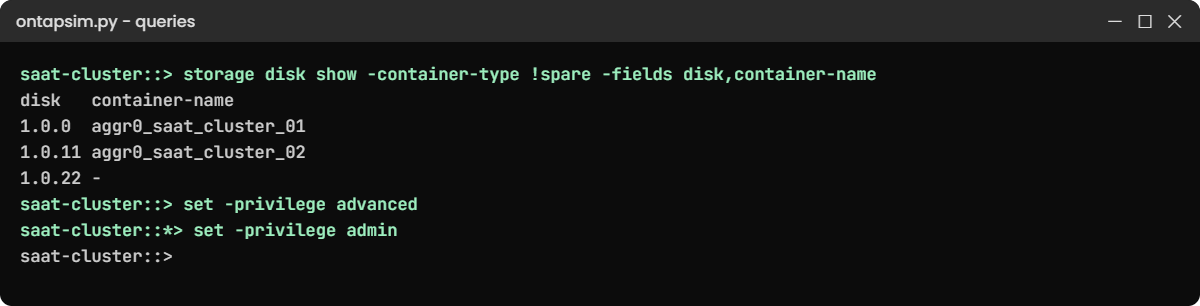
storage disk show -container-type spare -owner saat-cluster-02 -type SSD
storage disk show -container-type !spare -fields disk,container-nameYou should see this:
aggregate size availsize percent-used
--------------------- ------ --------- ------------
aggr0_saat_cluster_01 1.47TB 1.33TB 9%
aggr0_saat_cluster_02 1.47TB 1.33TB 9%
2 entries were displayed.
...
1.1.6 894.0GB 1 6 SSD spare - saat-cluster-02
...
6 entries were displayed.
saat-cluster::> storage disk show -container-type !spare -fields disk,container-name
disk container-name
------ ---------------------
1.0.0 aggr0_saat_cluster_01
1.0.1 aggr0_saat_cluster_01
1.0.2 aggr0_saat_cluster_01
1.0.11 aggr0_saat_cluster_02
1.0.12 aggr0_saat_cluster_02
1.0.13 aggr0_saat_cluster_02
1.0.22 -
1.0.23 -
8 entries were displayed.The last command reads “every disk that is not a spare”. It shows the six disks in the root aggregates and the two unassigned ones in one go.
✅ Checkpoint: The SSD query returns exactly 6 disks.
5Short forms
net int show -fields address,curr-portYou should see this:
vserver lif address curr-port
------------ --------------------- -------------- ---------
saat-cluster cluster_mgmt 192.168.56.100 e0M
saat-cluster saat-cluster-01_mgmt1 192.168.56.101 e0M
saat-cluster saat-cluster-02_mgmt1 192.168.56.102 e0M
Cluster saat-cluster-01_clus1 169.254.10.20 e0a
...
7 entries were displayed.✅ Checkpoint: net int show worked as network interface show.
6Privilege levels
set -privilege advanced
set -privilege adminYou should see this:
saat-cluster::> set -privilege advanced
saat-cluster::*> set -privilege admin
saat-cluster::>The * in the prompt is your reminder that you’re in advanced mode. Real ONTAP first prints a warning and asks you to confirm with y.
✅ Checkpoint: Your prompt is back to saat-cluster::>
Try it yourself: Build a capacity check with -fields in the Command Builder.
Break It, Then Fix It
Two mistakes that make people think a command is broken.
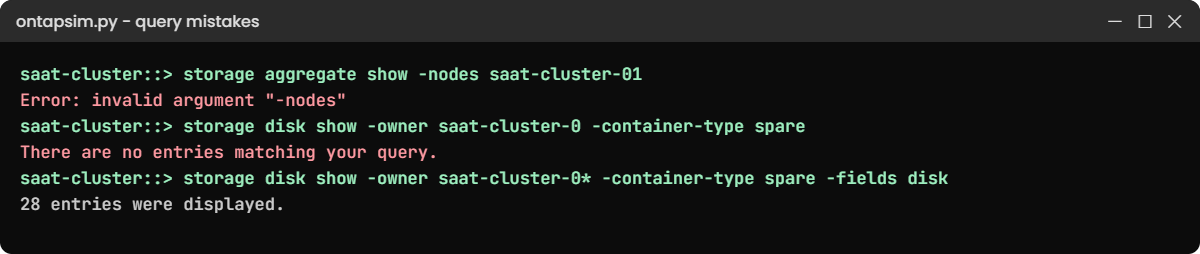
1A parameter name that doesn’t exist
storage aggregate show -nodes saat-cluster-01You’ll get this:
Error: invalid argument "-nodes"The column header says Nodes, but the parameter is -node. Check with storage aggregate show ? and run storage aggregate show -node saat-cluster-01.
✅ Checkpoint: The fixed command lists aggr0_saat_cluster_01.
2An exact match that matches nothing
storage disk show -owner saat-cluster-0 -container-type spareYou’ll get this:
There are no entries matching your query.A value without a wildcard must match exactly, and no node is called “saat-cluster-0”. Add *: storage disk show -owner saat-cluster-0* -container-type spare -fields disk now lists 28 spare disks across both nodes.
✅ Checkpoint: The wildcard query prints 28 entries.
This happened at work
The wildcard that went too far
A state e-governance data centre in Jaipur kept weekly snapshots on about 60 volumes. A new admin was asked to delete old weekly snapshots from one test volume, and he typed the delete with a wildcard in both the volume and the snapshot name, straight from a note a colleague had written for a different job.
The query matched weekly snapshots on every volume in the SVM. ONTAP asked for confirmation, he answered yes without reading the list, and two months of weekly restore points were gone across the SVM. Nothing was lost that day, but for weeks after, any older file restore had to come from tape.
The team’s rule now is simple to follow: run the same query as a show first, count the lines, and only then change show to the action.
Common mistakes and troubleshooting
| Mistake | What happens | Do this instead |
|---|---|---|
| Running an action with a wildcard you never tested | It hits more objects than you meant | Run the same query with show first and count the entries |
| Staying in advanced privilege | A risky command runs by accident later | Return with set -privilege admin at once |
| Using column headers as parameter names | “invalid argument” errors | Check parameters with ? after the command |
| Copying old 7-Mode commands from blogs | Commands like vol create fail | Use clustered ONTAP syntax; check the command reference |
| Short forms in change records | Reviewers can’t read them | Write full commands in documents |
Interview questions
Click a question to open it. Each one is written the way an interviewer would ask it. Under it you will see why they ask it and one way you could answer, in your own words.
Fresher level
1. How do you find a command in the ONTAP CLI if you don’t remember it?
Why they ask this: They want to see you can help yourself instead of guessing.
How you might answer: I’d use ? at the prompt to list directories, go into the likely one like storage or network, and use ? again. After a command, ? shows its parameters, and the command reference on docs.netapp.com has the full detail.
2. What’s the difference between -fields and -instance?
Why they ask this: They’re checking you can control output on a busy cluster.
How you might answer: -fields prints only the columns I name, one row per object, which is great for reports. -instance prints every field of each object as a long list, which I use when I need all the details of one thing.
2–5 years experience
3. You need to list every aggregate above 80 percent used on 12 clusters for a report. How would you do it?
Why they ask this: They want to see you use queries and think about scale.
How you might answer: On each cluster I’d run storage aggregate show -percent-used >80 -fields percent-used,availsize. For 12 clusters I’d script it against the REST API or use Unified Manager, rather than logging in 12 times.
4. When is it OK to use advanced privilege?
Why they ask this: They want to know you respect the guard rails on production.
How you might answer: Only when a NetApp KB article or support case tells me to, or for a known read-only field that needs it. I note it in the change record and go back to admin right after, because advanced commands can hurt a cluster if mistyped.
Senior level
5. A junior engineer deleted the wrong snapshots with a wildcard. How would you stop it happening again?
Why they ask this: They want process and coaching thinking, not blame.
How you might answer: I’d make “show first, then act” part of our runbooks, with the show output pasted in the change record. For risky jobs I’d ask for a second pair of eyes and give juniors a role without delete rights until they’re comfortable.
6. Your team argues whether to standardise on System Manager or the CLI. What’s your view?
Why they ask this: They want balanced judgement about tools, people and audit.
How you might answer: I’d use both on purpose: System Manager for visual tasks and people who are new, the CLI or REST API for repeatable work, scripts and troubleshooting. What matters more is that every change is recorded, and both paths land in the same audit log.
Quick quiz
Q1. What does ? do at the clustershell prompt?
- Shows command history
- Lists the directories and commands available here
- Runs the last command
- Logs you out
Show answer
B — ? lists what you can type at that level.
Q2. Which query lists only disks that are NOT spares?
- -container-type spare
- -container-type !spare
- -container-type *spare
- -container-type >spare
Show answer
B — ! negates a value.
Q3. What does the * in saat-cluster::*> mean?
- A wildcard query is active
- You are in advanced privilege
- The cluster has an error
- You are in diagnostic mode only
Show answer
B — the prompt shows * in advanced privilege.
Q4. Why did -owner saat-cluster-0 return nothing?
- The shell was broken
- Values without wildcards must match exactly
- Owner is not a parameter
- You need advanced privilege
Show answer
B — add * to match a pattern.
Q5. What does System Manager use to talk to the cluster?
- SNMP
- The ONTAP REST API
- The nodeshell
- FTP
Show answer
B — System Manager and scripts use the REST API.
Quick recap
- Commands live in directories; ? shows what’s there.
- Short forms work if they’re unique; write full commands in documents.
- Queries with *, ! and comparisons, plus -fields and -instance, give you exact answers.
- Use advanced privilege only when told to, and leave it quickly.
- System Manager menus map closely to the CLI directories.
Next lesson
Lesson 9: Boot process, vol0 and the Service Processor → You’ll see how a node boots, what vol0 holds, and how the SP gets you in when ONTAP is down.
Further reading: ONTAP CLI basics
Want to go deeper into ONTAP CLI basics? Read NetApp’s ONTAP concepts guide, then keep the ONTAP command reference on docs.netapp.com open while you practise. You can also see the full plan for this course on the NetApp ONTAP Storage Administration course page.
