The NetApp product family: ONTAP, E-Series, StorageGRID and cloud

NetApp sells more than one kind of storage, and job ads, RFPs and vendor calls mix the names freely. If you can’t tell ONTAP from E-Series or StorageGRID, you’ll read the wrong manual and open the wrong support case.

This page maps the whole NetApp family as it stands in late 2026: the ONTAP systems this course teaches, the other hardware lines, and the cloud services that run ONTAP for you.

Where this page fits

Deep dive in NetApp ONTAP Storage Administration · Phase 0, Start here · Before this: the practice shell · Next: Lesson 3, Scale-up vs scale-out

TimeYou needBy the end you can
40 minutesThe practice shell and a web browserName each NetApp product line, say what it is for, and match a business need to the right one

What it is, in one line

NetApp’s product family is a set of storage systems and cloud services, and most of them (but not all) run the same ONTAP software you learn in this course.

In Simple Words

One car company, many vehicles

A car company sells hatchbacks, trucks and buses. They share a logo, but a bus driver can’t just jump into a truck and know every switch, and you’d never use a hatchback to move furniture.

NetApp is the same: ONTAP systems are the everyday cars, E-Series is the race car, StorageGRID is the warehouse truck, and the cloud services are a taxi you hire instead of buying a car.

Engineer's View

The lines that matter in 2026

ONTAP runs on AFF (all-flash, unified), ASA (all-flash, SAN only), FAS (hybrid disk and flash) and the new AFX (disaggregated all-flash for AI, launched October 2025). It also runs as software: ONTAP Select on your own servers, and in the cloud.

E-Series and EF-Series run SANtricity, a different operating system built for simple, fast block storage. StorageGRID is NetApp’s S3 object storage, now at release 12.0.

SolidFire and NetApp HCI are discontinued: HCI stopped selling in 2022 and SolidFire hardware last shipped in October 2023, with support running out over the next few years. BlueXP, the cloud control plane, was renamed NetApp Console on 6 October 2025.

How it works, step by step

1ONTAP hardware: AFF, ASA, FAS and AFX

These are the systems the rest of this course is about. They share one operating system, so the commands you learn work on all of them.

LineWhat it isCurrent models (2026)Typical use
AFF A-SeriesAll-flash, NAS and SAN, lowest latencyA20, A30, A50, A70, A90, A1KDatabases, VMware, mixed workloads
AFF C-SeriesAll-flash with capacity (QLC) flashC30, C60, C80Large file shares, backup targets that need flash
ASA (r2)All-flash, block only (iSCSI, FC, NVMe)A20 to A1K, C30SAN-only estates, Oracle, SQL, VMware VMFS
FASHard disks plus SSD cacheFAS50, FAS70, FAS90Home shares, archive, backup copies
AFXDisaggregated all-flash: controllers and NVMe shelves scale apartAFX 1K and AFX 2K, with NX224 NVMe shelves and optional DX50 nodesAI training data, very large file sets

Older models you’ll still find at work include FAS2750, FAS2820, FAS8300, FAS8700, FAS9500 and AFF A250, A400, A800 and A900. Our practice shell pretends to be a FAS8300 pair.

NetApp product portfolio lines in 2026 and the software each runs

2ONTAP as software and in the cloud

The same ONTAP also runs where there is no NetApp hardware at all. That’s why one skill set covers so many jobs.

OfferingWho runs the ONTAPWhere
ONTAP SelectYouVMware ESXi or KVM servers in your own data centre or a branch
Cloud Volumes ONTAPYou (deployed from NetApp Console)AWS, Azure or Google Cloud virtual machines
Amazon FSx for NetApp ONTAPAWSA managed AWS service; you still use ONTAP CLI and SnapMirror
Azure NetApp FilesMicrosoft and NetAppA managed Azure service for NFS and SMB volumes
Google Cloud NetApp VolumesGoogle and NetAppA managed Google Cloud service; block (iSCSI) support was added in 2025

Keystone is a different idea: you pay a monthly subscription for storage that sits in your own building, and NetApp owns and manages the hardware.

3The non-ONTAP lines

These use different software and different commands. A job ad that says “NetApp” might mean one of these, so read it carefully.

LineSoftwareGood forNot for
E-Series (E2800, E4000, E5700)SANtricitySimple block storage for backup, video, analyticsFile shares, snapshots-heavy NAS
EF-Series (EF300, EF600)SANtricityVery low latency block storage for HPC and databasesMulti-tenant unified storage
StorageGRID 12.0StorageGRIDS3 object storage across sites, backup and archive targets, FabricPool tierLow-latency block or NFS home directories
SolidFire / NetApp HCIElement OSDiscontinued; only existing systems under supportAny new project
NetApp product portfolio: where ONTAP runs, from hardware to managed cloud

4The management and support tools around them

You’ll meet these names in almost every NetApp shop.

ToolWhat it does
System ManagerThe web GUI built into every ONTAP cluster
NetApp Console (was BlueXP)One web console for on-premises and cloud ONTAP, replication, backup and tiering
Digital Advisor (was Active IQ)Reads AutoSupport data and shows risks, upgrades and capacity trends; now inside NetApp Console
Active IQ Unified ManagerOn-premises monitoring for many ONTAP clusters (Lesson 45)
Hardware Universe (hwu.netapp.com)The official limits and compatibility for every model
Interoperability Matrix Tool (IMT)Which host OS, HBA and software versions are supported together

Hands-on lab: identify a system and match products to needs

Before you run any command, double-check it

Read every command twice before you press Enter. Check the target: the server name, the user, the disk or device name, the path and the sizes. These commands are for learning and were tested in our lab, not on your system. At work, run the read-only commands first, follow your change process, make sure a backup exists, and ask a second person to check anything that changes or deletes data. You run them at your own risk.

This lab uses the SaatVedha ONTAP practice shell, our own learning tool. It is not NetApp software: real ONTAP output looks like this but is not identical.

This lab has two parts: look at what an ONTAP system tells you about itself, then fill in a short comparison sheet for a real scenario. No cloud account or paid service is needed.

1Ask the cluster what it is

Reset the shell, log in and run:

version
system node show -fields model,serialnumber
storage shelf show

You should see this:

saat-cluster::> version
NetApp Release 9.18.1: Sat Nov 07 2026 (SaatVedha practice shell 1.0, not NetApp software)
saat-cluster::> system node show -fields model,serialnumber
node            model   serialnumber
--------------- ------- ------------
saat-cluster-01 FAS8300 721500001001
saat-cluster-02 FAS8300 721500001002
2 entries were displayed.
saat-cluster::> storage shelf show
                                               Module
Shelf Name Shelf ID Serial Number    Model     Type   Status
---------- -------- ---------------- --------- ------ --------
1.0               0 SHFMS100110      DS224C    IOM12  Normal
1.1               1 SHFMS100111      DS224C    IOM12  Normal
2 entries were displayed.

Three commands tell you the product line (FAS), the model, the ONTAP release and the disk shelves. On a real system, these are the first lines of any support case.

✅ Checkpoint: You can name the model, the release and the shelf model of the lab cluster.

Practice shell: version, node model and shelf model of the lab cluster
Three commands tell you the line, model, release and shelves.

2Look up the model in Hardware Universe

Open hwu.netapp.com in your browser, choose Platforms, then the FAS8300. Note its maximum raw capacity, the shelves it supports and the ONTAP releases it runs.
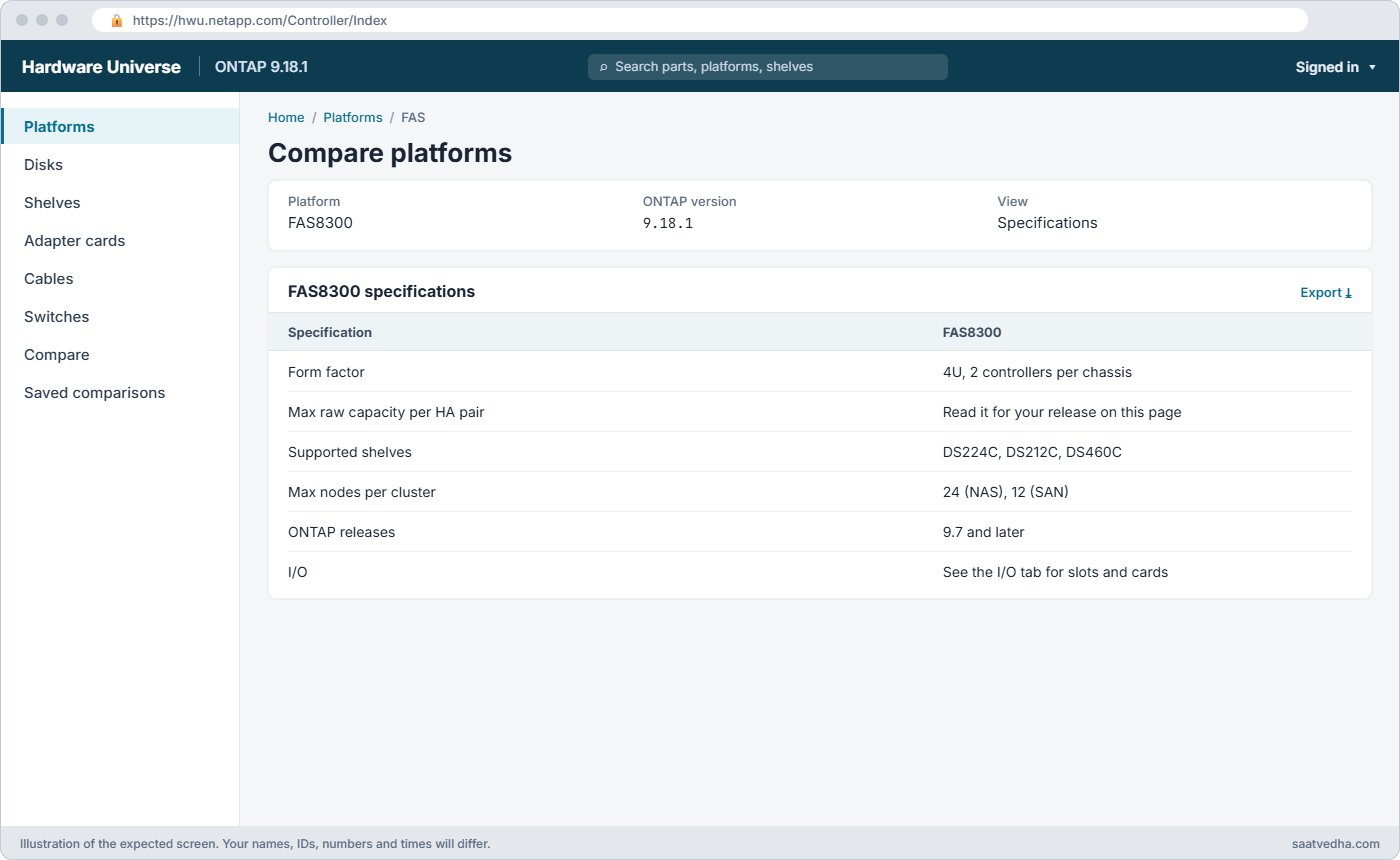
NetApp product portfolio lab: Hardware Universe page for the FAS8300
Hardware Universe for the FAS8300: capacity, supported shelves and ONTAP releases.

✅ Checkpoint: You found the supported ONTAP releases for the FAS8300.

3Tour the cloud consoles without spending money

If you have an AWS account, open the console and search for FSx; choose “Create file system” and stop at the first page, which lists “Amazon FSx for NetApp ONTAP” next to the other FSx types. In Azure, search the portal for “Azure NetApp Files” and open the overview. Don’t create anything.

Amazon FSx console create file system page with FSx for NetApp ONTAP option
The FSx “Create file system” page lists Amazon FSx for NetApp ONTAP next to the other FSx types. Stop here; nothing is created.

Notice that FSx for ONTAP asks for things you now know: an SVM, a volume, throughput and storage capacity. That’s ONTAP underneath.

✅ Checkpoint: You can point to where an SVM or volume is set in at least one cloud console.

4Match three needs to three products

Copy this sheet and fill in the last column yourself before you open the answer.

NeedYour pick
A hospital wants 50 TB of SMB shares and NFS datastores with hourly snapshots?
A media company needs 4 PB of S3 storage across two cities?
A bank wants SAN only for Oracle, all flash, no file services?

Suggested answers: AFF A-Series or C-Series (unified NAS with snapshots), StorageGRID (multi-site S3), and ASA (block only). Other answers can be right if you can explain them.

✅ Checkpoint: Each need has a product and one sentence on why.

Break It, Then Fix It

Most mix-ups happen because old blogs and old habits use commands from another product or another era. Try these in the practice shell.

1Run a 7-Mode command on clustered ONTAP

vol status

You’ll get this:

Error: "status" is not a recognized command

vol status was a 7-Mode command. In ONTAP 9 vol is a short form of volume, and the verb you want is show: volume show.

✅ Checkpoint: volume show lists the volumes.
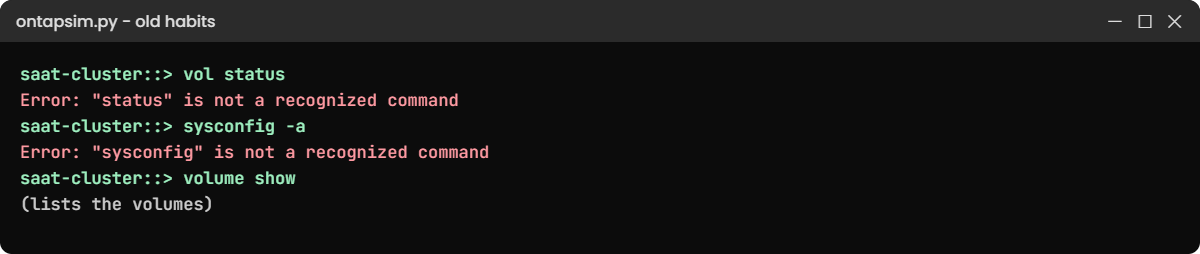
Practice shell errors for 7-Mode commands vol status and sysconfig
Old commands from 7-Mode blogs fail on ONTAP 9.

2Ask for hardware details the old way

sysconfig -a

You’ll get this:

Error: "sysconfig" is not a recognized command

Clustershell doesn’t have sysconfig. Use system node show -fields model,serialnumber and storage shelf show. On a real cluster sysconfig -a still exists inside the nodeshell (system node run), but the practice shell doesn’t include it.

✅ Checkpoint: You found the model without sysconfig.

This happened at work

The quote that said “NetApp”

A tea exporter in Siliguri asked three vendors for “NetApp storage” to replace an old file server. One partner quoted an E-Series box because it was the cheapest NetApp system on their price list.

The IT lead had read enough to ask one question: “Will it give us SMB shares and snapshots for the accounts team?” The partner went quiet, because E-Series serves block storage only and would have needed a Windows file server in front of it.

They chose a small AFF system instead, with SMB shares and hourly snapshots built in. The lead’s advice to his team afterwards was to write the need first, then the product, never the other way round.

Common mistakes and troubleshooting

MistakeWhat happensDo this instead
Treating every NetApp product as ONTAPWrong commands, wrong manuals, wrong support queueCheck the product line first: AFF/ASA/FAS/AFX run ONTAP; E-Series and StorageGRID do not
Buying ASA for file sharesASA serves blocks only, so there is no NFS or SMBPick AFF or FAS when you need NAS
Planning new work on SolidFire or NetApp HCIThe products are discontinuedUse AFF/ASA or ONTAP Select for new projects
Searching for “BlueXP” in 2026 docsPages have moved to the NetApp Console nameSearch for NetApp Console, and remember older guides still say BlueXP
Skipping Hardware Universe before a shelf or disk orderUnsupported parts or ONTAP releasesCheck hwu.netapp.com and the IMT before every hardware change

Interview questions

Click a question to open it. Each one is written the way an interviewer would ask it. Under it you will see why they ask it and one way you could answer, in your own words.

Fresher level

1. Can you explain the difference between AFF, ASA and FAS in simple words?

Why they ask this: They want to know you understand the main ONTAP hardware lines and what each is for.

How you might answer: All three run ONTAP. AFF is all-flash and serves both NAS and SAN, ASA is all-flash but SAN only, and FAS uses hard disks with some flash, so it’s cheaper per terabyte.

I’d pick AFF for mixed workloads, ASA for a block-only estate and FAS for capacity data like archives.

2. What is StorageGRID, and when would you use it instead of an ONTAP system?

Why they ask this: They’re checking that you don’t think every NetApp box does the same job.

How you might answer: StorageGRID is NetApp’s S3 object storage, built to spread data across sites with policies for copies and erasure coding. I’d use it for backup and archive targets, large media libraries or as a FabricPool cloud tier, not for low-latency NFS or LUNs.

2–5 years experience

3. A manager asks you to move some file shares to the cloud but keep using SnapMirror. What options would you suggest?

Why they ask this: They want to see that you know which cloud services run ONTAP underneath.

How you might answer: I’d look at Amazon FSx for NetApp ONTAP or Cloud Volumes ONTAP on AWS, Azure or Google. Both run ONTAP, so I can SnapMirror from our cluster and keep the same snapshots and tools.

If they want a fully managed NFS or SMB service on Azure, Azure NetApp Files is another option, though it isn’t administered with the ONTAP CLI.

4. What’s the first thing you’d check before ordering new disks or shelves for a cluster?

Why they ask this: They want to see a careful habit before hardware changes.

How you might answer: I’d check Hardware Universe for the exact model: which shelves and drives it supports, and from which ONTAP release. I’d also check the cluster’s current release with version, and if anything doesn’t match, plan an upgrade first.

Senior level

5. Your company still runs SolidFire and NetApp HCI. How would you plan the next three years?

Why they ask this: They’re looking for awareness of product lifecycle and a calm migration plan.

How you might answer: Both are discontinued, so I’d confirm the end-of-support dates for our exact nodes and set a target date well before them. Then I’d size a replacement, usually AFF or ASA for block workloads, and plan migrations host by host with the application owners.

6. A customer wants AI training data on NetApp. How would you explain the choice between AFF and AFX?

Why they ask this: They want to see that you can match an architecture to a workload, not just recite model names.

How you might answer: AFF is a classic HA-pair design that scales by adding pairs, which suits most enterprise work. AFX separates controllers from NVMe shelves so you can grow performance and capacity on their own, which fits very large AI data sets that many GPUs read at once.

I’d look at data size, growth and how many clients read in parallel before picking.

Quick quiz

Q1. Which line is all-flash and serves block storage only?

  1. FAS
  2. ASA
  3. StorageGRID
  4. AFF C-Series
Show answer

B — ASA is the SAN-only all-flash array.

Q2. What software does E-Series run?

  1. ONTAP
  2. Element OS
  3. SANtricity
  4. StorageGRID
Show answer

C — E-Series and EF-Series run SANtricity.

Q3. What is BlueXP called since October 2025?

  1. Digital Advisor
  2. NetApp Console
  3. System Manager
  4. Keystone
Show answer

B — BlueXP was renamed NetApp Console on 6 October 2025.

Q4. Which product is discontinued?

  1. StorageGRID
  2. ONTAP Select
  3. NetApp HCI
  4. AFF A-Series
Show answer

C — NetApp HCI stopped selling in 2022; SolidFire followed.

Q5. Where do you check which shelves a model supports?

  1. Hardware Universe
  2. The event log
  3. Keystone
  4. System Manager dashboard
Show answer

A — hwu.netapp.com lists limits and supported parts per model.

Quick recap

  • ONTAP runs on AFF, ASA, FAS and AFX hardware, as ONTAP Select, and in AWS, Azure and Google Cloud.
  • E-Series, EF-Series and StorageGRID are NetApp products that don’t run ONTAP.
  • SolidFire and NetApp HCI are discontinued.
  • BlueXP is now NetApp Console; Active IQ is now Digital Advisor.
  • Check Hardware Universe and the IMT before any hardware change.

Next lesson

Lesson 3: Scale-up vs scale-out: 7-Mode to clustered ONTAP → You’ll see why ONTAP grew into clusters, and move a volume between nodes while a client keeps working.

Further reading: NetApp product portfolio

Want to go deeper into NetApp product portfolio? See NetApp’s list of supported ONTAP platforms, the E-Series family overview and the Digital Advisor release notes (which record the NetApp Console rename). You can also see the full plan for this course on the NetApp ONTAP Storage Administration course page.

Scroll to Top

This website uses cookies

We use a few cookies to keep this site working. If you allow it, we also use Google Analytics to count visits so we can improve our lessons. You can accept all, deny the optional ones, or choose what to allow.