Licences, NTP, AutoSupport and EMS
-
Phase 0: Start here
-
Phase 1: Architecture and foundation
-
Phase 2: Protocols and day-to-day administration
-
Phase 3: Data protection and enterprise integrations
-
Phase 4: Troubleshooting blueprint
-
Phase 5: Final project and career
A new cluster that serves data isn’t finished yet. It also needs the right licences, a correct clock, a working line home to NetApp, and someone listening to its events. These four jobs take half an hour, and skipping them is behind a surprising number of bad nights.
In this lesson you’ll check licences, set NTP, test AutoSupport and read the event management system (EMS). Then you’ll block AutoSupport, as a firewall change might, and find out how you’d notice.
Where this lesson fits
Lesson 10 of 56 in NetApp ONTAP Storage Administration · Phase 1: Architecture and foundation · Before this: Lesson 9, boot and the SP · Next: Lesson 11, disks and disk ownership
| Time | You need | By the end you can |
|---|---|---|
| 45 minutes | The practice shell | Check licences, set NTP servers, configure and test AutoSupport, and read and route EMS events |
What it is, in one line
Licences turn ONTAP features on, NTP keeps every node’s clock right, AutoSupport sends health reports and failure alerts to NetApp, and EMS is the event log where ONTAP records what happens and warns you about problems.
In Simple Words
A new car before the long drive
You’ve bought a new car. Before a long trip you check the papers are in the glovebox, set the clock, switch on the service reminder that phones the dealer when something’s wrong, and learn which dashboard lights mean “stop now”.
The car drives fine without any of that, until the day a warning light comes on and nobody understands it, or the dealer never hears that a part failed.
Licences are the papers, NTP is the clock, AutoSupport is the call to the dealer and EMS is the dashboard lights.
Engineer's View
How an engineer describes it
Licences: since ONTAP 9.10.1, features are licensed with NetApp License Files (NLF), and new systems ship with the ONTAP One bundle, which includes protocols, SnapMirror, FlexClone and the rest. You check them with system license show; older systems may show separate bundles. NTP: cluster time-service ntp server create adds time servers for the whole cluster.
Use at least three in production, ideally the same source as your domain controllers, because SMB Kerberos fails if clocks drift more than 5 minutes.
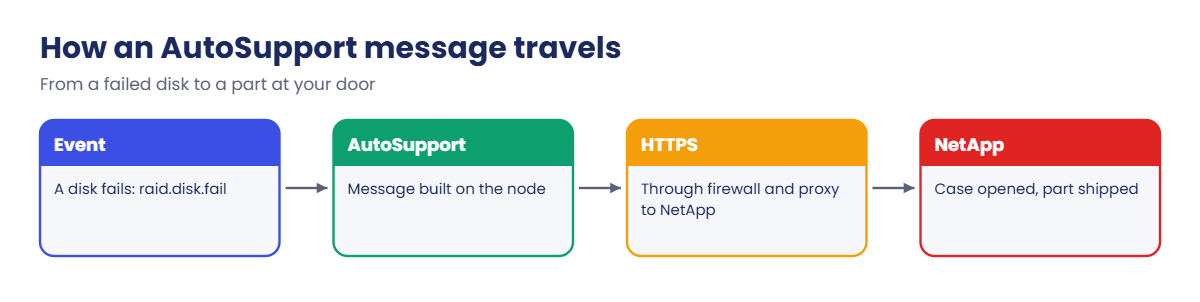
AutoSupport sends a weekly health report and event-triggered messages (a failed disk, a panic, a failed power supply) to NetApp over HTTPS. Support uses them to open cases and ship parts, and Digital Advisor (formerly Active IQ) turns them into health and risk reports. You can also send copies to your own team by email.
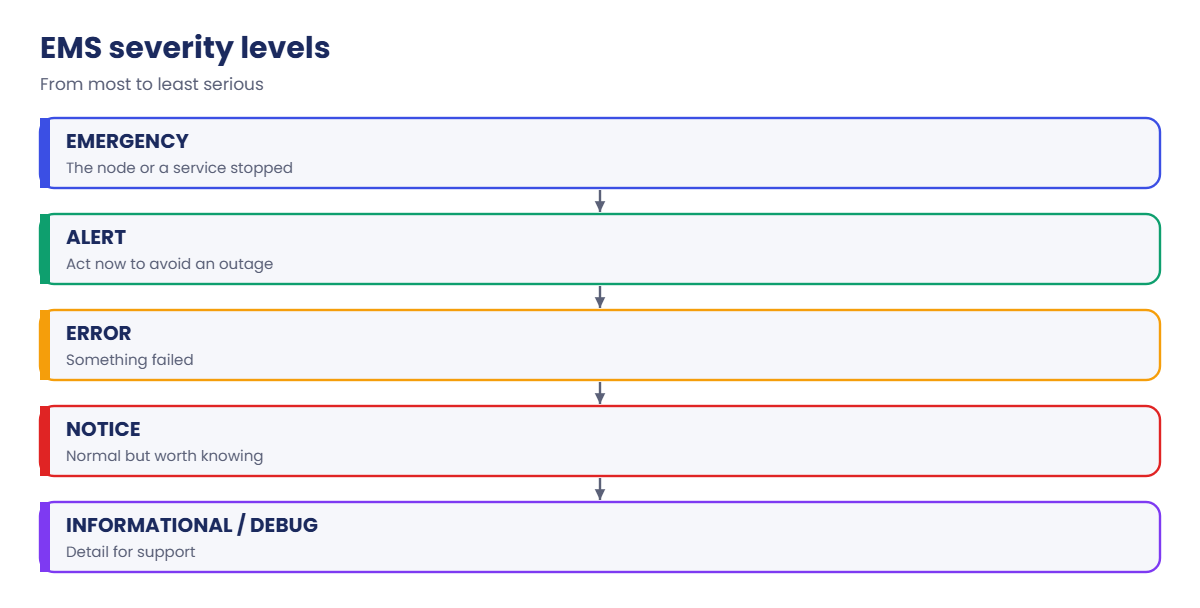
EMS (event management system) records events with a severity: EMERGENCY, ALERT, ERROR, NOTICE, INFORMATIONAL and DEBUG. event log show reads them. To be told without logging in, you create an event notification destination (email, syslog, SNMP or a REST webhook) and an event notification that sends a filter such as important-events to it.
How it works, step by step
1Confirm what is licensed
Run system license show. If a feature you need is missing, add the licence file from NetApp’s support site with system license add.
2Set the time sources
Add your NTP servers and check cluster date show: every node should show the same time and the right time zone.
3Point AutoSupport home
Turn it on with HTTPS transport, add your team’s email, and send a test. The history must show sent-successful.
4Route the important events
Send important events to your email, syslog server or monitoring tool, so a failed disk at night reaches someone who can act.
5Recheck after every network change
Firewall, proxy and DNS changes are the usual reason AutoSupport and NTP stop working. Make a test AutoSupport part of those changes.
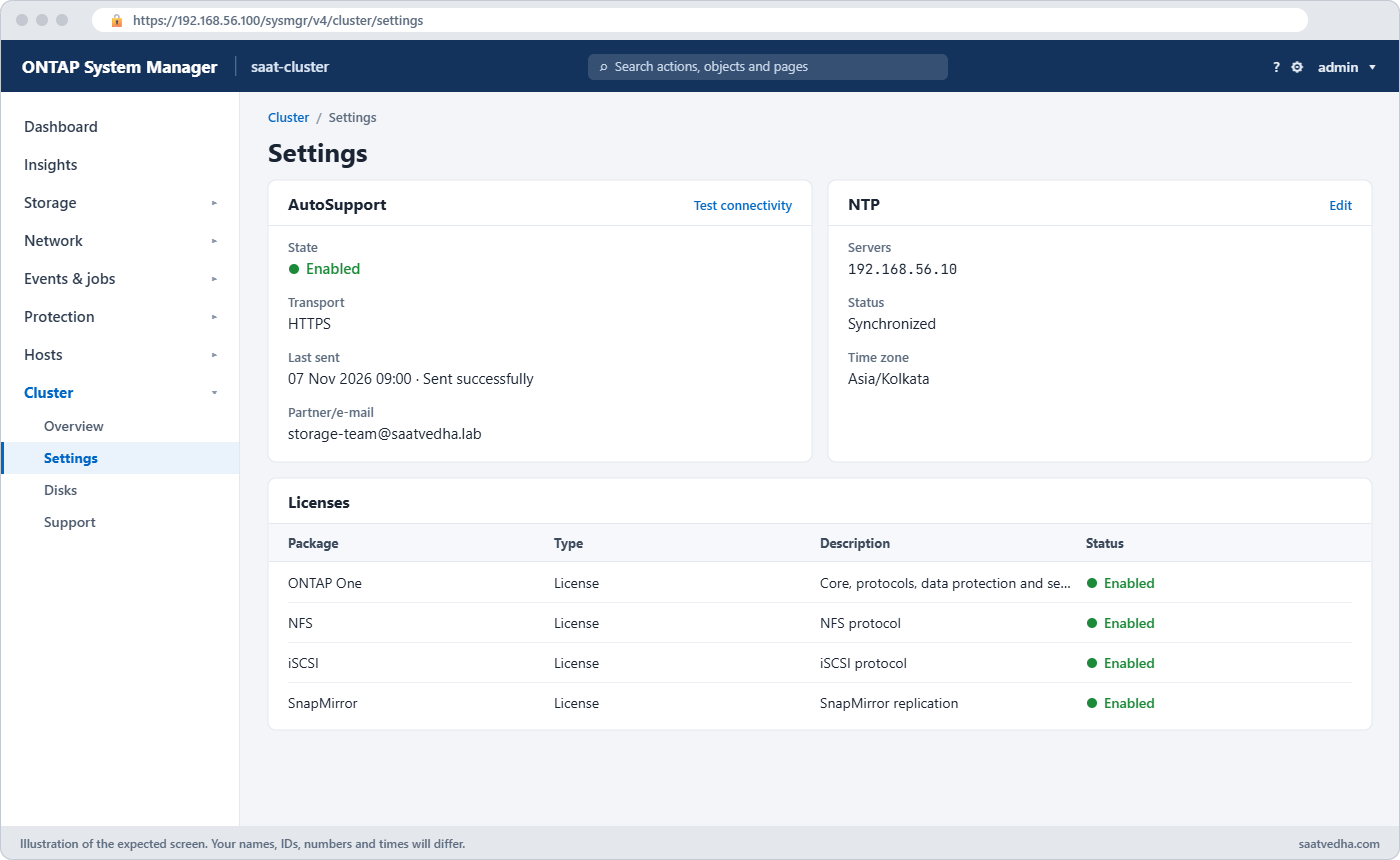
In System Manager: licences are under Cluster › Settings › Licenses, NTP under Cluster › Settings (NTP card), AutoSupport under Cluster › Settings › AutoSupport with a Test connectivity button, and events under Events & Jobs › Events.
| Severity | Meaning | Example |
|---|---|---|
| EMERGENCY | The node or service stopped | A node panic |
| ALERT | Act now to avoid an outage | A shelf lost power on both supplies |
| ERROR | Something failed | A disk failed, a port went down |
| NOTICE | Normal but worth knowing | Configuration backup done |
| INFORMATIONAL / DEBUG | Detail for support | Routine messages |
Hands-on lab: finish a new cluster
Before you run any command, double-check it
Read every command twice before you press Enter. Check the target: the server name, the user, the disk or device name, the path and the sizes. These commands are for learning and were tested in our lab, not on your system. At work, run the read-only commands first, follow your change process, make sure a backup exists, and ask a second person to check anything that changes or deletes data. You run them at your own risk.
This lab uses the SaatVedha ONTAP practice shell, our own learning tool. It is not NetApp software: real ONTAP output looks like this but is not identical.
1Reset and log in
python ontapsim.py -c "simctl reset"
python ontapsim.py✅ Checkpoint: Your prompt reads saat-cluster::>
2Licences
system license showYou should see this:
Serial Number: 9990001001
Owner: saat-cluster
Installed License: NetApp License File (NLF)
Capacity: -
Package Type Description Expiration
------------------------- -------- -------------------------------- -------------------
Core Bundle license Core Bundle (NLF) -
Data Protection Bundle license Data Protection Bundle (NLF) -
2 entries were displayed.The lab cluster has two bundles with no expiry date. A real system with ONTAP One shows its own list; system license show-status lists each feature as enabled or not.
✅ Checkpoint: Both bundles are listed with no expiration.
3NTP and the clock
cluster time-service ntp server show
cluster time-service ntp server create -server 192.168.56.10
cluster time-service ntp server show
cluster date showYou should see this:
Server Version Key ID
------------------------------ ------- ------
pool.ntp.org auto -
...
Server Version Key ID
------------------------------ ------- ------
pool.ntp.org auto -
192.168.56.10 auto -
2 entries were displayed.
saat-cluster::> cluster date show
Node Date Time zone
--------------------- -------------------------- -------------------------
saat-cluster-01 11/7/2026 06:54:06 Asia/Kolkata
saat-cluster-02 11/7/2026 06:54:06 Asia/Kolkata
2 entries were displayed.192.168.56.10 is the lab domain controller, dc1. Both nodes agree on the time and the zone.
✅ Checkpoint: The NTP list now has two servers.
4AutoSupport
system node autosupport show -node * -fields state,transport,to,mail-hosts
system node autosupport modify -node * -state enable -transport https -to storage-team@saatvedha.lab
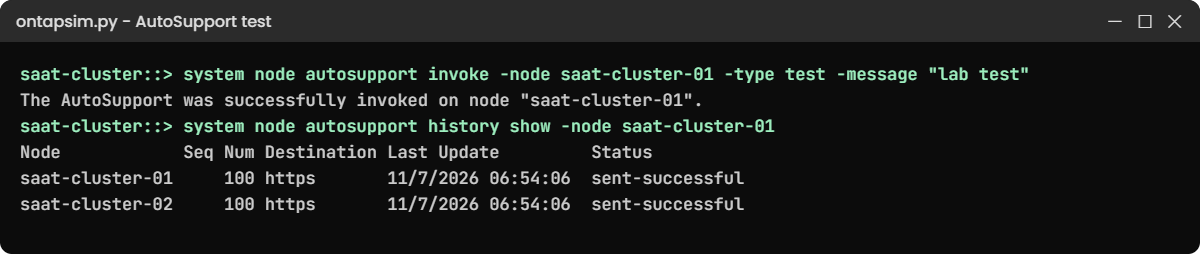
system node autosupport invoke -node saat-cluster-01 -type test -message "lab test"
system node autosupport history show -node saat-cluster-01You should see this:
Node State From To Mail Hosts
--------------------- -------- --------------------- -------------------- ---------------
saat-cluster-01 enable admin@localhost - mailhost
saat-cluster-02 enable admin@localhost - mailhost
...
The AutoSupport was successfully invoked on node "saat-cluster-01". To view the status
of the AutoSupport, use the "system node autosupport history show" command.
Note: It may take several minutes for the AutoSupport to appear in the history list.
saat-cluster::> system node autosupport history show -node saat-cluster-01
Node Seq Num Destination Last Update Status
--------------- ------- ----------- ------------------- ----------------------
saat-cluster-01 100 https 11/7/2026 06:54:06 sent-successful
saat-cluster-02 100 https 11/7/2026 06:54:06 sent-successful
2 entries were displayed.“Successfully invoked” only means the message was created. The history line saying sent-successful is the real proof. On a real cluster it can take a few minutes, and system node autosupport check show tests the connection settings.
✅ Checkpoint: History shows sent-successful.
5Read the event log
event log show
event log show -severity <=ERRORYou should see this:
Time Node Severity Event
------------------- ---------------- ------------- ------------------------
11/7/2026 06:54:06 saat-cluster-01 NOTICE mgmtgwd.configbr.noSNCBackup: Cluster configuration backup
11/7/2026 06:54:06 saat-cluster-02 NOTICE mgmtgwd.configbr.noSNCBackup: Cluster configuration backup
saat-cluster::> event log show -severity <=ERROR
There are no entries matching your query.No errors, only notices. Make -severity <=ERROR your first look on any cluster: it shows ERROR, ALERT and EMERGENCY only.
✅ Checkpoint: There are no ERROR events.
Try it yourself: Build the AutoSupport check in the Command Builder.
Break It, Then Fix It
The network team tightens the firewall and nobody tells storage.
1Block AutoSupport
simctl break asup-blocked
system node autosupport invoke -node saat-cluster-01 -type test -message "after firewall change"
system node autosupport history show -node saat-cluster-01You’ll get this:
The AutoSupport was successfully invoked on node "saat-cluster-01". ...
saat-cluster::> system node autosupport history show -node saat-cluster-01
Node Seq Num Destination Last Update Status
--------------- ------- ----------- ------------------- ----------------------
saat-cluster-01 100 https 11/7/2026 06:54:06 sent-successful
saat-cluster-02 100 https 11/7/2026 06:54:06 sent-successful
saat-cluster-01 101 https 11/7/2026 06:54:06 transmission-failed
saat-cluster-02 101 https 11/7/2026 06:54:06 transmission-failed
4 entries were displayed.The invoke still says “successfully invoked”, which is why people miss this. Only the history shows transmission-failed. On real systems, check the firewall allows HTTPS to NetApp’s AutoSupport address, the proxy settings (system node autosupport modify -proxy-url) and DNS.
2Fix and prove it
simctl fix asup-blocked
system node autosupport invoke -node saat-cluster-01 -type test -message "after fix"
system node autosupport history show -node saat-cluster-01You’ll get this:
...
saat-cluster-01 102 https 11/7/2026 06:54:06 sent-successful
saat-cluster-02 102 https 11/7/2026 06:54:06 sent-successful
6 entries were displayed.✅ Checkpoint: The newest history line is sent-successful.

This happened at work
Three weeks of silence
An auto-parts manufacturer in Indore moved its office internet to a new proxy in March. Nobody added the storage cluster to the proxy rules, and AutoSupport quietly started failing.
Over the next three weeks two disks failed in the same aggregate. RAID-DP rebuilt each time onto spares, but no replacement drives were shipped, because NetApp never got the messages. The spares ran out, and a storage engineer only found the two broken disks by chance while checking space for a new project.
The drives came the next day and no data was lost. The team then added the cluster’s AutoSupport history and storage disk show -broken to their weekly checklist, and set up an event notification to email them every ERROR and above.
Common mistakes and troubleshooting
| Mistake | What happens | Do this instead |
|---|---|---|
| Trusting “successfully invoked” | AutoSupport failures go unnoticed | Check history for sent-successful |
| One NTP server, or none | Clock drift breaks SMB Kerberos and confuses logs | Use three NTP servers, same source as AD |
| No event notifications | Nobody hears about errors at night | Send important events to email, syslog or monitoring |
| Forgetting licences after a controller swap | A protocol or SnapMirror stops working | Run system license show before and after hardware changes |
| Reading the whole event log | Real errors get lost in notices | Start with event log show -severity <=ERROR |
Interview questions
Click a question to open it. Each one is written the way an interviewer would ask it. Under it you will see why they ask it and one way you could answer, in your own words.
Fresher level
1. What is AutoSupport and why does it matter?
Why they ask this: They want to know you understand NetApp’s support model.
How you might answer: AutoSupport sends health reports and failure messages from the cluster to NetApp, usually over HTTPS. NetApp uses them to open cases and send parts, like a replacement disk, and Digital Advisor builds risk reports from them. Without it, failures can go unnoticed.
2. Why does correct time matter on a storage cluster?
Why they ask this: They’re checking you link NTP to real problems.
How you might answer: SMB with Active Directory uses Kerberos, which fails if the clock is more than 5 minutes off the domain controller. Correct time also keeps logs, snapshots and SnapMirror schedules in order across both sites.
2–5 years experience
3. How would you prove AutoSupport is working after a firewall change?
Why they ask this: They want a concrete check, not “it looked fine”.
How you might answer: I’d send a test with system node autosupport invoke -type test and then look at system node autosupport history show for sent-successful. If it fails, I’d check the proxy, DNS and that HTTPS to NetApp is allowed, and I’d run the AutoSupport check command.
4. Your manager wants an email when anything serious happens on the cluster. How would you set that up?
Why they ask this: They’re checking you know EMS notifications, not just the log.
How you might answer: I’d create an event notification destination with the team’s email and an event notification using the important-events filter. Then I’d test it, for example by pulling a lab port, and also forward the same events to our syslog or monitoring tool.
Senior level
5. You inherit 20 clusters. How would you make sure none of them has silent AutoSupport or NTP problems?
Why they ask this: They want scale thinking and use of tools.
How you might answer: I’d check Digital Advisor first to see which clusters haven’t sent AutoSupport recently. Then I’d use Unified Manager or a small REST script to check NTP servers, date and AutoSupport history on all 20, and fix the outliers one by one.
6. A security team wants to switch AutoSupport off. How would you respond?
Why they ask this: They want you to balance security and support needs.
How you might answer: I’d explain what AutoSupport sends and that it’s how failed parts get replaced quickly. Then I’d offer options: HTTPS through their proxy, limiting what’s sent, or AutoSupport with sensitive data removed, rather than switching it off completely.
Quick quiz
Q1. Which command proves an AutoSupport message really reached NetApp?
- system node autosupport invoke
- system node autosupport history show
- system license show
- event log show
Show answer
B — history shows sent-successful or transmission-failed.
Q2. How far can a clock drift before SMB Kerberos fails?
- 1 minute
- 5 minutes
- 30 minutes
- 1 hour
Show answer
B — Kerberos allows about 5 minutes of skew.
Q3. Which severities does event log show -severity <=ERROR show?
- Only ERROR
- ERROR, ALERT and EMERGENCY
- NOTICE and above
- Everything
Show answer
B — <=ERROR includes the more serious levels too.
Q4. What licence format do ONTAP 9.10.1 and later use?
- 28-character keys only
- NetApp License Files (NLF)
- No licences at all
- USB dongles
Show answer
B — 9.10.1 and later use NLF files.
Q5. How do you get emailed about important events?
- event log show
- An event notification destination and notification
- system license add
- cluster date modify
Show answer
B — EMS notifications route events to email, syslog, SNMP or webhooks.
Quick recap
- Check licences with system license show; new systems use NLF files and ONTAP One.
- Set three NTP servers and keep clocks within 5 minutes of AD.
- AutoSupport must show sent-successful in its history, not just “invoked”.
- Start event checks with event log show -severity <=ERROR.
- Route important events to people with EMS notifications.
Next lesson
Lesson 11: Disks, shelf numbering and disk ownership → You’ll see who owns each disk, assign the unowned ones, and keep spares on both nodes.
Further reading: ONTAP AutoSupport
Want to go deeper into ONTAP AutoSupport? Read NetApp’s ONTAP concepts guide, then the system administration pages on docs.netapp.com for AutoSupport, NTP and EMS notifications. You can also see the full plan for this course on the NetApp ONTAP Storage Administration course page.
