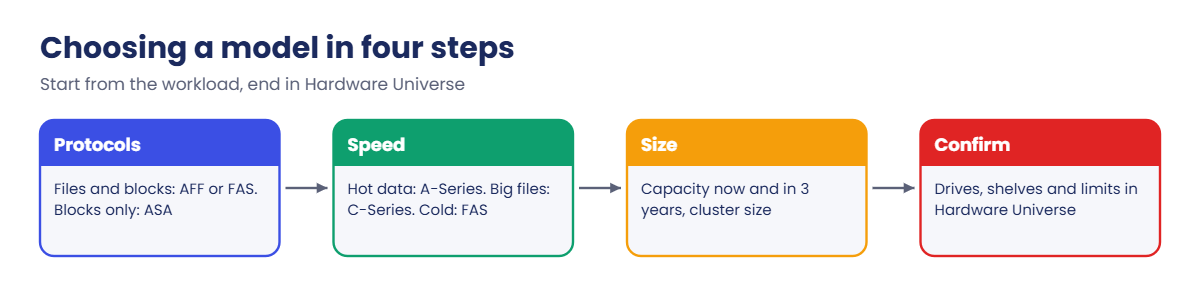
NetApp platform models and specs: AFF, ASA, FAS, C-Series

Every NetApp quote, design document and support case starts with a model name: AFF A50, FAS2820, ASA C30. This page puts the current and recent NetApp AFF models, ASA, FAS and C-Series side by side, so you can tell an entry system from a high-end one at a glance.

Numbers below come from NetApp’s published key specifications and product poster. Drive sizes change every year, so treat capacity as a guide and confirm the final figure in Hardware Universe before you design anything.

Where this page fits

Deep dive in NetApp ONTAP Storage Administration · Phase 1, Architecture and foundation · Before this: Inside a NetApp controller · Next: Lesson 7, Cluster setup

TimeYou needBy the end you can
40 minutesA browser and the practice shellPlace any AFF, ASA, FAS or C-Series model in its family, read its key limits, and look up any part in Hardware Universe

What it is, in one line

NetApp builds ONTAP systems in four families: AFF (all-flash, unified), AFF C-Series (lower-cost QLC flash), ASA (all-flash for SAN only) and FAS (hard disks with optional flash), each from a small 2U model to a large high-end one.

In Simple Words

Cars from one maker

A car maker sells a small hatchback, a family sedan and a big SUV, and often an electric version of each. They share parts and the same driving controls, but you’d never buy an SUV to drive two people around a city.

NetApp models work the same way. Every one runs ONTAP with the same commands, so what you learn on one applies to all, but the size, speed and price you pick depend on the job.

Engineer's View

How to read a model name

The letters give the family: AFF A is performance flash (TLC NVMe SSDs), AFF C is capacity flash (QLC), ASA is the SAN-only array and FAS is hybrid. A bigger number means a bigger system: an A20 is the entry model and an A1K is the top of the range.

The 2024 to 2025 generation (A20 to A1K, C30 to C80, FAS50 to FAS90) replaced the 2019 to 2022 generation (A250, A400, A800, A900, C250 to C800, FAS8300 to FAS9500). Both are common in data centres today, so you need to recognise both.

Current ASA models (A20 to A1K and C30) run the newer ASA r2 software personality: SAN only, symmetric active-active paths, storage availability zones instead of aggregates, and no mixing with AFF or FAS nodes in one cluster.

How it works, step by step

1AFF A-Series: performance all-flash

The workhorse for databases, VMware, mixed NAS and SAN. All models below are HA pairs.

ModelChassisDrives (internal + external)Max raw per HA pairMemory per HA pairMax nodes NAS / SANFirst ONTAP
AFF A202U, one chassis, 2 controllers24 + 24 SAS SSD (48 max)4.04 PB128 GB6 / 69.16.1
AFF A302U, one chassis24 + 48 NVMe (72 max)4.04 PB128 GB8 / 89.16.1
AFF A502U, one chassis24 + 96 NVMe (120 max)4.04 PB256 GB24 / 129.16.1
AFF A704U, one chassis48 + 192 NVMe (240 max)6.61 PB256 GB24 / 129.15.1
AFF A904U, one chassis48 + 192 NVMe (240 max)6.61 PB2,048 GB24 / 129.15.1
AFF A1K2 x 2U, two chassis240 NVMe, all in NS224 shelves14.69 PB2,048 GB24 / 129.15.1

On its AFF page, netapp.com quotes the A1K, A90 and A70 at up to 330 PB effective capacity in a 24-node cluster. The raw figures above are per HA pair from NetApp’s key specification pages.

NVRAM sizes aren’t published on netapp.com or the key specification pages; look them up per platform in Hardware Universe.

The A20 is the only current A-Series model with SAS SSDs; the rest use NVMe throughout, with NS224 shelves for expansion.

NetApp AFF models, AFF C-Series, ASA and FAS families compared

2AFF C-Series and ASA

AFF C-Series uses QLC flash: cheaper per terabyte than TLC, with a little more latency, and much faster than spinning disks. It suits file shares, backup targets and large VMware estates.

ModelChassisDrives (internal + external)Max raw per HA pairMemory per HA pairMax nodes NAS / SANFirst ONTAP
AFF C302U, one chassis24 + 48 QLC NVMe2.21 PB128 GB8 / 89.16.1
AFF C602U, one chassis24 + 96 QLC NVMe7.37 PB128 GB8 / 89.16.1
AFF C804U, one chassis48 + 192 QLC NVMe14.7 PB512 GB24 / 129.16.1

netapp.com gives the per-cluster view for C-Series: AFF C80 up to 24 nodes, 2,880 SSDs and 707 PB effective; AFF C60 up to 8 nodes, 480 SSDs and 118 PB effective; AFF C30 up to 8 nodes, 288 SSDs and 29.4 PB effective (all at 5:1 efficiency, ONTAP 9.16.1 or later).

ASA models use the same hardware as their AFF namesakes (plus the QLC-based ASA C30) but run SAN only: FC, iSCSI, NVMe/FC and NVMe/TCP. A cluster can have up to 12 nodes for the largest models, 8 for the A30 and C30, and 6 for the A20.

ASA modelChassisMax SSDs per clusterRaw capacity per clusterMax effective per clusterMemory per HA pairMax nodes
ASA A202U, 24 internal SSD slots14415 TB to 4.4 PBup to 18.8 PB128 GB6
ASA A302U, 24 internal SSD slots28815 TB to 8.8 PBup to 37.9 PB128 GB8
ASA A502U, 24 internal SSD slots72068 TB to 16 PBup to 69 PB256 GB12
ASA A704U, 48 internal SSD slots1,44068 TB to 16 PBup to 69 PB256 GB12
ASA A904U, 48 internal SSD slots1,44091 TB to 16 PBup to 69 PB2,048 GB12
ASA A1K2 x 2U, two chassis1,44091 TB to 16 PBup to 69 PB2,048 GB12
ASA C30 (QLC)2U, 24 internal SSD slots192122 TB to 5.8 PBup to 24 PBnot published8

Capacity, SSD and node figures are from the netapp.com ASA page; memory is from NetApp’s ASA r2 key specification pages. Those pages list a smaller SAN maximum for the A30 (4 HA pairs, 4.4 PB raw) than the 8.8 PB on netapp.com, so check Hardware Universe for your exact drive mix.

3FAS: hybrid systems

FAS systems take hard disks (and SSDs, or Flash Pool caching). They’re the choice when cost per terabyte matters more than latency: home directories, archives, backup copies and FabricPool-friendly cold data.

ModelChassisDrives (internal + external)Max raw per HA pairMemory per HA pairMax nodes NAS / SANFirst ONTAP
FAS27502U, one chassis24 int; up to 144 drives1.2 PB64 GB24 / 129.4RC1
FAS28202U, one chassis12 int (large drives); up to 144 HDD2.3 PB128 GB24 / 129.13.1
FAS502U, one chassisup to 480 HDD or 120 SSD10.6 PB128 GB8 / 89.16.1
FAS702 x 2U, two chassisexternal only, up to 1,440 HDD14.7 PB256 GB24 / 129.15.1
FAS902 x 2U, two chassisexternal only, up to 1,440 HDD14.7 PB1,024 GB24 / 129.15.1

Raw capacity per HA pair is the netapp.com FAS page figure. NetApp’s key specification pages show slightly higher numbers for some models (15.0 PB for FAS70 and FAS90, 3.17 PB for FAS2820) because they assume different drive sizes.

Large FAS systems connect DS212C and DS460C shelves for big hard disks and DS224C for small drives, all over 12 Gb SAS.

Choosing between NetApp AFF models, ASA and FAS in four steps

4The previous generation, and what is retiring

You’ll meet these in almost every data centre. They run current ONTAP releases, but check each model’s support end date before planning an upgrade.

ModelChassisMax raw per HA pairMemory per HA pairFirst ONTAPNote
AFF A2502U, 24 internal drives1.10 PB128 GB9.8Entry model of the last generation
AFF C2502U, 24 internal drives1.47 PB128 GB9.10.1P15QLC version of the A250
AFF A4004U, 2 controllers, external shelves14.69 PB256 GB9.7Mid-range workhorse
AFF C4004U, 2 controllers, external shelves2.95 PB256 GB9.10.1P15QLC version of the A400
AFF A8004U, 48 internal NVMe drives6.61 PB1,280 GB9.4RC1netapp.com lists ONTAP 9.7RC1 or later as the current minimum
AFF C8004U, 48 internal NVMe drives7.37 PB1,280 GB9.10.1End of availability January 2026
AFF A9008U, 2 controllers14.7 PB2,048 GB9.10.1High end of the last generation
FAS8300 / FAS87004U, 2 controllers15.0 PB256 GB / 512 GB9.7Mid-range hybrid
FAS95008U, 2 controllers15.0 PB2,048 GB9.10.1High-end hybrid

The previous ASA models (A150, A250, A400, A800, A900, C250, C400, C800) use the same chassis as their AFF namesakes. Their netapp.com tech sheet lists up to 12 nodes, ONTAP 9.13.1 or later, and raw capacity per HA pair from 547 TB (A150) to 14.7 PB (A400 and A900).

Some older models have already left the support list. NetApp’s release notes say ONTAP 9.17.1 and later no longer support the AFF A300 and FAS8200, and ONTAP 9.19.1 drops the AFF A700, FAS9000 and FAS500f. Such a system stays on its last supported release until it is replaced.

Beyond physical arrays: ONTAP Select runs ONTAP as a virtual machine on your own servers, Cloud Volumes ONTAP runs it in AWS, Azure or Google Cloud, and Amazon FSx for NetApp ONTAP is a managed ONTAP service. NetApp also launched AFX , a disaggregated design for AI data where diskless nodes and NVMe shelves scale separately through backend switches.

netapp.com now lists the AFX 2K controller (2U) with NX224 enclosures (2U): up to 128 controllers, 52 enclosures and about 1 EB of capacity.

Hands-on lab: look up a model and identify the lab hardware

Before you run any command, double-check it

Read every command twice before you press Enter. Check the target: the server name, the user, the disk or device name, the path and the sizes. These commands are for learning and were tested in our lab, not on your system. At work, run the read-only commands first, follow your change process, make sure a backup exists, and ask a second person to check anything that changes or deletes data. You run them at your own risk.

This lab uses the SaatVedha ONTAP practice shell, our own learning tool. It is not NetApp software: real ONTAP output looks like this but is not identical.

Two parts: first you find a model in Hardware Universe, the NetApp site every engineer keeps open, then you identify the hardware of the practice cluster from the CLI.

1Look up a model in Hardware Universe

Open hwu.netapp.com in your browser. Most pages work without logging in.

  1. Choose Platforms, then the family (for example AFF) and the model (for example AFF A50).
  2. Pick an ONTAP version, because supported parts and limits change by release.
  3. Read Specifications for drives, capacity and cluster size, and I/O for which cards fit in which slots.
  4. Use Compare to put two models side by side, for example AFF A30 and AFF A50.
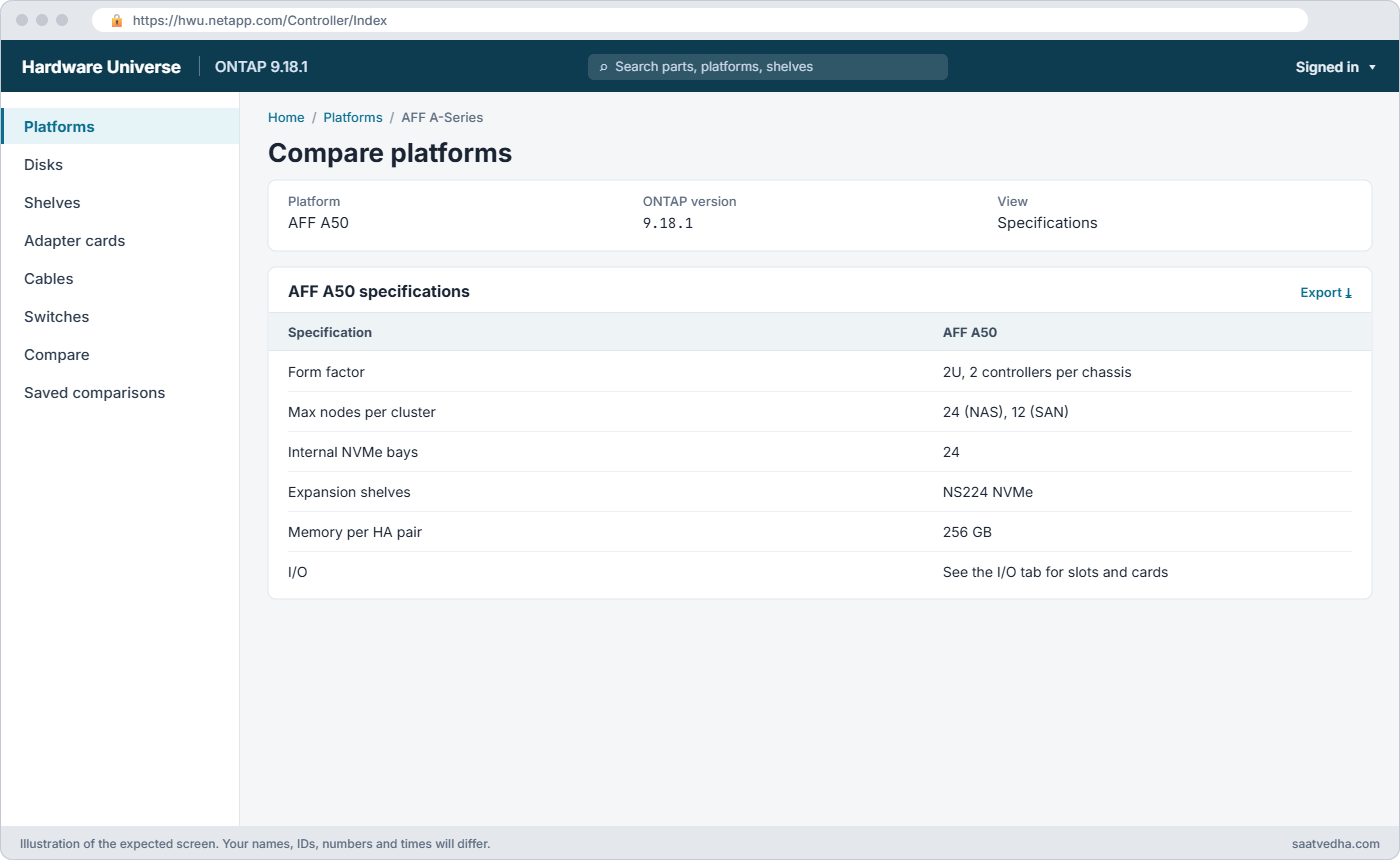
NetApp AFF models: Hardware Universe specification page for the AFF A50
Hardware Universe: the AFF A50 specifications for your ONTAP release.

✅ Checkpoint: You can find the maximum number of drives and the supported shelves for one model.

2Identify the lab cluster

Log in to the practice shell and run:

version
system node show -fields model,serialnumber,uptime
storage shelf show

You should see this:

saat-cluster::> version
NetApp Release 9.18.1: Sat Nov 07 2026 (SaatVedha practice shell 1.0, not NetApp software)
saat-cluster::> system node show -fields model,serialnumber,uptime
node            model   serialnumber uptime
--------------- ------- ------------ -------------
saat-cluster-01 FAS8300 721500001001 12 days 00:00
saat-cluster-02 FAS8300 721500001002 12 days 01:00
2 entries were displayed.
saat-cluster::> storage shelf show
                                               Module
Shelf Name Shelf ID Serial Number    Model     Type   Status
---------- -------- ---------------- --------- ------ --------
1.0               0 SHFMS100110      DS224C    IOM12  Normal
1.1               1 SHFMS100111      DS224C    IOM12  Normal
2 entries were displayed.

The lab is a FAS8300 HA pair with two DS224C shelves. From the table in step 3 of How it works, you know that’s a 4U previous-generation hybrid system that can grow to 24 nodes for NAS.

✅ Checkpoint: You know the model, the release and the shelf type of saat-cluster.
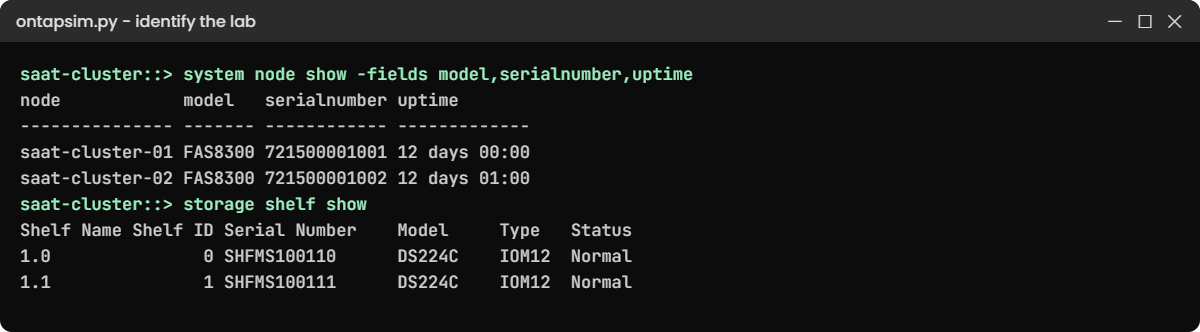
Practice shell: identifying the FAS8300 nodes and DS224C shelves
The lab is a FAS8300 HA pair with two DS224C shelves.

3Check the drive part numbers

storage disk show -disk 1.0.0|1.1.0 -fields model,type

You should see this:

disk  model            type
----- ---------------- ----
1.0.0 X425_HCBFE1T8A10 SAS
1.1.0 X357_S16433T8ATE SSD
2 entries were displayed.

The | means “or”, so one command shows both drives. Search Hardware Universe for a part number like X425 to see its size, type and which platforms accept it.

✅ Checkpoint: You can name one SAS and one SSD part number from the lab.

4Compare with the DR cluster

python ontapsim.py --cluster saat-dr

Log in, then run:

system node show -fields model,serialnumber
storage shelf show

You should see this:

saat-dr::> system node show -fields model,serialnumber
node       model   serialnumber
---------- ------- ------------
saat-dr-01 FAS8300 721500002001
saat-dr::> storage shelf show
                                               Module
Shelf Name Shelf ID Serial Number    Model     Type   Status
---------- -------- ---------------- --------- ------ --------
1.0               0 SHFMS200110      DS224C    IOM12  Normal

The DR site has one node and one shelf, which is common: DR often uses a smaller system than production. The next deep dive explains this single-node layout.

In System Manager, Cluster › Hardware shows the model and a picture of each controller and shelf.
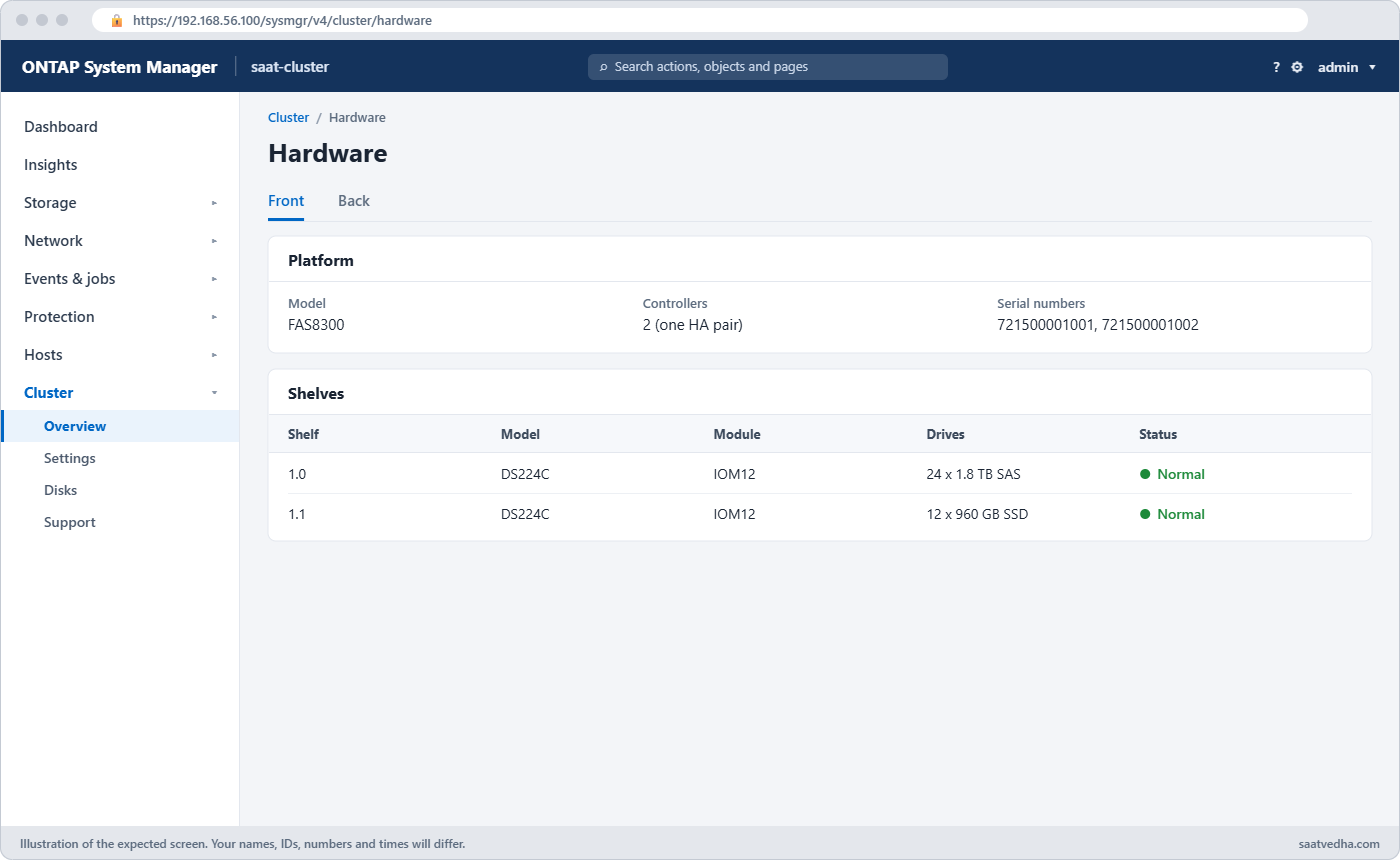
System Manager Cluster Hardware page showing FAS8300 controllers and DS224C shelves
Cluster › Hardware shows the model and a drawing of each controller and shelf.

✅ Checkpoint: You can describe both lab clusters in one sentence each.

Break It, Then Fix It

Planning on paper and then finding the hardware can’t do it is the most common sizing mistake. Make it happen in the lab, then fix it.

1Ask for more drives than the node has

storage aggregate create -aggregate aggr_ssd01 -node saat-cluster-01 -diskcount 12 -disktype SSD

You’ll get this:

Error: command failed: Aggregate operation would fail on node "saat-cluster-01". Reason: Not enough spare disks. 12 needed, 6 available of type SSD.

The design assumed 12 SSDs per node, but shelf 1.1 holds 12 SSDs for the whole HA pair, split six and six. Check what each node really owns before you plan, then size to it:

storage aggregate show-spare-disks -original-owner saat-cluster-01
storage aggregate create -aggregate aggr_ssd01 -node saat-cluster-01 -diskcount 5 -disktype SSD -simulate true

The simulation shows a layout that fits:

Info: The layout for aggregate "aggr_ssd01" on node "saat-cluster-01" would be:

      First Plex

        RAID Group rg0, 5 disks (block checksum, raid_dp)
                                                            Usable Physical
          Position   Disk                      Type           Size     Size
          ---------- ------------------------- ---------- -------- --------
          dparity    1.1.0                     SSD               -        -
          parity     1.1.1                     SSD               -        -
          data       1.1.2                     SSD         894.0GB  894.3GB
          data       1.1.3                     SSD         894.0GB  894.3GB
          data       1.1.4                     SSD         894.0GB  894.3GB

      Aggregate capacity available for volume use would be 2.36TB.

Five disks leaves one SSD as a spare. In a real design you’d go back to Hardware Universe and add drives or a shelf before the order is placed, not after.

✅ Checkpoint: The simulation shows a 5-disk raid_dp layout and one SSD stays spare.

Practice shell: aggregate fails because the node has only 6 SSD spares
Twelve SSDs were planned per node, but each node owns only six.

2Ask for a field that does not exist

system node show -fields modle

You’ll get this:

Error: "modle" is not a valid field for this command. Type "?" after -fields to list the fields.

A typo, but the habit matters: when you build an inventory script for many clusters, check every field name once by hand. Fix it with -fields model.

✅ Checkpoint: system node show -fields model lists FAS8300 for both nodes.

This happened at work

The quote that was one shelf short

A ceramics manufacturer in Rajkot was replacing an old FAS pair that held its ERP database and ten years of design files. The reseller quoted an AFF A30 for the database and planned to move the design files onto the same system, because “it’s all flash, it’ll be faster”.

The storage admin did her own check in Hardware Universe before signing. The design files alone needed more raw capacity than the quoted internal drives and one NS224 shelf could hold once RAID and spares were taken out, and buying more TLC flash for cold files made the price jump.

They changed the order to an AFF A30 for the database plus an AFF C30 for the files in the same cluster, which cost less than the bigger A-Series quote. Her rule now: no purchase order goes out until someone has checked the model’s limits in Hardware Universe against real capacity numbers.

Common mistakes and troubleshooting

MistakeWhat happensDo this instead
Sizing from the brochure capacityRaw capacity is far more than usable after RAID, spares and efficiency guessesSize from usable capacity and check the exact drives in Hardware Universe
Picking ASA for a site that also needs NFS or SMBASA r2 serves SAN only, so file shares need another systemUse AFF or FAS (unified) when you need both file and block
Mixing ASA r2 nodes into an AFF clusterNot supported; the nodes can’t joinKeep ASA r2 in its own cluster
Planning an upgrade without checking platform supportThe new ONTAP release may not support an old modelCheck the release notes and Hardware Universe for the platform
Treating QLC like TLC for every workloadLatency-sensitive databases may miss their targetsPut hot databases on A-Series and large file data on C-Series

Interview questions

Click a question to open it. Each one is written the way an interviewer would ask it. Under it you will see why they ask it and one way you could answer, in your own words.

Fresher level

1. What’s the difference between AFF and FAS?

Why they ask this: They want to know you can place the two main families.

How you might answer: AFF is all-flash and FAS is hybrid, built around hard disks with optional SSDs or Flash Pool. Both are unified, so they serve NFS, SMB and SAN from the same ONTAP. I’d pick AFF for latency-sensitive work and FAS when cost per terabyte matters most.

2. Where would you look up which disk shelves a model supports?

Why they ask this: They’re checking that you know the standard reference tool.

How you might answer: NetApp Hardware Universe at hwu.netapp.com. I pick the platform and the ONTAP version, and it lists supported shelves, drives, I/O cards and limits like maximum drives and cluster size.

2–5 years experience

3. A customer wants block storage only for a database cluster. Would you offer AFF or ASA, and why?

Why they ask this: They want to see you know what ASA is for and its limits.

How you might answer: For SAN only I’d look at ASA, because it’s built for block with symmetric active-active paths, so every path is optimised and failover is faster on the host side. If they might want NFS or SMB later, I’d offer AFF instead, since ASA r2 can’t serve files.

4. What does the C in AFF C30 tell you, and when would you use it?

Why they ask this: They’re checking your understanding of QLC and cost trade-offs.

How you might answer: C-Series uses QLC flash, which costs less per terabyte than the TLC drives in A-Series but has a bit more latency. I’d use it for big file shares, VMware with moderate performance needs, or as a backup target, and keep A-Series for the busiest databases.

Senior level

5. You’re asked to replace a FAS8300 pair that’s five years old. How do you choose the new model?

Why they ask this: They want a structured, data-driven approach rather than a guess.

How you might answer: I’d start from real numbers: capacity growth, IOPS and latency from the last year, and which protocols are used. Then I’d shortlist models in Hardware Universe, for example AFF A50 or C60 for flash, or FAS50 or FAS70 if most data is cold, and check the cluster limits and supported ONTAP release.

I’d also plan the move itself, like adding the new HA pair to the cluster and using volume move, so users barely notice.

6. How do you keep a mixed estate of old and new NetApp models supportable?

Why they ask this: They’re testing lifecycle thinking: support dates, ONTAP versions and risk.

How you might answer: I keep an inventory of every node with model, serial number and ONTAP version, and check the release notes for platforms that newer ONTAP releases drop. I plan hardware refresh before a model leaves the support list, and I watch Digital Advisor for support end dates and firmware risks.

Quick quiz

Q1. Which family is SAN only?

  1. AFF A-Series
  2. FAS
  3. ASA
  4. AFF C-Series
Show answer

C — ASA serves FC, iSCSI, NVMe/FC and NVMe/TCP only.

Q2. What kind of flash does AFF C-Series use?

  1. TLC
  2. QLC
  3. SLC
  4. Optane
Show answer

B — C-Series uses QLC flash for lower cost per terabyte.

Q3. Which is the entry model of the current AFF A-Series?

  1. AFF A1K
  2. AFF A90
  3. AFF A20
  4. AFF A400
Show answer

C — the A20 is the smallest current A-Series system.

Q4. Where do you confirm the shelves and drives a platform supports?

  1. Hardware Universe
  2. System Manager dashboard
  3. The event log
  4. AutoSupport
Show answer

A — hwu.netapp.com lists supported parts and limits per ONTAP release.

Q5. Which model in the practice lab is saat-cluster?

  1. AFF A50
  2. FAS8300
  3. ASA C30
  4. FAS2820
Show answer

B — system node show -fields model shows FAS8300 for both nodes.

Quick recap

  • AFF A-Series is performance flash, AFF C-Series is QLC flash, ASA is SAN only, FAS is hybrid.
  • Current models run from 2U entry systems (A20, C30, FAS50) to high-end systems (A90, A1K, FAS90).
  • The previous generation (A250 to A900, C250 to C800, FAS8300 to FAS9500) is still everywhere.
  • Capacity and cluster limits differ by model; confirm them in Hardware Universe.
  • Check release notes before an upgrade, because new ONTAP releases drop old platforms.

What’s next

Next, set up a cluster in Lesson 7, Cluster setup, then read ONTAP configuration modes to see every way a cluster can be built.

Further reading: NetApp AFF models

Want to go deeper into NetApp AFF models? NetApp’s What’s new for ONTAP hardware systems page lists every new platform with its release date, and the ASA r2 overview explains how the SAN-only systems differ. NetApp Hardware Universe has the full specifications for every model.

The figures on this page come from NetApp’s own product pages: AFF, ASA, FAS and AFX on netapp.com, plus the key specification pages for each system on docs.netapp.com, such as the FAS70 key specifications and the ASA r2 key specifications.

You can also see the full plan for this course on the NetApp ONTAP Storage Administration course page.

Scroll to Top

This website uses cookies

We use a few cookies to keep this site working. If you allow it, we also use Google Analytics to count visits so we can improve our lessons. You can accept all, deny the optional ones, or choose what to allow.