


4Report and adjust
volume quota report shows used and limit per target. Change a limit, then resize; check the report again.
| Quota type | Target | Typical use |
|---|---|---|
| tree | a qtree name | Project or department folders |
| user | a UNIX or Windows user | Home directories, per-person caps |
| group | a UNIX group | Team-wide caps on shared data |
| default (any type) | “” | Same limit for every qtree or user |
In System Manager: Storage › Qtrees to create qtrees and Storage › Quotas for rules and reports.

Good to know: how quota warnings reach you
Quota events go to the event log (EMS) and can also be sent as SNMP traps. ONTAP raises one when a write is refused at a hard limit, when a soft limit or threshold is crossed, and again when usage drops back under a soft limit.
Several quotas can apply to the same write, and all of them count. If a qtree has a 10 GB tree quota and is nearly full, a user with plenty left in their own user quota is still refused, because the tree limit is reached first.
Before you run any command, double-check it
Read every command twice before you press Enter. Check the target: the server name, the user, the disk or device name, the path and the sizes. These commands are for learning and were tested in our lab, not on your system. At work, run the read-only commands first, follow your change process, make sure a backup exists, and ask a second person to check anything that changes or deletes data. You run them at your own risk.
This lab uses the SaatVedha ONTAP practice shell, our own learning tool. It is not NetApp software: real ONTAP output looks like this but is not identical.
1Start from the NAS setup
Reset and run setup-29.txt, log in, and turn on NFS:
vserver nfs create -vserver svm1 -v3 enabled -v4.1 enabled
volume create -vserver svm1 -volume vol_proj -aggregate aggr1_01 -size 50g -junction-path /proj
volume qtree create -vserver svm1 -volume vol_proj -qtree alpha
volume qtree create -vserver svm1 -volume vol_proj -qtree beta
volume qtree show -vserver svm1 -volume vol_proj
You should see this:
Vserver    Volume        Qtree        Style        Oplocks    Status
---------- ------------- ------------ ------------ ---------- --------
svm1       vol_proj      ""           unix         enable     normal
svm1       vol_proj      alpha        unix         enable     normal
svm1       vol_proj      beta         unix         enable     normal
3 entries were displayed.
The "" line is the volume itself (qtree 0). Clients see alpha and beta as folders under /proj.
✅ Checkpoint: Two qtrees, alpha and beta.
2Add limits and turn quotas on
volume quota policy rule create -vserver svm1 -policy-name default -volume vol_proj -type tree -target alpha -disk-limit 10GB -soft-disk-limit 8GB
volume quota policy rule create -vserver svm1 -policy-name default -volume vol_proj -type tree -target beta -disk-limit 20GB
volume quota on -vserver svm1 -volume vol_proj
volume quota show -vserver svm1 -volume vol_proj
volume quota report -vserver svm1 -volume vol_proj
You should see this:
[Job 105] Job is queued: "quota on" performed for quota policy "default" on volume "vol_proj" in Vserver "svm1".
saat-cluster::> volume quota show -vserver svm1 -volume vol_proj
                                   Scan
Vserver    Volume       State      Status
---------- ------------ ---------- --------
svm1       vol_proj     on         -
saat-cluster::> volume quota report -vserver svm1 -volume vol_proj
Vserver: svm1

                                  ----Disk----          ----Files-----
Volume   Tree     Type   ID           Used    Limit    Used  Limit
-------- -------- ------ -------- -------- -------- ------- ------
vol_proj alpha    tree   alpha      3.13MB     10GB      12      -
vol_proj beta     tree   beta       3.13MB     20GB      12      -
2 entries were displayed.
✅ Checkpoint: Quotas are on and both qtrees show a limit.
3Watch a tree-style limit stop a write on Linux
The cluster can count against a quota, but you also want to see a limit stop a real write. Linux XFS project quotas behave like ONTAP tree quotas: a limit on one folder, not on a user.
Open a second terminal and start the lab server: python ontapsim.py --host sv-target. It has a spare 20 GB disk, /dev/sdb.
lsblk /dev/sdb
mkfs.xfs /dev/sdb
mount -o prjquota /dev/sdb /srv
mkdir -p /srv/proj/alpha
echo "10:/srv/proj/alpha" >> /etc/projects
echo "alpha:10" >> /etc/projid
xfs_quota -x -c 'project -s alpha' /srv
xfs_quota -x -c 'limit -p bsoft=80m bhard=100m alpha' /srv
dd if=/dev/zero of=/srv/proj/alpha/big.bin bs=1M count=200
xfs_quota -x -c 'report -pbih' /srv
df -h /srv
You should see this:
root@sv-target:~# lsblk /dev/sdb
NAME MAJ:MIN RM SIZE RO TYPE  MOUNTPOINTS
sdb    8:16   0  20G  0 disk
root@sv-target:~# mkfs.xfs /dev/sdb
meta-data=/dev/sdb               isize=512    agcount=4, agsize=1310720 blks
         =                       sectsz=512   attr=2, projid32bit=1
         =                       crc=1        finobt=1, sparse=1, rmapbt=1
         =                       reflink=1    bigtime=1 inobtcount=1 nrext64=1
data     =                       bsize=4096   blocks=5242880, imaxpct=25
         =                       sunit=0      swidth=0 blks
naming   =version 2              bsize=4096   ascii-ci=0, ftype=1
log      =internal log           bsize=4096   blocks=16384, version=2
         =                       sectsz=512   sunit=1 blks, lazy-count=1
realtime =none                   extsz=4096   blocks=0, rtextents=0
root@sv-target:~# mount -o prjquota /dev/sdb /srv
root@sv-target:~# mkdir -p /srv/proj/alpha
root@sv-target:~# echo "10:/srv/proj/alpha" >> /etc/projects
root@sv-target:~# echo "alpha:10" >> /etc/projid
root@sv-target:~# xfs_quota -x -c 'project -s alpha' /srv
Setting up project alpha (path /srv/proj/alpha)...
Processed 1 (/etc/projects and cmdline) paths for project alpha with recursion depth infinite (-1).
root@sv-target:~# xfs_quota -x -c 'limit -p bsoft=80m bhard=100m alpha' /srv
root@sv-target:~# dd if=/dev/zero of=/srv/proj/alpha/big.bin bs=1M count=200
dd: error writing '/srv/proj/alpha/big.bin': No space left on device
101+0 records in
100+0 records out
104857600 bytes (104 MB, 100 MiB) copied, 0.4167 s, 251 MB/s
root@sv-target:~# xfs_quota -x -c 'report -pbih' /srv
Project quota on /srv (/dev/sdb)
                        Blocks                            Inodes
Project ID   Used   Soft   Hard Warn/Grace     Used   Soft   Hard Warn/Grace
---------- --------------------------------- ---------------------------------
#0              0      0      0  00 [------]        3      0      0  00 [------]
alpha        100M    80M   100M  00 [------]        2      0      0  00 [------]
root@sv-target:~# df -h /srv
Filesystem Size  Used Avail Use% Mounted on
/dev/sdb     20G  242M   20G   2% /srv
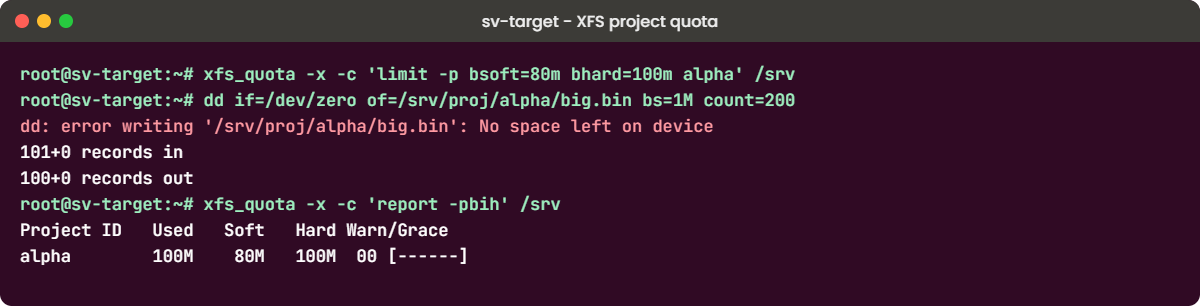
The disk has about 20 GB free, yet the write stopped at exactly 100 MiB: that’s the hard limit on the alpha folder, not a full disk. The report shows alpha at 100M used against an 80M soft and 100M hard limit, like the Used and Limit columns of volume quota report.
A local XFS write over its project limit says “No space left on device”. An NFS client writing into an ONTAP qtree over its tree quota gets “Disk quota exceeded” instead, so learn both messages.
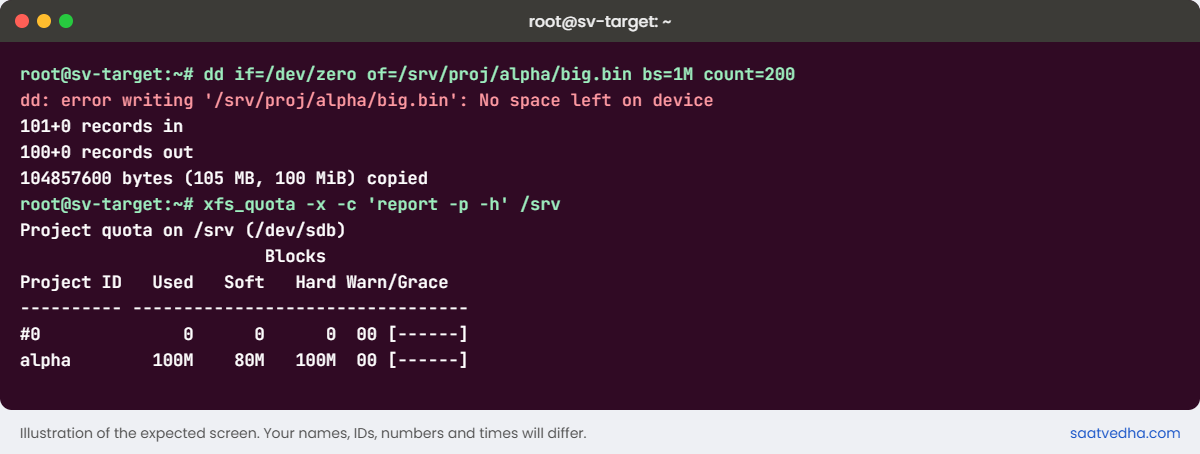
✅ Checkpoint: dd stops at 100 MiB and the report shows alpha at its 100M hard limit.
Try it yourself: Build a qtree quota in the Command Builder.
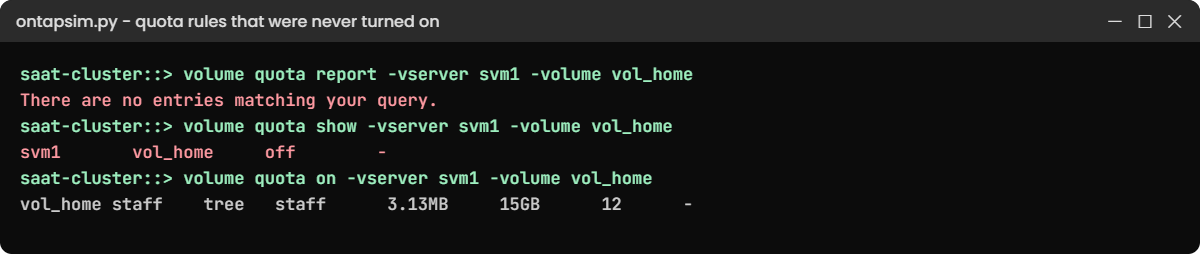
The most common quota ticket: “we set quotas, but nothing is limited”.
1Create rules on a new volume and forget to turn them on
volume create -vserver svm1 -volume vol_home -aggregate aggr1_02 -size 50g -junction-path /home
volume qtree create -vserver svm1 -volume vol_home -qtree staff
volume quota policy rule create -vserver svm1 -policy-name default -volume vol_home -type tree -target staff -disk-limit 15GB
volume quota report -vserver svm1 -volume vol_home
You’ll get this:
There are no entries matching your query.2Find out why
volume quota show -vserver svm1 -volume vol_home
volume quota resize -vserver svm1 -volume vol_home
You’ll see this:
                                   Scan
Vserver    Volume       State      Status
---------- ------------ ---------- --------
svm1       vol_home     off        -
saat-cluster::> volume quota resize -vserver svm1 -volume vol_home
Error: command failed: Quotas are not on for volume "vol_home". Use "volume quota on".
The rule exists, but quotas are off for this volume, so nothing is counted or enforced. Resize only works on a volume where quotas are already on.
3Turn them on and check
volume quota on -vserver svm1 -volume vol_home
volume quota report -vserver svm1 -volume vol_home
You should see this:
[Job 107] Job is queued: "quota on" performed for quota policy "default" on volume "vol_home" in Vserver "svm1".
saat-cluster::> volume quota report -vserver svm1 -volume vol_home
Vserver: svm1

                                  ----Disk----          ----Files-----
Volume   Tree     Type   ID           Used    Limit    Used  Limit
-------- -------- ------ -------- -------- -------- ------- ------
vol_home staff    tree   staff      3.13MB     15GB      12      -
✅ Checkpoint: staff shows a 15GB limit.
Make “quota report shows the new limit” the last line of every quota change.