SVM admin delegation and RBAC

Sooner or later someone asks for “just a login to the NetApp”: the monitoring team, a backup vendor, an application team that wants to make its own snapshots. Handing out the cluster admin password is the easy answer and the wrong one.

ONTAP has role-based access control (RBAC) built in. This last lesson of Phase 1 shows the built-in roles, how to give a team its own SVM admin, how to create a read-only account for monitoring, and how to build a small custom role when the built-in ones don’t fit.

Where this lesson fits

Lesson 22 of 56 in NetApp ONTAP Storage Administration · Phase 1: Architecture and foundation · Before this: Lesson 21, data LIFs, home ports and failover · Next: Lesson 23, LUNs, igroups, portsets and SLM

TimeYou needBy the end you can
45 minutesThe practice shell from Lesson 2Set up and enable vsadmin, create named read-only and custom-role users, and lock an account safely

What it is, in one line

ONTAP RBAC gives each login a role that decides which commands it can run and at which scope, the whole cluster or just one SVM, so every person gets only the access their job needs.

In Simple Words

Keys in a hotel

A hotel manager has a master key that opens every door. Housekeeping staff get keys for the floors they clean, a guest’s key opens only their own room, and the security guard can look at every corridor camera but can’t open any door.

Nobody hands the master key to a guest because it’s “easier”. And when a staff member leaves, the hotel cancels their key card that same day.

The master key is the cluster admin role, the guest’s key is an SVM admin, and the guard watching cameras is a read-only user.

Engineer's View

How an engineer describes it

Every login is a combination of user name, application, authentication method and role. Applications include ssh (CLI), http (System Manager and the REST API), ontapi, console and service-processor. Methods include password, domain (Active Directory users and groups), publickey and SAML, and ONTAP supports multi-factor login for SSH.

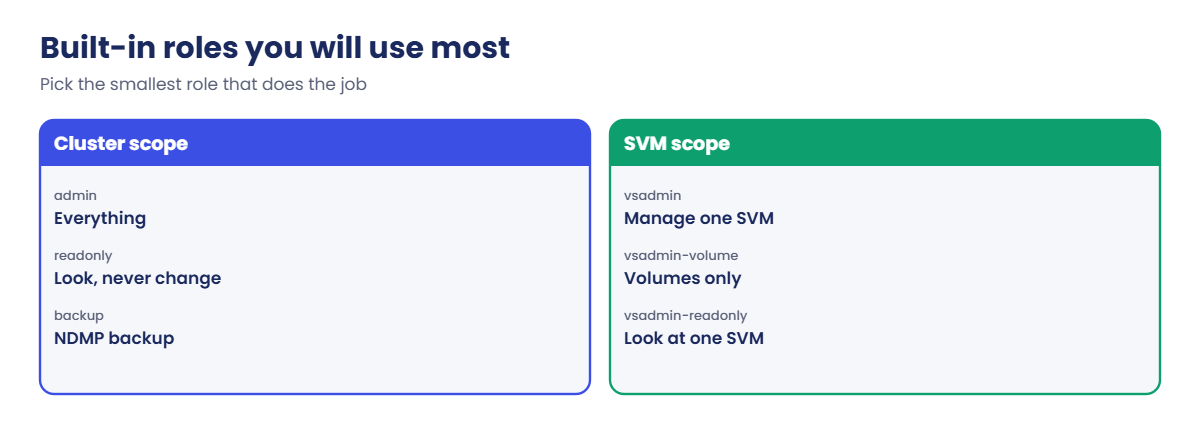
Cluster-scoped roles include admin, readonly, backup, autosupport and none. SVM-scoped roles include vsadmin, vsadmin-volume, vsadmin-protocol, vsadmin-backup and vsadmin-readonly. Every new data SVM has a vsadmin account that is locked and has no password until you set one.

A custom role is a list of command directories, each with an access level of all, readonly or none, created with security login role create. SVM admins usually log in through an SVM management LIF with the default-management service policy.

How it works, step by step

1Decide who needs what

List the people and tools that need access, and for each one the scope (cluster or one SVM) and whether they change things or only look. Most monitoring tools need read-only access only.

2Delegate an SVM

Set the vsadmin password, release its lock and give the SVM a management LIF. The application team then manages its volumes, shares and snapshots without seeing other SVMs or the hardware.

ONTAP RBAC: built-in cluster and SVM roles

3Create named accounts

One account per person or tool, never a shared login, so the audit log shows who ran each command. Use AD groups (-authentication-method domain) when many people need the same access.

4Use custom roles for the odd case

When a built-in role gives too much, build a small role from command directories, for example “volume all, volume snapshot readonly”.

ONTAP RBAC: four steps to delegate an SVM

5Lock and review

Lock accounts the day someone leaves or a vendor visit ends, and review security login show regularly. In System Manager: Cluster › Settings › Users and Roles for cluster accounts, and Storage › Storage VMs › select the SVM › Settings › Users and Roles for SVM accounts.
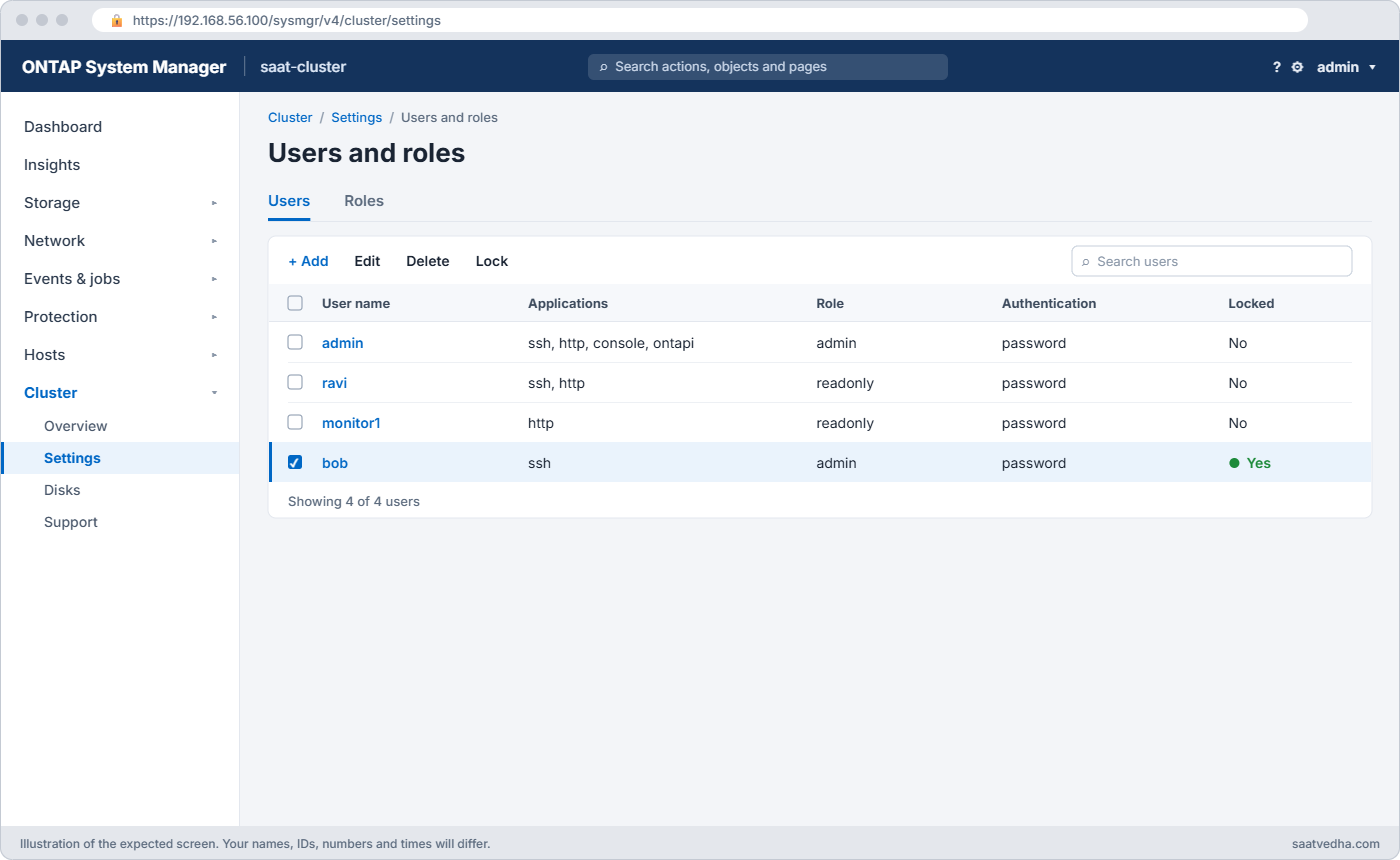
System Manager Users and Roles page listing admin, ravi, monitor1 and a locked account bob
System Manager: Cluster > Settings > Users and Roles. Check for locked and unused accounts here.
WhoRoleScope
Storage team membersadminCluster, named accounts or an AD group
Monitoring toolreadonlyCluster
Application teamvsadmin or vsadmin-volumeTheir SVM only
Backup software (NDMP)backup or vsadmin-backupCluster or SVM
Auditorreadonly or vsadmin-readonlyAs needed

Hands-on lab: delegate an SVM and create read-only and custom-role users

Before you run any command, double-check it

Read every command twice before you press Enter. Check the target: the server name, the user, the disk or device name, the path and the sizes. These commands are for learning and were tested in our lab, not on your system. At work, run the read-only commands first, follow your change process, make sure a backup exists, and ask a second person to check anything that changes or deletes data. You run them at your own risk.

This lab uses the SaatVedha ONTAP practice shell, our own learning tool. It is not NetApp software: real ONTAP output looks like this but is not identical.

You’ll delegate an SVM to an application team, create a read-only monitoring account and test it, then build a custom role for one operator and lock him out when he “leaves”. The practice shell doesn’t limit a vsadmin login to its SVM, so that part is shown as configuration only.

1Build an SVM to delegate

Create setup-22.txt with:

storage aggregate create -aggregate aggr1_01 -node saat-cluster-01 -diskcount 8 -disktype SAS
vserver create -vserver svm_app -aggregate aggr1_01 -rootvolume-security-style unix
volume create -vserver svm_app -volume vol_logs -aggregate aggr1_01 -size 10g -junction-path /logs
python ontapsim.py -c "simctl reset"
python ontapsim.py --run setup-22.txt

Log in as admin and run:

security login show

You should see this:

Vserver: saat-cluster
User/Group                         Authentication                  Acct
Name             Application       Method         Role Name        Locked
---------------- ----------------- -------------- ---------------- ------
admin            console           password       admin            no
admin            http              password       admin            no
admin            ontapi            password       admin            no
admin            ssh               password       admin            no
admin            service-processor password       admin            no

Vserver: svm_app
User/Group                         Authentication                  Acct
Name             Application       Method         Role Name        Locked
---------------- ----------------- -------------- ---------------- ------
vsadmin          http              password       vsadmin          yes
vsadmin          ontapi            password       vsadmin          yes
vsadmin          ssh               password       vsadmin          yes
8 entries were displayed.

The cluster has one admin login per application, and the new SVM already has a vsadmin account, locked.

✅ Checkpoint: vsadmin shows Locked yes.

2Delegate the SVM

security login password -vserver svm_app -username vsadmin
security login unlock -vserver svm_app -username vsadmin
network interface create -vserver svm_app -lif svm_app_mgmt -service-policy default-management -home-node saat-cluster-01 -home-port e0c -address 192.168.56.135 -netmask 255.255.255.0
security login show -vserver svm_app

The first command asks for the new password twice (it isn’t shown as you type); use Saat@vs2026. You should then see this:

Vserver: svm_app
User/Group                         Authentication                  Acct
Name             Application       Method         Role Name        Locked
---------------- ----------------- -------------- ---------------- ------
vsadmin          http              password       vsadmin          no
vsadmin          ontapi            password       vsadmin          no
vsadmin          ssh               password       vsadmin          no
3 entries were displayed.

On a real cluster the app team would now run ssh vsadmin@192.168.56.135, get the prompt svm_app::>, and see only svm_app’s volumes, LIFs and settings.

✅ Checkpoint: vsadmin shows Locked no.

3Create a read-only account for monitoring

security login create -user-or-group-name monitor1 -application ssh -authentication-method password -role readonly
security login create -user-or-group-name monitor1 -application http -authentication-method password -role readonly
security login show -vserver saat-cluster

The first command asks for a password twice; use Mon@2026x. The second reuses it. You should see this:

Vserver: saat-cluster
User/Group                         Authentication                  Acct
Name             Application       Method         Role Name        Locked
---------------- ----------------- -------------- ---------------- ------
admin            console           password       admin            no
admin            http              password       admin            no
admin            ontapi            password       admin            no
admin            ssh               password       admin            no
admin            service-processor password       admin            no
monitor1         ssh               password       readonly         no
monitor1         http              password       readonly         no
7 entries were displayed.

✅ Checkpoint: monitor1 has ssh and http with the readonly role.

4Test the read-only account

Type exit, start the shell again and log in as monitor1. Then run:

volume show -vserver svm_app
volume create -vserver svm_app -volume vol_x -aggregate aggr1_01 -size 10g

You should see this:

Vserver   Volume       Aggregate    State      Type       Size  Available Used%
--------- ------------ ------------ ---------- ---- ---------- ---------- -----
svm_app   svm_app_root aggr1_01     online     RW          1GB    972.2MB    0%
svm_app   vol_logs     aggr1_01     online     RW         10GB     9.50GB    0%
2 entries were displayed.
saat-cluster::> volume create -vserver svm_app -volume vol_x -aggregate aggr1_01 -size 10g
Error: "volume create" is not a recognized command

monitor1 can look at everything but the create commands don’t even exist for it. That’s exactly what a monitoring tool needs.

✅ Checkpoint: volume show works and volume create is refused.
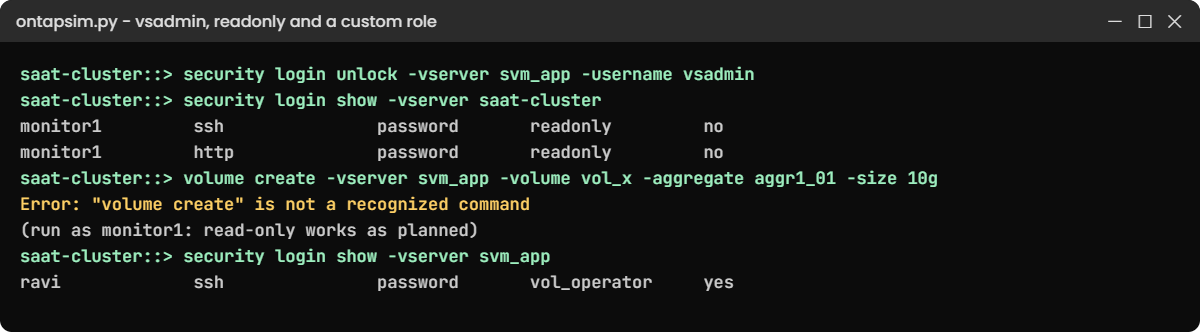
ONTAP RBAC lab: vsadmin, a read-only monitoring user and a locked custom-role user
monitor1 can look but not create, and the leaver ravi is locked.

5Build a custom role, then lock a leaver

Log out, log back in as admin and run:

security login role create -role vol_operator -cmddirname "volume" -access all -vserver svm_app
security login role create -role vol_operator -cmddirname "volume snapshot" -access readonly -vserver svm_app
security login role show

You should see this:

Role
Name               Command/Directory              Access Level
------------------ ------------------------------ ------------
admin              DEFAULT                        all
autosupport        DEFAULT                        none
autosupport        system node autosupport        all
backup             DEFAULT                        none
backup             vserver services ndmp          all
readonly           DEFAULT                        readonly
readonly           security login password        all
none               DEFAULT                        none
vol_operator       volume                         all
vol_operator       volume snapshot                readonly
10 entries were displayed.

vol_operator can manage volumes but only look at snapshots. Real ONTAP adds a Vserver column to this list; the practice shell shows all roles together. Give it to an operator, then lock him as if he’d left the company:

security login create -vserver svm_app -user-or-group-name ravi -application ssh -authentication-method password -role vol_operator
security login lock -vserver svm_app -username ravi
security login show -vserver svm_app

Use Ravi@2026x as the password. You should see this:

Vserver: svm_app
User/Group                         Authentication                  Acct
Name             Application       Method         Role Name        Locked
---------------- ----------------- -------------- ---------------- ------
vsadmin          http              password       vsadmin          no
vsadmin          ontapi            password       vsadmin          no
vsadmin          ssh               password       vsadmin          no
ravi             ssh               password       vol_operator     yes
4 entries were displayed.

Locking keeps the account and its history for the audit trail, but nobody can log in with it.

✅ Checkpoint: ravi shows Locked yes.

Break It, Then Fix It

Three account mistakes. Run the first two as admin.

1Create the same login twice

security login create -user-or-group-name monitor1 -application ssh -authentication-method password -role readonly

You’ll get this:

Error: command failed: duplicate entry

A login is unique per user, application and method. To change monitor1’s role, use security login modify instead of creating it again.

✅ Checkpoint: You can say which part of the login already existed.

2Use a role that doesn’t exist

security login create -user-or-group-name bob -application ssh -authentication-method password -role superadmin

You’ll get this:

Error: command failed: Role "superadmin" does not exist.

Check the role names with security login role show first. There’s no role above admin.

✅ Checkpoint: You picked a real role, such as readonly.

ONTAP RBAC break and fix: duplicate login, missing role and weak password
Three account errors you will meet when building logins.

3Set a weak password

Log in as monitor1 and try to change its password to abc:

security login password

You’ll get this:

Enter a new password:
Enter it again:
Error: command failed: The password must be at least 8 characters long and contain at least one letter and one number.

ONTAP’s default rules ask for at least 8 characters with letters and numbers; many companies make them stricter. On a real cluster the command also asks for the current password first.

✅ Checkpoint: You changed it to a password that meets the rule, or left it as it was.

This happened at work

Who deleted the video archive?

A media company in Dehradun had one ONTAP admin password, shared by six storage and server people and the hardware vendor’s engineer. One Monday a volume holding three years of raw video footage was gone. It came back from a SnapMirror copy at the DR site after most of a day.

The audit log showed the delete clearly, but the user was just “admin”, so nobody could say who had done it or why. The team suspected a cleanup script someone had run with the wrong volume name, but they never proved it.

Within a month every person had a named account through an AD group, the monitoring tool got a readonly login, the vendor got an account that stays locked between visits, and the shared admin password was changed and sealed in the company safe for emergencies only.

Common mistakes and troubleshooting

MistakeWhat happensDo this instead
Sharing the admin passwordNo way to tell who did what; leavers keep accessNamed accounts or AD groups for everyone
Giving monitoring tools adminA bug or stolen password can change or delete dataUse the readonly role
Giving an app team cluster admin to “make snapshots”They can touch every SVM and the hardwareDelegate their SVM with vsadmin or vsadmin-volume
Leaving vsadmin locked or add an SVM management LIFThe app team can’t log inSet the password, release the lock, and create a default-management LIF
Deleting leavers’ accounts straight awayTheir audit history becomes harder to followLock first; delete later under your retention policy

Interview questions

Click a question to open it. Each one is written the way an interviewer would ask it. Under it you will see why they ask it and one way you could answer, in your own words.

Fresher level

1. What is RBAC in ONTAP?

Why they ask this: They want to check you understand access control basics on the cluster.

How you might answer: RBAC is role-based access control. Each login has a role, like admin or readonly, that decides which commands the user can run, and the role can apply to the whole cluster or to one SVM.

2. An application team wants to manage its own volumes and snapshots. What would you give them?

Why they ask this: They’re checking you know SVM delegation instead of handing out cluster admin.

How you might answer: I’d delegate their SVM: set a password on vsadmin, release its lock and create an SVM management LIF. They log in to that LIF and can manage their volumes, shares and snapshots without seeing other SVMs or the hardware.

2–5 years experience

3. Your monitoring tool needs to read ONTAP data over the REST API. How would you set up its account?

Why they ask this: They want to see least-privilege thinking and the right application type.

How you might answer: I’d create a dedicated user with the readonly role and the http application, because REST and System Manager use http. If it also needs SSH I’d add an ssh login for the same user. It never needs admin.

4. A storage admin leaves the company today. What do you do on the clusters?

Why they ask this: They want to see a reliable leaver process and audit awareness.

How you might answer: I’d lock their accounts on every cluster with security login lock, or remove them from the AD group if we use domain logins. I’d check security login show for any other logins they had, such as service-processor or vendor accounts, and change any shared emergency password they knew.

I’d keep the locked account for a while so the audit history stays easy to read.

Senior level

5. How would you design admin access for a cluster shared by five business units?

Why they ask this: They want to see a structured access model across teams and scopes.

How you might answer: The storage team gets admin through an AD group with named users. Each business unit gets its own SVM, with vsadmin or a narrower SVM role for its admins, logging in through the SVM’s management LIF.

Monitoring and reporting tools get readonly accounts, backup software gets the backup role, and we review all logins every quarter with the audit log.

6. When would you build a custom role instead of using a built-in one?

Why they ask this: They’re checking judgement: custom roles add maintenance, so they should be justified.

How you might answer: Only when a built-in role clearly gives too much or too little. For example, an operator who should resize volumes but never delete snapshots could get a role with volume all and volume snapshot readonly.

I’d document the role, test it with a test user before giving it out, and keep the number of custom roles small.

Quick quiz

Q1. What state is the vsadmin account in when a new SVM is created?

  1. Open, with password admin
  2. Locked with no password
  3. Deleted
  4. Read-only
Show answer

B — you must set its password and release the lock before use.

Q2. Which application should a REST API monitoring account use?

  1. console
  2. ssh
  3. http
  4. service-processor
Show answer

C — System Manager and the REST API use the http application.

Q3. Which role lets a user look at everything but change nothing on the cluster?

  1. admin
  2. readonly
  3. none
  4. autosupport
Show answer

B — the readonly role can run show commands but not create, modify or delete.

Q4. Why did “volume create” fail for monitor1?

  1. The aggregate was full
  2. Its readonly role doesn’t include create commands
  3. The SVM was stopped
  4. It used the wrong LIF
Show answer

B — readonly users don’t get change commands at all.

Q5. What is the safest first step when a person leaves?

  1. Delete their account
  2. Lock their account
  3. Give them readonly
  4. Change the cluster name
Show answer

B — locking stops access at once and keeps the audit history easy to follow.

Quick recap

  • Every login is a user, an application, an authentication method and a role.
  • Cluster roles: admin, readonly, backup, autosupport, none. SVM roles: vsadmin and its narrower versions.
  • Delegate an SVM by setting the vsadmin password, releasing its lock and adding a management LIF.
  • Give tools readonly accounts and people named accounts or AD groups, never a shared admin.
  • Custom roles list command directories with all, readonly or none; lock leavers the same day.

Next lesson

Lesson 23: LUNs, igroups, portsets and SLM → Phase 2 begins: you’ll create LUNs and give them to hosts with igroups, portsets and selective LUN map.

Further reading: ONTAP RBAC

Want to go deeper into ONTAP RBAC? Read the ONTAP concepts guide for how SVMs isolate administration, then the administrator authentication and RBAC sections of the ONTAP documentation for the full role lists. You can also see the full plan for this course on the NetApp ONTAP Storage Administration course page.

Scroll to Top

This website uses cookies

We use a few cookies to keep this site working. If you allow it, we also use Google Analytics to count visits so we can improve our lessons. You can accept all, deny the optional ones, or choose what to allow.