FlexVol volumes
-
Phase 0: Start here
-
Phase 1: Architecture and foundation
-
Phase 2: Protocols and day-to-day administration
-
Phase 3: Data protection and enterprise integrations
-
Phase 4: Troubleshooting blueprint
-
Phase 5: Final project and career
Almost every request you’ll get as a storage admin ends in a volume: “we need 200 GB for the new CRM”, “the log share is full”, “can you make it bigger before tonight’s batch?”. In ONTAP that volume is usually a FlexVol.
This lesson covers what a FlexVol is, how thick and thin volumes use aggregate space differently, where the snapshot reserve comes from, and how to grow a volume or let it grow by itself. You’ll also see the errors ONTAP gives when a size request doesn’t add up.
Where this lesson fits
Lesson 17 of 56 in NetApp ONTAP Storage Administration · Phase 1: Architecture and foundation · Before this: Lesson 16, Storage Virtual Machines · Next: Lesson 18, qtrees and FlexGroup volumes
| Time | You need | By the end you can |
|---|---|---|
| 45 minutes | The practice shell from Lesson 2 | Create thick and thin FlexVol volumes, read their space, mount them in the namespace and resize them safely |
What it is, in one line
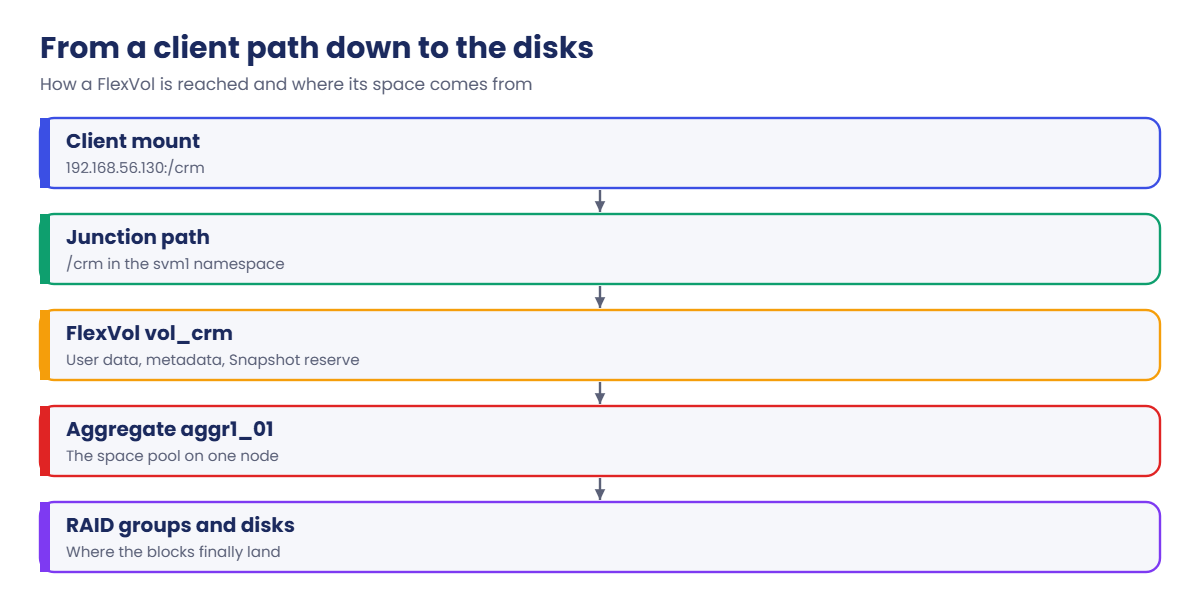
A FlexVol volume is a resizable container for files or LUNs that lives inside one aggregate, belongs to one SVM and appears to clients at its junction path.
In Simple Words
Water tanks on one big sump
Think of an apartment building with one big underground sump and a separate overhead tank for each flat. Some flats pay to have their full tank capacity kept aside in the sump, so they’re sure of water even when the sump runs low.
Other flats are promised a big tank but only take what they actually use. That lets the building promise more tanks than the sump could fill at once, which works fine until everyone opens their taps on the same morning.
The sump is the aggregate, each tank is a FlexVol, the reserved flats are thick volumes and the “take what you use” flats are thin ones.
Engineer's View
How an engineer describes it
A FlexVol is a WAFL file system that sits in a single aggregate and belongs to one SVM. It can hold NFS and SMB data, qtrees, or LUNs, and you can grow it, shrink it, move it to another aggregate, snapshot it and replicate it on its own. Its size is a logical limit, not a slice of disks, which is why resizing takes a second.
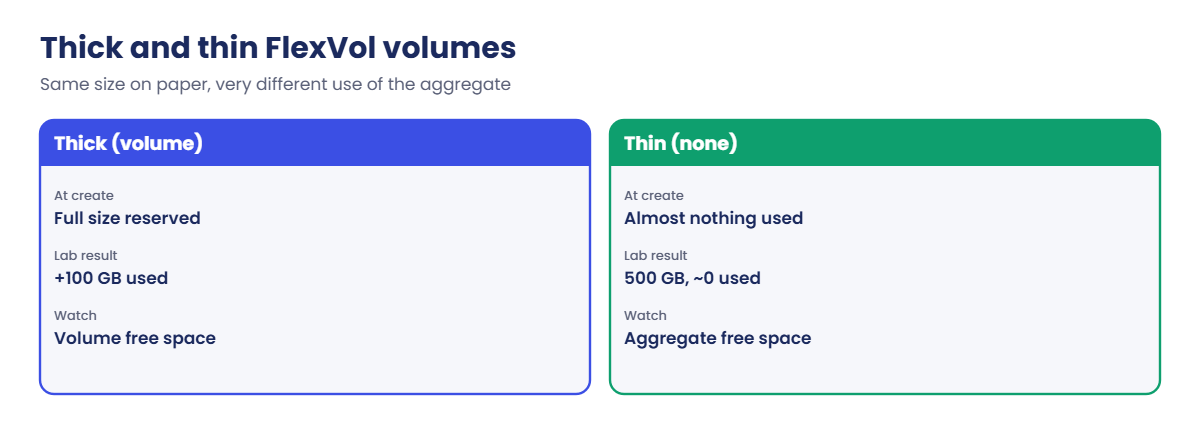
The space guarantee decides how much aggregate space is set aside. With -space-guarantee volume (thick) the whole size is reserved in the aggregate at once. With none (thin) only the data actually written uses aggregate space, so you can promise more than the aggregate holds, and the aggregate becomes the real limit to watch.
Part of every volume is the Snapshot reserve (-percent-snapshot-space, 5% by default for NAS volumes), kept for Snapshot copies. For NAS access a volume is mounted at a junction path in the SVM’s namespace, such as /crm. Autosize can grow (or grow and shrink) a volume within limits you set.
How it works, step by step
1Create the volume
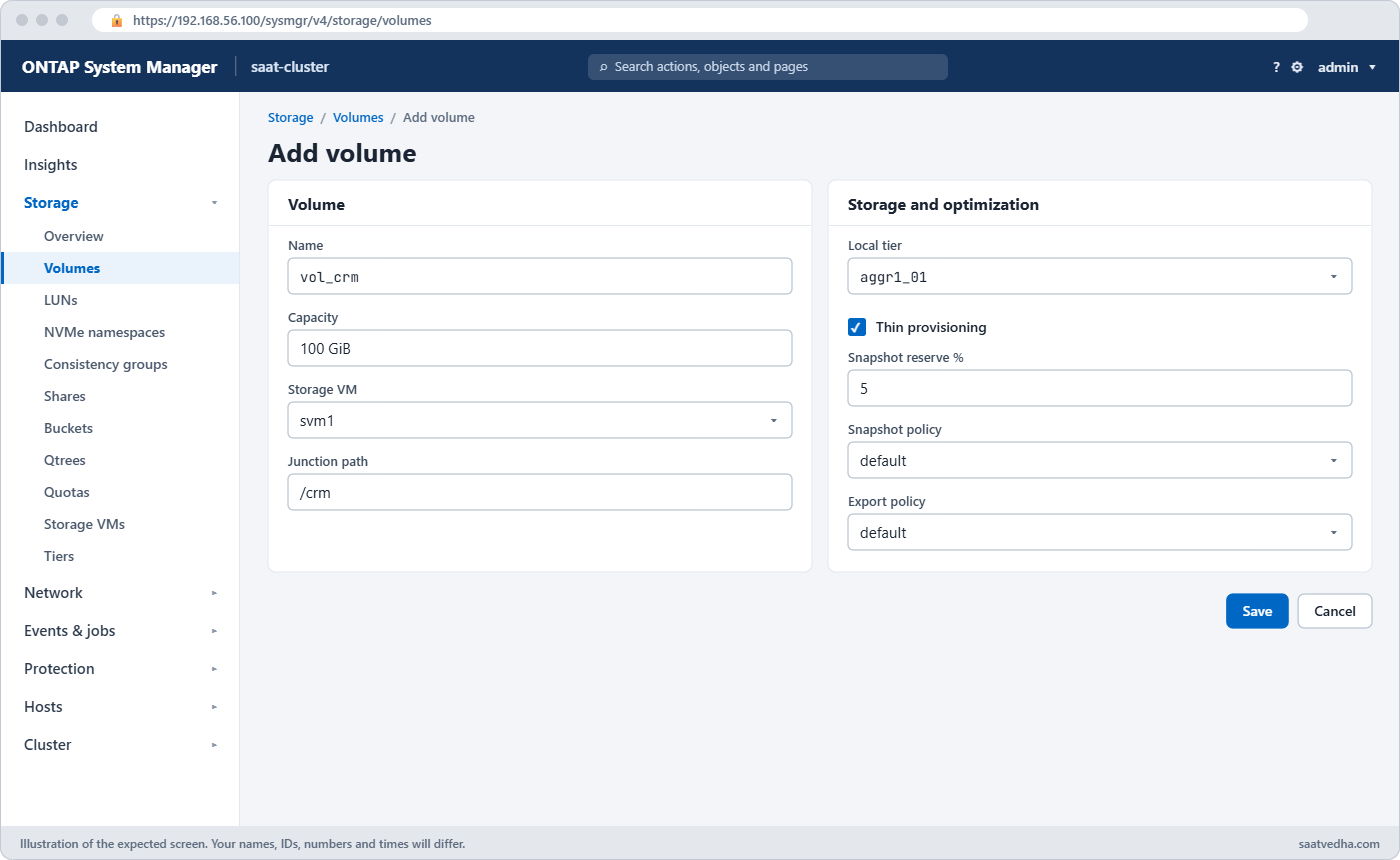
volume create needs an SVM, a name, an aggregate and a size. Names use letters, numbers and underscores. In System Manager: Storage › Volumes › + Add, then More options for thin or thick, snapshot reserve and export settings.
2Choose thick or thin
Thick protects one volume from others filling the aggregate. Thin saves space and suits most workloads, as long as someone watches aggregate free space.
3Mount it in the namespace
A junction path joins the volume to the SVM’s tree. Clients mount the SVM’s LIF plus that path, for example 192.168.56.130:/crm. Unmount it and the data is still there, but clients can’t reach it.
4Data and snapshots use the space
volume show-space breaks the used space into user data, metadata, inodes and snapshot reserve. Snapshot copies first use the reserve; if they need more, they spill into the volume’s free space.
5Grow, autosize or shrink
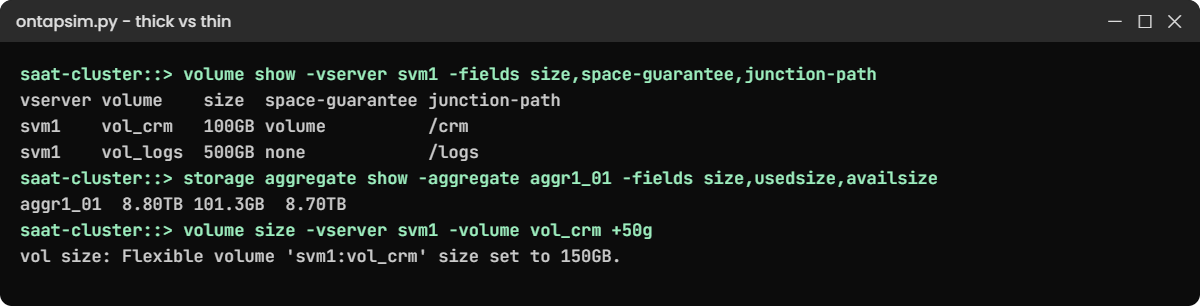
volume size sets a new size (or adds with +50g). Autosize grows the volume before it fills, up to -max-autosize. You can shrink a volume too, but never below the space already used.
| Setting | Thick (volume) | Thin (none) |
|---|---|---|
| Aggregate space taken at create | The full size | Almost nothing |
| Risk | Wastes space if unused | Writes fail if the aggregate fills |
| Good for | A few critical volumes that must never run out | Most NAS shares, VMs, test and dev |
| What to watch | Volume free space | Aggregate free space, and set alerts |
Good to know: moving a volume to another SVM
volume move changes the aggregate but keeps the volume in the same SVM. To hand a volume to a different SVM you use volume rehost -vserver svm1 -volume vol1 -destination-vserver svm2.
Rehost is disruptive: clients lose access, and you must set up exports, shares or LUN mappings again in the new SVM. Plan it like a small migration, not like a volume move.
Hands-on lab: create thick and thin FlexVol volumes and grow them
Before you run any command, double-check it
Read every command twice before you press Enter. Check the target: the server name, the user, the disk or device name, the path and the sizes. These commands are for learning and were tested in our lab, not on your system. At work, run the read-only commands first, follow your change process, make sure a backup exists, and ask a second person to check anything that changes or deletes data. You run them at your own risk.
This lab uses the SaatVedha ONTAP practice shell, our own learning tool. It is not NetApp software: real ONTAP output looks like this but is not identical.
You’ll create one thick and one thin volume, watch what each does to the aggregate, fill one with data, grow it, and move a junction path.
1Build an SVM to hold the volumes
Create setup-17.txt with:
storage aggregate create -aggregate aggr1_01 -node saat-cluster-01 -diskcount 8 -disktype SAS
vserver create -vserver svm1 -aggregate aggr1_01 -rootvolume-security-style unixpython ontapsim.py -c "simctl reset"
python ontapsim.py --run setup-17.txt✅ Checkpoint: The SVM reports “Vserver creation completed”.
2Note the aggregate’s used space
Log in and run:
storage aggregate show -aggregate aggr1_01 -fields size,usedsize,availsizeYou should see this:
aggregate size usedsize availsize
--------- ------ -------- ---------
aggr1_01 8.80TB 1.18GB 8.80TBOnly the SVM’s 1 GB root volume is using space.
✅ Checkpoint: usedsize is about 1 GB.
3Create a thick and a thin volume
volume create -vserver svm1 -volume vol_crm -aggregate aggr1_01 -size 100g -junction-path /crm -space-guarantee volume
volume create -vserver svm1 -volume vol_logs -aggregate aggr1_01 -size 500g -junction-path /logs -space-guarantee none
volume show -vserver svm1 -fields size,space-guarantee,percent-snapshot-space,junction-path
storage aggregate show -aggregate aggr1_01 -fields size,usedsize,availsizeYou should see this:
[Job 103] Job succeeded: Successful
[Job 104] Job succeeded: Successful
saat-cluster::> volume show -vserver svm1 -fields size,space-guarantee,percent-snapshot-space,junction-path
vserver volume size space-guarantee percent-snapshot-space junction-path
------- --------- ----- --------------- ---------------------- -------------
svm1 svm1_root 1GB volume 5% /
svm1 vol_crm 100GB volume 5% /crm
svm1 vol_logs 500GB none 5% /logs
3 entries were displayed.
saat-cluster::> storage aggregate show -aggregate aggr1_01 -fields size,usedsize,availsize
aggregate size usedsize availsize
--------- ------ -------- ---------
aggr1_01 8.80TB 101.3GB 8.70TBThe aggregate’s used space jumped by about 100 GB, all of it the thick vol_crm. The thin 500 GB vol_logs took almost nothing, because nothing has been written to it yet.
✅ Checkpoint: usedsize is about 101 GB, not 600 GB.
4Write data and read the space breakdown
simctl write svm1 vol_crm 30g db
volume show-space -vserver svm1 -volume vol_crmYou should see this:
Client wrote 30GB to svm1:vol_crm.
saat-cluster::> volume show-space -vserver svm1 -volume vol_crm
Vserver : svm1
Volume : vol_crm
Feature Used Used%
-------------------------------- ---------- ------
User Data 30.03GB 30%
Filesystem Metadata 123.2MB 0%
Inodes 7.61MB 0%
Snapshot Reserve 5GB 5%
Total Used 35.16GB 35%
Total Physical Used 30.03GB 30%30 GB of user data, a little metadata, and the 5 GB snapshot reserve that’s set aside even with no snapshots yet. That’s why the volume shows 35% used.
✅ Checkpoint: Snapshot Reserve shows 5GB.
5Grow the volume and turn on autosize
volume size -vserver svm1 -volume vol_crm +50g
volume modify -vserver svm1 -volume vol_crm -autosize-mode grow -max-autosize 300g
volume show -vserver svm1 -volume vol_crm -fields size,autosize-mode,max-autosizeYou should see this:
vol size: Flexible volume 'svm1:vol_crm' size set to 150GB.
saat-cluster::> volume modify -vserver svm1 -volume vol_crm -autosize-mode grow -max-autosize 300g
Volume modify successful on volume vol_crm of Vserver svm1.
saat-cluster::> volume show -vserver svm1 -volume vol_crm -fields size,autosize-mode,max-autosize
vserver volume size autosize-mode max-autosize
------- ------- ----- ------------- ------------
svm1 vol_crm 150GB grow 300GBThe volume is 150 GB now, clients see the extra space at once, and it can grow on its own up to 300 GB.
✅ Checkpoint: size is 150GB and autosize-mode is grow.
6Unmount and remount a volume
volume unmount -vserver svm1 -volume vol_logs
volume show -vserver svm1 -fields junction-path
volume mount -vserver svm1 -volume vol_logs -junction-path /logsYou should see this:
saat-cluster::> volume show -vserver svm1 -fields junction-path
vserver volume junction-path
------- --------- -------------
svm1 svm1_root /
svm1 vol_crm /crm
svm1 vol_logs -
3 entries were displayed.
saat-cluster::> volume mount -vserver svm1 -volume vol_logs -junction-path /logs
Queued private job: 105While vol_logs had no junction path, NFS clients that had it mounted would get “Stale file handle”. Remounting at the same path brings it back. You’ll meet that error properly in Lesson 49.
✅ Checkpoint: vol_logs is back at /logs.
Try it yourself: Open “Grow a volume and turn on autosize” in the Command Builder.
Break It, Then Fix It
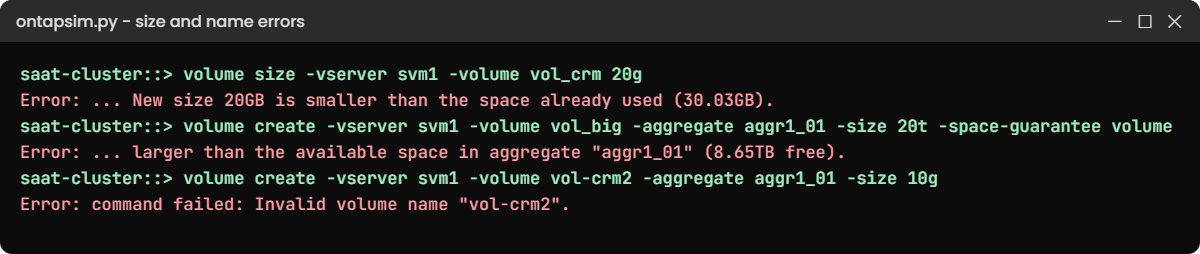
Three size and naming mistakes that ONTAP blocks. Run them on purpose.
1Shrink below the used space
volume size -vserver svm1 -volume vol_crm 20gYou’ll get this:
Error: command failed: Unable to set volume attribute "size" for volume "vol_crm". Reason: New size 20GB is smaller than the space already used (30.03GB).You can shrink a volume, but only to a size that still holds its data, and leave headroom. Check volume show -fields used first.
✅ Checkpoint: vol_crm is still 150GB.
2Ask for a thick volume bigger than the aggregate
volume create -vserver svm1 -volume vol_big -aggregate aggr1_01 -size 20t -space-guarantee volumeYou’ll get this:
Error: command failed: Unable to set volume attribute "size" for volume "vol_big" on Vserver "svm1". Reason: Request to make the volume larger than the available space in aggregate "aggr1_01" (8.65TB free). Use -space-guarantee none for a thin volume.A thick volume must fit in the aggregate. Either create it thin and watch the aggregate, or use a smaller size or a bigger aggregate. Don’t make it thin just to get past the error without telling the owner.
✅ Checkpoint: You can explain why the thin version would be accepted.
3Use a dash in the name
volume create -vserver svm1 -volume vol-crm2 -aggregate aggr1_01 -size 10gYou’ll get this:
Error: command failed: Invalid volume name "vol-crm2". The name must start with a letter or "_" and can contain only letters, numbers and "_".Use vol_crm2 instead. Teams that copy names from a request form often hit this, so put the rule in your naming standard.
✅ Checkpoint: vol_crm2 is created with an underscore.
This happened at work
Month-end at the cooperative bank
A cooperative bank in Vadodara had moved every volume to thin provisioning to save space, and on paper the aggregate was promised about twice its real size. Nobody had set an alert on aggregate free space, because the volumes all showed plenty of room.
On the last working day of the quarter, the statement generation job and a database export ran together and the aggregate went from 88% to full in under two hours. Writes started failing on several NFS volumes at once, even though each volume still said it had free space. The on-call engineer first grew the volumes, which changed nothing, before someone checked storage aggregate show.
They freed space by deleting old Snapshot copies and moving a test volume to another aggregate, then added disks the next week. Since then the core banking volumes are thick, everything else stays thin, and the monitoring tool raises an alert when any aggregate passes 80%.
Common mistakes and troubleshooting
| Mistake | What happens | Do this instead |
|---|---|---|
| Thin volumes with no aggregate alerts | The aggregate fills and many volumes fail at once | Alert at 80% and 90% aggregate used; review overcommit monthly |
| Growing a volume when the aggregate is full | Nothing changes; writes still fail | Check aggregate free space first, then free or add space there |
| Forgetting the snapshot reserve | Users see less space than the size they asked for | Size the volume for data plus reserve, or adjust -percent-snapshot-space |
| Unmounting a volume clients use | NFS clients get Stale file handle | Check who uses it, warn them, then unmount |
| Shrinking to the exact used size | The volume fills on the next write | Leave headroom, or use autosize grow_shrink |
Interview questions
Click a question to open it. Each one is written the way an interviewer would ask it. Under it you will see why they ask it and one way you could answer, in your own words.
Fresher level
1. What is a FlexVol volume in ONTAP?
Why they ask this: They want to know you understand the basic container that holds data.
How you might answer: A FlexVol is a volume that lives in one aggregate and belongs to one SVM. It holds files or LUNs, and I can resize it, snapshot it, move it or replicate it on its own. NAS clients reach it through its junction path in the SVM namespace.
2. What’s the difference between a thick and a thin volume?
Why they ask this: They’re checking you understand how space is reserved in the aggregate.
How you might answer: A thick volume, space guarantee volume, reserves its whole size in the aggregate when it’s created. A thin volume, space guarantee none, only uses aggregate space as data is written. In my lab a 100 GB thick volume raised aggregate used space by about 100 GB, while a 500 GB thin one used almost nothing.
2–5 years experience
3. A user says the volume shows free space but writes are failing. What would you check?
Why they ask this: They want to see that you look beyond the volume to the aggregate and snapshots.
How you might answer: First I’d check the aggregate with storage aggregate show, because with thin volumes the aggregate can be full even when the volume isn’t. Then I’d look at volume show-space to see if snapshots have spilled past their reserve.
If the aggregate is full, growing the volume won’t help; I’d free space or move a volume off that aggregate.
4. How would you set up a volume so it doesn’t run out of space during a night batch?
Why they ask this: They’re checking practical use of autosize and monitoring.
How you might answer: I’d turn on autosize with -autosize-mode grow and a sensible -max-autosize, and make sure the aggregate has room for it to grow. I’d also set alerts on the volume and the aggregate, so someone hears about it before it fills.
Senior level
5. Your manager asks whether the team should make every volume thin. What would you tell them?
Why they ask this: They want to see a balanced view of efficiency against risk.
How you might answer: I’d say thin is right for most volumes because it saves a lot of space, but it moves the risk to the aggregate. So we’d need aggregate alerts, a monthly overcommit review and a plan for fast growth.
For a few critical systems, like core banking databases, I’d keep thick volumes so another team’s growth can never stop them.
6. How would you decide the size and layout of volumes for a new application?
Why they ask this: They want to see you think about growth, snapshots, protection and placement together.
How you might answer: I’d ask for current size, growth per month and how many days of snapshots they need, then add the snapshot reserve and some headroom. I’d place the volume on an aggregate with space and performance to spare, usually on the node that hosts its LIF.
I’d also split data with different protection or performance needs, like logs and databases, into separate volumes.
Quick quiz
Q1. Where does a FlexVol volume live?
- Across all aggregates in the cluster
- In one aggregate, owned by one SVM
- In the node’s root volume
- On a single disk
Show answer
B — a FlexVol sits in one aggregate and belongs to one SVM.
Q2. What does -space-guarantee none mean?
- The volume can’t hold snapshots
- The volume is thin and uses aggregate space only as data is written
- The volume is read-only
- The volume has no size limit
Show answer
B — a thin volume doesn’t reserve its full size in the aggregate.
Q3. What is the default Snapshot reserve on a new NAS volume?
- 0%
- 5%
- 20%
- 50%
Show answer
B — new NAS volumes keep 5% for Snapshot copies by default.
Q4. Why did “volume size vol_crm 20g” fail in the lab?
- Volumes can never shrink
- 20 GB is smaller than the space already used
- Autosize was on
- The volume was thick
Show answer
B — you can’t shrink a volume below the data it holds.
Q5. What do NFS clients see if their volume is unmounted from its junction path?
- An empty folder with free space
- Stale file handle errors
- A read-only copy
- Nothing changes
Show answer
B — the path they mounted no longer leads to the volume, so they get stale file handles.
Quick recap
- A FlexVol lives in one aggregate, belongs to one SVM and is reached through its junction path.
- Thick volumes reserve their full size; thin volumes use aggregate space only as data arrives.
- The 5% Snapshot reserve is part of the volume’s size.
- volume size and autosize grow volumes in seconds; shrinking stops at the used space.
- With thin volumes, the aggregate is the real limit, so alert on it.
Next lesson
Lesson 18: Qtrees and FlexGroup volumes → You’ll split a volume with qtrees and build a FlexGroup that spreads across both nodes.
Further reading: ONTAP FlexVol
Want to go deeper into ONTAP FlexVol? Read the ONTAP concepts guide for how volumes, aggregates and SVMs fit together, then the volume and space-management sections that follow it. You can also see the full plan for this course on the NetApp ONTAP Storage Administration course page.