Cluster, management and data networks
-
Phase 0: Start here
-
Phase 1: Architecture and foundation
-
Phase 2: Protocols and day-to-day administration
-
Phase 3: Data protection and enterprise integrations
-
Phase 4: Troubleshooting blueprint
-
Phase 5: Final project and career
Look at the back of an ONTAP controller and you’ll see a row of network ports that all look the same. They aren’t. Some carry the cluster’s private traffic, one is for managing the box, and the rest carry your users’ data.
Mixing them up is one of the most common causes of strange outages on new clusters. In this lesson you’ll learn the three networks every cluster has, read them in the practice shell, and then pull a cluster cable (virtually) to see how ONTAP reports it.
Where this lesson fits
Lesson 5 of 56 in NetApp ONTAP Storage Administration · Phase 1: Architecture and foundation · Before this: Lesson 4, HA pairs · Next: Lesson 6, AFF, FAS and ASA hardware
| Time | You need | By the end you can |
|---|---|---|
| 45 minutes | The practice shell | Name the cluster, management and data networks, find their ports and LIFs, and spot a failed cluster port |
What it is, in one line
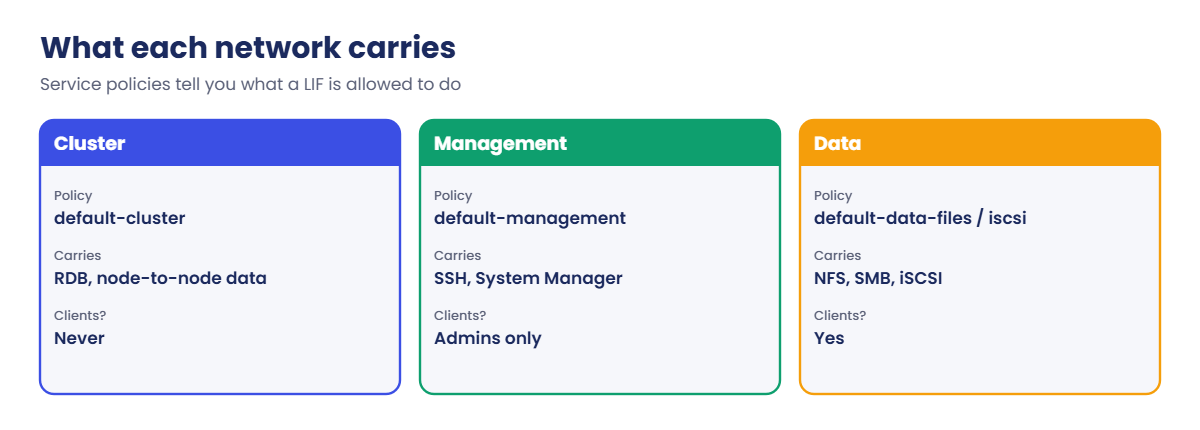
Every ONTAP cluster runs three separate networks: a private cluster network between the nodes, a management network for admins, and data networks that clients use to reach their storage.
In Simple Words
Three kinds of roads in a factory
A big factory campus has three kinds of roads. Inside the walls there’s a private road where forklifts move parts between the workshops, and no outside truck is ever allowed on it.
There’s a small gate with a guard where only managers and inspectors come in. And there are the big loading gates where customers’ trucks pick up and drop goods all day long.
If a customer’s truck ends up on the forklift road, or the manager’s gate is the only way in for customers, the whole campus slows down. ONTAP keeps its three networks apart for the same reason.
Engineer's View
How an engineer describes it
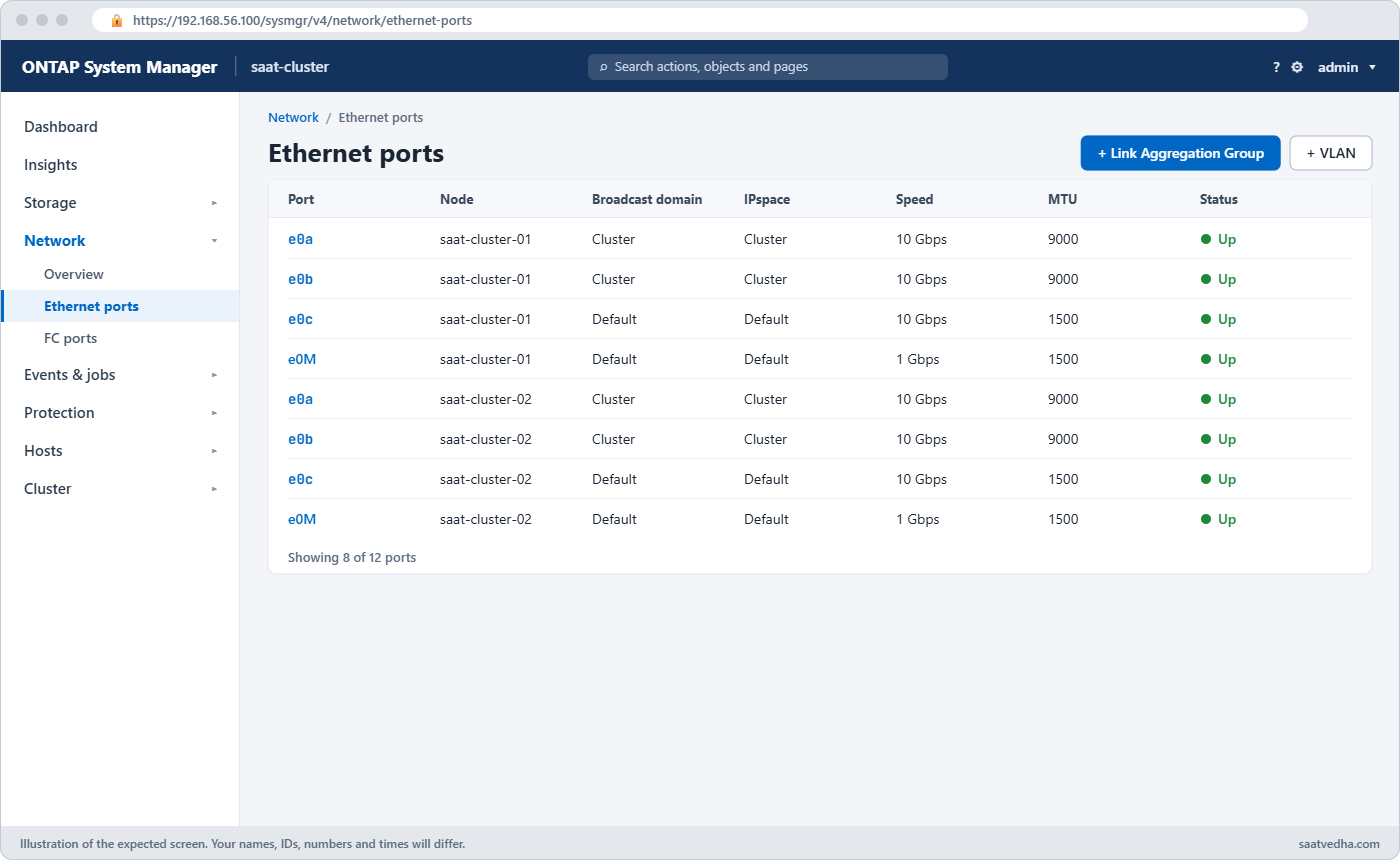
The cluster network lives in its own IPspace called Cluster. Each node has at least two cluster ports (in this lab e0a and e0b, MTU 9000), cabled to two dedicated cluster switches, or directly to the partner in a two-node switchless cluster. Cluster LIFs get link-local addresses in 169.254.0.0/16 and carry the replicated database, cluster management and any data that has to cross from one node to another.
The management network uses e0M, which also carries the Service Processor on many platforms. On it sit one node management LIF per node and one cluster management LIF that can move between nodes; System Manager and SSH use the cluster management address. The data network uses the remaining ports, often bundled into interface groups and VLANs, and holds the data LIFs that belong to SVMs (NFS, SMB, iSCSI) plus intercluster LIFs for SnapMirror.
Each LIF has a service policy that says what it may carry: default-cluster, default-management, default-data-files, default-data-iscsi, default-intercluster and so on. Broadcast domains group the ports that sit on the same layer-2 network, and IPspaces keep separate routing worlds apart.
How it works, step by step
1Nodes join through the cluster network
When a node boots, its cluster LIFs come up on the cluster ports and it finds the other nodes. Without a healthy cluster network a node can’t stay in the cluster, even if its data ports are fine.
2Admins come in on the management network
You SSH to the cluster management LIF (192.168.56.100 in the lab) or open System Manager on it. Node management LIFs are for jobs on one node, and the SP gives you a console when the node itself is down.
3Clients use data LIFs
An NFS client mounts through a data LIF with the default-data-files policy, and an iSCSI host logs in through LIFs with default-data-iscsi. You’ll build these in Lessons 19 to 21.
4Traffic that has to cross nodes uses the cluster network
If a client reaches node 01 for a volume that lives on node 02, node 01 forwards the request over the cluster network. It works, but it adds a little latency, so good designs keep LIFs and volumes on the same node.
5Find it all in one place
In System Manager, open Network › Overview: the tabs list network interfaces, broadcast domains and IPspaces. Network › Ethernet ports shows every port with its speed and link state.
| Network | Ports in the lab | LIFs | Service policy |
|---|---|---|---|
| Cluster | e0a, e0b (MTU 9000) | saat-cluster-0x_clus1/2, 169.254.x.x | default-cluster |
| Management | e0M | cluster_mgmt, node mgmt LIFs | default-management |
| Data | e0c to e0f, ifgrps, VLANs | SVM data LIFs, intercluster LIFs | default-data-files, default-data-iscsi, default-intercluster |
Good to know: designing the management network
Every controller has a dedicated management port, e0M, for node management LIFs and the Service Processor. NetApp doesn’t require a particular switch model for management, so most sites use ordinary access switches.
A single management switch works, but it is a single point of failure for your access to the cluster. The safer design uses two management switches, with the cluster management LIF able to fail over to a second 1 Gb or faster port on another node.
If data and management have to share switches, put them in separate VLANs. Keep the cluster network apart from both: the cluster switch pair carries only cluster traffic, and you never use its spare ports for anything else.
Hands-on lab: find the three networks on a cluster
Before you run any command, double-check it
Read every command twice before you press Enter. Check the target: the server name, the user, the disk or device name, the path and the sizes. These commands are for learning and were tested in our lab, not on your system. At work, run the read-only commands first, follow your change process, make sure a backup exists, and ask a second person to check anything that changes or deletes data. You run them at your own risk.
This lab uses the SaatVedha ONTAP practice shell, our own learning tool. It is not NetApp software: real ONTAP output looks like this but is not identical.
Start from a clean lab. Everything in this lab is read-only until the break section.
1Reset and log in
python ontapsim.py -c "simctl reset"
python ontapsim.py✅ Checkpoint: Your prompt reads saat-cluster::>
2IPspaces and broadcast domains
network ipspace show
network port broadcast-domain showYou should see this:
saat-cluster::> network ipspace show
IPspace Vserver List Broadcast Domains
------------------- ----------------------------- ----------------------------
Cluster
Cluster -
Default
saat-cluster Default
2 entries were displayed.
saat-cluster::> network port broadcast-domain show
IPspace Broadcast Update
Name Domain Name MTU Port List Status Details
------- ----------- ------ ----------------------------- --------------
Cluster Cluster 9000
saat-cluster-01:e0a complete
saat-cluster-01:e0b complete
saat-cluster-02:e0a complete
saat-cluster-02:e0b complete
Default Default 1500
saat-cluster-01:e0c complete
...
saat-cluster-02:e0M complete
2 entries were displayed.Two IPspaces: Cluster for the private network and Default for everything else. The Cluster broadcast domain has the four cluster ports at MTU 9000.
✅ Checkpoint: You can name the four ports in the Cluster broadcast domain.
3Ports on one node
network port show -node saat-cluster-01You should see this:
Node: saat-cluster-01
Ignore
Speed(Mbps) Health Health
Port IPspace Broadcast Domain Link MTU Admin/Oper Status Status
--------- ------------ ---------------- ---- ---- ----------- -------- ------
e0a Cluster Cluster up 9000 auto/10000 healthy false
e0b Cluster Cluster up 9000 auto/10000 healthy false
e0c Default Default up 1500 auto/10000 healthy false
e0d Default Default up 1500 auto/10000 healthy false
e0e Default Default up 1500 auto/10000 healthy false
e0f Default Default up 1500 auto/10000 healthy false
e0M Default Default up 1500 auto/1000 healthy false
7 entries were displayed.e0M runs at 1 Gb/s because it’s only for management. The 10 Gb ports e0c to e0f are free for data; nothing uses them yet.
✅ Checkpoint: Every port shows Link up and Health Status healthy.
4Which LIF uses which network
network interface show
network interface show -fields service-policyYou should see this:
Cluster
saat-cluster-01_clus1
up/up 169.254.10.20/16 saat-cluster-01 e0a true
saat-cluster-01_clus2
up/up 169.254.10.21/16 saat-cluster-01 e0b true
...
saat-cluster::> network interface show -fields service-policy
vserver lif service-policy
------------ --------------------- ------------------
saat-cluster cluster_mgmt default-management
saat-cluster saat-cluster-01_mgmt1 default-management
saat-cluster saat-cluster-02_mgmt1 default-management
Cluster saat-cluster-01_clus1 default-cluster
Cluster saat-cluster-01_clus2 default-cluster
Cluster saat-cluster-02_clus1 default-cluster
Cluster saat-cluster-02_clus2 default-cluster
7 entries were displayed.Seven LIFs: three management and four cluster. There are no data LIFs yet because there’s no data SVM.
✅ Checkpoint: You can say which service policy the cluster LIFs use.
5Test reachability
network ping -node saat-cluster-01 -destination 192.168.56.21
network ping -node saat-cluster-02 -destination 169.254.10.20You should see this:
192.168.56.21 is alive
169.254.10.20 is aliveThe first ping goes from node 01 to the Linux client on the management network. The second goes from node 02 to node 01’s cluster LIF, across the cluster network.
✅ Checkpoint: Both pings say “is alive”.

Try it yourself: Open the LIF and failover check in the Command Builder.
Break It, Then Fix It
A cluster cable gets pulled during rack work. Here’s how you’d notice.
1Take a cluster port down
simctl break port-down saat-cluster-01 e0a
network port show -ipspace Cluster
network interface show -vserver ClusterYou’ll get this:
Node: saat-cluster-01
...
e0a Cluster Cluster down 9000 auto/- healthy false
e0b Cluster Cluster up 9000 auto/10000 healthy false
...
saat-cluster::> network interface show -vserver Cluster
...
saat-cluster-01_clus1
up/down 169.254.10.20/16 saat-cluster-01 e0a trueThe node keeps working on its second cluster port, so cluster show still says healthy. On a real cluster, clus1 would move to e0b on the same node; the practice shell leaves it on e0a so the down port is easy to see.
2Find it in the event log
event log show -severity <=ERRORYou'll get this:
Time Node Severity Event
------------------- ---------------- ------------- ------------------------
11/7/2026 06:44:28 saat-cluster-01 ERROR vifmgr.portdown: A link down event was received on node saat-cluster-01, port e0a.Your time will differ. On real gear you'd check the cable, the SFP and the cluster switch port, then watch the link come back. In the shell:
simctl fix all
network port show -ipspace Cluster -node saat-cluster-01✅ Checkpoint: e0a shows Link up again.

This happened at work
The switch port that someone tidied away
An e-commerce company in Bengaluru ran a four-node cluster. During a cleanup of “unused” switch ports, a network engineer shut one cluster switch port that he thought was spare; it was node 3’s second cluster link. Nothing broke, so nobody noticed.
A month later the team upgraded the firmware on the other cluster switch during a sale-week night. Node 3 lost both cluster paths at once and dropped out of the cluster, and the order service, whose volumes lived on node 3, threw errors for about 15 minutes until the switch came back.
Afterwards the storage team got the cluster switches labelled as off-limits for general changes, and added a daily check of network port show -ipspace Cluster to their health report.
Common mistakes and troubleshooting
| Mistake | What happens | Do this instead |
|---|---|---|
| Plugging data or management traffic into cluster switches | The cluster network gets congested or unsupported | Use cluster switches only for cluster ports |
| Managing through a node management IP | You lose access when that node goes down | Use the cluster management LIF |
| Ignoring a single down cluster port | The next failure takes the node out of the cluster | Fix every cluster port at once; alert on vifmgr.portdown |
| Different MTU on cluster switches and ports | Odd timeouts and errors between nodes | Keep the cluster network at MTU 9000 end to end |
| Putting e0M on the user data VLAN | Management is exposed to every client | Keep e0M on a separate management network |
Interview questions
Click a question to open it. Each one is written the way an interviewer would ask it. Under it you will see why they ask it and one way you could answer, in your own words.
Fresher level
1. What are the three networks on an ONTAP cluster?
Why they ask this: They want to check you know the basic layout before you touch any cabling.
How you might answer: There’s the cluster network between nodes, in the Cluster IPspace on ports like e0a and e0b. There’s the management network on e0M with the node and cluster management LIFs. And there are data networks on the other ports with the SVM data LIFs and intercluster LIFs.
2. Why do cluster LIFs have 169.254 addresses?
Why they ask this: They’re checking you know the cluster network is private and self-contained.
How you might answer: Those are link-local addresses that ONTAP assigns for the private cluster network. They never route outside the cluster switches, so nobody has to plan IPs for them, and they live in their own Cluster IPspace.
2–5 years experience
3. One cluster port on a node is down, but the cluster looks healthy. What would you do?
Why they ask this: They want to see you treat redundancy loss as a real problem.
How you might answer: I’d treat it as urgent because the node is on its last cluster link. I’d check network port show -ipspace Cluster, the event log for vifmgr.portdown, then the cable, SFP and the switch port. I’d also check that no switch change is planned until it’s fixed.
4. A client mounts a volume through a LIF on node 01, but the volume lives on node 02. What happens?
Why they ask this: They’re testing whether you understand indirect access and its cost.
How you might answer: It still works because node 01 forwards the request to node 02 over the cluster network. It adds a little latency and cluster traffic, so I’d keep LIFs and volumes on the same node where I can, or move one of them.
Senior level
5. You’re designing the network for a new four-node cluster. What would you ask the network team for?
Why they ask this: They want to see that you can plan cabling and VLANs with another team.
How you might answer: Two dedicated cluster switches with MTU 9000 and nothing else on them, two cluster ports per node to different switches. A separate management VLAN for e0M and the SPs. Then data VLANs on LACP port channels for the interface groups, and an intercluster network that can reach the DR site.
6. How would you explain why ONTAP keeps management, cluster and data traffic apart to a manager who wants to save switch ports?
Why they ask this: They want to see you can defend a design choice in business terms.
How you might answer: I’d say the cluster network is like the cluster’s backbone: if it gets busy or breaks, nodes drop out and every application on them stops. Sharing it with data saves a few ports but puts the whole storage system at risk, and it isn’t a supported layout.
Quick quiz
Q1. Which IPspace holds the cluster LIFs?
- Default
- Cluster
- Management
- Data
Show answer
B — cluster ports and LIFs live in the Cluster IPspace.
Q2. Which port carries management traffic in the lab?
- e0a
- e0c
- e0M
- 0e
Show answer
C — e0M is the management port.
Q3. What service policy do cluster LIFs use?
- default-data-files
- default-cluster
- default-management
- default-intercluster
Show answer
B — cluster LIFs use default-cluster.
Q4. What MTU does the cluster network use in the lab?
- 1500
- 4000
- 9000
- It varies per port
Show answer
C — the Cluster broadcast domain shows MTU 9000.
Q5. A client hits a LIF on node 01 for a volume on node 02. How does the request reach node 02?
- It fails
- Over the cluster network
- Over e0M
- Through the HA interconnect only
Show answer
B — node 01 forwards it over the cluster network.
Quick recap
- Every cluster has a cluster network, a management network and data networks.
- Cluster ports and LIFs live in the Cluster IPspace with 169.254 addresses and MTU 9000.
- Manage through the cluster management LIF on e0M.
- Data LIFs and intercluster LIFs use the data ports.
- A single down cluster port is a warning to act on, not ignore.
Next lesson
Lesson 6: AFF, FAS and ASA hardware, shelves and cabling → You’ll look at the hardware families, disk shelves and how they are cabled.
Further reading: ONTAP cluster network
Want to go deeper into ONTAP cluster network? Read NetApp’s ONTAP concepts guide for the official description of cluster, management and data networks. You can also see the full plan for this course on the NetApp ONTAP Storage Administration course page.
