ONTAP configuration modes: single-node, switchless, switched and MetroCluster

Two ONTAP clusters can run the same release and still be built very differently: one node or twenty-four, with or without cluster switches, in one room or stretched across two sites. Before you change anything on a cluster you didn’t build, you need to know which of these layouts you’re standing in.

This deep dive walks through all the common ONTAP cluster configurations, from the single-node DR box to MetroCluster, and shows the commands that tell them apart.

Where this page fits

Deep dive in NetApp ONTAP Storage Administration · Phase 1, Architecture and foundation · Before this: Lesson 7, Cluster setup · Next: Lesson 8, ONTAP CLI and System Manager basics

TimeYou needBy the end you can
45 minutesThe practice shell, both clustersName each ONTAP configuration, say when it is used, and identify a cluster’s layout from the CLI

What it is, in one line

An ONTAP cluster can be one node, an HA pair with or without cluster switches, a switched cluster of many HA pairs, or a MetroCluster split across two sites, and the same ONTAP can also run as software (ONTAP Select) or in the cloud.

In Simple Words

Shops of different sizes

A single shop with one shopkeeper works, but if he falls ill the shop closes. Two partners in one shop can cover for each other, and they can just talk across the counter. A chain of ten branches needs a phone system so every branch can reach every other one.

And a business that can’t close even if a whole building floods keeps a copy of everything in a second building across town. ONTAP has a layout for each of these: single-node, switchless HA pair, switched cluster and MetroCluster.

Engineer's View

The building blocks behind every layout

The HA pair is the unit of protection: two nodes that share drives and mirror NVRAM, so one can take over the other. The cluster interconnect joins nodes into one cluster, either by cabling two nodes back to back (switchless) or through two dedicated cluster switches (switched).

A switched cluster grows to 24 nodes for NAS and 12 for SAN on the larger platforms, and smaller models have lower limits (see the platform models page). MetroCluster mirrors every write between two sites with SyncMirror, and SVM types (admin, node, system and data) tell you which virtual machines ONTAP created for itself and which ones serve your clients.

How it works, step by step

1Single-node, switchless and switched

LayoutNodesCluster interconnectUsed for
Single-node cluster1NoneDR targets, small branches, ONTAP Select and Cloud Volumes ONTAP single node. No takeover.
Two-node switchless cluster2 (one HA pair)Cluster ports cabled directly between the two nodesMost small and mid-size sites; saves two switches
Switched cluster2 to 24 (NAS), up to 12 (SAN)Two cluster switches; every node has a link to eachGrowing clusters; needed from the third node on

A two-node cluster can start switchless and move to switches later, without downtime, when you add the next HA pair. To see which one you have, go to advanced privilege and run network options switchless-cluster show; on a switchless pair it reports Enable Switchless Cluster: true.

ONTAP cluster configurations: single-node, two-node switchless and switched

2HA pairs, unified and ASA

Inside any multi-node cluster, nodes come in HA pairs. Both nodes serve data at the same time (active-active); each owns its own aggregates, and takeover moves one node’s aggregates to its partner when needed.

How hosts see paths depends on the system. On AFF and FAS (unified ONTAP), SAN hosts get optimised paths through the node that owns the LUN and non-optimised paths through the others (ALUA). On current ASA systems, every path is active and optimised (symmetric active-active), and the cluster serves SAN only.

Disks can also be split in different ways. With Advanced Disk Partitioning, entry systems use root-data partitioning (a small root partition plus one data partition per drive), and AFF systems usually use root-data-data (a root partition plus two data partitions, one for each node). Lesson 13 shows ADP in detail.

3MetroCluster: one cluster per site, mirrored

MetroCluster typeNodesBack-endNotes
MetroCluster IP4 or 8IP switches carry storage and NVRAM trafficLocal HA at each site; ONTAP Mediator supported; most common choice today
MetroCluster FC, fabric-attached2, 4 or 8FC switches and FC-to-SAS bridgesLonger-standing design; two-node version has no local HA
MetroCluster FC, stretch2Direct cables or bridges, no switch fabricShort distances, such as two rooms on one campus

Each site has its own cluster, and SyncMirror keeps a full copy (plex) of each aggregate at both sites. If a site is lost, the survivor switches over and serves both sites’ SVMs. Lesson 42 covers MetroCluster and its commands, such as metrocluster show and metrocluster switchover.

ONTAP cluster configurations: MetroCluster IP with two sites and a mediator

4Software and cloud, and SVM types

DeploymentLayoutsWhere it runs
ONTAP Select1, 2, 4, 6, 8, 10 or 12 nodesYour own VMware ESXi or KVM servers; two-node clusters use a mediator for HA
Cloud Volumes ONTAPSingle node or HA pairAWS, Azure or Google Cloud, managed through NetApp Console (formerly BlueXP)
Amazon FSx for NetApp ONTAPManaged file systems (single or multi-AZ)AWS, run for you by Amazon

Whatever the layout, vserver show -fields type lists the SVMs ONTAP keeps. The admin SVM is the cluster itself, each node SVM represents one node, the system SVM (named Cluster) owns the cluster LIFs, and data SVMs are the ones you create for clients.

Hands-on lab: identify the layout of two clusters

Before you run any command, double-check it

Read every command twice before you press Enter. Check the target: the server name, the user, the disk or device name, the path and the sizes. These commands are for learning and were tested in our lab, not on your system. At work, run the read-only commands first, follow your change process, make sure a backup exists, and ask a second person to check anything that changes or deletes data. You run them at your own risk.

This lab uses the SaatVedha ONTAP practice shell, our own learning tool. It is not NetApp software: real ONTAP output looks like this but is not identical.

The lab gives you two different layouts to compare: saat-cluster, a two-node HA pair, and saat-dr, a single-node cluster. Reset the lab first with python ontapsim.py -c "simctl reset".

1Count the nodes and check HA on saat-cluster

cluster show
cluster ha show
storage failover show

You should see this:

saat-cluster::> cluster show
Node                  Health  Eligibility
--------------------- ------- ------------
saat-cluster-01       true    true
saat-cluster-02       true    true
2 entries were displayed.
saat-cluster::> cluster ha show
      High-Availability Configured: true
      High-Availability Backend Configured (MBX): true
saat-cluster::> storage failover show
                                Takeover
Node            Partner         Possible State Description
--------------- --------------- -------- -------------------------------------
saat-cluster-01 saat-cluster-02 true     Connected to saat-cluster-02
saat-cluster-02 saat-cluster-01 true     Connected to saat-cluster-01
2 entries were displayed.

Two nodes, each other’s partner, with cluster HA configured: this is a two-node cluster made of one HA pair. cluster ha show matters only on two-node clusters, where it lets the cluster keep running if one node goes down.

✅ Checkpoint: saat-cluster has two healthy nodes in one HA pair.

2Look at the cluster interconnect

network interface show -role cluster

You should see this:

            Logical    Status     Network            Current         Current Is
Vserver     Interface  Admin/Oper Address/Mask       Node            Port    Home
----------- ---------- ---------- ------------------ --------------- ------- ----
Cluster
            saat-cluster-01_clus1
                       up/up      169.254.10.20/16   saat-cluster-01 e0a     true
            saat-cluster-01_clus2
                       up/up      169.254.10.21/16   saat-cluster-01 e0b     true
            saat-cluster-02_clus1
                       up/up      169.254.11.20/16   saat-cluster-02 e0a     true
            saat-cluster-02_clus2
                       up/up      169.254.11.21/16   saat-cluster-02 e0b     true
4 entries were displayed.

Each node has two cluster LIFs on e0a and e0b with 169.254 addresses. The output looks the same whether the ports go to switches or straight to the partner node. On a real cluster you’d tell them apart in advanced mode:

set -privilege advanced
network options switchless-cluster show
set -privilege admin

A switchless pair answers Enable Switchless Cluster: true. The practice shell doesn’t have this command yet; Lesson 7’s setup wizard built saat-cluster as a switched cluster.

✅ Checkpoint: You can name the cluster ports and their LIFs.

3See the SVM types

storage aggregate create -aggregate aggr1_01 -node saat-cluster-01 -diskcount 6 -disktype SAS
vserver create -vserver svm1 -aggregate aggr1_01 -rootvolume-security-style unix
vserver show -fields type

The last command shows:

vserver         type
--------------- -----
saat-cluster    admin
saat-cluster-01 node
saat-cluster-02 node
svm1            data
4 entries were displayed.

The admin SVM carries the cluster’s name, there’s a node SVM per node, and svm1 is the data SVM you just made. The system SVM (Cluster) holds the cluster LIFs from step 2. Answer y if the aggregate create asks you to confirm.

✅ Checkpoint: vserver show -fields type lists admin, node and data SVMs.
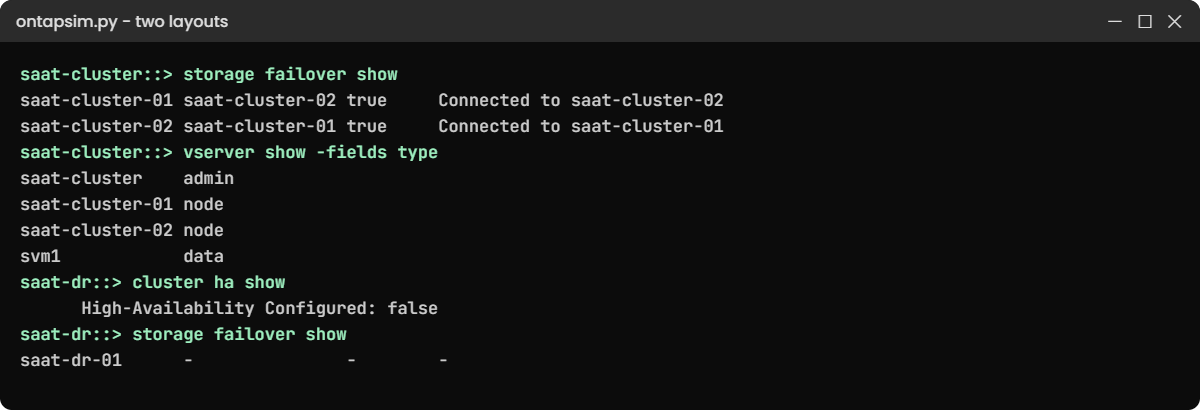
Practice shell: HA pair on saat-cluster and single-node saat-dr
Two layouts side by side: an HA pair and a single-node cluster.

4Compare with the single-node DR cluster

python ontapsim.py --cluster saat-dr

Log in, then run:

cluster show
cluster ha show
storage failover show

You should see this:

saat-dr::> cluster show
Node                  Health  Eligibility
--------------------- ------- ------------
saat-dr-01            true    true
saat-dr::> cluster ha show
      High-Availability Configured: false
saat-dr::> storage failover show
                                Takeover
Node            Partner         Possible State Description
--------------- --------------- -------- -------------------------------------
saat-dr-01      -               -        -

One node, no partner and no HA: a single-node cluster. It’s fine for a SnapMirror destination, but a node reboot means the DR copy is offline until it comes back.

In System Manager, the Cluster › Overview page shows the nodes and HA pairs, and a MetroCluster system adds a MetroCluster section to the dashboard.

ONTAP configuration modes: System Manager overview of the single-node saat-dr cluster
The single-node DR cluster in System Manager: one node, no HA partner, and no MetroCluster section.

✅ Checkpoint: You can say why saat-dr has no takeover.

Break It, Then Fix It

The commonest mistake with layouts is assuming one: planning maintenance on a node as if a partner will take over, when there is no partner. Try it on the DR cluster, then compare it with an HA pair whose link is broken.

1Plan a takeover on a single-node cluster

On saat-dr, run:

storage failover takeover -ofnode saat-dr-01

You’ll get this:

Error: command failed: Storage failover is not configured for node saat-dr-01.

There’s nothing to fail over to. For maintenance on a single-node cluster you plan an outage instead, or, for a DR target, pause SnapMirror updates and tell the business the DR copy is unavailable for that time. To get takeover you’d have to add a second node and form an HA pair, which is a hardware project, not a command.

✅ Checkpoint: You can explain why the takeover failed and what to do instead.
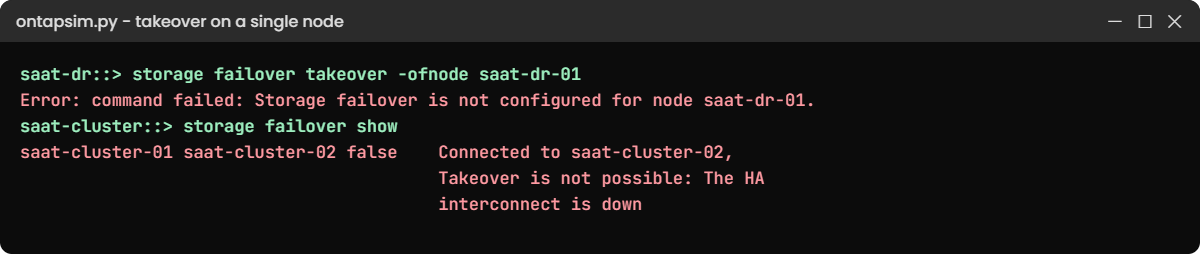
Practice shell: takeover fails on a single-node cluster
“Not configured” means no partner exists; “not possible” means the partner exists but the HA link is down.

2Compare with a broken HA pair

Back on saat-cluster:

simctl break ic-down
storage failover show

You’ll get this:

saat-cluster-01 saat-cluster-02 false    Connected to saat-cluster-02,
                                         Takeover is not possible: The HA
                                         interconnect is down
saat-cluster-02 saat-cluster-01 false    Connected to saat-cluster-01,
                                         Takeover is not possible: The HA
                                         interconnect is down

This cluster has a partner, but takeover is off because the HA link is down, which you fix (cables, ports or a part) rather than design around. Clear it with simctl fix ic-down and check that Takeover Possible shows true again.

✅ Checkpoint: You can tell “no HA configured” from “HA configured but broken”.

This happened at work

The DR box nobody knew was alone

A cooperative bank in Ujjain replicated its core banking volumes to a small system at a second site. When a new admin took over, the handover note said “DR: NetApp cluster, HA”, and nobody questioned it.

Months later, a firmware update needed a reboot of the DR node. The admin expected a takeover and scheduled it for a Tuesday afternoon, but the reboot took the DR copy offline for 25 minutes and the monitoring team raised an incident, because SnapMirror updates failed and the DR dashboard went red during business hours.

The DR site was a single-node cluster, bought to save cost years earlier. Nothing was lost, but the team rewrote the inventory with the real layout of every cluster (nodes, HA, switchless or switched) using cluster show and storage failover show, and now schedules DR-node work outside business hours with updates paused first.

Common mistakes and troubleshooting

MistakeWhat happensDo this instead
Assuming every cluster has HAMaintenance on a single node takes data offlineCheck storage failover show before planning any reboot
Adding a third node to a switchless pair without switchesThe new node can’t join the clusterMove the pair to cluster switches first, then add the HA pair
Mixing up switchless with “no cluster network”Someone unplugs the direct cables thinking they’re spareLabel the cluster cables and document the layout
Treating MetroCluster like SnapMirrorWrong failover steps under pressureLearn switchover and switchback (Lesson 42) and practise them
Expecting NAS on an ASA clusterNFS and SMB can’t be configuredUse AFF or FAS when you need file protocols

Interview questions

Click a question to open it. Each one is written the way an interviewer would ask it. Under it you will see why they ask it and one way you could answer, in your own words.

Fresher level

1. What’s a two-node switchless cluster?

Why they ask this: They want to know you understand the most common small layout.

How you might answer: It’s an HA pair where the cluster ports are cabled directly between the two nodes instead of going through cluster switches. It saves two switches, and you can move to switches later without downtime when you add more nodes.

2. How can you tell whether a cluster has HA?

Why they ask this: They’re checking that you look before you plan maintenance.

How you might answer: I run storage failover show. If each node lists a partner and Takeover Possible is true, it’s an HA pair. A single-node cluster shows no partner, and cluster ha show reports false.

2–5 years experience

3. A customer wants to grow from two nodes to four. What changes in the cluster network?

Why they ask this: They want to see you know switchless limits and the migration path.

How you might answer: A switchless pair has to move to two cluster switches first, because a third node can’t plug into the direct cables. NetApp has a procedure to migrate to switches without downtime, one cluster port at a time. Then the new HA pair joins the cluster with the setup wizard.

4. What’s the difference between unified ONTAP and ASA from a host’s point of view?

Why they ask this: They’re checking your SAN path knowledge.

How you might answer: On AFF or FAS, a host sees optimised paths through the node that owns the LUN and non-optimised ones through the others, which is ALUA. On ASA every path is active and optimised, so the host spreads I/O across all of them and doesn’t have to switch path states during a takeover.

Senior level

5. When would you recommend MetroCluster instead of SnapMirror?

Why they ask this: They want to see you match the design to recovery targets and cost.

How you might answer: When the business needs zero data loss and very fast recovery across two sites, MetroCluster fits, because every write is mirrored synchronously and a switchover brings the other site’s SVMs up. It needs a lot more: matching hardware at both sites, a low-latency link and careful operations.

If some data loss is acceptable, SnapMirror asynchronous to a smaller DR system is far cheaper and simpler.

6. You inherit 15 clusters with no documentation. How do you find out how each one is built?

Why they ask this: They’re testing a structured, low-risk discovery approach.

How you might answer: I’d collect read-only output from each: cluster show, storage failover show, cluster ha show, network interface show -role cluster and vserver show -fields type, plus metrocluster show where it applies. In advanced mode I’d check network options switchless-cluster show.

I’d also pull AutoSupport data, then write one line per cluster: nodes, HA, interconnect and MetroCluster or not.

Quick quiz

Q1. How many cluster switches does a switched cluster use?

  1. None
  2. One
  3. Two
  4. Four
Show answer

C — two switches, so every node has a link to each.

Q2. What does a single-node cluster lack?

  1. SVMs
  2. Takeover
  3. LIFs
  4. Aggregates
Show answer

B — with no partner, there is nothing to take over.

Q3. Which SVM type do you create for clients?

  1. admin
  2. node
  3. system
  4. data
Show answer

D — data SVMs serve NFS, SMB and SAN clients.

Q4. How many nodes can ONTAP Select run?

  1. Only 1
  2. 1 or 2 only
  3. 1, 2, 4, 6, 8, 10 or 12
  4. Up to 24
Show answer

C — ONTAP Select supports clusters of 1, 2, 4, 6, 8, 10 or 12 nodes.

Q5. Which MetroCluster type uses IP switches for the back end?

  1. MetroCluster IP
  2. Stretch MetroCluster
  3. Fabric-attached MetroCluster FC
  4. None
Show answer

A — MetroCluster IP carries storage and NVRAM traffic over IP switches.

Quick recap

  • Single-node clusters have no takeover; HA pairs do.
  • Two nodes can be switchless; from the third node on you need two cluster switches.
  • Unified ONTAP uses ALUA paths; ASA gives symmetric active-active paths for SAN only.
  • MetroCluster IP or FC mirrors every write between two sites.
  • cluster show, storage failover show, cluster ha show and vserver show -fields type reveal a cluster’s layout.

What’s next

Next, learn the CLI and System Manager properly in Lesson 8, ONTAP CLI and System Manager basics.

Further reading: ONTAP cluster configurations

Want to go deeper into ONTAP cluster configurations? NetApp’s MetroCluster configurations support matrix compares the IP and FC designs, and the ONTAP Select planning guide lists its cluster sizes. The command network options switchless-cluster show is documented in the ONTAP command reference.

You can also see the full plan for this course on the NetApp ONTAP Storage Administration course page.

Scroll to Top

This website uses cookies

We use a few cookies to keep this site working. If you allow it, we also use Google Analytics to count visits so we can improve our lessons. You can accept all, deny the optional ones, or choose what to allow.