Flash Cache, Flash Pool and storage pools

Hard disks give you cheap terabytes, but a random read on a 10K SAS drive still takes several milliseconds. All-flash systems fix that by throwing away the hard disks, which isn’t always in the budget.

ONTAP has two ways to put a little flash in front of a lot of disk: Flash Cache inside the controller, and Flash Pool, where SSDs join a hard-disk aggregate as a cache. This lesson shows how each one works, when to pick which, and what an SSD storage pool adds. In the lab you’ll watch latency on a busy HDD aggregate drop after adding three SSDs.

Where this lesson fits

Lesson 15 of 56 in NetApp ONTAP Storage Administration · Phase 1: Architecture and foundation · Before this: Lesson 14, WAFL, NVRAM and the memory cache · Next: Lesson 16, Storage Virtual Machines

TimeYou needBy the end you can
45 minutesThe practice shell from Lesson 2Explain Flash Cache, Flash Pool and storage pools, build a Flash Pool aggregate and check that it worked

What it is, in one line

Flash Pool adds a small RAID group of SSDs to a hard-disk aggregate as a cache for hot random reads and overwrites, while Flash Cache is a flash card inside the controller that caches reads for every aggregate on that node.

In Simple Words

The kirana shop counter

A kirana shop keeps most of its stock in the godown at the back, because the godown is big and cheap. The things people ask for all day, like milk, bread and biscuits, sit on a small shelf right at the counter.

When a customer asks for something that isn’t on the counter, the shopkeeper walks to the godown, which takes time. If the same item keeps getting asked for, it moves to the counter shelf, and the next customer gets it in a second.

The godown is your hard disks and the counter shelf is the SSD cache. Flash Pool gives one godown its own counter, while Flash Cache is one counter shared by every godown behind that shop.

Engineer's View

How an engineer describes it

Flash Cache is an NVMe flash module in the controller (many FAS models ship with one). It extends the memory read cache: blocks pushed out of memory can be kept on flash, and later reads hit flash instead of disk. It only caches reads, it serves every aggregate owned by that node, and it holds no data you could lose, so a failed card only costs performance.

A Flash Pool aggregate is a hard-disk aggregate with SSD RAID groups added as a cache tier. You set -hybrid-enabled true and add SSDs (or allocation units from an SSD storage pool).

By default it caches random reads and random overwrites; large sequential I/O goes straight to the hard disks. The SSDs are RAID protected, they don’t add usable capacity, and once added the cache can’t be removed from that aggregate.

An SSD storage pool is a set of SSDs split into four allocation units, so up to four Flash Pool aggregates, on either node of an HA pair, can share the same SSDs. On all-flash AFF systems none of this applies: every aggregate is already SSD.

How it works, step by step

1A read misses memory

A client reads a block that isn’t in the memory cache. On a plain HDD aggregate the node has to go to disk, which costs milliseconds.

2The cache layer is checked

With Flash Cache, the node first looks on the flash card. With Flash Pool, the aggregate checks its SSD cache tier. A hit there comes back in well under a millisecond.

ONTAP Flash Pool: Flash Cache, Flash Pool and SSD storage pools compared

3Hot blocks are kept on flash

Blocks that are read randomly and often are copied into the SSD cache. Over time the cache “warms up” and more reads hit it. That’s why a new Flash Pool can take a while to show its full effect.

4Overwrites can land on SSD first

In a Flash Pool, small random overwrites can be written to the SSD tier and moved to the hard disks later, which takes pressure off the disks during busy periods. Flash Cache never caches writes.

ONTAP Flash Pool: how a read is served from the SSD tier or the hard disks

5Pick the right tool

Flash CacheFlash Pool
Where the flash livesA module inside the controllerSSDs in a disk shelf, in the aggregate
What it cachesReads onlyRandom reads and random overwrites
ScopeEvery aggregate on that nodeOnly the aggregate it belongs to
Survives takeoverThe cache starts cold on the partnerYes, the SSDs move with the aggregate
UndoPull the cardCan’t remove the SSD tier from the aggregate

In System Manager (ONTAP 9.12.1 and later) go to Storage › Tiers, pick the HDD local tier and choose Add Flash Pool Cache, then use spare SSDs or storage pools. Check that Flash Pool shows as Enabled under the tier’s details.
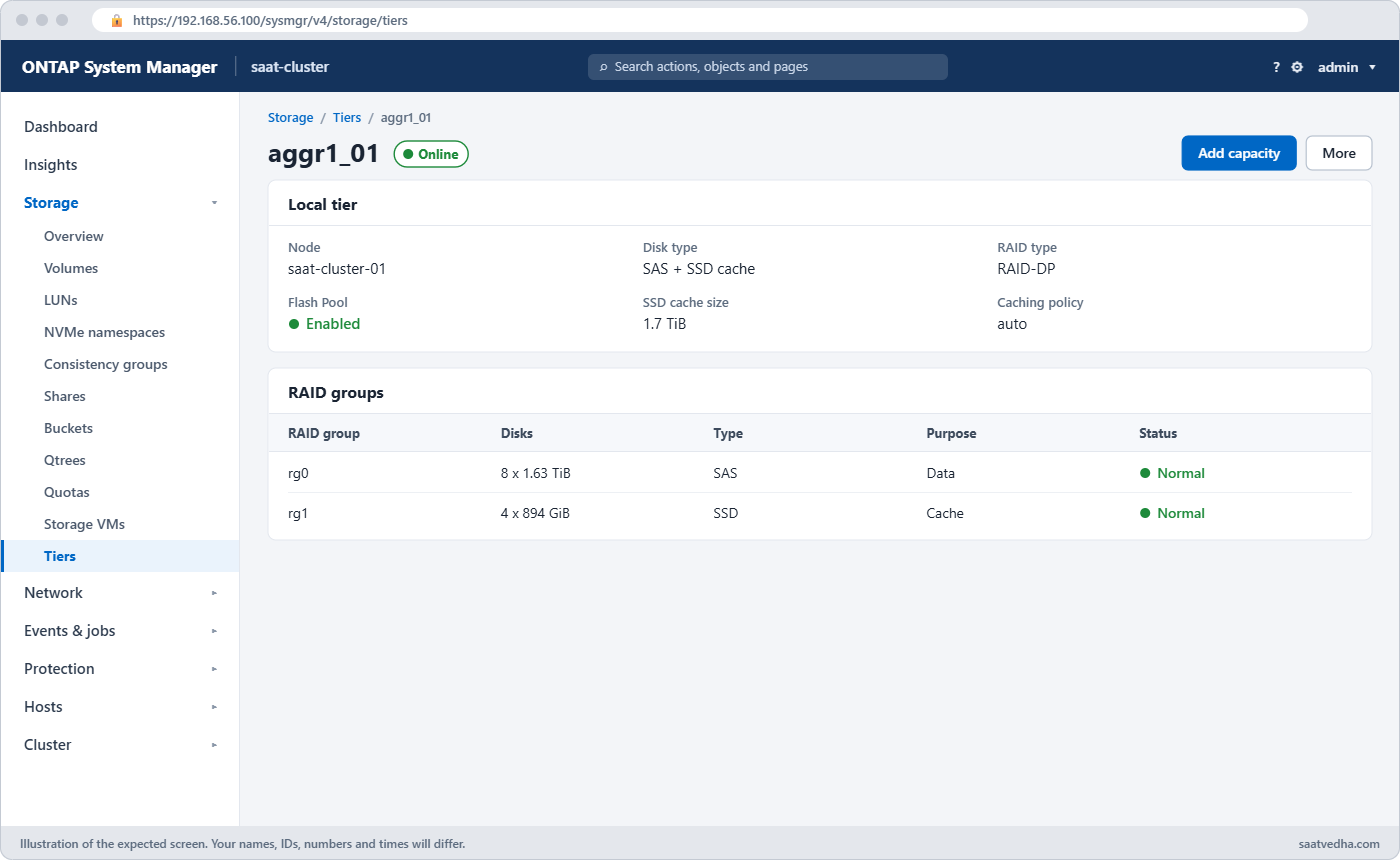
ONTAP Flash Pool in System Manager: local tier with Flash Pool cache enabled
The HDD local tier after Add Flash Pool Cache: Flash Pool shows Enabled with its SSD cache size.

Good to know: the Virtual Storage Tier and what flash costs in time

NetApp grouped Flash Cache and Flash Pool under the name Virtual Storage Tier: flash that speeds up hard disk aggregates without being extra capacity. FabricPool came later and is real tiering, because it moves cold data to object storage.

Flash Pool caches random reads and also absorbs small random overwrites, which are the slowest thing a hard disk does. Sequential reads and large writes go straight to the hard disks, so Flash Pool helps random workloads and does little for streaming ones.

Flash Cache lives inside one controller, so its contents don’t follow the aggregates during a takeover. Flash Pool’s cache sits on SSDs inside the aggregate, so it moves with the aggregate to the partner.

As a rough guide under moderate load, memory answers in about 0.1 ms, SSD in about 1 ms, 10K RPM SAS disks in around 10 ms, and NL-SAS disks in 15 ms or more. That gap is why a small amount of flash makes such a difference.

Hands-on lab: turn a slow HDD aggregate into a Flash Pool

Before you run any command, double-check it

Read every command twice before you press Enter. Check the target: the server name, the user, the disk or device name, the path and the sizes. These commands are for learning and were tested in our lab, not on your system. At work, run the read-only commands first, follow your change process, make sure a backup exists, and ask a second person to check anything that changes or deletes data. You run them at your own risk.

This lab uses the SaatVedha ONTAP practice shell, our own learning tool. It is not NetApp software: real ONTAP output looks like this but is not identical.

You’ll load a hard-disk aggregate with random reads until it struggles, then add three SSDs as a Flash Pool cache and measure again. The practice shell models the warm-up as instant, so the change shows after a short simctl tick.

1Build a busy HDD aggregate

Create setup-15.txt with these lines:

storage aggregate create -aggregate aggr1_01 -node saat-cluster-01 -diskcount 8 -disktype SAS
vserver create -vserver svm1 -aggregate aggr1_01 -rootvolume-security-style unix
volume create -vserver svm1 -volume vol_web -aggregate aggr1_01 -size 100g
simctl write svm1 vol_web 30g files
simctl load svm1 vol_web 3000 40 0.3
simctl tick 2
python ontapsim.py -c "simctl reset"
python ontapsim.py --run setup-15.txt

The load line starts 3,000 IOPS where only 30% of reads find the data in memory.

✅ Checkpoint: The run finishes with “time moved forward (2 steps)” and no Error lines.

2Measure the pain

Log in and run:

qos statistics volume latency show -iterations 1
statistics aggregate show

You should see this (qos columns after QoS Max trimmed, they are all 0ms):

Workload            ID    Latency    Network    Cluster       Data       Disk    QoS Max ...
--------------- ------ ---------- ---------- ---------- ---------- ---------- ---------- ...
-total-              -    54.06ms    59.96us        0ms   149.91us    53.85ms        0ms ...
vol_web-wid5057   5057    54.06ms    59.96us        0ms   149.91us    53.85ms        0ms ...

saat-cluster::> statistics aggregate show
Aggregate            Node             Total Ops Disk Util%
-------------------- ---------------- --------- ----------
aggr0_saat_cluster_01
                     saat-cluster-01          0         3%
aggr0_saat_cluster_02
                     saat-cluster-02          0         3%
aggr1_01             saat-cluster-01       3000       100%
3 entries were displayed.

Around 54 ms per operation, nearly all of it in the Disk column, and the SAS disks are at 100%. A web app on this volume would feel very slow.

✅ Checkpoint: aggr1_01 shows Disk Util% at 100%.

3Find spare SSDs on the same node

storage aggregate show-spare-disks -original-owner saat-cluster-01

You should see this:

Original Owner: saat-cluster-01
 Pool0
  Spare Pool

                                                            Usable Physical
 Disk             Type  Class          RPM Checksum           Size     Size Status
 ---------------- ----- ----------- ------ -------------- -------- -------- --------
 1.1.0            SSD   solid-state      - block           894.0GB  894.3GB zeroed
 1.1.1            SSD   solid-state      - block           894.0GB  894.3GB zeroed
 1.1.2            SSD   solid-state      - block           894.0GB  894.3GB zeroed
 1.1.3            SSD   solid-state      - block           894.0GB  894.3GB zeroed
 1.1.4            SSD   solid-state      - block           894.0GB  894.3GB zeroed
 1.1.5            SSD   solid-state      - block           894.0GB  894.3GB zeroed

The SSDs must be owned by the node that owns the aggregate, saat-cluster-01 here.

✅ Checkpoint: You can see six spare SSDs owned by saat-cluster-01.

4Enable hybrid and add the SSDs

storage aggregate modify -aggregate aggr1_01 -hybrid-enabled true
storage aggregate add-disks -aggregate aggr1_01 -disktype SSD -diskcount 3 -simulate true
storage aggregate add-disks -aggregate aggr1_01 -disktype SSD -diskcount 3

The simulate run shows the plan; the real run asks before it changes anything. You should see this:

saat-cluster::> storage aggregate add-disks -aggregate aggr1_01 -disktype SSD -diskcount 3

Info: Disks would be added to aggregate "aggr1_01" on node "saat-cluster-01" in the following manner:

      First Plex

        RAID Group rg1, 3 disks (block checksum, raid_dp)
          Cache tier: SSD

Do you want to continue? {y|n}: y

Type y. The three SSDs become RAID group rg1 with its own dparity and parity disk, marked as the cache tier.

✅ Checkpoint: No error, and the plan says “Cache tier: SSD”.

5Check the aggregate

storage aggregate show-status -aggregate aggr1_01
storage aggregate show -aggregate aggr1_01 -fields hybrid-enabled,size,availsize

You should see this (rg0 trimmed to its first lines):

Owner Node: saat-cluster-01
 Aggregate: aggr1_01 (online, raid_dp, hybrid) (block checksums)
  Plex: /aggr1_01/plex0 (online, normal, active, pool0)
   RAID Group /aggr1_01/plex0/rg0 (normal, block checksums)
     ...
   RAID Group /aggr1_01/plex0/rg1 (normal, block checksums)
                                                              Usable Physical
     Position Disk                        Pool Type     RPM     Size     Size Status
     -------- --------------------------- ---- ----- ------ -------- -------- ----------------
     dparity  1.1.0                          0 SSD        -  894.0GB  894.3GB (normal)
     parity   1.1.1                          0 SSD        -  894.0GB  894.3GB (normal)
     data     1.1.2                          0 SSD        -  894.0GB  894.3GB (normal)

saat-cluster::> storage aggregate show -aggregate aggr1_01 -fields hybrid-enabled,size,availsize
aggregate hybrid-enabled size   availsize
--------- -------------- ------ ---------
aggr1_01  true           8.80TB 8.70TB

The header now says hybrid, and rg1 is all SSD. Look at the size: still 8.80TB, the same as before. The SSDs are cache, not extra space.

✅ Checkpoint: aggr1_01 shows hybrid-enabled true and the size didn’t grow.
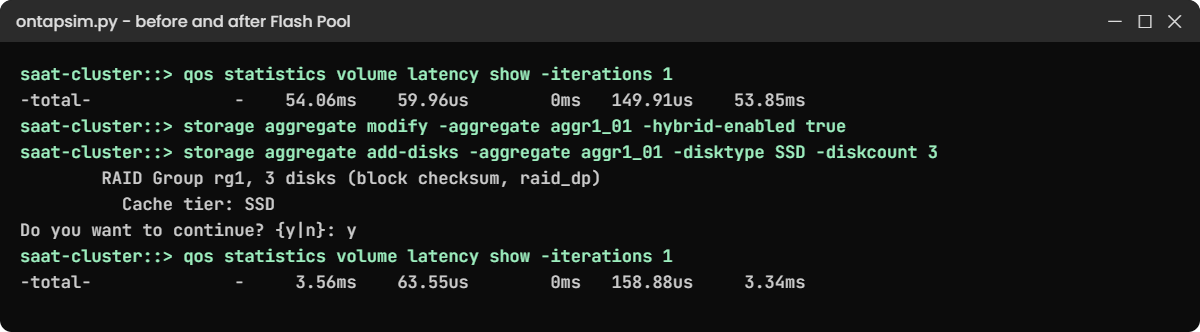
ONTAP Flash Pool lab: latency before and after adding an SSD cache tier
Latency on the same workload before and after the three SSDs joined aggr1_01 as a cache tier.

6Measure again

simctl tick 2
qos statistics volume latency show -iterations 1
statistics aggregate show

You should see this:

Workload            ID    Latency    Network    Cluster       Data       Disk    QoS Max ...
--------------- ------ ---------- ---------- ---------- ---------- ---------- ---------- ...
-total-              -     3.56ms    63.55us        0ms   158.88us     3.34ms        0ms ...
vol_web-wid5057   5057     3.56ms    63.55us        0ms   158.88us     3.34ms        0ms ...

saat-cluster::> statistics aggregate show
Aggregate            Node             Total Ops Disk Util%
-------------------- ---------------- --------- ----------
aggr0_saat_cluster_01
                     saat-cluster-01          0         3%
aggr0_saat_cluster_02
                     saat-cluster-02          0         3%
aggr1_01             saat-cluster-01       3000         3%
3 entries were displayed.

Same 3,000 IOPS, but latency fell from about 54 ms to under 4 ms and the hard disks are almost idle, because the hot reads now come from SSD. On a real system the drop is gradual as the cache warms up over hours.

✅ Checkpoint: Latency is below 5 ms and aggr1_01 Disk Util% is in single digits.

simctl load svm1 vol_web off

Stop the workload before you move on.

Break It, Then Fix It

Build a second Flash Pool on node 02 and make the two mistakes people hit first. Create its HDD aggregate:

storage aggregate create -aggregate aggr1_02 -node saat-cluster-02 -diskcount 8 -disktype SAS

Answer y to the layout question.

1Add SSDs before enabling hybrid

storage aggregate add-disks -aggregate aggr1_02 -disktype SSD -diskcount 3

You’ll get this:

Error: command failed: Cannot add SSDs to aggregate "aggr1_02" because it is not hybrid enabled. Run "storage aggregate modify -aggregate aggr1_02 -hybrid-enabled true" first.

ONTAP won’t mix SSDs into an HDD aggregate by accident. Make it hybrid first:

storage aggregate modify -aggregate aggr1_02 -hybrid-enabled true

✅ Checkpoint: The modify returns to the prompt with no error.

ONTAP Flash Pool break and fix: adding SSDs without hybrid-enabled and with too few disks
ONTAP refuses SSDs until the aggregate is hybrid, and a cache group needs enough SSDs for its RAID type.

2Add a single SSD

storage aggregate add-disks -aggregate aggr1_02 -disktype SSD -diskcount 1

You’ll get this:

Error: command failed: A Flash Pool cache RAID group needs at least 2 SSDs.

The cache is RAID protected like the rest of the aggregate, so one SSD can’t form a group. This message comes from the practice shell; real ONTAP also refuses a cache group that’s too small for its RAID type, with its own wording. Plan the count with -simulate true:

storage aggregate add-disks -aggregate aggr1_02 -disktype SSD -diskcount 3 -simulate true
Info: Disks would be added to aggregate "aggr1_02" on node "saat-cluster-02" in the following manner:

      First Plex

        RAID Group rg1, 3 disks (block checksum, raid_dp)
          Cache tier: SSD

Stop here and don’t run it for real: remember that an SSD tier can’t be taken out of an aggregate later, so on a real system you’d add it only when you mean it.

✅ Checkpoint: The simulation shows a 3-disk raid_dp cache group.

This happened at work

Results day at the university

A university in Bhubaneswar ran its learning portal and exam results site on a FAS pair with 10K SAS disks. On results day the site crawled, students refreshed again and again, and the refreshes made it worse. The storage admin saw Disk Util at 100% on one aggregate and about 40 ms of latency on the portal volumes.

They had six spare SSDs from an old project, so after a short test on a quiet weekend they enabled hybrid on that aggregate and added the SSDs as a Flash Pool cache. On the next results day latency stayed around 4 ms and nobody called the helpdesk about the portal.

Two surprises came later. The finance office asked why the aggregate hadn’t grown by the size of six SSDs, and the admin had to explain that the cache isn’t capacity.

A year on, they wanted those SSDs for a new SSD-only aggregate and found the cache can’t be removed from an aggregate. Their runbook now says: decide where SSDs will live for good before adding them as cache.

Common mistakes and troubleshooting

MistakeWhat happensDo this instead
Expecting Flash Pool SSDs to add spaceCapacity plans come out shortCount Flash Pool SSDs as cache only; size the HDD tier for capacity
Adding cache to an aggregate with sequential workloadsLittle or no gain, money wastedUse Flash Pool for random reads and overwrites, like databases, VMs and web content
Adding SSDs you may need elsewhereYou can’t take them back out of the aggregateDecide the SSDs’ long-term role first, or use a storage pool to share them
Judging the result on day oneThe cache is still cold, so gains look smallCompare latency after the cache has warmed up, for example after a full business day
Planning Flash Pool on an AFF systemIt isn’t needed and isn’t how AFF worksOn AFF every aggregate is already SSD; Flash Pool is for HDD aggregates on FAS

Interview questions

Click a question to open it. Each one is written the way an interviewer would ask it. Under it you will see why they ask it and one way you could answer, in your own words.

Fresher level

1. What’s the difference between Flash Cache and Flash Pool?

Why they ask this: They want to check you know the two caching options and don’t mix them up.

How you might answer: Flash Cache is a flash module inside the controller that caches reads for every aggregate on that node. Flash Pool is a set of SSDs added to one HDD aggregate as a cache tier, and it caches random reads and random overwrites for that aggregate only.

2. Do the SSDs in a Flash Pool add to the aggregate’s usable capacity?

Why they ask this: It’s a common misunderstanding, and they want to see you know cache from capacity.

How you might answer: No. They’re a cache tier, so the aggregate’s size stays the same. In my lab the aggregate showed 8.80 TB before and after I added three SSDs.

2–5 years experience

3. You add a Flash Pool to a busy aggregate and the users say nothing changed after an hour. What would you check?

Why they ask this: They want to see you understand cache warm-up and workload fit, not just the steps.

How you might answer: First I’d check that the aggregate shows hybrid-enabled true and the SSD RAID group is there with storage aggregate show-status. Then I’d look at the workload, because Flash Pool helps random reads and overwrites, not big sequential reads or writes.

If it fits, I’d give the cache time to warm up and compare latency with qos statistics volume latency show after a full business day.

4. What is an SSD storage pool and why would you use one?

Why they ask this: They’re checking you know how to share a small number of SSDs across aggregates and nodes.

How you might answer: It’s a group of SSDs split into four allocation units. I can give allocation units to Flash Pool aggregates on either node of the HA pair, so a few SSDs can cache up to four aggregates instead of being tied to one.

Senior level

5. A customer with a FAS system asks whether to buy more SSDs for Flash Pool or move to an all-flash AFF. How would you advise them?

Why they ask this: They want to see you weigh workload, cost and growth, and give a clear recommendation.

How you might answer: I’d look at how much of the hot data fits in a cache and how random the I/O is. If a small working set causes most of the load, Flash Pool or Flash Cache is a cheap fix on the existing system.

If most of the data is hot, or latency targets are tight across the board, a cache keeps missing and AFF is the better long-term answer. I’d show them the latency and disk numbers from a busy day to back it up.

6. What would you write in a change plan before adding Flash Pool SSDs to a production aggregate?

Why they ask this: They want to see risk awareness, especially about changes that can’t be undone.

How you might answer: I’d state clearly that the SSD tier can’t be removed afterwards, and get agreement that these SSDs stay with this aggregate. I’d include a -simulate true run to show the layout, check the SSDs belong to the right node and that spares remain.

I’d also capture latency before the change so we can prove the benefit later.

Quick quiz

Q1. What must you do before adding SSDs to an HDD aggregate?

  1. Take the aggregate offline
  2. Set -hybrid-enabled true on the aggregate
  3. Create a new SVM
  4. Turn off WAFL
Show answer

B — the aggregate must be hybrid enabled before SSDs can join it as a cache tier.

Q2. What does Flash Cache cache?

  1. Reads only
  2. Writes only
  3. Reads and writes
  4. Only metadata on AFF
Show answer

A — Flash Cache is a read cache that extends the memory cache.

Q3. What happens to the aggregate’s size when you add a Flash Pool cache?

  1. It grows by the SSD capacity
  2. It grows by half the SSD capacity
  3. It stays the same
  4. It shrinks
Show answer

C — the SSDs are cache, so usable capacity doesn’t change.

Q4. Into how many allocation units is an SSD storage pool divided?

  1. Two
  2. Four
  3. Eight
  4. One per SSD
Show answer

B — a storage pool is split into four allocation units that can go to different aggregates.

Q5. Which workload benefits least from Flash Pool?

  1. A database with random reads
  2. Virtual machines with random overwrites
  3. Large sequential backup streams
  4. A busy web content volume
Show answer

C — sequential I/O goes straight to the hard disks, so the cache doesn’t help much.

Quick recap

  • Flash Cache is a read cache module in the controller for all aggregates on that node.
  • Flash Pool adds SSD RAID groups to one HDD aggregate as a cache for random reads and overwrites.
  • Enable -hybrid-enabled true first, then add SSDs or storage pool allocation units.
  • The cache adds no capacity and can’t be removed from the aggregate later.
  • Storage pools split SSDs into four allocation units to share across aggregates.

Next lesson

Lesson 16: Storage Virtual Machines (SVMs) → You’ll create the SVM that clients actually talk to, and see what it owns.

Further reading: ONTAP Flash Pool

Want to go deeper into ONTAP Flash Pool? NetApp’s guide to creating a Flash Pool local tier using SSD storage pools lists the full steps and limits, and the ONTAP concepts guide explains how aggregates are built. You can also see the full plan for this course on the NetApp ONTAP Storage Administration course page.

Scroll to Top

This website uses cookies

We use a few cookies to keep this site working. If you allow it, we also use Google Analytics to count visits so we can improve our lessons. You can accept all, deny the optional ones, or choose what to allow.