Aggregates and Advanced Disk Partitioning
-
Phase 0: Start here
-
Phase 1: Architecture and foundation
-
Phase 2: Protocols and day-to-day administration
-
Phase 3: Data protection and enterprise integrations
-
Phase 4: Troubleshooting blueprint
-
Phase 5: Final project and career
Every volume, LUN and share you’ll ever create lives inside an aggregate, so the way you build aggregates decides how fast, how safe and how easy to grow your storage is. A badly built aggregate can’t be shrunk or rebuilt later without moving everything off it.
In this lesson you’ll build data aggregates on both nodes, grow one, and learn how Advanced Disk Partitioning (ADP) lets small systems and all-flash systems share disks between root and data. Then you’ll ask for more disks than you have and see how ONTAP warns you.
Where this lesson fits
Lesson 13 of 56 in NetApp ONTAP Storage Administration · Phase 1: Architecture and foundation · Before this: Lesson 12, RAID-DP and RAID-TEC · Next: Lesson 14, WAFL, NVRAM and the memory cache
| Time | You need | By the end you can |
|---|---|---|
| 50 minutes | The practice shell | Create, grow and check data aggregates, explain local tiers and ADP, and plan disk counts with spares in mind |
What it is, in one line
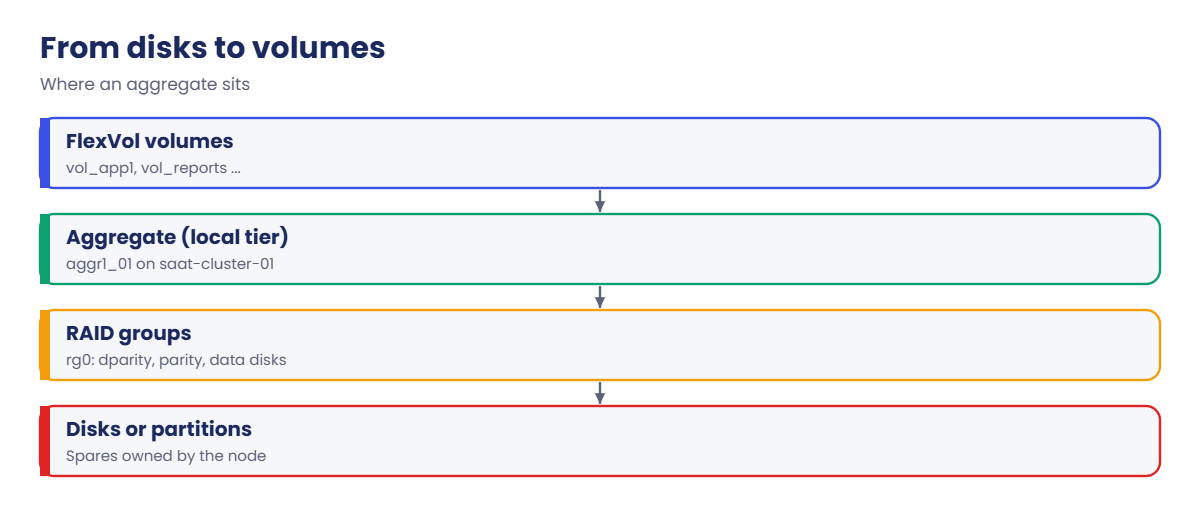
An aggregate (called a local tier in System Manager) is a pool of storage built from one or more RAID groups on one node, and it’s where every FlexVol volume gets its space.
In Simple Words
A plot of land for building flats
Before a builder puts up flats, he buys a plot and levels it. The plot belongs to one owner, the flats are built on top, and if more families come later he can buy the next plot over and join it on, but he can never sell back half of a plot once flats stand on it.
Small builders sometimes share one plot cleverly: a corner of every plot is kept for the watchman’s room and the rest is used for flats, so no single plot is wasted on just the watchman.
The plot is the aggregate, the flats are volumes, and the watchman’s corner on every plot is how ADP shares disks between the root aggregate and data.
Engineer's View
How an engineer describes it
A data aggregate belongs to one node (and moves to its partner on takeover). You create it with storage aggregate create, giving the node, the number and type of disks and the RAID type; ONTAP picks spares and builds the RAID groups. -simulate true shows the layout first. You grow it with storage aggregate add-disks, but you can’t remove disks or shrink it, so start with a sensible size.
System Manager can recommend a layout for you, as can storage aggregate auto-provision in the CLI.
New disks added to an aggregate are empty, so new writes go there first until data spreads out. Add disks in batches big enough to fill a RAID group, and avoid creating a tiny extra RAID group of two or three disks, which becomes a slow spot.
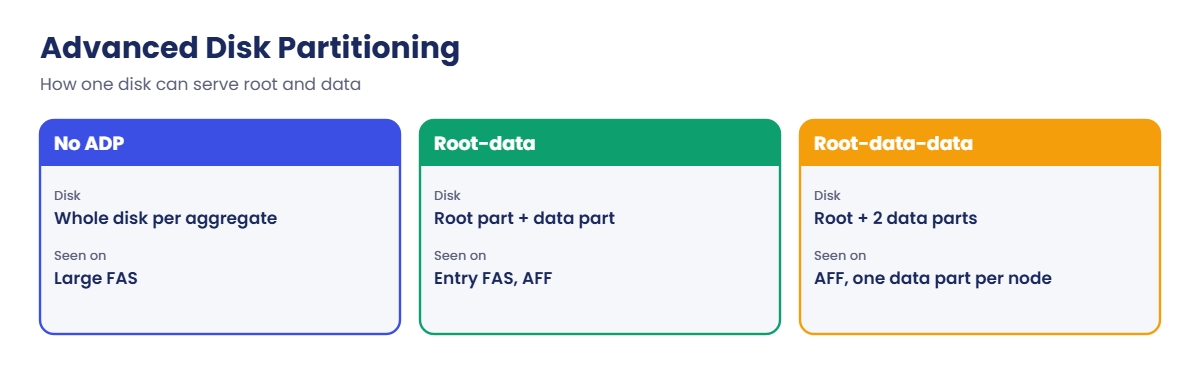
Advanced Disk Partitioning (ADP) splits disks into partitions. With root-data partitioning, each disk on an AFF or entry-level FAS system has a small root partition and a large data partition, so the root aggregates don’t use up whole disks. AFF systems often use root-data-data, where each disk has two data partitions, one for each node.
Partitioned disks show container type shared, and spares are spare partitions. ADP is set up at the factory or during initialisation; you don’t turn it on for an existing system.
How it works, step by step
1Check the spares
storage aggregate show-spare-disks shows what each node has. Plan to leave at least one spare per type after you build.
2Simulate, then create
Run the create with -simulate true, read the layout and capacity, then run it for real. One data aggregate per node is a common starting point, so both nodes do work.
3Put volumes on it
SVMs and their volumes take space from the aggregate (Lessons 16 and 17). With thin volumes, the aggregate is the real limit, so watch its used percentage.
4Grow it the right way
Add disks in full RAID-group batches with add-disks. Simulate first so you see which RAID group they join.
5Keep it healthy
Check storage aggregate show daily: used percentage, state online, RAID status normal. Above about 85% used, plan to add disks or move volumes.
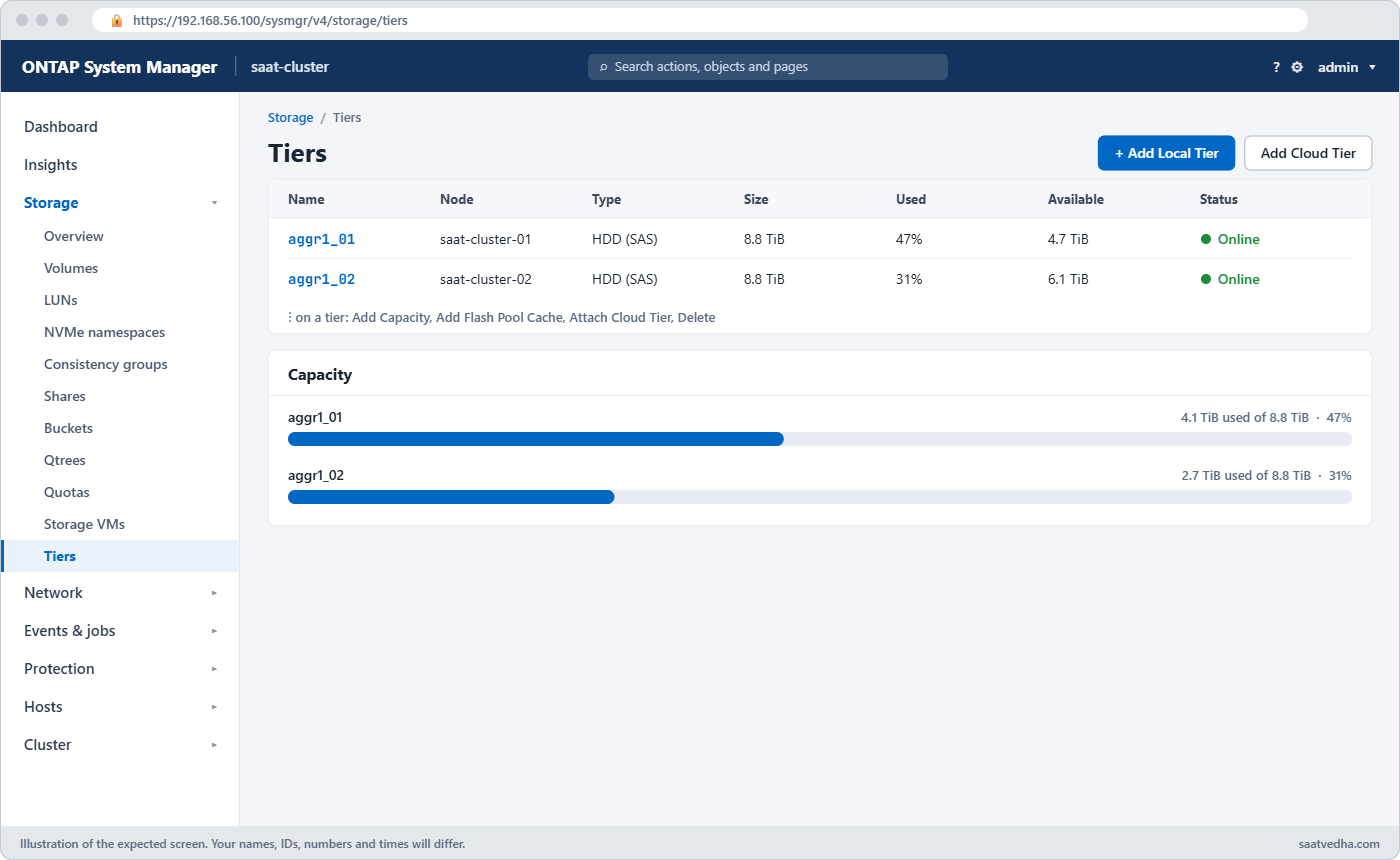
In System Manager, local tiers are under Storage › Tiers: Add Local Tier recommends a layout, and the ⋮ menu on a tier has Add Capacity.
| ADP type | How each disk is split | Where you meet it |
|---|---|---|
| No partitioning | Whole disks in each aggregate | Larger FAS systems with external shelves |
| Root-data | Small root partition + one data partition | Entry FAS and many AFF systems |
| Root-data-data | Small root partition + two data partitions (one per node) | AFF systems |
Good to know: sizing RAID groups and small two-node designs
NetApp’s sizing guidance for hard disk RAID groups is 12 to 20 disks each, with up to 28 allowed for performance disks when you need it. For SSD aggregates with RAID-DP the recommended range is 20 to 28 drives per RAID group.
Keep every RAID group in an aggregate about the same size. A new group much smaller than the others becomes a slow spot, so add disks in full groups or raise -maxraidsize first.
On a small two-node system you may see all data disks given to one node to build one large aggregate, which saves parity disks. The trade-off is that only that node serves the data, so the pair runs active/standby instead of both nodes sharing the work.
Hands-on lab: build data aggregates on both nodes
Before you run any command, double-check it
Read every command twice before you press Enter. Check the target: the server name, the user, the disk or device name, the path and the sizes. These commands are for learning and were tested in our lab, not on your system. At work, run the read-only commands first, follow your change process, make sure a backup exists, and ask a second person to check anything that changes or deletes data. You run them at your own risk.
This lab uses the SaatVedha ONTAP practice shell, our own learning tool. It is not NetApp software: real ONTAP output looks like this but is not identical.
You’ll build the two data aggregates that later lessons use: aggr1_01 on node 01 and aggr1_02 on node 02.
1Reset, log in and give out the unowned disks
python ontapsim.py -c "simctl reset"
python ontapsim.pyThen, as in Lesson 11:
storage disk assign -disk 1.0.22 -owner saat-cluster-01
storage disk assign -disk 1.0.23 -owner saat-cluster-02✅ Checkpoint: Each node has 9 SAS spares.
2Create one aggregate per node
storage aggregate create -aggregate aggr1_01 -node saat-cluster-01 -diskcount 6 -disktype SAS
storage aggregate create -aggregate aggr1_02 -node saat-cluster-02 -diskcount 6 -disktype SASAnswer y if asked. You should see this for each:
Info: The layout for aggregate "aggr1_01" on node "saat-cluster-01" would be:
First Plex
RAID Group rg0, 6 disks (block checksum, raid_dp)
Usable Physical
Position Disk Type Size Size
---------- ------------------------- ---------- -------- --------
dparity 1.0.3 SAS - -
parity 1.0.4 SAS - -
data 1.0.5 SAS 1.63TB 1.64TB
data 1.0.6 SAS 1.63TB 1.64TB
data 1.0.7 SAS 1.63TB 1.64TB
data 1.0.8 SAS 1.63TB 1.64TB
Aggregate capacity available for volume use would be 5.87TB.
[Job 101] Job succeeded: DONE✅ Checkpoint: Both jobs say Job succeeded.
3Grow aggr1_01 by two disks
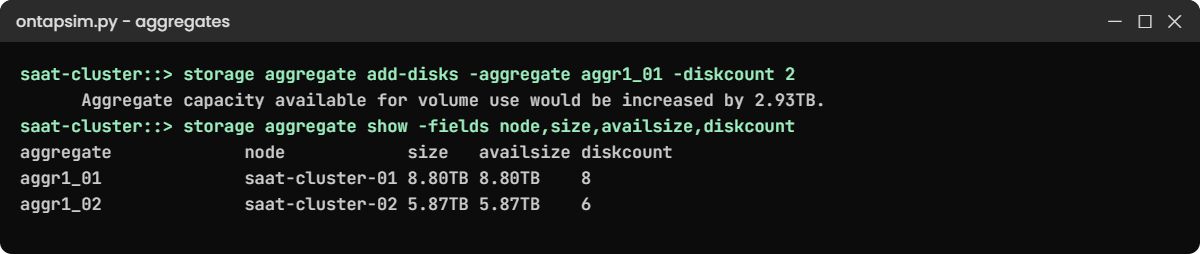
storage aggregate add-disks -aggregate aggr1_01 -diskcount 2 -simulate true
storage aggregate add-disks -aggregate aggr1_01 -diskcount 2You should see this:
Info: Disks would be added to aggregate "aggr1_01" on node "saat-cluster-01" in the following manner:
First Plex
RAID Group rg0, 2 disks (block checksum, raid_dp)
data 1.0.9 SAS 1.63TB
data 1.0.10 SAS 1.63TB
Aggregate capacity available for volume use would be increased by 2.93TB.
...
Info: Run "volume reallocation" or wait for new writes to spread data onto the new disks.The two disks join the existing group rg0, so no tiny new RAID group is made.
✅ Checkpoint: The simulation says the disks join rg0.
4Check the result
storage aggregate show -fields node,size,availsize,diskcountYou should see this:
aggregate node size availsize diskcount
--------------------- --------------- ------ --------- ---------
aggr0_saat_cluster_01 saat-cluster-01 1.47TB 1.33TB 3
aggr0_saat_cluster_02 saat-cluster-02 1.47TB 1.33TB 3
aggr1_01 saat-cluster-01 8.80TB 8.80TB 8
aggr1_02 saat-cluster-02 5.87TB 5.87TB 6
4 entries were displayed.Two data aggregates, one per node, and node 01 still has one SAS spare. To rename one later you’d use storage aggregate rename.
✅ Checkpoint: aggr1_01 has 8 disks and aggr1_02 has 6.
Try it yourself: Build an aggregate command in the Command Builder.
Break It, Then Fix It
A project manager asks for “one more big aggregate on node 01 today”.
1Ask for more disks than exist
storage aggregate create -aggregate aggr2_01 -node saat-cluster-01 -diskcount 12 -disktype SASYou’ll get this:
Error: command failed: Aggregate operation would fail on node "saat-cluster-01". Reason: Not enough spare disks. 12 needed, 1 available of type SAS.Node 01 has one SAS spare left, and ONTAP won’t build what it can’t. Look at what else the node owns before promising capacity.
2Use the SSDs, but keep a spare
storage aggregate create -aggregate aggr2_01 -node saat-cluster-01 -diskcount 5 -disktype SSD
storage aggregate show-spare-disks -original-owner saat-cluster-01You’ll get this:
RAID Group rg0, 5 disks (block checksum, raid_dp)
...
Aggregate capacity available for volume use would be 2.36TB.
[Job 103] Job succeeded: DONE
...
1.0.22 SAS performance 10000 block 1.63TB 1.64TB zeroed
1.1.5 SSD solid-state - block 894.0GB 894.3GB zeroedFive of the six SSDs make a flash aggregate, and one SSD stays as a spare. If you’d used all six, the shell (like a careful engineer) would warn that a failed SSD can’t be replaced automatically.
✅ Checkpoint: Node 01 still has one SAS spare and one SSD spare.

This happened at work
Three disks at a time
A news channel in Lucknow ran its video editing shares on a FAS aggregate. Whenever space ran low, someone bought three disks and added them with add-disks, and over two years the aggregate picked up several small RAID groups at the end.
Editors started complaining that new projects were slow while old ones were fine. The new data was landing mostly on the few fresh disks, which were far busier than the rest, while the older RAID groups sat half idle.
The storage team planned a proper expansion with a full shelf, used -simulate true to check the layout, moved the busiest volumes across with volume move, and now buys disks in full RAID-group batches.
Common mistakes and troubleshooting
| Mistake | What happens | Do this instead |
|---|---|---|
| Using every spare in a new aggregate | No automatic rebuild after the next failure | Leave at least one spare per type per node |
| Adding two or three disks at a time | Small RAID groups become hot spots | Add disks in full RAID-group batches |
| Creating without -simulate | A surprise layout you can’t undo | Simulate first, read the layout |
| All data aggregates on one node | One node works, the other idles | Spread aggregates and volumes over both nodes |
| Putting data on aggr0 | vol0 problems on that node | Keep aggr0 for the root volume only |
Interview questions
Click a question to open it. Each one is written the way an interviewer would ask it. Under it you will see why they ask it and one way you could answer, in your own words.
Fresher level
1. What is an aggregate in ONTAP?
Why they ask this: They want the basic storage building block in plain words.
How you might answer: It’s a pool of storage on one node, made from RAID groups of disks. Volumes get their space from it. System Manager calls it a local tier.
2. What is ADP?
Why they ask this: They’re checking you’ve seen partitioned systems.
How you might answer: Advanced Disk Partitioning splits each disk into partitions, for example a small root partition and a data partition, so root aggregates don’t use whole disks. On AFF you often see root-data-data, with one data partition per node on every disk.
2–5 years experience
3. You need to add capacity to an existing aggregate. How would you plan it?
Why they ask this: They want to see you think about RAID groups and performance, not just space.
How you might answer: I’d check the current RAID group sizes with show-status and spares per node. Then I’d add enough disks to fill a RAID group rather than a few, run add-disks -simulate true to confirm the layout, and keep a spare afterwards.
4. An aggregate is 92 percent full. What are your options?
Why they ask this: They’re checking you know more than one way out.
How you might answer: Short term, I’d find what’s growing with volume show and snapshot sizes, and delete old snapshots if allowed. Then I’d either add disks, move some volumes to another aggregate with volume move, or tier cold data with FabricPool if it’s set up.
Senior level
5. How would you lay out aggregates on a new two-node AFF system for mixed workloads?
Why they ask this: They want a design answer with reasons.
How you might answer: I’d usually let ONTAP’s recommendation build one data aggregate per node using root-data-data partitions, so both nodes share the work and every SSD contributes. I’d keep one spare partition per node and separate workloads with QoS rather than with many small aggregates.
6. A colleague added three disks to a big aggregate last month and now users report slowness. How would you investigate?
Why they ask this: They want to see you connect layout to performance.
How you might answer: I’d check show-status for a small new RAID group and look at disk utilisation per disk or per RAID group. If the new disks are much busier, I’d plan to add more disks to that group or move hot volumes, and I’d write a rule about adding disks in full batches.
Quick quiz
Q1. What does System Manager call an aggregate?
- A volume
- A local tier
- A cloud tier
- A storage pool
Show answer
B — System Manager uses the name local tier.
Q2. Which command shows the layout without creating anything?
- storage aggregate show
- storage aggregate create … -simulate true
- storage disk show
- volume create
Show answer
B — -simulate true prints the layout only.
Q3. Can you remove disks from an aggregate to shrink it?
- Yes, with remove-disks
- No, aggregates can’t shrink
- Only RAID-TEC aggregates
- Only on AFF
Show answer
B — you can add disks but not remove them.
Q4. What container type do partitioned disks show?
- spare
- shared
- aggregate
- partition
Show answer
B — partitioned disks show shared.
Q5. Why add disks in full RAID-group batches?
- ONTAP requires it
- To avoid small RAID groups that become hot spots
- To save licence cost
- Because parity disks are cheaper
Show answer
B — small new groups get most new writes and slow down.
Quick recap
- An aggregate (local tier) is a pool of RAID groups on one node; volumes live in it.
- Simulate, then create; one data aggregate per node is a good start.
- Grow with add-disks in full batches; aggregates never shrink.
- ADP splits disks into root and data partitions on AFF and entry FAS.
- Keep a spare per type per node after every build.
Next lesson
Lesson 14: WAFL, NVRAM and the memory cache → You’ll see how ONTAP writes data, why NVRAM makes writes fast, and how snapshots come almost for free.
Further reading: ONTAP aggregate
Want to go deeper into ONTAP aggregate? Read NetApp’s RAID groups and local tiers and the ONTAP concepts guide on docs.netapp.com. You can also see the full plan for this course on the NetApp ONTAP Storage Administration course page.
