
2Reading data: fields, filters and paging
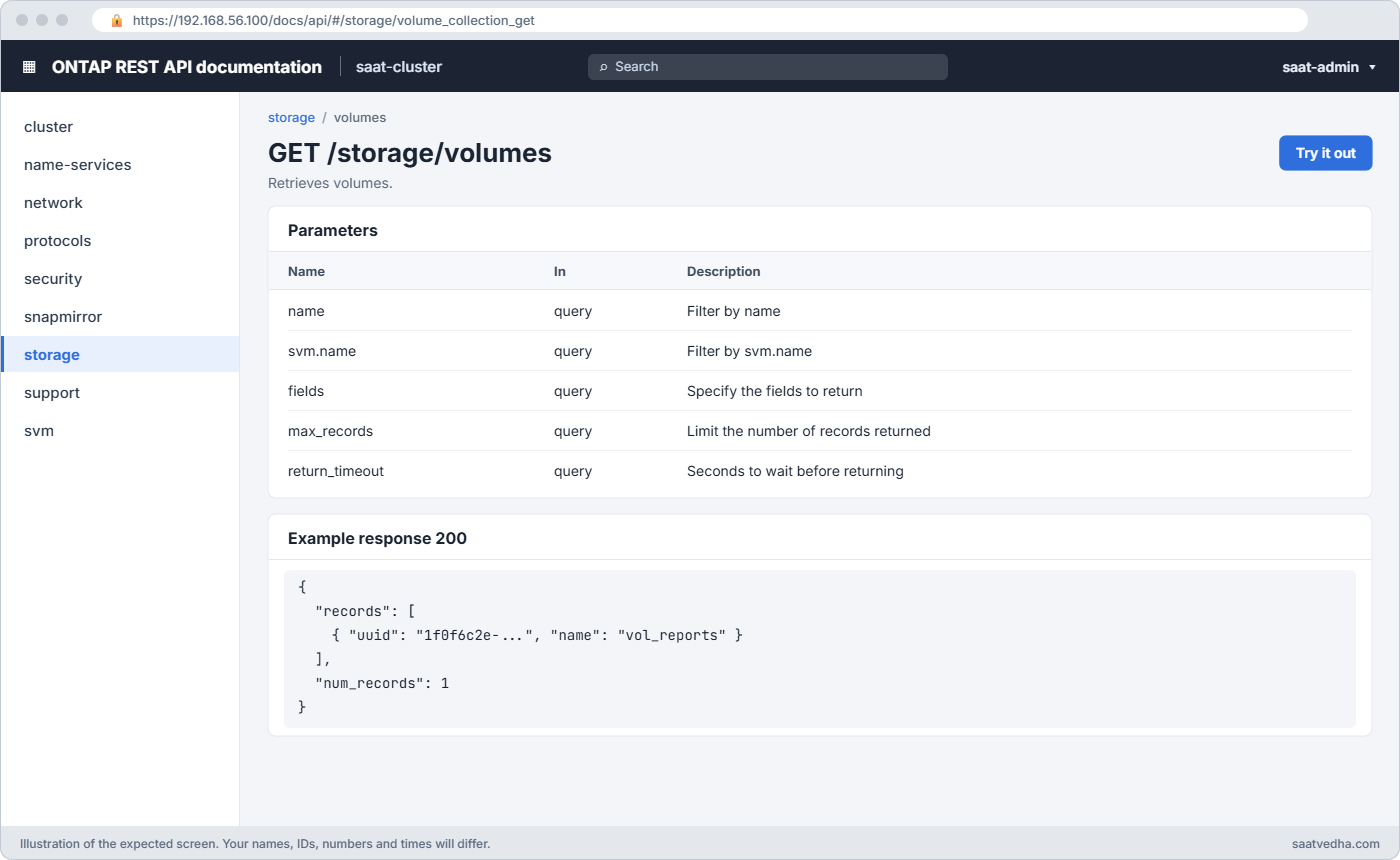
A GET on a collection returns only name and uuid by default, which keeps it fast. You ask for more with fields= and narrow the records with filters that look like field=value.
| Query parameter | Meaning |
|---|---|
| fields=size,state,nas.path | Return only these properties. Nested ones use dots |
| name=vol* or svm.name=svm1 | Filter on any field. * and | work like in the CLI |
| max_records=100 | Page size; a next link appears when there is more |
| order_by=size desc | Sort the records |
| return_timeout=30 | How long a POST or PATCH waits before it gives you a job instead |
| num_records (in the reply) | How many records came back |
Every cluster serves its own interactive API reference at https://<cluster-mgmt-IP>/docs/api. You log in, pick an endpoint, read the model of every field and press “Try it out”.
3Changing data: jobs and errors
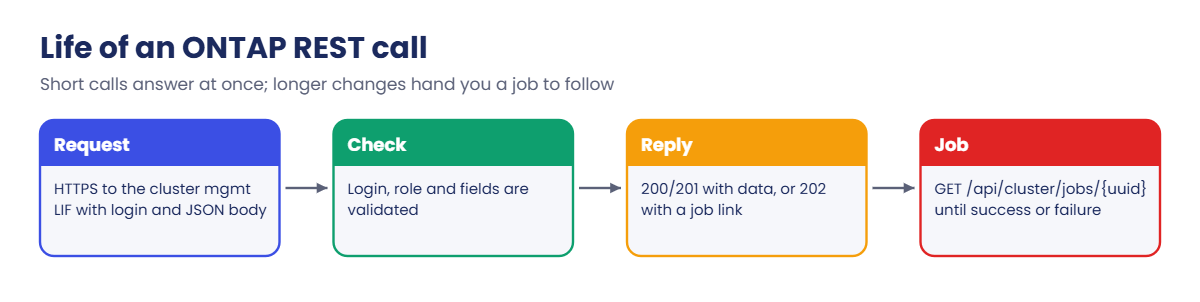
A POST to create a volume sends a JSON body with at least the name, the SVM and an aggregate. If the work finishes within return_timeout you get 201 or 200; otherwise you get 202 and a job link, and the job’s state tells you how it ended.
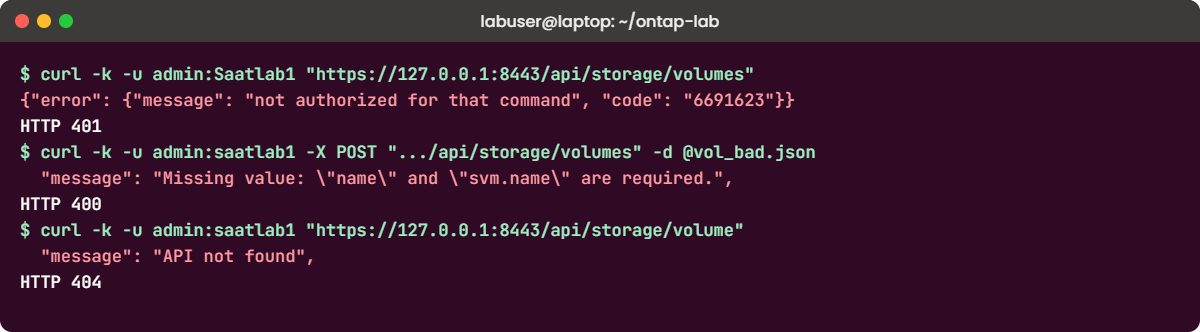
Check the HTTP status first and then the JSON. 401 means the login failed, 403 means the account has no right to that path, 404 means a wrong path or UUID, and 400 means the body or a parameter is wrong, with the error.message saying which.

Before you run any command, double-check it
Read every command twice before you press Enter. Check the target: the server name, the user, the disk or device name, the path and the sizes. These commands are for learning and were tested in our lab, not on your system. At work, run the read-only commands first, follow your change process, make sure a backup exists, and ask a second person to check anything that changes or deletes data. You run them at your own risk.
This lab uses the SaatVedha ONTAP practice shell, our own learning tool. It is not NetApp software: real ONTAP output looks like this but is not identical.
You need practice shell 1.1 for this lab. Its REST mode serves part of the real API from your lab, on your own laptop, so curl, Python and Ansible behave much as they would against a cluster.
1Build the lab
In your shell folder, create setup-rest.txt with these seven lines:
storage aggregate create -aggregate aggr1_01 -node saat-cluster-01 -diskcount 8 -disktype SAS
storage aggregate create -aggregate aggr1_02 -node saat-cluster-02 -diskcount 8 -disktype SAS
vserver create -vserver svm1 -aggregate aggr1_01 -rootvolume-security-style unix
network interface create -vserver svm1 -lif svm1_nas1 -service-policy default-data-files -home-node saat-cluster-01 -home-port e0c -address 192.168.56.130 -netmask 255.255.255.0
network interface create -vserver svm1 -lif svm1_nas2 -service-policy default-data-files -home-node saat-cluster-02 -home-port e0c -address 192.168.56.131 -netmask 255.255.255.0
vserver nfs create -vserver svm1 -v3 enabled -v4.1 enabled
vserver export-policy rule create -vserver svm1 -policyname default -clientmatch 192.168.56.0/24 -rorule sys -rwrule sys -superuser sys
python ontapsim.py -c "simctl reset"
python ontapsim.py --run setup-rest.txt✅ Checkpoint: No line of the output starts with Error.
2Start the REST server
Open a second terminal in the same folder and leave it running for the whole lab:
python ontapsim.py --rest 8443 --httpsYou should see this:
  -----------------------------------------------------------------
   SaatVedha ONTAP practice shell 1.1 - REST API mode (NOT NetApp software)
   Cluster saat-cluster at https://127.0.0.1:8443/api   (user admin, password saatlab1)
   Real ONTAP serves the REST API over HTTPS on port 443 of the cluster
   management LIF, for example https://192.168.56.100/api
   Press Ctrl-C to stop.
  -----------------------------------------------------------------
   HTTPS uses a self-signed lab certificate: tell clients not to verify it
   (curl -k, Ansible validate_certs: false).
Each request you send later prints one line here, such as GET /api/cluster?fields=version. It’s a handy way to see what a tool really asked for.
✅ Checkpoint: The banner shows https://127.0.0.1:8443/api and the window stays open.
3Your first GET
Back in the first terminal, run the command below. On Windows type curl.exe, because in Windows PowerShell 5.1 the word curl runs a different command.
curl -k -u admin:saatlab1 "https://127.0.0.1:8443/api/cluster?fields=version"You should see this:
{
  "name": "saat-cluster",
  "uuid": "65934747-1b5d-c79b-8dc1-5e4f0fafd9ea",
  "version": {
    "full": "NetApp Release 9.18.1: Sat Nov 07 2026 (SaatVedha practice shell 1.1)",
    "generation": 9,
    "major": 18,
    "minor": 1
  },
  "_links": {
    "self": {
      "href": "/api/cluster"
    }
  }
}
-k skips the certificate check (lab only) and -u sends the login. Your UUIDs will differ from the ones on this page.
✅ Checkpoint: You get JSON with major 18 and minor 1.
4Read collections, then pick fields
curl -k -u admin:saatlab1 "https://127.0.0.1:8443/api/storage/volumes"
curl -k -u admin:saatlab1 "https://127.0.0.1:8443/api/storage/aggregates?fields=node.name,space.block_storage.available"
You should see this (both replies trimmed where you see …):
{
  "records": [
    {
      "uuid": "0a1d689e-d551-ed6d-d71a-f8aa9e8b2389",
      "name": "svm1_root",
      "svm": {
        "name": "svm1",
        "uuid": "c84b2d40-ac3f-32ca-940f-cb7e13e6d933"
      },
      ...
    }
  ],
  "num_records": 1,
  ...
}
{
  "records": [
    {
      "uuid": "1e8b32c1-d25c-c67a-5261-1306d21f3b43",
      "name": "aggr1_01",
      "node": {
        "name": "saat-cluster-01"
      },
      "space": {
        "block_storage": {
          "available": 9676630902101
        }
      },
      ...
    },
    {
      "uuid": "ca96fe38-a4df-e8c7-e384-4ec44cd3e551",
      "name": "aggr1_02",
      ...
  "num_records": 2,
The plain volume GET gave names and UUIDs only. With fields= you got the node and the free bytes of each data aggregate; the root aggregates stay hidden, as they do on a real cluster.
✅ Checkpoint: num_records is 1 for volumes and 2 for aggregates.
5Create a volume with POST and follow the job
Create a file called vol_web.json:
{
  "name": "vol_web",
  "svm": {"name": "svm1"},
  "aggregates": [{"name": "aggr1_01"}],
  "size": "20GB",
  "nas": {"path": "/vol_web"}
}
Send it, then open the job link from the reply (paste your own job UUID):
curl -k -u admin:saatlab1 -X POST "https://127.0.0.1:8443/api/storage/volumes" -H "Content-Type: application/json" -d @vol_web.json
curl -k -u admin:saatlab1 "https://127.0.0.1:8443/api/cluster/jobs/65148cce-dfed-f87f-5086-6cb581fb34b9"
You should see this:
{
  "job": {
    "uuid": "65148cce-dfed-f87f-5086-6cb581fb34b9",
    "_links": {
      "self": {
        "href": "/api/cluster/jobs/65148cce-dfed-f87f-5086-6cb581fb34b9"
      }
    }
  }
}
{
  "uuid": "65148cce-dfed-f87f-5086-6cb581fb34b9",
  "description": "POST /api/storage/volumes/vol_web",
  "state": "success",
  "message": "success",
  "code": 0,
  "start_time": "2026-11-07T08:36:28+05:30",
  "end_time": "2026-11-07T08:36:28+05:30",
  ...
}
✅ Checkpoint: The job state is success.
6Find the UUID, then resize with PATCH
curl -k -u admin:saatlab1 "https://127.0.0.1:8443/api/storage/volumes?name=vol_web&fields=size,state,nas.path"You should see this:
{
  "records": [
    {
      "uuid": "963a394c-5a92-aba7-9fd1-ba9f8b39ce3a",
      "name": "vol_web",
      "svm": {
        "name": "svm1",
        "uuid": "c84b2d40-ac3f-32ca-940f-cb7e13e6d933"
      },
      "size": 21474836480,
      "state": "online",
      "nas": {
        "path": "/vol_web"
      },
      ...
Size comes back in bytes: 21474836480 is 20 GiB. Now create size.json containing {"size": "30GB"} and send a PATCH to your volume’s UUID, then check the result in the CLI:
curl -k -u admin:saatlab1 -X PATCH "https://127.0.0.1:8443/api/storage/volumes/963a394c-5a92-aba7-9fd1-ba9f8b39ce3a" -H "Content-Type: application/json" -d @size.json
python ontapsim.py -c "volume show -vserver svm1 -fields size,junction-path"
The PATCH returns a job link like the POST did. The CLI then shows:
vserver volume    size junction-path
------- --------- ---- -------------
svm1    svm1_root 1GB  /
svm1    vol_web   30GB /vol_web
2 entries were displayed.
The CLI and the API are two doors into the same cluster, so a change made through one shows up at once in the other.
✅ Checkpoint: vol_web is 30GB with junction path /vol_web.
7Do the same from Python
Install the library once with python -m pip install requests, then save this as ontap_api.py:
import time
import requests
import urllib3

urllib3.disable_warnings()     # lab only: hide the self-signed certificate warning

HOST = "https://127.0.0.1:8443"
AUTH = ("admin", "saatlab1")
VERIFY = False                 # lab only; at work, trust the cluster's certificate

# 1. List volumes with only the fields we need
r = requests.get(f"{HOST}/api/storage/volumes",
                 params={"fields": "size,state,svm.name"}, auth=AUTH, verify=VERIFY)
r.raise_for_status()
for v in r.json()["records"]:
    print(f'{v["svm"]["name"]:6} {v["name"]:10} {v["state"]:8} {v["size"] // 1024**3} GB')

# 2. Create a volume, then follow the job until it ends
body = {"name": "vol_py", "svm": {"name": "svm1"},
        "aggregates": [{"name": "aggr1_02"}], "size": "10GB",
        "nas": {"path": "/vol_py"}}
r = requests.post(f"{HOST}/api/storage/volumes", json=body, auth=AUTH, verify=VERIFY)
print("POST status:", r.status_code)
job_url = HOST + r.json()["job"]["_links"]["self"]["href"]
while True:
    job = requests.get(job_url, auth=AUTH, verify=VERIFY).json()
    if job["state"] in ("success", "failure"):
        print("Job:", job["state"], "-", job["message"])
        break
    time.sleep(2)
python ontap_api.pyYou should see this:
svm1   svm1_root  online   1 GB
svm1   vol_web    online   30 GB
POST status: 202
Job: success - success
The loop at the end is the pattern every real script needs: never assume a 202 means the work is done.
✅ Checkpoint: The script prints POST status 202 and Job: success.
8Install Ansible and the netapp.ontap collection
Ansible’s control node runs on Linux and macOS but not natively on Windows. On Windows, install WSL with wsl --install -d Ubuntu from an admin PowerShell, and run both the practice shell and Ansible inside that Ubuntu window so they share the same 127.0.0.1.
python3 -m venv ~/ansible-venv
source ~/ansible-venv/bin/activate
python -m pip install ansible requests
ansible-galaxy collection list netapp.ontap
The full ansible package already contains the netapp.ontap collection. If you installed only ansible-core, add it with ansible-galaxy collection install netapp.ontap. In the same folder, create ansible.cfg so the output stays short:
[defaults]
deprecation_warnings = False
localhost_warning = False

[inventory]
inventory_unparsed_warning = False
✅ Checkpoint: ansible-galaxy lists netapp.ontap with a version number.
9Create a volume with a playbook
Save this as create.yml. It describes the end state you want, not the steps to get there:
- name: Manage a volume over the ONTAP REST API
  hosts: localhost
  gather_facts: false
  collections: [netapp.ontap]
  tasks:
    - name: Make sure vol_ansible exists with 8 GB
      na_ontap_volume:
        hostname: 127.0.0.1
        username: admin
        password: saatlab1
        https: true
        validate_certs: false     # lab only
        http_port: 8443
        state: present
        name: vol_ansible
        vserver: svm1
        aggregate_name: aggr1_01
        size: 8
        size_unit: gb
        junction_path: /vol_ansible
ansible-playbook create.ymlYou should see this:
PLAY [Manage a volume over the ONTAP REST API] *********************************

TASK [Make sure vol_ansible exists with 8 GB] **********************************
changed: [localhost]

PLAY RECAP *********************************************************************
localhost                  : ok=1    changed=1    unreachable=0    failed=0    skipped=0    rescued=0    ignored=0
Keep the password out of playbooks at work: put it in Ansible Vault or pass it from your secrets tool. One limit of the practice shell: if you run create.yml a second time it reports changed again, because the shell doesn’t return the volume’s aggregate in the exact shape the module checks. A real cluster reports ok.
✅ Checkpoint: The recap shows changed=1 and failed=0.
10See idempotency in action
Save this as grow.yml and run it twice:
- name: Keep vol_web at 40 GB
  hosts: localhost
  gather_facts: false
  collections: [netapp.ontap]
  tasks:
    - name: vol_web should be 40 GB
      na_ontap_volume:
        hostname: 127.0.0.1
        username: admin
        password: saatlab1
        https: true
        validate_certs: false     # lab only
        http_port: 8443
        state: present
        name: vol_web
        vserver: svm1
        size: 40
        size_unit: gb
ansible-playbook grow.yml
ansible-playbook grow.ymlYou should see this:
TASK [vol_web should be 40 GB] *************************************************
changed: [localhost]

PLAY RECAP *********************************************************************
localhost                  : ok=1    changed=1    unreachable=0    failed=0    skipped=0    rescued=0    ignored=0

TASK [vol_web should be 40 GB] *************************************************
ok: [localhost]

PLAY RECAP *********************************************************************
localhost                  : ok=1    changed=0    unreachable=0    failed=0    skipped=0    rescued=0    ignored=0
The first run grew vol_web from 30 GB to 40 GB. The second run read the volume, saw it already matched, and changed nothing. That is idempotency, and it’s why teams can run the same playbook every night without fear.

✅ Checkpoint: The second run shows changed=0.
11Read facts with na_ontap_rest_info
Save this as info.yml:
- name: Read facts over the ONTAP REST API
  hosts: localhost
  gather_facts: false
  collections: [netapp.ontap]
  tasks:
    - name: Get the volumes
      na_ontap_rest_info:
        hostname: 127.0.0.1
        username: admin
        password: saatlab1
        https: true
        validate_certs: false
        http_port: 8443
        gather_subset: [storage/volumes]
        fields: [name]
      register: info

    - name: Show the volume names
      debug:
        msg: "{{ info.ontap_info['storage/volumes'].records | map(attribute='name') | list }}"
ansible-playbook info.ymlYou should see this:
TASK [Show the volume names] ***************************************************
ok: [localhost] => {
    "msg": [
        "svm1_root",
        "vol_web",
        "vol_py",
        "vol_ansible"
    ]
}
Four volumes, made four different ways: the SVM root by the CLI, vol_web by curl, vol_py by Python and vol_ansible by Ansible. Stop the REST server with Ctrl-C when you’re done.
✅ Checkpoint: The list shows all four volumes.
Try it yourself: See the CLI version of a volume resize in the Command Builder.
Four mistakes cover most of the “my script doesn’t work” messages you’ll get from colleagues. Make each one on purpose, read the reply, then fix it.
1A wrong password gives 401
curl -k -u admin:Saatlab1 "https://127.0.0.1:8443/api/storage/volumes"You’ll get this (curl -w was used here to print the status code too):
{"error": {"message": "not authorized for that command", "code": "6691623"}}
HTTP 401
Passwords are case-sensitive, and the capital S is enough to fail. Fix it with admin:saatlab1. At work, a 401 on a script that ran fine yesterday usually means the service account’s password was changed or the account was locked.
✅ Checkpoint: The same call with the right password returns num_records.
2A POST without the SVM gives 400
Create vol_bad.json with only a name and a size:
{
  "name": "vol_app",
  "size": "10GB"
}
curl -k -u admin:saatlab1 -X POST "https://127.0.0.1:8443/api/storage/volumes" -d @vol_bad.jsonYou’ll get this:
{
  "error": {
    "message": "Missing value: \"name\" and \"svm.name\" are required.",
    "code": "262179"
  }
}
HTTP 400
A volume always belongs to an SVM, so the body must say which one. Add "svm": {"name": "svm1"} and an aggregate, as in vol_web.json, and the POST returns a job. The wording here is the practice shell’s; a real cluster names the missing field in its own words, with the same idea.
✅ Checkpoint: The fixed POST returns a job link.
3A typo in the path gives 404
curl -k -u admin:saatlab1 "https://127.0.0.1:8443/api/storage/volume"You’ll get this:
{
  "error": {
    "message": "API not found",
    "code": "3"
  }
}
HTTP 404
Collections are plural: /api/storage/volumes. When you’re unsure of a path, look it up in /docs/api on the cluster rather than guessing.
✅ Checkpoint: /api/storage/volumes returns records again.
4Python refuses the self-signed certificate
Remove verify=VERIFY from the first requests.get line in ontap_api.py and run it again.
The last line of the error is:
requests.exceptions.SSLError: HTTPSConnectionPool(host='127.0.0.1', port=8443): Max retries exceeded with url: /api/cluster (Caused by SSLError(SSLCertVerificationError(1, '[SSL: CERTIFICATE_VERIFY_FAILED] certificate verify failed: self-signed certificate (_ssl.c:1035)')))Python checks certificates by default, which is good. Put verify=VERIFY back for the lab. At work, don’t turn checking off; install the cluster’s CA-signed certificate (security certificate) and point verify= at your company’s CA bundle instead.
✅ Checkpoint: The script runs again and prints the volume list.