Data LIFs, home ports and failover

Every client conversation with ONTAP starts at a LIF. The NFS server address in a Linux fstab, the share path a Windows user maps, the iSCSI target portal a database server logs in to: each one is a LIF.

With ports, broadcast domains and subnets in place, you can now create LIFs properly. This lesson shows how NAS and SAN LIFs behave differently when something fails, how to move a LIF by hand, and the one command you should run after every maintenance window.

Where this lesson fits

Lesson 21 of 56 in NetApp ONTAP Storage Administration · Phase 1: Architecture and foundation · Before this: Lesson 20, broadcast domains, subnets and IPspaces · Next: Lesson 22, SVM admin delegation and RBAC

TimeYou needBy the end you can
50 minutesThe practice shell from Lesson 2Create NAS and iSCSI LIFs, control where a NAS LIF can fail over, migrate and revert it, and explain why SAN LIFs stay put

What it is, in one line

A LIF (logical interface) is an IP address or FC WWPN that belongs to an SVM and lives on a port; NAS LIFs can move between ports and nodes, while SAN LIFs stay where they are and rely on host multipathing.

In Simple Words

A shop’s phone number, not its phone

A shop prints its phone number on every bill. If the phone on the counter breaks, the owner forwards the number to the phone in the back room, and customers keep calling the same number without knowing anything changed.

Some customers, like a bank’s two separate hotlines, work differently: they already have two numbers and simply call the other one if the first doesn’t answer.

A NAS LIF is the forwarded number, the phones are ports, and the bank’s two hotlines are SAN LIFs with host multipathing.

Engineer's View

How an engineer describes it

A data LIF belongs to one SVM and has a home node and home port, plus a current node and port. Its service policy says what it serves: default-data-files for NFS and SMB, default-data-iscsi for iSCSI (ONTAP 9.10.1 and later), default-data-blocks on older releases, default-management and default-intercluster for the other jobs.

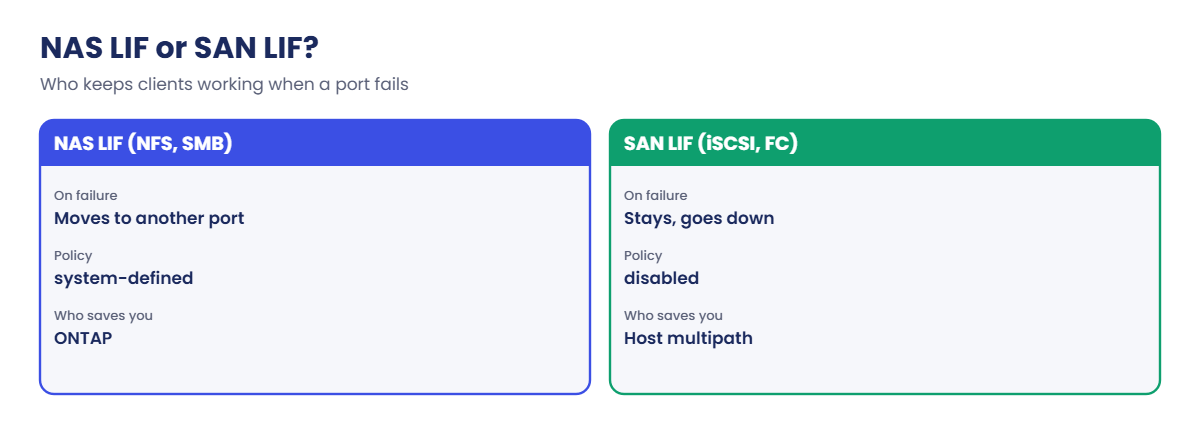
NAS LIFs fail over to another port in their failover group when a port, link or node fails, and with -auto-revert true they go home when it’s healthy again. NFSv3 clients barely notice; SMB clients may reconnect, unless the share uses continuous availability.

SAN LIFs (iSCSI, FC, NVMe) never fail over. The host has a path through a LIF on each node, and its multipath software (MPIO, dm-multipath) moves I/O to a surviving path. That’s why you create SAN LIFs on every node that serves the LUNs.

How it works, step by step

1Create the LIF

Give it an SVM, a name, a service policy, a home node and port, and an address (or -subnet-name). In System Manager: Network › Overview › Network interfaces › + Add.

System Manager Add network interface form for svm1 with data NAS service, home saat-cluster-01 e0c and IP 192.168.56.130
System Manager: Network > Overview > Network interfaces > + Add for a NAS data LIF.

2Check where it may fail over

network interface show -failover lists the failover policy, group and every target port. If that list has ports you don’t want, like the 1 Gb e0M, use a custom failover group.
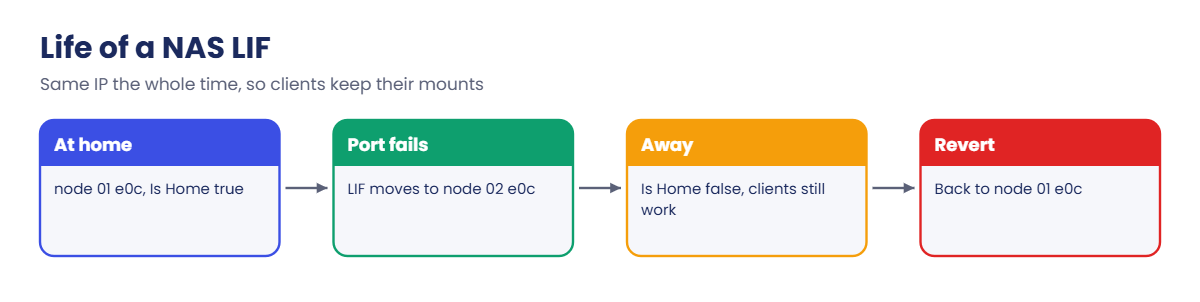
ONTAP LIF: the life of a NAS LIF from home to failover and back

3Something fails, the NAS LIF moves

When the home port goes down or the node is taken over, the LIF moves to a target port and answers on the same IP. Clients keep their mounts.

4It goes home again

With auto-revert on, the LIF returns when the home port is back. Without it, the LIF stays away until you run network interface revert.

ONTAP LIF: NAS LIFs and SAN LIFs compared

5Move it by hand when you need to

network interface migrate moves a NAS LIF now, for example before you work on a port. SAN LIFs can’t be migrated while up: you set them down, change the home port and bring them up, while the host uses its other paths.

NAS LIF (NFS, SMB)SAN LIF (iSCSI, FC, NVMe)
When a port or node failsMoves to another port in its failover groupStays; goes down with the port
Who keeps clients workingONTAP, by moving the IPThe host’s multipath software
How many to createAt least one per node, usuallyOne or more on every node serving the LUNs
Failover policysystem-defined (default)disabled

Hands-on lab: create LIFs, migrate one and watch it fail over

Before you run any command, double-check it

Read every command twice before you press Enter. Check the target: the server name, the user, the disk or device name, the path and the sizes. These commands are for learning and were tested in our lab, not on your system. At work, run the read-only commands first, follow your change process, make sure a backup exists, and ask a second person to check anything that changes or deletes data. You run them at your own risk.

This lab uses the SaatVedha ONTAP practice shell, our own learning tool. It is not NetApp software: real ONTAP output looks like this but is not identical.

You’ll create one NAS LIF and two iSCSI LIFs, fix a risky failover target list, then move the NAS LIF while a Linux client keeps using it.

1Build an SVM with NFS and a volume

Create setup-21.txt with:

storage aggregate create -aggregate aggr1_01 -node saat-cluster-01 -diskcount 8 -disktype SAS
vserver create -vserver svm1 -aggregate aggr1_01 -rootvolume-security-style unix
vserver nfs create -vserver svm1 -v3 enabled -v4.1 enabled
vserver export-policy rule create -vserver svm1 -policyname default -clientmatch 192.168.56.0/24 -rorule sys -rwrule sys -superuser sys
volume create -vserver svm1 -volume vol_app -aggregate aggr1_01 -size 50g -junction-path /app
python ontapsim.py -c "simctl reset"
python ontapsim.py --run setup-21.txt

✅ Checkpoint: No Error lines in the output.

2Create a NAS LIF and two iSCSI LIFs

Log in and run:

network interface create -vserver svm1 -lif svm1_nas1 -service-policy default-data-files -home-node saat-cluster-01 -home-port e0c -address 192.168.56.130 -netmask 255.255.255.0 -auto-revert true
network interface create -vserver svm1 -lif svm1_iscsi1 -service-policy default-data-iscsi -home-node saat-cluster-01 -home-port e0d -address 192.168.56.131 -netmask 255.255.255.0
network interface create -vserver svm1 -lif svm1_iscsi2 -service-policy default-data-iscsi -home-node saat-cluster-02 -home-port e0d -address 192.168.56.132 -netmask 255.255.255.0
network interface show -vserver svm1
network interface show -vserver svm1 -fields service-policy,failover-policy,auto-revert,failover-group

You should see this:

            Logical    Status     Network            Current         Current Is
Vserver     Interface  Admin/Oper Address/Mask       Node            Port    Home
----------- ---------- ---------- ------------------ --------------- ------- ----
svm1
            svm1_nas1  up/up      192.168.56.130/24  saat-cluster-01 e0c     true
            svm1_iscsi1
                       up/up      192.168.56.131/24  saat-cluster-01 e0d     true
            svm1_iscsi2
                       up/up      192.168.56.132/24  saat-cluster-02 e0d     true
3 entries were displayed.
saat-cluster::> network interface show -vserver svm1 -fields service-policy,failover-policy,auto-revert,failover-group
vserver lif         service-policy     failover-policy auto-revert failover-group
------- ----------- ------------------ --------------- ----------- --------------
svm1    svm1_nas1   default-data-files system-defined  true        Default
svm1    svm1_iscsi1 default-data-iscsi disabled        false       Default
svm1    svm1_iscsi2 default-data-iscsi disabled        false       Default
3 entries were displayed.

All three are up and at home. The NAS LIF has the system-defined failover policy, while both iSCSI LIFs show disabled: they will never move, and there’s one on each node for the host’s multipathing.

✅ Checkpoint: The iSCSI LIFs show failover-policy disabled.

3Fix the failover targets

network interface show -vserver svm1 -failover

You should see this (first LIF shown):

         Logical         Home                  Failover        Failover
Vserver  Interface       Node:Port             Policy          Group
-------- --------------- --------------------- --------------- ---------------
svm1
         svm1_nas1       saat-cluster-01:e0c   system-defined  Default
                         Failover Targets: saat-cluster-01:e0c,
                                           saat-cluster-01:e0d,
                                           saat-cluster-01:e0e,
                                           saat-cluster-01:e0f,
                                           saat-cluster-01:e0M,
                                           saat-cluster-02:e0c,
                                           saat-cluster-02:e0d,
                                           saat-cluster-02:e0e,
                                           saat-cluster-02:e0f,
                                           saat-cluster-02:e0M

The lab never split the Default broadcast domain, so the NAS LIF could land on the 1 Gb e0M management port. Limit it to e0c on both nodes with a custom failover group:

network interface failover-groups create -vserver svm1 -failover-group fg_nas -targets saat-cluster-01:e0c,saat-cluster-02:e0c
network interface modify -vserver svm1 -lif svm1_nas1 -failover-group fg_nas
network interface show -vserver svm1 -failover
         Logical         Home                  Failover        Failover
Vserver  Interface       Node:Port             Policy          Group
-------- --------------- --------------------- --------------- ---------------
svm1
         svm1_nas1       saat-cluster-01:e0c   system-defined  fg_nas
                         Failover Targets: saat-cluster-01:e0c,
                                           saat-cluster-02:e0c
         svm1_iscsi1     saat-cluster-01:e0d   disabled        Default
                         Failover Targets: -
         svm1_iscsi2     saat-cluster-02:e0d   disabled        Default
                         Failover Targets: -
3 entries were displayed.

In production you’d normally fix this at the broadcast domain level, as in Lesson 20. A custom failover group is the quick way to narrow one LIF.

✅ Checkpoint: svm1_nas1 now has only two failover targets.

4Migrate the LIF while a client works

simctl host linux1 mount 192.168.56.130:/app /mnt/app vers=3
simctl host linux1 touch /mnt/app/orders.db
network interface migrate -vserver svm1 -lif svm1_nas1 -destination-node saat-cluster-02 -destination-port e0c
network interface show -vserver svm1 -lif svm1_nas1 -fields home-node,home-port,curr-node,curr-port,is-home
simctl host linux1 ls /mnt/app

You should see this:

(mounted 192.168.56.130:/app on /mnt/app type nfs)
saat-cluster::> simctl host linux1 touch /mnt/app/orders.db
saat-cluster::> network interface migrate -vserver svm1 -lif svm1_nas1 -destination-node saat-cluster-02 -destination-port e0c
saat-cluster::> network interface show -vserver svm1 -lif svm1_nas1 -fields home-node,home-port,curr-node,curr-port,is-home
vserver lif       home-node       home-port curr-node       curr-port is-home
------- --------- --------------- --------- --------------- --------- -------
svm1    svm1_nas1 saat-cluster-01 e0c       saat-cluster-02 e0c       false
saat-cluster::> simctl host linux1 ls /mnt/app
orders.db

The LIF now lives on node 02 but its home is still node 01, so Is Home is false. The client didn’t remount and still sees its file. Send it home and check nothing is left away:

network interface revert -vserver svm1 -lif svm1_nas1
network interface show -vserver svm1 -is-home false
There are no entries matching your query.

✅ Checkpoint: No LIF is away from home.
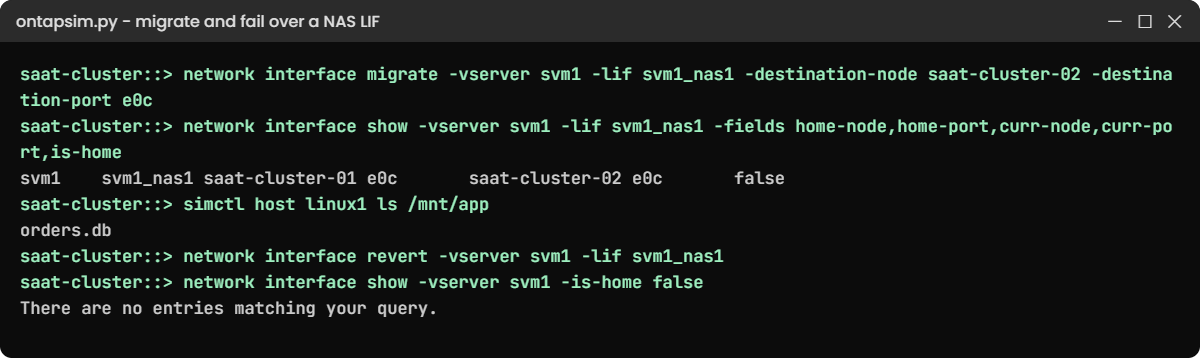
ONTAP LIF lab: migrating a NAS LIF while an NFS client keeps working
svm1_nas1 moved to node 02 and back while the Linux client kept reading orders.db.

5Fail the home port

simctl break port-down saat-cluster-01 e0c
network interface show -vserver svm1 -lif svm1_nas1 -fields home-node,home-port,curr-node,curr-port,is-home
simctl host linux1 ls /mnt/app

You should see this:

simctl: fault "port-down" is active. Now find it with ONTAP commands.
saat-cluster::> network interface show -vserver svm1 -lif svm1_nas1 -fields home-node,home-port,curr-node,curr-port,is-home
vserver lif       home-node       home-port curr-node       curr-port is-home
------- --------- --------------- --------- --------------- --------- -------
svm1    svm1_nas1 saat-cluster-01 e0c       saat-cluster-02 e0c       false
saat-cluster::> simctl host linux1 ls /mnt/app
orders.db

ONTAP moved the LIF by itself to the only other target, node 02’s e0c, and the client carried on. Now fix the “cable”:

simctl fix all
network interface revert -vserver svm1 -lif svm1_nas1

On a real cluster, auto-revert would bring the LIF home once the port is stable again; the practice shell doesn’t model that, so you revert it by hand. Either way, check with -is-home false afterwards.

✅ Checkpoint: svm1_nas1 is back on saat-cluster-01 e0c with is-home true.

Break It, Then Fix It

Three LIF mistakes, run on purpose.

1Try to migrate an iSCSI LIF

network interface migrate -vserver svm1 -lif svm1_iscsi1 -destination-node saat-cluster-02 -destination-port e0d

You’ll get this:

Error: command failed: SAN LIFs cannot be migrated while they are up. Set the LIF down, change its home port, then bring it up.

SAN LIFs don’t move like NAS LIFs. If one really must change port, take it down (the host keeps working on its other path), change -home-node and -home-port, bring it up, and confirm the host sees the path again. The message is the practice shell’s; real ONTAP refuses too.

✅ Checkpoint: You can explain why the host didn’t lose access during that change.

2Reuse an IP address

network interface create -vserver svm1 -lif svm1_nas2 -service-policy default-data-files -home-node saat-cluster-02 -home-port e0c -address 192.168.56.130 -netmask 255.255.255.0

You’ll get this:

Error: command failed: Duplicate IP address 192.168.56.130. It is already used by LIF svm1_nas1 on Vserver svm1.

Take the next free address from your IP plan, or use a subnet so ONTAP picks one.

✅ Checkpoint: You know which IP is free for a second NAS LIF.

ONTAP LIF break and fix: SAN LIF migrate, duplicate IP and admin-down LIF
SAN LIFs don’t migrate, IPs must be unique, and an admin-down LIF just stops answering.

3Set a LIF down while clients use it

network interface modify -vserver svm1 -lif svm1_nas1 -status-admin down
network interface show -vserver svm1 -lif svm1_nas1 -fields status-admin,status-oper,curr-node,curr-port
simctl host linux1 ls /mnt/app

You’ll get this:

vserver lif       status-admin status-oper curr-node       curr-port
------- --------- ------------ ----------- --------------- ---------
svm1    svm1_nas1 down         down        saat-cluster-01 e0c
saat-cluster::> simctl host linux1 ls /mnt/app
nfs: server 192.168.56.130 not responding, still trying
(the command hangs: a hard mount waits for the server. Press Ctrl-C on a real host.)

An admin-down LIF doesn’t fail over; it simply stops answering, and NFS clients with hard mounts hang. Bring it back and test from the LIF itself:

network interface modify -vserver svm1 -lif svm1_nas1 -status-admin up
network ping -lif svm1_nas1 -vserver svm1 -destination 192.168.56.21
simctl host linux1 ls /mnt/app
192.168.56.21 is alive
saat-cluster::> simctl host linux1 ls /mnt/app
orders.db

✅ Checkpoint: The ping says alive and the client lists orders.db again.

This happened at work

Three weeks on the wrong node

An insurance company in Chandigarh did a planned takeover and giveback to replace a memory module on node 01. The work went well and everyone went home. Three weeks later the month-end claims reports ran slowly, and node 02’s CPU was much higher than node 01’s.

A storage engineer ran network interface show -is-home false and found six NAS LIFs still sitting on node 02. They’d been created years earlier with auto-revert off, so after giveback they never went home, and every request for volumes on node 01 was crossing the cluster network from node 02.

She reverted them during a quiet hour and the next report run was back to normal. The team turned on auto-revert for those LIFs, added -is-home false to the post-change checklist, and put the same command in their daily health check.

Common mistakes and troubleshooting

MistakeWhat happensDo this instead
Creating one NAS LIF for a two-node SVMAll traffic goes through one node; more indirect accessCreate at least one NAS LIF per node and spread clients
Creating iSCSI LIFs on one node onlyHosts lose the LUN when that node goes downCreate SAN LIFs on every node that serves the LUN
Leaving LIFs away from home after maintenanceUnbalanced nodes and slower accessRun network interface show -is-home false and revert
Failover targets that include slow or wrong portsA LIF lands on e0M or an unreachable VLANCheck -failover output; fix the broadcast domain or use a failover group
Setting a LIF down to “test failover”Clients hang; admin-down LIFs don’t fail overTest with migrate, a port-down test, or a planned takeover

Interview questions

Click a question to open it. Each one is written the way an interviewer would ask it. Under it you will see why they ask it and one way you could answer, in your own words.

Fresher level

1. What is a LIF in ONTAP?

Why they ask this: They want to check you know what clients actually connect to.

How you might answer: A LIF is a logical interface: an IP address or an FC WWPN that belongs to an SVM and lives on a physical or logical port. Clients mount NFS, map SMB shares or log in over iSCSI to a LIF, not to the node itself.

2. What happens to a NAS LIF and an iSCSI LIF when their port goes down?

Why they ask this: They’re checking the most important difference between NAS and SAN networking.

How you might answer: The NAS LIF fails over to another port in its failover group and keeps the same IP, so clients carry on. The iSCSI LIF doesn’t move; it goes down, and the host’s multipath software sends I/O through the LIF on the other node.

2–5 years experience

3. After a maintenance window, what LIF checks do you run and why?

Why they ask this: They want to see good post-change habits.

How you might answer: I run network interface show -is-home false to find LIFs still away from home, and revert them if auto-revert didn’t. I also check that every LIF is up/up and that hosts see all their SAN paths again, because a missing path only shows up when the next failure hits.

4. How would you stop a NAS LIF from failing over to the e0M management port?

Why they ask this: They’re checking you can read failover targets and control them.

How you might answer: I’d check the targets with network interface show -failover. The proper fix is to keep e0M out of the data broadcast domain, but for one LIF I can create a custom failover group with only the data ports and set it with network interface modify -failover-group.

Senior level

5. You need to move all iSCSI LIFs from old ports to new 25 Gb ports during business hours. How would you plan it?

Why they ask this: They want to see you can change SAN paths safely without an outage.

How you might answer: I’d first confirm every host has healthy paths through LIFs on both nodes. Then I’d move one LIF at a time: set it down, change its home port to the new one, bring it up, and check each host sees the path come back before moving the next.

I’d do node 01’s LIFs first, verify, then node 02’s, so hosts always have at least one good path.

6. How many data LIFs would you create for an SVM on a four-node cluster, and where?

Why they ask this: They want to see balanced design thinking about access paths and failover.

How you might answer: For NAS I’d create at least one LIF per node, ideally on the node that owns the volumes each group of clients uses, so access is direct. For SAN I’d create at least one LIF per node per fabric or iSCSI network, and use selective LUN mapping so hosts only see paths through the LUN’s HA pair.

Then I’d point clients at the right LIFs with DNS or by documenting which LIF each application uses.

Quick quiz

Q1. Which service policy does an NFS and SMB data LIF use?

  1. default-management
  2. default-data-files
  3. default-data-iscsi
  4. default-intercluster
Show answer

B — default-data-files serves NFS and SMB.

Q2. What is the failover policy of an iSCSI LIF?

  1. system-defined
  2. local-only
  3. disabled
  4. broadcast-domain-wide
Show answer

C — SAN LIFs don’t fail over; host multipathing handles path loss.

Q3. What does Is Home false tell you?

  1. The LIF is down
  2. The LIF is on a port other than its home port
  3. The LIF has no IP
  4. The SVM is stopped
Show answer

B — the LIF is currently away from its home node or port.

Q4. Which command sends a LIF back to its home port?

  1. network interface migrate
  2. network interface revert
  3. network interface modify -status-admin up
  4. network port modify
Show answer

B — revert moves a LIF back to its home node and port.

Q5. Why did the client hang when svm1_nas1 was set admin down?

  1. It failed over to e0M
  2. An admin-down LIF stops answering and doesn’t fail over
  3. The export policy changed
  4. The volume went offline
Show answer

B — admin down means “stop”, not “move”.

Quick recap

  • A LIF is an IP or WWPN owned by an SVM, with a home port and a current port.
  • Service policies set what a LIF serves: files, iSCSI, blocks, management or intercluster.
  • NAS LIFs fail over within their failover group; SAN LIFs stay put and rely on host multipathing.
  • migrate moves a NAS LIF now; revert sends it home; auto-revert does it for you.
  • After every change, run network interface show -is-home false.

Next lesson

Lesson 22: SVM admin delegation and RBAC → You’ll give an application team its own SVM admin login and a read-only account for monitoring.

Further reading: ONTAP LIF

Want to go deeper into ONTAP LIF? Read the networking chapters linked from the ONTAP concepts guide for LIFs, service policies and failover in more detail. You can also see the full plan for this course on the NetApp ONTAP Storage Administration course page.

Scroll to Top

This website uses cookies

We use a few cookies to keep this site working. If you allow it, we also use Google Analytics to count visits so we can improve our lessons. You can accept all, deny the optional ones, or choose what to allow.