Cluster and SVM peering
-
Phase 0: Start here
-
Phase 1: Architecture and foundation
-
Phase 2: Protocols and day-to-day administration
-
Phase 3: Data protection and enterprise integrations
-
Phase 4: Troubleshooting blueprint
-
Phase 5: Final project and career
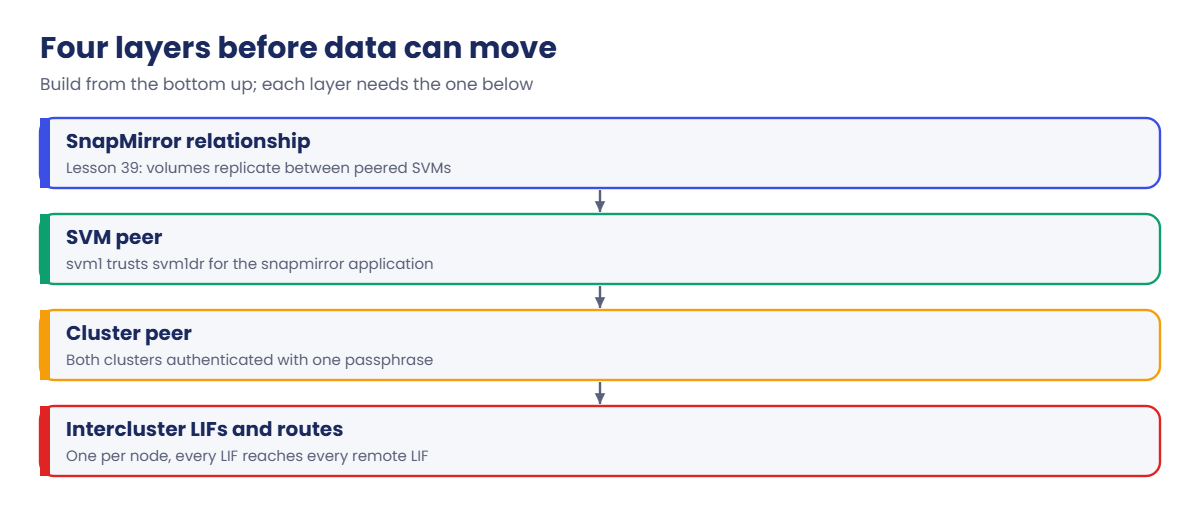
Every DR design for ONTAP starts with the same question from the network team: “Which IPs talk to which, and on what ports?” Before a single block can be replicated, the production and DR clusters must trust each other, and so must the two SVMs.
That trust is called peering. In this lesson you’ll give both clusters intercluster LIFs, peer them with a passphrase, peer the SVMs, and see the two errors that block most first-time DR builds.
Where this lesson fits
Lesson 38 of 56 in NetApp ONTAP Storage Administration · Phase 3: Data protection and integrations · Before this: Lesson 37, takeover and giveback · Next: Lesson 39, SnapMirror asynchronous DR
| Time | You need | By the end you can |
|---|---|---|
| 45 minutes | The practice shell, using both saat-cluster and saat-dr | Create intercluster LIFs, peer two clusters and two SVMs, and fix a peer that can’t reach the other side |
What it is, in one line
Cluster peering is a trusted, authenticated connection between two ONTAP clusters over intercluster LIFs, and SVM peering then allows two specific SVMs on those clusters to replicate data to each other.
In Simple Words
Two branch offices of a bank
A bank opens a new branch in another city. Before the two branches can send cash to each other, head office gives both managers the same secret code word, and a guard at each branch checks the code before any van is let in.
Even then, not every counter can trade with every other counter: the loans desk in one branch must be introduced to the loans desk in the other, and both desks must say yes. That second introduction is the SVM peer.
Engineer's View
How an engineer describes it
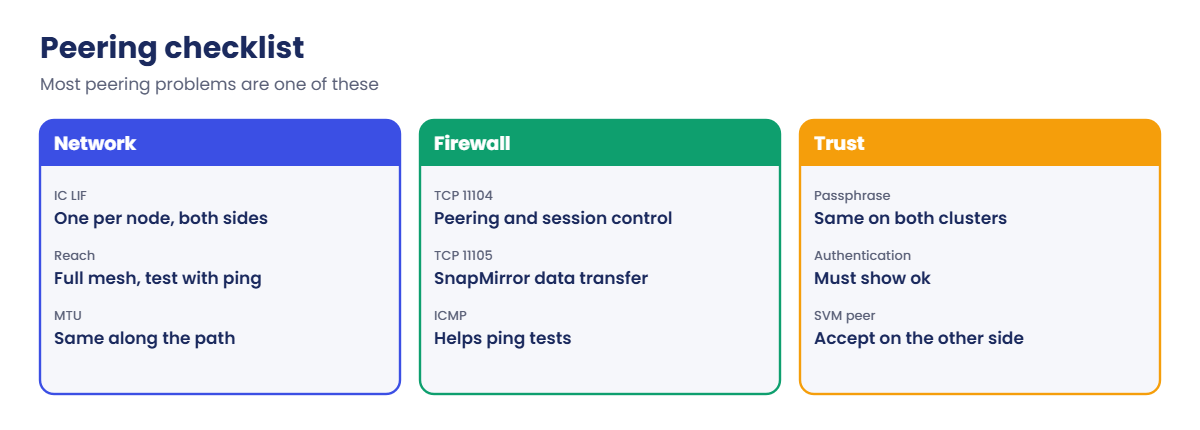
Intercluster LIFs carry all cross-cluster traffic. Create at least one per node, owned by the admin SVM (the cluster), with the default-intercluster service policy. Every intercluster LIF on one side must reach every intercluster LIF on the other (full mesh), and firewalls must allow TCP 11104 (cluster peering) and TCP 11105 (SnapMirror data), plus ICMP if you want ping tests to work.
cluster peer create runs on both clusters with the other side’s intercluster IPs and the same passphrase (at least eight characters). cluster peer show must show Availability Available and Authentication ok; current releases also encrypt the peer connection with TLS by default. With -generate-passphrase one side creates the passphrase and you paste it on the other.
vserver peer create names the local SVM, the remote SVM, the remote cluster and the applications (snapmirror, flexcache and others). The remote admin runs vserver peer accept, unless a vserver peer permission entry accepts it automatically. Peering between two SVMs in the same cluster is accepted at once.
How it works, step by step
1Plan the addresses
Pick one intercluster IP per node on each cluster, on a network that can route between sites. Give the network team the full list and the ports before change day.
2Create intercluster LIFs on both clusters
Use a data port or a dedicated replication VLAN, not e0M. Then ping each remote intercluster IP from each local intercluster LIF with network ping -lif.
3Peer the clusters
Run cluster peer create on one cluster, then on the other with the same passphrase. Authentication moves from pending to ok when the second side finishes.
4Peer the SVMs
Create the SVM peer from the source side and accept it on the destination side. Its state goes from initiated and pending to peered.
| Command | Healthy result |
|---|---|
network interface show -service-policy default-intercluster | One up/up LIF per node |
cluster peer show | Available, Authentication ok |
cluster peer health show | Every node pair reachable (real ONTAP) |
vserver peer show | State peered, applications snapmirror |
5Then replicate
Only now can you create SnapMirror relationships between volumes in the two SVMs, which is the next lesson.
System Manager does both in one place: Protection › Overview › Cluster peers › Generate passphrase on the DR cluster, then Peer cluster on production with that passphrase and the intercluster IPs. Storage VM peers are created for you when you first protect a volume, or under Protection › Overview › Storage VM peers.

Hands-on lab: peer saat-cluster with saat-dr
Before you run any command, double-check it
Read every command twice before you press Enter. Check the target: the server name, the user, the disk or device name, the path and the sizes. These commands are for learning and were tested in our lab, not on your system. At work, run the read-only commands first, follow your change process, make sure a backup exists, and ask a second person to check anything that changes or deletes data. You run them at your own risk.
This lab uses the SaatVedha ONTAP practice shell, our own learning tool. It is not NetApp software: real ONTAP output looks like this but is not identical.
You’ll work on two clusters. Open a second terminal and log in to the DR cluster with python ontapsim.py --cluster saat-dr (admin / saatlab1), and each step says which prompt to use. Start from the usual setup with svm1 on saat-cluster.
1saat-cluster: create intercluster LIFs
network interface create -vserver saat-cluster -lif ic1 -service-policy default-intercluster -home-node saat-cluster-01 -home-port e0e -address 192.168.56.140 -netmask 255.255.255.0
network interface create -vserver saat-cluster -lif ic2 -service-policy default-intercluster -home-node saat-cluster-02 -home-port e0e -address 192.168.56.141 -netmask 255.255.255.0
network interface show -service-policy default-interclusterYou should see this:
Logical Status Network Current Current Is
Vserver Interface Admin/Oper Address/Mask Node Port Home
----------- ---------- ---------- ------------------ --------------- ------- ----
saat-cluster
ic1 up/up 192.168.56.140/24 saat-cluster-01 e0e true
ic2 up/up 192.168.56.141/24 saat-cluster-02 e0e true
2 entries were displayed.Notice the Vserver column says saat-cluster: intercluster LIFs belong to the cluster’s admin SVM, not to svm1.
✅ Checkpoint: ic1 and ic2 are up/up, one on each node.
2saat-dr: build the DR side
storage aggregate create -aggregate aggr1_dr -node saat-dr-01 -diskcount 8 -disktype SAS
vserver create -vserver svm1dr -aggregate aggr1_dr -rootvolume-security-style unix
network interface create -vserver saat-dr -lif ic1 -service-policy default-intercluster -home-node saat-dr-01 -home-port e0e -address 192.168.57.140 -netmask 255.255.255.0
network ping -lif ic1 -vserver saat-dr -destination 192.168.56.140Answer y to the aggregate layout. The last lines should be:
[Job 104] Job succeeded: DONE
saat-dr::> vserver create -vserver svm1dr -aggregate aggr1_dr -rootvolume-security-style unix
[Job 105] Job succeeded: Vserver creation completed.
saat-dr::> network interface create -vserver saat-dr -lif ic1 -service-policy default-intercluster -home-node saat-dr-01 -home-port e0e -address 192.168.57.140 -netmask 255.255.255.0
saat-dr::> network ping -lif ic1 -vserver saat-dr -destination 192.168.56.140
192.168.56.140 is alivesaat-dr has one node, so it needs one intercluster LIF. The ping proves the DR LIF can reach production before you try to peer.
✅ Checkpoint: The ping says 192.168.56.140 is alive.
3saat-dr: start the cluster peer
cluster peer create -address-family ipv4 -peer-addrs 192.168.56.140,192.168.56.141
cluster peer showType a passphrase twice (it doesn’t show), for example SaatDR#2026peer. You should see this:
Enter the passphrase:
Confirm the passphrase:
Notice: Now use the same passphrase in the "cluster peer create" command in the other cluster.
saat-dr::> cluster peer show
Peer Cluster Name Cluster Serial Number Availability Authentication
------------------------- --------------------- -------------- --------------
saat-cluster 1-80-001001 Available pendingPending is normal: production hasn’t confirmed the passphrase yet.
✅ Checkpoint: saat-cluster shows Available and pending.
4saat-cluster: finish the cluster peer
cluster peer create -address-family ipv4 -peer-addrs 192.168.57.140
cluster peer show
cluster peer show -instanceUse the same passphrase. You should see this:
saat-cluster::> cluster peer show
Peer Cluster Name Cluster Serial Number Availability Authentication
------------------------- --------------------- -------------- --------------
saat-dr 1-80-002001 Available ok
saat-cluster::> cluster peer show -instance
Peer Cluster Name: saat-dr
Remote Intercluster Addresses: 192.168.57.140
Availability of the Remote Cluster: Available
Cluster Serial Number: 1-80-002001
Remote Cluster Nodes: saat-dr-01
Authentication Status Operational: ok
IPspace for the Relationship: DefaultAuthentication ok means both sides proved they know the same passphrase. The passphrase isn’t stored in clear text, so keep it in your password vault in case you ever need to re-authenticate.
✅ Checkpoint: Authentication shows ok on saat-cluster.
5Peer the SVMs and accept on DR
On saat-cluster:
vserver peer create -vserver svm1 -peer-vserver svm1dr -applications snapmirror -peer-cluster saat-drOn saat-dr:
vserver peer show
vserver peer accept -vserver svm1dr -peer-vserver svm1
vserver peer showYou should see this on saat-dr:
saat-dr::> vserver peer show
Peer Peer Peering Remote
Vserver Vserver State Peer Cluster Applications Vserver
----------- ----------- ------------ ----------------- -------------- ---------
svm1dr svm1 pending saat-cluster snapmirror svm1
saat-dr::> vserver peer accept -vserver svm1dr -peer-vserver svm1
Info: [Job 107] 'vserver peer accept' job queued
saat-dr::> vserver peer show
Peer Peer Peering Remote
Vserver Vserver State Peer Cluster Applications Vserver
----------- ----------- ------------ ----------------- -------------- ---------
svm1dr svm1 peered saat-cluster snapmirror svm1Production shows the same pair as initiated until DR accepts, then both sides say peered. Keep both terminals open; Lesson 39 builds the first mirror on this peering.
✅ Checkpoint: vserver peer show says peered on both clusters.

Try it yourself: Build the peering commands in the Command Builder.
Break It, Then Fix It
Reset both clusters (simctl reset at each prompt) and redo only lab step 1 on saat-cluster before you start.
1Peer before the other side has an intercluster LIF
cluster peer create -address-family ipv4 -peer-addrs 192.168.57.140On saat-cluster you’ll get this:
Error: command failed: Unable to reach the remote cluster at 192.168.57.140. Check the intercluster LIFs, routes and firewall (ports 11104 and 11105).Nothing answers at 192.168.57.140 because the DR LIF doesn’t exist yet. At work the same error comes from a missing route or a firewall rule, so test in layers: does the remote LIF exist and show up/up, does network ping -lif work, and are 11104 and 11105 open both ways? Fix it by doing lab steps 2 to 4.
✅ Checkpoint: After the DR LIF exists, the peer reaches Authentication ok.

2Create SnapMirror before the SVM peer is accepted
Do lab steps 2 to 4, run only the vserver peer create from step 5, and skip the accept. Then on saat-cluster create a source volume, and on saat-dr try to mirror it:
On saat-cluster:
volume create -vserver svm1 -volume vol_sales -aggregate aggr1_01 -size 100g -junction-path /salesOn saat-dr:
volume create -vserver svm1dr -volume vol_sales_dr -aggregate aggr1_dr -size 100g -type DP
snapmirror create -source-path svm1:vol_sales -destination-path svm1dr:vol_sales_dr -policy MirrorAllSnapshots -schedule hourlyYou’ll get this:
Error: command failed: Vserver "svm1dr" is not peered with Vserver "svm1". Run "vserver peer create" and accept it on the other cluster.The cluster peer is fine, but the SVMs aren’t. Run vserver peer accept -vserver svm1dr -peer-vserver svm1 on saat-dr and the same snapmirror create works, which is where Lesson 39 picks up.
✅ Checkpoint: vserver peer show says peered and the snapmirror create no longer fails.
This happened at work
Half the ports open
A bank in Dubai was building its first ONTAP DR site. The storage team sent the firewall request with “port 11104 between the intercluster subnets”, copied from an old email, and the change went in on a Thursday night.
Peering worked first time: cluster peer show said Available and ok, and everyone went home happy. The next morning every SnapMirror initialize sat at 0 bytes transferred and then failed with a transfer error. The team spent two hours checking aggregates and volume sizes before someone looked at the firewall logs and saw packets to TCP 11105 being dropped.
Peering control traffic uses 11104 but the data itself moves on 11105, so the cluster peer looked healthy while no data could move. After the second port was opened, the baseline transfers started within a minute. The team’s DR template now lists both ports, ICMP for testing, and a step to run a small test mirror before the change is closed.
Common mistakes and troubleshooting
| Mistake | What happens | Do this instead |
|---|---|---|
| Opening only TCP 11104 | Peering looks fine but SnapMirror transfers fail | Open 11104 and 11105 in both directions between all intercluster IPs |
| Creating intercluster LIFs on some nodes only | Peering or transfers fail when a node without a LIF owns the volume | Create one per node on both clusters |
| Putting intercluster LIFs on e0M | Replication competes with management and is slow | Use data ports or a dedicated replication VLAN |
| Forgetting to accept the SVM peer | snapmirror create fails with “not peered” | Run vserver peer accept on the other cluster, or set a peer permission |
| Losing the passphrase | You can’t re-authenticate later without re-peering | Store it in the team’s password vault, or use -generate-passphrase and save the output |
Interview questions
Click a question to open it. Each one is written the way an interviewer would ask it. Under it you will see why they ask it and one way you could answer, in your own words.
Fresher level
1. What do you need before you can set up SnapMirror between two ONTAP clusters?
Why they ask this: They want to see that you know the layers in order.
How you might answer: First intercluster LIFs on every node of both clusters, with routes and firewall ports open. Then a cluster peer with the same passphrase on both sides, and an SVM peer between the source and destination SVMs. After that I can create the SnapMirror relationship.
2. Which ports must be open between clusters for peering and SnapMirror?
Why they ask this: They’re checking a practical detail that often breaks DR projects.
How you might answer: TCP 11104 for the peering session and TCP 11105 for the SnapMirror data transfer, in both directions between all intercluster LIFs. I also ask for ICMP so I can test with ping.
2–5 years experience
3. cluster peer show says Authentication problem. What would you check?
Why they ask this: They want a methodical approach to a common peering fault.
How you might answer: It usually means the passphrases didn’t match or one side was re-created. I’d check cluster peer show -instance on both clusters, then re-enter the passphrase with cluster peer modify on the side that’s wrong, or re-peer both with a newly generated passphrase.
4. The cluster peer is healthy but SnapMirror initialize transfers nothing. Where do you look?
Why they ask this: They’re testing whether you separate control traffic from data traffic.
How you might answer: Peering control uses 11104, but data goes over 11105, so I’d check the firewall for 11105 first. Then I’d confirm every node has an intercluster LIF that reaches every remote one, check MTU along the path, and look at snapmirror show -instance for the exact transfer error.
Senior level
5. How would you design the replication network between a production site and a DR site?
Why they ask this: They want design thinking about bandwidth, isolation and failure.
How you might answer: I’d put intercluster LIFs on a dedicated replication VLAN with its own failover group across both nodes, sized for the daily change rate plus catch-up after an outage. I’d agree the ports and routes with the network team, use encryption, and add bandwidth throttles if the WAN is shared.
6. A business unit wants its own SVM replicated to a cloud ONTAP system. What questions do you ask first?
Why they ask this: They’re checking that you think about trust, security and cost before running commands.
How you might answer: I’d ask about the network path (VPN or direct link), who owns the cloud cluster and its admin accounts, the RPO they need, and how much data changes per day.
I’d also check what they expect at failover: just data, or the SVM’s identity too, which points to SVM DR instead of volume mirrors.
Quick quiz
Q1. Which SVM owns intercluster LIFs?
- The data SVM
- The admin SVM (the cluster)
- The node SVM only
- The DR SVM
Show answer
B — intercluster LIFs are created with -vserver followed by the cluster name.
Q2. Which port carries SnapMirror data between clusters?
- TCP 443
- TCP 11104
- TCP 11105
- UDP 2049
Show answer
C — 11104 is for peering control, 11105 for data.
Q3. What does Authentication pending mean right after the first cluster peer create?
- The passphrase was wrong
- The other cluster hasn’t run cluster peer create yet
- The firewall is blocked
- The peer was deleted
Show answer
B — it turns to ok once the second side uses the same passphrase.
Q4. What must the destination cluster’s admin do after vserver peer create?
- Nothing
- Run vserver peer accept
- Reboot the node
- Create a new cluster peer
Show answer
B — the remote side must accept unless a peer permission allows it.
Q5. How many intercluster LIFs should each node have?
- None
- At least one
- Exactly four
- Only the first node needs one
Show answer
B — every node needs one so any node can replicate its volumes.
Quick recap
- Intercluster LIFs on every node carry all cross-cluster traffic.
- Open TCP 11104 and 11105 both ways between all intercluster IPs.
- Cluster peer: same passphrase on both clusters, Authentication ok.
- SVM peer: create on one side, accept on the other.
- Only then can SnapMirror relationships be created.
Next lesson
Lesson 39: SnapMirror asynchronous DR → You’ll mirror a volume from saat-cluster to saat-dr, watch the lag, and run a DR failover and resync.
Further reading: ONTAP cluster peering
Want to go deeper into ONTAP cluster peering? Read NetApp’s ONTAP concepts guide for how intercluster networking, peering and SnapMirror fit together. You can also see the full plan for this course on the NetApp ONTAP Storage Administration course page.
