Snapshots and restores
-
Phase 0: Start here
-
Phase 1: Architecture and foundation
-
Phase 2: Protocols and day-to-day administration
-
Phase 3: Data protection and enterprise integrations
-
Phase 4: Troubleshooting blueprint
-
Phase 5: Final project and career
Someone deletes a folder at 4:55 p.m. on a Friday and calls you in a panic. On most storage that means a ticket to the backup team and a long wait for tape or disk restore jobs. On ONTAP you can usually have the file back in under a minute, because the volume already has snapshot copies from earlier in the day.
This lesson opens Phase 3, where you protect data. You’ll see why a snapshot takes less than a second and almost no space when you create it, how schedules and the snapshot reserve work, and which restore to choose so you don’t make the problem bigger.
Where this lesson fits
Lesson 35 of 56 in NetApp ONTAP Storage Administration · Phase 3: Data protection and integrations · Before this: Lesson 34, deduplication and compression · Next: Lesson 36, FlexClone
| Time | You need | By the end you can |
|---|---|---|
| 50 minutes | The practice shell from Lesson 2 | Create and schedule snapshots, read their size, restore one file, and explain exactly what a volume restore throws away |
What it is, in one line
A snapshot is a read-only, point-in-time picture of a volume that ONTAP takes in about a second by freezing the block pointers, so it costs no extra space until the data in the volume changes.
In Simple Words
A photo of the notice board
Picture the notice board in your office corridor. Before the admin team pins up new circulars every morning, someone takes a photo of the board with their phone, which takes one second and doesn’t move a single sheet of paper.
If a circular is torn down by mistake, you look at yesterday’s photo and pin a fresh copy of only that sheet back up. You could also take the whole board back to how it looked yesterday, but then every notice pinned since then would be thrown away, and that’s why you only do it when the whole board went wrong.
Engineer's View
How an engineer describes it
WAFL never overwrites a block in place. When a client changes data, the new version goes to a free block and the volume’s pointer tree is updated, so a Snapshot copy only has to keep a frozen copy of the root of that tree. Blocks that a snapshot still points to can’t be freed, and that held space is what volume snapshot show reports as the snapshot size.
A FlexVol volume can hold up to 1023 snapshots. Each volume has a snapshot policy (the built-in default policy keeps 6 hourly, 2 daily and 2 weekly copies) and a snapshot reserve, which is 5% of the volume by default. When snapshots grow past the reserve they spill into the volume’s free space.
Restores come in three sizes. Users can copy a file back themselves from the .snapshot directory (NFS) or Previous Versions (SMB); an admin can run volume snapshot restore-file; or the whole volume can be reverted with SnapRestore (volume snapshot restore), which needs the SnapRestore licence, included in ONTAP One on current systems. A volume restore deletes every newer snapshot and every change made after the chosen one.
How it works, step by step
1The volume points to its blocks
Every file in a volume is a tree of pointers ending in 4 KB data blocks. Nothing special yet.
2A snapshot freezes the pointers
When you run volume snapshot create, or the schedule fires, ONTAP saves a read-only copy of the root of that tree with a name and a time. No data blocks are copied, which is why it finishes in about a second even on a 50 TB volume.
3New writes go to new blocks
A user edits a spreadsheet. The changed 4 KB pieces land in new blocks and the live volume points to them. The old blocks are still referenced by the snapshot, so they stay on disk.
4Snapshot size grows with change, not with volume size
A 1 TB volume where 20 GB changes per day holds roughly 20 GB per daily snapshot. Count your change rate, not your volume size, when you size the reserve.
| Setting | Where you see it | Default |
|---|---|---|
| Snapshot policy | volume show -fields snapshot-policy | default (6 hourly, 2 daily, 2 weekly) |
| Snapshot reserve | volume show -fields percent-snapshot-space | 5% |
| Autodelete | volume snapshot autodelete show | Off |
| .snapshot visible to NFS clients | volume show -fields snapdir-access | true |
5Restore the smallest thing that fixes the problem
One lost file: restore the file. A corrupted database LUN where the application owner agrees to lose everything since the snapshot: restore the volume. Not sure what you need yet: make a FlexClone from the snapshot and look first (next lesson).
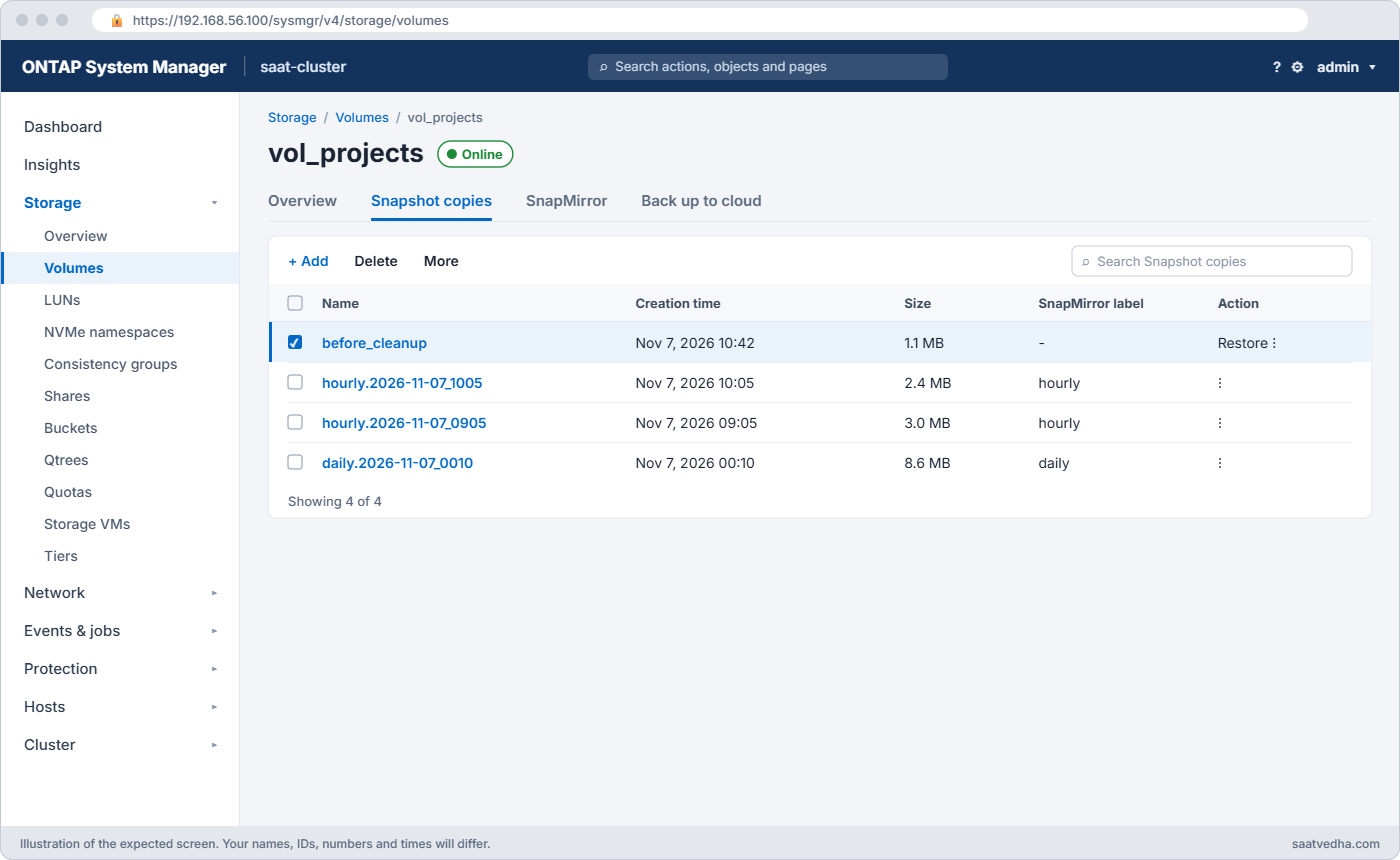
In System Manager the same jobs live under Storage › Volumes, select the volume, then the Snapshot copies tab: + Add takes one, and the three-dot menu next to a copy offers Restore. Policies are under Protection › Overview › Local policy settings › Snapshot policies.
Good to know: aggregate snapshots and choosing a schedule
Snapshots also exist one level down, on the aggregate. They matter for SyncMirror and MetroCluster, which use them to resync plexes, and NetApp support can use them in rare repairs; on ordinary aggregates you seldom touch them.
For volume schedules, start with the default policy and then measure. On many file shares only 5 to 10 percent of data changes in a week, so the default copies use far less than the volume size; on a very busy volume, keep hourly copies for only a few hours or the reserve fills fast.
Size the snapshot reserve to what snapshots really use. Too small and snapshots spill into the space users need; too large and that reserve sits empty, because the active file system can’t use it.
Hands-on lab: take, schedule and restore snapshots
Before you run any command, double-check it
Read every command twice before you press Enter. Check the target: the server name, the user, the disk or device name, the path and the sizes. These commands are for learning and were tested in our lab, not on your system. At work, run the read-only commands first, follow your change process, make sure a backup exists, and ask a second person to check anything that changes or deletes data. You run them at your own risk.
This lab uses the SaatVedha ONTAP practice shell, our own learning tool. It is not NetApp software: real ONTAP output looks like this but is not identical.
Start from a clean lab and run the setup file you made in Lesson 3 (setup-03.txt without its volume lines): two data aggregates, svm1, the NAS LIF 192.168.56.130, NFS and the default export rule. If you’ve kept your lab from earlier lessons, you can skip this step.
1Make a project share and add files
volume create -vserver svm1 -volume vol_projects -aggregate aggr1_01 -size 100g -junction-path /projects
simctl host linux1 mount 192.168.56.130:/projects /mnt/projects vers=3
simctl write svm1 vol_projects 10g files
simctl host linux1 touch /mnt/projects/budget.xlsx
simctl host linux1 touch /mnt/projects/report.docx
volume show -vserver svm1 -volume vol_projects -fields snapshot-policy,percent-snapshot-spaceYou should see this:
[Job 104] Job succeeded: Successful
(mounted 192.168.56.130:/projects on /mnt/projects type nfs)
Client wrote 10GB to svm1:vol_projects.
saat-cluster::> volume show -vserver svm1 -volume vol_projects -fields snapshot-policy,percent-snapshot-space
vserver volume snapshot-policy percent-snapshot-space
------- ------------ --------------- ----------------------
svm1 vol_projects default 5%A new volume gets the default snapshot policy and a 5% reserve without you asking for it. Your job number may differ.
✅ Checkpoint: snapshot-policy is default and the reserve is 5%.
2Take a snapshot before a risky change
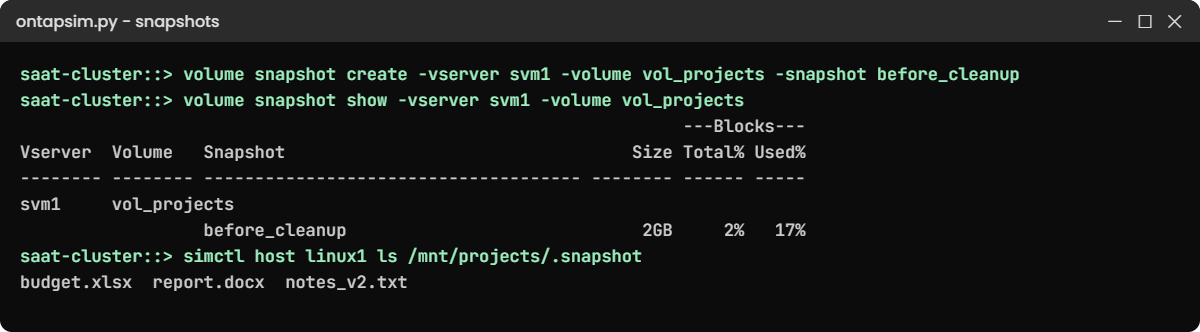
volume snapshot create -vserver svm1 -volume vol_projects -snapshot before_cleanup
simctl host linux1 touch /mnt/projects/notes_v2.txt
simctl overwrite svm1 vol_projects 2g
volume snapshot show -vserver svm1 -volume vol_projectsYou should see this:
Client changed 2GB of existing data in svm1:vol_projects.
saat-cluster::> volume snapshot show -vserver svm1 -volume vol_projects
---Blocks---
Vserver Volume Snapshot Size Total% Used%
-------- -------- ------------------------------------- -------- ------ -----
svm1 vol_projects
before_cleanup 2GB 2% 17%The create command prints nothing when it works. The snapshot held 0 bytes when you took it and is 2 GB now, because the client changed 2 GB of data that the snapshot still points to.
✅ Checkpoint: before_cleanup shows a size of 2GB.
3Look inside the snapshot from the client
simctl host linux1 ls /mnt/projects
simctl host linux1 ls /mnt/projects/.snapshotYou should see this:
budget.xlsx report.docx notes_v2.txt
budget.xlsx report.docx notes_v2.txtOn a real Linux client, ls /mnt/projects/.snapshot lists one folder per snapshot (before_cleanup, hourly.2026-11-07_1005 and so on), and users can copy a file out of it with plain cp. The practice shell shows a flat file list instead, so treat this step as a picture of the idea.
✅ Checkpoint: The client can read the .snapshot directory.
4Restore one file as the admin
volume snapshot restore-file -vserver svm1 -volume vol_projects -snapshot before_cleanup -path /budget.xlsx
volume snapshot restore-file -vserver svm1 -volume vol_projects -snapshot before_cleanup -path /notes_v2.txtYou should see this:
saat-cluster::> volume snapshot restore-file -vserver svm1 -volume vol_projects -snapshot before_cleanup -path /budget.xlsx
saat-cluster::> volume snapshot restore-file -vserver svm1 -volume vol_projects -snapshot before_cleanup -path /notes_v2.txt
Error: command failed: File "/notes_v2.txt" was not found in Snapshot copy "before_cleanup".The first restore worked silently. The second one failed for a good reason: notes_v2.txt was created after the snapshot, so the snapshot never saw it. The path is relative to the root of the volume, not to the client’s mount point.
✅ Checkpoint: budget.xlsx restored, and you can explain why notes_v2.txt could not be.
5Put the volume on your own schedule
volume snapshot policy create -vserver svm1 -policy proj_policy -enabled true -schedule1 hourly -count1 6 -schedule2 daily -count2 7
volume modify -vserver svm1 -volume vol_projects -snapshot-policy proj_policy
volume snapshot policy show -vserver svm1 -policy proj_policyYou should see this:
Volume modify successful on volume vol_projects of Vserver svm1.
saat-cluster::> volume snapshot policy show -vserver svm1 -policy proj_policy
Vserver: svm1
Number of Is
Policy Name Schedules Enabled Comment
------------------------ --------- ------- ----------------------------------
proj_policy 2 true -
Schedule Count Prefix SnapMirror Label
---------------------- ----- ---------------------- -------------------
hourly 6 hourly -
daily 7 daily -Six hourly and seven daily copies means a user can go back to any hour today or any day this week. The SnapMirror Label column is empty for now; Lesson 40 fills it so a backup cluster knows which copies to keep longer.
✅ Checkpoint: proj_policy shows two schedules and vol_projects uses it.
6Let a day pass
simctl tick --days 1
volume snapshot show -vserver svm1 -volume vol_projectsYou should see this (the timestamp will differ):
simctl: time moved forward (1 step, 1 day(s)).
saat-cluster::> volume snapshot show -vserver svm1 -volume vol_projects
---Blocks---
Vserver Volume Snapshot Size Total% Used%
-------- -------- ------------------------------------- -------- ------ -----
svm1 vol_projects
before_cleanup 2GB 2% 17%
daily.2026-11-07_0642_1 0B 0% 0%
2 entries were displayed.The schedule made a daily copy by itself. Real ONTAP names it like daily.2026-11-08_0010; the extra number on the end is the practice shell’s. It’s 0 B because nothing changed after it was taken.
✅ Checkpoint: A daily snapshot appeared without you creating it.
Try it yourself: Build a snapshot command in the Command Builder.
Break It, Then Fix It
Two mistakes, one small and one that loses data. Do the second one in the lab so you never do it at work.
1Reuse a snapshot name
volume snapshot create -vserver svm1 -volume vol_projects -snapshot before_cleanupYou’ll get this:
Error: command failed: Snapshot copy "before_cleanup" already exists.Names must be unique inside a volume. Put the date or the change number in manual snapshot names, for example chg4512_20261107, so nobody has to guess what they were for.
✅ Checkpoint: You created a second snapshot with a new name.

2Restore the whole volume when you only needed one file
Take a safety snapshot first, then restore the volume to before_cleanup. The shell asks you to confirm; answer y.
volume snapshot create -vserver svm1 -volume vol_projects -snapshot pre_restore
volume snapshot restore -vserver svm1 -volume vol_projects -snapshot before_cleanup
simctl host linux1 ls /mnt/projects
volume snapshot show -vserver svm1 -volume vol_projectsYou’ll get this:
Warning: This operation will discard all data in volume "vol_projects" that was written after Snapshot copy "before_cleanup" was created. Newer Snapshot copies will be deleted. Do you want to continue? {y|n}: y
saat-cluster::> simctl host linux1 ls /mnt/projects
budget.xlsx report.docx
saat-cluster::> volume snapshot show -vserver svm1 -volume vol_projects
---Blocks---
Vserver Volume Snapshot Size Total% Used%
-------- -------- ------------------------------------- -------- ------ -----
svm1 vol_projects
before_cleanup 2GB 2% 17%notes_v2.txt is gone, and so are the daily copy and your safety snapshot, because a volume restore deletes every newer snapshot too. That’s how SnapRestore behaves on real ONTAP as well, so a “safety snapshot” taken just before a volume restore doesn’t protect you.
The fix is a habit, not a command. For lost files use restore-file, the .snapshot folder or Previous Versions. If you think you need a volume restore, make a FlexClone of the snapshot first (Lesson 36) or SnapMirror the newer data somewhere, and get the data owner’s written OK before you type y.
✅ Checkpoint: You can explain why pre_restore disappeared.
This happened at work
The restore that took a morning with it
A pharma research company in Hyderabad kept its lab results on an NFS volume with hourly snapshots. One Tuesday a scientist overwrote a single results file with an older version and asked for yesterday’s copy back. The ticket landed with a night-shift admin who had read about SnapRestore and liked how fast it was.
He ran volume snapshot restore to the 9 p.m. snapshot instead of restoring one file. The volume went back in seconds, and so did every result the morning shift had saved, about four hours of instrument output for eleven people. Two newer hourly snapshots were deleted by the restore, so there was nothing on the cluster to recover from.
The team rebuilt most of it from the instruments’ local buffers, which took two days. Afterwards they turned off the admin role’s access to volume restore for the night shift, wrote a one-page restore guide that starts with restore-file and FlexClone, and made “who approved losing newer data?” a required field on any volume restore ticket.
Common mistakes and troubleshooting
| Mistake | What happens | Do this instead |
|---|---|---|
| Using volume snapshot restore for a single lost file | Every newer change and every newer snapshot is lost | Use restore-file, the .snapshot folder, Previous Versions or a FlexClone |
| Sizing the snapshot reserve from volume size | Snapshots spill into the active file system and the volume fills up | Size it from the daily change rate times the number of days you keep |
| Treating snapshots as backup | A lost aggregate or a deleted volume takes the snapshots with it | Copy them to another cluster with SnapMirror (Lessons 39 and 40) |
| Keeping hundreds of manual snapshots | Space is held forever and nobody knows which can go | Name them with a date or change number and delete them after the change |
| Snapshotting a database LUN without the application | The copy may be crash-consistent only | Quiesce the application first or use SnapCenter (Lesson 43) |
Interview questions
Click a question to open it. Each one is written the way an interviewer would ask it. Under it you will see why they ask it and one way you could answer, in your own words.
Fresher level
1. Can you explain in simple words what an ONTAP snapshot is?
Why they ask this: They want to hear that you understand it’s a pointer copy, not a full copy of the data.
How you might answer: It’s a read-only, point-in-time picture of a volume. ONTAP freezes the block pointers instead of copying data, so it’s taken in about a second and only grows as the live data changes after it.
2. A user deleted a file from an NFS share this morning. How would you get it back?
Why they ask this: They’re checking that you pick the smallest, safest restore.
How you might answer: First I’d check volume snapshot show to find a snapshot from before the delete. Then I’d either let the user copy it from the .snapshot folder or run volume snapshot restore-file with the path relative to the volume root. I wouldn’t touch volume restore for one file.
2–5 years experience
3. Your volume is full and snapshots are using 40% of it. What would you look at?
Why they ask this: They want to see that you understand change rate, reserve and spill, and that you won’t just delete things blindly.
How you might answer: I’d run volume show-space and volume snapshot show to see which copies hold the most. Usually it’s one old manual snapshot or a schedule that keeps too many copies for the change rate.
I’d agree with the owner what can go, adjust the policy or the reserve, and only then delete the old copies or grow the volume.
4. When would you use SnapRestore on a whole volume, and what do you check first?
Why they ask this: They’re testing that you know it’s destructive and that you get approval.
How you might answer: Only when the whole volume is bad, like a database corrupted by a failed upgrade, and the owner accepts losing every change since the snapshot. I’d confirm the snapshot time, warn that newer snapshots will be deleted, stop the application and get written approval. If there’s any doubt, I clone the snapshot first and let them check it.
Senior level
5. How would you design snapshot policies for a cluster with file shares, VMware and databases?
Why they ask this: They want to see design thinking: different data needs different schedules and consistency.
How you might answer: File shares get frequent hourly copies with a few dailies and weeklies, because users restore files themselves. VMware and databases need application-consistent copies, so I’d drive those from SnapCenter or the backup tool rather than plain ONTAP schedules.
Every policy gets SnapMirror labels so the backup cluster can keep longer history, and I size reserves from measured change rates.
6. An auditor asks whether your snapshots protect you from ransomware. How do you answer?
Why they ask this: They want an honest answer about limits, not a sales line.
How you might answer: Snapshots are read-only, so ransomware on a client can’t encrypt them, which makes them very good for quick recovery. But an attacker with admin access could delete them, and they live on the same aggregate as the data.
So I’d add tamperproof snapshot locking where the release supports it, multi-admin verification for deletes, and a SnapMirror copy on another cluster.
Quick quiz
Q1. Why does an ONTAP snapshot take about a second?
- It copies data in the background later
- It freezes block pointers instead of copying data
- It only copies the first 1 GB
- It uses the NVRAM
Show answer
B — WAFL never overwrites blocks, so freezing the pointer tree is enough.
Q2. What is the default snapshot reserve on a new volume?
- 0%
- 5%
- 20%
- 50%
Show answer
B — new volumes reserve 5% for snapshots.
Q3. What happens to newer snapshots when you run volume snapshot restore?
- They are kept
- They are moved to the reserve
- They are deleted
- They are converted to clones
Show answer
C — a volume restore deletes every snapshot newer than the one you restore to.
Q4. A snapshot was 0 B when created and is 2 GB now. Why?
- ONTAP copied the data later
- 2 GB of data it points to was changed in the live volume
- The reserve was resized
- Compression was turned off
Show answer
B — snapshot size is the old blocks it still holds after changes.
Q5. Which is the safest way to bring back one lost file?
- volume snapshot restore
- volume snapshot restore-file or the .snapshot folder
- snapmirror break
- volume offline then online
Show answer
B — a single-file restore leaves all other data alone.
Quick recap
- A snapshot freezes block pointers, so it’s instant and grows only with change.
- Policies schedule snapshots; the reserve (5% by default) holds their space.
- Restore one file with restore-file, .snapshot or Previous Versions.
- volume snapshot restore throws away all newer data and newer snapshots.
- Snapshots live with the volume, so copy them elsewhere for real backup.
Next lesson
Lesson 36: FlexClone → You’ll make a writable copy of a volume in seconds, test on it, and split or delete it when you’re done.
Further reading: ONTAP snapshot
Want to go deeper into ONTAP snapshot? Read NetApp’s ONTAP concepts guide for how WAFL, Snapshot copies and SnapRestore fit together. You can also see the full plan for this course on the NetApp ONTAP Storage Administration course page.
