Broadcast domains, failover groups, subnets and IPspaces

In the last lesson you built ports, interface groups and VLANs. ONTAP still doesn’t know which of those ports sit on the same network, so it can’t tell where a LIF is allowed to move when a port or a node fails.

Broadcast domains answer that question. On top of them come failover groups, subnets that hand out IP addresses, and IPspaces that keep tenants’ networks apart. Get these right and LIF failover just works; get them wrong and a LIF can fail over to a port where no client can reach it.

Where this lesson fits

Lesson 20 of 56 in NetApp ONTAP Storage Administration · Phase 1: Architecture and foundation · Before this: Lesson 19, ports, interface groups and VLANs · Next: Lesson 21, data LIFs, home ports and failover

TimeYou needBy the end you can
50 minutesThe practice shell from Lesson 2Create a broadcast domain and subnet, take a LIF address from the subnet, and put a tenant SVM in its own IPspace

What it is, in one line

A broadcast domain is a group of ports, usually on several nodes, that are all on the same layer-2 network, so ONTAP knows a LIF can move between them and still be reachable.

In Simple Words

Counters in the same bank branch

In a bank branch, any cashier counter can serve you because they’re all in the same hall, on the same side of the security door. A counter in a different branch can’t, even if it looks the same.

If one cashier goes on break, the manager sends you to another counter in the same hall, never to another branch. Some big companies even have their own private branch inside their office, with its own counters and its own account numbers that can match numbers at the public branch without clashing.

The hall is a broadcast domain, the list of counters you can be sent to is a failover group, and the private branch is an IPspace.

Engineer's View

How an engineer describes it

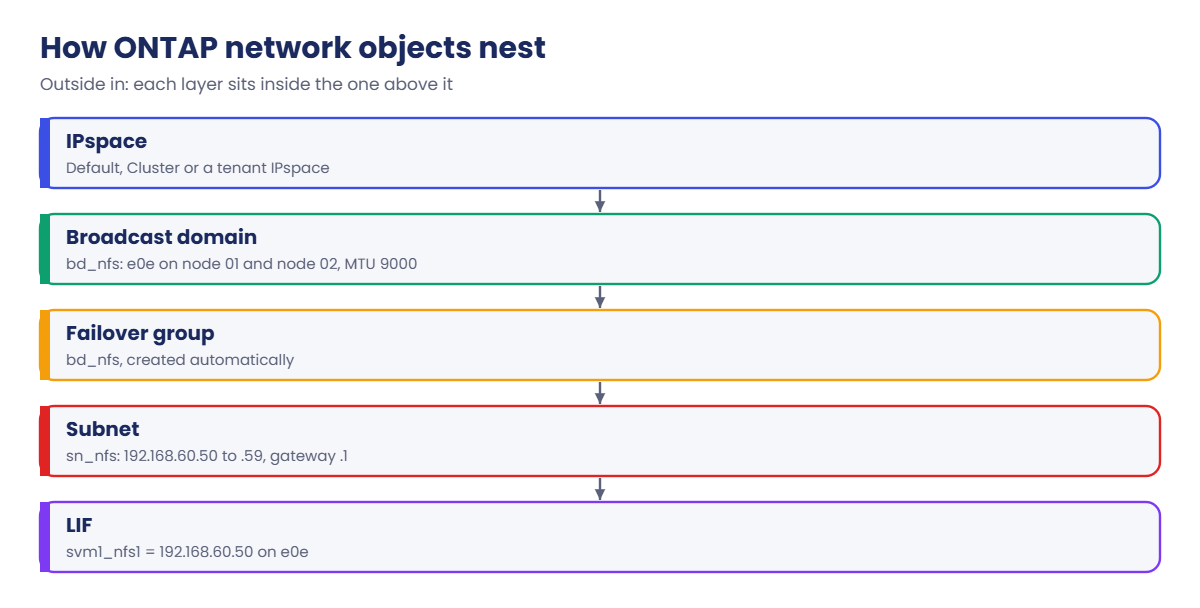
A broadcast domain groups ports that share a layer-2 network (same VLAN, same subnet) and gives them one MTU. Each broadcast domain lives in one IPspace, and when you create it ONTAP also creates a failover group with the same name that lists the same ports.

A LIF homed on one of those ports can fail over to any of them. From ONTAP 9.8, new clusters build broadcast domains automatically from what each port can reach.

A subnet is an optional pool of IP addresses, with a gateway, tied to a broadcast domain. When a LIF is created with -subnet-name, ONTAP picks a free address from the pool and adds the route for you, which saves typing and stops two LIFs grabbing the same IP.

An IPspace is a separate routing world. Every cluster has a Cluster IPspace for cluster ports and a Default IPspace. You add IPspaces when tenants use overlapping private ranges, such as two customers both on 10.0.0.0/24.

An SVM belongs to exactly one IPspace and can only use ports from it.

How it works, step by step

1Group ports by network

Ports that connect to the same VLAN go into one broadcast domain, with ports from both nodes of every HA pair. A port can be in only one broadcast domain at a time, so you remove it from Default first.

2Set the MTU once

The broadcast domain’s MTU applies to all its ports. Use 9000 only if every switch port and every host on the path uses jumbo frames.

ONTAP broadcast domain: how IPspaces, broadcast domains, failover groups, subnets and LIFs nest

3Get a failover group for free

ONTAP creates a failover group named after the broadcast domain. LIFs use it by default, so they can move to any port in the domain. You can create a smaller custom failover group if you want to limit where a LIF goes.

4Add a subnet

network subnet create defines the network, gateway and a range of addresses for LIFs. network subnet show counts how many are free.

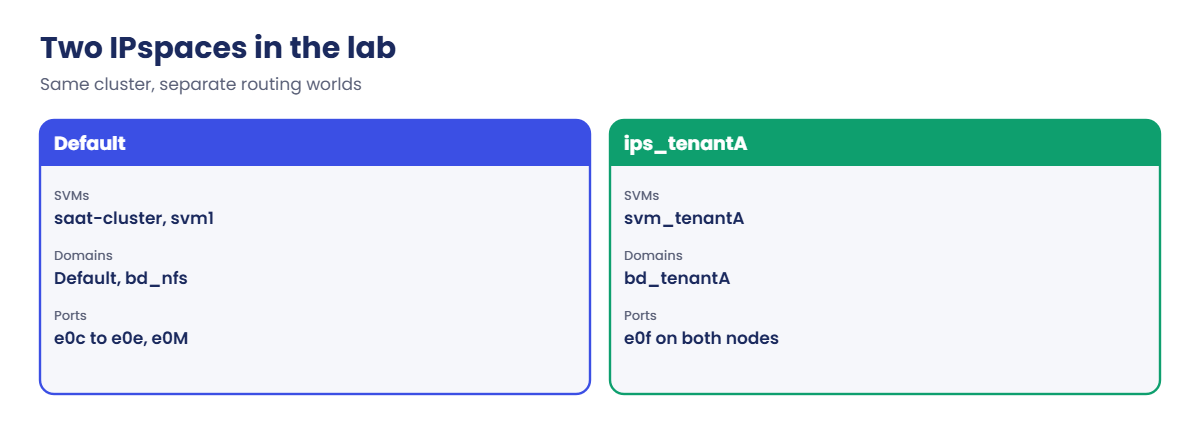
ONTAP broadcast domain: the Default and tenant IPspaces in the lab

5Separate tenants with IPspaces

Create an IPspace, give it its own broadcast domains, and create the tenant’s SVM with -ipspace. In System Manager these live under Network › Overview, where you’ll find Broadcast domains, Subnets and IPspaces sections with + Add buttons.
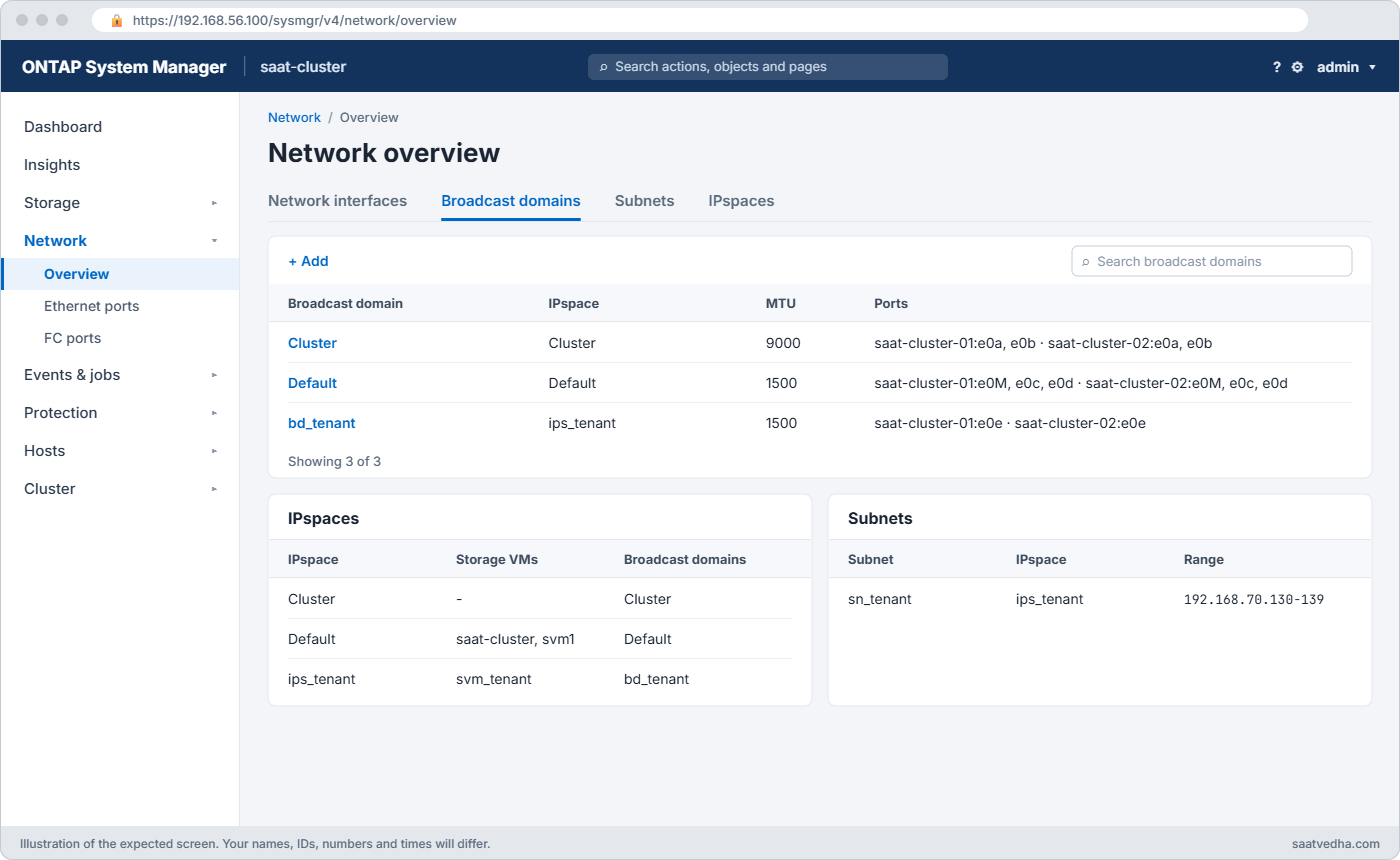
System Manager Network Overview showing broadcast domains, subnets and IPspaces including tenant IPspace ips_tenant
System Manager: Network > Overview lists broadcast domains, subnets and IPspaces, each with its own + Add.
Failover policyWhere the LIF can go
system-defined (default for NAS data LIFs)A port on another node first, from its failover group
local-onlyOnly ports on its home node
sfo-partner-onlyIts home node or the HA partner
broadcast-domain-wideAny port in the broadcast domain
disabledNowhere: it stays put (SAN LIFs behave this way)

Good to know: IPspaces and existing LIFs

If you know networking, an IPspace is ONTAP’s version of VRF: each IPspace keeps its own routing table, so two SVMs in different IPspaces can use the same subnet and even the same addresses. You only need extra IPspaces for overlapping addresses, such as a service provider or a company merger; SVMs already keep tenants apart.

When you create a subnet over a range that already has LIFs using some of its addresses, the command fails. Add -force-update-lif-associations true to network subnet create so those LIFs are linked to the new subnet instead.

Hands-on lab: build a broadcast domain, a subnet and a tenant IPspace

Before you run any command, double-check it

Read every command twice before you press Enter. Check the target: the server name, the user, the disk or device name, the path and the sizes. These commands are for learning and were tested in our lab, not on your system. At work, run the read-only commands first, follow your change process, make sure a backup exists, and ask a second person to check anything that changes or deletes data. You run them at your own risk.

This lab uses the SaatVedha ONTAP practice shell, our own learning tool. It is not NetApp software: real ONTAP output looks like this but is not identical.

You’ll make an NFS network on port e0e of both nodes with jumbo frames, hand out LIF addresses from a subnet, and give a tenant its own IPspace on e0f.

1Build an SVM to use the network

Create setup-20.txt with:

storage aggregate create -aggregate aggr1_01 -node saat-cluster-01 -diskcount 8 -disktype SAS
vserver create -vserver svm1 -aggregate aggr1_01 -rootvolume-security-style unix
python ontapsim.py -c "simctl reset"
python ontapsim.py --run setup-20.txt

Log in and look at the IPspaces:

network ipspace show
IPspace             Vserver List                  Broadcast Domains
------------------- ----------------------------- ----------------------------
Cluster
                    Cluster                       -
Default
                    saat-cluster, svm1            Default
2 entries were displayed.

✅ Checkpoint: You see the Cluster and Default IPspaces, with svm1 in Default.

2Create a broadcast domain for NFS

network port broadcast-domain remove-ports -broadcast-domain Default -ports saat-cluster-01:e0e,saat-cluster-02:e0e
network port broadcast-domain create -broadcast-domain bd_nfs -mtu 9000 -ipspace Default -ports saat-cluster-01:e0e,saat-cluster-02:e0e
network port broadcast-domain show -broadcast-domain bd_nfs
network interface failover-groups show -failover-group bd_nfs

You should see this:

IPspace Broadcast                                        Update
Name    Domain Name    MTU Port List                     Status Details
------- ----------- ------ ----------------------------- --------------
Default bd_nfs        9000
                           saat-cluster-01:e0e           complete
                           saat-cluster-02:e0e           complete
saat-cluster::> network interface failover-groups show -failover-group bd_nfs
                                  Failover
Vserver          Group            Targets
---------------- ---------------- --------------------------------------------
saat-cluster
                 bd_nfs
                                  saat-cluster-01:e0e, saat-cluster-02:e0e

bd_nfs has one port from each node at MTU 9000, and ONTAP built a failover group of the same name with the same two ports.

✅ Checkpoint: bd_nfs lists e0e on both nodes.

3Add a subnet and take an address from it

network subnet create -subnet-name sn_nfs -broadcast-domain bd_nfs -ipspace Default -subnet 192.168.60.0/24 -gateway 192.168.60.1 -ip-ranges 192.168.60.50-192.168.60.59
network interface create -vserver svm1 -lif svm1_nfs1 -service-policy default-data-files -home-node saat-cluster-01 -home-port e0e -subnet-name sn_nfs
network interface show -vserver svm1
network interface show -vserver svm1 -failover
network subnet show

You should see this:

saat-cluster::> network interface show -vserver svm1
            Logical    Status     Network            Current         Current Is
Vserver     Interface  Admin/Oper Address/Mask       Node            Port    Home
----------- ---------- ---------- ------------------ --------------- ------- ----
svm1
            svm1_nfs1  up/up      192.168.60.50/24   saat-cluster-01 e0e     true
saat-cluster::> network interface show -vserver svm1 -failover
         Logical         Home                  Failover        Failover
Vserver  Interface       Node:Port             Policy          Group
-------- --------------- --------------------- --------------- ---------------
svm1
         svm1_nfs1       saat-cluster-01:e0e   system-defined  bd_nfs
                         Failover Targets: saat-cluster-01:e0e,
                                           saat-cluster-02:e0e
saat-cluster::> network subnet show
IPspace: Default
     Subnet                     Broadcast                    Avail/
     Name      Subnet           Domain    Gateway             Total Ranges
     --------- ---------------- --------- --------------- --------- ---------------
     sn_nfs    192.168.60.0/24  bd_nfs    192.168.60.1         9/10 192.168.60.50-192.168.60.59

You never typed an IP address: the LIF got 192.168.60.50, the first free one in the range, and the subnet now shows 9 of 10 free. The LIF can fail over to e0e on node 02 because both ports are in bd_nfs.

✅ Checkpoint: svm1_nfs1 is up/up with failover targets on both nodes.
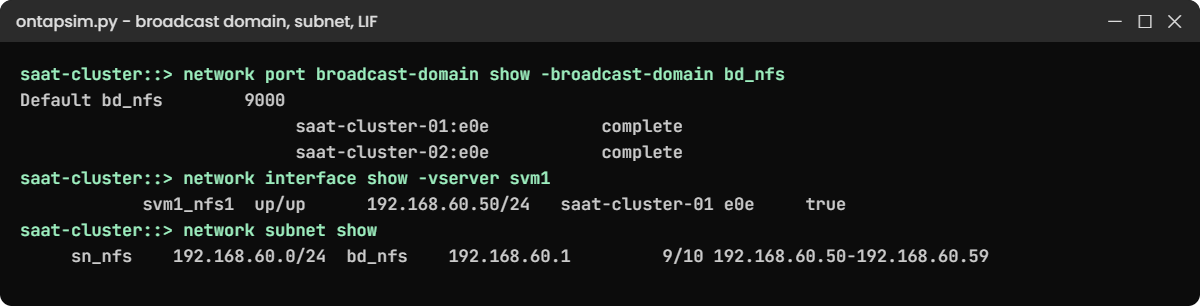
ONTAP broadcast domain lab: bd_nfs, a LIF from subnet sn_nfs and its failover targets
bd_nfs spans e0e on both nodes, and svm1_nfs1 took 192.168.60.50 from the subnet.

4Give a tenant its own IPspace

network ipspace create -ipspace ips_tenantA
network port broadcast-domain remove-ports -broadcast-domain Default -ports saat-cluster-01:e0f,saat-cluster-02:e0f
network port broadcast-domain create -broadcast-domain bd_tenantA -mtu 1500 -ipspace ips_tenantA -ports saat-cluster-01:e0f,saat-cluster-02:e0f
vserver create -vserver svm_tenantA -aggregate aggr1_01 -ipspace ips_tenantA -rootvolume-security-style unix
network ipspace show

You should see this at the end:

IPspace             Vserver List                  Broadcast Domains
------------------- ----------------------------- ----------------------------
Cluster
                    Cluster                       -
Default
                    saat-cluster, svm1            Default, bd_nfs
ips_tenantA
                    svm_tenantA                   bd_tenantA
3 entries were displayed.

svm_tenantA lives in its own IPspace with its own broadcast domain on e0f. Its LIFs can only use those ports, and its routes are separate from svm1’s.

✅ Checkpoint: ips_tenantA shows svm_tenantA and bd_tenantA.

Break It, Then Fix It

Three mistakes that ONTAP stops for you. Run them in the same session.

1Reuse a port that is already in a broadcast domain

network port broadcast-domain create -broadcast-domain bd_backup -mtu 1500 -ipspace Default -ports saat-cluster-01:e0d,saat-cluster-02:e0d

You’ll get this:

Error: command failed: Port "saat-cluster-01:e0d" is already a member of broadcast domain "Default". Remove it first.

A port belongs to one broadcast domain. Run network port broadcast-domain remove-ports for the ports first, as you did for e0e, and only after checking no LIF uses them.

✅ Checkpoint: You can say which domain e0d is in now.

2Give a subnet a range outside its network

network subnet create -subnet-name sn_nfs2 -broadcast-domain bd_nfs -ipspace Default -subnet 192.168.60.0/24 -gateway 192.168.60.1 -ip-ranges 192.168.61.70-192.168.61.79

You’ll get this:

Error: command failed: IP range 192.168.61.70-192.168.61.79 is not inside subnet 192.168.60.0/24.

A typo of one digit (61 instead of 60) is enough. Copy the range from the IP plan and read it against the subnet before you press Enter.

✅ Checkpoint: You can spot the wrong octet.
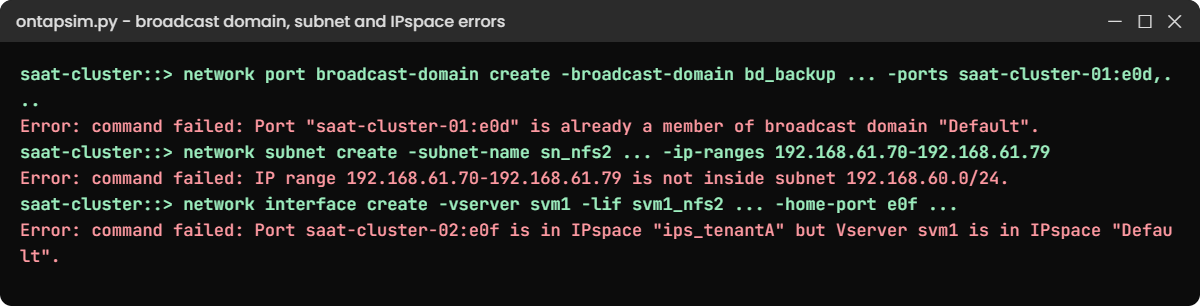
ONTAP broadcast domain break and fix: port reuse, subnet range and IPspace errors
Three network mistakes ONTAP blocks before they cause an outage.

3Home a LIF on a port in another IPspace

network interface create -vserver svm1 -lif svm1_nfs2 -service-policy default-data-files -home-node saat-cluster-02 -home-port e0f -address 192.168.60.61 -netmask 255.255.255.0

You’ll get this:

Error: command failed: Port saat-cluster-02:e0f is in IPspace "ips_tenantA" but Vserver svm1 is in IPspace "Default".

e0f now belongs to the tenant. Put svm1’s second LIF on e0e of node 02 and let the subnet choose the address:

network interface create -vserver svm1 -lif svm1_nfs2 -service-policy default-data-files -home-node saat-cluster-02 -home-port e0e -subnet-name sn_nfs
network interface show -vserver svm1
            Logical    Status     Network            Current         Current Is
Vserver     Interface  Admin/Oper Address/Mask       Node            Port    Home
----------- ---------- ---------- ------------------ --------------- ------- ----
svm1
            svm1_nfs1  up/up      192.168.60.50/24   saat-cluster-01 e0e     true
            svm1_nfs2  up/up      192.168.60.51/24   saat-cluster-02 e0e     true
2 entries were displayed.

✅ Checkpoint: svm1 has one NFS LIF on each node.

This happened at work

The LIF that failed over into the wrong VLAN

A logistics company in Gurugram ran a planned takeover test on a Saturday night, and their tracking app lost its NFS share for the whole test. The LIF had moved to the partner node as expected, so at first everyone blamed the app.

The storage engineer checked where the LIF had landed and pinged the gateway from that port; nothing answered. Months earlier, during a rack move, node 02’s e0e had been recabled to a switch port in a different VLAN, but it was still in the NFS broadcast domain. Nobody noticed, because no LIF had ever lived there until the takeover.

The network team put the port back in the right VLAN and the next test passed. Now, after any cabling change, the team runs network port reachability show on ONTAP 9.8 and later, and before every takeover test they ping the gateway from every port in each broadcast domain.

Common mistakes and troubleshooting

MistakeWhat happensDo this instead
Ports from different VLANs in one broadcast domainA LIF fails over to a port where clients can’t reach itOne broadcast domain per layer-2 network; check reachability after cabling work
Broadcast domain with ports on one node onlyLIFs have nowhere to go when that node failsInclude matching ports from every node
MTU 9000 without end-to-end jumbo framesOdd hangs: small requests work, large ones stallUse 9000 only when every switch and host on the path is set for it
Typing LIF IPs by hand from memoryDuplicate IPs and outagesUse subnets, or check the IP plan first
Creating IPspaces “just in case”Extra routing tables and confusionUse IPspaces only for overlapping ranges or strict tenant separation

Interview questions

Click a question to open it. Each one is written the way an interviewer would ask it. Under it you will see why they ask it and one way you could answer, in your own words.

Fresher level

1. What is a broadcast domain in ONTAP?

Why they ask this: They want to check you understand the layer that tells ONTAP where LIFs can move.

How you might answer: It’s a group of ports that are on the same layer-2 network, usually with ports from every node. ONTAP uses it to know which ports a LIF can fail over to and still be reachable, and all ports in it share one MTU.

2. What’s the difference between a broadcast domain and a failover group?

Why they ask this: They’re checking you know how the two relate.

How you might answer: The broadcast domain is the set of ports on one network. When I create it, ONTAP makes a failover group with the same name and the same ports, and LIFs use that by default. I can also create a custom failover group with fewer ports if I want to control where a LIF goes.

2–5 years experience

3. A LIF failed over during maintenance and clients couldn’t reach it. What would you check?

Why they ask this: They want to see a practical troubleshooting path for network failover problems.

How you might answer: I’d check which port the LIF moved to with network interface show, then ping the gateway from that port. Most of the time the port is in the right broadcast domain in ONTAP but sits in the wrong VLAN on the switch.

On 9.8 and later I’d also run network port reachability show to find ports whose layer-2 reachability doesn’t match their broadcast domain.

4. Why would you use ONTAP subnets instead of typing LIF IP addresses?

Why they ask this: They’re checking you know the operational benefit, not just the command.

How you might answer: A subnet holds a range of free IPs and the gateway for a broadcast domain. When I create a LIF with -subnet-name, ONTAP picks a free address and adds the route, so I avoid typos and duplicate IPs, and network subnet show tells me how many addresses are left.

Senior level

5. Two customers on your cluster both use 10.0.0.0/24 internally. How would you design their network access?

Why they ask this: They want to see you understand IPspaces and multi-tenancy design.

How you might answer: I’d create a separate IPspace for each customer, each with its own broadcast domains on its own VLAN ports, and create each customer’s SVM in its IPspace. Each IPspace has its own routing table, so the same addresses can exist in both without clashing.

I’d also give each SVM its own admin and keep Default for our internal SVMs.

6. How would you plan broadcast domains for a four-node cluster with NFS, iSCSI and backup networks?

Why they ask this: They want to see structured network design across nodes and protocols.

How you might answer: I’d create one broadcast domain per network, each with matching VLAN ports from all four nodes, so LIFs can fail over anywhere on the same network. NFS might use MTU 9000 if the whole path supports it, while backup and iSCSI follow their own network standards.

I’d add a subnet to each domain from the IP plan, and test failover by pinging the gateway from every port before go-live.

Quick quiz

Q1. What does ONTAP create automatically when you create a broadcast domain?

  1. A subnet
  2. An IPspace
  3. A failover group with the same name
  4. A LIF
Show answer

C — each broadcast domain gets a matching failover group.

Q2. How many broadcast domains can one port belong to?

  1. One
  2. Two
  3. One per IPspace
  4. Unlimited
Show answer

A — a port can be in only one broadcast domain at a time.

Q3. When would you create a new IPspace?

  1. For every new SVM
  2. When tenants use overlapping IP ranges
  3. To change MTU
  4. To add a VLAN
Show answer

B — IPspaces give separate routing worlds so the same addresses can be reused.

Q4. What did svm1_nfs1 get when created with -subnet-name sn_nfs?

  1. No address
  2. The first free IP in the subnet range
  3. A DHCP address
  4. The gateway address
Show answer

B — ONTAP picked 192.168.60.50, the first free address.

Q5. Why did the LIF on saat-cluster-02:e0f fail to create in the lab?

  1. The port was down
  2. The port was in another IPspace
  3. The subnet was full
  4. The MTU was wrong
Show answer

B — an SVM can only use ports in its own IPspace.

Quick recap

  • A broadcast domain groups ports on one layer-2 network, with one MTU, inside one IPspace.
  • Each broadcast domain gets a failover group of the same name; LIFs fail over within it.
  • Subnets hand out LIF addresses and gateways from a planned range.
  • IPspaces separate tenants with overlapping IP ranges; an SVM uses only its IPspace’s ports.
  • Check that every port in a domain really reaches that network before you trust failover.

Next lesson

Lesson 21: Data LIFs, home ports and failover → You’ll create NAS and SAN LIFs, migrate them, and watch them fail over and revert.

Further reading: ONTAP broadcast domain

Want to go deeper into ONTAP broadcast domain? Read the networking chapters linked from the ONTAP concepts guide for broadcast domains, failover groups, subnets and IPspaces in more detail. You can also see the full plan for this course on the NetApp ONTAP Storage Administration course page.

Scroll to Top

This website uses cookies

We use a few cookies to keep this site working. If you allow it, we also use Google Analytics to count visits so we can improve our lessons. You can accept all, deny the optional ones, or choose what to allow.