MetroCluster and SyncMirror

Some businesses can’t lose a single transaction and can’t wait an hour for DR either: stock exchanges, payment switches, hospital systems. For them NetApp sells MetroCluster, which stretches ONTAP across two sites a few kilometres or a few hundred kilometres apart and writes every block to both.

MetroCluster needs special hardware and links, so you won’t build one on a laptop. In this lesson you’ll learn how it’s put together, read the plex and pool details the practice shell does show, see why spares matter even with mirrored data, and walk through switchover, heal and switchback with the real commands.

Where this lesson fits

Lesson 42 of 56 in NetApp ONTAP Storage Administration · Phase 3: Data protection and integrations · Before this: Lesson 41, SVM DR and SnapMirror Synchronous · Next: Lesson 43, backup integration

TimeYou needBy the end you can
45 minutesThe practice shell with two data aggregatesExplain SyncMirror plexes and pools, the MetroCluster layout and DR partners, and the switchover, heal and switchback order

What it is, in one line

MetroCluster joins two ONTAP sites into one mirrored configuration where SyncMirror writes every block to a plex at each site, so if one site is lost the other switches over and serves its data with zero data loss.

In Simple Words

Two kitchens cooking every order

A wedding caterer runs two kitchens in two buildings, and every dish is cooked twice, once in each, before the waiter is told it’s ready. That’s slower than one kitchen, but if a gas leak shuts one building, the guests never notice because the other kitchen already has every dish.

When the closed kitchen reopens, the cooks first catch up on what they missed, and only then does the head cook hand its share of the orders back.

Engineer's View

How an engineer describes it

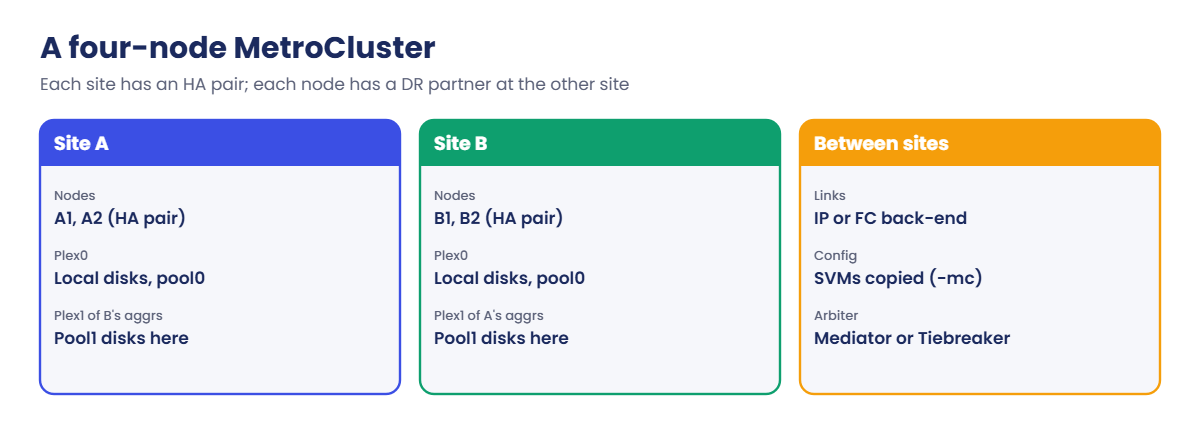
SyncMirror gives an aggregate two plexes: plex0 built from pool0 disks and plex1 built from pool1 disks. Every write goes to both plexes, and either plex can serve reads alone. In MetroCluster, pool0 disks sit at the aggregate owner’s site and pool1 disks at the other site, so each site holds a full copy of every mirrored aggregate.

A four-node MetroCluster is two HA pairs, one per site, joined by a back-end network (MetroCluster IP over Ethernet, or MetroCluster FC over fibre channel and bridges). Each node has an HA partner at its own site and a DR partner at the other; together they form a DR group. SVMs are copied to the partner site by the configuration replication service and appear there with a -mc suffix, stopped until a switchover.

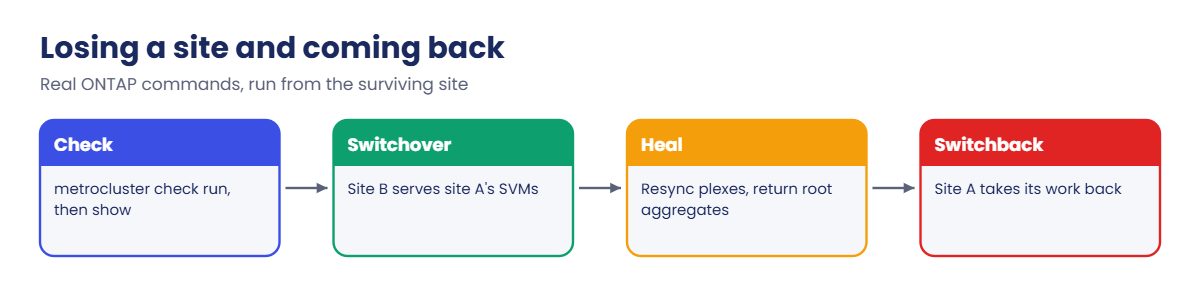
metrocluster switchover moves a site’s SVMs to the other site, a negotiated switchover for planned work or with -forced-on-disaster true after a real loss. ONTAP Mediator or the Tiebreaker software can watch both sites and trigger automatic unplanned switchover. After the failed site is repaired you heal (resynchronise the plexes and return root aggregates, automatic on many current MetroCluster IP releases) and run metrocluster switchback.

How it works, step by step

1Two sites, one configuration

Each site has an HA pair and shelves for both its own pool0 and the other site’s pool1. Local failures (a node, a disk) are handled by the local HA pair and RAID, exactly as in Lessons 12 and 37.

2Every write goes to both plexes

A host writes to site A. The write is logged in NVRAM, mirrored to the HA partner and to the DR partner at site B, then written to both plexes. That’s why RPO is zero and why distance adds latency.

ONTAP MetroCluster layout: an HA pair at each site, SyncMirror plexes in pool0 and pool1

3A whole site is lost

Site B runs metrocluster switchover, or the Mediator triggers it. Site B’s nodes take over site A’s mirrored aggregates (using the plexes at site B) and start the -mc SVMs with the same identities, so clients and hosts reconnect.

4Repair, heal, switch back

Once site A’s power and links are back, the plexes resynchronise (heal), the root aggregates go home, and switchback hands the SVMs back. You check state with metrocluster operation show after each step.

Real ONTAP commandWhat it does
metrocluster showConfiguration state and mode of each cluster
metrocluster check runRuns health checks on nodes, aggregates, links and config
metrocluster check showResults of the last check
metrocluster switchoverPlanned (negotiated) switchover to the partner site
metrocluster heal -phase aggregatesResync mirrored data aggregates (where healing is manual)
metrocluster switchbackReturn work to the repaired site
ONTAP MetroCluster switchover, heal and switchback steps

5When to use it, and when not

MetroCluster suits sites within metro or regional distance with strict zero RPO and short RTO for everything on the cluster. For longer distances or per-application choices, SnapMirror (async, sync or active sync) is cheaper and more flexible.

System Manager shows MetroCluster state on the Dashboard and under Protection › Overview, and newer releases can run switchover and switchback from there. Most teams still run the checks and switchover from the CLI with a written runbook.

ONTAP MetroCluster overview in System Manager showing both sites healthy
System Manager on a MetroCluster IP pair: both sites healthy, ready for switchover.

Hands-on lab: plexes, pools and spares

Before you run any command, double-check it

Read every command twice before you press Enter. Check the target: the server name, the user, the disk or device name, the path and the sizes. These commands are for learning and were tested in our lab, not on your system. At work, run the read-only commands first, follow your change process, make sure a backup exists, and ask a second person to check anything that changes or deletes data. You run them at your own risk.

This lab uses the SaatVedha ONTAP practice shell, our own learning tool. It is not NetApp software: real ONTAP output looks like this but is not identical.

The practice shell is a normal two-node cluster, not a MetroCluster, so you can’t switch over in it. You can read the same plex and pool information a MetroCluster engineer checks every day, and see how spares decide whether a failed disk is rebuilt. Start from the usual setup with aggr1_01 and aggr1_02.

1Read the plex and pool of an aggregate

storage aggregate show-status -aggregate aggr1_01

You should see this:

Owner Node: saat-cluster-01
 Aggregate: aggr1_01 (online, raid_dp) (block checksums)
  Plex: /aggr1_01/plex0 (online, normal, active, pool0)
   RAID Group /aggr1_01/plex0/rg0 (normal, block checksums)
                                                              Usable Physical
     Position Disk                        Pool Type     RPM     Size     Size Status
     -------- --------------------------- ---- ----- ------ -------- -------- ----------------
     dparity  1.0.3                          0 SAS    10000   1.63TB   1.64TB (normal)
     parity   1.0.4                          0 SAS    10000   1.63TB   1.64TB (normal)
     data     1.0.5                          0 SAS    10000   1.63TB   1.64TB (normal)
     data     1.0.6                          0 SAS    10000   1.63TB   1.64TB (normal)
     data     1.0.7                          0 SAS    10000   1.63TB   1.64TB (normal)
     data     1.0.8                          0 SAS    10000   1.63TB   1.64TB (normal)
     data     1.0.9                          0 SAS    10000   1.63TB   1.64TB (normal)
     data     1.0.10                         0 SAS    10000   1.63TB   1.64TB (normal)

One plex, plex0, all disks in pool 0. On a MetroCluster the same command lists a second block, /aggr1_01/plex1 (online, normal, active, pool1), with its own RAID group of pool1 disks at the other site.

✅ Checkpoint: You can point to the plex name and the pool number.

2Check the spares

storage aggregate show-spare-disks -original-owner saat-cluster-01
storage disk show -container-type unassigned

You should see this:

Original Owner: saat-cluster-01
 Pool0
  Spare Pool

                                                            Usable Physical
 Disk             Type  Class          RPM Checksum           Size     Size Status
 ---------------- ----- ----------- ------ -------------- -------- -------- --------
 1.1.0            SSD   solid-state      - block           894.0GB  894.3GB zeroed
 1.1.1            SSD   solid-state      - block           894.0GB  894.3GB zeroed
 1.1.2            SSD   solid-state      - block           894.0GB  894.3GB zeroed
 1.1.3            SSD   solid-state      - block           894.0GB  894.3GB zeroed
 1.1.4            SSD   solid-state      - block           894.0GB  894.3GB zeroed
 1.1.5            SSD   solid-state      - block           894.0GB  894.3GB zeroed

saat-cluster::> storage disk show -container-type unassigned
                     Usable           Disk  Container   Container
Disk                   Size Shelf Bay Type  Type        Name                  Owner
---------------- ---------- ----- --- ----- ----------- --------------------- ----------------
1.0.22               1.63TB     0  22 SAS   unassigned  -                     -
1.0.23               1.63TB     0  23 SAS   unassigned  -                     -
2 entries were displayed.

Node 01 has SSD spares but no SAS spare, and aggr1_01 is built from SAS disks, so an SSD can’t replace one of them. On a MetroCluster you check this for both pools: a plex1 disk can only be replaced by a pool1 spare at the remote site.

✅ Checkpoint: You noticed node 01 has no SAS spare.

3Give node 01 a SAS spare, then fail a disk

storage disk assign -disk 1.0.22 -owner saat-cluster-01
simctl break disk-fail 1.0.5
storage aggregate show -aggregate aggr1_01 -fields raidstatus
event log show -event raid.rg*
simctl tick 3
storage aggregate show -aggregate aggr1_01 -fields raidstatus

You should see this:

saat-cluster::> storage aggregate show -aggregate aggr1_01 -fields raidstatus
aggregate raidstatus
--------- --------------------
aggr1_01  raid_dp, reconstruct
saat-cluster::> event log show -event raid.rg*
Time                Node             Severity      Event
------------------- ---------------- ------------- ------------------------
11/7/2026 07:07:56  saat-cluster-01  NOTICE        raid.rg.recons.start: Reconstruction started on aggr1_01 using spare 1.0.22
saat-cluster::> simctl tick 3
simctl: time moved forward (3 steps).
saat-cluster::> storage aggregate show -aggregate aggr1_01 -fields raidstatus
aggregate raidstatus
--------- ---------------
aggr1_01  raid_dp, normal

RAID-DP rebuilt the missing disk onto 1.0.22 and the aggregate is normal again. In a mirrored aggregate this rebuild happens inside one plex, while the other plex keeps serving data untouched.

✅ Checkpoint: raidstatus goes from reconstruct to normal.

4The MetroCluster checks, on paper

These are the commands you’d run on a real MetroCluster before any planned work. Read them and the order. Only metrocluster show runs in practice shell 1.1, where it reports Configuration state not-configured because the lab is a plain HA pair.

metrocluster show
metrocluster check run
metrocluster check show
metrocluster node show
metrocluster switchover
metrocluster operation show
metrocluster switchback

Never start a switchover until metrocluster check show is clean. If it isn’t, fix the reported component first, exactly like checking Takeover Possible before an HA takeover.

metrocluster check show output with all components ok
A clean metrocluster check show: every component ok.

✅ Checkpoint: You can say the order: check, switchover, heal, switchback.

Practice shell output: an aggregate with one plex in pool0 and a disk rebuilt on a spare
Plex0 lives in pool0; with a matching spare in place, the failed disk is rebuilt and the RAID group goes back to normal.

Break It, Then Fix It

Reset the lab and set up the aggregates again, but skip step 3’s disk assign.

Practice shell output: an aggregate left degraded because no spare was available
No SAS spare on node 01, so the aggregate stays degraded and the event log raises an ALERT.

1A disk fails and there is no spare

simctl break disk-fail 1.0.5
storage aggregate show -aggregate aggr1_01 -fields raidstatus
event log show -severity <=ALERT

You'll get this:

saat-cluster::> storage aggregate show -aggregate aggr1_01 -fields raidstatus
aggregate raidstatus
--------- -----------------
aggr1_01  raid_dp, degraded
saat-cluster::> event log show -severity <=ALERT
Time                Node             Severity      Event
------------------- ---------------- ------------- ------------------------
11/7/2026 07:07:52  saat-cluster-01  ALERT         raid.vol.disk.missing: No spare available, aggr1_01 is degraded

The data is still there, because RAID-DP survives two failed disks, but the aggregate has used one of its two lives and nothing is rebuilding. A second failure would leave it with no protection at all.

The fix is a spare of the right type and size: assign one with storage disk assign, and on a real system ONTAP starts reconstruction as soon as a suitable spare appears. The practice shell only rebuilds at the moment of the failure, so reset and run lab step 3 to see the rebuild. On a MetroCluster the same rule applies per pool and per site, and a missing pool1 spare is one of the things metrocluster check reports.

✅ Checkpoint: You can explain why "degraded with no spare" is urgent.

This happened at work

The switchover test that found a dead shelf

A manufacturing group in Ludhiana ran a four-node MetroCluster across two buildings about eight kilometres apart. Twice a year they did a planned switchover to prove it worked, and this time a new engineer was given the runbook and a Sunday slot.

He skipped metrocluster check run because “it passed last time” and went straight to the switchover. It failed its own pre-checks: one shelf at site B had lost both its paths after a cable was pulled during rack work, so several plex1 copies of site A’s aggregates were offline and site B couldn’t take them over safely.

Nothing broke, because the switchover refused to start, but the team realised they’d been running without a full mirror for some weeks. They reseated the cables, waited for the plexes to resync, ran the checks clean and did the switchover an hour later. The runbook now starts with the checks, and the monitoring team alerts on any plex that isn’t online and normal.

Common mistakes and troubleshooting

MistakeWhat happensDo this instead
Skipping metrocluster check before a switchoverThe switchover fails, or worse, runs with a broken mirrorRun check run and check show; fix every warning first
Ignoring an offline or resyncing plexYou think data is at both sites when it isn’tAlert on any plex that isn’t online and normal
No pool1 spares at the remote sitePlex1 disks can’t be rebuilt and the mirror stays degradedKeep spares for both pools on both sites
Treating MetroCluster as a backupDeleted or corrupted data is deleted at both sites at onceKeep snapshots and a SnapMirror vault as well
Switching back before healingSwitchback fails or takes much longerWait for heal to finish and check metrocluster operation show

Interview questions

Click a question to open it. Each one is written the way an interviewer would ask it. Under it you will see why they ask it and one way you could answer, in your own words.

Fresher level

1. What is MetroCluster, in simple words?

Why they ask this: They want to know you understand the purpose before the details.

How you might answer: It’s ONTAP stretched across two sites, where every write is mirrored to both sites with SyncMirror. If one site is lost, the other site switches over and serves all the data with zero data loss.

2. What’s a plex, and how does it relate to pools?

Why they ask this: They’re checking the building blocks of SyncMirror.

How you might answer: A plex is one complete copy of an aggregate. A mirrored aggregate has plex0 from pool0 disks and plex1 from pool1 disks; in MetroCluster pool0 is at the owner’s site and pool1 at the other site, so each site holds a full copy.

2–5 years experience

3. Walk me through a planned MetroCluster switchover and switchback.

Why they ask this: They want the right order and the checks in between.

How you might answer: First I run metrocluster check run and make sure metrocluster check show is clean. Then I run metrocluster switchover from the site that will keep running and watch metrocluster operation show.

After the maintenance I heal the aggregates and root aggregates if my release doesn’t do it automatically, confirm plexes are back in sync, and then run metrocluster switchback.

4. What’s the difference between an HA takeover and a MetroCluster switchover?

Why they ask this: They’re testing whether you know which failure each one handles.

How you might answer: A takeover is inside one site: a node’s HA partner takes over its aggregates. A switchover moves a whole site’s work to the other site, using the plexes and the -mc SVM copies there. A single node failure in a MetroCluster is still handled by local HA first.

Senior level

5. A customer wants zero RPO for everything. When would you recommend MetroCluster, and when SnapMirror?

Why they ask this: They want trade-off thinking on cost, distance and flexibility.

How you might answer: MetroCluster fits when the sites are close enough for synchronous writes, the whole cluster needs zero RPO, and they want a single switchover for everything. If only some applications need zero RPO, or the sites are far apart, SnapMirror Synchronous or active sync for those volumes plus async for the rest costs less and is more flexible.

6. How would you monitor a MetroCluster so you know it can actually switch over?

Why they ask this: They want proactive operations, not just setup knowledge.

How you might answer: I’d schedule metrocluster check run and alert on any warning, watch that every plex is online and normal, and check spares for both pools at both sites.

I’d also watch the back-end links and the Mediator or Tiebreaker connection, and prove it all with a planned switchover twice a year.

Quick quiz

Q1. How many plexes does a SyncMirror aggregate have?

  1. One
  2. Two
  3. Three
  4. One per RAID group
Show answer

B — plex0 and plex1, one per pool.

Q2. In MetroCluster, where are pool1 disks for an aggregate?

  1. At the same site as pool0
  2. At the other site
  3. In the cloud
  4. In the controller
Show answer

B — pool1 is the remote copy.

Q3. What should you always run before a planned switchover?

  1. metrocluster check run
  2. volume move start
  3. snapmirror break
  4. storage disk zerospares
Show answer

A — checks confirm both sites are ready.

Q4. What comes between switchover and switchback?

  1. Peering
  2. Healing
  3. Vaulting
  4. Zoning
Show answer

B — plexes must be resynchronised and root aggregates returned.

Q5. An aggregate shows “raid_dp, degraded” with no spare. What does that mean?

  1. Data is lost
  2. A disk failed and nothing is rebuilding
  3. The aggregate is mirrored
  4. The node is in takeover
Show answer

B — the data is protected by remaining parity, but there’s no rebuild until a spare appears.

Quick recap

  • MetroCluster mirrors every write to two sites with SyncMirror plexes.
  • Plex0 uses pool0 at the owner’s site; plex1 uses pool1 at the other site.
  • Local failures use HA and RAID; a lost site uses switchover.
  • Order: check, switchover, heal, switchback.
  • Spares for both pools at both sites keep the mirror healthy.

Next lesson

Lesson 43: Backup integration: SnapCenter, Commvault IntelliSnap, Rubrik, NDMP → You’ll see how backup software drives ONTAP snapshots and SnapMirror, and back up a volume over NDMP.

Further reading: ONTAP MetroCluster

Want to go deeper into ONTAP MetroCluster? Read NetApp’s ONTAP concepts guide for how HA pairs, SyncMirror and MetroCluster protect data. You can also see the full plan for this course on the NetApp ONTAP Storage Administration course page.

Scroll to Top

This website uses cookies

We use a few cookies to keep this site working. If you allow it, we also use Google Analytics to count visits so we can improve our lessons. You can accept all, deny the optional ones, or choose what to allow.