SnapMirror and takeover failures
-
Phase 0: Start here
-
Phase 1: Architecture and foundation
-
Phase 2: Protocols and day-to-day administration
-
Phase 3: Data protection and enterprise integrations
-
Phase 4: Troubleshooting blueprint
-
Phase 5: Final project and career
Two kinds of failure hurt most when nobody notices them in time: a DR mirror that quietly stopped updating, and an HA pair that can’t take over or won’t give back.
Both are silent until the day you need them. A mirror can show “Snapmirrored” for weeks while its lag grows, and an HA pair can lose its interconnect without any user noticing, until a node fails and the partner can’t help.
In the lab you’ll build a mirror to the DR cluster, cut the link between the sites and bring it back. In Break It you’ll find an HA interconnect fault and a giveback that ONTAP refuses.
Where this lesson fits
Lesson 54 of 56 in NetApp ONTAP Storage Administration · Phase 4: Troubleshooting blueprint · Before this: Lesson 53, LIF and network problems · Next: Lesson 55, the final project
| Time | You need | By the end you can |
|---|---|---|
| 75 minutes | The practice shell with setup-p4.txt from Lesson 47 | Read SnapMirror health and lag, fix a broken replication link, and handle “takeover not possible” and a vetoed giveback |
What it is, in one line
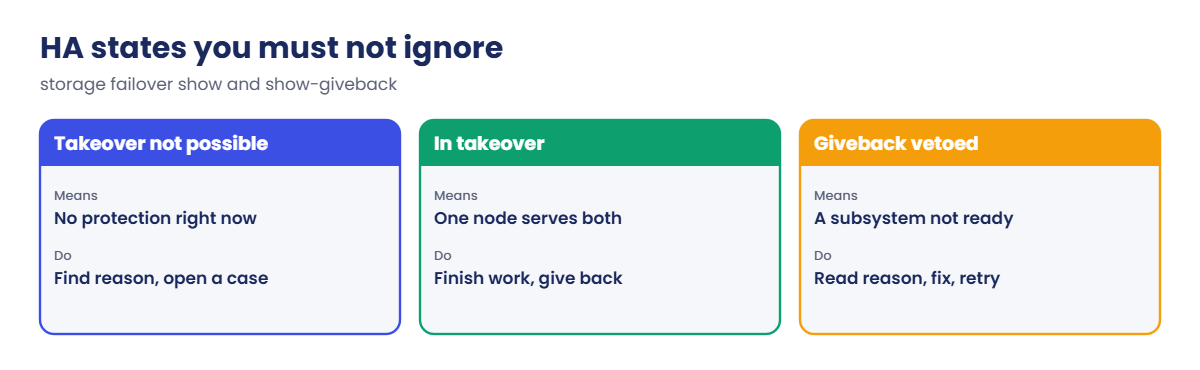
SnapMirror and takeover failures are protection features that have stopped working: a relationship that is unhealthy or lagging, or an HA pair where storage failover show says takeover isn’t possible or a giveback is vetoed.
In Simple Words
A spare key and a neighbour
You keep a spare house key at your sister’s place across town, and you update it whenever you change the lock. If the road between your houses is closed for a week, her key slowly becomes useless, but nothing tells you until the day you’re locked out.
Your next-door neighbour also has a deal with you: if one of you is away, the other keeps an eye on both houses. That only works if you can still talk to each other.
The key at your sister’s is the SnapMirror copy, the road is the intercluster link, and the neighbour is the HA partner with the interconnect as your phone line.
Engineer's View
How an engineer describes it
A SnapMirror relationship has a Mirror State (Snapmirrored, Broken-off, Uninitialized), a Status (Idle, Transferring, Quiesced), a Healthy flag with an Unhealthy Reason, and a Lag Time: how old the newest copy on the destination is. Healthy false or a lag well above the schedule means your RPO is broken, whatever the state says.
Transfers need the clusters peered (cluster peer show Availability Available, Authentication ok), intercluster LIFs on every node, and TCP 11104 and 11105 open between the sites. Most failures are network or firewall changes, a full destination volume or aggregate, or a missing common Snapshot copy.
For HA, storage failover show must say Takeover Possible true. The HA interconnect (or the partner mailbox disks) must work for that. A giveback can be vetoed when a subsystem on the node isn’t ready; storage failover show-giveback shows per aggregate what happened, and -override-vetoes true is a last resort, ideally with NetApp support.
How it works, step by step
1What you see
Mirror: an alert from Unified Manager, a lag far above the schedule, or a DR test that finds old data. HA: an AutoSupport or event about the interconnect, “Takeover is not possible”, or a node stuck in “Waiting for giveback”.
2Where to look for SnapMirror
| Question | Command (on the destination) | Problem looks like |
|---|---|---|
| Is it healthy and current? | snapmirror show -fields state,status,healthy,lag-time,unhealthy-reason | healthy false, lag growing |
| Can the clusters talk? | cluster peer show | Availability Unavailable |
| Is the network path open? | network ping -vserver <cluster> -lif <ic LIF> | no answer |
| Is there room? | volume show, storage aggregate show on the destination | Destination full |
| What happened? | event log show -severity <=ERROR | Peering or transfer errors |
3Where to look for takeover and giveback
storage failover show for Takeover Possible and the reason, storage failover show-giveback for giveback status per aggregate, and the event log. A vetoed giveback is usually retried after fixing the cause; don’t force it on a guess.
4In System Manager
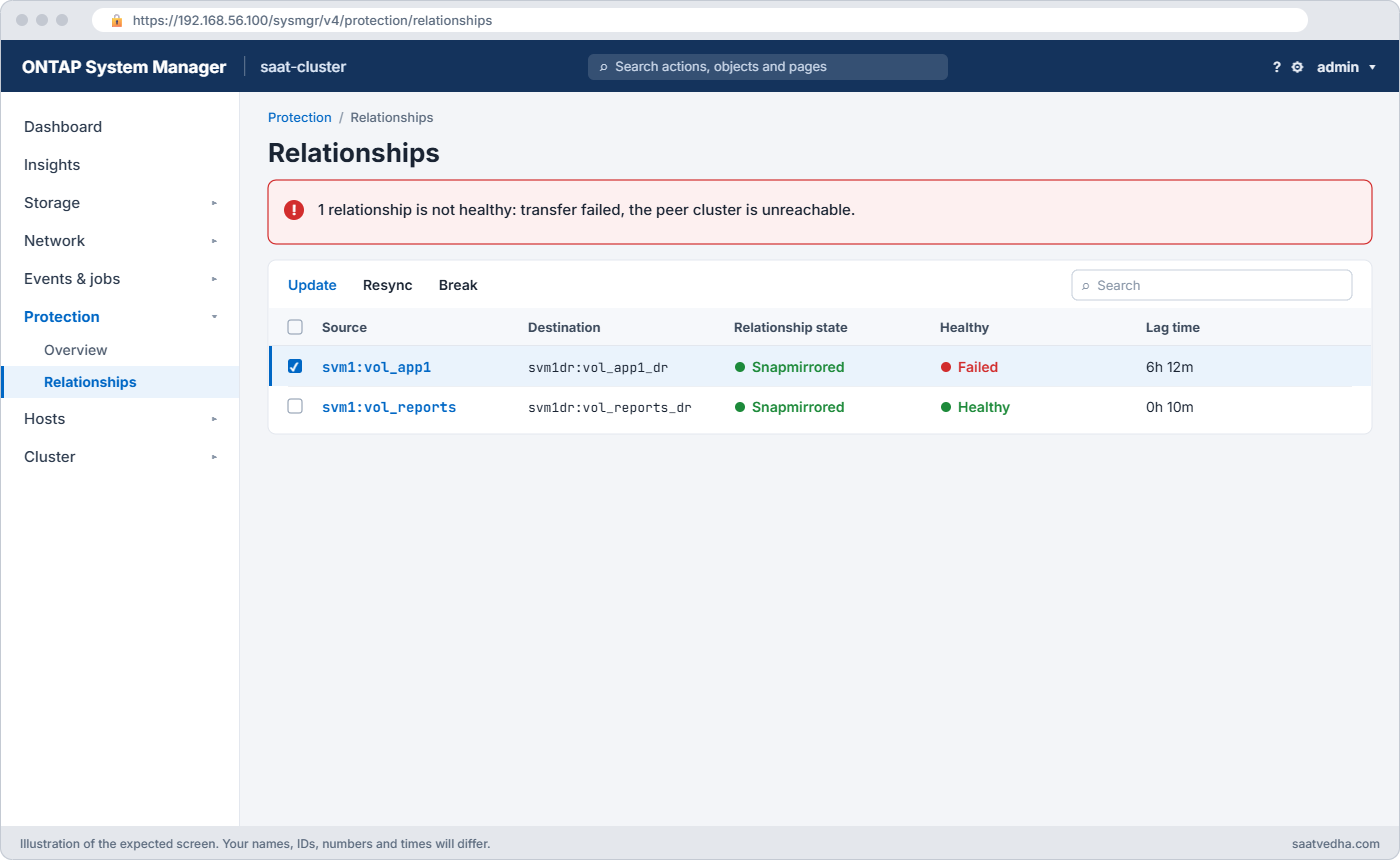
Protection › Relationships lists health and lag, with Update and Resync actions. Cluster › Overview shows each node and its HA state, with Take over and Give back in the node menu.
Hands-on lab: a DR mirror that stops updating
Before you run any command, double-check it
Read every command twice before you press Enter. Check the target: the server name, the user, the disk or device name, the path and the sizes. These commands are for learning and were tested in our lab, not on your system. At work, run the read-only commands first, follow your change process, make sure a backup exists, and ask a second person to check anything that changes or deletes data. You run them at your own risk.
This lab uses the SaatVedha ONTAP practice shell, our own learning tool. It is not NetApp software: real ONTAP output looks like this but is not identical.
1Build the mirror to DR
This is the setup from the peering and SnapMirror lessons, split into five small files because some commands run on the DR cluster (--cluster saat-dr) and some on production. Start from setup-p4.txt, then create the files below and run them in this order.
dr-1.txt (this one runs on the DR cluster):
storage aggregate create -aggregate aggr1_dr -node saat-dr-01 -diskcount 8 -disktype SAS
vserver create -vserver svm1dr -aggregate aggr1_dr -rootvolume-security-style unix
network interface create -vserver saat-dr -lif ic1 -service-policy default-intercluster -home-node saat-dr-01 -home-port e0e -address 192.168.57.140 -netmask 255.255.255.0prod-1.txt (lines starting with > answer the passphrase prompts):
network interface create -vserver saat-cluster -lif ic1 -service-policy default-intercluster -home-node saat-cluster-01 -home-port e0e -address 192.168.56.140 -netmask 255.255.255.0
network interface create -vserver saat-cluster -lif ic2 -service-policy default-intercluster -home-node saat-cluster-02 -home-port e0e -address 192.168.56.141 -netmask 255.255.255.0
cluster peer create -address-family ipv4 -peer-addrs 192.168.57.140
> SaatPeer#2026
> SaatPeer#2026dr-2.txt:
cluster peer create -address-family ipv4 -peer-addrs 192.168.56.140,192.168.56.141
> SaatPeer#2026
> SaatPeer#2026prod-2.txt:
vserver peer create -vserver svm1 -peer-vserver svm1dr -applications snapmirror -peer-cluster saat-drdr-3.txt:
vserver peer accept -vserver svm1dr -peer-vserver svm1
volume create -vserver svm1dr -volume vol_app1_dr -aggregate aggr1_dr -size 60g -type DP
snapmirror create -source-path svm1:vol_app1 -destination-path svm1dr:vol_app1_dr -policy MirrorAllSnapshots -schedule hourly
snapmirror initialize -destination-path svm1dr:vol_app1_dr
simctl tick 2
snapmirror showpython ontapsim.py --cluster saat-dr --run dr-1.txt
python ontapsim.py --run prod-1.txt
python ontapsim.py --cluster saat-dr --run dr-2.txt
python ontapsim.py --run prod-2.txt
python ontapsim.py --cluster saat-dr --run dr-3.txtThe last file ends with:
Source Destination Mirror Relationship Total Last
Path Type Path State Status Progress Healthy Updated
----------- ---- ------------ ------- -------------- --------- ------- --------
svm1:vol_app1
XDP svm1dr:vol_app1_dr
Snapmirrored
Idle - true 06:59:54✅ Checkpoint: The relationship is Snapmirrored and Healthy true.
2The WAN link fails
Log in to the DR cluster (python ontapsim.py --cluster saat-dr) and let six hours pass with the link down:
simctl break sm-link-down
simctl tick 6
snapmirror show -fields state,status,healthy,lag-timeYou should see this:
source-path destination-path state status healthy lag-time
------------- ------------------ ------------ ------ ------- --------
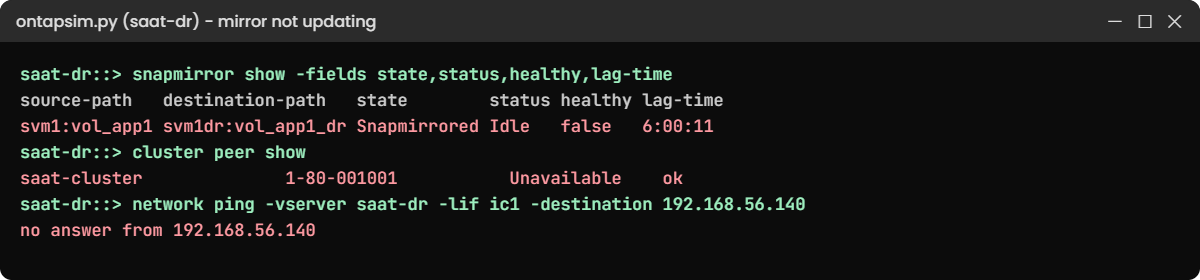
svm1:vol_app1 svm1dr:vol_app1_dr Snapmirrored Idle false 6:00:11The state still says Snapmirrored, which fools people. Healthy is false and the copy is six hours old on an hourly schedule: your RPO is already six times worse than promised.
✅ Checkpoint: healthy is false and lag-time is about 6 hours.
3Find out why
snapmirror show -destination-path svm1dr:vol_app1_dr -instance
cluster peer show
snapmirror update -destination-path svm1dr:vol_app1_dr
network ping -vserver saat-dr -lif ic1 -destination 192.168.56.140You should see this (instance output shortened):
Healthy: false
Unhealthy Reason: Scheduled update failed to start. (Transfer failed to connect to the source cluster.)
Lag Time: 6:00:11
...
saat-dr::> cluster peer show
Peer Cluster Name Cluster Serial Number Availability Authentication
------------------------- --------------------- -------------- --------------
saat-cluster 1-80-001001 Unavailable ok
saat-dr::> snapmirror update -destination-path svm1dr:vol_app1_dr
Error: command failed: Transfer failed to start: unable to connect to the source cluster saat-cluster.
saat-dr::> network ping -vserver saat-dr -lif ic1 -destination 192.168.56.140
no answer from 192.168.56.140The unhealthy reason, the peer showing Unavailable and a ping with no answer from the intercluster LIF all say the same thing: the path between the sites is down. That’s a call to the network team, with the exact LIF IPs and ports 11104 and 11105.
✅ Checkpoint: cluster peer show says Unavailable.
4Link restored: update and confirm
simctl fix sm-link-down
cluster peer show
snapmirror update -destination-path svm1dr:vol_app1_dr
simctl tick 1
snapmirror showYou should see this:
Peer Cluster Name Cluster Serial Number Availability Authentication
------------------------- --------------------- -------------- --------------
saat-cluster 1-80-001001 Available ok
saat-dr::> snapmirror update -destination-path svm1dr:vol_app1_dr
Operation is queued: snapmirror update of destination "svm1dr:vol_app1_dr".
...
svm1:vol_app1
XDP svm1dr:vol_app1_dr
Snapmirrored
Idle - true 07:00:05Don’t wait for the next scheduled update; run one by hand and check Healthy and Last Updated. Only a fresh, healthy copy counts.
✅ Checkpoint: Healthy is true again with a new Last Updated time.
Try it yourself: Open the SnapMirror task in the Command Builder.
Break It, Then Fix It
Now the HA side, on the production cluster (python ontapsim.py).
1The interconnect fails
simctl break ic-down
storage failover show
storage failover takeover -ofnode saat-cluster-02You’ll get this:
Takeover
Node Partner Possible State Description
--------------- --------------- -------- -------------------------------------
saat-cluster-01 saat-cluster-02 false Connected to saat-cluster-02,
Takeover is not possible: The HA
interconnect is down
saat-cluster-02 saat-cluster-01 false Connected to saat-cluster-01,
Takeover is not possible: The HA
interconnect is down
2 entries were displayed.
saat-cluster::> storage failover takeover -ofnode saat-cluster-02
Error: command failed: Takeover is not possible: Connected to saat-cluster-01, Takeover is not possible: The HA interconnect is downUsers notice nothing, but if either node fails now, its data goes offline. On real hardware this means a cable, a module or a card, so open a NetApp case at once; the practice shell’s simctl fix stands in for the repair.
✅ Checkpoint: Takeover Possible is false on both nodes.
2Repaired: planned takeover, then a giveback that is refused
simctl fix ic-down
storage failover takeover -ofnode saat-cluster-02
simctl tick 1
simctl break giveback-veto
storage failover giveback -ofnode saat-cluster-02
storage failover show-givebackAnswer y to the takeover warning. Then you’ll get this:
Error: command failed: Giveback vetoed: Giveback of aggregate is vetoed: Cannot send volume state to partner. Fix the cause and retry, or use -override-vetoes true only if NetApp support tells you to.
saat-cluster::> storage failover show-giveback
Partner Giveback
Node Aggregate Status
-------------- ------------------------- ------------------------------
saat-cluster-01
aggr0_saat_cluster_02 Not attempted yet
saat-cluster-01
aggr1_02 Not attempted yet
saat-cluster-02
No aggregates to give back
3 entries were displayed.Node 01 still serves node 02’s aggregates, so you’re running on one node with no protection. Read the veto reason and the event log, fix that cause, and retry; forcing past a veto can cause a disruption.
✅ Checkpoint: Giveback is vetoed and node 02’s aggregates are still on node 01.

3Fix the cause and give back
simctl fix giveback-veto
storage failover giveback -ofnode saat-cluster-02
simctl tick 1
storage failover show
network interface show -is-home falseYou should see this:
Takeover
Node Partner Possible State Description
--------------- --------------- -------- -------------------------------------
saat-cluster-01 saat-cluster-02 true Connected to saat-cluster-02
saat-cluster-02 saat-cluster-01 true Connected to saat-cluster-01
2 entries were displayed.
saat-cluster::> network interface show -is-home false
There are no entries matching your query.✅ Checkpoint: Takeover Possible is true on both nodes and every LIF is home.
Try it yourself: Open the planned takeover and giveback task in the Command Builder.
This happened at work
The DR copy that was three days old
A dairy cooperative in Tirupati mirrored its ERP and billing volumes every hour to a DR cluster in another city. Their internet provider changed the MPLS link one Thursday, and the new firewall policy at the DR site allowed ping between the sites but not TCP 11104 and 11105.
The SnapMirror alerts went to the e-mail address of an engineer who had left the company. Nobody noticed until the quarterly DR drill on Sunday, when the team broke the mirror and found the newest data was from Thursday afternoon.
The drill was stopped, the provider opened the two ports, and the mirrors caught up within a few hours. The cooperative moved alerts to a team mailbox, added a daily check of snapmirror show -fields healthy,lag-time, and now tests a real transfer, not just ping, after every WAN change.
Common mistakes and troubleshooting
| Mistake | What happens | Do this instead |
|---|---|---|
| Trusting “Snapmirrored” alone | A copy days old looks fine | Watch Healthy and Lag Time against the schedule |
| Testing the WAN with ping only | Ping works, transfers still fail | Check 11104/11105 and run snapmirror update |
| Alerts to one person’s mailbox | Nobody sees the warning | Send to a team address or monitoring tool |
| Forcing a giveback past a veto | Possible disruption on the node | Fix the veto reason; override only with support |
| Ignoring “Takeover is not possible” | The next node failure becomes an outage | Treat it as urgent and open a case |
Interview questions
Click a question to open it. Each one is written the way an interviewer would ask it. Under it you will see why they ask it and one way you could answer, in your own words.
Fresher level
1. What does SnapMirror lag time tell you?
Why they ask this: They want to know you understand RPO in practice.
How you might answer: It’s how old the newest copy on the destination is. If the schedule is hourly and the lag is six hours, I could lose up to six hours of data in a disaster, even if the state still says Snapmirrored.
2. What does “Takeover Possible false” mean, and why does it matter?
Why they ask this: They’re checking basic HA awareness.
How you might answer: It means that if one node fails, its partner can’t take over its storage right now. Users don’t feel anything yet, but the next failure becomes an outage, so I’d find the reason in storage failover show and fix it fast.
2–5 years experience
3. A SnapMirror relationship shows Healthy false. Walk me through your checks.
Why they ask this: They want a structured path from symptom to cause.
How you might answer: I’d read the unhealthy reason in snapmirror show -instance, then check cluster peer show for availability and ping between intercluster LIFs. If the peer is fine, I’d check space on the destination and the event log, then run a manual snapmirror update to confirm the fix.
4. A giveback is vetoed during a maintenance window. What do you do?
Why they ask this: They’re testing patience and judgement under time pressure.
How you might answer: I’d run storage failover show-giveback and read the event log to find which subsystem vetoed and why. Usually it’s a busy process or a CIFS or disk issue I can fix and retry; I’d only use -override-vetoes after understanding the impact, and preferably with NetApp support on the line.
Senior level
5. How would you make sure your DR copies are really usable, not just “green”?
Why they ask this: They want monitoring plus proof through testing.
How you might answer: I’d alert on Healthy false and lag above twice the schedule, send alerts to a team channel, and review lag daily. Then I’d run regular DR tests using FlexClone copies of the destination, so I prove the data and the application work without breaking the mirror.
6. A network team plans a firewall migration between your sites. What do you ask for?
Why they ask this: They want to see you protect replication during changes you don’t own.
How you might answer: I’d give them the intercluster LIF IPs on both clusters and ask for TCP 11104 and 11105 both ways, plus ICMP. After the change I’d check cluster peer show and run a manual SnapMirror update on a few relationships before signing off.
Quick quiz
Q1. A relationship shows Snapmirrored, Healthy false, lag 6 hours, schedule hourly. Is DR OK?
- Yes, the state is Snapmirrored
- No, the copy is 6 hours old and updates are failing
- Yes, lag doesn’t matter
- Only if the volume is online
Show answer
B — health and lag show the real protection level.
Q2. Which ports must be open between clusters for SnapMirror?
- TCP 22 and 80
- TCP 11104 and 11105
- UDP 123
- TCP 445
Show answer
B — intercluster management and data use 11104 and 11105.
Q3. cluster peer show says Unavailable. What does it suggest?
- The source volume is full
- The clusters can’t reach each other over the intercluster network
- The passphrase expired
- The schedule is wrong
Show answer
B — the peer link itself is down.
Q4. Which command shows giveback status per aggregate?
- storage failover show-giveback
- storage aggregate show
- cluster show
- snapmirror show
Show answer
A — it lists each partner aggregate and its giveback status.
Q5. When should you use -override-vetoes on a giveback?
- Always, to save time
- Only after understanding the veto, ideally with NetApp support
- Never under any condition
- Only on weekends
Show answer
B — forcing a giveback can disrupt clients.
Quick recap
- Check SnapMirror with healthy, lag-time and unhealthy-reason, not the state alone.
- Broken transfers are mostly network: peer availability, intercluster LIFs, ports 11104 and 11105.
- After a fix, run a manual update and confirm a fresh, healthy copy.
- Takeover not possible is urgent even when users feel nothing.
- A vetoed giveback: read show-giveback and the events, fix the cause, then retry.
Next lesson
Lesson 55: Final project: build it, break it, fix it → You’ll build a full small environment and fix several faults on your own.
Further reading: ONTAP SnapMirror troubleshooting
Want to go deeper into ONTAP SnapMirror troubleshooting? NetApp’s ONTAP concepts guide explains HA pairs, cluster peering and data protection, the three things this lesson checks. You can also see the full plan for this course on the NetApp ONTAP Storage Administration course page.
