What NetApp ONTAP is and where you’ll meet it

Walk into almost any bank, hospital or big company data centre in India and you’ll find NetApp ONTAP storage somewhere in the racks. It holds file shares for thousands of users, LUNs for databases and VMware, and the backup copies that save the day after a ransomware attack.

This course takes you from “what is that box?” to running and fixing ONTAP like an experienced storage engineer. This first lesson gives you the big picture: what ONTAP is, which NetApp products run it, and how a cluster looks when you log in for the first time.

You won’t change anything today. You’ll log in to a practice cluster and look around, the same way a good engineer does on their first day with a new system.

Where this lesson fits

Lesson 1 of 56 in NetApp ONTAP Storage Administration · Phase 0: Start here · Next: Lesson 2, your lab setup

TimeYou needBy the end you can
45 minutesA Windows, macOS or Linux laptop with Python 3.8 or newerExplain what ONTAP is, name the platforms it runs on, and read the first health commands on a cluster

What it is, in one line

ONTAP is NetApp’s storage operating system: it turns a pair (or more) of controllers and their disks into one managed system that serves files (NFS, SMB), blocks (iSCSI, FC, NVMe) and objects (S3) to your servers.

In Simple Words

A housing society for your data

Think of a big housing society in a city. There are several buildings, and they’re built in pairs that share a back-up water tank and generator, so if one building’s pump fails the neighbour keeps water flowing to both.

The society office manages everything in one place: who lives where, which gate is open, and the rules for each tenant. Each tenant family gets its own flat with its own front door and name plate, and they never see inside the neighbours’ flats even though they share the same land.

ONTAP is that society office. The buildings are controllers (nodes), the pairs are HA pairs, the land and floors are disks, and the tenant flats are storage virtual machines (SVMs) that your servers connect to.

Engineer's View

How an engineer describes it

ONTAP 9 is a clustered, scale-out storage OS. A cluster is made of nodes (controllers) that always come in HA pairs: each node can take over its partner’s disks if the partner fails. Nodes talk to each other over a private cluster interconnect network.

A cluster can grow to 24 nodes for NAS workloads and 12 nodes when it serves SAN, and you manage the whole thing as one system.

Under the hood, disks are grouped into RAID groups (RAID-DP or RAID-TEC), RAID groups form aggregates (System Manager calls them local tiers), and aggregates hold FlexVol volumes. Volumes belong to an SVM, which owns its own network addresses (LIFs) and protocol settings. The WAFL file system makes snapshots almost free, which is why SnapMirror replication and fast restores are a big part of daily work.

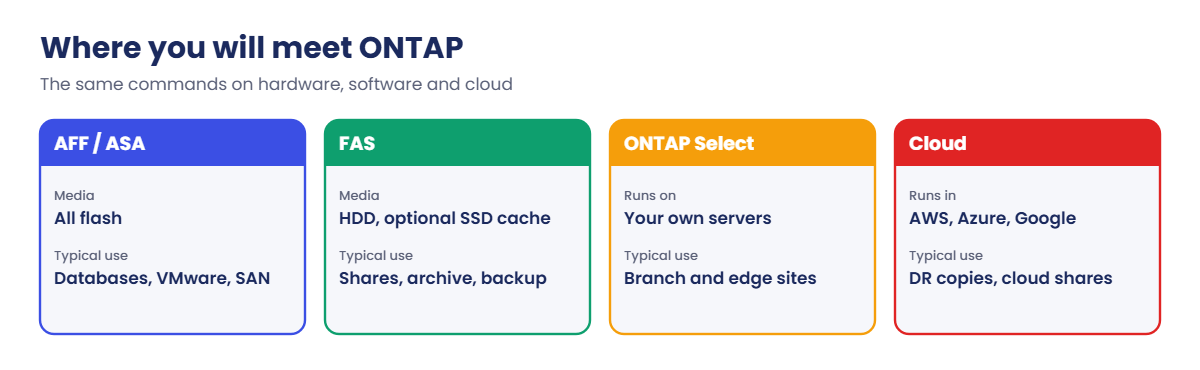
You can run ONTAP on NetApp hardware (AFF, ASA and FAS systems), as software on your own servers (ONTAP Select), or in the public cloud (Cloud Volumes ONTAP, Amazon FSx for NetApp ONTAP, Azure NetApp Files and Google Cloud NetApp Volumes). The commands you learn here work almost the same in all of them.

How it works, step by step

1Disks sit in shelves

Drives (SSDs or hard disks) live in the controller chassis or in external disk shelves. Every disk is owned by one node, which you’ll check with storage disk show.

2Disks become RAID groups and aggregates

A node groups its disks into RAID groups with two (RAID-DP) or three (RAID-TEC) parity disks, and one or more RAID groups make an aggregate. The aggregate is the pool of space that volumes are carved from.

NetApp ONTAP storage layers from disks to clients

3An SVM gets volumes, addresses and protocols

A storage virtual machine is the “server” your clients actually see. It has volumes (for files, or to hold LUNs), logical network interfaces (LIFs) with IP addresses or FC WWPNs, and protocol services such as NFS, SMB or iSCSI.

4Clients connect through LIFs

A Linux server mounts a volume over NFS, a Windows user maps an SMB share, or a database server logs in over iSCSI or FC and sees a LUN as a local disk. If a node fails, its partner takes over its aggregates and the NAS LIFs move, so clients keep working.

NetApp ONTAP storage platforms: AFF, ASA, FAS, ONTAP Select and cloud

5You manage it from one place

Every task can be done in System Manager (the web GUI at the cluster management IP), in the CLI over SSH, or through the REST API. This course shows the GUI path and the CLI command for each job, and the labs use the CLI because that’s what you’ll lean on when things go wrong at 2 a.m.

Where you’ll meet ONTAPWhat it isTypical use
AFF A-SeriesAll-flash controllers for fast, mixed workloadsDatabases, VMware, file shares
AFF C-SeriesAll-flash with high-capacity (QLC) drivesLarge file shares, backup targets that still need flash
ASAAll-flash systems built only for SANBlock storage for databases and hypervisors
FASHybrid or disk-based systems (HDD, optional SSD cache)Home shares, archives, backup copies
ONTAP SelectONTAP as a virtual machine on your own serversBranch offices, edge sites
Cloud Volumes ONTAP and cloud servicesONTAP running in AWS, Azure or Google CloudDR copies in the cloud, cloud file shares

NetApp also sells products that don’t run ONTAP, such as E-Series and EF-Series (SANtricity OS) and StorageGRID (object storage). You may still meet older SolidFire or NetApp HCI systems running Element software. This course is about ONTAP only.

Hands-on lab: your first look at an ONTAP cluster

Before you run any command, double-check it

Read every command twice before you press Enter. Check the target: the server name, the user, the disk or device name, the path and the sizes. These commands are for learning and were tested in our lab, not on your system. At work, run the read-only commands first, follow your change process, make sure a backup exists, and ask a second person to check anything that changes or deletes data. You run them at your own risk.

This lab uses the SaatVedha ONTAP practice shell, our own learning tool. It is not NetApp software: real ONTAP output looks like this but is not identical.

Lesson 2 sets up the full lab with Linux and Windows VMs. Today you only need Python.

1Check Python

Open a terminal (Command Prompt or PowerShell on Windows) and run this:

python --version

You should see something like this:

Python 3.12.6

On macOS and Linux the command is often python3. If you see “not recognized”, install Python from python.org and tick “Add python.exe to PATH” during setup.

✅ Checkpoint: Python prints a version of 3.8 or newer.

2Get the practice shell

Download ontapsim.zip from the practice shell lesson and unzip it into a folder such as C:\ontap-lab (Windows) or ~/ontap-lab (macOS, Linux). Inside you’ll find ontapsim.py and a short README.

3Log in to the cluster

Run this inside that folder:

cd C:\ontap-lab
python ontapsim.py

Log in as admin with the password saatlab1. The password doesn’t show while you type. You should see this:

  -----------------------------------------------------------------
   SaatVedha ONTAP practice shell 1.0  (NOT NetApp software)
   Looks like the ONTAP 9.18.1 clustershell for learning. Real output
   is similar but not identical. Type "help" or "simctl help".
  -----------------------------------------------------------------

login as: admin
admin@192.168.56.100's password:

Last login time: 11/7/2026 10:42:07

saat-cluster::>

The prompt saat-cluster::> tells you the cluster name. On a real system you’d connect with ssh admin@192.168.56.100 (the cluster management IP) and see the same kind of prompt.

✅ Checkpoint: Your prompt reads saat-cluster::>

NetApp ONTAP storage lab: cluster show and storage failover show
Example output from the practice shell. Real ONTAP looks similar but not identical.

4Which version is this, and are the nodes healthy?

version
cluster show
system node show

You should see this:

saat-cluster::> version
NetApp Release 9.18.1: Sat Nov 07 2026 (SaatVedha practice shell 1.0, not NetApp software)

saat-cluster::> cluster show
Node                  Health  Eligibility
--------------------- ------- ------------
saat-cluster-01       true    true
saat-cluster-02       true    true
2 entries were displayed.

saat-cluster::> system node show
Node             Health Eligibility Uptime        Model    Personality Location
---------------- ------ ----------- ------------- -------- ----------- ---------
saat-cluster-01  true   true        12 days 00:00 FAS8300  Unified     Rack A1
saat-cluster-02  true   true        12 days 01:00 FAS8300  Unified     Rack A2
2 entries were displayed.

Two nodes, both healthy and eligible. Health false or Eligibility false on a real cluster is the first thing you’d raise.

✅ Checkpoint: Both nodes show Health true and Eligibility true.

5Are they an HA pair?

storage failover show

You should see this:

                                Takeover
Node            Partner         Possible State Description
--------------- --------------- -------- -------------------------------------
saat-cluster-01 saat-cluster-02 true     Connected to saat-cluster-02
saat-cluster-02 saat-cluster-01 true     Connected to saat-cluster-01
2 entries were displayed.

Each node names the other as its partner, and Takeover Possible is true, so either one can carry the other’s work if something breaks.

✅ Checkpoint: Takeover Possible is true for both nodes.

6What storage is there?

storage aggregate show
storage shelf show
storage disk show -container-type unassigned

You should see this:

saat-cluster::> storage aggregate show
Aggregate     Size Available Used% State    #Vols Nodes            RAID Status
--------- -------- --------- ----- ------- ------ ---------------- ------------
aggr0_saat_cluster_01
            1.47TB    1.33TB    9% online       1 saat-cluster-01  raid_dp,
                                                                   normal
aggr0_saat_cluster_02
            1.47TB    1.33TB    9% online       1 saat-cluster-02  raid_dp,
                                                                   normal
2 entries were displayed.

saat-cluster::> storage shelf show
                                               Module
Shelf Name Shelf ID Serial Number    Model     Type   Status
---------- -------- ---------------- --------- ------ --------
1.0               0 SHFMS100110      DS224C    IOM12  Normal
1.1               1 SHFMS100111      DS224C    IOM12  Normal
2 entries were displayed.

saat-cluster::> storage disk show -container-type unassigned
                     Usable           Disk  Container   Container
Disk                   Size Shelf Bay Type  Type        Name                  Owner
---------------- ---------- ----- --- ----- ----------- --------------------- ----------------
1.0.22               1.63TB     0  22 SAS   unassigned  -                     -
1.0.23               1.63TB     0  23 SAS   unassigned  -                     -
2 entries were displayed.

Only the two root aggregates exist so far, one per node. They hold each node’s own system volume (vol0), and you never put user data on them. You’ll build data aggregates in Lesson 13.

Two disks have no owner yet; you’ll fix that in Lesson 11.

✅ Checkpoint: You can name the two root aggregates and the two unassigned disks.

7Who can clients talk to?

vserver show
network interface show -vserver saat-cluster

You should see this:

saat-cluster::> vserver show
                               Admin      Operational Root
Vserver     Type    Subtype    State      State       Volume     Aggregate
----------- ------- ---------- ---------- ----------- ---------- ----------
saat-cluster
            admin   -          -          -           -          -
saat-cluster-01
            node    -          -          -           -          -
saat-cluster-02
            node    -          -          -           -          -
3 entries were displayed.

saat-cluster::> network interface show -vserver saat-cluster
            Logical    Status     Network            Current         Current Is
Vserver     Interface  Admin/Oper Address/Mask       Node            Port    Home
----------- ---------- ---------- ------------------ --------------- ------- ----
saat-cluster
            cluster_mgmt
                       up/up      192.168.56.100/24  saat-cluster-01 e0M     true
            saat-cluster-01_mgmt1
                       up/up      192.168.56.101/24  saat-cluster-01 e0M     true
            saat-cluster-02_mgmt1
                       up/up      192.168.56.102/24  saat-cluster-02 e0M     true
3 entries were displayed.

There’s an admin SVM for the cluster and one node SVM per node, but no data SVM yet, so no client could connect today. The three LIFs are management addresses: one for the whole cluster and one per node.

✅ Checkpoint: You can point to the cluster management IP, 192.168.56.100.

8Log out

exit

The practice shell saves the lab in ontapsim-state.json, so your work is still there next time.

Break It, Then Fix It

Two small mistakes that every beginner makes on day one. Make them on purpose so they don’t scare you later.

1Wrong password

Start the shell again and type a wrong password, for example saatlab.

You’ll get this:

login as: admin
admin@192.168.56.100's password:
Access denied
login as:

Retype it carefully. On a real cluster, repeated failures can lock an account (the admin account itself is never locked), and every failed attempt is written to the audit log, so don’t guess passwords on production.

✅ Checkpoint: You logged in after the failed attempt.
NetApp ONTAP storage lab: typo and ambiguous command errors
A typo and an ambiguous short form, then the short form that works.

2A typo in a command

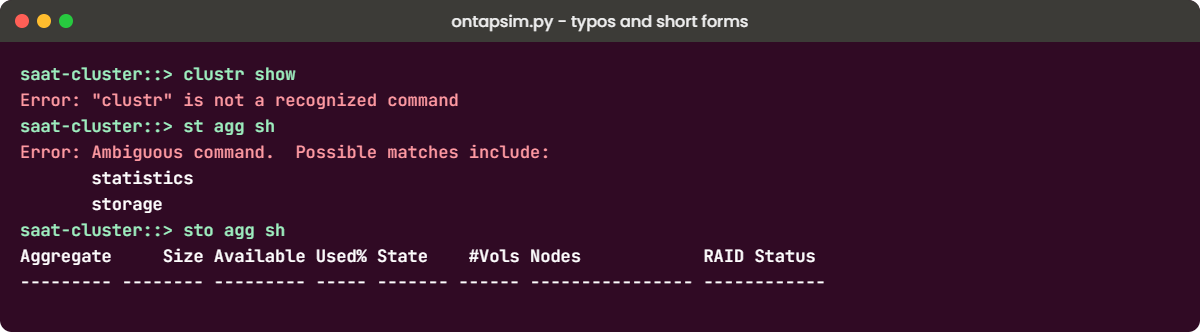
clustr show

You’ll get this:

Error: "clustr" is not a recognized command

ONTAP accepts any unique start of a word, and ? lists what’s possible at each level. Try these three:

cl ?
st agg sh
sto agg sh

cl ? lists what sits under cluster. st agg sh fails with “Ambiguous command” because st could mean statistics or storage, while sto agg sh matches only one command, so it runs storage aggregate show. Use short forms for typing, but write full commands in change records and scripts so the next person can read them.

✅ Checkpoint: sto agg sh prints the aggregate table.

This happened at work

“Just restart the NetApp”

A logistics company in Pune had a new storage admin, three weeks into the job, when the warehouse team called one afternoon. Their scanning app was slow and someone said, “The NetApp is hanging, just restart it.” He found the Service Processor address in an old document, logged in and power-cycled node 1.

The partner node took over as designed, but the takeover wasn’t planned, so SMB sessions on that node dropped. The scanning app didn’t reconnect by itself and the warehouse stopped for about 20 minutes until the app servers were restarted. Later the team found the real cause of the slowness: an antivirus full scan running on the Windows file server in front of the share.

Nothing was wrong with ONTAP. The team added a rule that nobody restarts a storage node without a change record, and every “storage is slow” call now starts with the read-only health check you just ran: cluster show, storage failover show, storage aggregate show and the event log.

Common mistakes and troubleshooting

MistakeWhat happensDo this instead
Calling the whole system “the NetApp” and treating it like one boxYou restart or change the wrong thingLearn the parts: cluster, nodes, HA pairs, SVMs. Check which node and SVM a problem is on
Putting volumes on aggr0The node root volume runs short of space and the node can become unhealthyKeep root aggregates for vol0 only. Create data aggregates
Using short command forms in change recordsReviewers can’t read or check the planWrite full commands in documents; short forms only at the prompt
Changing things on day one before lookingSurprises, outages, blameRun the read-only health commands first and save the output
Mixing up ONTAP with E-Series or StorageGRIDWrong documentation, wrong commandsCheck what you have: run version on ONTAP; E-Series uses SANtricity, StorageGRID uses its own Grid Manager

Interview questions

Click a question to open it. Each one is written the way an interviewer would ask it. Under it you will see why they ask it and one way you could answer, in your own words.

Fresher level

1. Can you explain in simple words what NetApp ONTAP is?

Why they ask this: They want to see that you understand the basic idea, not just the brand name.

How you might answer: ONTAP is NetApp’s storage operating system. It runs on a pair or more of controllers, groups their disks into RAID-protected aggregates, and serves that space to servers as NFS or SMB shares, or as LUNs over iSCSI, FC or NVMe.

It also gives you snapshots, replication with SnapMirror and storage efficiency like dedupe, and you manage the whole cluster as one system.

2. You log in to a NetApp cluster for the first time. What are the first commands you run?

Why they ask this: They’re checking whether you look before you touch, and whether you know the basic health commands.

How you might answer: I’d start with version, cluster show and system node show to see the release and whether every node is healthy. Then storage failover show to confirm the HA pairs can take over, storage aggregate show for space and RAID status, and the event log for recent errors.

2–5 years experience

3. What’s the difference between AFF, ASA and FAS, and when would you pick each?

Why they ask this: They want to know you can match the platform to the workload, not just recite model names.

How you might answer: AFF is all-flash for mixed workloads like databases, VMware and file shares. ASA is all-flash too, but it’s built only for SAN, so I’d pick it for block-only estates.

FAS uses hard disks, sometimes with SSD cache, so it suits capacity-heavy data like home shares, archives and backup copies where cost per TB matters more than latency.

4. A customer wants a DR copy of their on-prem ONTAP volumes in AWS without buying a second array. What options would you mention?

Why they ask this: They’re testing whether you know ONTAP also runs as software and in the cloud.

How you might answer: I’d mention Cloud Volumes ONTAP or Amazon FSx for NetApp ONTAP as the destination. Both run ONTAP, so we can use SnapMirror from the on-prem cluster and keep the same commands and snapshots. The choice usually comes down to who manages it and the cost model.

Senior level

5. How would you explain ONTAP’s scale-out design to a manager who only knows traditional dual-controller arrays?

Why they ask this: They want to see if you can explain architecture clearly to non-specialists, which senior engineers do all the time.

How you might answer: I’d say a traditional array is one box with two controllers; when it’s full, you buy another box and migrate. With ONTAP we add HA pairs to the same cluster and move volumes between them while users keep working, so it grows without a big migration project.

I’d also mention we still manage it as one system with one set of policies.

6. You’re taking over a NetApp estate from another team. What would you check in your first week?

Why they ask this: They want to see a structured, low-risk approach and an eye for operational risks like backups and support.

How you might answer: First I’d collect the inventory: clusters, releases, nodes, aggregates and how full they are, plus the SVMs and protocols. Then I’d check the risky things: is AutoSupport working, are SnapMirror relationships healthy and current, are there failed disks or nodes without spares, and is the ONTAP release still supported.

I wouldn’t change anything that week except fixing clear risks with the owner’s OK.

Quick quiz

Q1. What is an HA pair in ONTAP?

  1. Two clusters that mirror each other
  2. Two nodes that can take over each other’s storage
  3. Two disks in a RAID 1 mirror
  4. Two SVMs with the same name
Show answer

B — each node in an HA pair can take over its partner’s aggregates if the partner fails.

Q2. Which of these does NOT run ONTAP?

  1. AFF C-Series
  2. ONTAP Select
  3. StorageGRID
  4. Amazon FSx for NetApp ONTAP
Show answer

C — StorageGRID is NetApp’s object storage product with its own software.

Q3. What do clients actually connect to?

  1. The aggregate
  2. The RAID group
  3. An SVM through its LIFs
  4. The shelf
Show answer

C — clients reach an SVM through its logical interfaces (LIFs) and protocols.

Q4. What is aggr0 on each node used for?

  1. User file shares
  2. The node’s root volume (vol0)
  3. SnapMirror copies
  4. FlexClone volumes
Show answer

B — the root aggregate holds the node root volume; keep data off it.

Q5. Which command shows whether a node can take over its partner?

  1. cluster show
  2. storage failover show
  3. version
  4. vserver show
Show answer

B — storage failover show lists each node, its partner and Takeover Possible.

Quick recap

  • ONTAP is NetApp’s storage OS; it serves files, blocks and objects from one cluster.
  • Nodes come in HA pairs; clusters grow by adding pairs.
  • Disks, then RAID groups, then aggregates, then volumes in SVMs, then LIFs, then clients.
  • It runs on AFF, ASA and FAS hardware, as ONTAP Select, and in the cloud.
  • First day on any cluster: version, cluster show, storage failover show, storage aggregate show.

Next lesson

Lesson 2: Your lab: ONTAP practice shell and VirtualBox hosts → You’ll set up the practice cluster properly and build the Linux and Windows VMs used in later labs.

Further reading: NetApp ONTAP storage

Want to go deeper into NetApp ONTAP storage? Read NetApp’s own ONTAP concepts guide for the official description of clusters, HA pairs and SVMs. You can also see the full plan for this course on the NetApp ONTAP Storage Administration course page.

Scroll to Top

This website uses cookies

We use a few cookies to keep this site working. If you allow it, we also use Google Analytics to count visits so we can improve our lessons. You can accept all, deny the optional ones, or choose what to allow.