Nodes, HA pairs and the cluster interconnect
-
Phase 0: Start here
-
Phase 1: Architecture and foundation
-
Phase 2: Protocols and day-to-day administration
-
Phase 3: Data protection and enterprise integrations
-
Phase 4: Troubleshooting blueprint
-
Phase 5: Final project and career
A storage system that holds a hospital’s scans or a bank’s database can’t stop because one controller has a bad day. ONTAP’s answer is the HA pair: two nodes that watch each other, and either one can carry the other’s work.
In this lesson you’ll see what links the two nodes of a pair, how a takeover and a giveback work, and how the cluster interconnect ties every node together. Then you’ll run a planned takeover in the practice shell and break the HA link on purpose.
Where this lesson fits
Lesson 4 of 56 in NetApp ONTAP Storage Administration · Phase 1: Architecture and foundation · Before this: Lesson 3, scale-up vs scale-out · Next: Lesson 5, cluster, management and data networks
| Time | You need | By the end you can |
|---|---|---|
| 50 minutes | The practice shell from Lesson 2 (Python 3.8 or newer) | Read storage failover show, explain HA interconnect vs cluster interconnect, and run a planned takeover and giveback |
What it is, in one line
An HA pair is two ONTAP nodes connected to the same disks, each mirroring the other’s pending writes, so that if one node fails the partner takes over its storage and keeps serving data.
In Simple Words
Two shopkeepers, one shared godown
Picture two shops side by side in a market, run by two brothers. Each has his own counter and his own customers, but the goods for both shops sit in one shared godown at the back, and both of them have a key.
Every time one brother takes an order, he writes it in his own notebook and shouts it across to the other, who writes it down too. If one brother falls ill, the other opens both counters, takes the half-written orders from his own copy, and nobody’s order gets lost. When the sick brother comes back, the other hands his counter back to him.
The brothers are the two nodes, the godown is the shared disk shelves, and the shouting across is the HA interconnect.
Engineer's View
How an engineer describes it
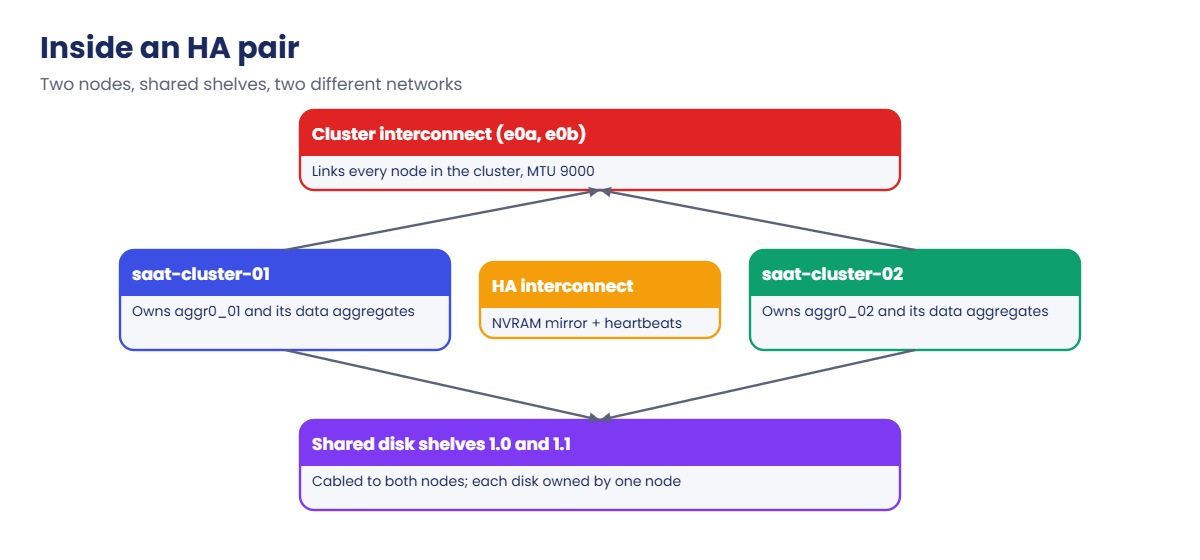
Both nodes of an HA pair are cabled to every disk shelf of the pair (usually with multipath SAS or NVMe connections), but each disk is owned by one node at a time. Incoming writes land in each node’s NVRAM (non-volatile memory) and are mirrored to the partner’s NVRAM over the HA interconnect before the client gets an acknowledgement. In single-chassis systems such as the FAS8300 that link runs inside the chassis; on some newer platforms the HA traffic shares the cluster network ports.
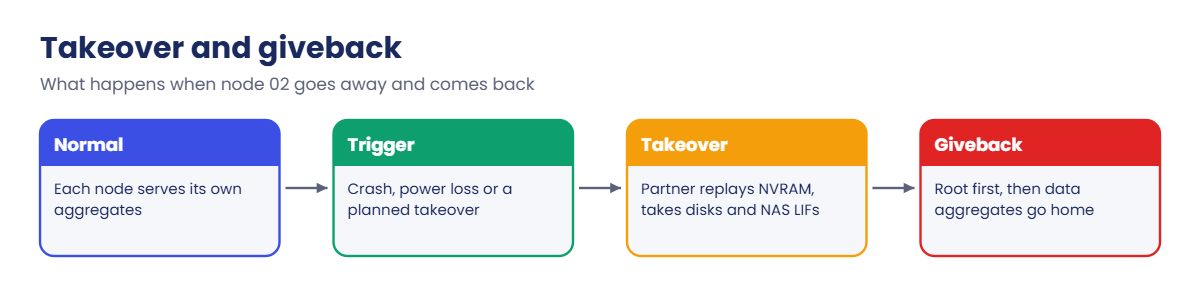
When a node fails, its partner reads the mirrored NVRAM log, takes ownership of the failed node’s disks and aggregates, and brings its NAS LIFs up on its own ports. This is a takeover. The reverse step, where the repaired node gets its aggregates back, is a giveback.
Root aggregates use the CFO policy (they move with the node), and data aggregates use SFO (they’re handed over one by one), which is why giveback returns the root first.
The cluster interconnect is a different network. It’s a private, dedicated set of ports (here e0a and e0b, MTU 9000) that links every node in the cluster, through two cluster switches or, in a two-node cluster, directly cabled as a switchless cluster. It carries cluster management traffic and data that has to cross between nodes, for example when a client hits a LIF on node 01 for a volume on node 02.
How it works, step by step
1Each node owns its own disks
In normal running, node 01 serves its aggregates and node 02 serves its own. Both are busy, so you get the work of two controllers, not one active and one waiting.
2Writes are mirrored before they are confirmed
A write goes into the owning node’s NVRAM and a copy goes to the partner over the HA interconnect. Only then does the client get “write done”. The disks are updated later, in batches, at a consistency point.
3The partners watch each other
Each node sends heartbeats to its partner over the HA interconnect and also writes its state to mailbox disks on the shelves. With hardware-assisted takeover, the Service Processor can tell the partner at once that its node lost power or crashed, so takeover starts sooner.
4Takeover
If the heartbeats stop (a crash, a power loss) or you run storage failover takeover for maintenance, the partner replays the mirrored writes, takes the disks and aggregates, and moves the NAS LIFs to its own ports. SAN hosts keep working through their paths to the surviving node.
5Giveback
Once the repaired node boots, it waits with the state “Waiting for giveback”. You run storage failover giveback, the aggregates go home, and the LIFs return to their home ports (revert any that don’t).
In System Manager you’ll find the same actions under Cluster › Overview: open the menu (⋮) next to a node and choose Take over or Give back. The HA status shows on the dashboard.

| HA interconnect | Cluster interconnect | |
|---|---|---|
| Links | The two nodes of one HA pair | Every node in the cluster |
| Carries | NVRAM mirroring and heartbeats | Cluster traffic, data between nodes, replicated database (RDB) |
| You see it with | storage failover show | network port show -ipspace Cluster |
| If it breaks | Takeover is no longer possible | Nodes can lose contact with the cluster |
Hands-on lab: a planned takeover and giveback
Before you run any command, double-check it
Read every command twice before you press Enter. Check the target: the server name, the user, the disk or device name, the path and the sizes. These commands are for learning and were tested in our lab, not on your system. At work, run the read-only commands first, follow your change process, make sure a backup exists, and ask a second person to check anything that changes or deletes data. You run them at your own risk.
This lab uses the SaatVedha ONTAP practice shell, our own learning tool. It is not NetApp software: real ONTAP output looks like this but is not identical.
You need nothing new for this lab, only the practice shell. Start from a clean lab so your output matches the one below.
1Reset and log in
python ontapsim.py -c "simctl reset"
python ontapsim.pyLog in as admin with the password saatlab1.
✅ Checkpoint: Your prompt reads saat-cluster::>
2Look at the HA pair
storage failover show
storage failover show -instanceYou should see this:
saat-cluster::> storage failover show
Takeover
Node Partner Possible State Description
--------------- --------------- -------- -------------------------------------
saat-cluster-01 saat-cluster-02 true Connected to saat-cluster-02
saat-cluster-02 saat-cluster-01 true Connected to saat-cluster-01
2 entries were displayed.
saat-cluster::> storage failover show -instance
Node: saat-cluster-01
Partner Name: saat-cluster-02
Takeover Enabled: true
Takeover Possible: true
Auto Giveback: false
HA Mode: ha
State Description: Connected to saat-cluster-02
...Takeover Possible is the line that matters most. If it ever says false on a real cluster, your safety net is gone, even though users notice nothing yet.
✅ Checkpoint: Both nodes show Takeover Possible true.
3Two-node cluster checks
cluster ha show
network port show -ipspace ClusterYou should see this:
saat-cluster::> cluster ha show
High-Availability Configured: true
High-Availability Backend Configured (MBX): true
saat-cluster::> network port show -ipspace Cluster
Node: saat-cluster-01
Ignore
Speed(Mbps) Health Health
Port IPspace Broadcast Domain Link MTU Admin/Oper Status Status
--------- ------------ ---------------- ---- ---- ----------- -------- ------
e0a Cluster Cluster up 9000 auto/10000 healthy false
e0b Cluster Cluster up 9000 auto/10000 healthy false
Node: saat-cluster-02
...
4 entries were displayed.cluster ha show only applies to two-node clusters, where it must say true so the cluster stays up when one node is down. The Cluster ports are the cluster interconnect: two per node, MTU 9000.
✅ Checkpoint: All four Cluster ports show Link up and healthy.
4Planned takeover of node 02
storage failover takeover -ofnode saat-cluster-02Answer y to the warning, then run:
storage failover show
storage aggregate show
network interface show -vserver saat-clusterYou should see this:
saat-cluster::> storage failover show
Takeover
Node Partner Possible State Description
--------------- --------------- -------- -------------------------------------
saat-cluster-01 saat-cluster-02 false In takeover
saat-cluster-02 saat-cluster-01 false Waiting for giveback (HA mailboxes)
2 entries were displayed.
saat-cluster::> storage aggregate show
Aggregate Size Available Used% State #Vols Nodes RAID Status
--------- -------- --------- ----- ------- ------ ---------------- ------------
aggr0_saat_cluster_01
1.47TB 1.33TB 9% online 1 saat-cluster-01 raid_dp,
normal
aggr0_saat_cluster_02
1.47TB 1.33TB 9% online 1 saat-cluster-01 raid_dp,
normal
2 entries were displayed.
saat-cluster::> network interface show -vserver saat-cluster
...
saat-cluster-02_mgmt1
up/down 192.168.56.102/24 saat-cluster-02 e0M trueNode 01 now serves node 02’s aggregate (look at the Nodes column), and node 02 waits for giveback. Node 02’s own management LIF is down because node management LIFs never fail over; the cluster management LIF does, which is why you should always manage through it.
✅ Checkpoint: aggr0_saat_cluster_02 shows saat-cluster-01 in the Nodes column.
5Give it back
storage failover giveback -ofnode saat-cluster-02
storage failover show-giveback
storage failover showYou should see this:
Info: Run the storage failover show-giveback command to check giveback status.
saat-cluster::> storage failover show-giveback
Partner Giveback
Node Aggregate Status
-------------- ------------------------- ------------------------------
saat-cluster-01
No aggregates to give back
saat-cluster-02
No aggregates to give back
2 entries were displayed.
saat-cluster::> storage failover show
...
saat-cluster-01 saat-cluster-02 true Connected to saat-cluster-02
saat-cluster-02 saat-cluster-01 true Connected to saat-cluster-01On real hardware giveback takes a few minutes, and show-giveback lists each aggregate as it goes home. Always finish with network interface show -is-home false and revert any LIF still on the partner.
✅ Checkpoint: Takeover Possible is true again on both nodes.

Try it yourself: Build a planned takeover and giveback in the Command Builder.
Break It, Then Fix It
Now take away the safety net and see how ONTAP tells you.
1Break the HA interconnect
simctl break ic-down
storage failover showYou’ll get this:
saat-cluster::> storage failover show
Takeover
Node Partner Possible State Description
--------------- --------------- -------- -------------------------------------
saat-cluster-01 saat-cluster-02 false Connected to saat-cluster-02,
Takeover is not possible: The HA
interconnect is down
saat-cluster-02 saat-cluster-01 false Connected to saat-cluster-01,
Takeover is not possible: The HA
interconnect is downBoth nodes still serve data and clients notice nothing. That’s the danger: the cluster looks fine until the day a node fails.
2Try a takeover anyway
storage failover takeover -ofnode saat-cluster-02You’ll get this:
Error: command failed: Takeover is not possible: Connected to saat-cluster-01, Takeover is not possible: The HA interconnect is downONTAP refuses because it can’t hand over writes it hasn’t mirrored. On a real system you’d check the event log (event log show -severity <=ERROR), the HA interconnect cabling or adapter, and open a case if the hardware is faulty. In the practice shell the repair is:
simctl fix ic-down
storage failover show✅ Checkpoint: Takeover Possible is true on both nodes again.

This happened at work
The safety net that was already gone
A private hospital in Chennai kept its PACS imaging archive on an ONTAP HA pair. During a rack clean-up one weekend, a contractor moved some cables, and on Monday the dashboards were green, so nobody looked further.
Two weeks later node 1 crashed at 3 a.m. after a memory fault. The partner didn’t take over, because the HA interconnect had been showing “Takeover is not possible” since that weekend. The radiology team couldn’t open scans for about 40 minutes, until the on-call engineer got node 1 booted again.
The fix was a reseated cable. The bigger change was in monitoring: the team added an alert on Takeover Possible false, and now runs storage failover show after any physical work in the racks.
Common mistakes and troubleshooting
| Mistake | What happens | Do this instead |
|---|---|---|
| Watching only “is the node up?” | A broken HA link stays hidden until a node fails | Alert on Takeover Possible false and HA interconnect events |
| Mixing up the HA interconnect and the cluster interconnect | You look at the wrong cables during an outage | HA links two partners; the cluster network links every node |
| Managing through a node management LIF | You lose the session during takeover of that node | Use the cluster management LIF; it fails over |
| Forgetting to revert LIFs after giveback | Traffic keeps crossing the cluster network | Run network interface show -is-home false and revert |
| Two-node cluster without cluster HA | The cluster can go down when one node stops | Check cluster ha show says true on two-node clusters |
Interview questions
Click a question to open it. Each one is written the way an interviewer would ask it. Under it you will see why they ask it and one way you could answer, in your own words.
Fresher level
1. Can you explain in simple words what an HA pair is in ONTAP?
Why they ask this: They want to know you understand the basic building block before anything else.
How you might answer: An HA pair is two nodes that share access to the same disks and mirror each other’s incoming writes. If one node fails, the partner takes over its disks and aggregates and keeps serving data, and later gives them back.
2. What’s the difference between a takeover and a giveback?
Why they ask this: They’re checking that you know the two halves of the HA process and the order they come in.
How you might answer: A takeover is when one node takes the partner’s aggregates and NAS LIFs, either because the partner failed or because I ran storage failover takeover for maintenance. A giveback is the reverse, once the partner is back and shows Waiting for giveback. After giveback I check storage failover show and revert any LIFs that didn’t go home.
2–5 years experience
3. You’re asked to replace a controller part tonight. Walk me through the HA steps.
Why they ask this: They want to see a safe, ordered habit for planned maintenance.
How you might answer: First I’d check storage failover show says Takeover Possible true on both nodes and that every SAN host has paths to both nodes. Then I’d take over the node, do the work, wait for Waiting for giveback, and run the giveback.
At the end I’d check show-giveback, Takeover Possible, LIFs at home and the event log, and save that output in the change record.
4. Storage failover show says Takeover Possible false, but users have no problems. Is it urgent?
Why they ask this: They’re checking whether you understand hidden risk, not only visible outages.
How you might answer: Yes, I’d treat it as urgent. Nothing is broken for users yet, but if a node fails now there’s no takeover and its data goes offline. I’d read the state description, check the event log and the HA interconnect, and open a hardware case if needed.
Senior level
5. How would you explain the HA interconnect and the cluster interconnect to a network engineer who must cable a new four-node cluster?
Why they ask this: They want to see that you can explain design clearly to another team, which seniors do all the time.
How you might answer: I’d say the HA interconnect only joins the two nodes of each pair, and on many systems it’s inside the chassis, so they may not cable it at all. The cluster interconnect joins all four nodes through two dedicated cluster switches, with two ports per node, MTU 9000, and nothing else on those switches.
6. A two-node cluster had a node failure and the whole cluster stopped serving data. What design checks would you make afterwards?
Why they ask this: They want to see root-cause thinking about quorum and HA settings, not only the hardware.
How you might answer: I’d check whether takeover was possible before the failure, using the event log history, and whether cluster ha show was configured true. In a two-node cluster that setting lets the survivor keep quorum.
I’d also check monitoring for Takeover Possible and add it if missing.
Quick quiz
Q1. What does the HA interconnect carry?
- Client NFS traffic
- NVRAM mirroring and heartbeats between partners
- SnapMirror transfers
- Management GUI traffic
Show answer
B — partners mirror pending writes and heartbeats over the HA interconnect.
Q2. After a takeover of node 02, which node serves node 02’s aggregates?
- Node 02
- Node 01, its partner
- Any node in the cluster
- Nobody until giveback
Show answer
B — the HA partner takes over the failed node’s aggregates.
Q3. Which LIF keeps working when node 02 is taken over?
- saat-cluster-02_mgmt1
- The cluster management LIF
- Both
- Neither
Show answer
B — node management LIFs stay on their node; the cluster management LIF fails over.
Q4. Which ports form the cluster interconnect in the lab?
- e0M
- e0c and e0d
- e0a and e0b in IPspace Cluster
- 0e and 0f
Show answer
C — network port show -ipspace Cluster lists e0a and e0b.
Q5. Storage failover show says the HA interconnect is down. What happens if you try a takeover?
- It works but slowly
- ONTAP refuses because takeover is not possible
- It deletes the partner’s data
- It reboots both nodes
Show answer
B — without the mirrored NVRAM, ONTAP refuses the takeover.
Quick recap
- An HA pair is two nodes with shared disks that mirror each other’s writes.
- Takeover moves aggregates and NAS LIFs to the partner; giveback returns them.
- The HA interconnect joins partners; the cluster interconnect joins every node.
- Takeover Possible false is urgent even when users see no problem.
- Manage through the cluster management LIF, and revert LIFs after giveback.
Next lesson
Lesson 5: Cluster, management and data networks → You’ll see the three kinds of networks on a cluster and which LIF uses which port.
Further reading: ONTAP HA pair
Want to go deeper into ONTAP HA pair? Read NetApp’s ONTAP concepts guide for the official description of HA pairs, takeover and giveback. You can also see the full plan for this course on the NetApp ONTAP Storage Administration course page.
