
ONTAP practice shell: your lab on a laptop
-
Phase 0: Start here
-
Phase 1: Architecture and foundation
-
Phase 2: Protocols and day-to-day administration
-
Phase 3: Data protection and enterprise integrations
-
Phase 4: Troubleshooting blueprint
-
Phase 5: Final project and career
Every lab in this course runs on one small program: the SaatVedha ONTAP practice shell. It looks and answers like the ONTAP clustershell, it runs on your own laptop, and it needs no NetApp account or hardware.
This page is the reference for it. Read it once now, then come back whenever a lab says “run this in the practice shell”.
Where this page fits
Reference page in NetApp ONTAP Storage Administration · Phase 0, Start here · Before this: Lesson 2, Your lab · Next: Lesson 3, Scale-up vs scale-out
| Time | You need | By the end you can |
|---|---|---|
| 30 minutes | A Windows, macOS or Linux laptop with Python 3.8 or newer | Install the shell, log in, find any command, break and fix the lab, and reset it |
What it is, in one line
The practice shell is a pretend two-node ONTAP cluster that lives in one Python file, so you can type real ONTAP commands and see realistic answers on your laptop.
In Simple Words
A driving simulator for storage
Pilots learn in a flight simulator before they fly a real plane. If they crash the simulator, they press reset and try again. Nobody gets hurt and nothing costs money.
The practice shell is that simulator for NetApp storage. You can delete a volume, pull a cable or crash a node, then reset and try again in seconds.
Engineer's View
What it is and what it is not
ontapsim.py is a single Python 3 program that uses only the standard library. It copies the ONTAP 9.18.1 command tree, prompts and table layouts for more than 220 commands, and keeps the lab state in ontapsim-state.json next to the script.
It is not NetApp software and contains no NetApp code. Output is close to the real thing but not identical, and some rare options are missing. NetApp’s own ONTAP Simulator exists, but only customers and partners can download it, which is why we built this.
The shell also has simctl, a lab control command that real ONTAP doesn’t have. It lets you cause faults, pass time, add load and play the part of client hosts.
How it works, step by step
1The lab inside the shell
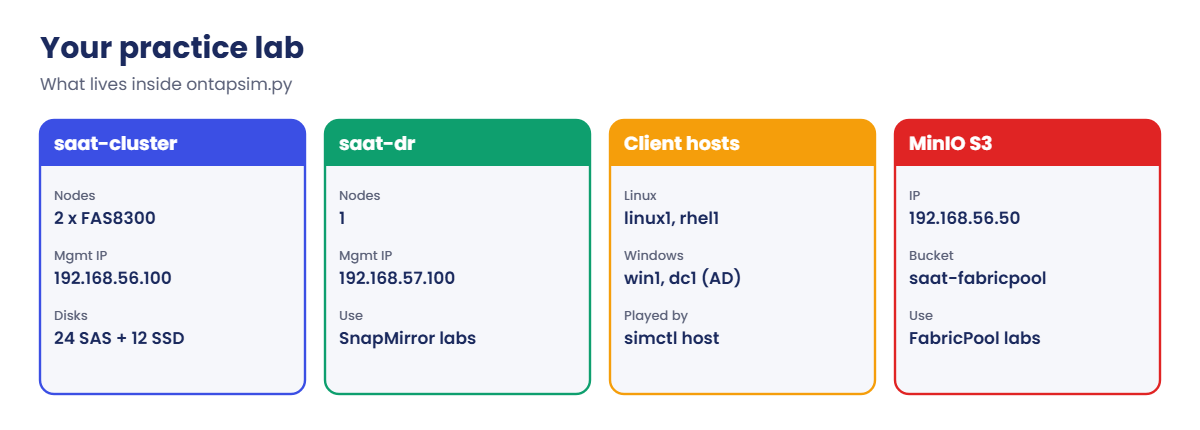
When you start the shell you get the same lab every lesson uses. The table below is your lab map; keep it handy.
| Item | Name | Address or detail |
|---|---|---|
| Main cluster | saat-cluster, 2 nodes (FAS8300) | Cluster management 192.168.56.100; nodes .101 and .102 |
| Disks | Shelf 1.0: 24 SAS 1.8 TB; shelf 1.1: 12 SSD 960 GB | Disks 1.0.22 and 1.0.23 start unassigned |
| DR cluster | saat-dr, 1 node | 192.168.57.100 (start with --cluster saat-dr) |
| Linux clients | linux1 (Ubuntu 24.04), rhel1 (Rocky Linux 9) | 192.168.56.21 and .22 |
| Windows | win1 (Windows Server 2025), dc1 (AD and DNS) | 192.168.56.31 and .10; domain SAATVEDHA.LAB |
| Object store | MinIO for FabricPool | 192.168.56.50, bucket saat-fabricpool |
The clients and MinIO are not real machines. simctl host plays them for you, so you can mount an export or log in to an iSCSI target without building every VM. Lesson 2 shows how to build the real VirtualBox hosts too.
2Finding commands
Commands work like real ONTAP. Type ? to list what comes next, use any unique short form, and add -fields or -instance to show more.
?
volume ?
volume show -fields aggregate,size
sto agg sh
sto agg sh runs storage aggregate show. st alone is ambiguous because it could mean statistics or storage, just as on a real cluster.
3Lab controls: simctl
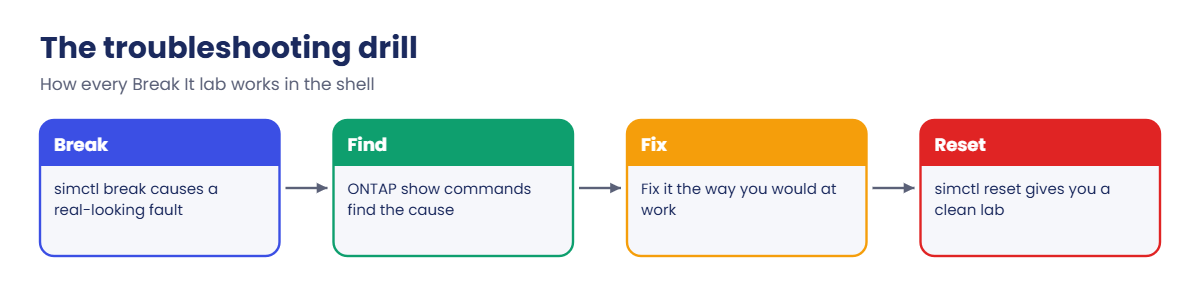
simctl help lists everything. These are the ones you’ll use most:
| Command | What it does |
|---|---|
| simctl reset | Puts both clusters back to the starting state |
| simctl status | Shows active faults and the lab clock |
| simctl break <fault> | Causes a problem, for example port-down, disk-fail, node-panic, export-drop |
| simctl fix <fault> | all | Removes a fault |
| simctl tick [n] | Lets time pass, so moves, rebuilds and transfers finish |
| simctl write / load | A client writes data or starts a workload |
| simctl host <name> <command> | Runs a client command: mount, ls, iscsiadm, multipath and more |
| simctl zone add | Zones a host to an FC LIF (the switch side of FC labs) |
| simctl break <host fault> | Host-mode faults (v1.2): host-iqn-wrong, multipathd-stopped, no-mpio, mtu-mismatch, nfs-wrong-version |
Version 1.2 has 26 faults in all: 21 on the storage side and 5 on the client hosts. The troubleshooting phase of the course uses most of them, and you’ll find each one with real ONTAP commands, not with simctl.
4Running a whole file of commands
Many labs give you a setup file. --run runs it line by line and answers yes to questions, so the lab is ready in one step.
python ontapsim.py -c "simctl reset"
python ontapsim.py --run setup-03.txt
python ontapsim.py --cluster saat-dr
-c runs one command and exits. In a --run file, a line that starts with > is the answer to the question before it, when a lab needs a specific answer.
5What’s new in version 1.1
Version 1.1 adds the commands used by the newer deep-dive pages. Labs saved with version 1.0 keep working, so you only need to replace ontapsim.py.
| Area | New in 1.1 |
|---|---|
| Security | Onboard key manager, volume encryption, anti-ransomware, SnapLock, locked snapshots, multi-admin verification |
| S3 | Object store server, users, buckets and bucket policies, plus aws s3 commands on the lab clients |
| Upgrades | cluster image: package get, validate, update and a rolling update that moves forward with simctl tick |
| Mirrors and network | Load-sharing mirrors of the SVM root, on-box DNS load balancing with -dns-zone |
| Small extras | system health, aggregate show-space, export rule setindex, cluster peer modify, qtree delete, metrocluster show |
The other big addition is a REST mode for automation labs. python ontapsim.py --rest 8443 --https serves a few real ONTAP REST endpoints (cluster, nodes, aggregates, volumes, SVMs, LUNs, LIFs, SnapMirror, jobs) on https://127.0.0.1:8443/api with a self-signed lab certificate, so you can practise with curl and with the Ansible netapp.ontap modules. Real ONTAP serves its REST API over HTTPS on port 443 of the cluster management LIF.
6Host mode: real-looking Linux and Windows clients (v1.2)
Version 1.2 adds host mode. Open a second terminal in the same folder and run python ontapsim.py --host linux1 (or rhel1, sv-target, win1). You get the client’s own prompt, and it shares the lab with the cluster: a LUN you map appears after a rescan, an iSCSI login shows up in vserver iscsi session show, and an NFS mount shows up in network connections active show.
Starting linux1 looks like this:
Welcome to Ubuntu 24.04.1 LTS (GNU/Linux 6.8.0-48-generic x86_64)

 * Documentation:  https://help.ubuntu.com

(SaatVedha practice shell 1.2: a pretend linux1 client, not a real operating system. Type "help".)

root@linux1:~# hostname
linux1
root@linux1:~# ip -br a
lo               UNKNOWN        127.0.0.1/8 ::1/128
enp0s3           UP             10.0.2.15/24 metric 100 fe80::a00:27ff:fe59:f91f/64
enp0s8           UP             192.168.56.21/24 fe80::a00:27ff:feff:6dcf/64
root@linux1:~# exit
The Linux hosts answer the commands you use in the SAN and NAS lessons in their real formats: ip, ping, tcpdump, iscsiadm, multipath -ll, lsblk, mkfs.xfs, mount, nfsstat, nvme, fstrim and xfs_quota. win1 gives you a PowerShell prompt with the iSCSI, MPIO, disk and SMB cmdlets.
Starting win1 and the iSCSI service looks like this:
Windows PowerShell
Copyright (C) Microsoft Corporation. All rights reserved.

Install the latest PowerShell for new features and improvements! https://aka.ms/PSWindows

(SaatVedha practice shell 1.2: a pretend Windows Server 2025 client, not a real operating system. Type "help".)

PS C:\Users\Administrator> Get-Service msiscsi

Status   Name               DisplayName
------   ----               -----------
Stopped  msiscsi            Microsoft iSCSI Initiator Service

PS C:\Users\Administrator> Start-Service msiscsi
PS C:\Users\Administrator> Set-Service msiscsi -StartupType Automatic
PS C:\Users\Administrator> Get-Service msiscsi

Status   Name               DisplayName
------   ----               -----------
Running  msiscsi            Microsoft iSCSI Initiator Service
Like the cluster side, host mode is our own learning tool, not a real operating system, and each host prints a reminder when it starts. Type help at a host prompt to list what it understands, and exit to leave.
✅ Checkpoint: You can open linux1 or win1 in a second terminal while the cluster runs in the first.
Hands-on lab: install the shell, log in and run your first drill
Before you run any command, double-check it
Read every command twice before you press Enter. Check the target: the server name, the user, the disk or device name, the path and the sizes. These commands are for learning and were tested in our lab, not on your system. At work, run the read-only commands first, follow your change process, make sure a backup exists, and ask a second person to check anything that changes or deletes data. You run them at your own risk.
This lab uses the SaatVedha ONTAP practice shell, our own learning tool. It is not NetApp software: real ONTAP output looks like this but is not identical.
1Download the shell
Download ontapsim.zip (about 180 KB). Unzip it into a new folder, for example C:\ontap-lab on Windows or ~/ontap-lab on macOS and Linux. You get two files: ontapsim.py and README.txt.
✅ Checkpoint: The folder holds ontapsim.py and README.txt.
2Check Python
Open a terminal in that folder (Windows: PowerShell; macOS: Terminal). Run:
python --versionYou should see something like this:
Python 3.13.1Any version from 3.8 up works. On macOS and Linux the command may be python3. On Windows, if nothing is found, install Python from python.org and tick “Add python.exe to PATH” during setup.
✅ Checkpoint: python --version prints 3.8 or newer.
3Log in
python ontapsim.pyLog in as admin with the password saatlab1.
You should see this:
  -----------------------------------------------------------------
   SaatVedha ONTAP practice shell 1.2  (NOT NetApp software)
   Looks like the ONTAP 9.18.1 clustershell for learning. Real output
   is similar but not identical. Type "help" or "simctl help".
  -----------------------------------------------------------------

login as: admin
admin@192.168.56.100's password:

saat-cluster::>
✅ Checkpoint: Your prompt is saat-cluster::>.
4Run your first commands
version
cluster show
simctl status
You should see this:
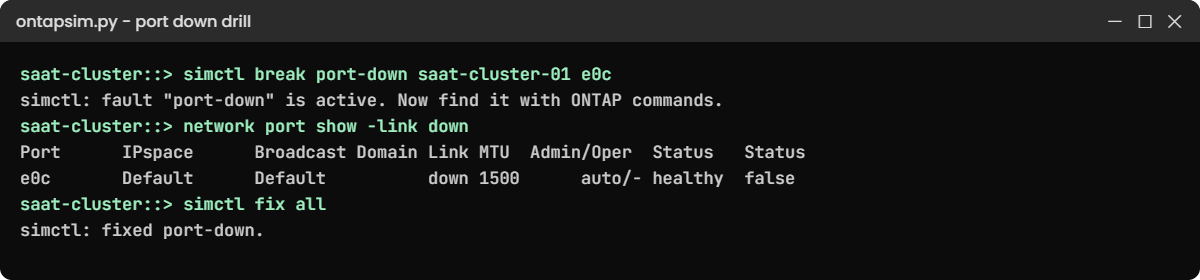
saat-cluster::> version
NetApp Release 9.18.1: Sat Nov 07 2026 (SaatVedha practice shell 1.2, not NetApp software)
saat-cluster::> cluster show
Node                  Health  Eligibility
--------------------- ------- ------------
saat-cluster-01       true    true
saat-cluster-02       true    true
2 entries were displayed.
saat-cluster::> simctl status
Active faults: none
Clock offset: 0 s   Clusters: saat-cluster, saat-dr
✅ Checkpoint: Both nodes show Health true and there are no active faults.
5Break something, find it, fix it
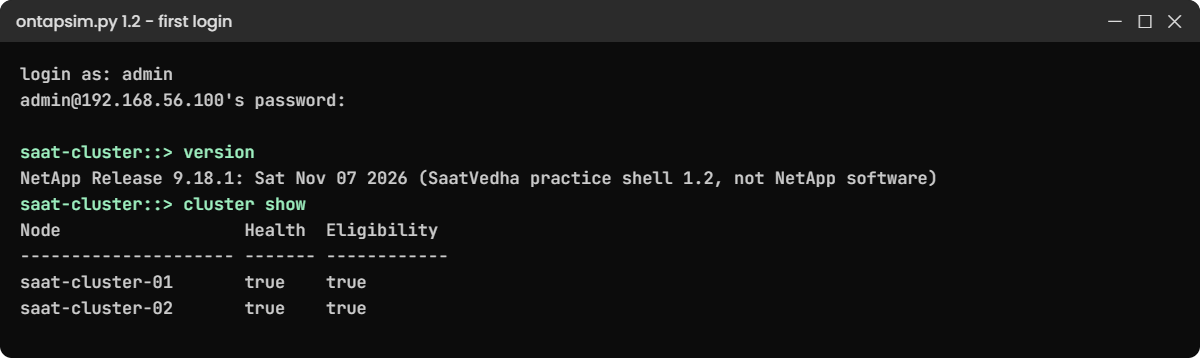
simctl break port-down saat-cluster-01 e0c
network port show -link down
simctl fix all
You should see this:
saat-cluster::> simctl break port-down saat-cluster-01 e0c
simctl: fault "port-down" is active. Now find it with ONTAP commands.
saat-cluster::> network port show -link down

Node: saat-cluster-01
                                                                       Ignore
                                                  Speed(Mbps) Health   Health
Port      IPspace      Broadcast Domain Link MTU  Admin/Oper  Status   Status
--------- ------------ ---------------- ---- ---- ----------- -------- ------
e0c       Default      Default          down 1500      auto/- healthy  false

saat-cluster::> simctl fix all
simctl: fixed port-down.
That’s the pattern for every troubleshooting lab: simctl breaks it, ONTAP commands find it, and you fix it the way you would at work.
✅ Checkpoint: network port show -link down listed e0c, and simctl fix all removed the fault.
6Reset and log out
simctl reset
exit
Practice shell reset. Cluster saat-cluster (2 nodes) and saat-dr (1 node) are back to the starting state.Your work is saved between sessions in ontapsim-state.json. Reset whenever a lab says “start from a clean lab”.
✅ Checkpoint: You can start, use, reset and leave the shell.
Try it yourself: Open the cluster health check in the Command Builder.
Break It, Then Fix It
Three things go wrong for most people on day one. Try each so you know the fix.
1Wrong password
Start the shell and type admin with a wrong password.
You’ll get this:
admin@192.168.56.100's password:
Access denied
login as:
The password is saatlab1, all lower case. The shell asks again, just like SSH to a real cluster.
✅ Checkpoint: You log in on the second try.
2Running it from the wrong folder
python ontapsim.pyFrom another folder you’ll get something like this:
python: can't open file 'C:\Users\you\ontapsim.py': [Errno 2] No such file or directoryChange to the folder you unzipped into first (cd C:\ontap-lab), or give the full path to the file.
✅ Checkpoint: python ontapsim.py starts the login banner.
3An ambiguous short command
st agg shThe shell says the command is ambiguous, because st matches both statistics and storage. Type one more letter: sto agg sh.
✅ Checkpoint: sto agg sh prints the aggregate table.
This happened at work
Practice before the night shift
A support engineer in Kanpur joined a managed services team that looked after six NetApp clusters for different customers. Her first on-call week was a month away, and she had never logged in to ONTAP.
She spent 30 minutes a day in a practice shell: one fault, find it, fix it, reset. By the end of the month she had broken and fixed every common problem at least twice.
On her second on-call night a customer’s NFS clients hung after a switch change. She ran network interface show -is-home false out of habit, saw two LIFs on the wrong ports, reverted them and closed the call in 15 minutes. Her lead asked where she had learned that; her answer was “I broke it about forty times first.”
Common mistakes and troubleshooting
| Mistake | What happens | Do this instead |
|---|---|---|
| Copying commands from the shell straight to production | Some options and defaults differ on a real cluster | Check every command in the official ONTAP documentation first |
| Forgetting to reset between labs | Old volumes or faults change what you see | Run simctl reset when a lab says to start clean |
| Using simctl to fix a fault | You learn the lab tool, not ONTAP | Find and fix faults with ONTAP commands; use simctl fix only to clean up |
| Saving the zip in a synced folder that blocks scripts | Python can’t write the state file | Use a plain local folder like C:\ontap-lab |
| Typing the password in the command line history | Others can read it later | Let the shell ask for it; never script real passwords |
Interview questions
Click a question to open it. Each one is written the way an interviewer would ask it. Under it you will see why they ask it and one way you could answer, in your own words.
Fresher level
1. How can you practise NetApp ONTAP without access to a real cluster?
Why they ask this: They want to see that you take initiative and know the options.
How you might answer: Customers and partners can use NetApp’s ONTAP Simulator. Without that, I use a practice shell or lab guides to learn the commands, and Linux VMs to practise the client side: NFS mounts, iSCSI logins and multipath.
I also read the official command reference so I know the exact options.
2. What would you check first after logging in to a cluster you don’t know?
Why they ask this: They’re checking for a safe, read-only habit.
How you might answer: version, cluster show, storage failover show, storage aggregate show and the event log, without changing anything.
2–5 years experience
3. How do you test a change before you run it on production?
Why they ask this: They want to see a careful change process.
How you might answer: I try it on a lab or test cluster first, use options like -simulate true where ONTAP offers them, and write the exact commands plus a rollback in the change record. I take a snapshot before risky data changes.
4. A junior engineer wants to learn troubleshooting faster. What would you suggest?
Why they ask this: They’re checking whether you can coach others.
How you might answer: Break things on purpose in a lab: a port down, a missing export rule, a full volume. Each time, find it with show commands before reading the answer, then write a short runbook entry.
Senior level
5. How would you build a training lab for a new storage team?
Why they ask this: They want to see planning and an eye for cost.
How you might answer: A practice environment for the CLI, VirtualBox hosts for NFS, SMB and iSCSI clients, and a test SVM on a non-production cluster if we have one. I’d add a set of fault drills that match our real incidents, with a written check for each.
6. Why does knowing the output format of commands matter in an outage?
Why they ask this: They’re testing whether you read output carefully under pressure.
How you might answer: In an outage you scan tables fast. If you already know where Health, Takeover Possible or Is Home sit in the output, you spot the odd value in seconds instead of minutes.
Quick quiz
Q1. What is the practice shell’s login?
- root / netapp
- admin / saatlab1
- admin / admin
- vsadmin / saatlab1
Show answer
B — log in as admin with the password saatlab1.
Q2. Which command puts the lab back to the start?
- simctl reset
- system node reboot
- cluster setup
- simctl tick
Show answer
A — simctl reset rebuilds both clusters in their starting state.
Q3. Is the practice shell NetApp software?
- Yes, it is the ONTAP Simulator
- Yes, it is ONTAP Select
- No, it is a learning tool written by SaatVedha
- No, it is StorageGRID
Show answer
C — it imitates the ONTAP CLI for learning and contains no NetApp code.
Q4. What does simctl tick do?
- Shows the time
- Lets time pass so moves and rebuilds finish
- Deletes old snapshots
- Restarts a node
Show answer
B — tick moves the lab clock forward.
Q5. Why does st agg sh fail?
- Aggregates are hidden
- st could mean statistics or storage
- You must be in advanced mode
- The shell has no aggregates
Show answer
B — short forms must be unique; sto agg sh works.
Quick recap
- The practice shell is a pretend 2-node ONTAP cluster in one Python file.
- Log in with admin / saatlab1; the lab saves itself between sessions.
- ? lists commands; short forms work if they are unique.
- simctl breaks, fixes, resets and plays the client hosts.
- Always check commands in the official documentation before using them on a real cluster.
Next lesson
Lesson 3: Scale-up vs scale-out: 7-Mode to clustered ONTAP → You’ll see why ONTAP grew into clusters, and move a volume between nodes while a client keeps working.
Further reading: ONTAP practice
Want to go deeper into ONTAP practice? NetApp’s ONTAP concepts guide explains the real system behind every command in the shell. You can also see the full plan for this course on the NetApp ONTAP Storage Administration course page.