2How ARP spots an attack
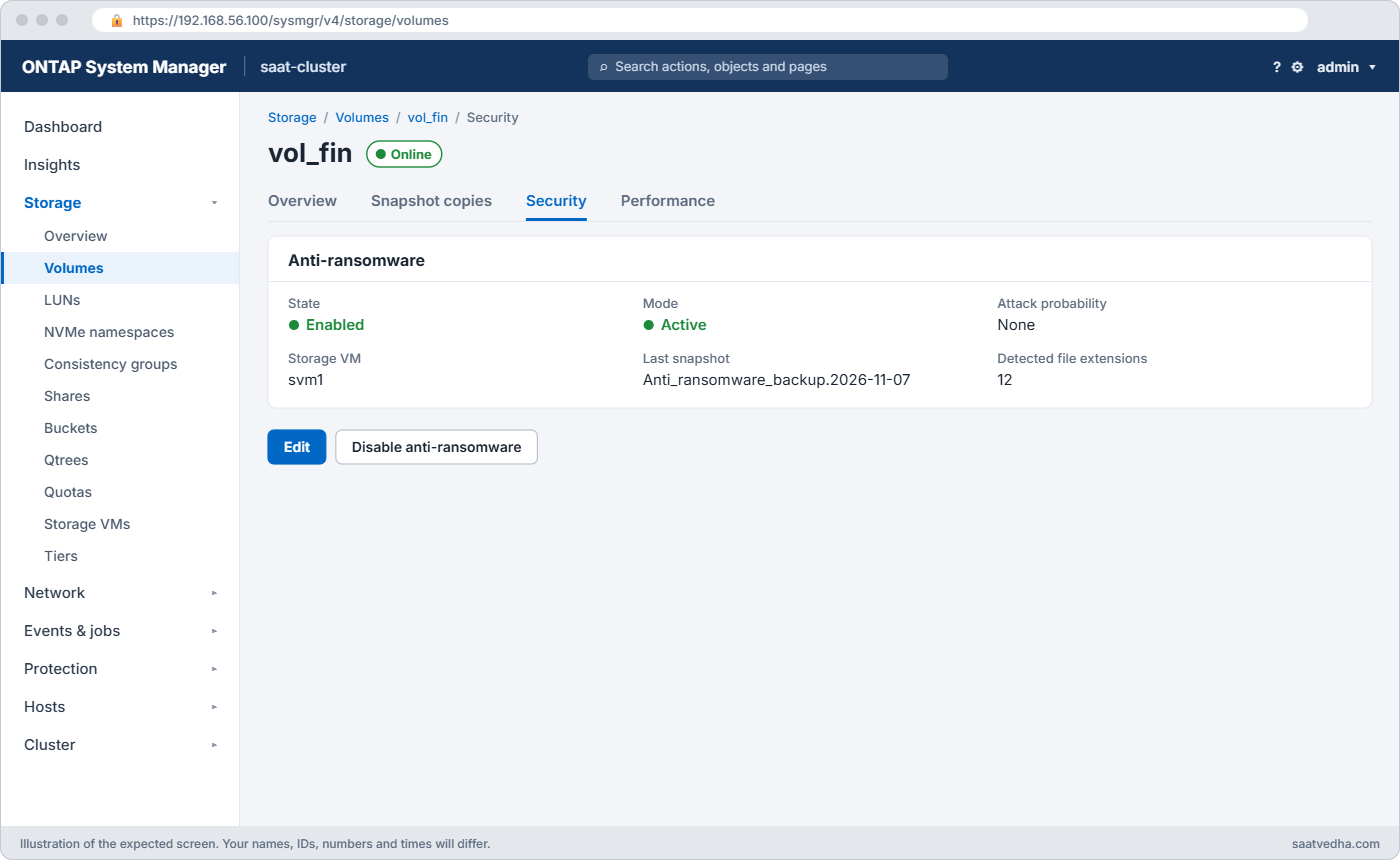
ARP watches the data written to a volume. Ransomware leaves fingerprints: file contents suddenly look random (high entropy), extensions change, and files are renamed or deleted in bursts.
When ARP sees this it takes a snapshot straight away, raises an EMS event and marks the volume under attack. In the practice shell the snapshot is called Anti_ransomware_backup...; on 9.17.1 and later real systems name it Anti_ransomware_attack_backup... and also keep periodic ARP snapshots.
In System Manager: Storage › Volumes › select a volume › Security › Anti-ransomware.
3Copies nobody can delete
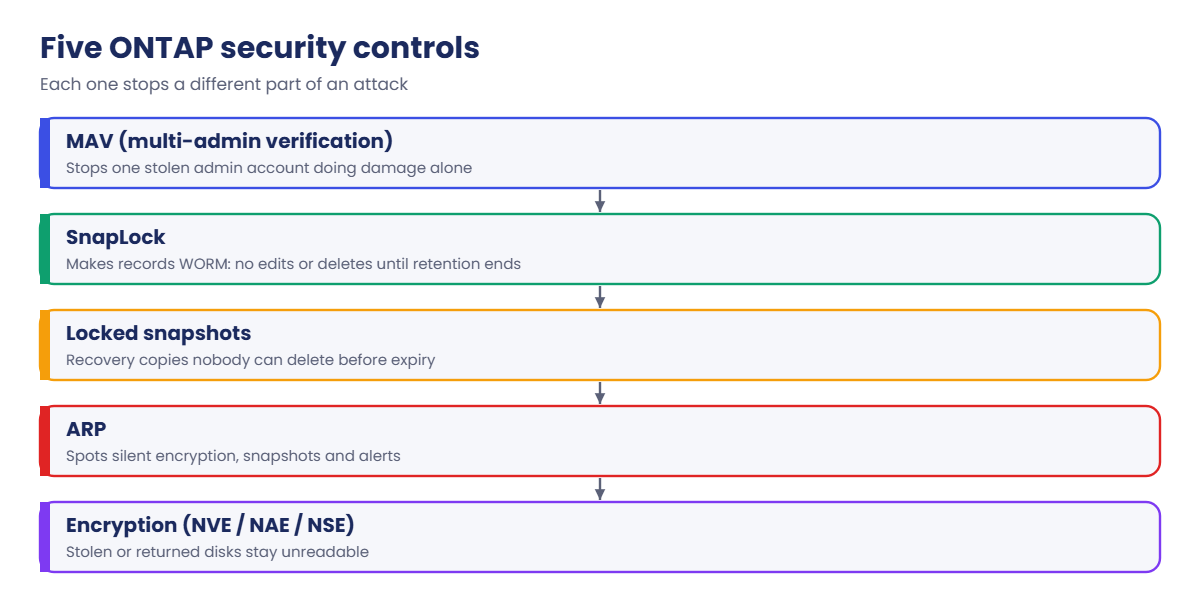
Attackers who get admin rights try to delete snapshots before encrypting data. Locked snapshots stop that: a snapshot with a SnapLock expiry time can’t be deleted, and a volume holding one can’t be deleted either, until the time passes.
SnapLock goes further and locks individual files. In Compliance mode not even the storage admin can delete a file before its retention ends; Enterprise mode allows a trusted admin to do a “privileged delete”. Both modes depend on the ComplianceClock, which you set once per node.

Before you run any command, double-check it
Read every command twice before you press Enter. Check the target: the server name, the user, the disk or device name, the path and the sizes. These commands are for learning and were tested in our lab, not on your system. At work, run the read-only commands first, follow your change process, make sure a backup exists, and ask a second person to check anything that changes or deletes data. You run them at your own risk.
This lab uses the SaatVedha ONTAP practice shell, our own learning tool. It is not NetApp software: real ONTAP output looks like this but is not identical.
You need practice shell version 1.1 or later. Some steps can’t be undone on a real cluster (the ComplianceClock, SnapLock Compliance files), so only ever try them on a lab.
1Build the starting lab
Create setup-sec.txt with these lines, then reset the lab and run it:
storage aggregate create -aggregate aggr1_01 -node saat-cluster-01 -diskcount 8 -disktype SAS
storage aggregate create -aggregate aggr1_02 -node saat-cluster-02 -diskcount 8 -disktype SAS
vserver create -vserver svm1 -aggregate aggr1_01 -rootvolume-security-style unix
network interface create -vserver svm1 -lif svm1_nas1 -service-policy default-data-files -home-node saat-cluster-01 -home-port e0c -address 192.168.56.130 -netmask 255.255.255.0
network interface create -vserver svm1 -lif svm1_nas2 -service-policy default-data-files -home-node saat-cluster-02 -home-port e0c -address 192.168.56.131 -netmask 255.255.255.0
vserver nfs create -vserver svm1 -v3 enabled -v4.1 enabled
vserver export-policy rule create -vserver svm1 -policyname default -clientmatch 192.168.56.0/24 -rorule sys -rwrule sys -superuser sys
python ontapsim.py -c "simctl reset"
python ontapsim.py --run setup-sec.txt✅ Checkpoint: No line in the output starts with Error.
2Turn on the Onboard Key Manager
Log in and try an encrypted volume first, so you see why a key manager is needed.
volume create -vserver svm1 -volume vol_fin -aggregate aggr1_01 -size 20g -junction-path /fin -encrypt true
security key-manager onboard enable
security key-manager keystore show
You should see this (type a long passphrase twice; the practice shell echoes it, real ONTAP hides it, so it is masked here):
Error: command failed: Failed to create volume "vol_fin" because volume encryption needs a key manager. Configure onboard key management with "security key-manager onboard enable" first.
saat-cluster::> security key-manager onboard enable
Enter the cluster-wide passphrase for onboard key management: ************
Again enter the cluster-wide passphrase for onboard key management: ************

After configuring onboard key management, save the encrypted configuration data in a safe location so that you can use it if you need to perform a manual recovery operation. To view the data, use the "security key-manager onboard show-backup" command.
saat-cluster::> security key-manager keystore show
Vserver                         Type   Keystore State
------------------------------- ------ ---------------
saat-cluster                    OKM    active
Run security key-manager onboard show-backup and store the block it prints, together with the passphrase, somewhere off the cluster. Without both, a rebuilt node can’t open its own encrypted data.
✅ Checkpoint: Keystore State is active.
3Create an encrypted volume and convert an old one
volume create -vserver svm1 -volume vol_fin -aggregate aggr1_01 -size 20g -junction-path /fin -encrypt true
volume create -vserver svm1 -volume vol_old -aggregate aggr1_01 -size 10g -junction-path /old -encrypt false
volume encryption conversion start -vserver svm1 -volume vol_old
simctl tick 2
volume show -vserver svm1 -fields is-encrypted,encryption-type
You should see this at the end:
vserver volume    is-encrypted encryption-type
------- --------- ------------ ---------------
svm1    svm1_root false        none
svm1    vol_fin   true         volume
svm1    vol_old   true         volume
3 entries were displayed.
✅ Checkpoint: vol_fin and vol_old both show is-encrypted true.
4Protect a volume with ARP and attack it
Mount the finance volume on linux1, write two files and switch ARP on. Then simctl break ransomware plays the attacker.
simctl host linux1 mount 192.168.56.130:/fin /mnt/fin vers=3
simctl host linux1 touch /mnt/fin/q3-ledger.xlsx
simctl host linux1 touch /mnt/fin/payroll-oct.csv
security anti-ransomware volume enable -vserver svm1 -volume vol_fin
simctl break ransomware svm1 vol_fin
simctl host linux1 ls /mnt/fin
security anti-ransomware volume show -vserver svm1 -volume vol_fin -fields attack-probability,attack-timeline,no-of-attacks
event log show -severity <=ALERT
volume snapshot show -vserver svm1 -volume vol_fin
You should see this:
saat-cluster::> simctl host linux1 ls /mnt/fin
q3-ledger.xlsx.lckd  payroll-oct.csv.lckd  README_RESTORE.txt
saat-cluster::> security anti-ransomware volume show -vserver svm1 -volume vol_fin -fields attack-probability,attack-timeline,no-of-attacks

vserver volume  attack-probability attack-timeline    no-of-attacks
------- ------- ------------------ ------------------ -------------
svm1    vol_fin moderate           11/7/2026 08:35:30 1
saat-cluster::> event log show -severity <=ALERT
Time                Node             Severity      Event
------------------- ---------------- ------------- ------------------------
11/7/2026 08:35:30  saat-cluster-01  ALERT         callhome.arw.activity.seen: Called home for possible ransomware activity on volume vol_fin (DSID: 5018) in Vserver svm1.
saat-cluster::> volume snapshot show -vserver svm1 -volume vol_fin
                                                                 ---Blocks---
Vserver  Volume   Snapshot                                  Size Total% Used%
-------- -------- ------------------------------------- -------- ------ -----
svm1     vol_fin
                  Anti_ransomware_backup.2026-11-07_0835
                                                              0B     0%    0%
The files were renamed to .lckd and a ransom note appeared. ARP noticed, called home and took a snapshot from just before the damage.
✅ Checkpoint: attack-probability is moderate and an Anti_ransomware_backup snapshot exists.
5Recover the data
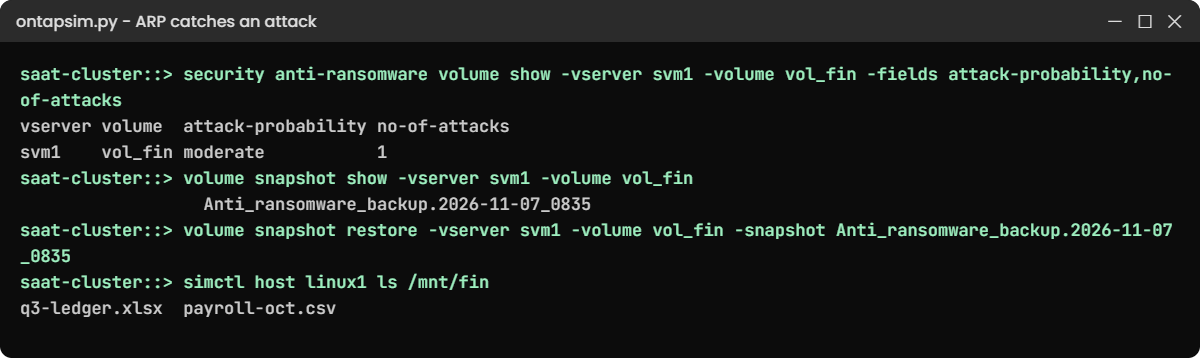
On a real system you would first cut the attacker off (block the client, reset passwords). Then restore the ARP snapshot, using the exact name from your own output, and tell ONTAP the attack was real.
simctl fix ransomware
volume snapshot restore -vserver svm1 -volume vol_fin -snapshot Anti_ransomware_backup.2026-11-07_0835
simctl host linux1 ls /mnt/fin
security anti-ransomware volume attack clear-suspect -vserver svm1 -volume vol_fin -false-positive false
You should see this:
saat-cluster::> simctl host linux1 ls /mnt/fin
q3-ledger.xlsx  payroll-oct.csv
saat-cluster::> security anti-ransomware volume attack clear-suspect -vserver svm1 -volume vol_fin -false-positive false
Info: The suspect files are cleared. Keep the Anti_ransomware_backup Snapshot copies until the recovery is complete.
✅ Checkpoint: The client sees its two original files again.
6Lock a snapshot and a file
Both features need the ComplianceClock. Initialize it on each node (once per node, ever), then lock a snapshot on vol_old and create a SnapLock Compliance volume.
snaplock compliance-clock initialize -node saat-cluster-01
snaplock compliance-clock initialize -node saat-cluster-02
volume modify -vserver svm1 -volume vol_old -snapshot-locking-enabled true
volume snapshot create -vserver svm1 -volume vol_old -snapshot locked_daily_1 -snaplock-expiry-time "11/30/2026 23:00:00"
volume snapshot show -vserver svm1 -volume vol_old -fields snaplock-expiry-time
volume create -vserver svm1 -volume vol_audit -aggregate aggr1_02 -size 10g -junction-path /audit -snaplock-type compliance
volume snaplock modify -vserver svm1 -volume vol_audit -default-retention-period 7days
You should see this from the snapshot show:
vserver volume  snapshot       snaplock-expiry-time
------- ------- -------------- --------------------
svm1    vol_old locked_daily_1 11/30/2026 23:00:00
Now commit a file to WORM from the client. On SnapLock volumes, removing write permission from a file is the signal to lock it.
simctl host linux1 mount 192.168.56.131:/audit /mnt/audit vers=3
simctl host linux1 touch /mnt/audit/gst-return-2026-10.pdf
simctl host linux1 chmod -w /mnt/audit/gst-return-2026-10.pdf
simctl host linux1 rm /mnt/audit/gst-return-2026-10.pdf
volume file retention show -vserver svm1 -file /vol/vol_audit/gst-return-2026-10.pdf
You should see this:
rm: cannot remove '/mnt/audit/gst-return-2026-10.pdf': Read-only file system
(the file is WORM on a SnapLock compliance volume until 11/14/2026 08:37:41)
saat-cluster::> volume file retention show -vserver svm1 -file /vol/vol_audit/gst-return-2026-10.pdf

                    Vserver: svm1
                  File Path: /vol/vol_audit/gst-return-2026-10.pdf
            Retention Time: 11/14/2026 08:37:41
✅ Checkpoint: The snapshot has an expiry time and the file can't be removed for 7 days.
7Require a second admin for deletes
Create two named admins, an approval group and rules, then switch MAV on. Each login asks for a password twice.
security login create -user-or-group-name ravi -application ssh -authentication-method password -role admin
security login create -user-or-group-name priya -application ssh -authentication-method password -role admin
security multi-admin-verify approval-group create -name mav-grp1 -approvers ravi,priya -email storage-team@saatvedha.lab
security multi-admin-verify rule create -operation "volume delete"
security multi-admin-verify rule create -operation "volume snapshot delete"
security multi-admin-verify modify -approval-groups mav-grp1 -required-approvers 1 -enabled true
volume create -vserver svm1 -volume vol_tmp -aggregate aggr1_01 -size 1g
volume offline -vserver svm1 -volume vol_tmp
volume delete -vserver svm1 -volume vol_tmp
The delete is held (answer y to create a request):
Warning: This operation requires multi-admin verification. To create a verification request use "security multi-admin-verify request create".

         Would you like to create a request for this operation? {y|n}: y

Error: command failed: The security multi-admin-verify request (index 1) requires approval.
Log out, log in as ravi (python ontapsim.py --user ravi), approve the request, then log back in as admin and run the delete again.
security multi-admin-verify request approve 1
exit
python ontapsim.py
volume delete -vserver svm1 -volume vol_tmp
security multi-admin-verify request show
As admin you should see this:
saat-cluster::> volume delete -vserver svm1 -volume vol_tmp
[Job 109] Job succeeded: Successful
saat-cluster::> security multi-admin-verify request show
                                                              Pending
Index Operation                                      State    Approvers Requestor
----- ---------------------------------------------- -------- --------- ---------
    1 volume delete -vserver svm1 -volume vol_tmp    executed 0         admin
✅ Checkpoint: The request shows executed and vol_tmp is gone.
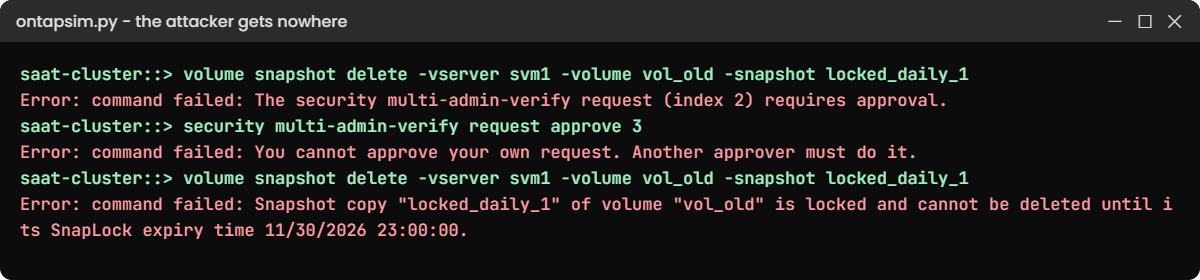
Now play the attacker who has stolen the admin password. Carry on from the lab, with MAV still on, and try to destroy the recovery copies.
1Delete the locked snapshot
volume snapshot delete -vserver svm1 -volume vol_old -snapshot locked_daily_1You’ll get this (answer y):
Warning: This operation requires multi-admin verification. To create a verification request use "security multi-admin-verify request create".

         Would you like to create a request for this operation? {y|n}: y

Error: command failed: The security multi-admin-verify request (index 2) requires approval.
The first wall is MAV. Suppose a careless approver says yes: log in as ravi, run security multi-admin-verify request approve 2, log back in as admin and try again.
saat-cluster::> volume snapshot delete -vserver svm1 -volume vol_old -snapshot locked_daily_1
Error: command failed: Snapshot copy "locked_daily_1" of volume "vol_old" is locked and cannot be deleted until its SnapLock expiry time 11/30/2026 23:00:00.
The second wall holds: the lock wins even with an approval. There is no “fix” here, and that’s the point; the only way past it is to wait for the expiry time.
✅ Checkpoint: The locked snapshot is still in volume snapshot show.
2Approve your own request
volume offline -vserver svm1 -volume vol_audit
volume delete -vserver svm1 -volume vol_audit
security multi-admin-verify request approve 3
You’ll get this:
Error: command failed: The security multi-admin-verify request (index 3) requires approval.
saat-cluster::> security multi-admin-verify request approve 3
Error: command failed: You cannot approve your own request. Another approver must do it.
One person can’t both ask and approve. Even after ravi approves request 3, the delete stops at SnapLock:
saat-cluster::> volume delete -vserver svm1 -volume vol_audit
Error: command failed: Volume "vol_audit" cannot be deleted because it is a SnapLock Compliance volume with unexpired WORM files.
Bring the volume back with volume online -vserver svm1 -volume vol_audit. In real life, a held request you didn’t expect is an alarm: check who raised it, and veto it with security multi-admin-verify request veto.
✅ Checkpoint: vol_audit is online again and its WORM file is still there.
3Switch MAV on without an approval group
On a fresh lab (simctl reset, then the setup file), make the group and try to enable MAV before you link them:
security multi-admin-verify approval-group create -name mav-grp1 -approvers ravi,priya -email storage-team@saatvedha.lab
security multi-admin-verify modify -enabled true
You’ll get this:
Error: command failed: Multi-admin verification cannot be enabled without at least one approval group. Use -approval-groups.Name the group in the same command: security multi-admin-verify modify -approval-groups mav-grp1 -required-approvers 1 -enabled true. Notice that after this, even adding a new rule needs approval, because MAV guards its own settings.
✅ Checkpoint: security multi-admin-verify show reports Is Enabled true.