Load-sharing mirrors and SVM root protection

Every NFS path and SMB share in an SVM starts at one small volume: the SVM root, mounted at /. If that volume goes offline, clients can’t walk down to any of the data volumes below it, even though those volumes are fine.

Load-sharing mirrors are read-only copies of that root volume spread over the nodes. This page shows when to use them, how to build and update them, and the one habit that trips up almost everyone the first time.

Where this page fits

Deep dive in NetApp ONTAP Storage Administration · Phase 3, Data protection and enterprise integrations · Before this: Lesson 41, SVM DR, SnapMirror Synchronous and cascades · Next: Lesson 42, MetroCluster and SyncMirror

TimeYou needBy the end you can
40 minutesThe practice shell (version 1.1), Lesson 16 (SVMs) and Lesson 39 (SnapMirror)Protect an SVM root volume with load-sharing mirrors, update them after namespace changes, and promote one in an emergency

What it is, in one line

A load-sharing (LS) mirror is a read-only copy of the SVM root volume, kept on other nodes so the NAS namespace stays reachable if the node holding the root fails.

In Simple Words

The building directory in the lobby

A big office building has one directory board in the lobby listing which company is on which floor. If that board is taken away for repair, visitors wander around lost even though every office upstairs is open.

So the building puts copies of the board at every entrance. The catch: when a new company moves in, someone must update every copy, or visitors at the side doors won’t find it.

Engineer's View

What LS mirrors are for today

An LS mirror relationship copies a source volume to one or more read-only destinations in the same SVM, using the SnapMirror engine with type LS. NFSv3 and SMB clients that read the namespace can be served from the copies, and if the source root becomes unavailable you can promote a copy to be the new root.

Since ONTAP 9.1, LS mirrors are deprecated for data volumes and supported only for SVM root volumes. NetApp’s guidance is to use them on clusters with two or more HA pairs, so the namespace survives the loss of a whole HA pair; they are not suitable for a single-HA-pair cluster or for MetroCluster.

They support NAS clients only (CIFS/SMB and NFSv3), not NFSv4 or SAN. An NFSv4 client can live in the same SVM, but it always uses the source root. Some teams protect the root with an ordinary data protection (DP) mirror instead, which is simpler to manage but needs a manual step to put it into service.

How it works, step by step

1Create one read-only copy per node

Create a small volume of type DP on each node’s data aggregate, about the size of the root (the root is usually 1 GB). The volume becomes type LS when the relationship is initialized.

volume create -vserver svm1 -volume svm1_root_ls1 -aggregate aggr1_01 -size 1g -type DP
snapmirror create -source-path svm1:svm1_root -destination-path svm1:svm1_root_ls1 -type LS -schedule hourly

Notice that source and destination are in the same SVM. That’s what makes it a load-sharing mirror and not a DR mirror to another cluster.

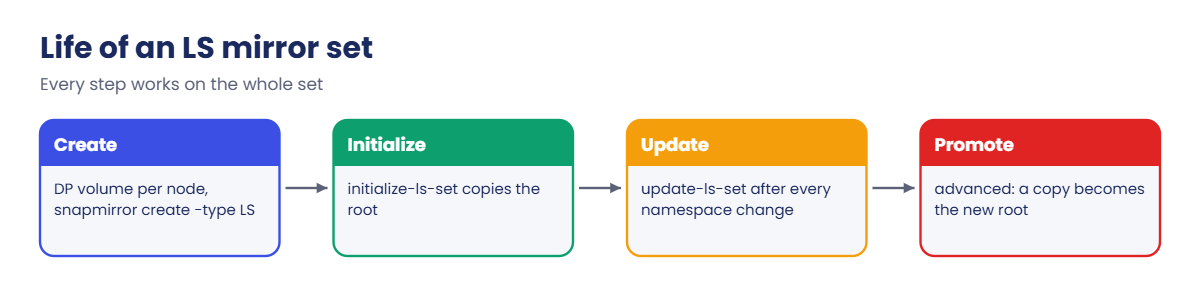
ONTAP load-sharing mirror life cycle: create, initialize, update, promote

2Initialize and update the whole set

All LS mirrors of one source form a set, and you work on the set, not on single relationships. snapmirror initialize-ls-set makes the first copy for every destination, and snapmirror update-ls-set pushes changes to all of them at once.

The schedule (hourly in this lab) updates the set by itself. But any change to the namespace (a new volume, a new junction path, a changed export policy on the root) only reaches clients that read from the copies after the next update.

That’s the classic gotcha: you create and mount a new volume, the source root knows its junction, the LS copies don’t, and clients get “No such file or directory” until you run update-ls-set. Make it the last line of every new-volume change.

3Promote a copy when the root is lost

If the root volume is damaged or its aggregate is offline, promote an LS copy. snapmirror promote needs advanced privilege and asks you to confirm; the copy becomes the read-write root of the SVM.

StepCommandWhy
1set -privilege advancedpromote is an advanced command
2snapmirror promote -destination-path svm1:svm1_root_ls1The copy becomes the SVM root
3set -privilege adminBack to normal
4volume rename … -newname svm1_rootKeep your naming standard
5Create and initialize LS mirrors againThe new root needs its own copies

Any change made after the last LS update is missing from the promoted copy. ONTAP deletes the original root if it can still reach it, so promote only when you’re sure the original is lost.

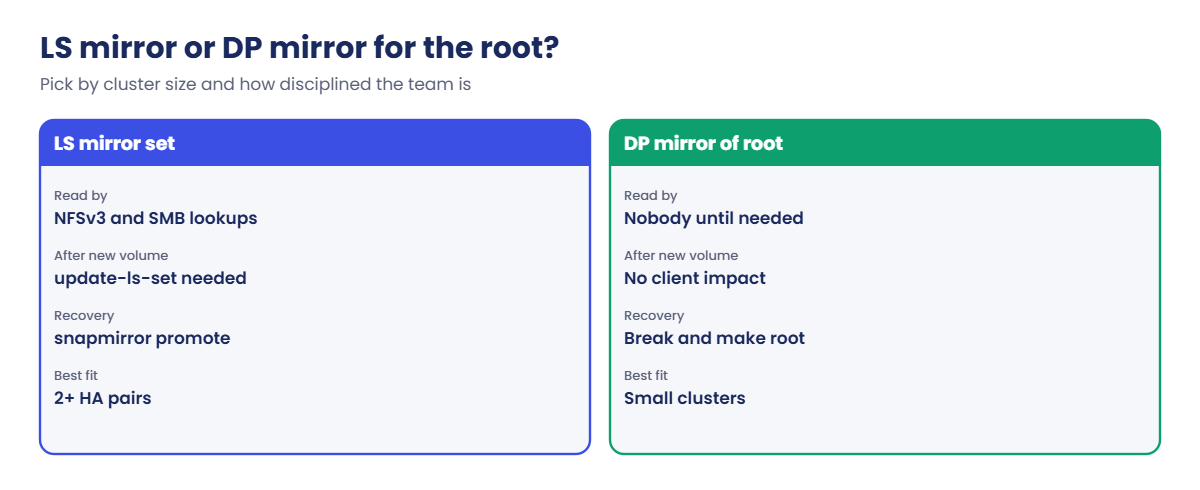
LS mirror set versus DP mirror for SVM root protection

4LS mirror or DP mirror for the root?

QuestionLS mirror setDP mirror of the root
Who reads it day to dayNFSv3 and SMB namespace lookupsNobody until you need it
After adding a volumeMust run update-ls-setNo impact on clients
Recoverysnapmirror promoteBreak the mirror and make it the root (manual)
Best fitClusters with 2+ HA pairsSmaller clusters, or teams that forget LS updates

System Manager doesn’t show LS mirrors as a separate menu; you see them in the CLI with snapmirror show -type LS. In System Manager the root volume appears under Storage > Volumes with the SVM’s other volumes.

Hands-on lab: protect the SVM root with an LS mirror set

Before you run any command, double-check it

Read every command twice before you press Enter. Check the target: the server name, the user, the disk or device name, the path and the sizes. These commands are for learning and were tested in our lab, not on your system. At work, run the read-only commands first, follow your change process, make sure a backup exists, and ask a second person to check anything that changes or deletes data. You run them at your own risk.

This lab uses the SaatVedha ONTAP practice shell, our own learning tool. It is not NetApp software: real ONTAP output looks like this but is not identical.

You need practice shell 1.1 or later. Our lab has only one HA pair, so in real life you’d use a DP mirror here; we build LS mirrors anyway so you learn the commands safely.

1Build the SVM

Save these lines as setup-ls.txt:

storage aggregate create -aggregate aggr1_01 -node saat-cluster-01 -diskcount 8 -disktype SAS
storage aggregate create -aggregate aggr1_02 -node saat-cluster-02 -diskcount 8 -disktype SAS
vserver create -vserver svm1 -aggregate aggr1_01 -rootvolume-security-style unix
network interface create -vserver svm1 -lif svm1_nas1 -service-policy default-data-files -home-node saat-cluster-01 -home-port e0c -address 192.168.56.130 -netmask 255.255.255.0
network interface create -vserver svm1 -lif svm1_nas2 -service-policy default-data-files -home-node saat-cluster-02 -home-port e0c -address 192.168.56.131 -netmask 255.255.255.0
vserver nfs create -vserver svm1 -v3 enabled -v4.1 enabled
vserver export-policy rule create -vserver svm1 -policyname default -clientmatch 192.168.56.0/24 -rorule sys -rwrule sys -superuser sys
python ontapsim.py -c "simctl reset"
python ontapsim.py --run setup-ls.txt

✅ Checkpoint: No line in the output starts with Error.

2Find the SVM root volume

volume show -vserver svm1 -fields type,junction-path,aggregate

You should see this:

vserver volume    type junction-path aggregate
------- --------- ---- ------------- ---------
svm1    svm1_root RW   /             aggr1_01

The root sits at / on node 01’s aggregate. If aggr1_01 goes offline, the whole namespace goes with it.

✅ Checkpoint: svm1_root is type RW at junction /.

3Create the LS mirror set

volume create -vserver svm1 -volume svm1_root_ls1 -aggregate aggr1_01 -size 1g -type DP
volume create -vserver svm1 -volume svm1_root_ls2 -aggregate aggr1_02 -size 1g -type DP
snapmirror create -source-path svm1:svm1_root -destination-path svm1:svm1_root_ls1 -type LS -schedule hourly
snapmirror create -source-path svm1:svm1_root -destination-path svm1:svm1_root_ls2 -type LS -schedule hourly
snapmirror initialize-ls-set -source-path svm1:svm1_root

You should see this (job numbers may differ):

[Job 104] Job succeeded: Successful
saat-cluster::> volume create -vserver svm1 -volume svm1_root_ls2 -aggregate aggr1_02 -size 1g -type DP
[Job 105] Job succeeded: Successful
saat-cluster::> snapmirror create -source-path svm1:svm1_root -destination-path svm1:svm1_root_ls1 -type LS -schedule hourly
[Job 106] Job is queued: snapmirror create for the relationship with destination "svm1:svm1_root_ls1".
saat-cluster::> snapmirror create -source-path svm1:svm1_root -destination-path svm1:svm1_root_ls2 -type LS -schedule hourly
[Job 107] Job is queued: snapmirror create for the relationship with destination "svm1:svm1_root_ls2".
saat-cluster::> snapmirror initialize-ls-set -source-path svm1:svm1_root
[Job 108] Job is queued: snapmirror initialize-ls-set for source "saat-cluster://svm1/svm1_root".

✅ Checkpoint: Both create commands and initialize-ls-set are queued with no errors.

4Check the set

snapmirror show -type LS
volume show -vserver svm1 -fields type,junction-path,aggregate

You should see this (times will differ):

Source            Destination  Mirror  Relationship   Total             Last
Path        Type  Path         State   Status         Progress  Healthy Updated
----------- ---- ------------ ------- -------------- --------- ------- --------
svm1:svm1_root
            LS   svm1:svm1_root_ls1
                              Snapmirrored
                                      Idle           -         true    08:35:48
svm1:svm1_root
            LS   svm1:svm1_root_ls2
                              Snapmirrored
                                      Idle           -         true    08:35:48
2 entries were displayed.
saat-cluster::> volume show -vserver svm1 -fields type,junction-path,aggregate
vserver volume        type junction-path aggregate
------- ------------- ---- ------------- ---------
svm1    svm1_root     RW   /             aggr1_01
svm1    svm1_root_ls1 LS   -             aggr1_01
svm1    svm1_root_ls2 LS   -             aggr1_02
3 entries were displayed.

The two copies are now type LS, one on each node, and both are Snapmirrored and healthy.

✅ Checkpoint: Two LS relationships show Snapmirrored and Healthy true.

Practice shell: two LS copies of the SVM root on two nodes
The root and its two LS copies, one per node.

5Practise a promote (optional)

Copy your lab first (copy ontapsim-state.json to a backup file) so you can go back. Then run:

set -privilege advanced
snapmirror promote -destination-path svm1:svm1_root_ls1
set -privilege admin
vserver show -vserver svm1 -fields rootvolume
snapmirror show -type LS

You should see this:

saat-cluster::*> snapmirror promote -destination-path svm1:svm1_root_ls1
[Job 111] Job succeeded: SnapMirror: done
saat-cluster::*> set -privilege admin
saat-cluster::> vserver show -vserver svm1 -fields rootvolume
vserver rootvolume
------- -------------
svm1    svm1_root_ls1
saat-cluster::> snapmirror show -type LS
Source            Destination  Mirror  Relationship   Total             Last
Path        Type  Path         State   Status         Progress  Healthy Updated
----------- ---- ------------ ------- -------------- --------- ------- --------
svm1:svm1_root_ls1
            LS   svm1:svm1_root_ls2
                              Snapmirrored
                                      Idle           -         true    08:35:49

svm1_root_ls1 is now the SVM root and the other copy mirrors from it. On a real cluster you’d then rename it to your standard root name and rebuild the mirror set; the practice shell asks no confirmation here, while real ONTAP warns you first. Put your backup state file back before the Break It lab.

✅ Checkpoint: vserver show lists svm1_root_ls1 as the root volume.

Break It, Then Fix It

This is the mistake almost everyone makes once: a new volume works for the admin but not for the users. Start from the end of Step 4 (before the promote).

1Add a volume and try to mount it

volume create -vserver svm1 -volume vol_new -aggregate aggr1_01 -size 10g -junction-path /newapp
simctl host linux1 mount 192.168.56.130:/newapp /mnt/newapp vers=3

You’ll get this:

[Job 109] Job succeeded: Successful
saat-cluster::> simctl host linux1 mount 192.168.56.130:/newapp /mnt/newapp vers=3
mount.nfs: mounting 192.168.56.130:/newapp failed, reason given by server: No such file or directory

The volume exists and has a junction path, but the client reads the namespace from an LS copy, and the copies were made before /newapp existed.

✅ Checkpoint: The mount fails with No such file or directory.
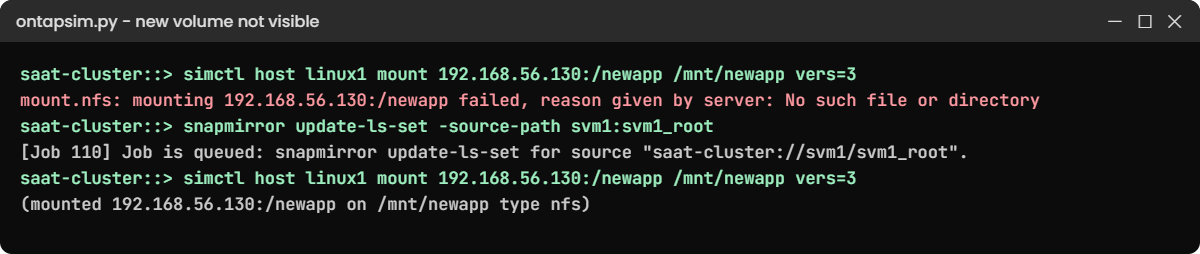
Practice shell: new volume not visible until update-ls-set
The mount fails until the LS set is updated.

2Update the set and mount again

snapmirror update-ls-set -source-path svm1:svm1_root
snapmirror show -type LS -fields last-transfer-end-timestamp,healthy
simctl host linux1 mount 192.168.56.130:/newapp /mnt/newapp vers=3

You should see this:

[Job 110] Job is queued: snapmirror update-ls-set for source "saat-cluster://svm1/svm1_root".
saat-cluster::> snapmirror show -type LS -fields last-transfer-end-timestamp,healthy
source-path    destination-path   last-transfer-end-timestamp healthy
-------------- ------------------ --------------------------- -------
svm1:svm1_root svm1:svm1_root_ls1 11/7/2026 08:35:49          true
svm1:svm1_root svm1:svm1_root_ls2 11/7/2026 08:35:49          true
2 entries were displayed.
saat-cluster::> simctl host linux1 mount 192.168.56.130:/newapp /mnt/newapp vers=3
(mounted 192.168.56.130:/newapp on /mnt/newapp type nfs)

After the update both copies know /newapp and the mount works. Waiting for the hourly schedule would also have fixed it, but users don’t wait an hour.

✅ Checkpoint: The second mount succeeds.

This happened at work

The share that appeared an hour late

A textile exporter in Panipat ran its ERP file shares on a six-node cluster with LS mirrors on every node. One Monday the storage admin created a new share for the auditors, tested it from his own PC, and closed the request.

Within ten minutes the auditors called: “Network path not found.” His test had worked because his session happened to read the source root, while the auditors’ sessions were served from LS copies. He checked the share settings twice and the AD group once before a senior colleague asked when the LS set had last updated.

One snapmirror update-ls-set later the share opened for everyone. The team added that command to their new-volume runbook and to the Ansible playbook that creates shares, so nobody relies on the hourly schedule again.

Common mistakes and troubleshooting

MistakeWhat happensDo this instead
Forgetting update-ls-set after a new volume or junctionClients get No such file or directory for up to an hourRun update-ls-set as the last step of every namespace change
Using LS mirrors for data volumesDeprecated since ONTAP 9.1 and not supported for new setupsUse them only for SVM root volumes
Running initialize on one LS relationshipONTAP refuses and asks for the set commandUse initialize-ls-set and update-ls-set
Adding LS mirrors on a one-HA-pair cluster or MetroClusterExtra admin work for little gain, and not recommendedUse a DP mirror of the root, or nothing, on small clusters
Promoting while the original root is still fineONTAP deletes the original and you lose newer changesPromote only when the original root is lost

Interview questions

Click a question to open it. Each one is written the way an interviewer would ask it. Under it you will see why they ask it and one way you could answer, in your own words.

Fresher level

1. What is a load-sharing mirror in ONTAP, in simple words?

Why they ask this: They want to check you know it protects the namespace, not user data.

How you might answer: It’s a read-only copy of the SVM root volume, kept in the same SVM on other nodes. If the node with the root fails, NFS and SMB clients can still find their way to the data volumes through the copies.

2. An admin creates a new NFS volume, but users get “No such file or directory” when they mount it. What’s your first guess?

Why they ask this: They’re checking if you know the most common LS mirror gotcha.

How you might answer: If the SVM has LS mirrors on its root, my first guess is the set hasn’t been updated since the volume was mounted. I’d run snapmirror update-ls-set for the root and try the mount again.

2–5 years experience

3. How do you create LS mirrors for an SVM root volume?

Why they ask this: They want the actual steps, which shows hands-on experience.

How you might answer: I create a small DP volume on each node’s data aggregate, then snapmirror create with -type LS from svm1:svm1_root to each copy, and run snapmirror initialize-ls-set once. I check them with snapmirror show -type LS.

4. When would you not use LS mirrors for the root?

Why they ask this: They’re testing whether you follow current guidance instead of habit.

How you might answer: On a cluster with one HA pair or a MetroCluster, NetApp doesn’t recommend them, so I’d use a DP mirror of the root or rely on HA. They also don’t help NFSv4 or SAN clients, and they’re deprecated for data volumes since 9.1.

Senior level

5. The aggregate holding an SVM root volume is offline and NAS clients can’t browse. Walk me through recovery.

Why they ask this: They want a calm, ordered recovery plan with the risks named.

How you might answer: First I’d confirm the root really can’t come back soon, because promote deletes the original if ONTAP can reach it. Then set -privilege advanced, snapmirror promote on the newest LS copy, back to admin, rename it to our standard root name and rebuild the LS set.

I’d also tell users that any namespace change after the last LS update may need redoing.

6. How would you stop “forgot to update the LS set” from happening again in a big team?

Why they ask this: They want to see process and automation thinking.

How you might answer: I’d put update-ls-set into the runbook and into whatever automation creates volumes, such as the Ansible playbook, so it runs every time. I’d also keep the schedule short enough and add a check that alerts if the LS set lags or is unhealthy.

Quick quiz

Q1. What does a load-sharing mirror protect?

  1. LUN data
  2. The SVM root volume and namespace
  3. The node root volume vol0
  4. Snapshots on the DR site
Show answer

B — LS mirrors copy the SVM root so the namespace stays reachable.

Q2. Which command pushes changes to every LS copy at once?

  1. snapmirror update
  2. snapmirror update-ls-set
  3. snapmirror resync
  4. volume mount
Show answer

B — LS mirrors are managed as a set with update-ls-set.

Q3. Since which release are LS mirrors deprecated for data volumes?

  1. ONTAP 8.2
  2. ONTAP 9.1
  3. ONTAP 9.10.1
  4. ONTAP 9.18.1
Show answer

B — from ONTAP 9.1 they are supported only for SVM root volumes.

Q4. Which clients can use LS mirror copies?

  1. NFSv3 and SMB
  2. NFSv4 only
  3. iSCSI and FC
  4. S3 only
Show answer

A — LS mirrors serve NAS clients using NFSv3 and SMB.

Q5. What privilege level does snapmirror promote need?

  1. admin
  2. advanced
  3. diag
  4. none
Show answer

B — promote is an advanced-privilege command.

Quick recap

  • An LS mirror is a read-only copy of the SVM root volume in the same SVM.
  • Build one per node with -type LS, then initialize-ls-set.
  • Run update-ls-set after every new volume or junction change.
  • Promote a copy (advanced privilege) only when the original root is lost.
  • Use LS mirrors on clusters with two or more HA pairs; otherwise protect the root with a DP mirror.

Next lesson

Lesson 42: MetroCluster and SyncMirror → You’ll see how ONTAP mirrors whole aggregates across two sites so one site can fail without data loss.

Further reading: ONTAP load-sharing mirrors

Want to go deeper into ONTAP load-sharing mirrors? NetApp’s SnapMirror root volume replication page gives the current support rules, and Restore an SVM root volume by promoting a mirror has the exact recovery steps. You can also see the full plan for this course on the NetApp ONTAP Storage Administration course page.

Scroll to Top

This website uses cookies

We use a few cookies to keep this site working. If you allow it, we also use Google Analytics to count visits so we can improve our lessons. You can accept all, deny the optional ones, or choose what to allow.