FabricPool tiering to S3

Look at any file share or image archive and most of it hasn’t been read in months. Keeping all of that on expensive SSDs is like storing old school notebooks in the living room cupboard when there’s a storeroom on the terrace.

FabricPool moves cold blocks from an SSD aggregate to cheap object storage, while users keep seeing one volume. In this lesson you’ll attach an S3 bucket (a MinIO server in the lab), choose a tiering policy, watch cold snapshot blocks move, and see what happens when the bucket can’t be reached.

Where this lesson fits

Lesson 46 of 56 in NetApp ONTAP Storage Administration · Phase 3: Data protection and integrations · Before this: Lesson 45, Active IQ Unified Manager · Next: Lesson 47, the troubleshooting workflow

TimeYou needBy the end you can
50 minutesThe practice shell (the MinIO bucket at 192.168.56.50 is simulated inside it)Attach an object store to an aggregate, set tiering policies, read volume footprint, and troubleshoot object store errors

What it is, in one line

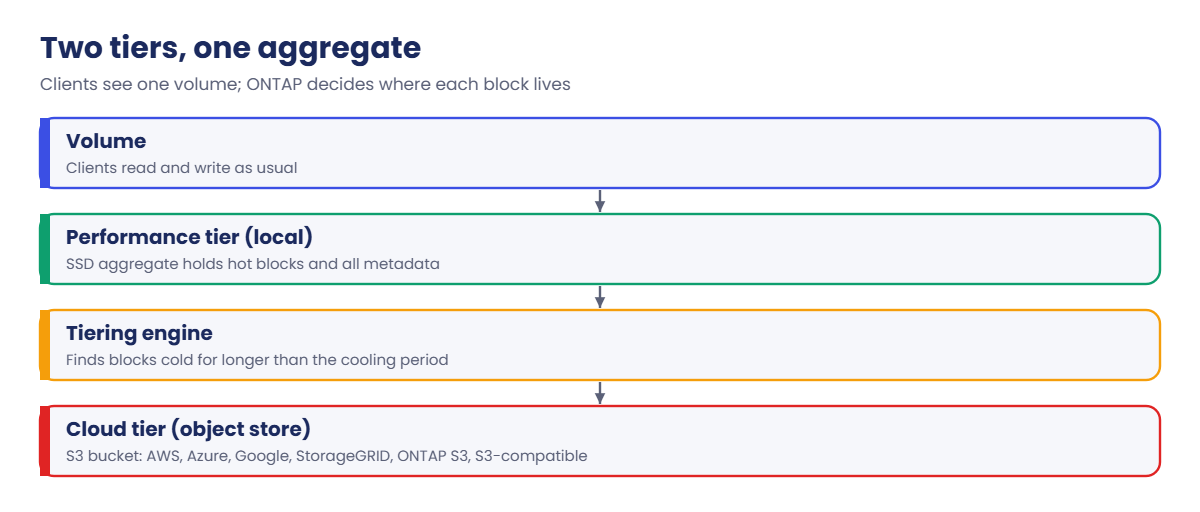
FabricPool joins an SSD (or, on FAS from ONTAP 9.8, all-HDD) aggregate with an S3 object store, so ONTAP can move blocks that haven’t been used for a while to the cheaper cloud tier and bring them back when someone reads them.

In Simple Words

The terrace storeroom

A family keeps this year’s books in the living room cupboard. Anything nobody has opened for a month goes up to the storeroom on the terrace, and a small card in the cupboard says exactly which box it’s in.

When someone wants an old book, it takes a little longer to fetch, but nobody has to search for it. If the terrace door gets stuck, this year’s books are still right there; only the old ones can’t be reached until the door is fixed.

Engineer's View

How an engineer describes it

An object store is defined once per cluster with storage aggregate object-store config create (provider type, server, bucket, keys) and then attached to an aggregate with storage aggregate object-store attach. That aggregate becomes a FabricPool: its disks are the performance tier and the bucket is the cloud tier. Attaching is permanent; you can’t detach the bucket later, only change or mirror it.

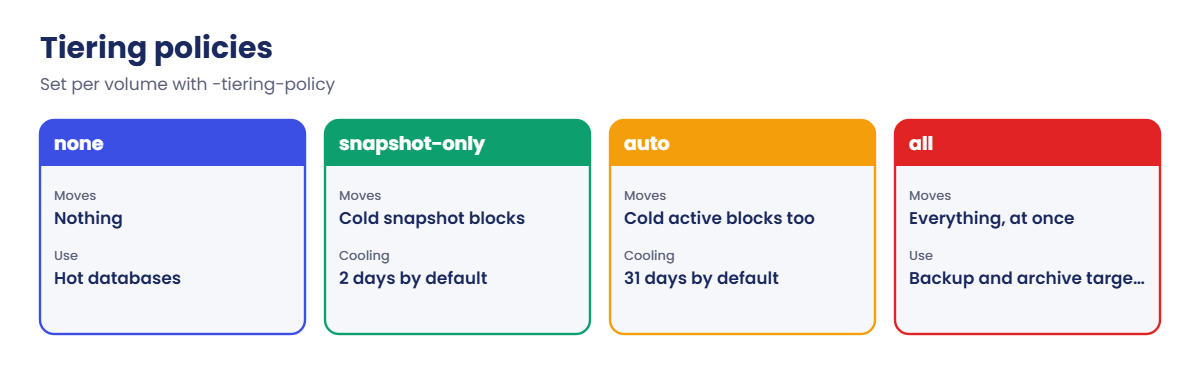
Each volume has a tiering policy. snapshot-only (the default on a FabricPool) moves snapshot blocks that have been cold for 2 days; auto also moves cold blocks of the active file system after 31 days; all sends data to the cloud tier as soon as it can; none keeps everything local. The cooling period can be changed with -tiering-minimum-cooling-days.

Metadata always stays on the performance tier, and FabricPool volumes should be thin (-space-guarantee none). Supported cloud tiers include AWS S3, Azure Blob, Google Cloud Storage, StorageGRID, ONTAP S3 and other S3-compatible stores; tiering to StorageGRID or ONTAP S3 needs no extra licence, while public cloud tiers are licensed by capacity. If the object store is unreachable, hot data keeps working but reads of cold blocks fail.

How it works, step by step

1Prepare the bucket

Create a bucket and an access key with rights to it, and make sure the cluster’s intercluster LIFs can reach the object store over HTTPS (port 443, or the port your S3 server uses).

2Define the object store

ONTAP tests the connection, the keys and the bucket before it saves the definition, so setup mistakes show up immediately.

ONTAP FabricPool: an SSD performance tier attached to an S3 cloud tier

3Attach it to an aggregate

Pick an SSD aggregate (or an all-HDD one on FAS). Remember this can’t be undone, so start with one aggregate.

4Set tiering policies on volumes

Start with snapshot-only for most volumes; it’s safe because users rarely read old snapshot blocks. Use auto for shares full of old files, and all for backup or archive destinations.

CommandWhat it shows
storage aggregate object-store showWhich aggregates use which store, and Availability
storage aggregate object-store show-spaceSpace used in the bucket
volume show-footprintHow much of a volume is local and how much is in the cloud tier
volume show -fields tiering-policyThe policy on each volume
ONTAP FabricPool tiering policies compared: none, snapshot-only, auto and all

5Watch the footprint and the link

Footprint shows the saving; object store availability shows the risk. Alert on an unavailable object store just as you would on a failed disk.

System Manager calls the cloud tier a cloud tier and the aggregate a local tier: Storage › Tiers › Add Cloud Tier defines the bucket, then Attach cloud tier on a local tier attaches it. The tiering policy is in each volume’s Edit dialog.

ONTAP FabricPool in System Manager: local tier aggr_ssd01 with cloud tier minio1
System Manager: the local tier aggr_ssd01 with the minio1 cloud tier attached.

Hands-on lab: attach an S3 bucket and tier cold snapshot blocks

Before you run any command, double-check it

Read every command twice before you press Enter. Check the target: the server name, the user, the disk or device name, the path and the sizes. These commands are for learning and were tested in our lab, not on your system. At work, run the read-only commands first, follow your change process, make sure a backup exists, and ask a second person to check anything that changes or deletes data. You run them at your own risk.

This lab uses the SaatVedha ONTAP practice shell, our own learning tool. It is not NetApp software: real ONTAP output looks like this but is not identical.

The practice shell simulates a MinIO S3 server at 192.168.56.50 with access key saatminio, secret saatminio123 and a bucket called saat-fabricpool. Start from a fresh lab (simctl reset): this time you’ll build an SSD aggregate, because FabricPool on FAS hard disks only arrived in ONTAP 9.8 and SSD is the common case.

1An SSD aggregate, an SVM and a thin volume with snapshots

storage aggregate create -aggregate aggr_ssd01 -node saat-cluster-01 -diskcount 6 -disktype SSD
vserver create -vserver svm1 -aggregate aggr_ssd01 -rootvolume-security-style unix
volume create -vserver svm1 -volume vol_scans -aggregate aggr_ssd01 -size 500g -space-guarantee none -junction-path /scans
simctl write svm1 vol_scans 200g media
volume snapshot create -vserver svm1 -volume vol_scans -snapshot s1
simctl overwrite svm1 vol_scans 100g

Answer y to the aggregate layout. The last lines should be:

Client wrote 200GB to svm1:vol_scans (inline efficiency saved 4GB).
saat-cluster::> volume snapshot create -vserver svm1 -volume vol_scans -snapshot s1
saat-cluster::> simctl overwrite svm1 vol_scans 100g
Note: Snapshot copies now use 100GB, more than the 5% reserve (25GB). The extra spills into the active file system space.
Client changed 100GB of existing data in svm1:vol_scans.

The scanned documents were rewritten, so snapshot s1 now holds 100 GB of old blocks on expensive SSD. Nobody is likely to read them unless a restore is needed, which makes them ideal for the cloud tier.

✅ Checkpoint: vol_scans exists and snapshot s1 holds old blocks.

2Define the MinIO bucket

storage aggregate object-store config create -object-store-name minio1 -provider-type S3_Compatible -server 192.168.56.50 -container-name saat-fabricpool -access-key saatminio -secret-password saatminio123 -port 9000 -is-ssl-enabled false
storage aggregate object-store config show

You should see this:

Name           Server                 Container Name     Provider Type
-------------- ---------------------- ------------------ --------------
minio1         192.168.56.50          saat-fabricpool    S3_Compatible

MinIO’s default port is 9000 and the lab runs it without TLS to keep things simple. In production you’d always use HTTPS, and for a public cloud you’d pick its own provider type, such as AWS_S3.

✅ Checkpoint: minio1 is listed with provider type S3_Compatible.

3Attach it and set the policy

storage aggregate object-store attach -aggregate aggr_ssd01 -object-store-name minio1
storage aggregate object-store show
volume show -vserver svm1 -volume vol_scans -fields tiering-policy
volume modify -vserver svm1 -volume vol_scans -tiering-policy snapshot-only

You should see this:

saat-cluster::> storage aggregate object-store show
Aggregate      Object Store Name  Availability Mirror Type
-------------- ------------------ ------------ -----------
aggr_ssd01     minio1             available    primary
saat-cluster::> volume show -vserver svm1 -volume vol_scans -fields tiering-policy
vserver volume    tiering-policy
------- --------- --------------
svm1    vol_scans none
saat-cluster::> volume modify -vserver svm1 -volume vol_scans -tiering-policy snapshot-only
Volume modify successful on volume vol_scans of Vserver svm1.

Real ONTAP asks you to confirm the attach because it’s permanent. The volume existed before the attach, so its policy was none; volumes created on a FabricPool afterwards get snapshot-only by default.

✅ Checkpoint: Availability is available and the policy is snapshot-only.

4Wait out the cooling period and read the footprint

volume show-footprint -vserver svm1 -volume vol_scans
simctl tick --days 3
volume show-footprint -vserver svm1 -volume vol_scans
storage aggregate object-store show-space

You should see this:

      Vserver : svm1
      Volume  : vol_scans

      Feature                                         Used       Used%
      --------------------------------          ----------     -----
      Volume Data Footprint                        296.2GB       9%
             Footprint in Performance Tier         296.2GB     100%
             Footprint in minio1                        0B       0%
      Volume Guarantee                                  0B        -
saat-cluster::> simctl tick --days 3
simctl: time moved forward (1 step, 3 day(s)).
saat-cluster::> volume show-footprint -vserver svm1 -volume vol_scans

      Vserver : svm1
      Volume  : vol_scans

      Feature                                         Used       Used%
      --------------------------------          ----------     -----
      Volume Data Footprint                        296.2GB       9%
             Footprint in Performance Tier         206.2GB      70%
             Footprint in minio1                      90GB      30%
      Volume Guarantee                                  0B        -
saat-cluster::> storage aggregate object-store show-space
                                                                Licensed
Aggregate      Object Store Name  Provider Type  Used Space   Used Space
-------------- ------------------ -------------- ---------- ------------
aggr_ssd01     minio1             S3_Compatible        90GB           0%

After the 2-day cooling period, 90 GB of the old snapshot blocks moved to the bucket and the SSD footprint dropped from 296 GB to 206 GB. The user’s live files didn’t move at all, because the policy is snapshot-only. Licensed Used Space is 0% because this is an S3-compatible lab store, not a licensed public cloud tier.

✅ Checkpoint: Footprint in minio1 shows 90GB.
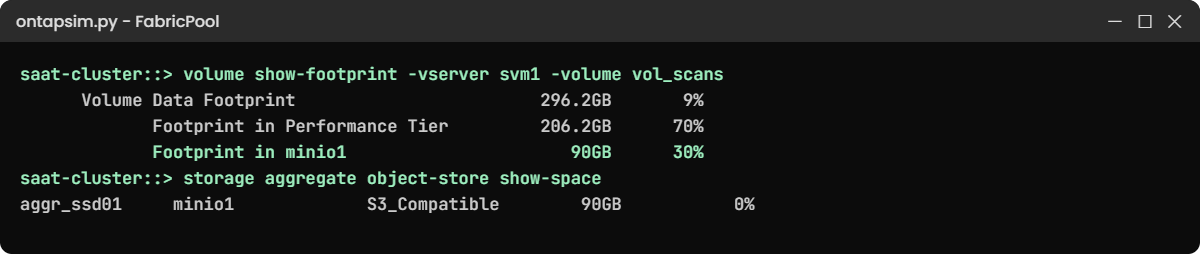
Practice shell output: ONTAP FabricPool footprint after cold snapshot blocks moved to the MinIO bucket
After the cooling period, 90 GB of cold snapshot blocks moved from SSD to the bucket.

Break It, Then Fix It

Continue in the same lab.

1Wrong secret key, then wrong bucket name

storage aggregate object-store config create -object-store-name minio2 -provider-type S3_Compatible -server 192.168.56.50 -container-name saat-fabricpool -access-key saatminio -secret-password wrongpass -port 9000 -is-ssl-enabled false
storage aggregate object-store config create -object-store-name minio3 -provider-type S3_Compatible -server 192.168.56.50 -container-name saat-fabricpol -access-key saatminio -secret-password saatminio123 -port 9000 -is-ssl-enabled false

You’ll get this:

Error: command failed: Cannot verify availability of the object store. Reason: Access Denied (the access key or secret key is wrong).
saat-cluster::> storage aggregate object-store config create -object-store-name minio3 ...
Error: command failed: Cannot verify availability of the object store. Reason: The specified bucket "saat-fabricpol" does not exist.

Good news: ONTAP checks before it saves, so a typo can’t half-configure your tier. Copy keys from your vault, check the bucket name letter by letter, and if the error mentions certificates on a real system, install the object store’s CA certificate on the cluster.

✅ Checkpoint: You can name the two setup errors.

Practice shell output: FabricPool object store errors and an unavailable cloud tier
Wrong keys and a wrong bucket name are caught at setup; an outage later shows as unavailable.

2The object store goes down

simctl break s3-down
storage aggregate object-store show

You’ll get this:

Aggregate      Object Store Name  Availability Mirror Type
-------------- ------------------ ------------ -----------
aggr_ssd01     minio1             unavailable  primary

Hot data on SSD keeps working, but any read of the 90 GB in the bucket would fail, and on a real cluster the event log fills with object store errors. Restoring an old snapshot is exactly the moment you’d discover this, so alert on Availability.

Bring the S3 server back (here simctl fix s3-down) and check Availability says available again. On a real system check the S3 service, DNS, routes from the intercluster LIFs, firewall and certificates, in that order.

simctl fix s3-down
storage aggregate object-store show

✅ Checkpoint: Availability is back to available.

This happened at work

The old X-rays that wouldn’t open

A diagnostic centre in Tiruchirappalli tiered its imaging archive to an on-premises S3 store with the auto policy. SSD use dropped by more than half, and for a year nobody thought about it.

Then a doctor asked for a patient’s scans from two years earlier, and the viewer timed out. New scans opened fine. The storage engineer found the object store showing unavailable: the S3 server’s TLS certificate had expired the previous weekend, so ONTAP refused to connect, and every cold block was out of reach.

Renewing the certificate fixed it within an hour, and nothing was lost. The team added the certificate expiry date to their calendar, an alert on object store availability, and a monthly test that opens one old study to prove the cold tier still answers.

Common mistakes and troubleshooting

MistakeWhat happensDo this instead
Attaching every aggregate on day oneA permanent change you can’t undo if the design is wrongStart with one aggregate and learn its behaviour
Using all on active volumesHot data is read back from the cloud and users see latencyUse snapshot-only or auto for live data; all for backup targets
Not monitoring object store availabilityCold data fails silently until someone needs itAlert on unavailable and test cold reads regularly
Thick volumes on a FabricPoolSpace savings don’t show up in the aggregateUse -space-guarantee none
Forgetting egress and request costs in public cloudThe cloud bill grows when cold data is read backTier data that really is cold and estimate read-back costs

Interview questions

Click a question to open it. Each one is written the way an interviewer would ask it. Under it you will see why they ask it and one way you could answer, in your own words.

Fresher level

1. What does FabricPool do, in simple words?

Why they ask this: They want the basic idea in plain language.

How you might answer: It joins an SSD aggregate with an S3 bucket. Blocks that haven’t been used for a while move to the bucket, which is much cheaper, while users still see one volume and the hot data stays on SSD.

2. What are the FabricPool tiering policies?

Why they ask this: They’re checking that you know the options and defaults.

How you might answer: none keeps everything local, snapshot-only moves cold snapshot blocks after 2 days and is the default, auto also moves cold active blocks after 31 days, and all sends data to the cloud tier straight away, which suits backup destinations.

2–5 years experience

3. Users say opening old files is slow after you enabled FabricPool. What do you check?

Why they ask this: They want to see you link symptoms to tiering behaviour.

How you might answer: First the tiering policy on that volume: with auto or all, old files are read back from the bucket, which is slower than SSD. Then I’d check object store latency and availability and the network path from the intercluster LIFs. If those files are still used often, I’d switch to snapshot-only or none.

4. The object store shows unavailable. What’s the impact and what do you do?

Why they ask this: They’re testing understanding of risk and a methodical fix.

How you might answer: Hot data keeps working, but any read of tiered blocks fails, including restores from old snapshots. I’d check the S3 service, DNS, routes, firewall and certificates from the cluster side, fix the cause, confirm Availability is available, and then test reading an old file.

Senior level

5. Would you put FabricPool in front of a public cloud bucket for a 500 TB file archive? What would you consider?

Why they ask this: They want cost, risk and design thinking.

How you might answer: I’d look at how cold the data really is, the WAN bandwidth, and the cloud costs for storage, requests and especially reading data back. An on-premises StorageGRID or ONTAP S3 target avoids egress costs and licences.

I’d also think about security of the bucket, encryption and whether we need a mirror of the cloud tier.

6. How would you explain the permanence of attaching an object store to a change board?

Why they ask this: They want risk communication.

How you might answer: I’d say clearly that the aggregate will depend on that bucket for as long as it exists; we can change or mirror the store later, but we can’t simply remove it.

So we’d pilot on one aggregate with snapshot-only, monitor availability and costs for a few months, and only then extend it.

Quick quiz

Q1. Which tiering policy is the default for new volumes on a FabricPool?

  1. none
  2. snapshot-only
  3. auto
  4. all
Show answer

B — snapshot-only is the default.

Q2. What is the default cooling period for the auto policy?

  1. 2 days
  2. 7 days
  3. 31 days
  4. 183 days
Show answer

C — auto waits 31 days by default.

Q3. Which data always stays on the performance tier?

  1. Snapshot blocks
  2. Metadata
  3. Cold user files
  4. Backup copies
Show answer

B — metadata never tiers.

Q4. What happens if the object store is unavailable?

  1. All data is unavailable
  2. Hot data works; cold blocks can’t be read
  3. The aggregate goes offline
  4. Nothing at all
Show answer

B — only tiered blocks are affected.

Q5. Can you detach an object store from an aggregate after attaching it?

  1. Yes, any time
  2. Only after a reboot
  3. No, the attach is permanent
  4. Only on FAS
Show answer

C — attaching is permanent.

Quick recap

  • FabricPool pairs an SSD (or FAS all-HDD) aggregate with an S3 bucket.
  • Define the store, attach it (permanently), then set tiering policies per volume.
  • snapshot-only is the default and safe; auto and all move more.
  • Metadata and hot data stay local; cold reads come back from the bucket.
  • Monitor object store availability and test cold reads.

Next lesson

Lesson 47: The troubleshooting workflow (EMS, event log, AutoSupport) → You’ll start Phase 4 with a repeatable way to work any ONTAP problem: what changed, where to look, and how to prove the fix.

Further reading: ONTAP FabricPool

Want to go deeper into ONTAP FabricPool? Read NetApp’s ONTAP concepts guide for how FabricPool, local tiers and cloud tiers fit together. You can also see the full plan for this course on the NetApp ONTAP Storage Administration course page.

Scroll to Top

This website uses cookies

We use a few cookies to keep this site working. If you allow it, we also use Google Analytics to count visits so we can improve our lessons. You can accept all, deny the optional ones, or choose what to allow.