Backup integration: SnapCenter, Commvault IntelliSnap, Rubrik, NDMP
-
Phase 0: Start here
-
Phase 1: Architecture and foundation
-
Phase 2: Protocols and day-to-day administration
-
Phase 3: Data protection and enterprise integrations
-
Phase 4: Troubleshooting blueprint
-
Phase 5: Final project and career
Most companies already own a backup product before they buy ONTAP, and the first question in every design meeting is “will our backup software work with it?” Usually the answer is yes, and the best answer is that the backup software stops copying data through a server and starts asking ONTAP for snapshots instead.
This lesson explains the four common patterns: NetApp SnapCenter, snapshot-based third-party tools such as Commvault IntelliSnap, file-level NAS backup tools such as Rubrik, and plain NDMP. You’ll then set up what every one of them needs from you on the ONTAP side: an account with just enough rights.
Where this lesson fits
Lesson 43 of 56 in NetApp ONTAP Storage Administration · Phase 3: Data protection and integrations · Before this: Lesson 42, MetroCluster and SyncMirror · Next: Lesson 44, QoS limits
| Time | You need | By the end you can |
|---|---|---|
| 45 minutes | The practice shell with svm1 from earlier lessons | Explain how backup software uses ONTAP snapshots, SnapMirror and NDMP, and create a least-privilege role and account for it |
What it is, in one line
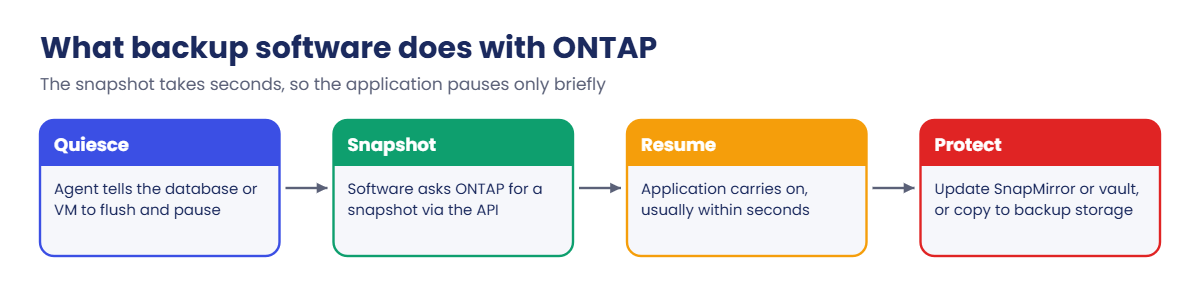
Backup integration means letting backup software drive ONTAP through its API: it pauses the application, asks ONTAP for a snapshot, then replicates or copies that snapshot, instead of reading every file through a host.
In Simple Words
The class photo instead of a portrait of every child
A school wants a record of every class. Drawing a portrait of each child takes all day and the children get restless, so the photographer asks everyone to stand still for one second and takes a single group photo.
Later, in the studio, he prints copies and sends one to the parents’ archive. The children were only still for a second; all the slow work happened afterwards, away from the classroom.
Engineer's View
How an engineer describes it
SnapCenter is NetApp’s own application-aware backup software. Plug-ins for databases such as Oracle, SQL Server and SAP HANA, and for VMware, quiesce the application, call ONTAP to take a snapshot of the right volumes, resume, then update SnapMirror or vault relationships, and they can also clone and restore. Commvault IntelliSnap does the same job from Commvault, then can make a “backup copy” from the snapshot to Commvault storage and manage SnapMirror copies.
File-level NAS tools such as Rubrik protect shares by reading them over NFS or SMB, usually from a snapshot so the copy is consistent, and can use NetApp’s snapshot difference API to find changed files quickly instead of walking millions of folders. NDMP (Network Data Management Protocol, TCP 10000) is the older standard: the backup server tells ONTAP to stream a volume or qtree to a tape or backup target, with dump for files or SMTape for whole-volume images.
All of them need an ONTAP account. Use a dedicated one per product, with a role that allows only what it needs, and HTTPS (the http application) for API tools. NDMP has its own SVM-scoped user and password, made with vserver services ndmp generate-password.
How it works, step by step
1Choose the pattern
Databases and VMware: SnapCenter or a snapshot-based third-party tool, so restores are fast and consistent. Big file shares: snapshots plus SnapMirror vault, or a NAS tool that reads changes. Tape or long-term offsite: NDMP or a backup copy.
2Create an account for the software
One account per product, not the shared admin. A custom role limits it to snapshots, SnapMirror and the show commands it needs.
3Register the cluster or SVM in the backup tool
In the tool you add the cluster management IP or an SVM management LIF with that account. The tool then discovers volumes, LUNs and relationships.
4Let the tool drive snapshots and copies
Jobs quiesce the application, take the snapshot, and then update SnapMirror or copy data out. ONTAP snapshot names usually carry the tool’s prefix, which tells you who made them.
| Real ONTAP command | Used for |
|---|---|
security login role create | A role with only the commands a tool needs |
security login create -application http | An API account for SnapCenter, Commvault and similar |
vserver services ndmp on -vserver svm1 | Turn on NDMP for an SVM |
vserver services ndmp generate-password | NDMP password for the backup server |
volume snapshot show -snapshot sc_* | Find snapshots made by a tool by their prefix |
5Test restores, not just backups
A green job only proves that a copy was made. Restore a database or a folder every quarter, and time it.
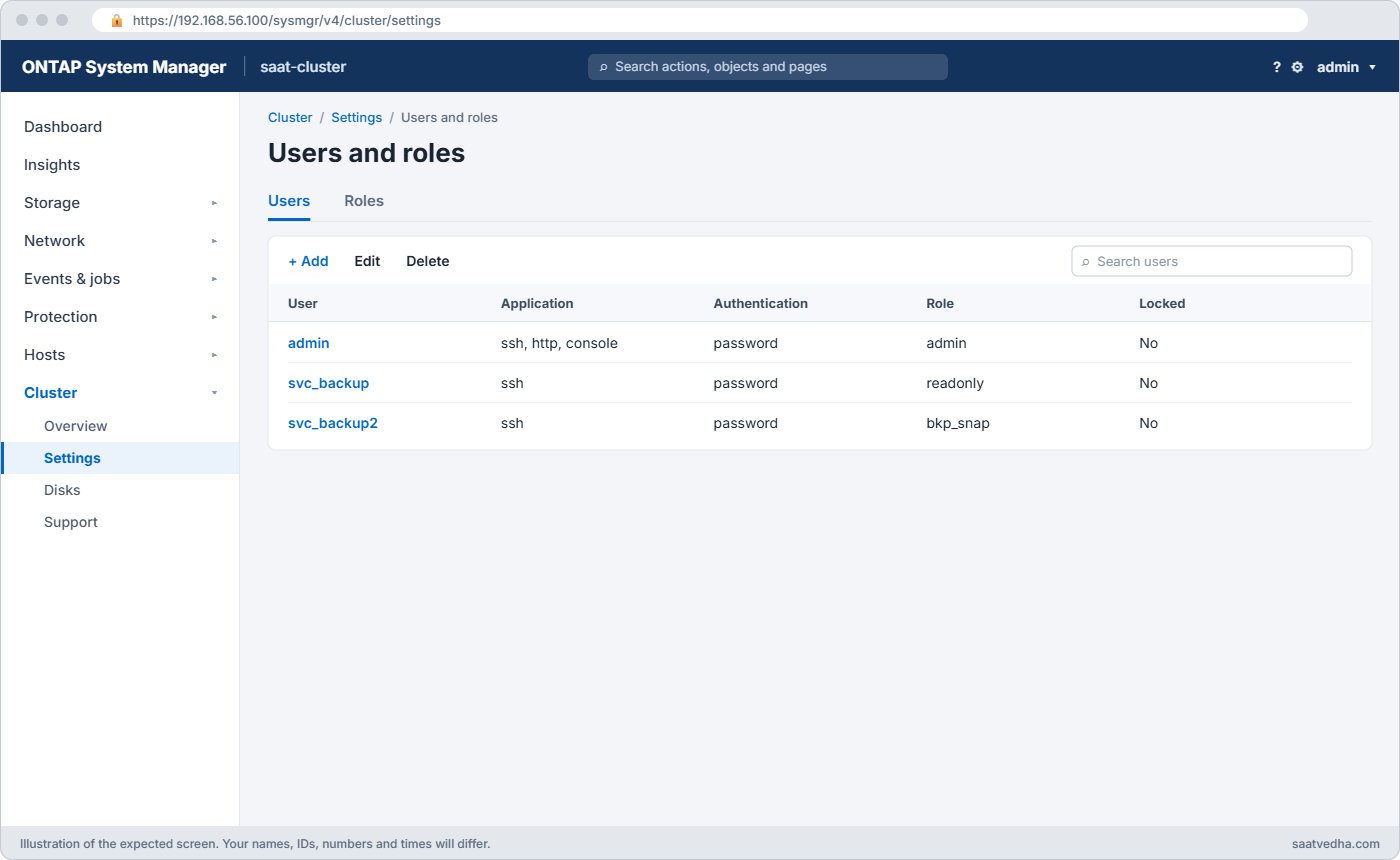
System Manager manages accounts under Cluster › Settings › Users and Roles, where + Add creates a user and the Roles tab shows the built-in and custom roles. NDMP is under Storage › Storage VMs, select the SVM, Settings › NDMP.
Good to know: older names you will still hear
Before SnapCenter, NetApp’s host-side tools were SnapDrive, which managed LUNs and file system consistent snapshots from the host, and the SnapManager family for Exchange, SQL Server, Oracle, SAP and others. Each one was installed and run host by host.
SnapCenter replaced them with one central server and plug-ins on the hosts, so backup, restore and clone jobs for many applications are run and watched from one place. If an older team document mentions SnapManager, read it as “SnapCenter plug-in” and check the current Interoperability Matrix.
Hands-on lab: a least-privilege account for backup software
Before you run any command, double-check it
Read every command twice before you press Enter. Check the target: the server name, the user, the disk or device name, the path and the sizes. These commands are for learning and were tested in our lab, not on your system. At work, run the read-only commands first, follow your change process, make sure a backup exists, and ask a second person to check anything that changes or deletes data. You run them at your own risk.
This lab uses the SaatVedha ONTAP practice shell, our own learning tool. It is not NetApp software: real ONTAP output looks like this but is not identical.
You can’t install SnapCenter or Commvault on the practice shell, but you can do the ONTAP side exactly as you would for them. Start from the usual setup with svm1.
1A database volume and the built-in roles
volume create -vserver svm1 -volume vol_oradb -aggregate aggr1_01 -size 200g -junction-path /oradb
security login role showYou should see this:
[Job 104] Job succeeded: Successful
saat-cluster::> security login role show
Role
Name Command/Directory Access Level
------------------ ------------------------------ ------------
admin DEFAULT all
autosupport DEFAULT none
autosupport system node autosupport all
backup DEFAULT none
backup vserver services ndmp all
readonly DEFAULT readonly
readonly security login password all
none DEFAULT none
8 entries were displayed.The built-in backup role only covers NDMP. readonly can’t create anything and admin can do everything, so neither fits a snapshot-based backup tool.
✅ Checkpoint: You can name what the built-in backup role allows.
2Build a role with just enough rights
security login role create -role bkp_snap -cmddirname "volume snapshot" -access all
security login role create -role bkp_snap -cmddirname "snapmirror" -access all
security login role create -role bkp_snap -cmddirname "volume show" -access readonly
security login role show -role bkp_snapThe new lines at the bottom should be:
bkp_snap volume snapshot all
bkp_snap snapmirror all
bkp_snap volume show readonlyThe practice shell lists every role even when you filter by one. A real tool’s documentation gives you its exact list of commands or REST paths; on current releases API tools may need a REST role made with security login rest-role create.
✅ Checkpoint: bkp_snap has three entries.
3Create the account the tool will use
security login create -user-or-group-name svc_backup2 -application ssh -authentication-method password -role bkp_snap
security login show -vserver saat-clusterEnter a password twice (Backup#2026 in this lab). The list should end with:
svc_backup2 ssh password bkp_snap noYou use ssh here so you can log in and test it. For a real backup product you’d create the same account with -application http, because the tools talk to ONTAP over HTTPS.
✅ Checkpoint: svc_backup2 appears with role bkp_snap.
4Log in as the backup account and test it
Type exit, then start the shell again and log in as svc_backup2.
volume snapshot create -vserver svm1 -volume vol_oradb -snapshot sc_oradb_20261107
volume snapshot show -vserver svm1 -volume vol_oradb
volume delete -vserver svm1 -volume vol_oradb
volume offline -vserver svm1 -volume vol_oradbYou should see this:
saat-cluster::> volume snapshot create -vserver svm1 -volume vol_oradb -snapshot sc_oradb_20261107
saat-cluster::> volume snapshot show -vserver svm1 -volume vol_oradb
---Blocks---
Vserver Volume Snapshot Size Total% Used%
-------- -------- ------------------------------------- -------- ------ -----
svm1 vol_oradb
sc_oradb_20261107 0B 0% 0%
saat-cluster::> volume delete -vserver svm1 -volume vol_oradb
Error: "volume delete" is not a recognized command
saat-cluster::> volume offline -vserver svm1 -volume vol_oradb
Error: "volume offline" is not a recognized commandThe account can do its job and nothing more. If its password ever leaks, an attacker can take snapshots but can’t take volumes offline or delete them. ONTAP hides commands a role can’t use, which is why the error says “not a recognized command” rather than “permission denied”.
✅ Checkpoint: The snapshot works and volume delete is refused.
5NDMP, on paper
The practice shell has no NDMP service. On a real cluster these commands turn it on for svm1 and create the credentials you type into the backup server:
vserver services ndmp on -vserver svm1
vserver services ndmp show -vserver svm1
vserver services ndmp generate-password -vserver svm1 -user ndmpuserThe backup server then connects to an SVM data or management LIF on TCP 10000. Make sure the firewall allows it and that the backup server’s NDMP version and ONTAP’s match.

Try it yourself: Build an account command in the Command Builder.
Break It, Then Fix It
Two account mistakes that show up as “backup failed” in the morning report. Do this as admin.

1Give the backup tool a read-only account
security login create -user-or-group-name svc_backup -application ssh -authentication-method password -role readonlyLog out, log in as svc_backup, and try what the backup job would do:
volume snapshot create -vserver svm1 -volume vol_oradb -snapshot sc_testYou’ll get this:
Error: "volume snapshot create" is not a recognized commandSomeone chose readonly “to be safe”, and every backup job fails at the snapshot step. In the tool’s log this usually shows as an API error. The fix is the bkp_snap role from the lab: as admin, give the account that role (or create a new account with it) and run the job again.
✅ Checkpoint: You can explain why readonly isn’t enough for a backup tool.
2Mistype the role name
security login create -user-or-group-name svc_x -application http -authentication-method password -role bkp-snapYou’ll get this:
Error: command failed: Role "bkp-snap" does not exist.A dash instead of an underscore. Copy role names from security login role show, and keep a short document listing each backup product, its account, its role and where its password lives.
✅ Checkpoint: The account is created with the correct role name.
This happened at work
The password change that stopped every backup
An export house in Amritsar used Commvault IntelliSnap to back up its SQL Server databases on ONTAP LUNs. When the auditors asked for the shared ONTAP admin password to be rotated every 90 days, the infra team did it on a Friday and went home.
Monday’s report showed three nights of failed snapshot jobs. The backup software had been registered with that same admin account years earlier, and nobody had connected the audit task with the backup configuration. Luckily SnapMirror kept running, so DR copies existed, but the snapshot-based backups had a three-day hole.
The team created a dedicated account with a custom role for the backup software, registered the cluster with it in Commvault, and stored its password in their vault with its own rotation process that includes updating the backup tool the same day. They also added a check for “no successful backup in 24 hours” to the morning dashboard.
Common mistakes and troubleshooting
| Mistake | What happens | Do this instead |
|---|---|---|
| Registering backup software with the shared admin account | Password changes break backups, and the tool can do anything | A dedicated account per tool with a custom role |
| Giving the tool the readonly role | Snapshot jobs fail with “not a recognized command” | Allow volume snapshot and snapmirror, plus the show commands it needs |
| Crash-consistent snapshots of databases | Restores need recovery or fail to open | Use an application plug-in that quiesces first |
| Letting tool snapshots pile up | Volumes fill with old backup snapshots | Check retention in the tool and watch for its prefix in volume snapshot show |
| Only checking job status | A green job with a broken restore path | Run and time a test restore every quarter |
Interview questions
Click a question to open it. Each one is written the way an interviewer would ask it. Under it you will see why they ask it and one way you could answer, in your own words.
Fresher level
1. How do snapshot-based backups differ from traditional backups through a host?
Why they ask this: They want to see you understand why snapshots change the backup window.
How you might answer: A traditional backup reads every file or block through a host, which takes hours and loads the server. A snapshot-based backup pauses the application for a moment, takes an ONTAP snapshot in seconds, and then copies or replicates that snapshot in the background.
2. What is NDMP used for?
Why they ask this: They’re checking that you know the older, still-common standard.
How you might answer: NDMP lets a backup server tell ONTAP to stream a volume or qtree directly to tape or a backup target, without the data going through a file server. It runs on TCP 10000 and uses an SVM-scoped NDMP user and password.
2–5 years experience
3. Backups started failing last night and nothing changed on the backup server. Where do you look on ONTAP?
Why they ask this: They want a methodical check of the storage side.
How you might answer: I’d check the account the tool uses with security login show: is it locked, did its password change, does its role still allow snapshots. Then I’d check the volumes are online and not full, look at the event log around the job time, and try the same snapshot command as that account.
4. Why use an application plug-in like SnapCenter instead of a plain ONTAP snapshot schedule for a database?
Why they ask this: They’re testing whether you understand consistency.
How you might answer: A plain schedule gives a crash-consistent copy, like pulling the power. The plug-in quiesces or puts the database in backup mode, takes the snapshot of the data and log volumes together, and records it in the catalog, so restores are consistent and point-in-time recovery works.
Senior level
5. How would you design backup for 300 TB of file shares where the nightly copy no longer finishes?
Why they ask this: They want design thinking that uses ONTAP features instead of brute force.
How you might answer: I’d stop full file walks and use snapshots as the backup point, with a SnapMirror vault to a second cluster for retention. If the business wants an independent backup product, I’d pick one that reads from snapshots and uses the snapshot difference API, so each night only changed files are read.
Then I’d add an immutable copy for ransomware protection.
6. Security asks you to limit what backup software can do on the cluster. How would you approach it?
Why they ask this: They want least privilege applied in practice.
How you might answer: I’d list exactly what each product needs from its documentation and build a custom role, or a REST role for API tools, with only those commands. Each product gets its own account over HTTPS, its password goes in the vault with a rotation process tied to the tool, and logins are audited.
I’d also turn on multi-admin verification for snapshot and volume deletes so a stolen backup account can’t destroy copies.
Quick quiz
Q1. What does backup software usually ask ONTAP to do during a database backup?
- Copy every block through the host
- Take a snapshot after the database is quiesced
- Reboot the node
- Delete old volumes
Show answer
B — the snapshot is taken while the application is paused.
Q2. Which TCP port does NDMP use by default?
- 443
- 2049
- 10000
- 11105
Show answer
C — NDMP listens on TCP 10000.
Q3. What does the built-in ONTAP backup role allow?
- Everything
- NDMP commands only
- Snapshot commands only
- Nothing
Show answer
B — it covers vserver services ndmp.
Q4. A user with the readonly role runs volume snapshot create. What happens?
- It works
- It says the command is not recognized
- It asks for approval
- It creates a read-only snapshot
Show answer
B — ONTAP hides commands the role can’t use.
Q5. Which application should an API-based backup tool’s account use?
- console
- http
- service-processor
- ssh only
Show answer
B — API tools connect over HTTPS.
Quick recap
- Backup tools quiesce the application, ask ONTAP for a snapshot, then copy or replicate it.
- SnapCenter and IntelliSnap are snapshot-based; NAS tools read from snapshots; NDMP streams to tape.
- Give each tool its own account and a role with only what it needs.
- The readonly role is too little and admin is too much.
- Test restores, not just backup jobs.
Next lesson
Lesson 44: QoS limits for noisy neighbours → You’ll find a volume that hogs the disks and cap it with a QoS policy group.
Further reading: ONTAP backup integration
Want to go deeper into ONTAP backup integration? Read NetApp’s ONTAP concepts guide for how Snapshot copies and SnapMirror underpin backup and recovery. You can also see the full plan for this course on the NetApp ONTAP Storage Administration course page.
