SnapMirror vault (SnapVault) and unified replication

An auditor asks for the finance share as it stood on the last day of March. Production keeps seven daily snapshots, so that copy is long gone, and the DR mirror only holds what production holds. Something else has to keep history for months or years.

On ONTAP that something is a SnapMirror relationship with a vault policy, still called SnapVault by most engineers. In this lesson you’ll label snapshots on the source, build a vault policy that keeps 30 dailies and 52 weeklies, and see how one relationship can do DR and backup together.

Where this lesson fits

Lesson 40 of 56 in NetApp ONTAP Storage Administration · Phase 3: Data protection and integrations · Before this: Lesson 39, SnapMirror asynchronous DR · Next: Lesson 41, SVM DR and SnapMirror Synchronous

TimeYou needBy the end you can
50 minutesThe practice shell with saat-cluster and saat-dr peered (Lesson 38)Label snapshots, create a vault policy with keep rules, vault a volume, and clean up a deleted relationship

What it is, in one line

A SnapMirror vault relationship copies selected, labelled snapshots from a source volume to a backup cluster and keeps many more of them there than production does, giving you long-term, disk-based backups.

In Simple Words

The school record room

A school keeps this year’s attendance registers in the staff room, and at the end of each week the clerk throws out the oldest one to make space. Before throwing anything out, she sends a photocopy of every register marked “monthly” to the district record room.

The record room keeps those copies for years. Nobody works in the record room every day, but when an inspector asks about March of two years ago, that’s where the answer is, and only the registers with the “monthly” mark ever got there.

Engineer's View

How an engineer describes it

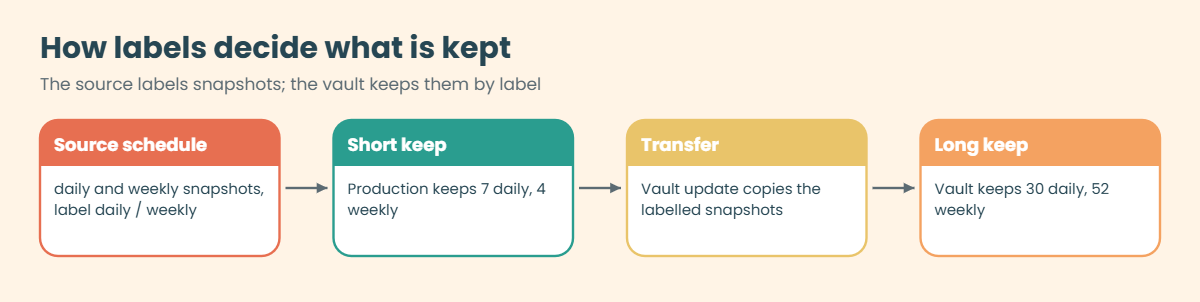
Every schedule in a snapshot policy can carry a SnapMirror label (-snapmirror-label1 daily). A SnapMirror policy of type vault has rules like “label daily, keep 30” and “label weekly, keep 52”. At each update ONTAP transfers the source snapshots whose labels match a rule, and the destination deletes the oldest copy of a label once it has more than the keep count.

The engine is the same XDP SnapMirror you used in Lesson 39, which is why NetApp calls it unified replication. The built-in XDPDefault policy is a vault policy (7 daily, 52 weekly); MirrorAndVault is a mirror-vault policy that keeps the latest copy for DR and labelled copies for backup in one relationship, so you don’t need a second baseline.

The destination is a DP volume, usually on cheaper capacity disks. You restore from it with snapmirror restore (a file, or a whole volume into a new one) or through System Manager, SnapCenter or your backup software. Vault copies are read-only, and on a SnapLock vault they can’t be deleted before their retention ends.

How it works, step by step

1Label the source snapshots

Edit the snapshot policy on the source volume so the daily schedule has the label daily and the weekly one weekly. The default policy already labels its daily and weekly copies.

2Create a vault policy on the destination

One rule per label, each with its own keep count. The labels must match the source exactly, including case.

ONTAP SnapVault labels: the source snapshot policy labels copies and the vault policy keeps them longer

3Create and initialize the relationship

Same commands as a mirror, run on the destination, with -policy set to your vault policy and usually a daily schedule.

4Let the copies build up

Each update brings over the new labelled snapshots, and the vault trims each label to its keep count. Production keeps deleting its own old copies on its own short schedule.

PolicyTypeTypical use
MirrorAllSnapshotsasync-mirrorDR copy that looks exactly like the source
XDPDefaultvaultBackup with 7 daily and 52 weekly copies
MirrorAndVaultmirror-vaultDR and backup from one relationship
Your own, e.g. vault_30d_52wvaultRetention that matches your backup policy
ONTAP SnapMirror policy types compared: async-mirror, vault and mirror-vault

5Restore when someone asks

Find the copy with volume snapshot show on the vault volume, then restore one file or a whole volume to a new location, never over production without the owner’s agreement.

In System Manager, choose Protect on a volume and pick a vault or mirror-and-vault policy, or build your own under Protection › Overview › Protection policies › + Add, with one row per label and keep count. Restores start from Protection › Relationships, three-dot menu, Restore.

ONTAP SnapVault vault policy vault_30d_52w with daily and weekly rules in System Manager
System Manager: a vault policy that keeps 30 daily and 52 weekly copies.

Hands-on lab: vault 30 daily and 52 weekly copies

Before you run any command, double-check it

Read every command twice before you press Enter. Check the target: the server name, the user, the disk or device name, the path and the sizes. These commands are for learning and were tested in our lab, not on your system. At work, run the read-only commands first, follow your change process, make sure a backup exists, and ask a second person to check anything that changes or deletes data. You run them at your own risk.

This lab uses the SaatVedha ONTAP practice shell, our own learning tool. It is not NetApp software: real ONTAP output looks like this but is not identical.

Start with the two clusters and SVMs peered as in Lesson 38. One terminal on each cluster.

1saat-cluster: a finance volume with labelled snapshots

volume create -vserver svm1 -volume vol_finance -aggregate aggr1_01 -size 100g -junction-path /finance
simctl write svm1 vol_finance 15g files
volume snapshot policy create -vserver svm1 -policy fin_daily -enabled true -schedule1 daily -count1 7 -snapmirror-label1 daily -schedule2 weekly -count2 4 -snapmirror-label2 weekly
volume modify -vserver svm1 -volume vol_finance -snapshot-policy fin_daily
volume snapshot policy show -vserver svm1 -policy fin_daily

You should see this:

Vserver: svm1
                         Number of Is
Policy Name              Schedules Enabled Comment
------------------------ --------- ------- ----------------------------------
fin_daily                        2 true    -
    Schedule               Count     Prefix                 SnapMirror Label
    ---------------------- -----     ---------------------- -------------------
    daily                      7     daily                  daily
    weekly                     4     weekly                 weekly

Production keeps one week of dailies and four weeklies. The SnapMirror Label column is what the backup cluster will look for.

✅ Checkpoint: Both schedules have a SnapMirror label.

2saat-dr: look at the built-in policies, then make your own

snapmirror policy show
snapmirror policy create -vserver svm1dr -policy vault_30d_52w -type vault
snapmirror policy add-rule -vserver svm1dr -policy vault_30d_52w -snapmirror-label daily -keep 30
snapmirror policy add-rule -vserver svm1dr -policy vault_30d_52w -snapmirror-label weekly -keep 52
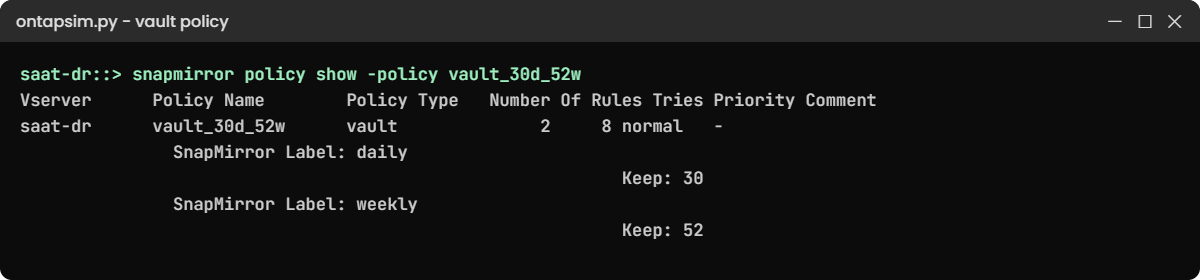
snapmirror policy show -policy vault_30d_52w

The last command should show:

Vserver      Policy Name        Policy Type   Number Of Rules Tries Priority Comment
------------ ------------------ ------------- ------ ----- -------- --------------------
saat-dr      vault_30d_52w      vault              2     8 normal   -
               SnapMirror Label: daily
                                                           Keep: 30
               SnapMirror Label: weekly
                                                           Keep: 52

In the first list you’ll find MirrorAllSnapshots (async-mirror), MirrorAndVault (mirror-vault), XDPDefault (vault) and a few more. The practice shell lists your policy under the cluster name; real ONTAP shows the SVM you created it in.

✅ Checkpoint: vault_30d_52w has two rules, keep 30 and keep 52.

3saat-dr: vault the volume

volume create -vserver svm1dr -volume vol_finance_vault -aggregate aggr1_dr -size 300g -type DP
snapmirror create -source-path svm1:vol_finance -destination-path svm1dr:vol_finance_vault -policy vault_30d_52w -schedule daily
snapmirror initialize -destination-path svm1dr:vol_finance_vault
simctl tick 2
snapmirror show -destination-path svm1dr:vol_finance_vault -fields state,status,healthy,policy-type

You should see this:

Operation succeeded: snapmirror create for the relationship with destination "svm1dr:vol_finance_vault".
saat-dr::> snapmirror initialize -destination-path svm1dr:vol_finance_vault
Operation is queued: snapmirror initialize of destination "svm1dr:vol_finance_vault".
saat-dr::> simctl tick 2
simctl: time moved forward (2 steps).
saat-dr::> snapmirror show -destination-path svm1dr:vol_finance_vault -fields state,status,healthy,policy-type
source-path      destination-path         state        status healthy policy-type
---------------- ------------------------ ------------ ------ ------- -----------
svm1:vol_finance svm1dr:vol_finance_vault Snapmirrored Idle   true    vault

The vault volume is three times the source size because it will hold months of changes. Policy type vault tells anyone reading this that it’s a backup, not a DR mirror.

✅ Checkpoint: state Snapmirrored, healthy true, policy-type vault.

4Let two days pass and update the vault

On saat-cluster:

simctl tick --days 2
volume snapshot show -vserver svm1 -volume vol_finance

On saat-dr:

snapmirror update -destination-path svm1dr:vol_finance_vault
simctl tick 1
volume snapshot show -vserver svm1dr -volume vol_finance_vault

On saat-dr you should see this (names will differ):

                                                                 ---Blocks---
Vserver  Volume   Snapshot                                  Size Total% Used%
-------- -------- ------------------------------------- -------- ------ -----
svm1dr   vol_finance_vault
                  daily.2026-11-07_0700_3                     0B     0%    0%
                  daily.2026-11-07_0700_4                     0B     0%    0%
                  snapmirror.6b894031_2159263636.2026-11-07_070023
                                                              0B     0%    0%
3 entries were displayed.

The two daily copies made on production arrived on the vault, plus the SnapMirror snapshot that marks the last transfer. Over a month the vault fills up to 30 dailies while production never holds more than 7. You ran the update by hand here; the daily schedule does it for you on a real cluster.

✅ Checkpoint: The vault volume lists the daily snapshots from production.

5Know how you would restore

On a real cluster you would restore one file from a vault copy into a new volume or back to the source with snapmirror restore, for example snapmirror restore -source-path svm1dr:vol_finance_vault -source-snapshot daily.2026-11-08_0010 -destination-path svm1:vol_finance_restore. The practice shell doesn’t run restores from a vault, so read the command and the System Manager path above, and try it on the ONTAP Simulator if you have access.
Practice shell output: ONTAP SnapVault policy with daily and weekly rules
The vault policy keeps 30 copies labelled daily and 52 labelled weekly on saat-dr.

Break It, Then Fix It

Two mistakes that happen when people build vaults in a hurry.

1Type the policy name wrong

volume create -vserver svm1dr -volume vol_x_vault -aggregate aggr1_dr -size 150g -type DP
snapmirror create -source-path svm1:vol_finance -destination-path svm1dr:vol_x_vault -policy vault_30d52w -schedule daily

On saat-dr you’ll get this:

Error: command failed: SnapMirror policy "vault_30d52w" does not exist.

One missing underscore. Copy policy names from snapmirror policy show instead of typing them, and once the relationship exists, check -fields policy,policy-type so you know it really is a vault.

✅ Checkpoint: You found the typo by comparing with snapmirror policy show.

Practice shell output: a missing vault policy and a SnapMirror release on the source
A typo in the policy name, and the release that cleans up the source after a relationship is deleted.

2Delete a relationship and forget the source side

A project ends and you remove its vault. Create a quick second relationship first so the real one stays:

On saat-cluster:

volume create -vserver svm1 -volume vol_legal -aggregate aggr1_01 -size 50g -junction-path /legal

On saat-dr:

volume create -vserver svm1dr -volume vol_legal_vault -aggregate aggr1_dr -size 150g -type DP
snapmirror create -source-path svm1:vol_legal -destination-path svm1dr:vol_legal_vault -policy vault_30d_52w -schedule daily
snapmirror initialize -destination-path svm1dr:vol_legal_vault
simctl tick 2
snapmirror delete -destination-path svm1dr:vol_legal_vault

The delete prints this:

Operation succeeded: snapmirror delete for the relationship with destination "svm1dr:vol_legal_vault".
Info: Run "snapmirror release" on the source cluster to remove the SnapMirror Snapshot copies there.

Deleting on the destination leaves the SnapMirror snapshot and the relationship record on the source, where it locks space for as long as nobody notices. Finish the job on the source:

On saat-cluster:

snapmirror release -destination-path svm1dr:vol_legal_vault
[Job 113] Job is queued: SnapMirror Release.

Your job number may differ. snapmirror list-destinations on the source should now show only the finance vault.

✅ Checkpoint: The release job ran and list-destinations no longer shows vol_legal_vault.

This happened at work

Seven days was not enough

A non-banking finance company in Navi Mumbai had a tidy setup: production snapshots, a SnapMirror copy at DR, and a “backup” relationship to a second cluster. During an RBI inspection the auditors asked for loan files as they stood five months earlier.

The storage admin opened the backup cluster with confidence and found only seven daily and a handful of weekly copies. Someone had created the relationship with XDPDefault two years earlier “just to get it working”, and nobody had compared its keep counts with the company’s written retention policy of one year.

The old file versions were finally found on tape from the previous backup product, which took four days. The team then created a vault policy with daily, weekly and monthly labels matching the written policy, checked that every source snapshot policy had the right labels, and now reviews snapmirror policy show against the retention document every quarter.

Common mistakes and troubleshooting

MistakeWhat happensDo this instead
Source snapshot policy without SnapMirror labelsThe vault has nothing to keep except the transfer snapshotAdd -snapmirror-label to each schedule on the source
Label spelled differently on each sideCopies never match a rule and aren’t keptCopy the labels exactly, including case
Using XDPDefault without checking keep countsRetention is much shorter than the business needsCreate a vault policy that matches your written retention
Vault volume sized like the sourceIt fills up as history grows and transfers failSize for months of change and turn on autosize
Deleting on the destination onlyOld SnapMirror snapshots stay on the source and hold spaceRun snapmirror release on the source after delete

Interview questions

Click a question to open it. Each one is written the way an interviewer would ask it. Under it you will see why they ask it and one way you could answer, in your own words.

Fresher level

1. What’s the difference between SnapMirror for DR and SnapVault?

Why they ask this: They want to see that you know a mirror and a backup have different jobs.

How you might answer: A DR mirror keeps the destination the same as the source so I can fail over to it. A vault keeps labelled snapshots for much longer than the source does, so it’s a backup for restores, not something I’d fail over to. Both use the same XDP engine with different policy types.

2. How does ONTAP know which snapshots to keep on the vault?

Why they ask this: They’re checking that you understand labels.

How you might answer: Through SnapMirror labels. Each schedule in the source snapshot policy has a label like daily or weekly, and the vault policy has rules that say how many copies of each label to keep. Snapshots without a matching label aren’t kept.

2–5 years experience

3. A vault relationship is healthy but the vault only holds one snapshot. What’s wrong?

Why they ask this: They want to see a quick diagnosis of a common setup error.

How you might answer: Almost always the source snapshot policy has no labels, or they don’t match the vault rules. I’d compare volume snapshot policy show on the source with snapmirror policy show on the destination, fix the labels, and the next updates will bring labelled copies over.

4. When would you use MirrorAndVault instead of two separate relationships?

Why they ask this: They want to hear about the trade-offs of unified replication.

How you might answer: When the DR site and the backup site are the same cluster, one mirror-vault relationship gives me a current DR copy and longer history with one baseline and one set of transfers. If backup must live on a different cluster from DR, I’d use a mirror to DR and a vault to the backup cluster, or a cascade.

Senior level

5. How would you design ONTAP backup retention for an organisation with a one-year legal hold requirement?

Why they ask this: They want design thinking about policy, cost and compliance.

How you might answer: I’d map the written policy to labels, say daily for 30 days, weekly for 13 weeks and monthly for 12 months, and put them on the source snapshot policies. The vault would sit on capacity disks or a cheaper cluster, possibly with FabricPool, and if the hold must be tamper-proof I’d use a SnapLock vault.

I’d test a restore every quarter, not just check that transfers are green.

6. Your company wants to drop its third-party backup software and rely on ONTAP vaults. What risks would you raise?

Why they ask this: They want a balanced view, not blind enthusiasm.

How you might answer: Vaults are fast and space-efficient, but they’re still on ONTAP, so an admin compromise or a bug could touch both copies. I’d ask for an air gap or immutable copy, like SnapLock or a cloud copy, plus multi-admin verification.

I’d also check application consistency for databases, catalog and search for restores, and who will handle restore requests day to day.

Quick quiz

Q1. What does a vault policy rule match on?

  1. Snapshot size
  2. SnapMirror label
  3. Volume name
  4. Creation time only
Show answer

B — rules keep copies by label.

Q2. Where do SnapMirror labels get set?

  1. On the vault volume
  2. In the source snapshot policy schedules
  3. In the export policy
  4. On the intercluster LIF
Show answer

B — each schedule in the source snapshot policy can carry a label.

Q3. Which policy type gives DR and backup in one relationship?

  1. async-mirror
  2. vault
  3. mirror-vault
  4. sync-mirror
Show answer

C — MirrorAndVault is a mirror-vault policy.

Q4. After snapmirror delete on the destination, what should you run on the source?

  1. snapmirror break
  2. snapmirror release
  3. volume delete
  4. cluster peer delete
Show answer

B — release removes the source-side record and SnapMirror snapshots.

Q5. Which built-in policy is a vault with 7 daily and 52 weekly copies?

  1. MirrorAllSnapshots
  2. XDPDefault
  3. StrictSync
  4. MirrorLatest
Show answer

B — XDPDefault is the default vault policy.

Quick recap

  • A vault keeps labelled snapshots far longer than production does.
  • Labels live in the source snapshot policy; keep counts live in the vault policy.
  • Policy types: async-mirror for DR, vault for backup, mirror-vault for both.
  • Size the vault for months of change and restore-test it.
  • After deleting a relationship, release it on the source.

Next lesson

Lesson 41: SVM DR, SnapMirror Synchronous and cascades → You’ll protect a whole SVM with its LIFs and shares, and see when synchronous replication or a cascade makes sense.

Further reading: ONTAP SnapVault

Want to go deeper into ONTAP SnapVault? Read NetApp’s ONTAP concepts guide for how SnapMirror policies, labels and Snapshot copies work together. You can also see the full plan for this course on the NetApp ONTAP Storage Administration course page.

Scroll to Top

This website uses cookies

We use a few cookies to keep this site working. If you allow it, we also use Google Analytics to count visits so we can improve our lessons. You can accept all, deny the optional ones, or choose what to allow.