Ports, interface groups and VLANs

You’ve built the storage side: aggregates, SVMs and volumes. None of it is any use until clients can reach it over the network, and ONTAP networking is built in layers, starting with the physical ports at the back of each node.

This lesson covers the bottom layers: physical ports, interface groups (ifgrps) that bundle ports together, and VLAN ports that let one bundle carry several networks. Lessons 20 and 21 build broadcast domains and LIFs on top of what you make here.

Where this lesson fits

Lesson 19 of 56 in NetApp ONTAP Storage Administration · Phase 1: Architecture and foundation · Before this: Lesson 18, qtrees and FlexGroup volumes · Next: Lesson 20, broadcast domains, subnets and IPspaces

TimeYou needBy the end you can
45 minutesThe practice shell from Lesson 2Read network port show, build an LACP interface group, add a VLAN port and spot a half-working ifgrp

What it is, in one line

An interface group bundles two or more physical Ethernet ports on one node into a single logical port for more bandwidth and a spare link, and a VLAN port adds a tag so that bundle can carry several separate networks.

In Simple Words

More lanes on the highway, and coloured lanes

Two single-lane roads between your town and the next one can be joined into one two-lane highway. More cars get through at once, and if a truck breaks down in one lane, traffic squeezes into the other lane instead of stopping.

Now paint the highway’s lanes for buses, lorries and cars, each with its own rules, even though they share the same road. That’s what VLANs do on a network cable.

The joined highway is the interface group and the painted lanes are VLAN ports.

Engineer's View

How an engineer describes it

Each node has physical ports named e<slot><letter>, like e0c or e4a, plus a management port e0M. Some ports belong to the Cluster IPspace and carry cluster interconnect traffic; the rest are for data and management. network port show lists each port’s IPspace, broadcast domain, link, MTU and speed.

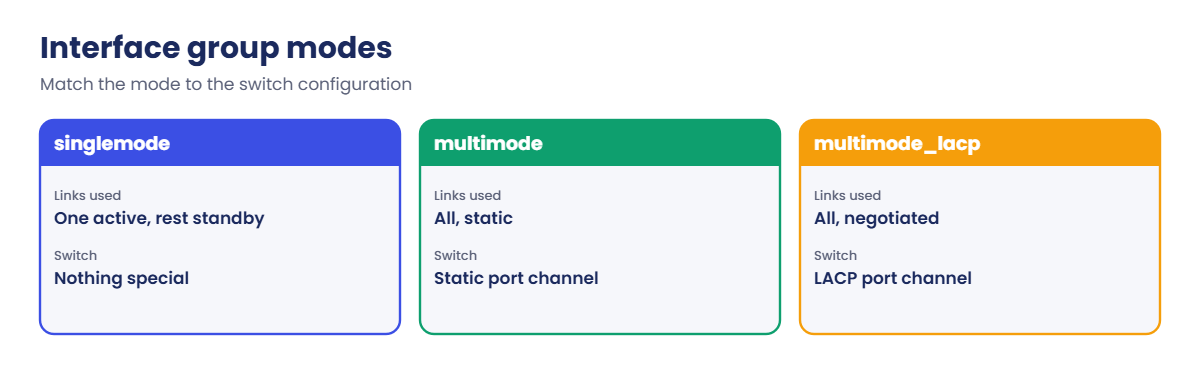
An interface group (named a<number><letter>, like a0a) joins ports of the same speed on one node. The mode can be singlemode (one active port, one standby), multimode (static port channel) or multimode_lacp (LACP, the usual choice). The distribution function (port, ip, mac or sequential) decides how traffic is spread over the links; port is the common recommendation.

A VLAN port is named <base port>-<VLAN ID>, like a0a-20, with IDs from 1 to 4094. You create VLANs on the ifgrp, never on its member ports. The switch side has to match: an LACP port channel (often across two switches with vPC or MLAG) and the same VLANs trunked.

How it works, step by step

1Free the ports

Member ports can’t host LIFs or belong to a broadcast domain, so remove them from the Default broadcast domain first.

2Create the interface group

network port ifgrp create names the ifgrp and sets the mode and distribution function. In System Manager: Network › Ethernet ports › + Link Aggregation Group.
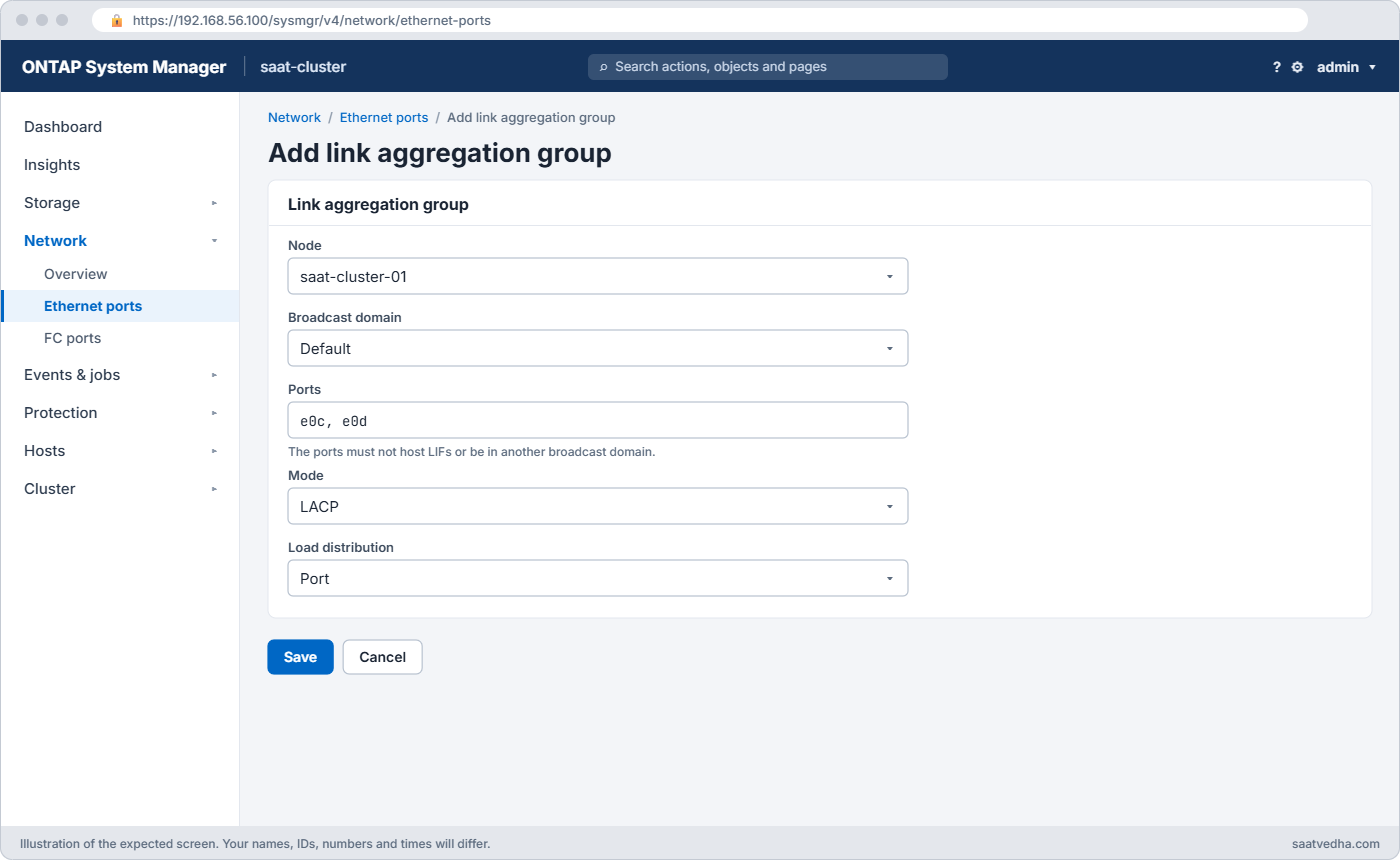
System Manager Ethernet ports page with a new link aggregation group a0a on saat-cluster-01 using e0c and e0d in LACP mode
System Manager: Network > Ethernet ports > + Link Aggregation Group, with ports e0c and e0d in LACP mode.
ONTAP interface group: network layers from ports to LIFs

3Add member ports

Add each port with add-port. When the switch’s port channel is ready, network port ifgrp show reports Active Ports as full.

4Add VLANs on top

network port vlan create -vlan-name a0a-20 makes a tagged port for VLAN 20 on the ifgrp. In System Manager: Network › Ethernet ports › + VLAN.

ONTAP interface group: singlemode, multimode and multimode_lacp compared

5Do the same on every node

Build matching ifgrps and VLANs on each node of the HA pair (and the whole cluster), so LIFs can fail over to a port on another node that reaches the same network. Lesson 20 groups those ports into broadcast domains.

Active PortsWhat it meansWhat to do
fullEvery member link is up and in the bundleNothing
partialSome members are up, some aren’tCheck cables, SFPs and the switch port channel
noneNo member is activeThe ifgrp is down; LIFs on it fail over or go down

Hands-on lab: build an LACP interface group and a VLAN port

Before you run any command, double-check it

Read every command twice before you press Enter. Check the target: the server name, the user, the disk or device name, the path and the sizes. These commands are for learning and were tested in our lab, not on your system. At work, run the read-only commands first, follow your change process, make sure a backup exists, and ask a second person to check anything that changes or deletes data. You run them at your own risk.

This lab uses the SaatVedha ONTAP practice shell, our own learning tool. It is not NetApp software: real ONTAP output looks like this but is not identical.

You’ll look at the ports on a fresh cluster, bundle e0c and e0d on node 01 into an LACP ifgrp, add VLAN 20, and see what a pulled cable looks like.

1Start fresh and look at the ports

python ontapsim.py -c "simctl reset"
python ontapsim.py

Log in and run:

network port show -node saat-cluster-01 -fields port,link,mtu,speed,broadcast-domain,ipspace

You should see this:

node            port link mtu  speed      broadcast-domain ipspace
--------------- ---- ---- ---- ---------- ---------------- -------
saat-cluster-01 e0a  up   9000 auto/10000 Cluster          Cluster
saat-cluster-01 e0b  up   9000 auto/10000 Cluster          Cluster
saat-cluster-01 e0c  up   1500 auto/10000 Default          Default
saat-cluster-01 e0d  up   1500 auto/10000 Default          Default
saat-cluster-01 e0e  up   1500 auto/10000 Default          Default
saat-cluster-01 e0f  up   1500 auto/10000 Default          Default
saat-cluster-01 e0M  up   1500 auto/1000  Default          Default
7 entries were displayed.

e0a and e0b are cluster ports with MTU 9000 in the Cluster IPspace; leave them alone. e0c to e0f are 10 Gb data ports, and e0M is the 1 Gb management port.

✅ Checkpoint: You can name the two cluster ports and the four data ports.

2Build the interface group

network port broadcast-domain remove-ports -broadcast-domain Default -ports saat-cluster-01:e0c,saat-cluster-01:e0d
network port ifgrp create -node saat-cluster-01 -ifgrp a0a -distr-func port -mode multimode_lacp
network port ifgrp add-port -node saat-cluster-01 -ifgrp a0a -port e0c
network port ifgrp add-port -node saat-cluster-01 -ifgrp a0a -port e0d
network port ifgrp show -node saat-cluster-01

The first four commands return quietly. Then you should see this:

                 Port    Distribution                   Active
Node             ifgrp   Function     MAC Address       Ports   Ports
---------------- ------- ------------ ----------------- ------- ---------------
saat-cluster-01
                 a0a     port         02:a0:98:0f:30:61 full    e0c, e0d

a0a uses the port distribution function, and Active Ports is full: both links are up and bundled. In the lab the “switch” is always ready; at work, the network team configures the LACP port channel first.

✅ Checkpoint: a0a shows full with ports e0c, e0d.

3Add VLAN 20 on the ifgrp

network port vlan create -node saat-cluster-01 -vlan-name a0a-20
network port vlan show -node saat-cluster-01
network port show -node saat-cluster-01

You should see this:

saat-cluster::> network port vlan show -node saat-cluster-01
                           Network Network
Node             VLAN Name Port    VLAN ID MAC Address
---------------- --------- ------- ------- ------------------
saat-cluster-01  a0a-20    a0a     20      00:a0:98:14:0f:61
saat-cluster::> network port show -node saat-cluster-01

Node: saat-cluster-01
                                                                       Ignore
                                                  Speed(Mbps) Health   Health
Port      IPspace      Broadcast Domain Link MTU  Admin/Oper  Status   Status
--------- ------------ ---------------- ---- ---- ----------- -------- ------
e0a       Cluster      Cluster          up   9000  auto/10000 healthy  false
e0b       Cluster      Cluster          up   9000  auto/10000 healthy  false
e0c       Default      -                up   1500  auto/10000 healthy  false
e0d       Default      -                up   1500  auto/10000 healthy  false
e0e       Default      Default          up   1500  auto/10000 healthy  false
e0f       Default      Default          up   1500  auto/10000 healthy  false
e0M       Default      Default          up   1500   auto/1000 healthy  false
a0a       Default      -                up   1500  auto/10000 healthy  false
a0a-20    Default      -                up   1500  auto/10000 healthy  false

9 entries were displayed.

The member ports e0c and e0d now have no broadcast domain, and two new logical ports appear: a0a and a0a-20. Neither is in a broadcast domain yet, so no LIF can use them; you’ll fix that in Lesson 20.

✅ Checkpoint: a0a-20 appears with VLAN ID 20 on port a0a.
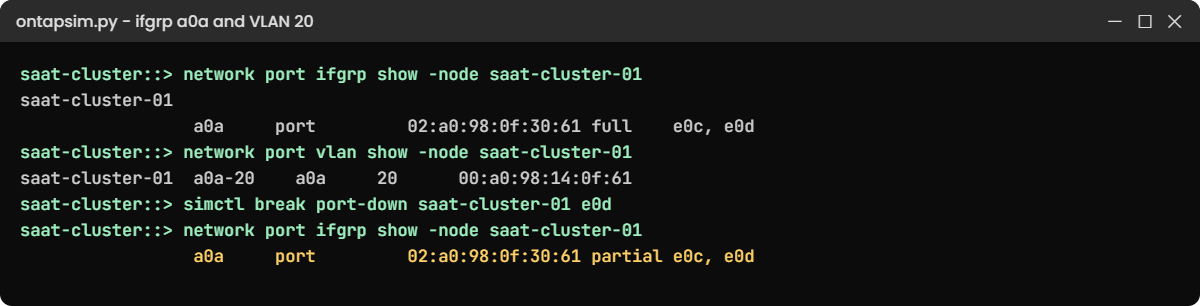
ONTAP interface group lab: a0a full, VLAN a0a-20, and partial after a pulled cable
a0a bundles e0c and e0d, VLAN 20 rides on it, and one pulled cable turns the ifgrp partial.

4Pull a cable (on purpose)

simctl break port-down saat-cluster-01 e0d
network port ifgrp show -node saat-cluster-01

You should see this:

simctl: fault "port-down" is active. Now find it with ONTAP commands.
saat-cluster::> network port ifgrp show -node saat-cluster-01
                 Port    Distribution                   Active
Node             ifgrp   Function     MAC Address       Ports   Ports
---------------- ------- ------------ ----------------- ------- ---------------
saat-cluster-01
                 a0a     port         02:a0:98:0f:30:61 partial e0c, e0d

The ifgrp keeps working on e0c alone, so clients stay connected, but at half the bandwidth and with no spare. “partial” is easy to miss because nothing actually breaks. Put the cable back:

simctl fix all

✅ Checkpoint: After the fix, a0a shows full again.

Break It, Then Fix It

Build the matching ifgrp on node 02 the wrong way first.

1Add a port before the ifgrp exists

network port ifgrp add-port -node saat-cluster-02 -ifgrp a0a -port e0c

You’ll get this:

Error: command failed: Interface group "a0a" does not exist on node "saat-cluster-02".

Ifgrps are per node. Creating a0a on node 01 didn’t create one on node 02.

network port ifgrp create -node saat-cluster-02 -ifgrp a0a -distr-func port -mode multimode_lacp

✅ Checkpoint: The create returns quietly.

2Add a port that is still in a broadcast domain

network port ifgrp add-port -node saat-cluster-02 -ifgrp a0a -port e0c

You’ll get this:

Error: command failed: Port saat-cluster-02:e0c is in broadcast domain "Default". Remove it from the broadcast domain first with "network port broadcast-domain remove-ports".

Do what the message says, then add both ports:

network port broadcast-domain remove-ports -broadcast-domain Default -ports saat-cluster-02:e0c,saat-cluster-02:e0d
network port ifgrp add-port -node saat-cluster-02 -ifgrp a0a -port e0c
network port ifgrp add-port -node saat-cluster-02 -ifgrp a0a -port e0d

All three return quietly. On a real system, a port that hosts a LIF also has to be cleared first, by migrating the LIF away.

✅ Checkpoint: network port ifgrp show lists a0a on both nodes as full.
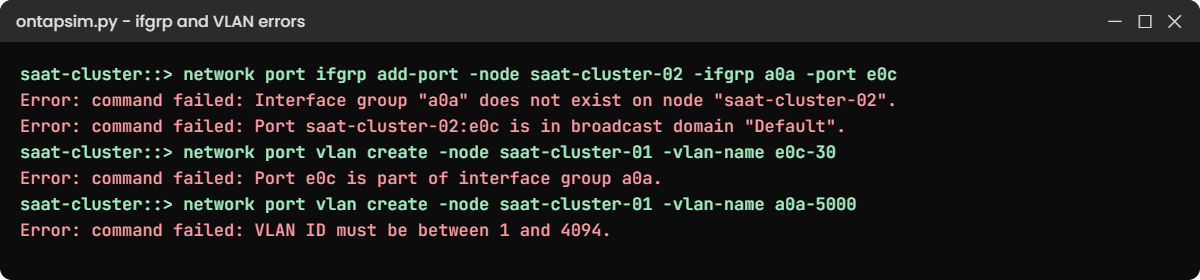
ONTAP interface group break and fix: ifgrp, broadcast domain and VLAN errors
Four refusals: no ifgrp yet, port still in a broadcast domain, VLAN on a member port, VLAN ID out of range.

3Put a VLAN on the wrong port, and use a bad VLAN ID

network port vlan create -node saat-cluster-01 -vlan-name e0c-30
network port vlan create -node saat-cluster-01 -vlan-name a0a-5000

You’ll get this:

Error: command failed: Port e0c is part of interface group a0a. Create the VLAN on the interface group instead.
saat-cluster::> network port vlan create -node saat-cluster-01 -vlan-name a0a-5000
Error: command failed: VLAN ID must be between 1 and 4094.

VLANs go on the ifgrp (a0a-30), and IDs run from 1 to 4094. Get the VLAN number from the network team’s records, not from memory. The wording of these two errors is the practice shell’s; real ONTAP refuses both as well.

✅ Checkpoint: You can say why e0c-30 and a0a-5000 are both wrong.

This happened at work

Half a highway after the switch swap

A telecom company in Thiruvananthapuram replaced its pair of data centre switches over a weekend. On Monday morning the billing team said their NFS exports felt slow at peak, but nothing was down and no alarms had fired.

The storage engineer ran network port ifgrp show and saw a0a on node 02 with Active Ports partial. One of the new switch ports had been configured without its LACP channel-group line when the config was copied across, so it was up but not in the bundle. All of node 02’s NFS traffic was squeezing through one 10 Gb link.

The network team added the missing line in five minutes and the ifgrp went back to full. Both teams now run network port ifgrp show on every node as the last step of any switch change, and partial ifgrps are on the monitoring dashboard as a warning.

Common mistakes and troubleshooting

MistakeWhat happensDo this instead
LACP on ONTAP, static channel on the switchThe ifgrp shows partial or noneAgree the mode with the network team: multimode_lacp with an LACP port channel
Mixing port speeds in one ifgrpMembers don’t join or traffic is unevenUse ports of the same speed and type
Creating VLANs on member portsONTAP refuses, or traffic bypasses the bundleCreate VLANs on the ifgrp
Building the ifgrp on one node onlyLIFs can’t fail over to a matching portMirror ifgrps and VLANs on every node
Ignoring “partial”Half bandwidth and no spare link, unnoticedCheck ifgrp show after switch work and alert on partial

Interview questions

Click a question to open it. Each one is written the way an interviewer would ask it. Under it you will see why they ask it and one way you could answer, in your own words.

Fresher level

1. What is an interface group in ONTAP?

Why they ask this: They want to check you know how ONTAP bundles network ports.

How you might answer: An interface group joins two or more physical ports on one node into one logical port, like a0a. It gives more bandwidth and a spare link, and with multimode_lacp it works with an LACP port channel on the switch.

2. How do you name a VLAN port in ONTAP?

Why they ask this: It’s a quick check that you’ve actually created one.

How you might answer: It’s the base port, a dash and the VLAN ID, for example a0a-20 for VLAN 20 on interface group a0a. I create it with network port vlan create -node saat-cluster-01 -vlan-name a0a-20.

2–5 years experience

3. Users report slow NFS but nothing is down. You see an ifgrp with Active Ports partial. What does that tell you and what do you do?

Why they ask this: They want to see you connect a quiet network fault to a performance symptom.

How you might answer: Partial means some member links aren’t in the bundle, so traffic is running on fewer links than planned. I’d check which port is down or not in the LACP group with network port show, then work with the network team to check the cable, SFP and switch port channel config.

4. What has to be done before a port can join an interface group?

Why they ask this: They’re checking you know the order of steps and why commands fail.

How you might answer: The port must not host any LIFs and must not be in a broadcast domain. So I’d migrate any LIFs off it, remove it from its broadcast domain with network port broadcast-domain remove-ports, then add it to the ifgrp.

Senior level

5. How would you design the data network for a new two-node ONTAP cluster with two top-of-rack switches?

Why they ask this: They want design thinking about redundancy across switches and nodes.

How you might answer: On each node I’d build a multimode_lacp ifgrp with one link to each switch, using a vPC or MLAG port channel so a whole switch can fail. Then I’d put VLAN ports on the ifgrps for each data network and keep the same layout on both nodes.

That way LIFs can fail over between nodes and the cluster survives a link, a switch or a node going down.

6. When would you not use an interface group?

Why they ask this: They want to see you understand trade-offs, not just default to bundling.

How you might answer: For iSCSI, many teams prefer separate ports on separate subnets, so the host’s multipath software handles redundancy instead of LACP. It also makes paths easier to see and test.

I’d also keep management on e0M and never touch the cluster ports.

Quick quiz

Q1. Which ifgrp mode works with an LACP port channel on the switch?

  1. singlemode
  2. multimode
  3. multimode_lacp
  4. sequential
Show answer

C — multimode_lacp negotiates the bundle with LACP.

Q2. What does Active Ports “partial” mean?

  1. The ifgrp is being created
  2. Some member links are not active in the bundle
  3. The VLAN is wrong
  4. The node is in takeover
Show answer

B — partial means at least one member link isn’t working in the group.

Q3. Where should you create VLAN 20 when e0c and e0d are in ifgrp a0a?

  1. e0c-20
  2. e0d-20
  3. a0a-20
  4. e0M-20
Show answer

C — VLANs go on the interface group, not on its members.

Q4. What must you do before adding e0c to an ifgrp?

  1. Reboot the node
  2. Remove it from its broadcast domain
  3. Set MTU to 9000
  4. Create a LIF on it
Show answer

B — member ports must not be in a broadcast domain or host LIFs.

Q5. Which ports should you leave alone when building data ifgrps in the lab?

  1. e0c and e0d
  2. e0e and e0f
  3. e0a and e0b (Cluster IPspace)
  4. a0a
Show answer

C — e0a and e0b carry cluster interconnect traffic.

Quick recap

  • Physical ports are named like e0c; cluster ports live in the Cluster IPspace.
  • An ifgrp (a0a) bundles ports on one node; multimode_lacp with port distribution is the usual choice.
  • Member ports must leave their broadcast domain and host no LIFs first.
  • VLAN ports (a0a-20) go on the ifgrp, with IDs 1 to 4094.
  • Build the same layout on every node, and watch for partial ifgrps.

Next lesson

Lesson 20: Broadcast domains, failover groups, subnets and IPspaces → You’ll put your new ports into broadcast domains so LIFs can use them and fail over safely.

Further reading: ONTAP interface group

Want to go deeper into ONTAP interface group? Read the networking part of the ONTAP concepts guide for how ports, ifgrps, VLANs, broadcast domains and LIFs stack up. You can also see the full plan for this course on the NetApp ONTAP Storage Administration course page.

Scroll to Top

This website uses cookies

We use a few cookies to keep this site working. If you allow it, we also use Google Analytics to count visits so we can improve our lessons. You can accept all, deny the optional ones, or choose what to allow.