Export policies for RHEL and Ubuntu clients
-
Phase 0: Start here
-
Phase 1: Architecture and foundation
-
Phase 2: Protocols and day-to-day administration
-
Phase 3: Data protection and enterprise integrations
-
Phase 4: Troubleshooting blueprint
-
Phase 5: Final project and career
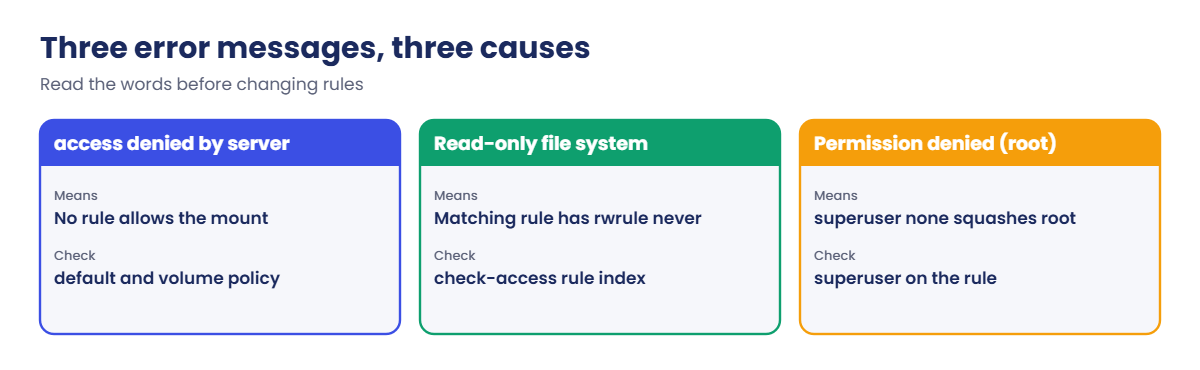
“Access denied by server” and “Read-only file system” are two of the most common NFS tickets in any storage team. Almost every time, the answer sits in an export policy rule.
In this lesson you’ll build an export policy that gives one Linux server read-write and the rest of the subnet read-only, then break it the two classic ways: rule order and root squash.
Where this lesson fits
Lesson 30 of 56 in NetApp ONTAP Storage Administration · Phase 2: Protocols and day-to-day administration · Before this: Lesson 29, NFS versions and name services · Next: Lesson 31, SMB shares with Active Directory
| Time | You need | By the end you can |
|---|---|---|
| 60 minutes | The practice shell with setup-29.txt from Lesson 29 | Write export rules, predict which rule a client hits, test with check-access, and fix rule order and root access problems |
What it is, in one line
An export policy is an ordered list of rules on an SVM; each NFS request is checked from rule 1 down, and the first rule whose clientmatch fits the client decides read-only, read-write and root access.
In Simple Words
The gate list at an office
The security guard at an office gate has a list, top to bottom. The first line that describes you is the one he follows, and he stops reading there.
If line 1 says “all visitors: lobby only” and line 2 says “Ravi from IT: every floor”, Ravi still stops at the lobby, because the guard never reached line 2. Put the specific line first.
Engineer's View
How an engineer describes it
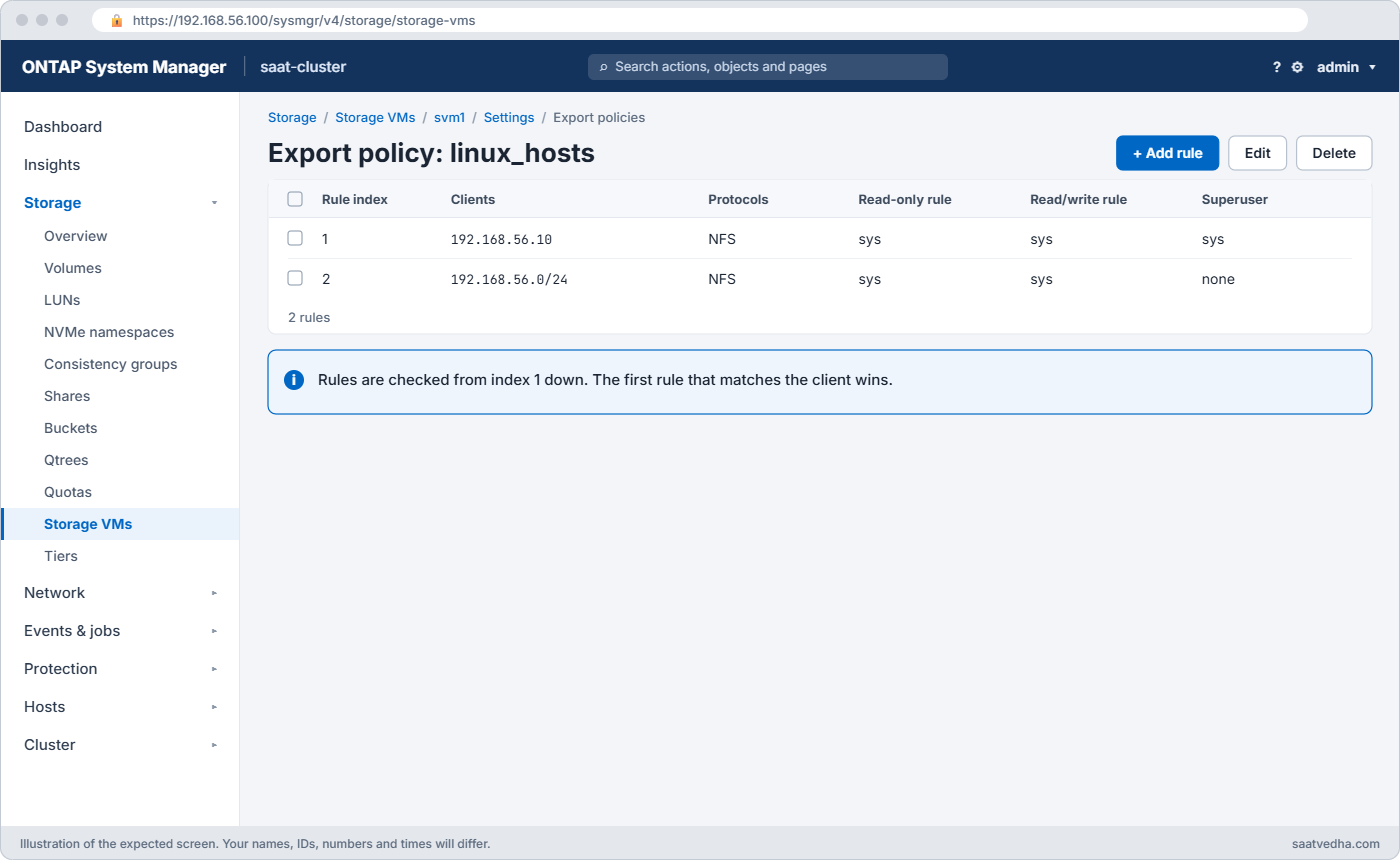
Each volume and qtree has one export policy (volume modify -policy); new volumes get default. A rule has -clientmatch (IP, subnet, host name, netgroup or domain), -protocol, -rorule, -rwrule and -superuser, each a security type such as sys, krb5, any or none/never.
Rules are evaluated by Rule Index; the first match wins. -superuser none squashes root to the anonymous user (UID 65534 by default, -anon), which is NetApp’s version of root_squash. -superuser sys lets root stay root.
Every directory on the path is checked. To reach /app the client also needs at least read access through the SVM root volume’s policy, usually default. vserver export-policy check-access shows exactly which rule each path level hits, without touching a client.
How it works, step by step
1Create the policy
vserver export-policy create makes an empty policy. An empty policy denies everyone.
2Add rules, specific ones first
Host rules before subnet rules. Use -ruleindex to insert a rule at a position; the others move down.
3Attach it to the volume
-policy on volume create or modify. Keep the SVM root volume’s default policy open for read to your client networks.
4Test before anyone mounts
check-access for each client IP and protocol; it prints the rule index and the access result at every level of the path.
| Field | sys | none / never | Typical use |
|---|---|---|---|
| -rorule | read with AUTH_SYS | no read | sys for normal Linux clients |
| -rwrule | write with AUTH_SYS | read-only | sys only for clients that write |
| -superuser | root stays root | root squashed to 65534 | sys for admin hosts, none for the rest |
System Manager: Storage › Storage VMs › svm1 › Settings › Export policies, and per volume under Storage › Volumes › Edit › Export settings.
On the clients, Ubuntu needs nfs-common and RHEL or Rocky needs nfs-utils; the mount command is the same. showmount -e returns nothing from ONTAP unless the SVM has -showmount enabled, so use check-access instead.
Hands-on lab: one volume, two clients, different access
Before you run any command, double-check it
Read every command twice before you press Enter. Check the target: the server name, the user, the disk or device name, the path and the sizes. These commands are for learning and were tested in our lab, not on your system. At work, run the read-only commands first, follow your change process, make sure a backup exists, and ask a second person to check anything that changes or deletes data. You run them at your own risk.
This lab uses the SaatVedha ONTAP practice shell, our own learning tool. It is not NetApp software: real ONTAP output looks like this but is not identical.
1Start from the NAS setup
Reset and run setup-29.txt from Lesson 29. It already gives the default policy a rule for 192.168.56.0/24, so clients can read the SVM root.
python ontapsim.py -c "simctl reset"
python ontapsim.py --run setup-29.txt✅ Checkpoint: No line starts with Error.
2Build the policy: linux1 writes, the rest read
vserver nfs create -vserver svm1 -v3 enabled -v4.1 enabled
vserver export-policy create -vserver svm1 -policyname pol_app
vserver export-policy rule create -vserver svm1 -policyname pol_app -clientmatch 192.168.56.21 -rorule sys -rwrule sys -superuser sys -protocol nfs
vserver export-policy rule create -vserver svm1 -policyname pol_app -clientmatch 192.168.56.0/24 -rorule sys -rwrule never -superuser none -protocol nfs
vserver export-policy rule show -vserver svm1 -policyname pol_app
volume create -vserver svm1 -volume vol_app -aggregate aggr1_01 -size 20g -junction-path /app -policy pol_appYou should see this:
Policy Rule Access Client RO
Vserver Name Index Protocol Match Rule
------------ ------------------ ------ -------- ------------------------ ------
svm1 pol_app 1 nfs 192.168.56.21 sys
svm1 pol_app 2 nfs 192.168.56.0/24 sys
2 entries were displayed.
saat-cluster::> volume create -vserver svm1 -volume vol_app -aggregate aggr1_01 -size 20g -junction-path /app -policy pol_app
[Job 104] Job succeeded: Successful✅ Checkpoint: linux1 (.21) is rule 1, the subnet is rule 2.
3Predict access with check-access
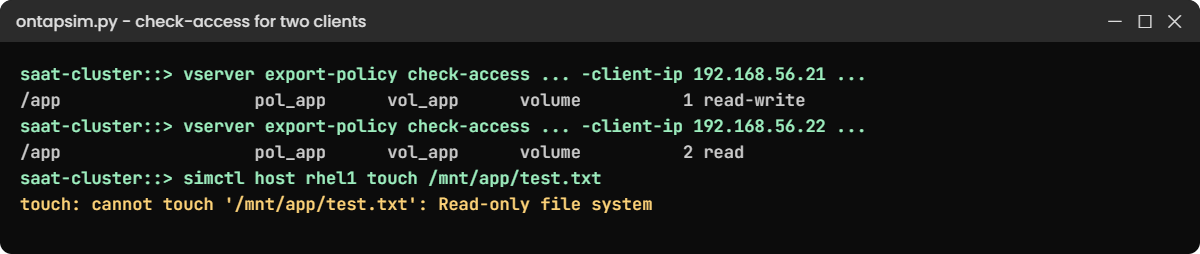
vserver export-policy check-access -vserver svm1 -volume vol_app -client-ip 192.168.56.21 -authentication-method sys -protocol nfs3 -access-type read-write
vserver export-policy check-access -vserver svm1 -volume vol_app -client-ip 192.168.56.22 -authentication-method sys -protocol nfs3 -access-type read-writeYou should see this:
Policy Policy Rule
Path Policy Owner Owner Type Index Access
---------------------- ------------ ------------ ---------- ------ ----------
/ default svm1_root volume 1 read-write
/app pol_app vol_app volume 1 read-write
2 entries were displayed.
saat-cluster::> vserver export-policy check-access -vserver svm1 -volume vol_app -client-ip 192.168.56.22 -authentication-method sys -protocol nfs3 -access-type read-write
Policy Policy Rule
Path Policy Owner Owner Type Index Access
---------------------- ------------ ------------ ---------- ------ ----------
/ default svm1_root volume 1 read-write
/app pol_app vol_app volume 2 read
2 entries were displayed.linux1 (Ubuntu) hits rule 1 and gets read-write; rhel1 (Rocky, .22) falls through to rule 2 and gets read only.
✅ Checkpoint: .21 shows read-write on /app, .22 shows read.
4Prove it from both clients
simctl host linux1 mount 192.168.56.130:/app /mnt/app vers=4.1
simctl host linux1 touch /mnt/app/report1.csv
simctl host rhel1 mount 192.168.56.130:/app /mnt/app vers=4.1
simctl host rhel1 touch /mnt/app/test.txtYou should see this:
(mounted 192.168.56.130:/app on /mnt/app type nfs4)
saat-cluster::> simctl host linux1 touch /mnt/app/report1.csv
saat-cluster::> simctl host rhel1 mount 192.168.56.130:/app /mnt/app vers=4.1
(mounted 192.168.56.130:/app on /mnt/app type nfs4)
saat-cluster::> simctl host rhel1 touch /mnt/app/test.txt
touch: cannot touch '/mnt/app/test.txt': Read-only file systemOn real hosts the commands are sudo mount -t nfs -o vers=4.1 192.168.56.130:/app /mnt/app and touch, on Ubuntu and RHEL alike. “Read-only file system” from NFS usually means the rwrule, not a full disk.
✅ Checkpoint: linux1 writes, rhel1 gets Read-only file system.
Try it yourself: Build an export rule in the Command Builder.
Break It, Then Fix It
Two classic breaks: someone adds a rule in the wrong place, then someone “secures” root access.
1A broad rule goes in at the top
vserver export-policy rule create -vserver svm1 -policyname pol_app -clientmatch 192.168.56.0/24 -rorule sys -rwrule never -superuser none -protocol nfs -ruleindex 1
simctl host linux1 touch /mnt/app/report2.csv
vserver export-policy check-access -vserver svm1 -volume vol_app -client-ip 192.168.56.21 -authentication-method sys -protocol nfs3 -access-type read-writeYou’ll get this:
touch: cannot touch '/mnt/app/report2.csv': Read-only file system
saat-cluster::> vserver export-policy check-access -vserver svm1 -volume vol_app -client-ip 192.168.56.21 -authentication-method sys -protocol nfs3 -access-type read-write
Policy Policy Rule
Path Policy Owner Owner Type Index Access
---------------------- ------------ ------------ ---------- ------ ----------
/ default svm1_root volume 1 read-write
/app pol_app vol_app volume 1 read
2 entries were displayed.linux1 now matches the new subnet rule at index 1 and never reaches its own rule. Its existing mount turned read-only without any change on the host.

2Fix the order
vserver export-policy rule delete -vserver svm1 -policyname pol_app -ruleindex 1
vserver export-policy rule show -vserver svm1 -policyname pol_app
simctl host linux1 touch /mnt/app/report2.csvThe list is back to host first, subnet second, and the touch works. After any delete or insert, run rule show again before your next change so you’re sure which number is which. To move a rule without deleting it, use vserver export-policy rule setindex -vserver svm1 -policyname pol_app -ruleindex 2 -newruleindex 1, which the practice shell (version 1.1) also runs.
✅ Checkpoint: report2.csv is created.
3Squash root on the writing host
vserver export-policy rule modify -vserver svm1 -policyname pol_app -ruleindex 1 -superuser none
simctl host linux1 touch /mnt/app/report3.csvYou’ll get this:
touch: cannot touch '/mnt/app/report3.csv': Permission denied
(you are root on the client, but superuser is "none" in export rule 1, so root is mapped to the anonymous user 65534, which cannot write here)“Permission denied” (not read-only) for root only is the sign of root squash. Either run the job as a normal user who owns the folder, or allow root for this one host:
vserver export-policy rule modify -vserver svm1 -policyname pol_app -ruleindex 1 -superuser sys
simctl host linux1 touch /mnt/app/report3.csv
simctl host linux1 ls /mnt/appreport1.csv report2.csv report3.csv✅ Checkpoint: All three files are listed.
This happened at work
The rule that went in at number one
A mining company in Ranchi ran its survey processing on Linux servers that wrote to an ONTAP volume over NFS. One Friday a new monitoring server needed read access to the same volume, and a junior admin added a rule for the whole subnet with -ruleindex 1, because the procedure document he copied from used it.
Nothing broke on Friday. On Saturday night the weekly processing job failed with “Read-only file system” on every server, and the on-call Linux engineer spent two hours checking disks, remounting and rebooting one host, which didn’t help.
The storage engineer ran check-access for one of the processing servers on Sunday morning and saw it hitting rule 1, the new subnet rule. Moving that rule below the host rules fixed every server at once. The team now attaches check-access output for every affected client to export policy changes.
Common mistakes and troubleshooting
| Mistake | What happens | Do this instead |
|---|---|---|
| Subnet rule above host rules | Hosts get the subnet’s weaker access | Specific rules first; check with rule show |
| Forgetting the SVM root (default) policy | Mount fails with access denied for every volume | Give clients read access in the default policy |
| superuser none where root must write | Root gets Permission denied | Use sys for that host only, or run as a normal user |
| superuser sys for the whole subnet | Any root user on any client owns your data | Allow root only on named admin hosts |
| Editing a policy shared by many volumes | A change for one app affects all of them | One policy per application or client group |
| Testing by mounting from production servers | Surprises during business hours | Test with check-access first |
Interview questions
Click a question to open it. Each one is written the way an interviewer would ask it. Under it you will see why they ask it and one way you could answer, in your own words.
Fresher level
1. What is an export policy in ONTAP, in simple words?
Why they ask this: They want to check you understand the basic NFS access control object.
How you might answer: It’s an ordered list of rules attached to a volume or qtree. Each rule says which clients match, and whether they get read, read-write and root access. ONTAP checks the rules from index 1 down and uses the first match.
2. What’s the difference between “Read-only file system” and “Permission denied” on an NFS mount?
Why they ask this: They’re testing whether you can tell rule problems from permission problems.
How you might answer: “Read-only file system” usually means the matching export rule has rwrule never, so the whole client is read-only. “Permission denied” usually means file permissions, or root squash with superuser none, where root becomes the anonymous user.
2–5 years experience
3. A server that used to write to a volume suddenly gets read-only errors. How do you find out why?
Why they ask this: They want to see you use the right tool and look at rule order.
How you might answer: I’d run vserver export-policy check-access with the server’s IP and protocol. It shows the rule index it hits on each path level. If it hits a broader rule than before, someone added or moved a rule, and rule show confirms the order.
4. Why does a client need access through the SVM root volume to mount a different volume?
Why they ask this: They’re checking understanding of the namespace and junction paths.
How you might answer: The client walks the path from the SVM root down to the junction, and ONTAP checks the export policy at every level. If the root volume’s policy, usually default, gives that client no read access, the mount fails before it ever reaches the volume.
Senior level
5. How would you design export policies for an SVM shared by ten application teams?
Why they ask this: They want to see a design that stays safe as it grows.
How you might answer: One policy per application, named after it, with host or netgroup rules for the servers that write and a read-only rule for anyone else who needs it. Root access only for named hosts.
The default policy only gives read to the client networks so they can walk the namespace. Every change comes with check-access output for the affected clients.
6. A security audit says “root squash must be on everywhere”. A backup server needs root to read all files. What do you propose?
Why they ask this: They’re testing how you balance a security rule with a real operational need.
How you might answer: I’d turn superuser none on for all rules, and add one rule for the backup server’s IP with superuser sys and rwrule never, so it can read everything as root but can’t write. I’d document it as an approved exception, or better, move the backups to an NDMP or snapshot-based method that doesn’t need NFS root at all.
Quick quiz
Q1. How does ONTAP pick which export rule applies to a client?
- The most specific rule
- The last matching rule
- The first matching rule by index
- All rules are combined
Show answer
C — rules are checked from index 1 down; the first match wins.
Q2. What does -superuser none do?
- Blocks all access
- Maps root to the anonymous user
- Gives root full access
- Disables NFSv4
Show answer
B — it squashes root to UID 65534 by default.
Q3. linux1 gets “Read-only file system”. Which rule field is most likely set to never for it?
- -rorule
- -rwrule
- -superuser
- -protocol
Show answer
B — rwrule never means read-only for that match.
Q4. Which command shows the rule index a client hits at each path level?
- vserver export-policy rule show
- vserver export-policy check-access
- volume show
- network connections active show
Show answer
B — check-access tests a client IP without a real mount.
Q5. Which option inserts a new rule at the top?
- -ruleindex 1
- -priority high
- -first true
- -order 0
Show answer
A — -ruleindex 1 inserts it at position 1 and the others move down.
Quick recap
- Export rules are checked by index; the first match wins.
- Put host rules above subnet rules.
- rwrule controls writes; superuser controls root (none = squash).
- Clients need read through the SVM root’s default policy too.
- Use check-access before and after every change.
Next lesson
Lesson 31: SMB shares with Active Directory → You’ll join an SVM to Active Directory, create a share and give a group access.
Further reading: ONTAP export policy
Want to go deeper into ONTAP export policy? Read NetApp’s ONTAP concepts guide for NAS basics, and try the export rule task in the Command Builder. You can also see the full plan for this course on the NetApp ONTAP Storage Administration course page.
