NFS versions and name services
-
Phase 0: Start here
-
Phase 1: Architecture and foundation
-
Phase 2: Protocols and day-to-day administration
-
Phase 3: Data protection and enterprise integrations
-
Phase 4: Troubleshooting blueprint
-
Phase 5: Final project and career
Most Linux and Unix servers that talk to ONTAP use NFS. It looks simple, one mount command, but the NFS version you pick changes how locks, ports, firewalls and user names behave.
This lesson compares NFSv3 and NFSv4.1 on ONTAP, explains the name services that turn numbers into user names, and has you mount the same volume both ways.
Where this lesson fits
Lesson 29 of 56 in NetApp ONTAP Storage Administration · Phase 2: Protocols and day-to-day administration · Before this: Lesson 28, NVMe/TCP and NVMe/FC · Next: Lesson 30, Export policies for RHEL and Ubuntu
| Time | You need | By the end you can |
|---|---|---|
| 60 minutes | The practice shell 1.2, with host mode for the linux1 and rhel1 clients | Turn on the right NFS versions, set the NFSv4 ID domain, mount with a chosen version, and fix “Protocol not supported” |
What it is, in one line
NFS lets a Linux or Unix client use a folder on ONTAP as if it were local; NFSv3 is simple and stateless, NFSv4.1 adds sessions, built-in locking and user names, and it needs both sides to agree on an ID domain.
In Simple Words
Two kinds of library card
An old library card only has a member number. The librarian doesn’t know your name; she checks the number and hands over the book. That’s NFSv3: it sends user IDs as numbers.
The new card says “Priya at Saat Library”. It’s nicer, but it only works if the library and your card agree on the library’s name. That’s NFSv4 with its ID domain: names like priya@saatvedha.lab, and a mismatch turns you into “nobody”.
Engineer's View
How an engineer describes it
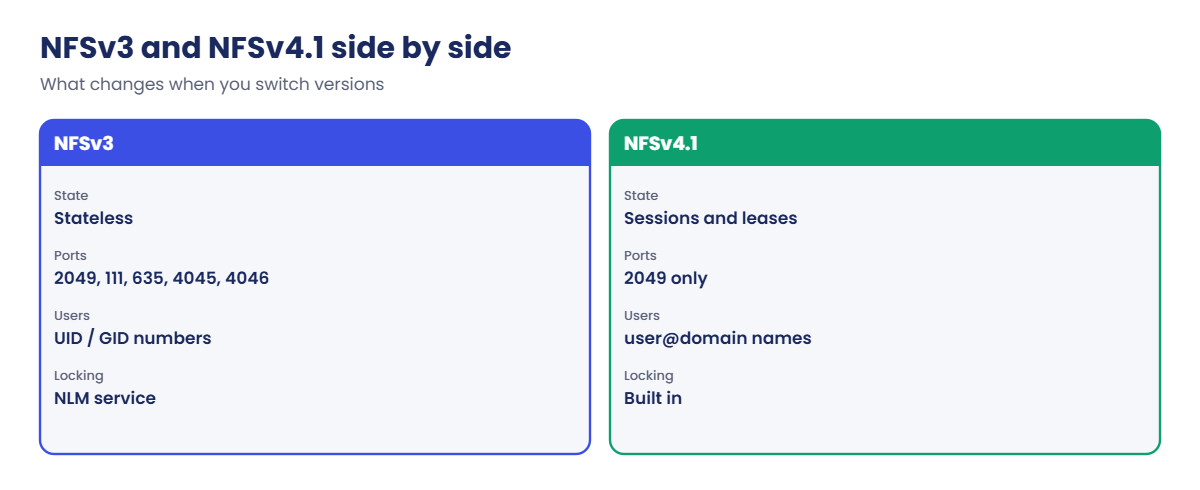
NFSv3 is stateless. Besides port 2049 it uses helper services: portmapper (111), mountd (635 on ONTAP), and NLM/NSM for locks. Firewalls must allow all of them.
Users and groups travel as numeric UID and GID.
NFSv4.x uses only port 2049, keeps state (leases and sessions in 4.1), has locking built in, supports NFSv4 ACLs, and 4.1 adds pNFS.
Owners can travel as user@domain strings, so the SVM’s -v4-id-domain must match Domain in the clients’ /etc/idmapd.conf. The ONTAP default is defaultv4iddomain.com, which almost never matches. ONTAP also supports NFSv4.2.
Name services tell ONTAP who UID 1001 is: local UNIX users and groups on the SVM, LDAP (often Active Directory) or NIS, in the order set by the SVM’s ns-switch. Multiprotocol (NFS and SMB on one volume) also needs name mapping between UNIX and Windows users.
How it works, step by step
1Turn on NFS with the versions you need
vserver nfs create with -v3, -v4.1 and so on. Only enabled versions answer; a client asking for another gets “Protocol not supported”.
2Set the NFSv4 ID domain
Match it to your DNS or AD domain, and set the same value on every client.
3Mount a volume into the namespace
The volume’s junction path is what clients mount, through a NAS LIF. The export policy (next lesson) decides who may mount.
4The client chooses a version
Linux tries the newest version the server offers unless you set vers=. Pin the version in fstab for anything important, so an upgrade on either side doesn’t silently switch it.
| NFSv3 | NFSv4.1 | |
|---|---|---|
| State | Stateless | Stateful (sessions, leases) |
| Ports | 2049 + 111, 635, NLM, NSM | 2049 only |
| Locking | Separate NLM service | Built in |
| Users | Numeric UID/GID | user@domain (ID domain must match) |
| ACLs | UNIX mode bits | NFSv4 ACLs too |
| Extras | Very simple, widely used | pNFS, referrals, delegations |
In System Manager: Storage › Storage VMs › svm1 › Settings › NFS to enable versions, and Settings › LDAP or UNIX users for name services.

Hands-on lab: one volume, two NFS versions
Before you run any command, double-check it
Read every command twice before you press Enter. Check the target: the server name, the user, the disk or device name, the path and the sizes. These commands are for learning and were tested in our lab, not on your system. At work, run the read-only commands first, follow your change process, make sure a backup exists, and ask a second person to check anything that changes or deletes data. You run them at your own risk.
This lab uses the SaatVedha ONTAP practice shell, our own learning tool. It is not NetApp software: real ONTAP output looks like this but is not identical.
1Build a NAS starting point
Save these five lines as setup-29.txt (you’ll reuse it in the next lessons), then reset and run it.
storage aggregate create -aggregate aggr1_01 -node saat-cluster-01 -diskcount 8 -disktype SAS
storage aggregate create -aggregate aggr1_02 -node saat-cluster-02 -diskcount 8 -disktype SAS
vserver create -vserver svm1 -aggregate aggr1_01 -rootvolume-security-style unix
network interface create -vserver svm1 -lif svm1_nas1 -service-policy default-data-files -home-node saat-cluster-01 -home-port e0c -address 192.168.56.130 -netmask 255.255.255.0
vserver export-policy rule create -vserver svm1 -policyname default -clientmatch 192.168.56.0/24 -rorule sys -rwrule sys -superuser syspython ontapsim.py -c "simctl reset"
python ontapsim.py --run setup-29.txt✅ Checkpoint: No line starts with Error.
2Turn on NFSv3 and NFSv4.1 with an ID domain
vserver nfs create -vserver svm1 -v3 enabled -v4.1 enabled
vserver nfs modify -vserver svm1 -v4-id-domain saatvedha.lab
vserver nfs show -vserver svm1You should see this:
Vserver: svm1
General NFS Access: true
NFS v3: enabled
NFS v4.0: disabled
UDP Protocol: enabled
TCP Protocol: enabled
NFS v4.1: enabled
NFS v4.2: disabled
NFSv4 ID Mapping Domain: saatvedha.lab✅ Checkpoint: v3 and v4.1 enabled, ID domain saatvedha.lab.
3Create a volume, then mount it from linux1 twice
volume create -vserver svm1 -volume vol_eng -aggregate aggr1_01 -size 20g -junction-path /eng[Job 104] Job succeeded: SuccessfulNow open a second terminal in the same folder and start the Linux client: python ontapsim.py --host linux1. You get a real-looking Ubuntu prompt that shares the lab with the cluster, so leave both terminals open. Install the NFS client tools and mount the volume once with each version:
apt install -y nfs-common
showmount -e 192.168.56.130
mkdir -p /mnt/eng3 /mnt/eng4
mount -t nfs -o vers=3 192.168.56.130:/eng /mnt/eng3
mount -t nfs -o vers=4.1 192.168.56.130:/eng /mnt/eng4
df -h /mnt/eng3
nfsstat -mYou should see this (the first apt lines are trimmed):
Setting up nfs-common (1:2.6.4-3ubuntu5.1) ...
Setting up rpcbind (1.2.6-7ubuntu2) ...
Processing triggers for man-db (2.12.0-4build2) ...
root@linux1:~# showmount -e 192.168.56.130
Export list for 192.168.56.130:
/ (everyone)
/eng (everyone)
root@linux1:~# mkdir -p /mnt/eng3 /mnt/eng4
root@linux1:~# mount -t nfs -o vers=3 192.168.56.130:/eng /mnt/eng3
root@linux1:~# mount -t nfs -o vers=4.1 192.168.56.130:/eng /mnt/eng4
root@linux1:~# df -h /mnt/eng3
Filesystem Size Used Avail Use% Mounted on
192.168.56.130:/eng 19G 6.5M 19G 1% /mnt/eng3
root@linux1:~# nfsstat -m
/mnt/eng3 from 192.168.56.130:/eng
Flags: rw,relatime,vers=3,rsize=65536,wsize=65536,namlen=255,hard,proto=tcp,timeo=600,retrans=2,sec=sys,mountaddr=192.168.56.130,mountvers=3,mountport=635,mountproto=udp,local_lock=none,addr=192.168.56.130
/mnt/eng4 from 192.168.56.130:/eng
Flags: rw,relatime,vers=4.1,rsize=65536,wsize=65536,namlen=255,hard,proto=tcp,timeo=600,retrans=2,sec=sys,clientaddr=192.168.56.21,local_lock=none,addr=192.168.56.130Same volume, two mounts. Read the vers= flag in nfsstat -m: that’s the version the client and server actually agreed on, which is what you check when someone says “we’re on 4.1”. The v3 mount also shows mountport=635, because NFSv3 needs the separate mount protocol and v4 doesn’t.
✅ Checkpoint: nfsstat -m shows one vers=3 and one vers=4.1 mount.
4Add a Rocky Linux client and look from the cluster
Open a third terminal with python ontapsim.py --host rhel1. Rocky and RHEL use dnf and the package is called nfs-utils:
dnf install -y nfs-utils
mkdir -p /mnt/eng
mount -t nfs -o vers=4.1 192.168.56.130:/eng /mnt/eng
touch /mnt/eng/status.txt
ls -l /mnt/eng
findmnt /mnt/engYou should see this (the dnf lines are trimmed):
Complete!
[root@rhel1 ~]# mkdir -p /mnt/eng
[root@rhel1 ~]# mount -t nfs -o vers=4.1 192.168.56.130:/eng /mnt/eng
[root@rhel1 ~]# touch /mnt/eng/status.txt
[root@rhel1 ~]# ls -l /mnt/eng
total 4
-rw-r--r-- 1 root root 0 Nov 7 12:01 status.txt
[root@rhel1 ~]# findmnt /mnt/eng
TARGET SOURCE FSTYPE OPTIONS
/mnt/eng 192.168.56.130:/eng nfs4 rw,relatime,vers=4.1,rsize=65536,wsize=65536,namlen=255,hard,proto=tcp,timeo=600,retrans=2,sec=sys,clientaddr=192.168.56.22,local_lock=none,addr=192.168.56.130Back in the cluster terminal, ask ONTAP who is connected:
network connections active show -vserver svm1You should see this:
Vserver Interface Remote
Name Name:Local Port IP Address:Port Protocol/Service
------- ------------------ --------------------- ----------------
svm1 svm1_nas1:2049 192.168.56.21:706 TCP/nfs
svm1 svm1_nas1:2049 192.168.56.22:705 TCP/nfs
3 entries were displayed.Two connections from linux1 (one per mount) and one from rhel1, all on port 2049. On real hosts the commands are the same; add sudo if you aren’t root. For the NFSv4 ID domain, set Domain = saatvedha.lab in /etc/idmapd.conf on each client so it matches the SVM.
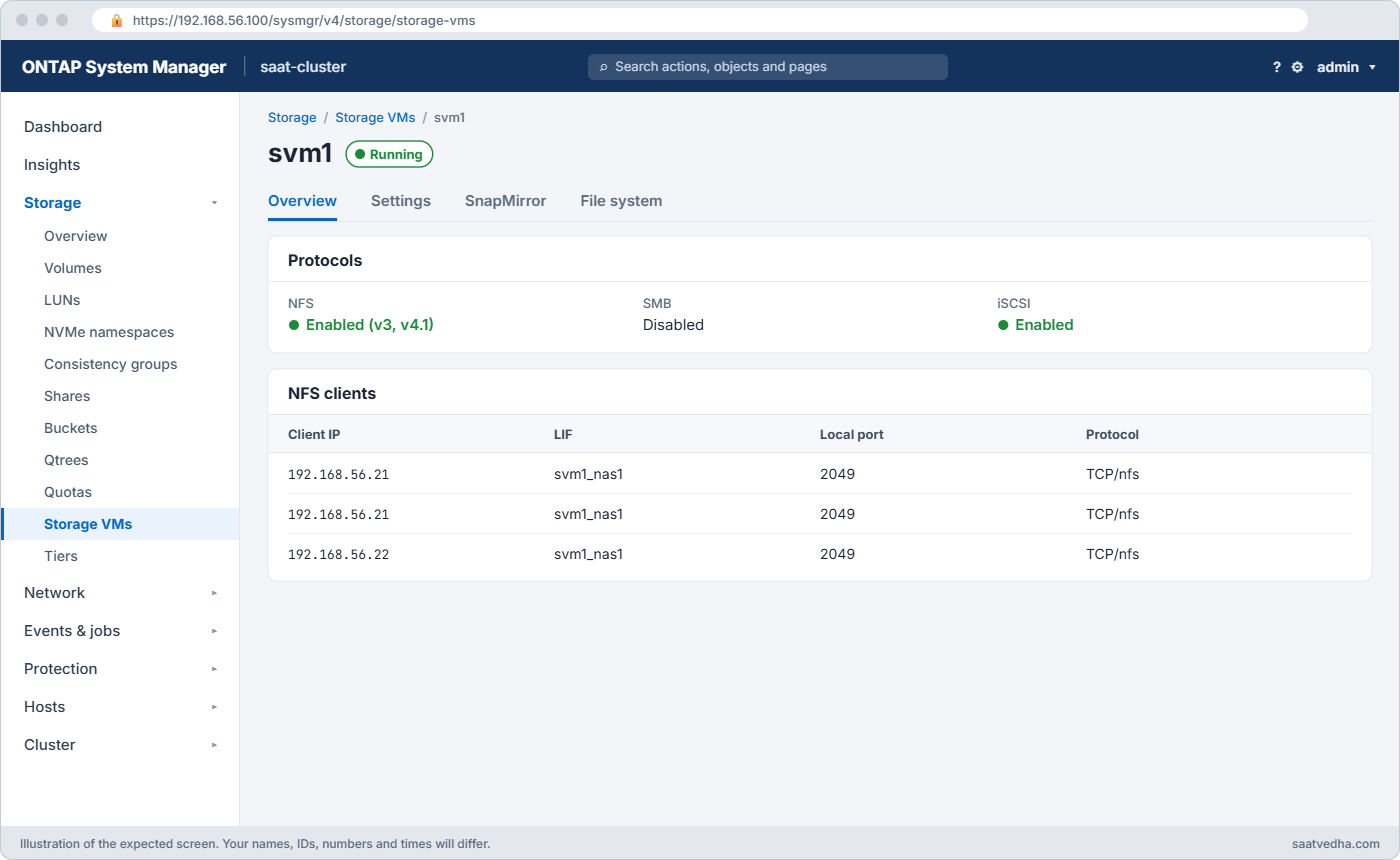
✅ Checkpoint: ONTAP lists connections from both 192.168.56.21 and 192.168.56.22.

Try it yourself: Build an NFS export with the Command Builder.
Break It, Then Fix It
Someone “tidies up” the SVM’s NFS settings, and new NFSv4.1 mounts stop working. Keep the cluster terminal and the linux1 terminal open.
1Turn off v4.1 on the SVM
In the cluster terminal:
vserver nfs modify -vserver svm1 -v4.1 disabled2Remount on linux1 and watch what happens
In the linux1 terminal:
umount /mnt/eng4
mount -t nfs -o vers=4.1 192.168.56.130:/eng /mnt/eng4
mount -t nfs 192.168.56.130:/eng /mnt/eng4
findmnt /mnt/eng4You’ll get this:
root@linux1:~# umount /mnt/eng4
root@linux1:~# mount -t nfs -o vers=4.1 192.168.56.130:/eng /mnt/eng4
mount.nfs: Protocol not supported
root@linux1:~# mount -t nfs 192.168.56.130:/eng /mnt/eng4
root@linux1:~# findmnt /mnt/eng4
TARGET SOURCE FSTYPE OPTIONS
/mnt/eng4 192.168.56.130:/eng nfs rw,relatime,vers=3,rsize=65536,wsize=65536,namlen=255,hard,proto=tcp,timeo=600,retrans=2,sec=sys,mountaddr=192.168.56.130,mountvers=3,mountport=635,mountproto=udp,local_lock=none,addr=192.168.56.130“Protocol not supported” is not a permission or network problem: the server simply doesn’t offer that version. The second mount, without vers=, is the dangerous one. It worked, but findmnt shows nfs and vers=3, so the client quietly fell back and nobody would notice.

3Check the SVM and fix it
In the cluster terminal:
vserver nfs show -vserver svm1 -fields v3,v4.0,v4.1,v4.2
vserver nfs modify -vserver svm1 -v4.1 enabledYou should see this:
vserver v3 v4.0 v4.1 v4.2
------- ------- -------- -------- --------
svm1 enabled disabled disabled disabled
saat-cluster::> vserver nfs modify -vserver svm1 -v4.1 enabledThen remount on linux1 with the version you want, written out:
umount /mnt/eng4
mount -t nfs -o vers=4.1 192.168.56.130:/eng /mnt/eng4
findmnt -t nfs4You should see this:
root@linux1:~# umount /mnt/eng4
root@linux1:~# mount -t nfs -o vers=4.1 192.168.56.130:/eng /mnt/eng4
root@linux1:~# findmnt -t nfs4
TARGET SOURCE FSTYPE OPTIONS
/mnt/eng4 192.168.56.130:/eng nfs4 rw,relatime,vers=4.1,rsize=65536,wsize=65536,namlen=255,hard,proto=tcp,timeo=600,retrans=2,sec=sys,clientaddr=192.168.56.21,local_lock=none,addr=192.168.56.130✅ Checkpoint: findmnt shows nfs4 with vers=4.1 again.
Put the version in /etc/fstab for every NFS mount (for example vers=4.1), so a server change fails loudly instead of falling back. The other classic NFSv4 surprise doesn’t fail the mount at all: files show owner nobody. That’s the ID domain or the name services, not permissions.
This happened at work
Everyone became nobody
A steel plant in Raipur kept its process-control reports on ONTAP and moved its Linux servers from NFSv3 to NFSv4.1 during a planned weekend, mainly to get rid of the extra firewall ports. Mounts worked, so the change was closed on Sunday.
On Monday the reporting application failed to write. ls -l showed every file owned by nobody:nogroup, and the application user couldn’t touch its own folders. The Linux team first suspected the export policy and spent the morning changing rules that weren’t the problem.
The cause was two settings. The SVM still had the default ID domain defaultv4iddomain.com, the clients used localdomain, and the SVM had no LDAP or local UNIX users, so it couldn’t turn UIDs into names. They set -v4-id-domain and the clients’ idmapd.conf to the plant’s domain, pointed the SVM at their LDAP, cleared the client caches with nfsidmap -c, and owners came back.
Common mistakes and troubleshooting
| Mistake | What happens | Do this instead |
|---|---|---|
| Leaving the default v4 ID domain | Owners show as nobody on NFSv4 | Set -v4-id-domain to match /etc/idmapd.conf on clients |
| No name service on the SVM | ONTAP can’t map UIDs to names for v4 or SMB | Configure LDAP or local UNIX users and the ns-switch |
| Not pinning vers= in fstab | A change silently drops clients to v3 or up to 4.2 | Set vers=3 or vers=4.1 explicitly |
| Opening only 2049 for NFSv3 | Mounts or locks fail through the firewall | v3 also needs 111, 635 and the lock ports, or move to v4.1 |
| Enabling every version “just in case” | Clients negotiate a version you never tested | Enable only the versions you support |
| Mounting the SVM root with no junctions | Empty directory, confused users | Mount the volume’s junction path, for example /eng |
Interview questions
Click a question to open it. Each one is written the way an interviewer would ask it. Under it you will see why they ask it and one way you could answer, in your own words.
Fresher level
1. What are the main differences between NFSv3 and NFSv4.1?
Why they ask this: They want to check you know why someone would choose one over the other.
How you might answer: NFSv3 is stateless, sends UIDs as numbers and needs extra services like mountd and the lock manager. NFSv4.1 uses only port 2049, keeps sessions, has locking built in, supports ACLs and sends user names, so the ID domain has to match on both sides.
2. A client says “mount.nfs: Protocol not supported”. What does that tell you?
Why they ask this: They’re testing whether you can read the error instead of guessing.
How you might answer: The server doesn’t offer the NFS version the client asked for. I’d run vserver nfs show to see which versions are enabled and compare with the vers option in the client’s mount or fstab.
2–5 years experience
3. After moving to NFSv4.1, files show owner nobody. How do you troubleshoot it?
Why they ask this: They want to see you know it’s an identity problem, not a permission rule.
How you might answer: I’d compare -v4-id-domain on the SVM with Domain in /etc/idmapd.conf on the client, using nfsidmap -d. Then I’d check ONTAP can resolve the users, through LDAP or local UNIX users and the ns-switch. After fixing it I’d clear the client cache with nfsidmap -c and remount.
4. Which firewall ports does NFSv3 need to ONTAP?
Why they ask this: They’re checking practical knowledge you need when mounts fail across networks.
How you might answer: Port 2049 for NFS, 111 for portmapper and 635 for mountd, plus the lock manager and status monitor ports, 4045 and 4046 on ONTAP. That list is one of the reasons teams move to NFSv4.1, which needs only 2049.
Senior level
5. You’re asked to standardise NFS for 300 Linux servers on ONTAP. What do you decide?
Why they ask this: They want to see a reasoned standard covering versions, identity and mount options.
How you might answer: I’d pick NFSv4.1 as the default, pinned with vers=4.1 in fstab, with hard mounts and the default timeouts. The SVM gets LDAP for name services and an ID domain that matches every client’s idmapd.conf, pushed by configuration management.
I’d keep v3 enabled only for named legacy systems and review that list every quarter.
6. An application team wants NFS and SMB access to the same volume. What do you warn them about?
Why they ask this: They’re testing awareness of multiprotocol identity and permissions.
How you might answer: Both sides must map to the same identity, so ONTAP needs name mapping between UNIX and Windows users, usually through LDAP and AD. They also need to choose a security style; with ntfs or unix style, the other protocol’s permission changes can behave differently. I’d test file ownership and permissions from both sides before go-live.
Quick quiz
Q1. Which NFS version needs only TCP port 2049?
- NFSv2
- NFSv3
- NFSv4.1
- All of them
Show answer
C — NFSv4.x uses port 2049 only.
Q2. What is ONTAP’s default NFSv4 ID domain?
- localdomain
- defaultv4iddomain.com
- saatvedha.lab
- It has none
Show answer
B — defaultv4iddomain.com, which you should change.
Q3. A client gets “Protocol not supported” on mount. What is the likely cause?
- Wrong password
- The requested NFS version is disabled on the SVM
- The volume is full
- The LIF is down
Show answer
B — ONTAP only answers enabled versions.
Q4. Files show owner nobody on an NFSv4 mount. What do you check first?
- Export policy rorule
- The ID domain on the SVM and the clients
- Disk ownership
- QoS
Show answer
B — a domain mismatch or missing name service causes nobody.
Q5. Where does a Linux client set its NFSv4 ID domain?
- /etc/exports
- /etc/idmapd.conf
- /etc/fstab
- /etc/hosts
Show answer
B — the Domain line in /etc/idmapd.conf.
Quick recap
- NFSv3: stateless, numeric IDs, extra ports. NFSv4.1: one port, sessions, locks, names.
- Enable only the versions you support with vserver nfs create or modify.
- Set -v4-id-domain to match Domain in the clients’ /etc/idmapd.conf.
- Give the SVM a name service: LDAP or local UNIX users.
- Pin vers= in fstab; “Protocol not supported” means the version is off.
Next lesson
Lesson 30: Export policies for RHEL and Ubuntu → You’ll write export rules, see why rule order matters, and fix root squashing and access denied errors.
Further reading: ONTAP NFS
Want to go deeper into ONTAP NFS? Read NetApp’s ONTAP concepts guide for where NAS fits, and your Linux distribution’s NFS client documentation for mount options. You can also see the full plan for this course on the NetApp ONTAP Storage Administration course page.
