Qtrees and FlexGroup volumes

A FlexVol is great until it isn’t: sometimes you need to split one volume into parts with their own rules, and sometimes one volume on one node simply isn’t big or fast enough for a share with millions of files.

ONTAP answers the first need with qtrees and the second with FlexGroup volumes. You’ll create both in the lab, see how a FlexGroup looks from the outside and from the inside, and hit the two errors people usually meet first.

Where this lesson fits

Lesson 18 of 56 in NetApp ONTAP Storage Administration · Phase 1: Architecture and foundation · Before this: Lesson 17, FlexVol volumes · Next: Lesson 19, ports, interface groups and VLANs

TimeYou needBy the end you can
45 minutesThe practice shell from Lesson 2Create qtrees with their own security style, build a FlexGroup across two aggregates and read its member volumes

What it is, in one line

A qtree is a special top-level folder inside a volume that can have its own security style, export policy and quota, while a FlexGroup is one big volume made of many FlexVol member volumes spread across aggregates and nodes.

In Simple Words

Rooms in a flat, and a hotel across buildings

A qtree is like putting walls inside a flat. It’s still one flat with one address, but now the kids’ room and the study each have their own door, their own lock and their own rule about who goes in.

A FlexGroup is more like a hotel that books guests into rooms across four buildings. The guest only knows the hotel’s name and gets a room key; the front desk decides which building has space, so no single building gets overcrowded.

Engineer's View

How an engineer describes it

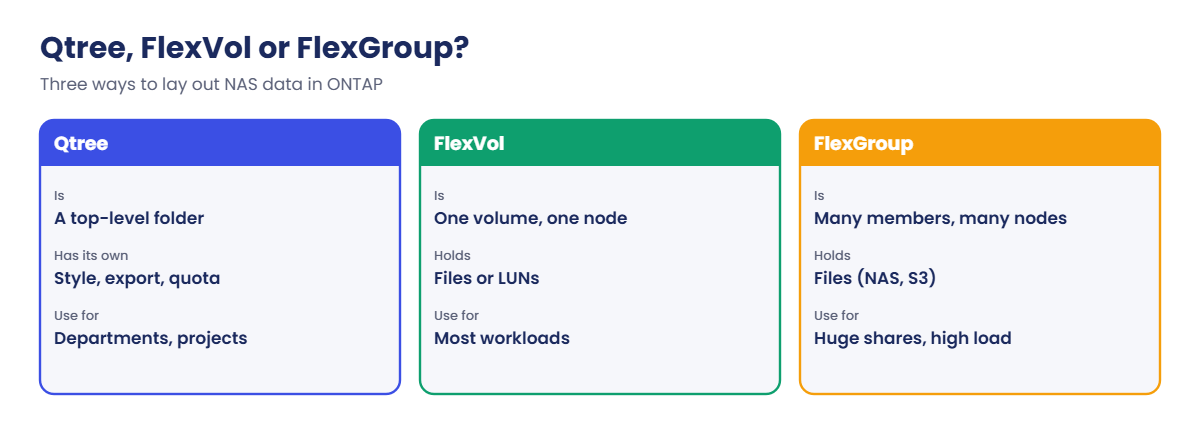
A qtree lives only at the top level of a volume (directly under its junction path). Each qtree can have its own security style (unix, ntfs or mixed), oplock setting, export policy and a tree quota (Lesson 32). A FlexVol can hold up to 4,995 qtrees, and they’re the usual way to give departments or projects their own limits inside one volume.

A FlexGroup is a single namespace built from many FlexVol member volumes (also called constituents) spread over several aggregates and nodes. ONTAP decides which member gets each new file or folder, so load and capacity spread across the cluster. A FlexGroup can grow to 20 PB, or 60 PB with large volume support from ONTAP 9.12.1P2.

FlexGroups serve NFS and SMB (and S3 buckets), not LUNs. You create one with -aggr-list and -aggr-list-multiplier (members per aggregate) or let ONTAP choose with -auto-provision-as flexgroup. An existing FlexVol can be converted in place with volume conversion start (ONTAP 9.7 and later).

How it works, step by step

1Split a volume with qtrees

Create a qtree with volume qtree create and give it a security style. To users it looks like an ordinary top-level folder, but ONTAP can now apply a quota or export policy to just that folder.

2Decide when one volume is not enough

One FlexVol lives on one aggregate on one node, so that node’s CPU and disks do all its work. Shares with huge file counts or very high throughput, like media, EDA, build farms or AI data sets, outgrow that.

ONTAP FlexGroup: qtree, FlexVol and FlexGroup compared

3Create the FlexGroup

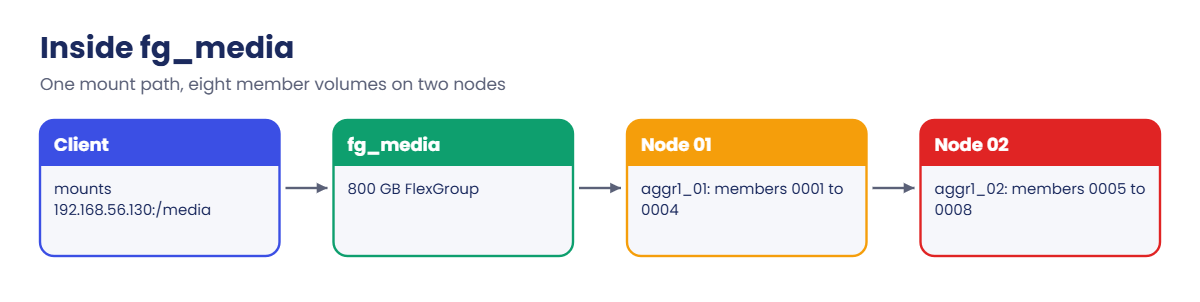
List the aggregates (ideally on every node of the cluster) and how many members to put on each. ONTAP creates the members, named <name>__0001, __0002 and so on, and joins them under one junction path.

4Clients see one volume

Clients mount one path such as /media. When they create a file, ONTAP places it in a member with room and low load. Each file lives in one member volume, so very large single files still sit in one place.

ONTAP FlexGroup: eight member volumes of fg_media on two nodes

5Grow it

Grow a FlexGroup like any volume with volume size, which grows its members, or add members on new aggregates with volume expand when you add nodes.

FlexVolFlexGroup
Lives onOne aggregate, one nodeMany aggregates, many nodes
Max size100 TB (300 TB with large volume support)20 PB (60 PB with large volume support)
ProtocolsNFS, SMB, iSCSI, FC, NVMeNFS, SMB, S3 (no LUNs)
Best forMost shares, LUNs, VMsHuge file counts, high throughput NAS

In System Manager, qtrees are under Storage › Qtrees › + Add. For a FlexGroup, use Storage › Volumes › + Add › More options and choose to distribute the volume data across the cluster.
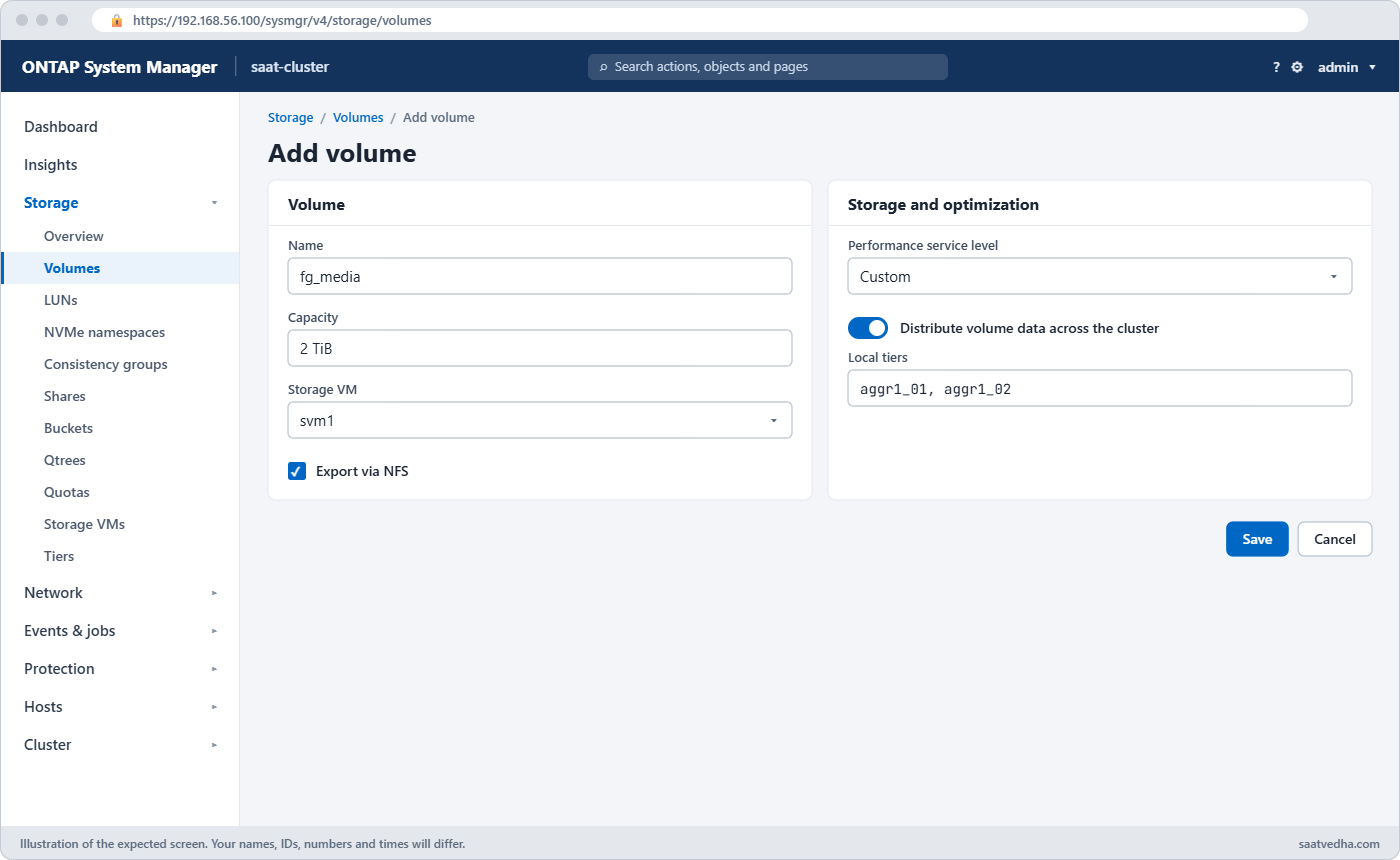
ONTAP FlexGroup in System Manager: Add Volume with distribute across the cluster
Storage › Volumes › + Add › More options: “Distribute volume data across the cluster” creates a FlexGroup.

Good to know: where FlexGroup came from

Before FlexGroup, ONTAP had Infinite Volumes, which also spanned many aggregates and nodes. They used a single namespace constituent for all file metadata, which became a bottleneck for workloads with many small files.

FlexGroup volumes arrived in ONTAP 9.1 without that bottleneck, because every member volume handles its own metadata. Infinite Volumes are not supported from ONTAP 9.5, so if you meet one on an old system, the way forward is a copy-based migration to a FlexGroup.

Hands-on lab: qtrees in a FlexVol and a FlexGroup across two nodes

Before you run any command, double-check it

Read every command twice before you press Enter. Check the target: the server name, the user, the disk or device name, the path and the sizes. These commands are for learning and were tested in our lab, not on your system. At work, run the read-only commands first, follow your change process, make sure a backup exists, and ask a second person to check anything that changes or deletes data. You run them at your own risk.

This lab uses the SaatVedha ONTAP practice shell, our own learning tool. It is not NetApp software: real ONTAP output looks like this but is not identical.

You’ll put two department qtrees in one FlexVol, then create one 800 GB FlexGroup that spreads over both nodes.

1Build the lab

Create setup-18.txt with:

storage aggregate create -aggregate aggr1_01 -node saat-cluster-01 -diskcount 8 -disktype SAS
storage aggregate create -aggregate aggr1_02 -node saat-cluster-02 -diskcount 8 -disktype SAS
vserver create -vserver svm1 -aggregate aggr1_01 -rootvolume-security-style unix
volume create -vserver svm1 -volume vol_proj -aggregate aggr1_01 -size 200g -junction-path /proj
python ontapsim.py -c "simctl reset"
python ontapsim.py --run setup-18.txt

✅ Checkpoint: The last line says “[Job 104] Job succeeded: Successful”.

2Create two qtrees with different security styles

Log in and run:

volume qtree create -vserver svm1 -volume vol_proj -qtree design -security-style unix
volume qtree create -vserver svm1 -volume vol_proj -qtree finance -security-style ntfs
volume qtree show -vserver svm1 -volume vol_proj

You should see this:

Vserver    Volume        Qtree        Style        Oplocks    Status
---------- ------------- ------------ ------------ ---------- --------
svm1       vol_proj      ""           unix         enable     normal
svm1       vol_proj      design       unix         enable     normal
svm1       vol_proj      finance      ntfs         enable     normal
3 entries were displayed.

The row with “” is the volume itself (qtree 0). design uses UNIX permissions for Linux users, while finance uses NTFS permissions for Windows users, inside the same volume.

✅ Checkpoint: You see design (unix) and finance (ntfs).

3Create a FlexGroup across both nodes

volume create -vserver svm1 -volume fg_media -aggr-list aggr1_01,aggr1_02 -aggr-list-multiplier 4 -size 800g -junction-path /media
volume show -vserver svm1
volume show -vserver svm1 -volume fg_media -fields volume-style-extended,size,junction-path

You should see this:

[Job 105] Job succeeded: Successful
saat-cluster::> volume show -vserver svm1
Vserver   Volume       Aggregate    State      Type       Size  Available Used%
--------- ------------ ------------ ---------- ---- ---------- ---------- -----
svm1      svm1_root    aggr1_01     online     RW          1GB    972.2MB    0%
svm1      vol_proj     aggr1_01     online     RW        200GB    189.9GB    0%
svm1      fg_media     -            online     RW        800GB    759.8GB    0%
3 entries were displayed.
saat-cluster::> volume show -vserver svm1 -volume fg_media -fields volume-style-extended,size,junction-path
vserver volume   volume-style-extended size  junction-path
------- -------- --------------------- ----- -------------
svm1    fg_media flexgroup             800GB /media

fg_media shows “-” for Aggregate because it doesn’t live on just one. Its style is flexgroup and clients will mount it at /media like any other volume.

✅ Checkpoint: volume-style-extended shows flexgroup.

4Look inside: the member volumes

simctl write svm1 fg_media 80g media
volume show -vserver svm1 -volume fg_media* -is-constituent

You should see this:

Client wrote 80GB to svm1:fg_media.
saat-cluster::> volume show -vserver svm1 -volume fg_media* -is-constituent
Vserver   Volume       Aggregate    State      Type       Size  Available Used%
--------- ------------ ------------ ---------- ---- ---------- ---------- -----
svm1      fg_media     -            online     RW        800GB    679.8GB   11%
          fg_media__0001
svm1                   aggr1_01     online     RW        100GB    94.97GB    0%
          fg_media__0002
svm1                   aggr1_01     online     RW        100GB    94.97GB    0%
          fg_media__0003
svm1                   aggr1_01     online     RW        100GB    94.97GB    0%
          fg_media__0004
svm1                   aggr1_01     online     RW        100GB    94.97GB    0%
          fg_media__0005
svm1                   aggr1_02     online     RW        100GB    94.97GB    0%
          fg_media__0006
svm1                   aggr1_02     online     RW        100GB    94.97GB    0%
          fg_media__0007
svm1                   aggr1_02     online     RW        100GB    94.97GB    0%
          fg_media__0008
svm1                   aggr1_02     online     RW        100GB    94.97GB    0%
9 entries were displayed.

On a real cluster the option takes a value: -is-constituent true. Eight members of 100 GB each: four on aggr1_01 (node 01) and four on aggr1_02 (node 02). The practice shell only tracks used space on the FlexGroup as a whole (11% here); on a real cluster you’d see the 80 GB spread across the members’ Used% column.

✅ Checkpoint: You count four members on each aggregate.
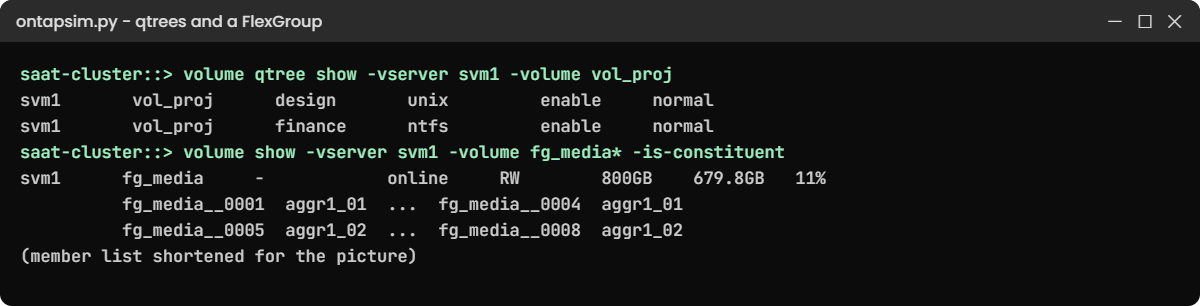
ONTAP FlexGroup lab: qtrees and the members of a FlexGroup
Two qtrees with different security styles, and a FlexGroup whose members sit on both nodes.

5Qtrees work in a FlexGroup too

volume qtree create -vserver svm1 -volume fg_media -qtree raw_footage

It returns to the prompt with no message. Qtrees and tree quotas are supported on FlexGroups, so the same department rules work on a scale-out share.

✅ Checkpoint: volume qtree show lists raw_footage under fg_media.

Break It, Then Fix It

Two errors people meet in their first week with qtrees and FlexGroups.

1Create a qtree that already exists

volume qtree create -vserver svm1 -volume vol_proj -qtree design

You’ll get this:

Error: command failed: Qtree "design" already exists in volume "vol_proj".

Qtree names are unique within a volume. If you wanted a folder under design, users create it from the client; qtrees only exist at the top level.

✅ Checkpoint: You ran volume qtree show and saw design is already there.

ONTAP FlexGroup break and fix: duplicate qtree and a FlexGroup too big for its aggregates
A duplicate qtree name, and a FlexGroup whose share per aggregate didn’t fit.

2Ask for a thick FlexGroup bigger than the aggregates

volume create -vserver svm1 -volume fg_archive -aggr-list aggr1_01,aggr1_02 -aggr-list-multiplier 4 -size 30t -junction-path /archive

You’ll get this:

Error: command failed: Not enough space in aggregate "aggr1_01" for the FlexGroup constituents. Need 15TB, 7.82TB free. Use -space-guarantee none or a smaller size.

The size is split across the members, so each aggregate must hold its share: 30 TB over two aggregates is 15 TB each. Pick a size that fits, or make it thin only if you’ve agreed to watch the aggregates:

volume create -vserver svm1 -volume fg_archive -aggr-list aggr1_01,aggr1_02 -aggr-list-multiplier 4 -size 10t -junction-path /archive
[Job 106] Job succeeded: Successful

Your job number may differ.

✅ Checkpoint: fg_archive is created at 10TB.

This happened at work

Ninety million product photos on one node

An online furniture seller in Mysuru kept every product photo and thumbnail in one FlexVol, roughly 90 million small files. Every night a job regenerated thumbnails for new listings, and the node that owned the volume ran hot until morning, while its partner sat mostly idle. Directory listings in the photo tool took seconds.

The team converted the volume in place with volume conversion start during a quiet Sunday, then added member volumes on the partner node’s aggregate. New uploads started landing on both nodes straight away, but the old files stayed in the original member, so the first node was still busier than the second for weeks.

They let natural churn even it out and kept an eye on per-member usage. For the next big share they started with a FlexGroup across both nodes from day one, and the storage lead now asks “how many files, not just how many terabytes?” in every new request.

Common mistakes and troubleshooting

MistakeWhat happensDo this instead
Making qtrees deep inside a volumeCan’t be done; qtrees exist only at the top levelPlan qtrees as the first level of folders under the junction path
Using a FlexGroup for LUNsNot supportedUse FlexVol volumes for SAN
Putting all members on one nodeNo scale-out benefitList aggregates on every node in -aggr-list
Tiny FlexGroups with many membersMembers fill unevenly and run out of space earlySize members sensibly and grow the FlexGroup before members get near full
Expecting old files to move after expandNew members fill only with new dataPlan the layout up front, or accept uneven use until data churns

Interview questions

Click a question to open it. Each one is written the way an interviewer would ask it. Under it you will see why they ask it and one way you could answer, in your own words.

Fresher level

1. What is a qtree and why would you use one?

Why they ask this: They want to check you know the basic way to split a volume for different teams.

How you might answer: A qtree is a special folder at the top level of a volume. It can have its own security style, export policy and quota, so I’d use qtrees to give each department or project its own limit and rules inside one volume.

2. Can you explain in simple words what a FlexGroup volume is?

Why they ask this: They’re checking you know ONTAP’s scale-out NAS container.

How you might answer: A FlexGroup is one big volume made of many FlexVol member volumes spread across aggregates and nodes. Clients mount one path, and ONTAP decides which member holds each new file, so the load and space spread across the cluster.

2–5 years experience

3. When would you choose a FlexGroup over a FlexVol?

Why they ask this: They want to see that you pick by workload, not by habit.

How you might answer: I’d choose a FlexGroup for very large NAS shares with high file counts or heavy throughput, like media, build or analytics data, because one FlexVol is limited to one node. For LUNs, or normal shares that fit comfortably in a FlexVol, I’d stay with FlexVol because it’s simpler to manage and supports everything.

4. A department wants their own quota and Windows permissions inside a shared Linux volume. How would you do it?

Why they ask this: They’re checking you can combine qtrees, security styles and quotas.

How you might answer: I’d create a qtree for that department with -security-style ntfs, so its files use Windows permissions while the rest of the volume stays unix. Then I’d add a tree quota on the qtree to cap their space.

Senior level

5. You converted a busy FlexVol to a FlexGroup and added members on another node, but the first node is still hot. What’s going on and what would you do?

Why they ask this: They want to see you understand how FlexGroups place data.

How you might answer: Existing files stay in the member they’re in; only new files go to the new members. So the old member and its node keep most of the load until data changes.

I’d watch per-member usage, let churn rebalance it, and for future shares I’d create the FlexGroup across all nodes from the start.

6. How would you plan a 500 TB research data share on a four-node cluster?

Why they ask this: They want design thinking about scale, layout and growth.

How you might answer: I’d use a FlexGroup with members on aggregates on all four nodes, so every controller shares the work. I’d ask about file counts and file sizes to choose the member count, and leave headroom so members stay under about 80% used.

I’d put each research group in its own qtree with a tree quota, and plan Snapshot and SnapMirror protection for the whole FlexGroup.

Quick quiz

Q1. Where can a qtree be created?

  1. Anywhere in the directory tree
  2. Only at the top level of a volume
  3. Only in the SVM root volume
  4. Only in a FlexGroup
Show answer

B — qtrees exist only directly under the volume’s junction path.

Q2. What is a FlexGroup made of?

  1. One large aggregate
  2. Many FlexVol member volumes across aggregates and nodes
  3. Many qtrees
  4. Many LUNs
Show answer

B — a FlexGroup joins many member FlexVols under one namespace.

Q3. Which protocol can’t use a FlexGroup?

  1. NFS
  2. SMB
  3. iSCSI LUNs
  4. S3
Show answer

C — FlexGroups are for NAS (and S3); LUNs need FlexVol volumes.

Q4. In the lab, how many members did fg_media have?

  1. 2
  2. 4
  3. 8
  4. 16
Show answer

C — two aggregates times a multiplier of 4 gives 8 members.

Q5. What can a qtree have that ordinary folders can’t?

  1. Its own aggregate
  2. Its own security style, export policy and quota
  3. Its own LIF
  4. Its own SVM
Show answer

B — those per-qtree settings are why qtrees exist.

Quick recap

  • Qtrees are top-level folders with their own security style, export policy and quota.
  • A FlexGroup is one namespace built from many FlexVol members across aggregates and nodes.
  • Create one with -aggr-list and -aggr-list-multiplier, or let ONTAP auto-provision it.
  • FlexGroups are for NFS, SMB and S3, not LUNs.
  • Existing files stay in their member; plan the FlexGroup across all nodes from the start.

Next lesson

Lesson 19: Ports, interface groups and VLANs → You’ll move from storage to networking and build an LACP interface group with VLANs.

Further reading: ONTAP FlexGroup

Want to go deeper into ONTAP FlexGroup? NetApp’s page What a FlexGroup volume is gives the current limits, and Volumes, qtrees, files and LUNs explains how qtrees fit inside volumes. You can also see the full plan for this course on the NetApp ONTAP Storage Administration course page.

Scroll to Top

This website uses cookies

We use a few cookies to keep this site working. If you allow it, we also use Google Analytics to count visits so we can improve our lessons. You can accept all, deny the optional ones, or choose what to allow.