Disks, shelf numbering and disk ownership

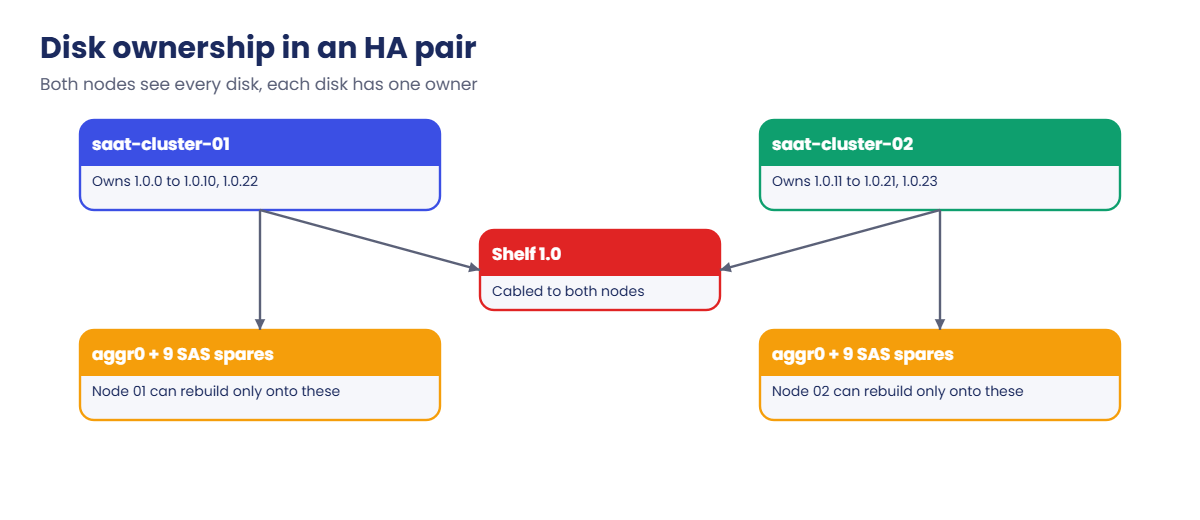
Both nodes in an HA pair can see every disk on the shelves, yet at any moment each disk belongs to exactly one of them. That ownership decides which node can build aggregates from a disk, and which node’s spares are there when a disk fails.

In this lesson you’ll learn how ownership works, what auto-assign does, why spares must be on both nodes, and how to move a spare from one node to the other properly. The lab hands you two unowned disks to sort out.

Where this lesson fits

Lesson 11 of 56 in NetApp ONTAP Storage Administration · Phase 1: Architecture and foundation · Before this: Lesson 10, AutoSupport and EMS · Next: Lesson 12, RAID-DP and RAID-TEC

TimeYou needBy the end you can
40 minutesThe practice shellRead disk ownership and container types, assign unowned disks, keep spares balanced, and move a spare safely

What it is, in one line

Disk ownership is a label ONTAP writes on each disk saying which node may use it; a node can only build aggregates from, and rebuild onto, the disks (spares) it owns.

In Simple Words

Lockers in a school

A school has a long row of lockers in the corridor that both sections of Class 6 walk past every day. Each locker has a name tag on it, and only the child whose name is on the tag puts books in it.

When new lockers are fitted, the class teacher writes names on them, usually half for section A and half for section B. A spare locker with your name on it is useful only to you, so each section needs its own empty ones for new students.

The name tag is disk ownership, and the empty named lockers are each node’s spares.

Engineer's View

How an engineer describes it

Ownership is written on the disk itself (software-based ownership). Each disk has an owner (the node using it now) and a home (the node it belongs to normally); during a takeover the owner changes but the home doesn’t, which is how giveback knows where to send it. storage disk show also shows a container type: aggregate, spare, unassigned, broken, or shared when the disk is partitioned (Lesson 13).

Auto-assign gives new disks an owner as soon as they’re inserted. Its policy can follow the stack, shelf, bay or a half-shelf split, and storage disk option show shows the setting per node. When auto-assign can’t decide, or someone left disks unowned, you assign them with storage disk assign -disk ... -owner ....

Only spares can change owner. You take ownership away with storage disk removeowner and assign it again, but turn auto-assign off first, or ONTAP may grab the disk back for the old node before you finish. Keep at least one spare of each disk type and size on each node; many teams keep two on large systems.

How it works, step by step

1A disk arrives

You slide a new drive into a bay. Both nodes see it through their shelf paths.

2Auto-assign labels it

If auto-assign is on and the policy is clear, ONTAP writes an owner on the disk within a few minutes and it becomes a spare.

ONTAP disk ownership: each node owning its own disks and spares on a shared shelf

3Or you assign it

Unowned disks show container type unassigned. You pick the node that needs it, usually the one with fewer spares, and run storage disk assign.

4Spares wait for work

Spares are used to build or grow aggregates, and to replace failed disks automatically. A node can only use its own spares.

ONTAP disk ownership: auto-assign off, removeowner, assign, auto-assign on

5Moving a spare

Auto-assign off, removeowner, assign to the other node, auto-assign on. Disks inside an aggregate can’t be moved this way.

In System Manager, Cluster › Disks lists every disk with its owner, type and container. Assigning or removing ownership is usually done in the CLI.

ONTAP disk ownership in System Manager: disks with owner and unassigned disks
Cluster › Disks with the owner and container of each disk; two disks are still unassigned.
Container typeMeaning
aggregateIn use inside an aggregate
spareOwned, empty, ready to use
unassignedNo owner yet
brokenFailed; replace it
sharedPartitioned; parts belong to aggregates or spares

Hands-on lab: give unowned disks to the right node

Before you run any command, double-check it

Read every command twice before you press Enter. Check the target: the server name, the user, the disk or device name, the path and the sizes. These commands are for learning and were tested in our lab, not on your system. At work, run the read-only commands first, follow your change process, make sure a backup exists, and ask a second person to check anything that changes or deletes data. You run them at your own risk.

This lab uses the SaatVedha ONTAP practice shell, our own learning tool. It is not NetApp software: real ONTAP output looks like this but is not identical.

1Reset and log in

python ontapsim.py -c "simctl reset"
python ontapsim.py

✅ Checkpoint: Your prompt reads saat-cluster::>

2Find disks without an owner

storage disk show -container-type unassigned
storage disk option show

You should see this:

Disk                   Size Shelf Bay Type  Type        Name                  Owner
---------------- ---------- ----- --- ----- ----------- --------------------- ----------------
1.0.22               1.63TB     0  22 SAS   unassigned  -                     -
1.0.23               1.63TB     0  23 SAS   unassigned  -                     -
2 entries were displayed.
saat-cluster::> storage disk option show
Node             BKg. FW. Upd. Auto Copy Auto Assign Auto Assign Policy
---------------- ------------- --------- ----------- ------------------
saat-cluster-01  on            on        on          default
saat-cluster-02  on            on        on          default
2 entries were displayed.

Auto-assign is on, yet two disks have no owner, as happens when someone removed ownership and forgot them. Each node has 8 SAS spares right now, so give one to each.

✅ Checkpoint: Two SAS disks are unassigned.

3Assign them

storage disk assign -disk 1.0.22 -owner saat-cluster-01
storage disk assign -disk 1.0.23 -owner saat-cluster-02
storage disk show -disk 1.0.22|1.0.23 -fields disk,owner,container-type

You should see this:

disk   owner           container-type
------ --------------- --------------
1.0.22 saat-cluster-01 spare
1.0.23 saat-cluster-02 spare
2 entries were displayed.

The | in the query means “or”, so one command checks both disks.

✅ Checkpoint: Both disks show container type spare.

4Check the spares are balanced

storage disk show -container-type unassigned
storage disk show -container-type spare -type SAS -fields disk,owner

You should see this:

There are no entries matching your query.
saat-cluster::> storage disk show -container-type spare -type SAS -fields disk,owner
disk   owner
------ ---------------
1.0.3  saat-cluster-01
...
1.0.10 saat-cluster-01
1.0.14 saat-cluster-02
...
1.0.21 saat-cluster-02
1.0.22 saat-cluster-01
1.0.23 saat-cluster-02
18 entries were displayed.

Nine SAS spares per node, and no unowned disks left. storage aggregate show-spare-disks gives the same picture grouped by node, with each disk’s size and zeroed state.

✅ Checkpoint: Each node owns 9 SAS spares.

ONTAP disk ownership lab: two unowned disks assigned, one to each node
One disk to each node keeps the spares balanced.

Break It, Then Fix It

Now try to move disks the wrong way, then the right way.

1Assign a disk that already has an owner

storage disk assign -disk 1.0.3 -owner saat-cluster-02

You’ll get this:

Error: command failed: Failed to assign disks. Reason: Disk "1.0.3" is already owned by node "saat-cluster-01". Use "storage disk removeowner" first.

2Remove the owner of a disk inside an aggregate

storage disk removeowner -disk 1.0.0

You’ll get this:

Error: command failed: Disk "1.0.0" is not a spare disk. Only spare disks can have their ownership removed.

Good: ONTAP protects disks that hold data. 1.0.0 is part of aggr0 on node 01.

3Move a spare properly

storage disk option modify -node * -autoassign off
storage disk removeowner -disk 1.0.3
storage disk assign -disk 1.0.3 -owner saat-cluster-02
storage disk option modify -node * -autoassign on
storage disk show -disk 1.0.3 -fields disk,owner,container-type

You’ll get this:

disk  owner           container-type
----- --------------- --------------
1.0.3 saat-cluster-02 spare

Turning auto-assign off first stops ONTAP from handing the disk straight back to node 01. Don’t forget to turn it on again. (Later lessons start with a reset, so you can leave 1.0.3 where it is.)

✅ Checkpoint: 1.0.3 is a spare owned by saat-cluster-02, and auto-assign is on again.

ONTAP disk ownership error: errors when assigning an owned disk and removing an aggregate disk
ONTAP refuses to reassign owned disks or disks inside an aggregate.

This happened at work

All the new SSDs went to one node

An engineering college in Coimbatore added a shelf of SSDs to the research cluster. Auto-assign used a stack-based policy, so all 12 new SSDs went to node 1, and node 1 built a flash aggregate with 11 of them, leaving one spare.

Months later the team built a second flash aggregate on node 2 from SSDs borrowed from the old shelf, and nobody checked spares. When an SSD failed in node 2’s aggregate on a Friday, there was no SSD spare on node 2, so the RAID group ran degraded for four days until the replacement arrived. The spare on node 1 couldn’t help, because it wasn’t node 2’s.

The fix was to move one SSD spare across with removeowner and assign, and to add “spares per node, per type” to the weekly health report.

Common mistakes and troubleshooting

MistakeWhat happensDo this instead
All spares on one nodeA failed disk on the other node has no spareKeep at least one spare per type and size on each node
removeowner with auto-assign onThe disk goes straight back to the old ownerTurn auto-assign off, move, turn it on again
Leaving disks unassignedThey can’t be used as sparesCheck -container-type unassigned after any hardware work
Mixing up owner and homeConfusion during takeoverOwner changes in takeover; home stays
Assigning by guessworkUnbalanced nodes and odd aggregate layoutsCount spares per node before you assign

Interview questions

Click a question to open it. Each one is written the way an interviewer would ask it. Under it you will see why they ask it and one way you could answer, in your own words.

Fresher level

1. What does disk ownership mean in ONTAP?

Why they ask this: They want to check the basic idea before aggregates and RAID.

How you might answer: Each disk is labelled with the node that may use it. Both nodes can see every disk, but only the owner can put it in an aggregate or use it as a spare.

2. What is a spare disk?

Why they ask this: They’re checking you know why spares matter.

How you might answer: It’s an owned, empty disk waiting for work. ONTAP uses it to build or grow an aggregate, or to rebuild automatically when a disk fails, but only on the node that owns it.

2–5 years experience

3. New disks were inserted, but they don’t show up as spares. What would you check?

Why they ask this: They want a methodical troubleshooting path.

How you might answer: I’d run storage disk show -container-type unassigned and storage disk option show to see if auto-assign is on and which policy it uses. If they’re unassigned, I’d count spares per node and assign them with storage disk assign, then confirm they’re zeroed spares.

4. How do you move a spare disk from one node to the other?

Why they ask this: They’re checking you know the safe order of steps.

How you might answer: I’d turn auto-assign off, run storage disk removeowner on the spare, assign it to the other node with storage disk assign, and turn auto-assign back on. Only spares can move like this; disks inside an aggregate can’t.

Senior level

5. How many spares would you keep on a large production HA pair, and why?

Why they ask this: They want to see you balance cost against risk.

How you might answer: At least one per disk type and size per node, and on big systems with many drives I’d keep two. Rebuilds on large disks take hours, and a second failure in that time is more likely, so a second spare is cheap insurance.

6. A shelf of new disks all got assigned to one node. How would you fix it and stop it happening again?

Why they ask this: They want both the fix and the process improvement.

How you might answer: I’d move half of the spares with auto-assign off, removeowner and assign, before anyone builds aggregates on them. Then I’d check the auto-assign policy, and add a spares-per-node check to the post-change checklist for hardware work.

Quick quiz

Q1. Which disks can have their ownership removed?

  1. Any disk
  2. Only spares
  3. Only disks in aggr0
  4. Only SSDs
Show answer

B — ONTAP refuses removeowner on disks in an aggregate.

Q2. Why turn auto-assign off before moving a spare?

  1. To speed it up
  2. So ONTAP doesn’t give it back to the old node
  3. Because removeowner needs advanced privilege
  4. To zero the disk
Show answer

B — auto-assign could reclaim the disk for the old owner.

Q3. During a takeover, which ownership value changes?

  1. Home
  2. Owner
  3. Both
  4. Neither
Show answer

B — the owner changes; home stays so giveback knows where it belongs.

Q4. Which query lists disks with no owner?

  1. storage disk show -broken
  2. storage disk show -container-type unassigned
  3. storage aggregate show
  4. storage disk option show
Show answer

B — unassigned is the container type for unowned disks.

Q5. A node has no SSD spares and an SSD fails in its aggregate. Can the partner’s SSD spare be used automatically?

  1. Yes, always
  2. No, a node only uses its own spares
  3. Only during takeover
  4. Only if it’s in the same shelf
Show answer

B — spares belong to one node.

Quick recap

  • Each disk has an owner and a home node; both nodes see every disk.
  • Auto-assign labels new disks; unassigned ones need storage disk assign.
  • Only spares can change owner: auto-assign off, removeowner, assign, auto-assign on.
  • Keep spares of each type on each node.
  • Check unassigned disks and spares per node after any hardware work.

Next lesson

Lesson 12: RAID-DP and RAID-TEC → You’ll see how ONTAP protects data with two or three parity disks and what happens during a rebuild.

Further reading: ONTAP disk ownership

Want to go deeper into ONTAP disk ownership? Read NetApp’s ONTAP concepts guide, then the disk and aggregate management pages on docs.netapp.com for auto-assign policies. You can also see the full plan for this course on the NetApp ONTAP Storage Administration course page.

Scroll to Top

This website uses cookies

We use a few cookies to keep this site working. If you allow it, we also use Google Analytics to count visits so we can improve our lessons. You can accept all, deny the optional ones, or choose what to allow.