FC target ports, UTA2 and WWPN zoning
-
Phase 0: Start here
-
Phase 1: Architecture and foundation
-
Phase 2: Protocols and day-to-day administration
-
Phase 3: Data protection and enterprise integrations
-
Phase 4: Troubleshooting blueprint
-
Phase 5: Final project and career
Many banks and hospitals still run their biggest databases over Fibre Channel. When an FC LUN doesn’t show up, the storage admin and the SAN switch admin often point at each other, and the answer is usually one WWPN in the wrong place.
This lesson connects ONTAP to the fabric: target ports, FC LIFs and their virtual WWPNs, and the zoning that ties a host’s HBAs to them.
Where this lesson fits
Lesson 27 of 56 in NetApp ONTAP Storage Administration · Phase 2: Protocols and day-to-day administration · Before this: Lesson 26, iSCSI on Windows Server · Next: Lesson 28, NVMe/TCP and NVMe/FC
| Time | You need | By the end you can |
|---|---|---|
| 60 minutes | The practice shell (the Brocade steps are shown as reference) | Create FC LIFs, read the right WWPNs to zone, map an FC LUN and find a WWPN typo |
What it is, in one line
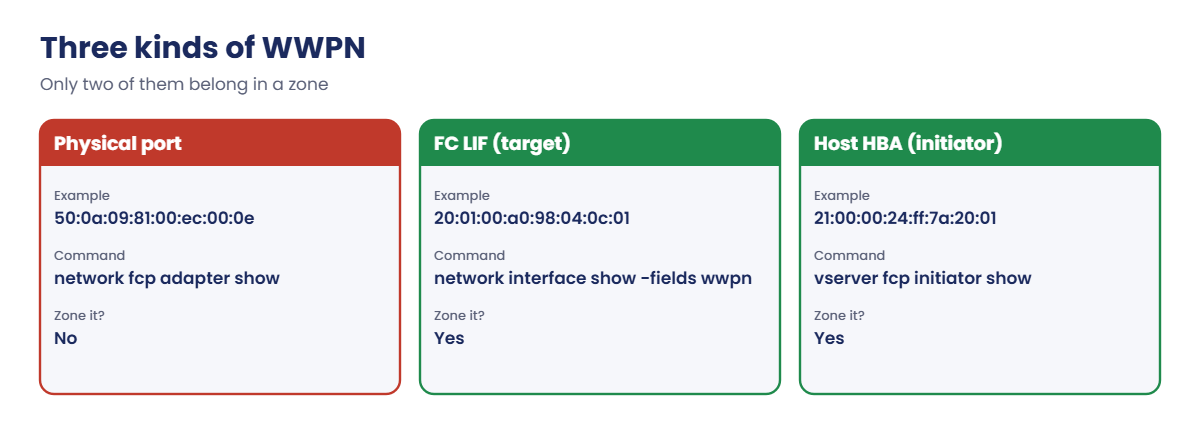
With FC, an SVM talks to hosts through FC LIFs, each with its own virtual WWPN, and the SAN switches must be zoned so every host HBA can reach those LIF WWPNs, never the physical port WWPN.
In Simple Words
Intercom codes in an apartment block
A big apartment block has one lobby panel. Each flat has its own intercom code, and the security office decides which visitor cards may call which codes.
The building’s main wiring has a number too, but nobody dials that; you dial the flat’s code. In FC, the flat codes are the LIF WWPNs, the wiring number is the physical port WWPN, and the security office’s list is the zoning on the switch.
Engineer's View
How an engineer describes it
FC ports on ONTAP must be in target mode. Unified Target Adapter 2 (UTA2) ports can run as FC or as 10 GbE (CNA), and you choose with system node hardware unified-connect modify -node N -adapter 0e -mode fc -type target while the port is offline, followed by a reboot. Dedicated FC adapters on current AFF and ASA systems run 32 Gb or 64 Gb.
vserver fcp create gives the SVM a WWNN. Each FC LIF gets a virtual WWPN (it starts 20:..) through N_Port ID Virtualization (NPIV), so the switch must support NPIV.
The physical port WWPN starts 50:0a:09:.. and is never zoned. FC LIFs don’t fail over; host multipath handles path loss, just like iSCSI.
Best practice is two separate fabrics (A and B), at least one FC LIF per node per fabric, and single-initiator zoning: one host HBA per zone, with the LIF WWPNs on that fabric as targets. ONTAP 9.18.1 supports up to 12 nodes in a SAN cluster.
How it works, step by step
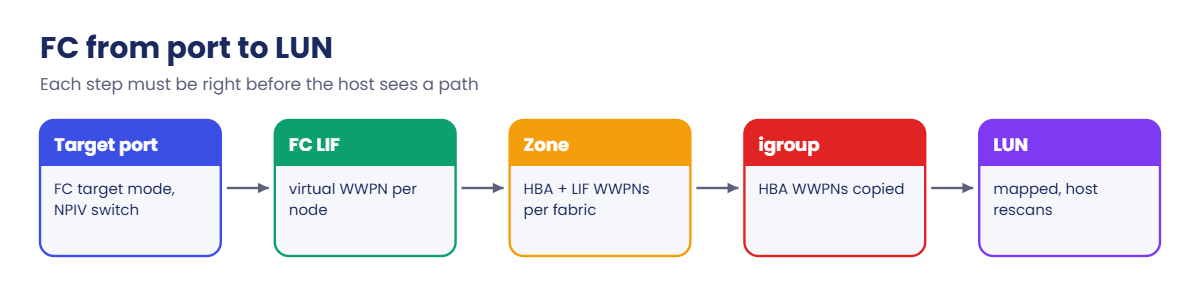
1Put the ports in target mode
network fcp adapter show lists the FC ports and their physical WWPNs. Fix UTA2 ports to FC target mode before the system goes live; changing later needs a reboot.
2Start FC and create LIFs
Turn on the FC service in the SVM and create one LIF per node on each fabric. Read their WWPNs with network interface show -fields wwpn.
3Zone each HBA to the LIFs on its fabric
On Fabric A, zone host HBA 1 with the fabric A LIF WWPNs; on Fabric B, HBA 2 with the fabric B LIFs. Use aliases so zones read like names, not hex.
4Check logins, then build the igroup
Once zoned, the host’s WWPNs appear in vserver fcp initiator show. Copy them from there into the igroup, map the LUN, and rescan the host.
| WWPN you see | Starts with | Zone it? |
|---|---|---|
| Physical FC port (network fcp adapter show) | 50:0a:09:.. | No |
| FC LIF (network interface show -fields wwpn) | 20:.. | Yes, as the target |
| Host HBA | 21:00:.. or 10:00:.. | Yes, as the initiator |
Brocade zoning, per fabric (Fabric A shown):
alicreate "rhel1_hba0", "21:00:00:24:ff:7a:20:01"
alicreate "svm1_fc1", "20:01:00:a0:98:04:0c:01"
alicreate "svm1_fc2", "20:02:00:a0:98:04:0c:02"
zonecreate "z_rhel1_hba0_svm1", "rhel1_hba0; svm1_fc1; svm1_fc2"
cfgadd "cfg_fabA", "z_rhel1_hba0_svm1"
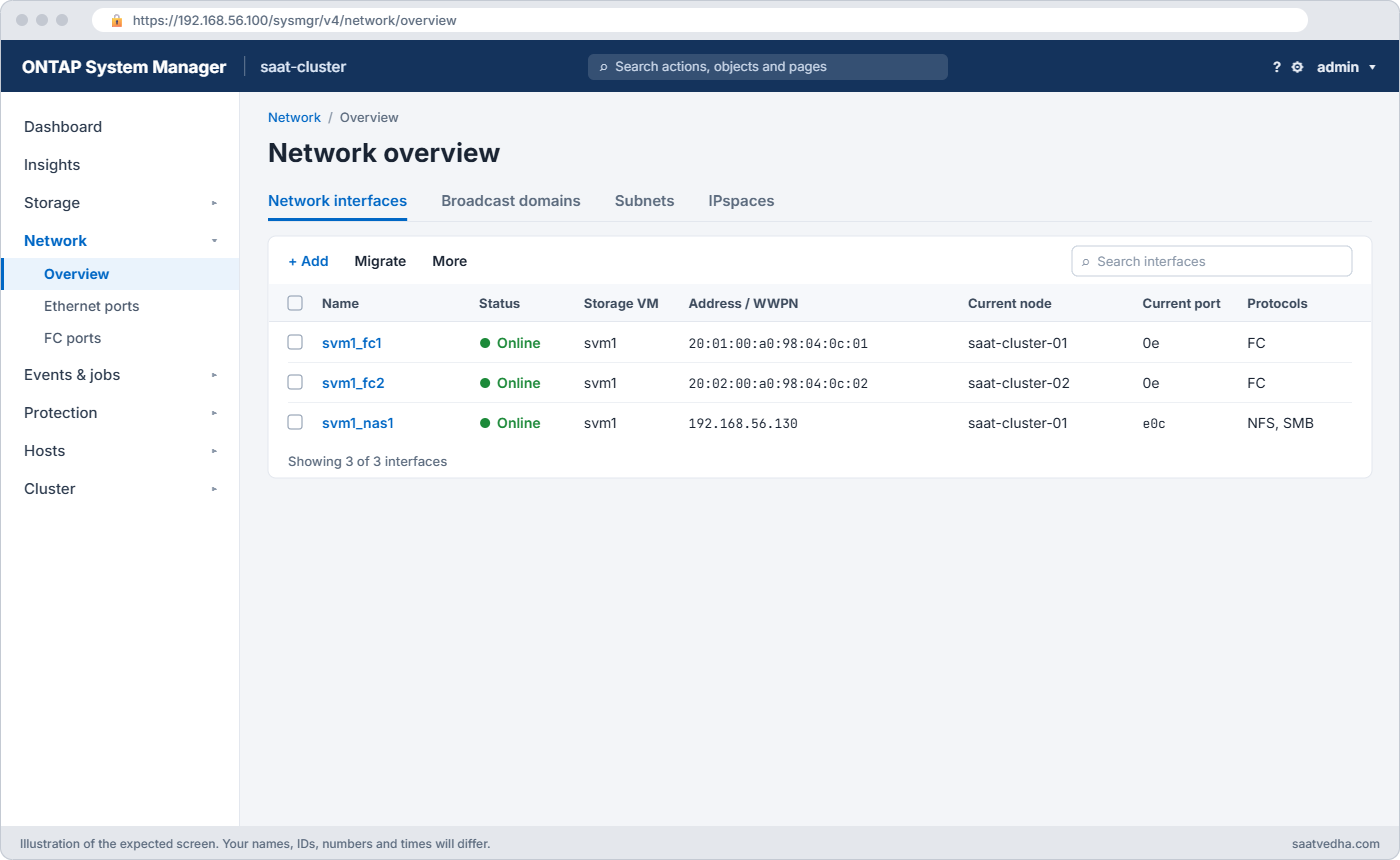
cfgenable "cfg_fabA"cfgenable also saves the configuration. In System Manager, FC LIFs are under Network › Overview › Network interfaces and FC ports under Network › FC ports. The Brocade zoning task in the Command Builder writes these lines for you.
Good to know: FC and FCoE are the same protocol
FCoE carries the same Fibre Channel Protocol inside Ethernet frames. ONTAP configures it exactly like FC: you create FC LIFs, zone their WWPNs and use FCP igroups, and the port runs in CNA mode instead of native FC mode.
FCoE needs lossless Ethernet switches built for it, and it is rare in new designs. Check Hardware Universe before planning it, because many current platforms and adapters don’t offer it.
Hands-on lab: FC LIFs, zoning and an FC LUN
Before you run any command, double-check it
Read every command twice before you press Enter. Check the target: the server name, the user, the disk or device name, the path and the sizes. These commands are for learning and were tested in our lab, not on your system. At work, run the read-only commands first, follow your change process, make sure a backup exists, and ask a second person to check anything that changes or deletes data. You run them at your own risk.
This lab uses the SaatVedha ONTAP practice shell, our own learning tool. It is not NetApp software: real ONTAP output looks like this but is not identical.
1Build the starting point
Reuse setup-23.txt from Lesson 23 (two aggregates, svm1, two iSCSI LIFs). Reset and run it:
python ontapsim.py -c "simctl reset"
python ontapsim.py --run setup-23.txt✅ Checkpoint: No line in the output starts with Error.
2Look at the FC target ports
network fcp adapter showYou should see this:
Connection Port Data Link
Node Adapter Established Address WWPN Rate (Gbit)
---------------- ------- ----------- ------- ----------------------- -----------
0x0f00100
saat-cluster-01 0e ptp 50:0a:09:81:00:ec:00:0e 32
0x0f00100
saat-cluster-01 0f ptp 50:0a:09:81:00:ec:00:0f 32
0x0f00100
saat-cluster-02 0e ptp 50:0a:09:82:00:ec:01:0e 32
0x0f00100
saat-cluster-02 0f ptp 50:0a:09:82:00:ec:01:0f 32
4 entries were displayed.Each node has 0e and 0f at 32 Gb, logged in to a switch (ptp). Note these physical WWPNs start 50:0a:09; you will not zone them.
✅ Checkpoint: You can point to a physical port WWPN.
3Turn on FC and create one LIF per node
vserver fcp create -vserver svm1 -status-admin up
network interface create -vserver svm1 -lif svm1_fc1 -data-protocol fcp -home-node saat-cluster-01 -home-port 0e -status-admin up
network interface create -vserver svm1 -lif svm1_fc2 -data-protocol fcp -home-node saat-cluster-02 -home-port 0e -status-admin up
network interface show -vserver svm1 -fields wwpn,home-node,home-portYou should see this:
vserver lif wwpn home-node home-port
------- ----------- ----------------------- --------------- ---------
svm1 svm1_iscsi1 - saat-cluster-01 e0d
svm1 svm1_iscsi2 - saat-cluster-02 e0d
svm1 svm1_fc1 20:01:00:a0:98:04:0c:01 saat-cluster-01 0e
svm1 svm1_fc2 20:02:00:a0:98:04:0c:02 saat-cluster-02 0e
4 entries were displayed.The iSCSI LIFs from the setup file have no WWPN. The FC LIF WWPNs start 20: these are what the switch admin zones. In production you’d add LIFs on 0f for Fabric B as well.
✅ Checkpoint: Both FC LIFs show a WWPN starting 20:.
4Zone the host and check logins
simctl zone add plays the switch admin running the Brocade lines above. rhel1 has two HBAs.
simctl zone add rhel1 svm1 svm1_fc1
simctl zone add rhel1 svm1 svm1_fc2
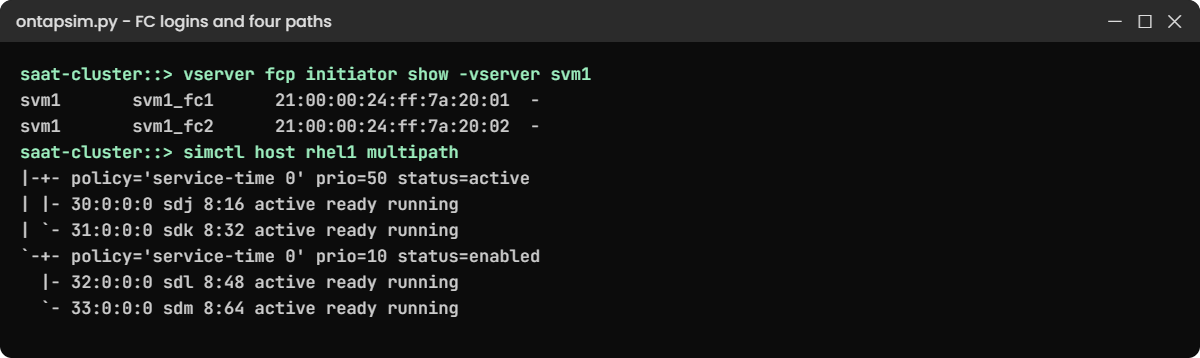
vserver fcp initiator show -vserver svm1The last command shows this:
Logical Initiator Igroup
Vserver Interface WWPN Name
---------- ------------- ------------------------ ---------------
svm1 svm1_fc1 21:00:00:24:ff:7a:20:01 -
svm1 svm1_fc1 21:00:00:24:ff:7a:20:02 -
svm1 svm1_fc2 21:00:00:24:ff:7a:20:01 -
svm1 svm1_fc2 21:00:00:24:ff:7a:20:02 -
4 entries were displayed.Both host HBAs have logged in through both LIFs. The dash means no igroup holds them yet.
✅ Checkpoint: Four logins, igroup “-“.
5Give rhel1 an FC LUN
volume create -vserver svm1 -volume vol_ora1 -aggregate aggr1_01 -size 60g -space-guarantee none -snapshot-policy none
lun create -vserver svm1 -path /vol/vol_ora1/lun_ora1 -size 50g -ostype linux -space-reserve disabled
lun igroup create -vserver svm1 -igroup ig_rhel1 -protocol fcp -ostype linux -initiator 21:00:00:24:ff:7a:20:01,21:00:00:24:ff:7a:20:02
lun mapping create -vserver svm1 -path /vol/vol_ora1/lun_ora1 -igroup ig_rhel1
simctl host rhel1 rescan
simctl host rhel1 multipathThe last two commands show this:
Scanning SCSI subsystem for new devices... 4 new or changed device(s) found.
saat-cluster::> simctl host rhel1 multipath
3600a098039666876544e57727244796 dm-2 NETAPP,LUN C-Mode
size=50G features='3 queue_if_no_path pg_init_retries 50' hwhandler='1 alua' wp=rw
|-+- policy='service-time 0' prio=50 status=active
| |- 30:0:0:0 sdj 8:16 active ready running
| `- 31:0:0:0 sdk 8:32 active ready running
`-+- policy='service-time 0' prio=10 status=enabled
|- 32:0:0:0 sdl 8:48 active ready running
`- 33:0:0:0 sdm 8:64 active ready runningTwo HBAs times two LIFs gives four paths: two optimized through node 01 and two non-optimized through node 02. On a real RHEL host, cat /sys/class/fc_host/host*/port_name shows the HBA WWPNs and multipath -ll shows the same groups.
✅ Checkpoint: multipath shows four paths in two groups.
Try it yourself: Build the FC LUN commands in the Command Builder.
Break It, Then Fix It
One wrong character in a WWPN halves your paths, and nothing turns red on the host.
1Put a typo in the igroup
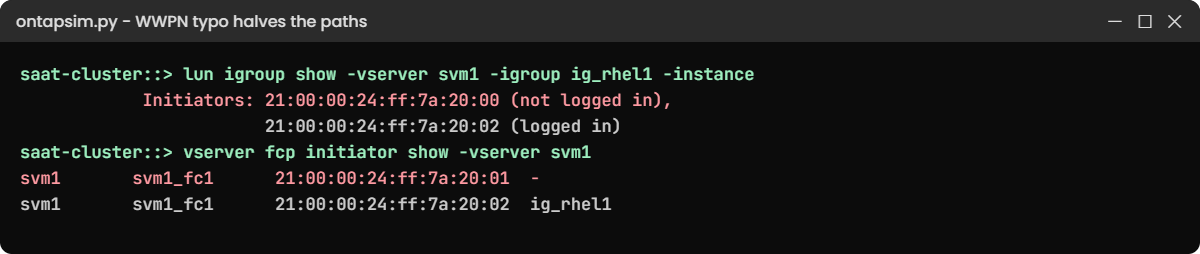
This fault changes the last character of rhel1’s first WWPN in the igroup, like a tired engineer typing from a label.
simctl break wwpn-typo svm1 ig_rhel1
lun igroup show -vserver svm1 -igroup ig_rhel1 -instance
simctl host rhel1 multipathYou’ll get this (trimmed):
Initiators: 21:00:00:24:ff:7a:20:00 (not logged in),
21:00:00:24:ff:7a:20:02 (logged in)
saat-cluster::> simctl host rhel1 multipath
3600a098039666876544e57727244796 dm-2 NETAPP,LUN C-Mode
size=50G features='3 queue_if_no_path pg_init_retries 50' hwhandler='1 alua' wp=rw
|-+- policy='service-time 0' prio=50 status=active
| `- 30:0:0:0 sdj 8:16 active ready running
`-+- policy='service-time 0' prio=10 status=enabled
`- 32:0:0:0 sdl 8:48 active ready runningThe host still has the disk, so nobody complains. But it now depends on one HBA and one fabric, and the next switch maintenance takes it down.
2Find the real WWPN
vserver fcp initiator show -vserver svm1You’ll see this:
svm1 svm1_fc1 21:00:00:24:ff:7a:20:01 -
svm1 svm1_fc1 21:00:00:24:ff:7a:20:02 ig_rhel1
svm1 svm1_fc2 21:00:00:24:ff:7a:20:01 -
svm1 svm1_fc2 21:00:00:24:ff:7a:20:02 ig_rhel120:01 is logged in but in no igroup; 20:00 is in the igroup but never logged in. That pair of facts is the typo.
3Fix it
lun igroup remove -vserver svm1 -igroup ig_rhel1 -initiator 21:00:00:24:ff:7a:20:00
lun igroup add -vserver svm1 -igroup ig_rhel1 -initiator 21:00:00:24:ff:7a:20:01
simctl host rhel1 multipath✅ Checkpoint: multipath shows four paths again.
Also try simctl break zone-missing: vserver fcp initiator show becomes empty and the host finds nothing. Empty logins point to the fabric; logins with a dash point to the igroup. Run simctl fix all when you’re done.
This happened at work
The zone that pointed at the wall socket
An auto parts maker in Pune added a new AFF pair to its cluster and moved its MES database LUNs onto it over FC. The storage admin sent the switch team a neat list of WWPNs, copied from network fcp adapter show.
The zones were created and enabled that evening, but the database hosts couldn’t see any paths through the new nodes. The switch team’s nsshow listed both the physical port and the LIF WWPNs logged in, so on their side “everything was online”, and the two teams spent an hour on a bridge call.
The problem was the list itself: those were physical port WWPNs (50:0a:09..), and ONTAP never presents LUNs on them. They rezoned to the FC LIF WWPNs from network interface show -fields wwpn, the hosts rescanned, and the paths appeared. The team’s runbook now has one line in bold: zone LIF WWPNs, never port WWPNs.
Common mistakes and troubleshooting
| Mistake | What happens | Do this instead |
|---|---|---|
| Zoning the physical port WWPN (50:0a:09..) | Host logs in but never sees LUNs | Zone the FC LIF WWPNs (20:..) |
| One zone with many hosts (multi-initiator) | A bad HBA can disturb other hosts on the fabric | Single-initiator zones: one HBA per zone |
| FC LIFs on one node only | A takeover or node reboot cuts the host off | One LIF per node per fabric |
| Typing WWPNs from a label | Half the paths, or no paths | Copy from vserver fcp initiator show or the switch |
| Switch ports without NPIV | FC LIFs can’t log in to the fabric | Turn on NPIV on the switch ports facing ONTAP |
| Changing UTA2 mode on a live system | The port is offline until a reboot | Set FC or CNA mode during the build |
Interview questions
Click a question to open it. Each one is written the way an interviewer would ask it. Under it you will see why they ask it and one way you could answer, in your own words.
Fresher level
1. What’s the difference between a physical FC port WWPN and an FC LIF WWPN on ONTAP?
Why they ask this: They want to check the single most common FC zoning mistake.
How you might answer: The physical port has its own WWPN, starting 50:0a:09 on NetApp. Each FC LIF gets a virtual WWPN through NPIV, starting 20:. Hosts reach LUNs only through LIF WWPNs, so those are what we zone.
2. What is single-initiator zoning?
Why they ask this: They’re checking you know the basic zoning best practice.
How you might answer: Each zone has one host HBA as the initiator and the storage target WWPNs it needs on that fabric. It keeps hosts isolated, so a misbehaving HBA or a fabric event on one host doesn’t disturb the others.
2–5 years experience
3. A host team says their new FC LUN isn’t visible. How do you split the problem between fabric and storage?
Why they ask this: They want to see a fast way to decide who owns the fix.
How you might answer: I run vserver fcp initiator show. If the host WWPNs aren’t there at all, the fabric is the problem: zoning or a switch port. If they’re there with a dash in the igroup column, the igroup has a different WWPN and it’s a storage fix.
4. How would you lay out FC LIFs for a two-node cluster with dual fabrics?
Why they ask this: They’re checking you can design for redundancy.
How you might answer: Each node gets one LIF on a fabric A port and one on a fabric B port, so four LIFs in total. Each host HBA on fabric A is zoned to the two fabric A LIFs and each HBA on fabric B to the two fabric B LIFs, giving four paths per LUN, two of them optimized.
Senior level
5. You’re adding a second HA pair to a SAN cluster. What FC changes do you plan?
Why they ask this: They want to see that you think about zoning, SLM and host rescans together.
How you might answer: I’d create FC LIFs on the new nodes on both fabrics and give the switch team their WWPNs for new zone members. LUNs only report through their own HA pair, so nothing changes for existing hosts until I move volumes.
Before a move I’d add reporting nodes, have hosts rescan, check the new paths, then move and clean up the old reporting nodes.
6. Some systems have UTA2 ports. How do you decide between FC and Ethernet mode for them?
Why they ask this: They’re testing hardware planning and awareness that the change needs a reboot.
How you might answer: I look at the workload plan: if FC SAN hosts need more target ports, I set them to FC target; if NAS or iSCSI needs more 10 GbE, I use CNA mode. I decide at build time, because changing mode needs the port offline and a node reboot, and I keep the same layout on both nodes of the pair.
Quick quiz
Q1. Which WWPN should be zoned on the switch for an ONTAP FC LIF?
- The physical port WWPN starting 50:0a:09
- The LIF’s virtual WWPN starting 20:
- The SVM’s WWNN
- The node serial number
Show answer
B — hosts reach LUNs through the LIF WWPN.
Q2. Which switch feature lets several FC LIFs share one physical port?
- VLAN
- NPIV
- LACP
- Trunking
Show answer
B — N_Port ID Virtualization gives each LIF its own WWPN on the port.
Q3. vserver fcp initiator show is empty for a new host. Where is the problem most likely?
- The igroup
- The fabric: zoning or switch port
- The LUN size
- The export policy
Show answer
B — no logins means the host never reached the LIFs.
Q4. What does single-initiator zoning mean?
- One storage port per fabric
- One host HBA per zone
- One zone per switch
- One LUN per host
Show answer
B — each zone holds one initiator with its targets.
Q5. Do FC LIFs fail over to the partner node?
- Yes, like NAS LIFs
- No, host multipath handles path loss
- Only on AFF
- Only with UTA2
Show answer
B — SAN LIFs stay on their port.
Quick recap
- FC ports must be in target mode; UTA2 ports pick FC or CNA mode at build time.
- Each FC LIF has a virtual WWPN (20:..) through NPIV; zone that, never the 50:0a:09 port WWPN.
- Use two fabrics, one LIF per node per fabric, and single-initiator zones.
- vserver fcp initiator show tells you: no login = fabric, dash = igroup.
- Copy WWPNs, don’t type them.
Next lesson
Lesson 28: NVMe/TCP and NVMe/FC → You’ll meet subsystems, namespaces and host NQNs, and connect a Linux VM over NVMe/TCP.
Further reading: ONTAP FC zoning
Want to go deeper into ONTAP FC zoning? Read NetApp’s ONTAP concepts guide for SAN basics, and the Brocade course on SaatVedha for aliases and zones. You can also see the full plan for this course on the NetApp ONTAP Storage Administration course page.
