Boot process, vol0 and the Service Processor
-
Phase 0: Start here
-
Phase 1: Architecture and foundation
-
Phase 2: Protocols and day-to-day administration
-
Phase 3: Data protection and enterprise integrations
-
Phase 4: Troubleshooting blueprint
-
Phase 5: Final project and career
Most days a node just runs. But on the day it hangs at boot, panics, or needs a reboot after a patch, you need to know what happens between power-on and the cluster prompt, and how to reach a node whose ONTAP isn’t answering.
This lesson covers the boot sequence, the node root volume (vol0) and the Service Processor, the small computer inside every controller that stays awake when ONTAP doesn’t. In the lab you’ll reboot a node the safe way and recover from a crash.
Where this lesson fits
Lesson 9 of 56 in NetApp ONTAP Storage Administration · Phase 1: Architecture and foundation · Before this: Lesson 8, CLI basics · Next: Lesson 10, licences, NTP, AutoSupport and EMS
| Time | You need | By the end you can |
|---|---|---|
| 45 minutes | The practice shell | Describe the boot steps, explain what vol0 is for, use the SP, and recover a node after a reboot or panic |
What it is, in one line
Each ONTAP node boots from its own boot device into ONTAP, mounts its node root volume (vol0) to load its configuration, and joins the cluster, while a separate Service Processor gives you remote power and console access even when ONTAP is down.
In Simple Words
The watchman at the gate
A factory opens every morning in the same order: the gates open, the lights come on, the manager reads yesterday’s notebook to know what was going on, and only then do the machines start.
At night there’s a watchman at the gate who never sleeps. If the factory goes dark, he can still switch the main power off and on, look inside through the window, and phone the owner.
The notebook is vol0, and the watchman is the Service Processor.
Engineer's View
How an engineer describes it
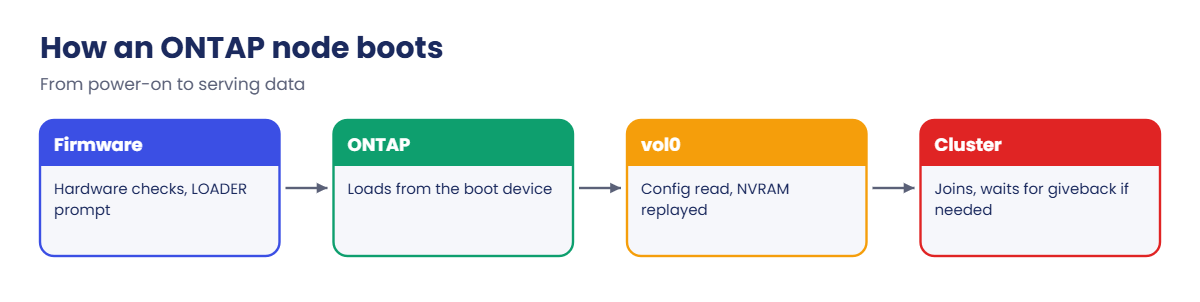
At power-on the controller’s firmware runs and stops at the LOADER prompt if you interrupt it; otherwise it loads ONTAP from the boot device (a small internal flash or USB device). Pressing Ctrl-C when prompted during boot opens the boot menu, with choices such as normal boot, maintenance mode, and the destructive “clean configuration and initialize all disks”. You’ll only use these with a runbook or NetApp support.
ONTAP then mounts vol0, the node root volume on the node’s root aggregate (aggr0). vol0 holds the node’s configuration, logs, core files and its copy of the cluster’s replicated database. It needs free space: when vol0 runs full, the node can stop working properly, which is one reason you never put data in aggr0.
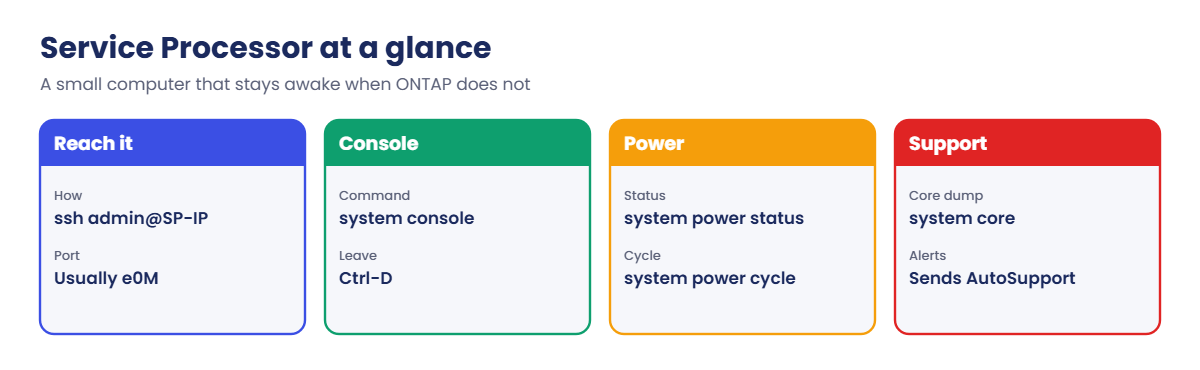
The Service Processor (SP; newer platforms have a BMC that does the same job) has its own IP address, usually on the e0M port. You SSH to it and use system console to see the node’s console, system power status or system power cycle to control power, and system core to force a core dump from a hung node. The SP also sends AutoSupport messages and, with hardware-assisted takeover, tells the partner straight away when its node dies.
How it works, step by step
1Firmware and LOADER
The controller runs its firmware and checks hardware. If you interrupt it, you land at LOADER-A> (or B), where you can set boot variables or boot a different image.
2ONTAP loads from the boot device
The node loads ONTAP from its boot device. A Ctrl-C at the right moment gives you the boot menu instead of a normal boot.
3vol0 is mounted
ONTAP reads its configuration from vol0 on aggr0, starts its services and replays any writes held in NVRAM.
4The node joins the cluster
Cluster LIFs come up, the node syncs the replicated database, and if its partner took over during the reboot, it waits for giveback.
5The SP watches all along
The SP runs on standby power the whole time, so you can reach the console over the network at every step, including when ONTAP never comes up.
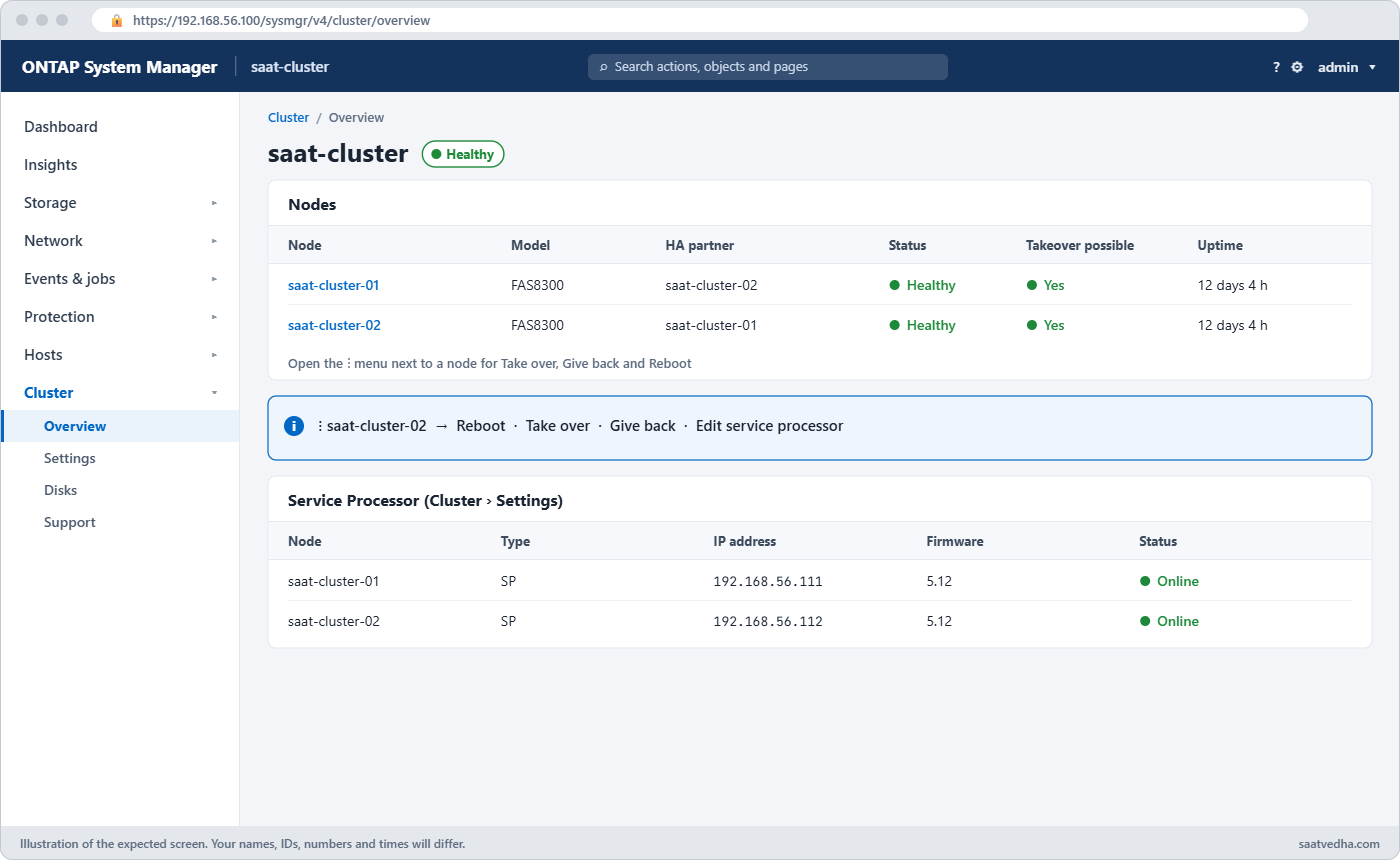
In System Manager you can reboot a node from Cluster › Overview: open the ⋮ menu next to the node. Service Processor addresses are under Cluster › Settings (look for the SP/BMC or “Service Processor” card).
| SP command (real hardware) | What it does |
|---|---|
| system console | Opens the node console; Ctrl-D returns to the SP |
| system power status | Shows whether the controller is powered on |
| system power cycle | Turns the controller off and on again |
| system core | Forces a core dump of a hung node for support |
| system sensors | Temperatures, voltages and fans |
| sp status | SP version and network settings |
Good to know: two boot images and the console keys
The boot device holds two ONTAP images, image1 and image2. An upgrade installs the new release into the image that isn’t running, and the node boots from it at the next reboot, so the old release is still there if you need to revert. system node image show lists both images and which one is default.
The start-up order is always the same: the firmware loader (LOADER), then the ONTAP image from the boot device, then the node’s configuration from vol0 in aggr0. You can interrupt at the LOADER prompt or at the boot menu when NetApp support or a procedure asks you to.
From the serial console you can jump to the Service Processor or BMC by pressing Ctrl-G, and Ctrl-D followed by Enter brings you back. This helps when ONTAP is hung and the network management IP doesn’t answer.
Hands-on lab: reboot a node the safe way
Before you run any command, double-check it
Read every command twice before you press Enter. Check the target: the server name, the user, the disk or device name, the path and the sizes. These commands are for learning and were tested in our lab, not on your system. At work, run the read-only commands first, follow your change process, make sure a backup exists, and ask a second person to check anything that changes or deletes data. You run them at your own risk.
This lab uses the SaatVedha ONTAP practice shell, our own learning tool. It is not NetApp software: real ONTAP output looks like this but is not identical.
The practice shell can’t show the LOADER or a real console, but it does model reboots, takeover and the SP addresses.
1Reset and log in
python ontapsim.py -c "simctl reset"
python ontapsim.py✅ Checkpoint: Your prompt reads saat-cluster::>
2Find the Service Processors
system node service-processor showYou should see this:
IP Firmware
Node Type Status Configured Version IP Address
------------- ---- ------------ ---------- --------- -------------------------
saat-cluster-01
SP online true 13.4 192.168.56.111
saat-cluster-02
SP online true 13.4 192.168.56.112
2 entries were displayed.
Practice shell note: real SP/BMC access is "ssh admin@<SP IP>", then "system console" to reach the node console.Add these SP addresses to your runbook today. On the night you need them, the cluster may not be there to tell you.
✅ Checkpoint: You noted both SP IP addresses.
3Look at vol0 and the root aggregates
volume show -vserver saat-cluster-01 -fields volume,aggregate,size,available
storage aggregate show -root trueYou should see this:
vserver volume aggregate size available
--------------- ------ --------------------- ----- ---------
saat-cluster-01 vol0 aggr0_saat_cluster_01 140GB 123.4GB
saat-cluster::> storage aggregate show -root true
Aggregate Size Available Used% State #Vols Nodes RAID Status
--------- -------- --------- ----- ------- ------ ---------------- ------------
aggr0_saat_cluster_01
1.47TB 1.33TB 9% online 1 saat-cluster-01 raid_dp,
normal
aggr0_saat_cluster_02
1.47TB 1.33TB 9% online 1 saat-cluster-02 raid_dp,
normal
2 entries were displayed.vol0 belongs to the node’s own SVM (saat-cluster-01), not to a data SVM, and it sits alone on aggr0.
✅ Checkpoint: vol0 on node 01 has more than 100 GB available.
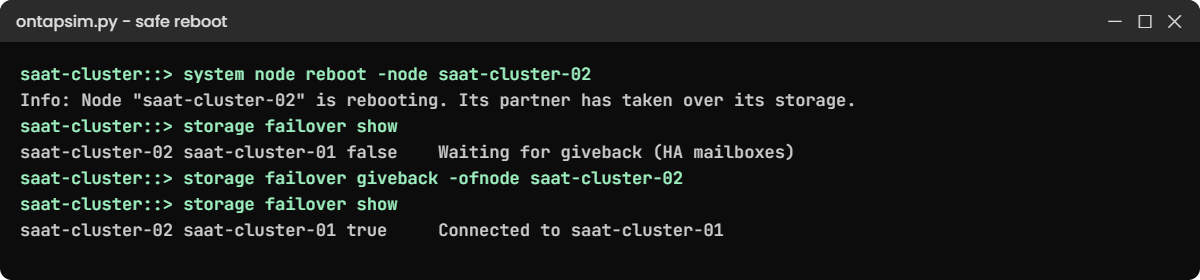
4Reboot node 02 the safe way
system node reboot -node saat-cluster-02
storage failover show
system node showYou should see this:
Info: Node "saat-cluster-02" is rebooting. Its partner has taken over its storage. Use "storage failover giveback -ofnode saat-cluster-02" when it is waiting for giveback.
saat-cluster::> storage failover show
...
saat-cluster-01 saat-cluster-02 false In takeover
saat-cluster-02 saat-cluster-01 false Waiting for giveback (HA mailboxes)
saat-cluster::> system node show
Node Health Eligibility Uptime Model Personality Location
---------------- ------ ----------- ------------- -------- ----------- ---------
saat-cluster-01 true true 12 days 00:00 FAS8300 Unified Rack A1
saat-cluster-02 false true - FAS8300 Unified Rack A2The partner takes over first, so data keeps flowing while node 02 restarts. On a real system the reboot takes several minutes; you’d watch it on the SP console.
✅ Checkpoint: Node 02 shows Waiting for giveback.
5Give back and check
storage failover giveback -ofnode saat-cluster-02
storage failover show
network interface show -is-home falseYou should see this:
Info: Run the storage failover show-giveback command to check giveback status.
saat-cluster::> storage failover show
...
saat-cluster-01 saat-cluster-02 true Connected to saat-cluster-02
saat-cluster-02 saat-cluster-01 true Connected to saat-cluster-01
saat-cluster::> network interface show -is-home false
There are no entries matching your query.✅ Checkpoint: Takeover Possible is true and no LIF is away from home.
Try it yourself: Build a planned takeover and giveback in the Command Builder.
Break It, Then Fix It
This time the reboot isn’t planned. Node 02 panics.
1Crash the node
simctl break node-panic saat-cluster-02
storage failover show
event log show -severity <=ERRORYou'll get this:
saat-cluster::> storage failover show
...
saat-cluster-01 saat-cluster-02 false In takeover
saat-cluster-02 saat-cluster-01 false Waiting for giveback (HA mailboxes)
saat-cluster::> event log show -severity <=ERROR
Time Node Severity Event
------------------- ---------------- ------------- ------------------------
11/7/2026 06:52:28 saat-cluster-02 EMERGENCY sk.panic: Panic String: practice shell panic on saat-cluster-02The partner took over by itself, which is HA doing its job. On a real system you'd SSH to node 02's SP (192.168.56.112), run system console to watch it reboot, and AutoSupport would send the panic details to NetApp. Don't give back until you know why it panicked, or it may crash again.
2Recover
simctl fix node-panic
storage failover giveback -ofnode saat-cluster-02
storage failover showYou'll get this:
simctl: node saat-cluster-02 has rebooted and is waiting for giveback. Run: storage failover giveback -ofnode saat-cluster-02
simctl: fixed node-panic.
...
saat-cluster-01 saat-cluster-02 true Connected to saat-cluster-02
saat-cluster-02 saat-cluster-01 true Connected to saat-cluster-01✅ Checkpoint: Both nodes show Takeover Possible true.

This happened at work
The SP that was never set up
A telecom company in Noida patched a FAS pair on a Saturday night. Node 2 rebooted and never came back; its partner took over, so subscribers didn’t notice, but the cluster couldn’t tell anyone why node 2 was stuck.
The engineer tried to reach the Service Processor and found it had no IP address: it was skipped during the install years ago. He drove 40 minutes to the data centre, plugged a laptop into the serial port, and found the node sitting at the LOADER prompt with a boot variable left wrong by the patch. Two commands and a boot later, it was waiting for giveback.
The first item on the next morning’s list was SP addresses on every controller, tested with system console, and the SP IPs printed in the on-call runbook.
Common mistakes and troubleshooting
| Mistake | What happens | Do this instead |
|---|---|---|
| No SP IP configured | A hung node means a trip to the data centre | Configure and test every SP at install |
| Rebooting a node without checking takeover | Data goes offline if takeover isn’t possible | Check storage failover show first |
| Putting data on aggr0 | vol0 runs short of space and the node misbehaves | Keep aggr0 for vol0 only |
| Picking boot menu option 4 casually | All disks are wiped | Use boot menu options only with a runbook or support |
| Giving back right after a panic | The node may panic again under load | Find the cause first, with support if needed |
Interview questions
Click a question to open it. Each one is written the way an interviewer would ask it. Under it you will see why they ask it and one way you could answer, in your own words.
Fresher level
1. What is vol0 and why shouldn’t you put data on it?
Why they ask this: They want to check you know the node’s own system volume.
How you might answer: vol0 is the node root volume on aggr0. It holds the node’s configuration, logs and its copy of the cluster database. If it fills up the node can stop working properly, so data always goes on separate data aggregates.
2. What is the Service Processor used for?
Why they ask this: They’re checking you know your way in when ONTAP is down.
How you might answer: It’s a separate small computer in the controller with its own IP. I can SSH to it to open the node console with system console, check or cycle power, and collect a core dump, even when ONTAP itself isn’t responding.
2–5 years experience
3. A node rebooted at 2 a.m. and is now waiting for giveback. What do you do?
Why they ask this: They want to see you don’t rush the giveback.
How you might answer: First I’d check the event log and AutoSupport for why it rebooted, a panic or a hardware fault. If the cause is clear and safe, I’d give back with storage failover giveback -ofnode and then check LIFs are home. If not, I’d leave it in takeover and open a case with NetApp.
4. You need to reboot a node for a patch. How do you do it without users noticing?
Why they ask this: They’re checking a careful planned-reboot habit.
How you might answer: I’d confirm takeover is possible and that SAN hosts have paths to both nodes. Then I’d reboot with system node reboot, which lets the partner take over, watch it on the SP console, and give back when it says Waiting for giveback.
Senior level
5. A node is stuck at the LOADER prompt after an upgrade. How would you approach it?
Why they ask this: They want calm, structured recovery thinking under pressure.
How you might answer: I’d get on the console through the SP and check the partner has taken over, so data is safe. Then I’d compare the boot environment variables with the healthy partner and the upgrade notes, and only change them following a NetApp article or with support on the line.
6. How would you make sure your team can always reach every controller during an outage?
Why they ask this: They want to see operational readiness planning.
How you might answer: I’d configure SP or BMC addresses on a separate management network, keep them in the runbook and the CMDB, and test SSH and system console on each one every quarter. I’d also make sure the SP firmware gets updated with ONTAP.
Quick quiz
Q1. Where does vol0 live?
- On any data aggregate
- On the node’s root aggregate, aggr0
- On the SP
- In NVRAM
Show answer
B — vol0 is the node root volume on aggr0.
Q2. Which SP command shows the node console?
- system power status
- system console
- sp status
- system core
Show answer
B — system console opens the console; Ctrl-D returns to the SP.
Q3. What happens when you run system node reboot on node 02 in an HA pair?
- All data goes offline
- The partner takes over first
- The whole cluster reboots
- vol0 is deleted
Show answer
B — the partner takes over while node 02 restarts.
Q4. Which boot menu choice wipes all disks?
- Normal boot
- Maintenance mode
- Clean configuration and initialize all disks
- Reboot node
Show answer
C — that option is destructive.
Q5. After a panic, the node waits for giveback. What should you do first?
- Give back at once
- Find out why it panicked
- Delete vol0
- Reboot the partner
Show answer
B — find the cause before you give back.
Quick recap
- A node boots through firmware and LOADER into ONTAP from its boot device.
- vol0 on aggr0 holds the node’s configuration; keep data off it and keep it from filling.
- The SP has its own IP and gives console and power control when ONTAP is down.
- system node reboot lets the partner take over first; give back when ready.
- After a panic, find the cause before giveback.
Next lesson
Lesson 10: Licences, NTP, AutoSupport and EMS → You’ll check licences, set time sources, test AutoSupport and read the event system.
Further reading: ONTAP Service Processor
Want to go deeper into ONTAP Service Processor? Read NetApp’s ONTAP concepts guide for nodes, root volumes and HA, and the system administration pages on docs.netapp.com for SP and BMC commands. You can also see the full plan for this course on the NetApp ONTAP Storage Administration course page.
