SMB share access problems
-
Phase 0: Start here
-
Phase 1: Architecture and foundation
-
Phase 2: Protocols and day-to-day administration
-
Phase 3: Data protection and enterprise integrations
-
Phase 4: Troubleshooting blueprint
-
Phase 5: Final project and career
Windows users don’t say “the CIFS server can’t reach a domain controller”. They say “I can’t open the finance share” and forward a screenshot of an error number.
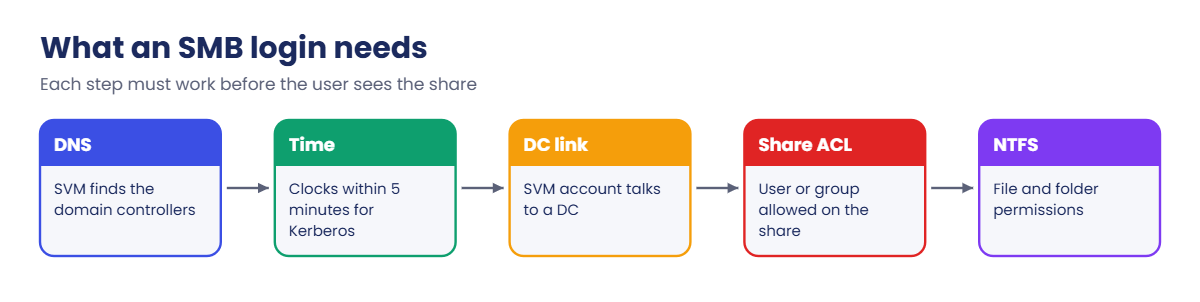
SMB access on ONTAP depends on more moving parts than NFS: DNS to find the domain controllers, Kerberos (which needs the clocks to agree), the SVM’s computer account in Active Directory, share permissions and NTFS file permissions. Any one of them can be the reason.
You’ll build a share joined to the lab domain, then break it with a clock problem and a DNS problem, and read the clues ONTAP gives you each time.
Where this lesson fits
Lesson 50 of 56 in NetApp ONTAP Storage Administration · Phase 4: Troubleshooting blueprint · Before this: Lesson 49, NFS stale file handle · Next: Lesson 51, high latency on a FlexVol
| Time | You need | By the end you can |
|---|---|---|
| 60 minutes | The practice shell with setup-p4.txt from Lesson 47 | Trace an SMB access error through permissions, time, DNS and the domain connection, and fix it |
What it is, in one line
SMB access problems on ONTAP come from one of five places: the user’s permissions, the share’s permissions, the SVM’s link to Active Directory, the clock (Kerberos), or DNS, and vserver cifs check plus the event log tell you which.
In Simple Words
Getting into an office building
To reach your desk you show your ID card at reception. The receptionist phones the HR office to check the card is real, and HR only answers if the receptionist’s watch roughly matches theirs, because an old pass with yesterday’s time stamp could be fake.
If the phone line to HR is dead, nobody gets in. If the watches don’t match, nobody gets in either. And even with a good card, the finance floor only lets in people on the finance list.
The SVM is the receptionist, the domain controller is HR, the watch is NTP time, the phone directory is DNS, and the floor lists are share and file permissions.
Engineer's View
How an engineer describes it
An SVM’s SMB server is a computer account in Active Directory. When a user connects, ONTAP normally uses Kerberos to check the ticket and talks to a domain controller for group membership. It finds domain controllers through the SVM’s DNS settings (vserver services name-service dns show).
Kerberos refuses tickets when the clocks differ by more than 5 minutes by default, so the cluster must use the same time source as the domain (cluster time-service ntp server show). A clock skew event in the event log and Windows error 1398 (“time and/or date difference”) point straight at this.
vserver cifs check shows, per node, whether the SVM can reach a domain controller. Then two permission layers apply: share permissions (vserver cifs share access-control show) and NTFS permissions on the files, and the stricter one wins. Error 5, “Access is denied”, with a healthy domain connection, is almost always a permission problem.
How it works, step by step
1What the user sees
| Windows error | Usually means | Check first |
|---|---|---|
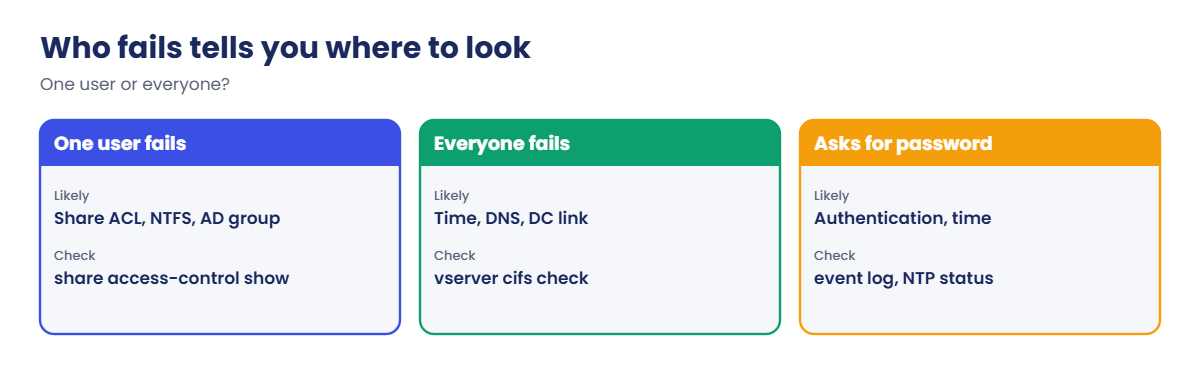
| System error 5: Access is denied | Logged in fine, but not allowed | Share ACL, NTFS permissions, group membership |
| System error 1398: time and/or date difference | Kerberos clock skew | Cluster time, NTP reachability |
| System error 53: network path not found | Name or connection problem | DNS, LIF, SVM to DC connection |
| Prompts for a password again and again | Authentication failing | DC connection, computer account, time |
2Where to look on ONTAP, in order
vserver cifs show (is the SMB server up and joined), vserver cifs check (DC connection per node), event log show -severity <=ERROR, then vserver services name-service dns show and network ping from the data LIF to the DNS server and DC. Time comes next with cluster date show and, at advanced privilege, cluster time-service ntp status show.
3Then the permissions
vserver cifs share access-control show for the share ACL, vserver cifs session show to see who is connected, and the folder’s Security tab on Windows for NTFS rights. A new group membership only works after the user signs out and back in, because the groups travel inside the user’s ticket.
4In System Manager
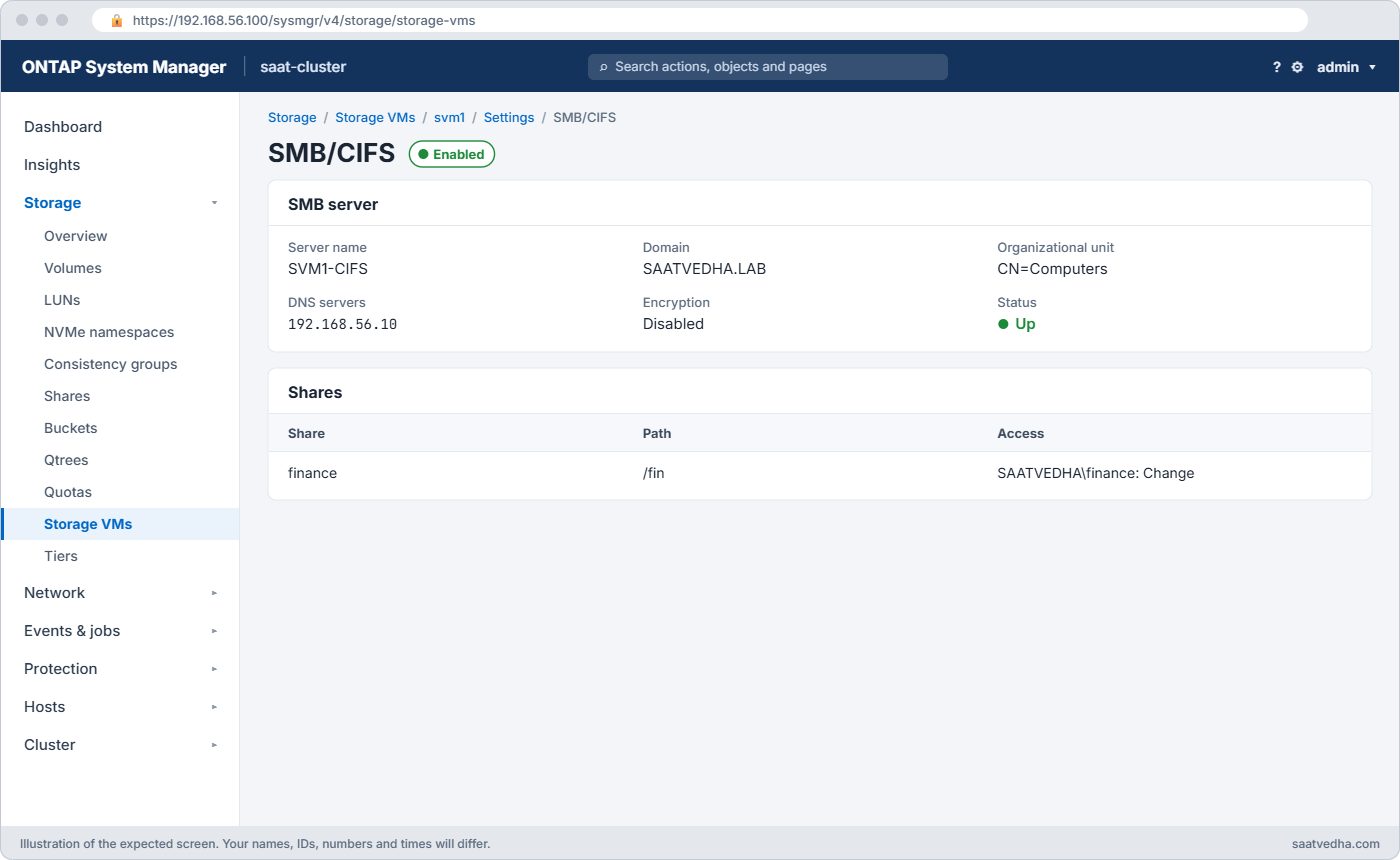
Storage › Storage VMs › svm1 › Settings › SMB/CIFS shows the server and domain, Storage › Shares lists shares and their permissions, and Cluster › Settings › NTP shows time servers.
Hands-on lab: an SMB share that stops working
Before you run any command, double-check it
Read every command twice before you press Enter. Check the target: the server name, the user, the disk or device name, the path and the sizes. These commands are for learning and were tested in our lab, not on your system. At work, run the read-only commands first, follow your change process, make sure a backup exists, and ask a second person to check anything that changes or deletes data. You run them at your own risk.
This lab uses the SaatVedha ONTAP practice shell, our own learning tool. It is not NetApp software: real ONTAP output looks like this but is not identical.
1Join svm1 to the lab domain and share a folder
Reset and run setup-p4.txt, log in, and run these. When vserver cifs create asks, enter Administrator and Saat@2026 (the lab domain admin from simctl ad).
vserver services name-service dns create -vserver svm1 -domains saatvedha.lab -name-servers 192.168.56.10
vserver cifs create -vserver svm1 -cifs-server SVM1-CIFS -domain saatvedha.lab
volume create -vserver svm1 -volume vol_fin -aggregate aggr1_02 -size 50g -junction-path /fin -security-style ntfs
vserver cifs share create -vserver svm1 -share-name finance -path /fin
vserver cifs share access-control create -vserver svm1 -share finance -user-or-group SAATVEDHA\finance -permission change
vserver cifs share access-control delete -vserver svm1 -share finance -user-or-group Everyone
vserver cifs share access-control show -vserver svm1 -share financeThe last command shows:
Share User/Group Access
Vserver Name User/Group Name Type Permission
-------------- ---------- ---------------------- ---------- ------------
svm1 finance SAATVEDHA\finance windows Change✅ Checkpoint: Only SAATVEDHA\finance has access to the share.
2Two users try the share
priya is in the finance group, ravi isn’t.
simctl host win1 map \\SVM1-CIFS\finance SAATVEDHA\priya
simctl host win1 map \\SVM1-CIFS\finance SAATVEDHA\ravi
vserver cifs session show -vserver svm1You should see this:
The command completed successfully.
saat-cluster::> simctl host win1 map \\SVM1-CIFS\finance SAATVEDHA\ravi
System error 5 has occurred.
Access is denied.
saat-cluster::> vserver cifs session show -vserver svm1
Session Open
Node Vserver ID Workstation Windows User Files
--------------- ---------- -------- --------------- -------------------- -----
saat-cluster-01 svm1 1 192.168.56.31 SAATVEDHA\priya 1Error 5 for ravi with priya working fine on the same share tells you the domain link is healthy and this is about permissions. If ravi should have access, the fix is in Active Directory (add him to the group, then he signs out and in), not on ONTAP.
✅ Checkpoint: priya has a session, ravi gets Access is denied.
3Now everyone fails
A firewall change has quietly blocked the cluster’s NTP traffic for weeks, and the clock has drifted by 10 minutes. Play it:
simctl break time-skew 600
simctl host win1 map \\SVM1-CIFS\finance SAATVEDHA\priya
vserver cifs check -vserver svm1
event log show -severity <=ERRORYou should see this (one node shown):
System error 1398 has occurred.
There is a time and/or date difference between the client and server.
saat-cluster::> vserver cifs check -vserver svm1
Vserver : svm1
Cifs NetBIOS Name : SVM1-CIFS
Cifs Status : Error
Site : Default-First-Site-Name
Node : saat-cluster-01
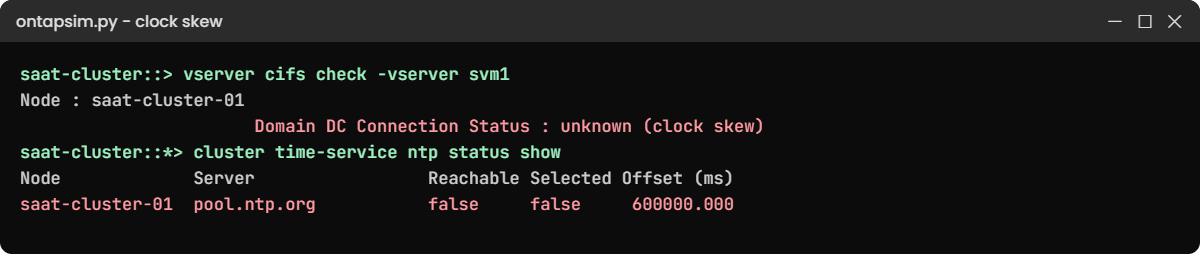
Domain DC Connection Status : unknown (clock skew)
Name Mapping DC Status : unknown
...
saat-cluster::> event log show -severity <=ERROR
Time Node Severity Event
------------------- ---------------- ------------- ------------------------
11/7/2026 07:00:31 saat-cluster-01 ERROR secd.kerberos.clockskew: Kerberos clock skew with the domain controller is 600 seconds✅ Checkpoint: The event log reports a 600 second clock skew.
4Check NTP
The NTP status command needs advanced privilege. ONTAP asks you to confirm when you switch; answer y.
set -privilege advanced
cluster time-service ntp status show
set -privilege adminYou should see this:
Node Server Reachable Selected Offset (ms)
---------------- ---------------------- --------- -------- -----------
saat-cluster-01 pool.ntp.org false false 600000.000
saat-cluster-02 pool.ntp.org false false 600000.000
2 entries were displayed.The time server can’t be reached and the offset is 600,000 ms. In a domain, point the cluster at the domain controllers or the same source they use (cluster time-service ntp server create -server 192.168.56.10), and get UDP port 123 opened.
✅ Checkpoint: Reachable is false on both nodes.
5Fix and confirm
In the lab, simctl fix stands in for the firewall team reopening NTP.
simctl fix time-skew
vserver cifs check -vserver svm1
simctl host win1 map \\SVM1-CIFS\finance SAATVEDHA\priyaYou should see this:
Vserver : svm1
Cifs NetBIOS Name : SVM1-CIFS
Cifs Status : Running
Site : Default-First-Site-Name
Node : saat-cluster-01
Domain DC Connection Status : ok
Name Mapping DC Status : ok
...
saat-cluster::> simctl host win1 map \\SVM1-CIFS\finance SAATVEDHA\priya
The command completed successfully.✅ Checkpoint: DC Connection Status is ok and priya can map the share.
Try it yourself: Open the SMB server task in the Command Builder.
Break It, Then Fix It
Same symptom for every user, different cause: the SVM loses its DNS server.
1Break DNS
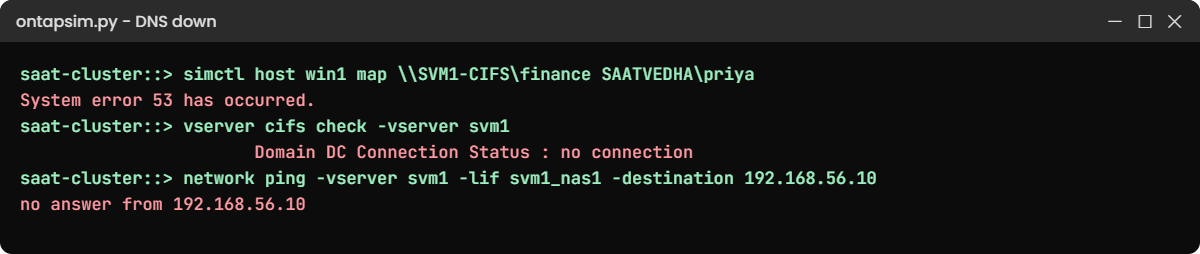
simctl break dns-down
simctl host win1 map \\SVM1-CIFS\finance SAATVEDHA\priya
vserver cifs check -vserver svm1You’ll get this:
System error 53 has occurred.
The network path was not found.
saat-cluster::> vserver cifs check -vserver svm1
Vserver : svm1
Cifs NetBIOS Name : SVM1-CIFS
Cifs Status : Error
Site : Default-First-Site-Name
Node : saat-cluster-01
Domain DC Connection Status : no connection
Name Mapping DC Status : unknown
...✅ Checkpoint: DC Connection Status says no connection.
2Test DNS from the SVM’s own LIF
vserver services name-service dns show -vserver svm1
network ping -vserver svm1 -lif svm1_nas1 -destination 192.168.56.10You’ll get this:
Name
Name
Vserver State Domains Servers
--------------- -------- ---------------------- --------------------
svm1 enabled saatvedha.lab 192.168.56.10
saat-cluster::> network ping -vserver svm1 -lif svm1_nas1 -destination 192.168.56.10
no answer from 192.168.56.10The DNS setting is right, but the server doesn’t answer from svm1’s data LIF. Ping from the SVM’s LIF, not from the cluster management LIF, because that’s the path the SMB server really uses. In the real world you’d now check the DNS server itself, routes (network route show -vserver svm1) and firewalls.
✅ Checkpoint: Ping from svm1_nas1 gets no answer.
3Fix and confirm
simctl fix dns-down
vserver cifs check -vserver svm1You should see Domain DC Connection Status : ok on both nodes again.
Give every SVM at least two DNS servers in different places, so one failed server doesn’t stop every Windows user.
✅ Checkpoint: cifs check shows ok on both nodes.
This happened at work
Three weeks of drift
A university in Varanasi kept exam results and scanned answer sheets on an ONTAP SMB share. In January the security team tightened firewall rules for the storage subnet and, without noticing, blocked UDP 123 to the internet NTP servers the cluster used.
Nothing broke for three weeks while the cluster clock slowly drifted. On result day, staff uploading marks began getting “time and/or date difference” errors, first a few and then everyone, and the helpdesk reset several user passwords before anyone looked at the storage.
vserver cifs check showed clock skew, and the cluster was a little over 5 minutes behind the domain controllers. The team pointed the cluster at the domain controllers for NTP, opened UDP 123 between them, and added NTP reachability to their Monday health check.
Common mistakes and troubleshooting
| Mistake | What happens | Do this instead |
|---|---|---|
| Resetting user passwords for a 1398 error | Users suffer, the clock problem stays | Check cluster time and NTP first |
| Pinging the DC from the cluster management LIF | It works, but the SVM’s own path is broken | Use network ping -vserver svm1 -lif <data LIF> |
| Giving Everyone Full Control to “fix” Access denied | Anyone on the network can change the data | Find the missing group membership or ACL entry |
| Only one DNS server for the SVM | One server down stops all SMB logins | Configure two or more, in different places |
| Changing group membership and expecting it at once | The user still gets Access denied | Sign out and back in to get a new ticket |
Interview questions
Click a question to open it. Each one is written the way an interviewer would ask it. Under it you will see why they ask it and one way you could answer, in your own words.
Fresher level
1. A Windows user gets “Access is denied” on a share, but their colleague can open it. Where would you look?
Why they ask this: They want to see that you can tell an access problem from a connection problem.
How you might answer: If the colleague gets in, the SVM and the domain link are fine, so I’d look at permissions. I’d check vserver cifs share access-control show and the NTFS permissions, and whether the user is actually in the right AD group and has signed in again since being added.
2. Why does ONTAP care about the clock for SMB?
Why they ask this: They’re checking that you understand Kerberos basics.
How you might answer: SMB logins usually use Kerberos, and Kerberos rejects tickets if the clocks differ by more than 5 minutes. So the cluster has to use the same time source as the domain controllers, otherwise everyone gets error 1398.
2–5 years experience
3. Every user suddenly fails to map SMB shares on one SVM. What’s your order of checks?
Why they ask this: They want a calm, structured checklist under pressure.
How you might answer: I’d run vserver cifs check to see the DC connection per node and read the event log for authentication errors. Then I’d check time with NTP status and DNS with network ping from the SVM’s data LIF to the DNS servers and DCs, because those cover most “everyone fails” cases.
4. What does vserver cifs check tell you, and what doesn’t it tell you?
Why they ask this: They’re checking you know the limits of a tool.
How you might answer: It tells me, per node, whether the SMB server is running and can reach a domain controller, and it shows clock skew or no connection. It doesn’t tell me about share or NTFS permissions for one user, so an “ok” there with Access denied means I move on to permissions.
Senior level
5. How would you design SMB on ONTAP so that one infrastructure failure doesn’t stop all file access?
Why they ask this: They want to see design for dependencies, not just storage.
How you might answer: I’d give each SVM at least two DNS servers and point it at domain controllers in its own AD site, with NTP from the same source the domain uses. I’d have data LIFs on both nodes, and alerting on secd and clock skew events, so we hear about it before users do.
6. A firewall project is coming for the storage network. What would you ask the security team to keep open for SMB?
Why they ask this: They want to know you understand ONTAP’s outbound dependencies.
How you might answer: From the SVM data LIFs: DNS on port 53, Kerberos on 88, LDAP on 389 or 636, and SMB/RPC to the DCs on 445, plus NTP on UDP 123 from the cluster. I’d also ask for a test plan with vserver cifs check and a test login right after the change.
Quick quiz
Q1. Windows shows System error 1398 when mapping a share. What should you check first?
- Share permissions
- Cluster time and NTP
- Aggregate space
- The volume’s snapshot policy
Show answer
B — 1398 means a time difference, which breaks Kerberos.
Q2. What is the default maximum clock difference Kerberos allows?
- 30 seconds
- 5 minutes
- 1 hour
- 24 hours
Show answer
B — more than 5 minutes and tickets are rejected.
Q3. One user gets Access is denied while others can open the share. What is most likely?
- DNS is down
- A permission or group membership problem
- The cluster clock is wrong
- The LIF is down
Show answer
B — others working proves the domain link is healthy.
Q4. From where should you ping the DNS server when troubleshooting SMB?
- The cluster management LIF
- The SVM’s data LIF
- The node SP
- The Windows client only
Show answer
B — the SMB server uses the SVM’s own LIFs and routes.
Q5. Which command shows the DC connection status per node?
- vserver cifs check
- vserver cifs share show
- network port show
- volume show
Show answer
A — it reports Domain DC Connection Status for each node.
Quick recap
- SMB access depends on permissions, the AD link, time, DNS and the LIF.
- Error 5 with others working = permissions; everyone failing = DC link, time or DNS.
- vserver cifs check shows DC connection and clock skew per node.
- Keep cluster time on the same source as the domain; Kerberos allows 5 minutes.
- Test DNS and DC reachability from the SVM’s own data LIF.
Next lesson
Lesson 51: High latency on a FlexVol → You’ll find out which layer adds the delay when a volume gets slow.
Further reading: ONTAP CIFS troubleshooting
Want to go deeper into ONTAP CIFS troubleshooting? NetApp’s ONTAP concepts guide explains how SVMs serve SMB and NFS clients. You can also see the full plan for this course on the NetApp ONTAP Storage Administration course page.
