Takeover, giveback, RDB, quorum and epsilon
-
Phase 0: Start here
-
Phase 1: Architecture and foundation
-
Phase 2: Protocols and day-to-day administration
-
Phase 3: Data protection and enterprise integrations
-
Phase 4: Troubleshooting blueprint
-
Phase 5: Final project and career
Sooner or later every storage engineer gets the job: “NetApp support is replacing a DIMM in node 1 on Saturday, please prepare.” Nobody wants users to notice, and they won’t if you move node 1’s work to its partner first and bring it back afterwards.
That move is a takeover, and bringing it back is a giveback. You met HA pairs in Lesson 4; here you’ll run the full planned procedure, watch what happens to LIFs, and learn how quorum, epsilon and the replicated database stop a cluster from tearing itself in half.
Where this lesson fits
Lesson 37 of 56 in NetApp ONTAP Storage Administration · Phase 3: Data protection and integrations · Before this: Lesson 36, FlexClone · Next: Lesson 38, cluster and SVM peering
| Time | You need | By the end you can |
|---|---|---|
| 50 minutes | The practice shell with svm1 and the NAS LIF from earlier lessons | Run a planned takeover and giveback, revert LIFs, read show-giveback, and explain quorum and epsilon |
What it is, in one line
A takeover moves one node’s aggregates and NAS LIFs to its HA partner so the partner serves both, and a giveback hands them back once the node is healthy again.
In Simple Words
Two shopkeepers on the same lane
Two cousins run shops next door to each other and each holds a spare key to the other’s shutter. When one goes to a wedding for a day, the other opens both shops and serves customers from either counter, so nobody walks away.
When the cousin comes back, he takes his keys and his counter back, and he checks the cash box before the other leaves. The street’s trader association, meanwhile, only makes decisions when more than half its members agree, which stops two groups from making opposite rules on the same day.
Engineer's View
How an engineer describes it
Each node mirrors its partner’s NVRAM log over the HA interconnect, and the HA mailbox disks hold state for both. On storage failover takeover -ofnode node1, node 2 takes ownership of node 1’s aggregates (the root aggregate and the data ones), replays any logged writes, and NAS LIFs fail over to node 2’s ports. SAN LIFs don’t move; hosts switch to the paths through node 2 using ALUA.
storage failover giveback returns the node’s root aggregate first and then its data (SFO) aggregates one at a time, and you follow it with storage failover show-giveback. A module that isn’t ready, such as a busy CIFS or a disk inventory mismatch, can veto the giveback. Use -override-vetoes true only when NetApp support tells you to.
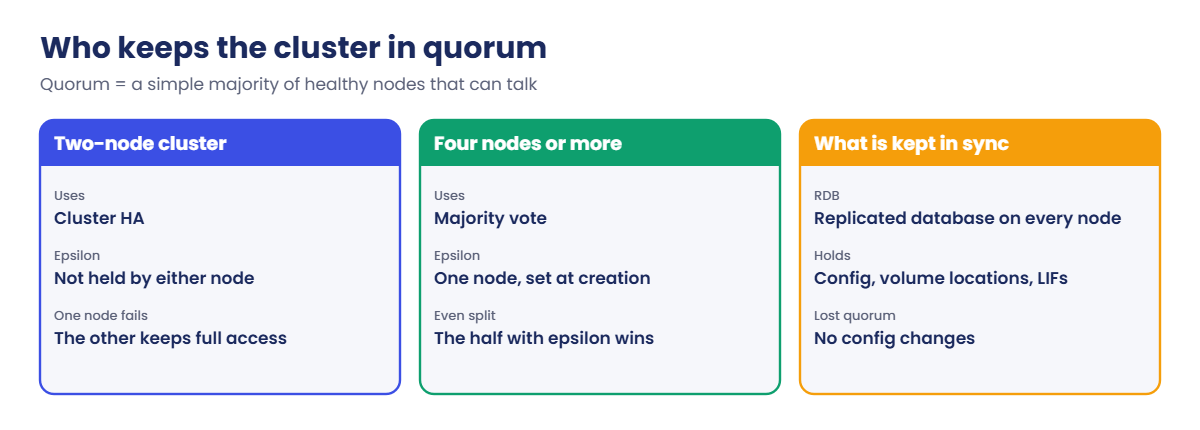
Cluster-wide state lives in the replicated database (RDB), copied to every node in units such as mgmt, vldb (where volumes live) and vifmgr (LIFs). Changes need quorum: a simple majority of healthy nodes that can talk. In even-sized clusters one node holds epsilon, a tie-breaking extra vote; two-node clusters use cluster HA instead and neither node holds epsilon.
How it works, step by step
1Check before you touch
storage failover show must say Takeover Possible true for both nodes. Save the output of network interface show -is-home false too, so you know which LIFs were already away from home before you started.
2Take over the node
Run the takeover from either node, naming the node that goes down with -ofnode. The node that’s taken over reboots and waits; its partner shows “In takeover”.
3Do the work
The engineer replaces the part or the node boots a new ONTAP image. Clients keep working through the partner, with a short pause for NAS while LIFs move and a path switch for SAN hosts.
4Give back and watch
When the node shows “Waiting for giveback”, run the giveback and follow show-giveback until every aggregate says done. If a module vetoes it, read the reason, fix the cause and run it again.
| Command | What it shows |
|---|---|
storage failover show | Takeover Possible and the state of each node |
storage failover show-giveback | Giveback status for each aggregate |
cluster ha show | Whether cluster HA is on (two-node clusters) |
cluster ring show | RDB units and their master, at advanced privilege |
network interface show -is-home false | LIFs not on their home port |
5Send LIFs home
LIFs with auto-revert off stay on the partner after a giveback, so one node quietly does all the network work. Revert them with network interface revert and run the health check from Lesson 1.
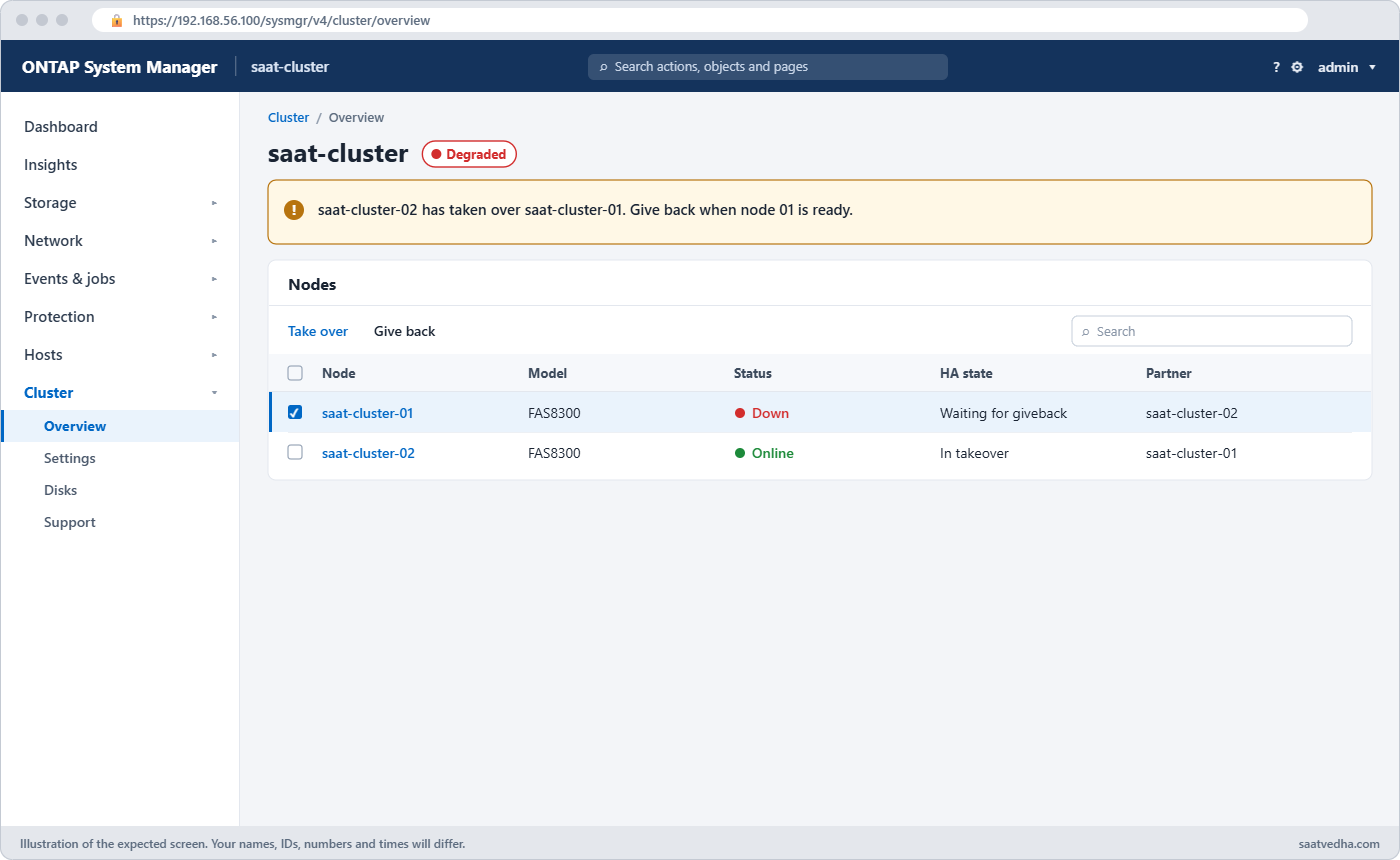
System Manager does the same from Cluster › Overview: the three-dot menu next to a node has Take over and Give back, and the node card shows the HA state while it runs.
Good to know: what the replicated database holds
The replicated database (RDB) lives in each node’s vol0 and is split into units, each with its own master node. The management gateway (mgwd) runs the CLI and keeps cluster settings, the volume location database (VLDB) knows which aggregate and node hold each volume, the virtual interface manager (vifmgr) tracks LIFs and their failover, and BCOM keeps SAN settings such as igroups and LUN maps.
MetroCluster adds the configuration replication service (CRS), which copies configuration to the partner site. You can see every unit, its master and whether it is online with cluster ring show at advanced privilege.
Hands-on lab: a planned takeover and giveback
Before you run any command, double-check it
Read every command twice before you press Enter. Check the target: the server name, the user, the disk or device name, the path and the sizes. These commands are for learning and were tested in our lab, not on your system. At work, run the read-only commands first, follow your change process, make sure a backup exists, and ask a second person to check anything that changes or deletes data. You run them at your own risk.
This lab uses the SaatVedha ONTAP practice shell, our own learning tool. It is not NetApp software: real ONTAP output looks like this but is not identical.
Start with svm1, the NAS LIF 192.168.56.130 on node 01 and NFS turned on, as in the earlier Phase 3 lessons.
1Put a client on node 01 and check HA
volume create -vserver svm1 -volume vol_home -aggregate aggr1_01 -size 50g -junction-path /home
simctl host linux1 mount 192.168.56.130:/home /mnt/home vers=3
storage failover show
cluster ha showYou should see this:
saat-cluster::> storage failover show
Takeover
Node Partner Possible State Description
--------------- --------------- -------- -------------------------------------
saat-cluster-01 saat-cluster-02 true Connected to saat-cluster-02
saat-cluster-02 saat-cluster-01 true Connected to saat-cluster-01
2 entries were displayed.
saat-cluster::> cluster ha show
High-Availability Configured: true
High-Availability Backend Configured (MBX): trueBoth nodes can take over, and cluster HA is on because this is a two-node cluster, so neither node needs epsilon.
✅ Checkpoint: Takeover Possible is true for both nodes.
2Take over node 01
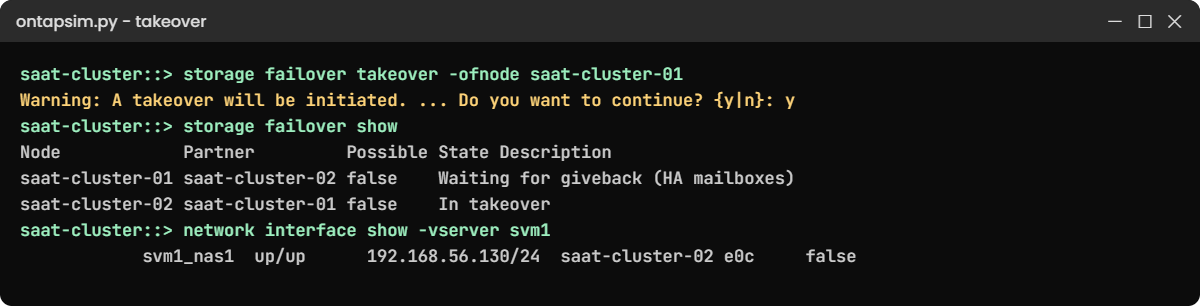
storage failover takeover -ofnode saat-cluster-01
storage failover show
network interface show -vserver svm1
simctl host linux1 touch /mnt/home/during_takeover.txtAnswer y to the warning. You should see this:
Warning: A takeover will be initiated. Once the partner node reboots, a giveback will
be automatically initiated. Do you want to continue? {y|n}: y
saat-cluster::> storage failover show
Takeover
Node Partner Possible State Description
--------------- --------------- -------- -------------------------------------
saat-cluster-01 saat-cluster-02 false Waiting for giveback (HA mailboxes)
saat-cluster-02 saat-cluster-01 false In takeover
2 entries were displayed.
saat-cluster::> network interface show -vserver svm1
Logical Status Network Current Current Is
Vserver Interface Admin/Oper Address/Mask Node Port Home
----------- ---------- ---------- ------------------ --------------- ------- ----
svm1
svm1_nas1 up/up 192.168.56.130/24 saat-cluster-02 e0c falseNode 02 now serves node 01’s aggregates, and the NAS LIF moved to node 02 with the same IP, so the client’s write worked without a remount. Notice the warning: by default, the node gives back automatically when it reboots.
✅ Checkpoint: Node 02 is In takeover and svm1_nas1 is on saat-cluster-02.
3Check what will be given back, then give back
storage failover show-giveback
storage failover giveback -ofnode saat-cluster-01
storage failover showYou should see this:
saat-cluster::> storage failover show-giveback
Partner Giveback
Node Aggregate Status
-------------- ------------------------- ------------------------------
saat-cluster-01
No aggregates to give back
saat-cluster-02
aggr0_saat_cluster_01 Not attempted yet
saat-cluster-02
aggr1_01 Not attempted yet
3 entries were displayed.
saat-cluster::> storage failover giveback -ofnode saat-cluster-01
Info: Run the storage failover show-giveback command to check giveback status.
saat-cluster::> storage failover show
Takeover
Node Partner Possible State Description
--------------- --------------- -------- -------------------------------------
saat-cluster-01 saat-cluster-02 true Connected to saat-cluster-02
saat-cluster-02 saat-cluster-01 true Connected to saat-cluster-01
2 entries were displayed.Node 02 was holding node 01’s root and data aggregates; after the giveback both nodes are connected again. On a real system this takes a few minutes, so run show-giveback a few times until every aggregate says Done.
✅ Checkpoint: Both nodes show Connected and Takeover Possible true.
4Find and fix LIFs left on the partner
network interface show -is-home false
network interface revert -vserver * -lif *
network interface show -is-home falseYou should see this:
saat-cluster::> network interface show -is-home false
Logical Status Network Current Current Is
Vserver Interface Admin/Oper Address/Mask Node Port Home
----------- ---------- ---------- ------------------ --------------- ------- ----
saat-cluster
cluster_mgmt
up/up 192.168.56.100/24 saat-cluster-02 e0M false
svm1
svm1_nas1 up/up 192.168.56.130/24 saat-cluster-02 e0c false
2 entries were displayed.
saat-cluster::> network interface revert -vserver * -lif *
8 entries were acted on.
saat-cluster::> network interface show -is-home false
There are no entries matching your query.The giveback brought the aggregates home but not these two LIFs, because their auto-revert setting is off. Until you revert them, node 02 carries all the NFS traffic for data that lives on node 01.
✅ Checkpoint: network interface show -is-home false returns no entries.
Try it yourself: Build the planned takeover steps in the Command Builder.
Break It, Then Fix It
Two faults that stop planned HA work. The practice shell can switch them on for you.

1A giveback that gets vetoed
simctl break giveback-veto
storage failover takeover -ofnode saat-cluster-02
storage failover giveback -ofnode saat-cluster-02Answer y to the takeover warning. You’ll get this:
Error: command failed: Giveback vetoed: Giveback of aggregate is vetoed: Cannot send volume state to partner. Fix the cause and retry, or use -override-vetoes true only if NetApp support tells you to.Node 01 is still serving everything, so users are fine, but the HA pair has no protection until the giveback completes. Check storage failover show-giveback and the event log for the module that vetoed, fix that cause (here, clear the fault with simctl fix giveback-veto), and run the giveback again.
simctl fix giveback-veto
storage failover giveback -ofnode saat-cluster-02
storage failover show✅ Checkpoint: Both nodes are back to Connected.
2Try a takeover with the HA link down
simctl break ic-down
storage failover show
storage failover takeover -ofnode saat-cluster-01You’ll get this:
saat-cluster-01 saat-cluster-02 false Connected to saat-cluster-02,
Takeover is not possible: The HA
interconnect is down
saat-cluster::> storage failover takeover -ofnode saat-cluster-01
Error: command failed: Takeover is not possible: Connected to saat-cluster-02, Takeover is not possible: The HA interconnect is downWithout the interconnect the partner can’t have a current copy of the NVRAM log, so ONTAP refuses. That’s why step 1 of the procedure is always storage failover show: cancel the maintenance or fix the interconnect first, then run simctl fix ic-down and check again.
✅ Checkpoint: Takeover Possible is true again after the fix.
This happened at work
The LIF that stayed away for a week
A shipping company in Singapore patched its ONTAP cluster on a Sunday night: takeover, upgrade, giveback, node by node. Everything looked green when the team went home at 3 a.m.
By Wednesday the container-tracking app was slow every afternoon. Latency on the NFS volumes was fine at the disk, but node 2’s CPU was far busier than node 1’s. A junior engineer finally ran network interface show -is-home false and found six NAS LIFs still on node 2, so every request for node 1’s volumes was crossing the cluster network.
Reverting the LIFs took ten seconds and the afternoon slowness stopped. The team added “revert LIFs and run the is-home check” as the last line of their upgrade checklist and set auto-revert on the NAS LIFs that had no reason to stay off.
Common mistakes and troubleshooting
| Mistake | What happens | Do this instead |
|---|---|---|
| Starting a takeover without checking Takeover Possible | The command fails, or worse, you find out mid-change that HA was broken | Run storage failover show first and stop if it isn’t true |
| Forgetting to revert LIFs after giveback | One node carries all traffic and indirect access adds latency | Check network interface show -is-home false and revert |
| Using -override-vetoes as the first fix | A real problem such as a busy CIFS or disk mismatch is hidden | Read the veto reason, fix it, retry; override only on support’s advice |
| Taking down two nodes of a four-node cluster at once | The cluster can lose quorum and stop accepting changes | Do one HA pair at a time and keep a majority healthy |
| Not telling SAN host teams | Hosts with a single path lose their LUNs | Check every host has paths through both nodes before the takeover |
Interview questions
Click a question to open it. Each one is written the way an interviewer would ask it. Under it you will see why they ask it and one way you could answer, in your own words.
Fresher level
1. What happens in an ONTAP takeover, in simple words?
Why they ask this: They want to see you understand which parts move and which don’t.
How you might answer: The partner node takes ownership of the failed or maintained node’s aggregates and serves its data. NAS LIFs move to the partner’s ports with the same IPs, and SAN hosts switch to the paths through the partner, so clients keep working.
2. Before a planned takeover, what do you check?
Why they ask this: They’re checking your habits before a disruptive change.
How you might answer: I run storage failover show and only go ahead if Takeover Possible is true for both nodes. I also save network interface show -is-home false and the event log, and I confirm with host teams that every SAN host has paths through both nodes.
2–5 years experience
3. A giveback was vetoed during an upgrade. How do you handle it?
Why they ask this: They want to see that you investigate before overriding.
How you might answer: I’d run storage failover show-giveback and check the event log for the module that vetoed, for example CIFS sessions or disk inventory. Once I fix that cause I retry the giveback. I’d only use -override-vetoes true if NetApp support tells me it’s safe.
4. After a giveback users say performance is worse than before. What would you look at first?
Why they ask this: They want to see you think of LIF placement, not only disks.
How you might answer: First I’d check network interface show -is-home false. If NAS LIFs are still on the partner, traffic crosses the cluster network and one node does all the work. I’d revert them and then compare node CPU and volume latency again.
Senior level
5. Explain quorum and epsilon to a new team member, and why a two-node cluster is different.
Why they ask this: They want a clear explanation of a concept people often get wrong.
How you might answer: Quorum means a simple majority of healthy nodes that can talk to each other; only that group can change the cluster’s configuration in the RDB. With an even number of nodes, one node holds epsilon so a 2-2 split still has a winner.
A two-node cluster can’t have a majority after one failure, so it uses cluster HA and neither node holds epsilon.
6. You’re planning firmware upgrades on an eight-node cluster. How do you keep the risk low?
Why they ask this: They’re testing planning across HA pairs and quorum.
How you might answer: I’d go one HA pair at a time with a full health check between pairs, so a majority is always healthy and quorum is never at risk. I’d watch where epsilon is so I don’t take its node down while another pair is in trouble.
I’d also keep LIF reverts, SnapMirror status and AutoSupport messages in the checklist after each pair.
Quick quiz
Q1. During a takeover, what happens to a NAS LIF of the node being taken over?
- It goes down until giveback
- It moves to a port on the partner with the same IP
- It gets a new IP
- It moves to another cluster
Show answer
B — NAS LIFs fail over to the partner and keep their address.
Q2. What do SAN LIFs do in a takeover?
- They move to the partner
- They stay put; hosts switch paths with ALUA
- They are deleted
- They change WWPNs
Show answer
B — SAN LIFs don’t migrate; multipath handles it.
Q3. What does a two-node cluster use instead of epsilon?
- SnapMirror
- Cluster HA
- A third mediator node only
- Nothing; it has no quorum
Show answer
B — two-node clusters use cluster HA, and neither node holds epsilon.
Q4. Which command shows the status of each aggregate during giveback?
- storage failover show-giveback
- storage aggregate show-status
- cluster ring show
- event log show
Show answer
A — show-giveback lists each aggregate and its giveback status.
Q5. After giveback, why might a LIF still be on the partner?
- The LIF is broken
- Its auto-revert setting is off
- The aggregate is offline
- Quorum was lost
Show answer
B — LIFs without auto-revert stay where they are until you revert them.
Quick recap
- Takeover moves a node’s aggregates and NAS LIFs to its partner; SAN hosts switch paths.
- Always check Takeover Possible before a planned takeover.
- Follow giveback with show-giveback, then revert LIFs.
- A veto is a reason to investigate, not to override.
- Quorum needs a majority; epsilon breaks ties; two-node clusters use cluster HA.
Next lesson
Lesson 38: Cluster and SVM peering → You’ll connect the production cluster to the DR cluster with intercluster LIFs and peer the SVMs, ready for SnapMirror.
Further reading: ONTAP takeover giveback
Want to go deeper into ONTAP takeover giveback? Read NetApp’s page on quorum and epsilon and the cluster ha modify command reference for two-node clusters. You can also see the full plan for this course on the NetApp ONTAP Storage Administration course page.
