
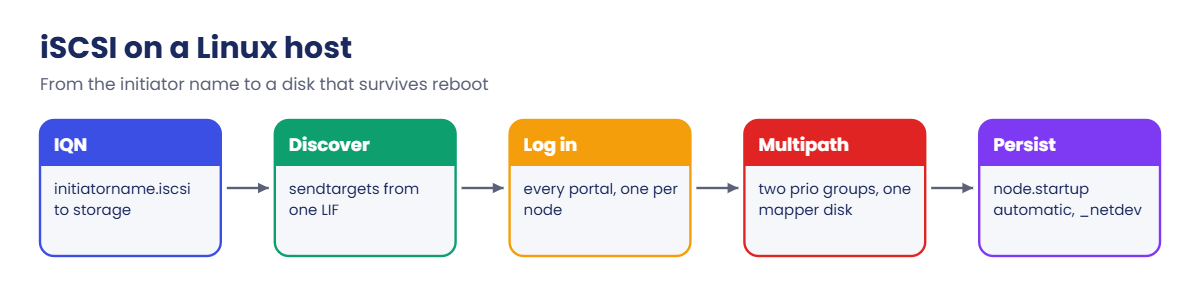

Before you run any command, double-check it
Read every command twice before you press Enter. Check the target: the server name, the user, the disk or device name, the path and the sizes. These commands are for learning and were tested in our lab, not on your system. At work, run the read-only commands first, follow your change process, make sure a backup exists, and ask a second person to check anything that changes or deletes data. You run them at your own risk.
This lab uses the SaatVedha ONTAP practice shell, our own learning tool. It is not NetApp software: real ONTAP output looks like this but is not identical.
You’ll use two terminal windows.
The first runs the cluster shell (python ontapsim.py). The second runs a client host: python ontapsim.py --host linux1 opens a root prompt on linux1, an Ubuntu 24.04 server at 192.168.56.21. Both read the same lab file, so what you map on the cluster shows up on the host.
1Build the storage side
In C:\ontap-lab, save these ten lines as setup-25.txt. They make two aggregates, an SVM with one iSCSI LIF per node, and a 10 GB LUN mapped to linux1’s IQN, which is everything Lessons 23 and 24 taught.
storage aggregate create -aggregate aggr1_01 -node saat-cluster-01 -diskcount 8 -disktype SAS
storage aggregate create -aggregate aggr1_02 -node saat-cluster-02 -diskcount 8 -disktype SAS
vserver create -vserver svm1 -aggregate aggr1_01 -rootvolume-security-style unix
network interface create -vserver svm1 -lif svm1_iscsi1 -service-policy default-data-iscsi -home-node saat-cluster-01 -home-port e0d -address 192.168.56.131 -netmask 255.255.255.0
network interface create -vserver svm1 -lif svm1_iscsi2 -service-policy default-data-iscsi -home-node saat-cluster-02 -home-port e0d -address 192.168.56.132 -netmask 255.255.255.0
vserver iscsi create -vserver svm1
volume create -vserver svm1 -volume vol_web1 -aggregate aggr1_01 -size 12g -space-guarantee none -snapshot-policy none
lun create -vserver svm1 -path /vol/vol_web1/lun_web1 -size 10g -ostype linux -space-reserve disabled
lun igroup create -vserver svm1 -igroup ig_linux1 -protocol iscsi -ostype linux -initiator iqn.2004-10.com.ubuntu:01:5a7e1a2b3c4d
lun mapping create -vserver svm1 -path /vol/vol_web1/lun_web1 -igroup ig_linux1
Reset the lab and run the file from your normal terminal:
python ontapsim.py -c "simctl reset"
python ontapsim.py --run setup-25.txt
Each line prints its result. You should see no line that starts with Error.
✅ Checkpoint: The run ends with the lun mapping create line and no errors.
2Open linux1 and read its IQN
Open a second terminal in the same folder and start the host:
python ontapsim.py --host linux1You’re now root on linux1. On a real server you’d use sudo; the practice host logs you in as root so you can skip it. Check the initiator name and that the iSCSI daemon is running:
cat /etc/iscsi/initiatorname.iscsi
systemctl status iscsid
You should see this (times will differ):
root@linux1:~# cat /etc/iscsi/initiatorname.iscsi
## DO NOT EDIT OR REMOVE THIS FILE!
## If you remove this file, the iSCSI daemon will not start.
## If you change the InitiatorName, existing access control lists
## may reject this initiator.  The InitiatorName must be unique
## for each iSCSI initiator.  Do NOT duplicate iSCSI InitiatorNames.
InitiatorName=iqn.2004-10.com.ubuntu:01:5a7e1a2b3c4d
root@linux1:~# systemctl status iscsid
● iscsid.service - iSCSI initiator daemon (iscsid)
     Loaded: loaded (/usr/lib/systemd/system/iscsid.service; enabled; preset: enabled)
     Active: active (running) since Sat 2026-11-07 11:24:19 IST; 37min ago
TriggeredBy: ● iscsid.socket
       Docs: man:iscsid(8)
   Main PID: 1639 (iscsid)
      Tasks: 2 (limit: 4613)
     Memory: 3.7M (peak: 4.5M)
        CPU: 58ms
     CGroup: /system.slice/iscsid.service
             └─1639 /usr/sbin/iscsid
The IQN on the last line of the file must match the igroup exactly, character for character. On a fresh Ubuntu install you’d first run apt install -y open-iscsi multipath-tools; the practice linux1 already has both.
✅ Checkpoint: The InitiatorName ends in 5a7e1a2b3c4d and iscsid is active (running).
3Discover the target and log in to every portal
iscsiadm -m discovery -t sendtargets -p 192.168.56.131
iscsiadm -m node --login
iscsiadm -m session
You should see this:
root@linux1:~# iscsiadm -m discovery -t sendtargets -p 192.168.56.131
192.168.56.131:3260,1033 iqn.1992-08.com.netapp:sn.c84b2d40ac3f32ca940fcb7e13e6d933:vs.3
192.168.56.132:3260,1034 iqn.1992-08.com.netapp:sn.c84b2d40ac3f32ca940fcb7e13e6d933:vs.3
root@linux1:~# iscsiadm -m node --login
Logging in to [iface: default, target: iqn.1992-08.com.netapp:sn.c84b2d40ac3f32ca940fcb7e13e6d933:vs.3, portal: 192.168.56.131,3260]
Logging in to [iface: default, target: iqn.1992-08.com.netapp:sn.c84b2d40ac3f32ca940fcb7e13e6d933:vs.3, portal: 192.168.56.132,3260]
Login to [iface: default, target: iqn.1992-08.com.netapp:sn.c84b2d40ac3f32ca940fcb7e13e6d933:vs.3, portal: 192.168.56.131,3260] successful.
Login to [iface: default, target: iqn.1992-08.com.netapp:sn.c84b2d40ac3f32ca940fcb7e13e6d933:vs.3, portal: 192.168.56.132,3260] successful.
root@linux1:~# iscsiadm -m session
tcp: [1] 192.168.56.131:3260,1033 iqn.1992-08.com.netapp:sn.c84b2d40ac3f32ca940fcb7e13e6d933:vs.3 (non-flash)
tcp: [2] 192.168.56.132:3260,1034 iqn.1992-08.com.netapp:sn.c84b2d40ac3f32ca940fcb7e13e6d933:vs.3 (non-flash)
You asked one LIF, and it answered with both LIFs of the SVM, one per node. --login without a portal logs in to every discovered portal, so you get two sessions.
✅ Checkpoint: iscsiadm -m session lists two sessions, one to .131 and one to .132.
4Check the disks and multipath
lsblk
multipath -ll
You should see this:
root@linux1:~# lsblk
NAME                                MAJ:MIN RM  SIZE RO TYPE  MOUNTPOINTS
sda                                   8:0    0   25G  0 disk
├─sda1                                8:1    0    1M  0 part
├─sda2                                8:2    0    2G  0 part  /boot
└─sda3                                8:3    0   23G  0 part
  └─ubuntu--vg-ubuntu--lv           252:0    0 11.5G  0 lvm   /
sdb                                   8:16   0   10G  0 disk
└─3600a09806e7553666d67586b74577143 252:1    0   10G  0 mpath
sdc                                   8:32   0   10G  0 disk
└─3600a09806e7553666d67586b74577143 252:1    0   10G  0 mpath
sr0                                  11:0    1 1024M  0 rom
root@linux1:~# multipath -ll
3600a09806e7553666d67586b74577143 dm-1 NETAPP,LUN C-Mode
size=10G features='3 queue_if_no_path pg_init_retries 50' hwhandler='1 alua' wp=rw
|-+- policy='service-time 0' prio=50 status=active
| `- 30:0:0:0 sdb 8:16 active ready running
`-+- policy='service-time 0' prio=10 status=enabled
  `- 31:0:0:0 sdc 8:32 active ready running
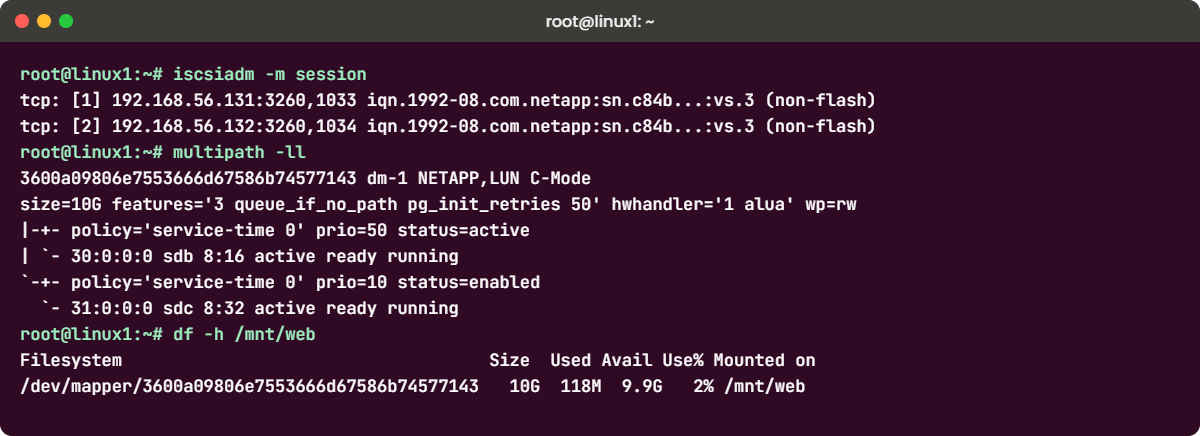
sdb and sdc are the same 10 GB LUN, seen once through each session. dm-multipath joined them into one device named after the LUN’s WWID. The path with prio=50 goes through the LUN’s own node (active/optimized); prio=10 goes through the partner, exactly the ALUA picture from Lesson 24.
✅ Checkpoint: multipath -ll shows one NETAPP device with two paths: prio=50 active and prio=10 enabled.
5See the same login from ONTAP
Back in the first terminal, in the cluster shell:
vserver iscsi session show -vserver svm1
lun igroup show -vserver svm1 -igroup ig_linux1 -instance
You should see this:
saat-cluster::> vserver iscsi session show -vserver svm1
           Tpgroup            Initiator                                      Initiator
Vserver    Name          TSIH Name                                           Alias
---------- ------------- ---- ---------------------------------------------- ----------
svm1       svm1_iscsi1      1 iqn.2004-10.com.ubuntu:01:5a7e1a2b3c4d         linux1
svm1       svm1_iscsi2      2 iqn.2004-10.com.ubuntu:01:5a7e1a2b3c4d         linux1
2 entries were displayed.
saat-cluster::> lun igroup show -vserver svm1 -igroup ig_linux1 -instance
          Vserver Name: svm1
           Igroup Name: ig_linux1
              Protocol: iscsi
               OS Type: linux
Portset Binding Igroup: -
           Igroup UUID: 9cb5f1f0-3cfe-5eb6-6aab-dd1205720888
            Initiators: iqn.2004-10.com.ubuntu:01:5a7e1a2b3c4d (logged in)
One session per LIF, and the igroup now says (logged in). When a server team says “we can’t see the disk”, these two commands tell you in seconds whether the host ever logged in.
✅ Checkpoint: Two sessions and the initiator shows (logged in).
6Make a file system that survives a reboot
On linux1. Always use the /dev/mapper name, never sdb or sdc: those names can change and they bypass multipath. Use the WWID from your own multipath -ll output.
mkfs.xfs -L webdata /dev/mapper/3600a09806e7553666d67586b74577143
mkdir -p /mnt/web
echo "/dev/mapper/3600a09806e7553666d67586b74577143 /mnt/web xfs _netdev,nofail 0 0" >> /etc/fstab
mount -a
df -h /mnt/web
findmnt /mnt/web
iscsiadm -m node --op update -n node.startup -v automatic
systemctl enable iscsid open-iscsi
You should see this:
root@linux1:~# mkfs.xfs -L webdata /dev/mapper/3600a09806e7553666d67586b74577143
Discarding blocks...Done.
meta-data=/dev/mapper/3600a09806e7553666d67586b74577143 isize=512    agcount=4, agsize=655360 blks
         =                       sectsz=4096  attr=2, projid32bit=1
         =                       crc=1        finobt=1, sparse=1, rmapbt=1
         =                       reflink=1    bigtime=1 inobtcount=1 nrext64=1
data     =                       bsize=4096   blocks=2621440, imaxpct=25
         =                       sunit=0      swidth=0 blks
naming   =version 2              bsize=4096   ascii-ci=0, ftype=1
log      =internal log           bsize=4096   blocks=16384, version=2
         =                       sectsz=4096  sunit=1 blks, lazy-count=1
realtime =none                   extsz=4096   blocks=0, rtextents=0
root@linux1:~# mkdir -p /mnt/web
root@linux1:~# echo "/dev/mapper/3600a09806e7553666d67586b74577143 /mnt/web xfs _netdev,nofail 0 0" >> /etc/fstab
root@linux1:~# mount -a
root@linux1:~# df -h /mnt/web
Filesystem                                    Size  Used Avail Use% Mounted on
/dev/mapper/3600a09806e7553666d67586b74577143   10G  118M  9.9G   2% /mnt/web
root@linux1:~# findmnt /mnt/web
TARGET   SOURCE                                        FSTYPE OPTIONS
/mnt/web /dev/mapper/3600a09806e7553666d67586b74577143 xfs    rw,relatime,attr2,inode64,logbufs=8,logbsize=32k,noquota
root@linux1:~# iscsiadm -m node --op update -n node.startup -v automatic
root@linux1:~# systemctl enable iscsid open-iscsi
_netdev tells systemd to wait for the network before mounting, and nofail lets the server boot even if the storage is missing. node.startup automatic makes the sessions log in again at boot; on Ubuntu the default is manual, which is the classic “it vanished after the reboot” ticket.
✅ Checkpoint: df -h /mnt/web shows a 10G XFS file system on the /dev/mapper device.
7Optional: the same LUN on Rocky Linux with NetApp Host Utilities
Red Hat style servers use dnf and mpathconf, and NetApp’s Linux Host Utilities add sanlun, which maps every Linux device back to its ONTAP LUN and LIF. First give rhel1 its own LUN in the cluster shell (never share one LUN between two servers without a cluster file system):
saat-cluster::> lun create -vserver svm1 -path /vol/vol_web1/lun_db -size 5g -ostype linux -space-reserve disabled

Created a LUN of size 5GB (5368709120)
saat-cluster::> lun igroup create -vserver svm1 -igroup ig_rhel1 -protocol iscsi -ostype linux -initiator iqn.1994-05.com.redhat:8f3d2c1b9a7e
saat-cluster::> lun mapping create -vserver svm1 -path /vol/vol_web1/lun_db -igroup ig_rhel1
Then open a third terminal with python ontapsim.py --host rhel1 and run:
dnf install -y iscsi-initiator-utils device-mapper-multipath
mpathconf --enable --with_multipathd y
systemctl enable --now iscsid
iscsiadm -m discovery -t st -p 192.168.56.131
iscsiadm -m node -L all
rpm -ivh netapp_linux_unified_host_utilities-8-0.x86_64.rpm
sanlun lun show -p
You should see this:
[root@rhel1 ~]# dnf install -y iscsi-initiator-utils device-mapper-multipath
(dnf output trimmed: 5 packages installed)
Complete!
[root@rhel1 ~]# mpathconf --enable --with_multipathd y
[root@rhel1 ~]# systemctl enable --now iscsid
Created symlink /etc/systemd/system/multi-user.target.wants/iscsid.service → /usr/lib/systemd/system/iscsid.service.
[root@rhel1 ~]# iscsiadm -m discovery -t st -p 192.168.56.131
192.168.56.131:3260,1033 iqn.1992-08.com.netapp:sn.c84b2d40ac3f32ca940fcb7e13e6d933:vs.3
192.168.56.132:3260,1034 iqn.1992-08.com.netapp:sn.c84b2d40ac3f32ca940fcb7e13e6d933:vs.3
[root@rhel1 ~]# iscsiadm -m node -L all
Logging in to [iface: default, target: iqn.1992-08.com.netapp:sn.c84b2d40ac3f32ca940fcb7e13e6d933:vs.3, portal: 192.168.56.131,3260]
Logging in to [iface: default, target: iqn.1992-08.com.netapp:sn.c84b2d40ac3f32ca940fcb7e13e6d933:vs.3, portal: 192.168.56.132,3260]
Login to [iface: default, target: iqn.1992-08.com.netapp:sn.c84b2d40ac3f32ca940fcb7e13e6d933:vs.3, portal: 192.168.56.131,3260] successful.
Login to [iface: default, target: iqn.1992-08.com.netapp:sn.c84b2d40ac3f32ca940fcb7e13e6d933:vs.3, portal: 192.168.56.132,3260] successful.
[root@rhel1 ~]# rpm -ivh netapp_linux_unified_host_utilities-8-0.x86_64.rpm
Verifying...                          ################################# [100%]
Preparing...                          ################################# [100%]
Updating / installing...
   1:netapp_linux_unified_host_utiliti################################# [100%]
[root@rhel1 ~]# sanlun lun show -p

                    ONTAP Path: svm1:/vol/vol_web1/lun_db
                           LUN: 0
                      LUN Size: 5g
                       Product: cDOT
                   Host Device: mpatha
              Multipath Policy: service-time 0
            Multipath Provider: Native
--------- ---------- ------- ------------ ----------------------------------------------
host      vserver
path      path       /dev/   host         vserver
state     type       node    adapter      LIF
--------- ---------- ------- ------------ ----------------------------------------------
up        primary    sdb     host30       svm1_iscsi1
up        secondary  sdc     host31       svm1_iscsi2
sanlun lun show -p is the command support engineers ask for first: it shows the ONTAP path, the multipath device and which LIF each path uses, with primary meaning the optimized path. On a real server you download the Host Utilities rpm from the NetApp support site.
✅ Checkpoint: sanlun shows two paths that are up: primary through svm1_iscsi1 and secondary through svm1_iscsi2.
Try it yourself: Build the ONTAP side of an iSCSI LUN in the Command Builder.
The most common iSCSI ticket of all: “the host logs in, but there’s no disk”. Nine times out of ten the IQN on the host doesn’t match the igroup, usually after someone edited the file, cloned a VM or rebuilt the server.
1Break the initiator name
On linux1, unmount the file system, let simctl put a one-character typo in the IQN, then log out and in again the way a reboot would:
umount /mnt/web
simctl break host-iqn-wrong linux1
iscsiadm -m node -U all
iscsiadm -m node -L all
lsblk
cat /etc/iscsi/initiatorname.iscsi
You’ll get this:
root@linux1:~# umount /mnt/web
root@linux1:~# simctl break host-iqn-wrong linux1
simctl: fault "host-iqn-wrong" is active on linux1. Now find it from the host and the cluster.
root@linux1:~# iscsiadm -m node -U all
Logging out of session [sid: 1, target: iqn.1992-08.com.netapp:sn.c84b2d40ac3f32ca940fcb7e13e6d933:vs.3, portal: 192.168.56.131,3260]
Logging out of session [sid: 2, target: iqn.1992-08.com.netapp:sn.c84b2d40ac3f32ca940fcb7e13e6d933:vs.3, portal: 192.168.56.132,3260]
Logout of [sid: 1, target: iqn.1992-08.com.netapp:sn.c84b2d40ac3f32ca940fcb7e13e6d933:vs.3, portal: 192.168.56.131,3260] successful.
Logout of [sid: 2, target: iqn.1992-08.com.netapp:sn.c84b2d40ac3f32ca940fcb7e13e6d933:vs.3, portal: 192.168.56.132,3260] successful.
root@linux1:~# iscsiadm -m node -L all
Logging in to [iface: default, target: iqn.1992-08.com.netapp:sn.c84b2d40ac3f32ca940fcb7e13e6d933:vs.3, portal: 192.168.56.131,3260]
Logging in to [iface: default, target: iqn.1992-08.com.netapp:sn.c84b2d40ac3f32ca940fcb7e13e6d933:vs.3, portal: 192.168.56.132,3260]
Login to [iface: default, target: iqn.1992-08.com.netapp:sn.c84b2d40ac3f32ca940fcb7e13e6d933:vs.3, portal: 192.168.56.131,3260] successful.
Login to [iface: default, target: iqn.1992-08.com.netapp:sn.c84b2d40ac3f32ca940fcb7e13e6d933:vs.3, portal: 192.168.56.132,3260] successful.
root@linux1:~# lsblk
NAME                      MAJ:MIN RM  SIZE RO TYPE  MOUNTPOINTS
sda                         8:0    0   25G  0 disk
├─sda1                      8:1    0    1M  0 part
├─sda2                      8:2    0    2G  0 part  /boot
└─sda3                      8:3    0   23G  0 part
  └─ubuntu--vg-ubuntu--lv 252:0    0 11.5G  0 lvm   /
sr0                        11:0    1 1024M  0 rom
root@linux1:~# cat /etc/iscsi/initiatorname.iscsi
## DO NOT EDIT OR REMOVE THIS FILE!
## If you remove this file, the iSCSI daemon will not start.
## If you change the InitiatorName, existing access control lists
## may reject this initiator.  The InitiatorName must be unique
## for each iSCSI initiator.  Do NOT duplicate iSCSI InitiatorNames.
InitiatorName=iqn.2004-10.com.ubuntu:01:5a7e1a2b3cxd
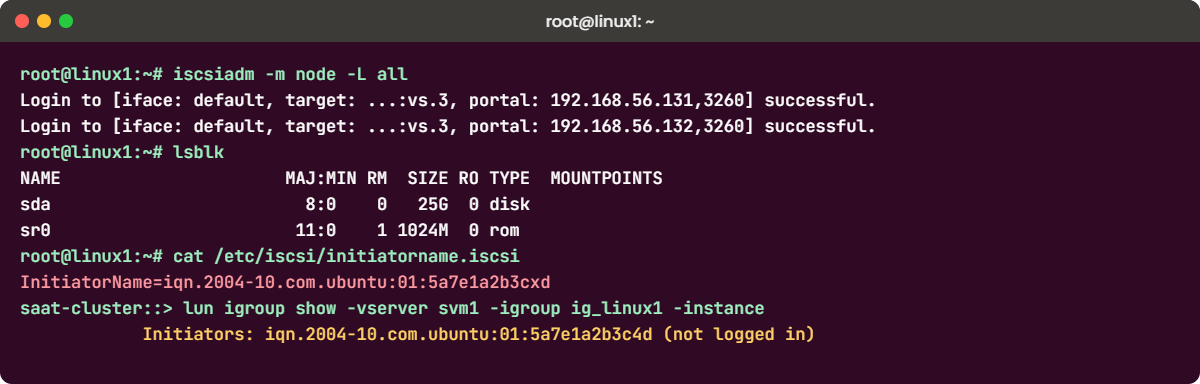
The logins succeed, yet lsblk shows no sdb, sdc or mpath device. iSCSI login only proves the network path; the igroup decides which LUNs the host may see.
✅ Checkpoint: Logins succeed but lsblk shows no NETAPP disk.
2Find it from the storage side
In the cluster shell:
lun igroup show -vserver svm1 -igroup ig_linux1 -instance
vserver iscsi initiator show -vserver svm1
You’ll get this:
saat-cluster::> lun igroup show -vserver svm1 -igroup ig_linux1 -instance
          Vserver Name: svm1
           Igroup Name: ig_linux1
              Protocol: iscsi
               OS Type: linux
Portset Binding Igroup: -
           Igroup UUID: 9cb5f1f0-3cfe-5eb6-6aab-dd1205720888
            Initiators: iqn.2004-10.com.ubuntu:01:5a7e1a2b3c4d (not logged in)
saat-cluster::> vserver iscsi initiator show -vserver svm1
           Tpgroup       Initiator                                      Igroup
Vserver    Name          Name                                           Name
---------- ------------- ---------------------------------------------- ------------
svm1       svm1_iscsi1   iqn.2004-10.com.ubuntu:01:5a7e1a2b3cxd         -
svm1       svm1_iscsi2   iqn.2004-10.com.ubuntu:01:5a7e1a2b3cxd         -
svm1       svm1_iscsi1   iqn.1994-05.com.redhat:8f3d2c1b9a7e            ig_rhel1
svm1       svm1_iscsi2   iqn.1994-05.com.redhat:8f3d2c1b9a7e            ig_rhel1
4 entries were displayed.
The igroup’s IQN (...3c4d) is not logged in, while an unknown initiator (...3cxd) is logged in with no igroup. Put the two strings side by side and the typo jumps out.
✅ Checkpoint: You can point at the one character that differs.
3Fix it on the host
Fix the file the host reads, not the igroup: the igroup holds the name the server team gave you. Then restart iscsid and log in again:
sed -i 's/3cxd/3c4d/' /etc/iscsi/initiatorname.iscsi
systemctl restart iscsid
iscsiadm -m node -U all
iscsiadm -m node -L all
multipath -ll
mount -a
df -h /mnt/web
simctl fix host-iqn-wrong
You should see this:
root@linux1:~# sed -i 's/3cxd/3c4d/' /etc/iscsi/initiatorname.iscsi
root@linux1:~# systemctl restart iscsid
root@linux1:~# iscsiadm -m node -U all
Logging out of session [sid: 1, target: iqn.1992-08.com.netapp:sn.c84b2d40ac3f32ca940fcb7e13e6d933:vs.3, portal: 192.168.56.131,3260]
Logging out of session [sid: 2, target: iqn.1992-08.com.netapp:sn.c84b2d40ac3f32ca940fcb7e13e6d933:vs.3, portal: 192.168.56.132,3260]
Logout of [sid: 1, target: iqn.1992-08.com.netapp:sn.c84b2d40ac3f32ca940fcb7e13e6d933:vs.3, portal: 192.168.56.131,3260] successful.
Logout of [sid: 2, target: iqn.1992-08.com.netapp:sn.c84b2d40ac3f32ca940fcb7e13e6d933:vs.3, portal: 192.168.56.132,3260] successful.
root@linux1:~# iscsiadm -m node -L all
Logging in to [iface: default, target: iqn.1992-08.com.netapp:sn.c84b2d40ac3f32ca940fcb7e13e6d933:vs.3, portal: 192.168.56.131,3260]
Logging in to [iface: default, target: iqn.1992-08.com.netapp:sn.c84b2d40ac3f32ca940fcb7e13e6d933:vs.3, portal: 192.168.56.132,3260]
Login to [iface: default, target: iqn.1992-08.com.netapp:sn.c84b2d40ac3f32ca940fcb7e13e6d933:vs.3, portal: 192.168.56.131,3260] successful.
Login to [iface: default, target: iqn.1992-08.com.netapp:sn.c84b2d40ac3f32ca940fcb7e13e6d933:vs.3, portal: 192.168.56.132,3260] successful.
root@linux1:~# multipath -ll
3600a09806e7553666d67586b74577143 dm-3 NETAPP,LUN C-Mode
size=10G features='3 queue_if_no_path pg_init_retries 50' hwhandler='1 alua' wp=rw
|-+- policy='service-time 0' prio=50 status=active
| `- 30:0:0:0 sdb 8:16 active ready running
`-+- policy='service-time 0' prio=10 status=enabled
  `- 31:0:0:0 sdc 8:32 active ready running
root@linux1:~# mount -a
root@linux1:~# df -h /mnt/web
Filesystem                                    Size  Used Avail Use% Mounted on
/dev/mapper/3600a09806e7553666d67586b74577143   10G  118M  9.9G   2% /mnt/web
root@linux1:~# simctl fix host-iqn-wrong
simctl: fixed host-iqn-wrong.
The disk is back with both paths and the file system mounts from fstab. The last line just tidies the lab.
✅ Checkpoint: multipath -ll shows two paths again and /mnt/web is mounted.
If the host’s IQN is the one that’s right and the igroup has the typo, fix the igroup instead with lun igroup add and lun igroup remove. Either way, compare both sides before you change anything.