


5Pick the right tool
| Flash Cache | Flash Pool | |
|---|---|---|
| Where the flash lives | A module inside the controller | SSDs in a disk shelf, in the aggregate |
| What it caches | Reads only | Random reads and random overwrites |
| Scope | Every aggregate on that node | Only the aggregate it belongs to |
| Survives takeover | The cache starts cold on the partner | Yes, the SSDs move with the aggregate |
| Undo | Pull the card | Can’t remove the SSD tier from the aggregate |
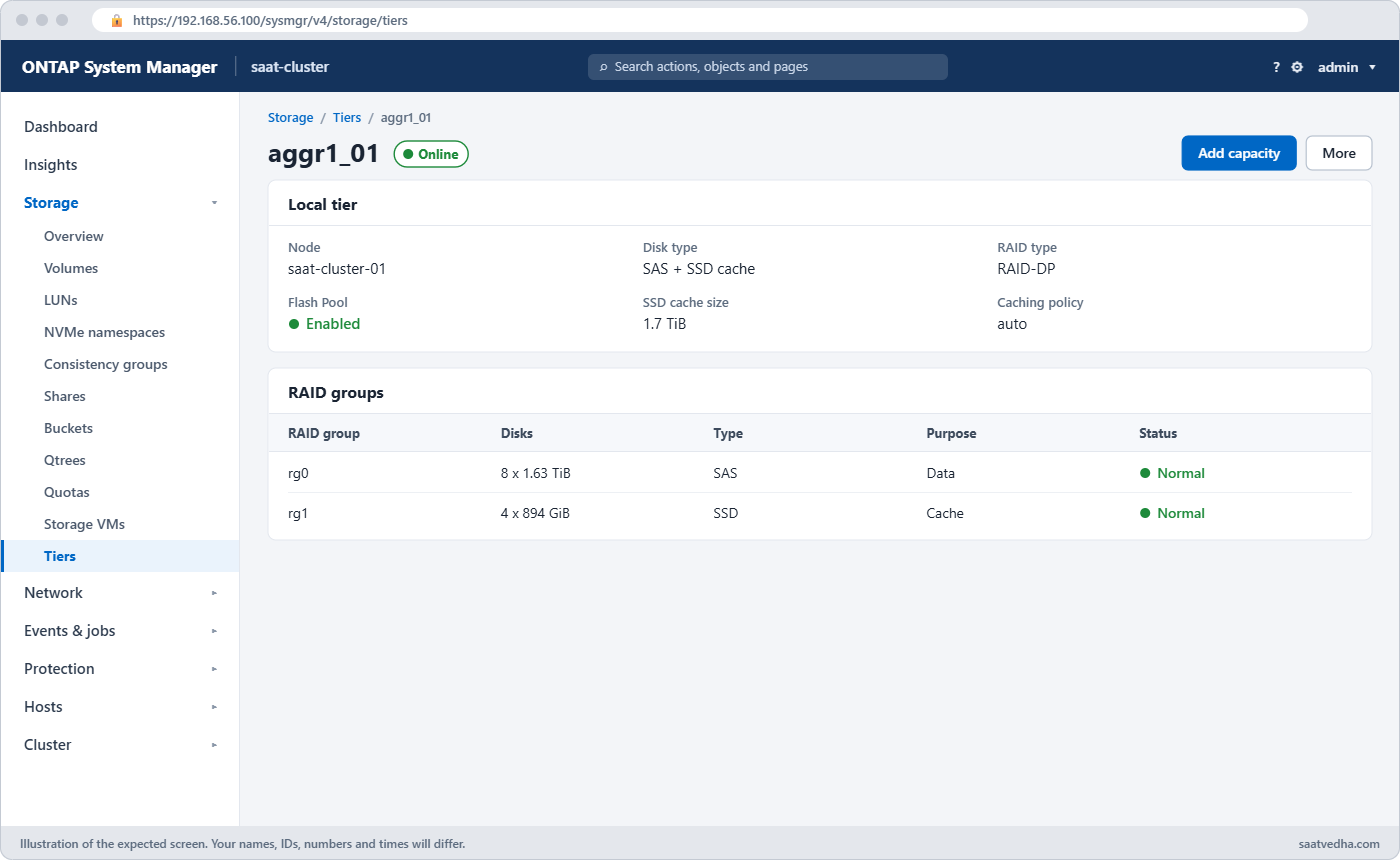
In System Manager (ONTAP 9.12.1 and later) go to Storage › Tiers, pick the HDD local tier and choose Add Flash Pool Cache, then use spare SSDs or storage pools. Check that Flash Pool shows as Enabled under the tier’s details.
Good to know: the Virtual Storage Tier and what flash costs in time
NetApp grouped Flash Cache and Flash Pool under the name Virtual Storage Tier: flash that speeds up hard disk aggregates without being extra capacity. FabricPool came later and is real tiering, because it moves cold data to object storage.
Flash Pool caches random reads and also absorbs small random overwrites, which are the slowest thing a hard disk does. Sequential reads and large writes go straight to the hard disks, so Flash Pool helps random workloads and does little for streaming ones.
Flash Cache lives inside one controller, so its contents don’t follow the aggregates during a takeover. Flash Pool’s cache sits on SSDs inside the aggregate, so it moves with the aggregate to the partner.
As a rough guide under moderate load, memory answers in about 0.1 ms, SSD in about 1 ms, 10K RPM SAS disks in around 10 ms, and NL-SAS disks in 15 ms or more. That gap is why a small amount of flash makes such a difference.
Before you run any command, double-check it
Read every command twice before you press Enter. Check the target: the server name, the user, the disk or device name, the path and the sizes. These commands are for learning and were tested in our lab, not on your system. At work, run the read-only commands first, follow your change process, make sure a backup exists, and ask a second person to check anything that changes or deletes data. You run them at your own risk.
This lab uses the SaatVedha ONTAP practice shell, our own learning tool. It is not NetApp software: real ONTAP output looks like this but is not identical.
You’ll load a hard-disk aggregate with random reads until it struggles, then add three SSDs as a Flash Pool cache and measure again. The practice shell models the warm-up as instant, so the change shows after a short simctl tick.
1Build a busy HDD aggregate
Create setup-15.txt with these lines:
storage aggregate create -aggregate aggr1_01 -node saat-cluster-01 -diskcount 8 -disktype SAS
vserver create -vserver svm1 -aggregate aggr1_01 -rootvolume-security-style unix
volume create -vserver svm1 -volume vol_web -aggregate aggr1_01 -size 100g
simctl write svm1 vol_web 30g files
simctl load svm1 vol_web 3000 40 0.3
simctl tick 2
python ontapsim.py -c "simctl reset"
python ontapsim.py --run setup-15.txtThe load line starts 3,000 IOPS where only 30% of reads find the data in memory.
✅ Checkpoint: The run finishes with “time moved forward (2 steps)” and no Error lines.
2Measure the pain
Log in and run:
qos statistics volume latency show -iterations 1
statistics aggregate show
You should see this (qos columns after QoS Max trimmed, they are all 0ms):
Workload            ID    Latency    Network    Cluster       Data       Disk    QoS Max ...
--------------- ------ ---------- ---------- ---------- ---------- ---------- ---------- ...
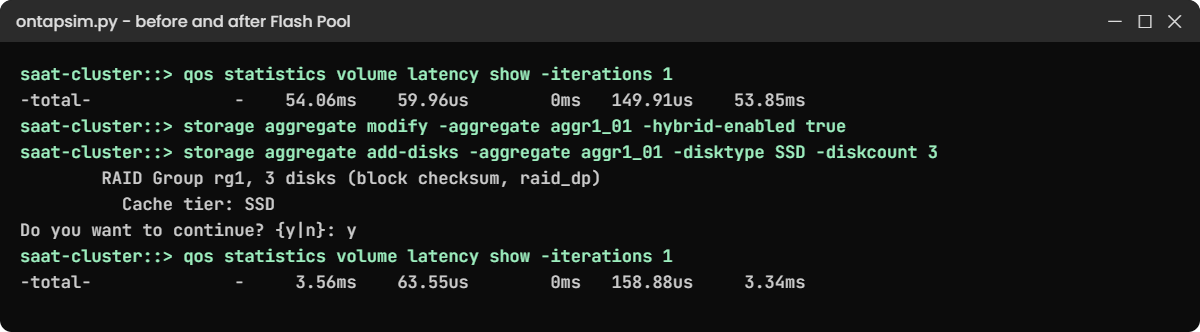
-total-              -    54.06ms    59.96us        0ms   149.91us    53.85ms        0ms ...
vol_web-wid5057   5057    54.06ms    59.96us        0ms   149.91us    53.85ms        0ms ...

saat-cluster::> statistics aggregate show
Aggregate            Node             Total Ops Disk Util%
-------------------- ---------------- --------- ----------
aggr0_saat_cluster_01
                     saat-cluster-01          0         3%
aggr0_saat_cluster_02
                     saat-cluster-02          0         3%
aggr1_01             saat-cluster-01       3000       100%
3 entries were displayed.
Around 54 ms per operation, nearly all of it in the Disk column, and the SAS disks are at 100%. A web app on this volume would feel very slow.
✅ Checkpoint: aggr1_01 shows Disk Util% at 100%.
3Find spare SSDs on the same node
storage aggregate show-spare-disks -original-owner saat-cluster-01You should see this:
Original Owner: saat-cluster-01
 Pool0
  Spare Pool

                                                            Usable Physical
 Disk             Type  Class          RPM Checksum           Size     Size Status
 ---------------- ----- ----------- ------ -------------- -------- -------- --------
 1.1.0            SSD   solid-state      - block           894.0GB  894.3GB zeroed
 1.1.1            SSD   solid-state      - block           894.0GB  894.3GB zeroed
 1.1.2            SSD   solid-state      - block           894.0GB  894.3GB zeroed
 1.1.3            SSD   solid-state      - block           894.0GB  894.3GB zeroed
 1.1.4            SSD   solid-state      - block           894.0GB  894.3GB zeroed
 1.1.5            SSD   solid-state      - block           894.0GB  894.3GB zeroed
The SSDs must be owned by the node that owns the aggregate, saat-cluster-01 here.
✅ Checkpoint: You can see six spare SSDs owned by saat-cluster-01.
4Enable hybrid and add the SSDs
storage aggregate modify -aggregate aggr1_01 -hybrid-enabled true
storage aggregate add-disks -aggregate aggr1_01 -disktype SSD -diskcount 3 -simulate true
storage aggregate add-disks -aggregate aggr1_01 -disktype SSD -diskcount 3
The simulate run shows the plan; the real run asks before it changes anything. You should see this:
saat-cluster::> storage aggregate add-disks -aggregate aggr1_01 -disktype SSD -diskcount 3

Info: Disks would be added to aggregate "aggr1_01" on node "saat-cluster-01" in the following manner:

      First Plex

        RAID Group rg1, 3 disks (block checksum, raid_dp)
          Cache tier: SSD

Do you want to continue? {y|n}: y
Type y. The three SSDs become RAID group rg1 with its own dparity and parity disk, marked as the cache tier.
✅ Checkpoint: No error, and the plan says “Cache tier: SSD”.
5Check the aggregate
storage aggregate show-status -aggregate aggr1_01
storage aggregate show -aggregate aggr1_01 -fields hybrid-enabled,size,availsize
You should see this (rg0 trimmed to its first lines):
Owner Node: saat-cluster-01
 Aggregate: aggr1_01 (online, raid_dp, hybrid) (block checksums)
  Plex: /aggr1_01/plex0 (online, normal, active, pool0)
   RAID Group /aggr1_01/plex0/rg0 (normal, block checksums)
     ...
   RAID Group /aggr1_01/plex0/rg1 (normal, block checksums)
                                                              Usable Physical
     Position Disk                        Pool Type     RPM     Size     Size Status
     -------- --------------------------- ---- ----- ------ -------- -------- ----------------
     dparity  1.1.0                          0 SSD        -  894.0GB  894.3GB (normal)
     parity   1.1.1                          0 SSD        -  894.0GB  894.3GB (normal)
     data     1.1.2                          0 SSD        -  894.0GB  894.3GB (normal)

saat-cluster::> storage aggregate show -aggregate aggr1_01 -fields hybrid-enabled,size,availsize
aggregate hybrid-enabled size   availsize
--------- -------------- ------ ---------
aggr1_01  true           8.80TB 8.70TB
The header now says hybrid, and rg1 is all SSD. Look at the size: still 8.80TB, the same as before. The SSDs are cache, not extra space.
✅ Checkpoint: aggr1_01 shows hybrid-enabled true and the size didn’t grow.
6Measure again
simctl tick 2
qos statistics volume latency show -iterations 1
statistics aggregate show
You should see this:
Workload            ID    Latency    Network    Cluster       Data       Disk    QoS Max ...
--------------- ------ ---------- ---------- ---------- ---------- ---------- ---------- ...
-total-              -     3.56ms    63.55us        0ms   158.88us     3.34ms        0ms ...
vol_web-wid5057   5057     3.56ms    63.55us        0ms   158.88us     3.34ms        0ms ...

saat-cluster::> statistics aggregate show
Aggregate            Node             Total Ops Disk Util%
-------------------- ---------------- --------- ----------
aggr0_saat_cluster_01
                     saat-cluster-01          0         3%
aggr0_saat_cluster_02
                     saat-cluster-02          0         3%
aggr1_01             saat-cluster-01       3000         3%
3 entries were displayed.
Same 3,000 IOPS, but latency fell from about 54 ms to under 4 ms and the hard disks are almost idle, because the hot reads now come from SSD. On a real system the drop is gradual as the cache warms up over hours.
✅ Checkpoint: Latency is below 5 ms and aggr1_01 Disk Util% is in single digits.
simctl load svm1 vol_web offStop the workload before you move on.
Try it yourself: Open “Add disks to an aggregate” in the Command Builder.
Build a second Flash Pool on node 02 and make the two mistakes people hit first. Create its HDD aggregate:
storage aggregate create -aggregate aggr1_02 -node saat-cluster-02 -diskcount 8 -disktype SASAnswer y to the layout question.
1Add SSDs before enabling hybrid
storage aggregate add-disks -aggregate aggr1_02 -disktype SSD -diskcount 3You’ll get this:
Error: command failed: Cannot add SSDs to aggregate "aggr1_02" because it is not hybrid enabled. Run "storage aggregate modify -aggregate aggr1_02 -hybrid-enabled true" first.ONTAP won’t mix SSDs into an HDD aggregate by accident. Make it hybrid first:
storage aggregate modify -aggregate aggr1_02 -hybrid-enabled true✅ Checkpoint: The modify returns to the prompt with no error.

2Add a single SSD
storage aggregate add-disks -aggregate aggr1_02 -disktype SSD -diskcount 1You’ll get this:
Error: command failed: A Flash Pool cache RAID group needs at least 2 SSDs.The cache is RAID protected like the rest of the aggregate, so one SSD can’t form a group. This message comes from the practice shell; real ONTAP also refuses a cache group that’s too small for its RAID type, with its own wording. Plan the count with -simulate true:
storage aggregate add-disks -aggregate aggr1_02 -disktype SSD -diskcount 3 -simulate trueInfo: Disks would be added to aggregate "aggr1_02" on node "saat-cluster-02" in the following manner:
First Plex
RAID Group rg1, 3 disks (block checksum, raid_dp)
Cache tier: SSDStop here and don’t run it for real: remember that an SSD tier can’t be taken out of an aggregate later, so on a real system you’d add it only when you mean it.
✅ Checkpoint: The simulation shows a 3-disk raid_dp cache group.