ALUA and multipath I/O
-
Phase 0: Start here
-
Phase 1: Architecture and foundation
-
Phase 2: Protocols and day-to-day administration
-
Phase 3: Data protection and enterprise integrations
-
Phase 4: Troubleshooting blueprint
-
Phase 5: Final project and career
In Lesson 23 your Linux host found one LUN through two paths, and sanlun called one of them primary and the other secondary. That label isn’t random, and getting it wrong can quietly double your latency.
Here you’ll learn how ONTAP tells a host which path is best (ALUA), how the host’s multipath software uses that, and what happens when the LUN moves or a port dies.
Where this lesson fits
Lesson 24 of 56 in NetApp ONTAP Storage Administration · Phase 2: Protocols and day-to-day administration · Before this: Lesson 23, LUNs and igroups · Next: Lesson 25, iSCSI on Linux
| Time | You need | By the end you can |
|---|---|---|
| 50 minutes | The practice shell; optionally linux1 from Lesson 2 | Read path states, explain Active/Optimized and Active/Non-optimized, and check that a host fails over to its other path |
What it is, in one line
ALUA (Asymmetric Logical Unit Access) is how ONTAP tells a host “this path is the short road, that one is the long road”, so multipath software sends I/O down the short road and keeps the long one for emergencies.
In Simple Words
Two roads to the same shop
Say you go to a shop every day. One road takes you straight to its front door. The other road reaches the back gate, and the shopkeeper has to walk through the store to serve you, so it takes longer.
Both roads work. On a normal day you take the front road, but if it’s dug up for repairs you happily use the back gate rather than go home empty-handed.
ALUA is the signboard that says which road is the front one, and your multipath software is the driver that reads it.
Engineer's View
How an engineer describes it
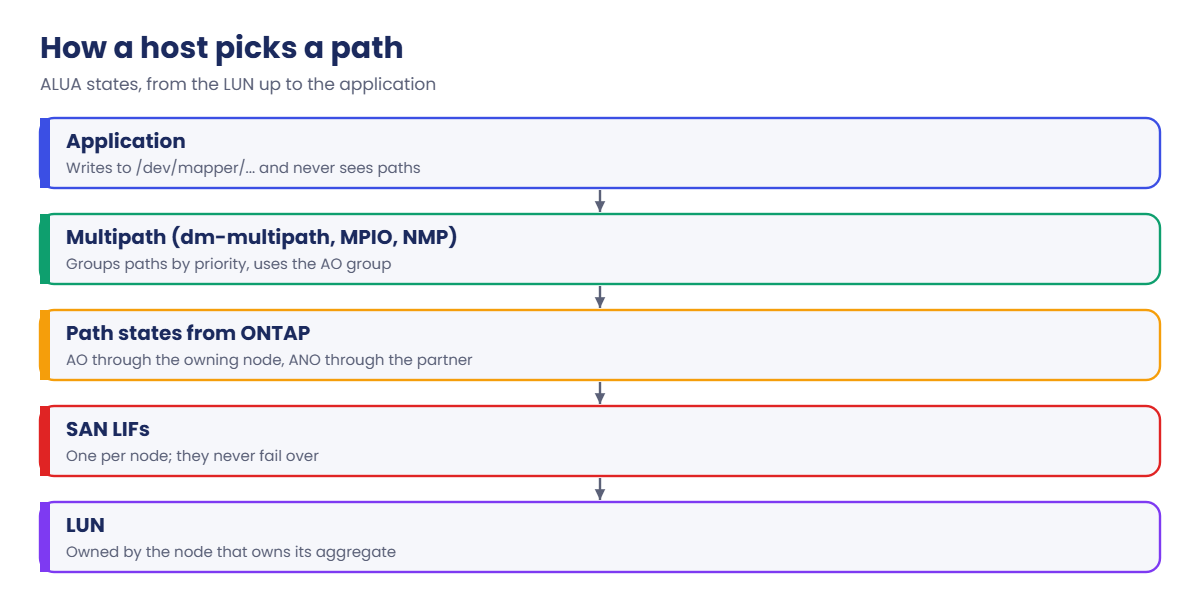
A LUN belongs to a volume, and the volume sits on an aggregate owned by one node. Paths through that node’s LIFs are Active/Optimized (AO). Paths through its HA partner are Active/Non-optimized (ANO): they work, but each I/O has to cross the cluster network to the owning node, which adds latency.
The host learns these states with the SCSI REPORT TARGET PORT GROUPS command. Linux dm-multipath (with prio alua and hardware_handler "1 alua"), Windows MPIO with the ONTAP DSM policy, and VMware’s VMW_SATP_ALUA all group the paths by priority and send I/O only to the AO group while it has a working path.
The states follow the data. Move the volume to the partner’s aggregate, or take over a node, and ONTAP flips the states; the host picks it up on its next check. SAN LIFs themselves never fail over, so the host must always have paths through both nodes.
How it works, step by step
1The host logs in to LIFs on both nodes
One iSCSI LIF (or FC LIF) per node is the minimum. With SLM, only the owning node and its partner report the LUN, so a host normally sees two paths per fabric or network.
2ONTAP reports a state for each path
The node that owns the aggregate answers “optimized”, the partner answers “non-optimized”. In multipath -ll you see two path groups: prio=50 status=active for AO and prio=10 status=enabled for ANO.
3Multipath sends I/O down the AO group
Inside the AO group the host spreads I/O over all optimized paths (service-time or round-robin). The ANO group stays idle while any AO path works.
4Something changes, and the host adapts
If every AO path fails, I/O moves to the ANO group and keeps running, a bit slower. If the volume moves to the partner, ONTAP swaps the states and the host follows without a remount.
| Host OS | Multipath stack | Check command |
|---|---|---|
| Linux (RHEL, Rocky, Ubuntu, SUSE) | dm-multipath, built-in NETAPP defaults | multipath -ll |
| Windows Server | MPIO feature + ONTAP DSM settings (Round Robin with Subset) | mpclaim -s -d |
| VMware ESXi | NMP with VMW_SATP_ALUA, Round Robin PSP | esxcli storage nmp device list |
In System Manager you won’t see per-path states; open Hosts › SAN Initiator Groups to check the initiators are connected, and use the host’s own tools for paths.

Good to know: how many paths is enough
More paths don’t always mean more safety. NetApp’s guidance is to stay at or below eight paths from a host to each node, and with Selective LUN Map a LUN normally reports paths only through its owning node and that node’s HA partner.
A common design is two paths per fabric or network: one through the owning node (optimized) and one through the partner (non-optimized). That gives four paths per LUN, which survives a switch, a cable or a controller failure without making path lists hard to read.
Hands-on lab: watch optimized paths move
Before you run any command, double-check it
Read every command twice before you press Enter. Check the target: the server name, the user, the disk or device name, the path and the sizes. These commands are for learning and were tested in our lab, not on your system. At work, run the read-only commands first, follow your change process, make sure a backup exists, and ask a second person to check anything that changes or deletes data. You run them at your own risk.
This lab uses the SaatVedha ONTAP practice shell, our own learning tool. It is not NetApp software: real ONTAP output looks like this but is not identical.
1Build the starting point
This setup file repeats Lesson 23: an SVM with an iSCSI LIF on each node, a 20 GB LUN on node 01’s aggregate, and linux1 logged in. Save it as setup-24.txt.
storage aggregate create -aggregate aggr1_01 -node saat-cluster-01 -diskcount 8 -disktype SAS
storage aggregate create -aggregate aggr1_02 -node saat-cluster-02 -diskcount 8 -disktype SAS
vserver create -vserver svm1 -aggregate aggr1_01 -rootvolume-security-style unix
network interface create -vserver svm1 -lif svm1_iscsi1 -service-policy default-data-iscsi -home-node saat-cluster-01 -home-port e0d -address 192.168.56.131 -netmask 255.255.255.0
network interface create -vserver svm1 -lif svm1_iscsi2 -service-policy default-data-iscsi -home-node saat-cluster-02 -home-port e0d -address 192.168.56.132 -netmask 255.255.255.0
vserver iscsi create -vserver svm1
volume create -vserver svm1 -volume vol_db1 -aggregate aggr1_01 -size 24g -space-guarantee none -snapshot-policy none
lun create -vserver svm1 -path /vol/vol_db1/lun_db1 -size 20g -ostype linux -space-reserve disabled
lun igroup create -vserver svm1 -igroup ig_linux1 -protocol iscsi -ostype linux -initiator iqn.2004-10.com.ubuntu:01:5a7e1a2b3c4d
lun mapping create -vserver svm1 -path /vol/vol_db1/lun_db1 -igroup ig_linux1
simctl host linux1 iscsi-discover 192.168.56.131
simctl host linux1 iscsi-login
simctl host linux1 rescanpython ontapsim.py -c "simctl reset"
python ontapsim.py --run setup-24.txt✅ Checkpoint: The last line says 2 new or changed device(s) found.
2Read the paths from the host
simctl host linux1 multipath
simctl host linux1 sanlunYou should see this (sanlun trimmed):
3600a0980574c595642543063646d767 dm-2 NETAPP,LUN C-Mode
size=20G features='3 queue_if_no_path pg_init_retries 50' hwhandler='1 alua' wp=rw
|-+- policy='service-time 0' prio=50 status=active
| `- 30:0:0:0 sdj 8:16 active ready running
`-+- policy='service-time 0' prio=10 status=enabled
`- 32:0:0:0 sdl 8:48 active ready running
saat-cluster::> simctl host linux1 sanlun
ONTAP Path: svm1:/vol/vol_db1/lun_db1
LUN: 0
...
up primary sdb host30 svm1_iscsi1
up secondary sdc host31 svm1_iscsi2Two path groups: prio=50 (active) is the optimized group and prio=10 (enabled) is the standby. sanlun names the LIF behind each path: primary through svm1_iscsi1 on node 01, which owns aggr1_01. The WWID and sd names on your screen may differ.
✅ Checkpoint: You can say which LIF carries the optimized path.
3Move the LUN’s volume to the partner
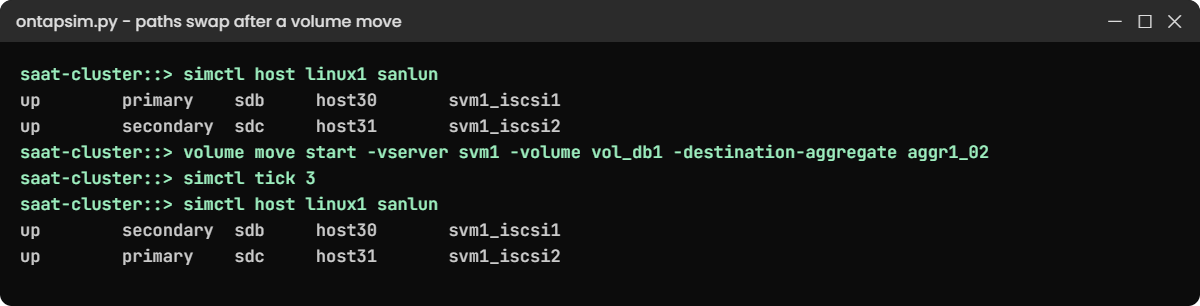
volume move start -vserver svm1 -volume vol_db1 -destination-aggregate aggr1_02
simctl tick 3
volume show -vserver svm1 -volume vol_db1 -fields aggregate,node
simctl host linux1 sanlunYou should see this (trimmed):
vserver volume aggregate node
------- ------- --------- ---------------
svm1 vol_db1 aggr1_02 saat-cluster-02
saat-cluster::> simctl host linux1 sanlun
...
up secondary sdb host30 svm1_iscsi1
up primary sdc host31 svm1_iscsi2The volume now lives on node 02, so the path through svm1_iscsi2 became primary. The host didn’t log out, remount or rescan: ALUA told it the roads had swapped.
✅ Checkpoint: primary now shows svm1_iscsi2.
4Check the reporting nodes
lun mapping show -vserver svm1 -fields reporting-nodesYou should see this:
vserver path igroup reporting-nodes
------- -------------------- --------- -------------------------------
svm1 /vol/vol_db1/lun_db1 ig_linux1 saat-cluster-01,saat-cluster-02The move stayed inside one HA pair, so nothing needed to change. On a bigger cluster, before you move a LUN’s volume to another HA pair, run lun mapping add-reporting-nodes -vserver svm1 -path /vol/vol_db1/lun_db1 -igroup ig_linux1 -destination-aggregate <new aggr>, then rescan the hosts so they see the new paths first.
✅ Checkpoint: Both nodes are reporting nodes.
5If you built linux1 in Lesson 2
On a real Ubuntu host, sudo multipath -ll shows the same two groups. The NETAPP defaults are already built into dm-multipath, so the /etc/multipath.conf file only has to exist with a basic defaults section; don’t copy old overrides into it. You’ll set this up for real in Lesson 25.
Try it yourself: Open the LUN and path checks in the Command Builder.
Break It, Then Fix It
Now take away the optimized road and see what the host does.
1Pull the cable on the owning node’s iSCSI port
vol_db1 lives on node 02 after the move, so break node 02’s e0d:
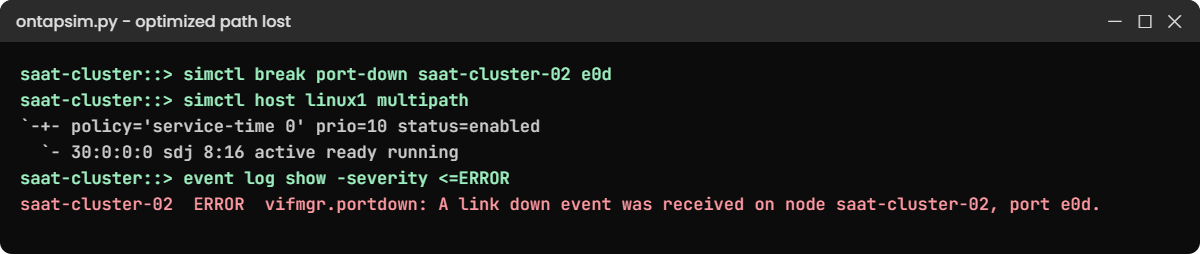
simctl break port-down saat-cluster-02 e0d
simctl host linux1 multipath
simctl host linux1 sanlunYou’ll get this (sanlun trimmed):
3600a0980574c595642543063646d767 dm-2 NETAPP,LUN C-Mode
size=20G features='3 queue_if_no_path pg_init_retries 50' hwhandler='1 alua' wp=rw
`-+- policy='service-time 0' prio=10 status=enabled
`- 30:0:0:0 sdj 8:16 active ready running
saat-cluster::> simctl host linux1 sanlun
...
up secondary sdb host30 svm1_iscsi1The LUN is still there and I/O carries on, but only through the non-optimized path on node 01. Every I/O now crosses the cluster network, and on a busy system users would notice the extra latency.
2Find the cause from the storage side
network interface show -vserver svm1
event log show -severity <=ERRORYou'll see this (trimmed):
svm1_iscsi2
up/down 192.168.56.132/24 saat-cluster-02 e0d true
saat-cluster::> event log show -severity <=ERROR
Time Node Severity Event
11/7/2026 06:45:14 saat-cluster-02 ERROR vifmgr.portdown: A link down event was received on node saat-cluster-02, port e0d.The SAN LIF stayed on its port and went down with it. That's by design: SAN LIFs don't move, the host's multipath does the failover.
3Fix it and check the host is back on the short road
simctl fix port-down
simctl host linux1 sanlunYou should see this (trimmed):
up secondary sdb host30 svm1_iscsi1
up primary sdc host31 svm1_iscsi2✅ Checkpoint: Both paths are up and primary is back on svm1_iscsi2.
On a real host, check multipath -ll after every network change. A host that quietly runs on its non-optimized path for weeks is a classic hidden problem.
This happened at work
The sale that ran on the back road
An online fashion store in Delhi ran its order database on LUNs from a four-node ONTAP cluster. Two weeks before a big festival sale, the team moved the database volumes to a new HA pair to spread the load, and they remembered to add the new reporting nodes first.
On sale day, database latency doubled. The storage graphs showed most of the time sitting in the Cluster column of qos statistics volume latency show, which means I/O was crossing the cluster network instead of landing on the owning node.
The cause was on the hosts. Someone had copied an old multipath.conf from another vendor’s array with path_grouping_policy multibus, so the servers spread I/O over all paths, optimized or not.
They removed the override, reloaded multipathd host by host, and latency dropped back within minutes. Since then every new host build checks multipath -ll for two priority groups.
Common mistakes and troubleshooting
| Mistake | What happens | Do this instead |
|---|---|---|
| Only one SAN LIF, or LIFs on one node only | A node failover or port failure cuts the host off | At least one LIF per node per fabric or network |
| Copying old multipath.conf overrides | I/O goes over non-optimized paths and latency rises | Use the built-in NETAPP defaults; check two prio groups in multipath -ll |
| Expecting SAN LIFs to fail over like NAS LIFs | Confusion when a LIF shows up/down after a port fails | Remember: SAN LIFs stay put, host multipath fails over |
| Moving a LUN volume to another HA pair without reporting nodes | Hosts lose all optimized paths, or the LUN disappears | add-reporting-nodes before the move, rescan, then remove old ones |
| Never checking paths after network work | Hosts run for weeks on the slow path or a single path | Check multipath -ll, mpclaim or esxcli after every change |
Interview questions
Click a question to open it. Each one is written the way an interviewer would ask it. Under it you will see why they ask it and one way you could answer, in your own words.
Fresher level
1. What do Active/Optimized and Active/Non-optimized mean for a NetApp LUN?
Why they ask this: They want to know you understand the two path states and why they matter.
How you might answer: Active/Optimized paths go through the node that owns the LUN’s volume, so I/O is handled locally. Active/Non-optimized paths go through the HA partner, which forwards the I/O over the cluster network, so they work but are slower. Multipath uses the optimized ones and keeps the others as backup.
2. Why must a host have paths through both nodes of an HA pair?
Why they ask this: They’re checking that you know SAN LIFs don’t move during failover.
How you might answer: SAN LIFs never fail over. If a node goes down, its LIFs go down with it, so the host needs paths through the partner to keep running. Multipath moves I/O to those paths and back again after giveback.
2–5 years experience
3. A DBA says latency went up after a storage change, and qos statistics shows most latency under Cluster. What do you suspect?
Why they ask this: They want to see you can connect a latency breakdown to path selection.
How you might answer: High Cluster latency usually means I/O is arriving at the partner node and being forwarded, so the host is using non-optimized paths. I’d check multipath -ll on the host for two priority groups, and check the reporting nodes if the volume moved to another HA pair recently.
4. How do you move a LUN’s volume to another HA pair without hurting the host?
Why they ask this: They’re testing whether you know the reporting-nodes steps in the right order.
How you might answer: Before the move I’d run lun mapping add-reporting-nodes with the destination aggregate, then have the host rescan so it sees the new paths. After the move finishes I’d confirm the optimized paths are on the new nodes and then remove the old reporting nodes, followed by another rescan.
Senior level
5. You’re setting the standard for SAN host builds across Linux, Windows and ESXi. What would you put in it about multipathing?
Why they ask this: They want to see that you can turn knowledge into a repeatable standard for a team.
How you might answer: For each OS I’d name the stack and the check: dm-multipath with the built-in NETAPP defaults on Linux, MPIO with the ONTAP host utilities settings on Windows, and VMW_SATP_ALUA with Round Robin on ESXi.
Every build ends with proof of at least two paths through both nodes and the right priority groups, saved in the build record. After any network change we check paths again.
6. During a planned takeover, one application hung while others were fine. How would you investigate?
Why they ask this: They’re checking structured troubleshooting across storage and host teams.
How you might answer: I’d first check whether that host had paths through both nodes before the takeover, using the host’s multipath output and lun igroup show -instance. A host with a single path, or with its timeouts set too short, is the usual cause.
Then I’d compare its multipath settings with our standard and fix it before the next maintenance.
Quick quiz
Q1. Which path to a LUN is Active/Optimized?
- Any path on a 10 GbE port
- A path through the node that owns the LUN’s aggregate
- A path through the cluster management LIF
- The first path the host found
Show answer
B — the owning node’s paths are optimized; the partner’s are non-optimized.
Q2. In multipath -ll, what does prio=10 status=enabled usually mean for an ONTAP LUN?
- The optimized group in use
- The non-optimized standby group
- A failed path
- A disabled LUN
Show answer
B — prio=50 active is the optimized group; prio=10 enabled is the standby group.
Q3. What happens to an iSCSI LIF when its port goes down?
- It fails over to the partner
- It stays on the port and goes down; the host uses another path
- It moves to e0M
- The LUN goes offline
Show answer
B — SAN LIFs don’t fail over; host multipath handles the loss.
Q4. After a volume move to the HA partner, what changes for the host?
- It must remount the LUN
- The LUN ID changes
- The optimized and non-optimized paths swap
- Nothing at all
Show answer
C — ALUA states follow the owning node, so the paths swap roles.
Q5. Which latency column points to non-optimized paths being used?
- Disk
- Network
- Cluster
- QoS Max
Show answer
C — Cluster latency is time spent forwarding I/O between nodes.
Quick recap
- ALUA tells the host which paths are optimized (owning node) and which are non-optimized (partner).
- Multipath sends I/O to the optimized group and keeps the other as standby.
- SAN LIFs never fail over; give every host paths through both nodes.
- Volume moves and takeovers swap path states without a remount.
- Before moving a LUN to another HA pair, add reporting nodes first.
Next lesson
Lesson 25: iSCSI on Linux → You’ll set up open-iscsi and dm-multipath on a real Ubuntu VM, log in to a target, and make the disk survive a reboot.
Further reading: ONTAP ALUA
Want to go deeper into ONTAP ALUA? Read NetApp’s ONTAP concepts guide for how SAN paths and HA pairs work together, and keep the LUN checks from the Command Builder handy. You can also see the full plan for this course on the NetApp ONTAP Storage Administration course page.
