


5The host logs in and rescans
The host discovers the SVM’s iSCSI LIFs (or logs in through the FC fabric), rescans its SCSI bus, and the LUN appears as a new disk with two or more paths. The host’s multipath software joins those paths into one device, which is Lesson 24.
| Object | Command to check it | What “good” looks like |
|---|---|---|
| LUN | lun show | online, mapped |
| igroup | lun igroup show -instance | every initiator says (logged in) |
| Mapping | lun mapping show -fields reporting-nodes | the LUN’s node and its HA partner |
| Portset | lun portset show | LIFs on both nodes of the HA pair |
In System Manager the same jobs live under Storage › LUNs › + Add (it can create the volume, igroup and mapping in one go) and Hosts › SAN Initiator Groups. Portsets may not appear in every System Manager release, so use the CLI for them.

Before you run any command, double-check it
Read every command twice before you press Enter. Check the target: the server name, the user, the disk or device name, the path and the sizes. These commands are for learning and were tested in our lab, not on your system. At work, run the read-only commands first, follow your change process, make sure a backup exists, and ask a second person to check anything that changes or deletes data. You run them at your own risk.
This lab uses the SaatVedha ONTAP practice shell, our own learning tool. It is not NetApp software: real ONTAP output looks like this but is not identical.
1Build the starting point
In your lab folder create setup-23.txt with these six lines. They make two data aggregates, an SVM, one iSCSI LIF on each node and the iSCSI service.
storage aggregate create -aggregate aggr1_01 -node saat-cluster-01 -diskcount 8 -disktype SAS
storage aggregate create -aggregate aggr1_02 -node saat-cluster-02 -diskcount 8 -disktype SAS
vserver create -vserver svm1 -aggregate aggr1_01 -rootvolume-security-style unix
network interface create -vserver svm1 -lif svm1_iscsi1 -service-policy default-data-iscsi -home-node saat-cluster-01 -home-port e0d -address 192.168.56.131 -netmask 255.255.255.0
network interface create -vserver svm1 -lif svm1_iscsi2 -service-policy default-data-iscsi -home-node saat-cluster-02 -home-port e0d -address 192.168.56.132 -netmask 255.255.255.0
vserver iscsi create -vserver svm1
Reset the lab and run the file from your terminal:
python ontapsim.py -c "simctl reset"
python ontapsim.py --run setup-23.txt
✅ Checkpoint: No line in the output starts with Error.
2Check the target side
Log in (admin / saatlab1) and look at what the host will connect to.
vserver iscsi show -vserver svm1
network interface show -vserver svm1
You should see this:
saat-cluster::> vserver iscsi show -vserver svm1
              Vserver: svm1
          Target Name: iqn.1992-08.com.netapp:sn.c84b2d40ac3f32ca940fcb7e13e6d933:vs.3
         Target Alias: svm1
Administrative Status: up
saat-cluster::> network interface show -vserver svm1
            Logical    Status     Network            Current         Current Is
Vserver     Interface  Admin/Oper Address/Mask       Node            Port    Home
----------- ---------- ---------- ------------------ --------------- ------- ----
svm1
            svm1_iscsi1
                       up/up      192.168.56.131/24  saat-cluster-01 e0d     true
            svm1_iscsi2
                       up/up      192.168.56.132/24  saat-cluster-02 e0d     true
2 entries were displayed.
The SVM has its own iSCSI target name (yours may differ) and one LIF on each node.
✅ Checkpoint: The iSCSI service is up and both LIFs are up/up.
3Create the volume and the LUN
volume create -vserver svm1 -volume vol_db1 -aggregate aggr1_01 -size 24g -space-guarantee none -snapshot-policy none
lun create -vserver svm1 -path /vol/vol_db1/lun_db1 -size 20g -ostype linux -space-reserve disabled
lun show -vserver svm1
You should see this:
[Job 104] Job succeeded: Successful

Created a LUN of size 20GB (21474836480)
saat-cluster::> lun show -vserver svm1
Vserver   Path                            State   Mapped   Type         Size
--------- ------------------------------- ------- -------- -------- --------
svm1      /vol/vol_db1/lun_db1            online  unmapped linux        20GB
✅ Checkpoint: lun_db1 is online and unmapped.
4Create the igroup and map the LUN
linux1’s IQN is iqn.2004-10.com.ubuntu:01:5a7e1a2b3c4d (simctl host list shows it). On a real Ubuntu host you’d read it with sudo cat /etc/iscsi/initiatorname.iscsi.
lun igroup create -vserver svm1 -igroup ig_linux1 -protocol iscsi -ostype linux -initiator iqn.2004-10.com.ubuntu:01:5a7e1a2b3c4d
lun mapping create -vserver svm1 -path /vol/vol_db1/lun_db1 -igroup ig_linux1
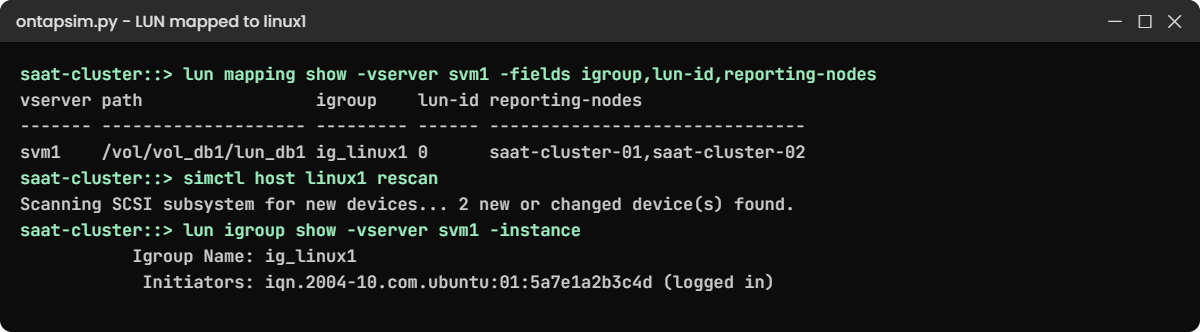
lun mapping show -vserver svm1 -fields igroup,lun-id,reporting-nodes
You should see this:
vserver path                 igroup    lun-id reporting-nodes
------- -------------------- --------- ------ -------------------------------
svm1    /vol/vol_db1/lun_db1 ig_linux1 0      saat-cluster-01,saat-cluster-02
LUN ID 0, and both nodes of the HA pair report paths. On a four-node cluster you’d still see only these two nodes, because SLM leaves out the other pair.
✅ Checkpoint: The mapping shows lun-id 0 and both nodes as reporting nodes.
5Let the host log in and find the disk
The simctl host lines play linux1. Each one matches a real command, shown in simctl host help.
simctl host linux1 iscsi-discover 192.168.56.131
simctl host linux1 iscsi-login
simctl host linux1 rescan
simctl host linux1 sanlun
lun igroup show -vserver svm1 -instance
You should see this (trimmed):
192.168.56.131:3260,1028 iqn.1992-08.com.netapp:sn.c84b2d40ac3f32ca940fcb7e13e6d933:vs.3
192.168.56.132:3260,1029 iqn.1992-08.com.netapp:sn.c84b2d40ac3f32ca940fcb7e13e6d933:vs.3
Login to [iface: default, target: iqn.1992-08.com.netapp:sn.c84b2d40ac3f32ca940fcb7e13e6d933:vs.3, portal: 192.168.56.131,3260] successful.
Login to [iface: default, target: iqn.1992-08.com.netapp:sn.c84b2d40ac3f32ca940fcb7e13e6d933:vs.3, portal: 192.168.56.132,3260] successful.
Scanning SCSI subsystem for new devices... 2 new or changed device(s) found.

                    ONTAP Path: svm1:/vol/vol_db1/lun_db1
                           LUN: 0
                      LUN Size: 20GB
...
up        primary    sdb     host30       svm1_iscsi1
up        secondary  sdc     host31       svm1_iscsi2
saat-cluster::> lun igroup show -vserver svm1 -instance
          Vserver Name: svm1
           Igroup Name: ig_linux1
              Protocol: iscsi
               OS Type: linux
Portset Binding Igroup: -
           Igroup UUID: 9cb5f1f0-3cfe-5eb6-6aab-dd1205720888
            Initiators: iqn.2004-10.com.ubuntu:01:5a7e1a2b3c4d (logged in)
Discovery from one LIF returned both portals, the host logged in to both, and one LUN came back as two paths. The primary path goes through node 01, which owns aggr1_01; the secondary goes through the partner.
✅ Checkpoint: sanlun shows one primary and one secondary path, and the initiator says (logged in).
6Add a portset
lun portset create -vserver svm1 -portset ps_db -protocol iscsi -port-name svm1_iscsi1,svm1_iscsi2
lun igroup bind -vserver svm1 -igroup ig_linux1 -portset ps_db
lun portset show -vserver svm1
You should see this:
Vserver    Portset      Protocol Port Names           Igroups
---------- ------------ -------- -------------------- ------------
                                 svm1_iscsi1, svm1_iscsi2
svm1       ps_db        iscsi                         ig_linux1
With only two LIFs this changes nothing, but on a cluster with eight iSCSI LIFs a portset keeps a host down to the four or so paths it really needs. Always keep LIFs from both nodes of the HA pair in a portset.
✅ Checkpoint: ps_db lists both LIFs and ig_linux1.
Try it yourself: Build the full iSCSI LUN commands in the Command Builder.
The most common SAN ticket of all: “I can’t see the disk”. Here you cause it with one wrong character.
1Map a LUN to an igroup with a typo
rhel1’s real IQN ends in 9a7e. Type it with 9a7f:
volume create -vserver svm1 -volume vol_app2 -aggregate aggr1_02 -size 12g -space-guarantee none -snapshot-policy none
lun create -vserver svm1 -path /vol/vol_app2/lun_app2 -size 10g -ostype linux -space-reserve disabled
lun igroup create -vserver svm1 -igroup ig_rhel1 -protocol iscsi -ostype linux -initiator iqn.1994-05.com.redhat:8f3d2c1b9a7f
lun mapping create -vserver svm1 -path /vol/vol_app2/lun_app2 -igroup ig_rhel1
simctl host rhel1 iscsi-discover 192.168.56.132
simctl host rhel1 iscsi-login
simctl host rhel1 rescan
The last line gives you this:
Scanning SCSI subsystem for new devices... 0 new or changed device(s) found.
(No LUN paths. Check: sessions or FC logins, igroup initiators, LUN mapping, LUN/volume online, reporting nodes.)
The host logged in fine, so the network is good. ONTAP simply doesn’t find that host’s name on the LUN’s guest list.
2Find the mismatch
lun igroup show -vserver svm1 -igroup ig_rhel1 -fields initiator
vserver iscsi initiator show -vserver svm1
You should see this:
vserver igroup   initiator
------- -------- -----------------------------------
svm1    ig_rhel1 iqn.1994-05.com.redhat:8f3d2c1b9a7f
saat-cluster::> vserver iscsi initiator show -vserver svm1
           Tpgroup       Initiator                                      Igroup
Vserver    Name          Name                                           Name
---------- ------------- ---------------------------------------------- ------------
svm1       svm1_iscsi1   iqn.2004-10.com.ubuntu:01:5a7e1a2b3c4d         ig_linux1
svm1       svm1_iscsi2   iqn.2004-10.com.ubuntu:01:5a7e1a2b3c4d         ig_linux1
svm1       svm1_iscsi1   iqn.1994-05.com.redhat:8f3d2c1b9a7e            -
svm1       svm1_iscsi2   iqn.1994-05.com.redhat:8f3d2c1b9a7e            -
4 entries were displayed.
The logged-in rhel1 initiator has a dash in the Igroup column: it belongs to no igroup. Compare the two names character by character and the 9a7f stands out.

3Fix it and rescan
lun igroup remove -vserver svm1 -igroup ig_rhel1 -initiator iqn.1994-05.com.redhat:8f3d2c1b9a7f
lun igroup add -vserver svm1 -igroup ig_rhel1 -initiator iqn.1994-05.com.redhat:8f3d2c1b9a7e
simctl host rhel1 rescan
You should see this:
Scanning SCSI subsystem for new devices... 2 new or changed device(s) found.✅ Checkpoint: rhel1 finds two paths after the fix.
Copy initiator names from vserver iscsi initiator show or from the host itself, never by retyping. While you’re here, try lun delete -vserver svm1 -path /vol/vol_db1/lun_db1: ONTAP refuses because the LUN is still mapped, which is a safety net worth knowing.