Scale-up vs scale-out: 7-Mode to clustered ONTAP
-
Phase 0: Start here
-
Phase 1: Architecture and foundation
-
Phase 2: Protocols and day-to-day administration
-
Phase 3: Data protection and enterprise integrations
-
Phase 4: Troubleshooting blueprint
-
Phase 5: Final project and career
If you talk to senior NetApp engineers, you’ll hear old words like “7-Mode”, “filer” and “vFiler”. They come from the time before ONTAP scale-out architecture, and you’ll still meet them in old runbooks, interview questions and the odd system that nobody has replaced.
This lesson explains the difference between scaling up (one bigger box) and scaling out (more boxes working as one), how NetApp went from 7-Mode to clustered ONTAP, and what that means for you on a normal working day. Then you’ll prove the main benefit in the lab by moving a volume to another node while a Linux client keeps reading and writing.
Where this lesson fits
Lesson 3 of 56 in NetApp ONTAP Storage Administration · Phase 1: Architecture and foundation · Before this: Lesson 2, your lab · Next: Lesson 4, HA pairs and the cluster interconnect
| Time | You need | By the end you can |
|---|---|---|
| 50 minutes | The practice shell from Lesson 2 | Explain scale-up vs scale-out, describe 7-Mode and clustered ONTAP, and move a volume between nodes without client downtime |
What it is, in one line
Scale-up means making one storage system bigger; ONTAP scale-out architecture means adding more HA pairs to one cluster and moving data between them while users keep working.
In Simple Words
One big kitchen or a chain of kitchens
A popular restaurant gets busier every year. The first idea is to make its one kitchen bigger: a larger stove, more burners, two more cooks.
That works for a while, but the room has walls, and one day there’s simply no space left. Moving to a bigger building means closing for the shift change.
The other idea is a central kitchen that runs several kitchen units under one manager. When orders grow you open another unit next door, and the manager can move a dish from a busy unit to a quiet one while customers keep eating. That’s scale-out, and it’s how clustered ONTAP grows.
Engineer's View
7-Mode, cDOT and ONTAP 9
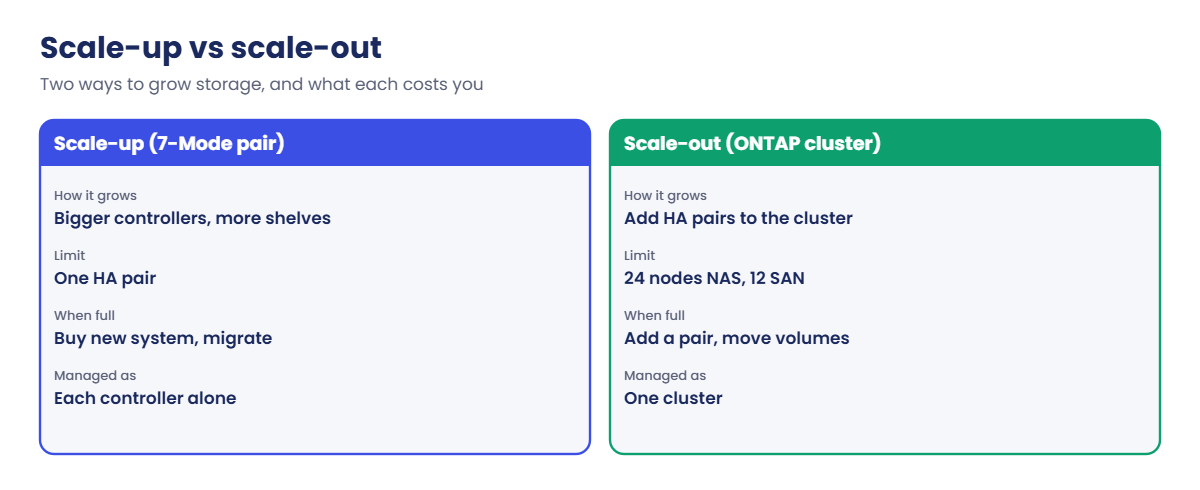
Data ONTAP 7-Mode ran on a single controller or an HA pair. Each controller (a “filer”) owned its aggregates and volumes, and you managed each pair on its own. vFilers gave some separation, but a pair could only grow as far as its controllers and shelves allowed, and moving data to another pair meant copying it and cutting clients over.
Clustered ONTAP grew out of technology NetApp got when it bought Spinnaker Networks in 2003. It was called Cluster-Mode, C-Mode or clustered Data ONTAP (cDOT).
Data ONTAP 8.2 was the last release that offered both modes, 8.3 was cluster-only, and from 2016 the product has simply been called ONTAP 9. Systems moving from 7-Mode used the 7-Mode Transition Tool or copy-based migration.
In a cluster, HA pairs are joined by a private cluster network. Any node can serve data from any aggregate through the cluster, volume move relocates volumes non-disruptively, and SVMs give each tenant its own namespace, LIFs and admins. A cluster scales to 24 nodes for NAS and 12 nodes when SAN is used, and you manage it as one system.
How it works, step by step
1Start with one HA pair
Most clusters begin with two nodes. Each owns its own disks and aggregates, and each can take over the other.
2Add a second HA pair when you need more
New nodes join the existing cluster over the cluster network. They bring CPU, memory, ports and shelves. The cluster name, admin accounts and SVMs stay the same.
3Spread SVMs across all nodes
An SVM isn’t tied to one node. It can have volumes on aggregates of every node and LIFs on ports of every node, so you can grow a tenant without creating a new one.
4Move volumes while clients work
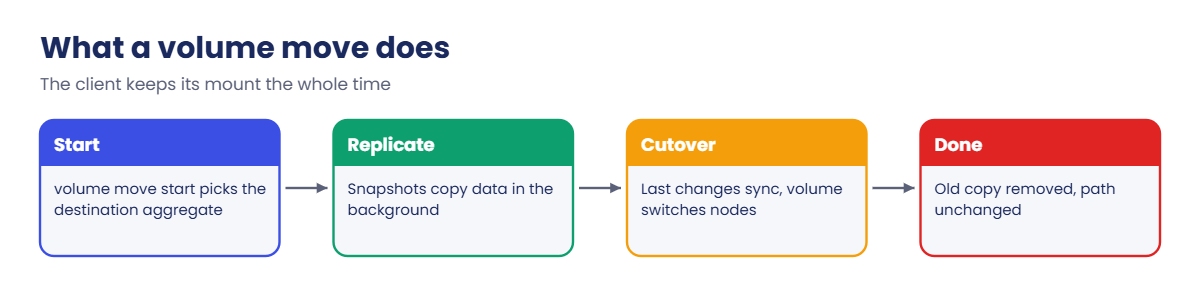
volume move start copies a volume to another aggregate in the background, sends the last changes, then does a short cutover. The volume keeps its name, junction path and identity, so NFS clients don’t need to remount and LUN hosts keep their disks.
5Retire old hardware the same way
To replace an old HA pair, you add the new pair, move the volumes and LIFs to it, and remove the old nodes from the cluster. Users don’t see a migration weekend.
| 7-Mode (scale-up) | Clustered ONTAP (scale-out) | |
|---|---|---|
| Unit you manage | One controller or HA pair at a time | The whole cluster |
| Growing | Bigger controllers, more shelves, then a new system | Add HA pairs to the same cluster |
| Moving data between systems | Copy and cut over clients | volume move, non-disruptive |
| Multi-tenancy | vFilers (limited) | SVMs with their own LIFs, protocols and admins |
| Releases | Up to Data ONTAP 8.2.x | Data ONTAP 8.3, then ONTAP 9 |
Hands-on lab: move a volume while a client keeps working
Before you run any command, double-check it
Read every command twice before you press Enter. Check the target: the server name, the user, the disk or device name, the path and the sizes. These commands are for learning and were tested in our lab, not on your system. At work, run the read-only commands first, follow your change process, make sure a backup exists, and ask a second person to check anything that changes or deletes data. You run them at your own risk.
This lab uses the SaatVedha ONTAP practice shell, our own learning tool. It is not NetApp software: real ONTAP output looks like this but is not identical.
You haven’t learned aggregates, SVMs or LIFs yet; they come in later lessons. So a short setup file builds them for you, and today you only watch what a volume move does.
1Start from a clean lab and run the setup file
In C:\ontap-lab create a text file called setup-03.txt with these six lines:
storage aggregate create -aggregate aggr1_01 -node saat-cluster-01 -diskcount 8 -disktype SAS
storage aggregate create -aggregate aggr1_02 -node saat-cluster-02 -diskcount 8 -disktype SAS
vserver create -vserver svm1 -aggregate aggr1_01 -rootvolume-security-style unix
network interface create -vserver svm1 -lif svm1_nas1 -service-policy default-data-files -home-node saat-cluster-01 -home-port e0c -address 192.168.56.130 -netmask 255.255.255.0
vserver nfs create -vserver svm1 -v3 enabled -v4.1 enabled
vserver export-policy rule create -vserver svm1 -policyname default -clientmatch 192.168.56.0/24 -rorule sys -rwrule sys -superuser sysThen reset the lab and run the file from your terminal (not inside the shell):
python ontapsim.py -c "simctl reset"
python ontapsim.py --run setup-03.txtThe shell prints each command and its result: two aggregate layouts, two “Job succeeded” lines and no errors. --run skips the y/n questions so the file runs in one go.
✅ Checkpoint: No line in the output starts with Error.
2Create a volume and let a client use it
Log in (python ontapsim.py, admin / saatlab1) and run:
volume create -vserver svm1 -volume vol_reports -aggregate aggr1_01 -size 50g -junction-path /reports
simctl host linux1 mount 192.168.56.130:/reports /mnt/reports vers=3
simctl host linux1 touch /mnt/reports/jan.csv
volume show -vserver svm1 -volume vol_reports -fields aggregate,nodeYou should see this:
saat-cluster::> volume create -vserver svm1 -volume vol_reports -aggregate aggr1_01 -size 50g -junction-path /reports
[Job 104] Job succeeded: Successful
saat-cluster::> simctl host linux1 mount 192.168.56.130:/reports /mnt/reports vers=3
(mounted 192.168.56.130:/reports on /mnt/reports type nfs)
saat-cluster::> simctl host linux1 touch /mnt/reports/jan.csv
saat-cluster::> volume show -vserver svm1 -volume vol_reports -fields aggregate,node
vserver volume aggregate node
------- ----------- --------- ---------------
svm1 vol_reports aggr1_01 saat-cluster-01The simctl host lines play the part of a Linux client: it mounted the volume over NFS and wrote a file. The volume sits on node 01. Your job number may differ.
✅ Checkpoint: vol_reports shows aggr1_01 and saat-cluster-01.
3Move it to the other node
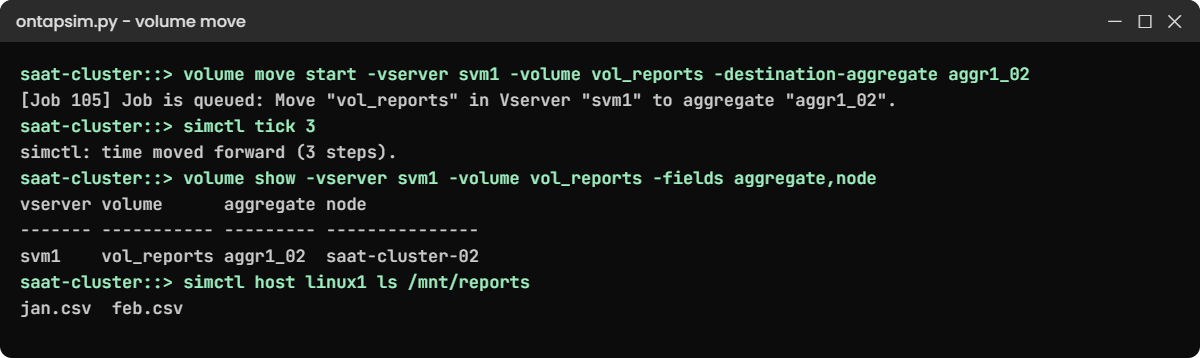
volume move start -vserver svm1 -volume vol_reports -destination-aggregate aggr1_02
volume move show
simctl host linux1 ls /mnt/reportsYou should see this:
[Job 105] Job is queued: Move "vol_reports" in Vserver "svm1" to aggregate "aggr1_02". Use the "volume move show -vserver svm1 -volume vol_reports" command to view the status of this operation.
saat-cluster::> volume move show
Vserver Volume State Move Phase Percent-Complete Time-To-Complete
--------- ------------ -------- ----------- ---------------------------------
svm1 vol_reports healthy replicating 0%
saat-cluster::> simctl host linux1 ls /mnt/reports
jan.csvThe move is running in the background and the client can still list its file. On a real cluster, a big volume can replicate for hours while users carry on.
✅ Checkpoint: Move Phase shows replicating and the client still sees jan.csv.
4Let it finish and check from both sides
simctl tick 3
volume move show -vserver svm1 -volume vol_reports
volume show -vserver svm1 -volume vol_reports -fields aggregate,node
simctl host linux1 touch /mnt/reports/feb.csv
simctl host linux1 ls /mnt/reportsYou should see this (times will differ):
saat-cluster::> volume move show -vserver svm1 -volume vol_reports
Vserver Name: svm1
Volume Name: vol_reports
Actual Completion Time: Sat Nov 07 11:50:30 2026
Bytes Remaining: -
Destination Aggregate: aggr1_02
Detailed Status: Successful
Percentage Complete: -
Move Phase: completed
Source Aggregate: aggr1_01
Start Time of Move: Sat Nov 07 11:50:30 2026
Move State: done
saat-cluster::> volume show -vserver svm1 -volume vol_reports -fields aggregate,node
vserver volume aggregate node
------- ----------- --------- ---------------
svm1 vol_reports aggr1_02 saat-cluster-02
saat-cluster::> simctl host linux1 ls /mnt/reports
jan.csv feb.csvThe volume now lives on node 02. The client didn’t remount, kept its file and wrote a new one: that’s scale-out in one picture.
Notice that the NFS LIF is still on node 01, so traffic now crosses the cluster network to reach node 02. You’ll see in Lesson 5 why that’s allowed but worth watching.
✅ Checkpoint: aggregate is aggr1_02, node is saat-cluster-02, and the client lists both files.
Try it yourself: Build a volume move command in the Command Builder.
Break It, Then Fix It
Two mistakes people make with volumes and aggregates on their first cluster.
1Put a data volume on the root aggregate
volume create -vserver svm1 -volume vol_temp -aggregate aggr0_saat_cluster_01 -size 50gYou’ll get this:
Error: command failed: Cannot create volume. Reason: Aggregate "aggr0_saat_cluster_01" is a node root aggregate. Volumes for data cannot be created on it.Root aggregates hold each node’s vol0, and ONTAP keeps data off them. Pick a data aggregate (storage aggregate show lists them) and try again with -aggregate aggr1_01. The practice shell’s wording is ours; real ONTAP also refuses, with its own message.
✅ Checkpoint: vol_temp is created on aggr1_01.

2Move a volume to where it already is
volume move start -vserver svm1 -volume vol_reports -destination-aggregate aggr1_02You’ll get this:
Error: command failed: Volume "vol_reports" is already on aggregate "aggr1_02".Check where a volume lives before you move it, with volume show -fields aggregate,node. In real change records, write both the source and the destination so a reviewer can spot this before the work starts.
✅ Checkpoint: You can say which node vol_reports is on without guessing.
This happened at work
The weekend the old pair ran out of room
An insurance company in Mumbai ran its claims scans and policy documents on a 7-Mode HA pair. By the third year both controllers sat above 85% CPU at month end, and the disk shelves they could add were maxed out. The only way to grow was a bigger pair, which meant copying everything and moving every share and LUN by hand.
The team bought a four-node cluster instead. They used NetApp’s 7-Mode Transition Tool to copy data with SnapMirror over two weeks, then cut over on a Saturday night. The cutover itself took about three hours, mostly remounting clients and re-mapping LUNs, because 7-Mode shares and IP addresses don’t carry over by themselves.
Eighteen months later the claims volume doubled again. This time nobody planned a weekend.
They added a third HA pair, ran volume move on the busiest volumes during working hours, and users never noticed. Their storage lead said the real win wasn’t speed, it was never having to do another migration.
Common mistakes and troubleshooting
| Mistake | What happens | Do this instead |
|---|---|---|
| Thinking a cluster is one giant controller | You expect every node to see every disk | Each node owns its own disks; the cluster joins nodes so data can move between them |
| Moving a volume without checking space on the target | The move fails or the target aggregate fills up | Run storage aggregate show and check Available before you start |
| Moving a busy volume away from its LIF’s node and forgetting | Traffic crosses the cluster network and latency rises a little | Keep the LIF and the volume on the same node where you can, or move the LIF too |
| Mixing up 7-Mode and clustered ONTAP commands from old blogs | Commands like vol create or exportfs fail | Check the date of what you read; this course uses clustered ONTAP 9 commands only |
| Running many large moves at once in business hours | Disks and the cluster network get busy and users feel it | Start one or two moves, watch latency, then queue the rest |
Interview questions
Click a question to open it. Each one is written the way an interviewer would ask it. Under it you will see why they ask it and one way you could answer, in your own words.
Fresher level
1. What does scale-out mean in storage?
Why they ask this: They want to know you understand the basic idea in plain words.
How you might answer: Scale-up means making one system bigger, with more disks or a faster controller, until it hits a limit. Scale-out means adding more systems, here HA pairs, that work together as one cluster, so capacity and performance grow together.
2. What is a volume move in ONTAP, and does it disrupt clients?
Why they ask this: They’re checking if you know the main tool that makes scale-out useful.
How you might answer: volume move copies a volume from one aggregate to another, on the same node or a different one, while it stays online. It replicates in the background with snapshots, then does a short cutover. NFS and SMB clients keep their mount because the SVM and junction path don’t change.
2–5 years experience
3. A volume move is stuck in the cutover phase. What would you check?
Why they ask this: They want to see that you know moves can retry and how to look into them.
How you might answer: I’d run volume move show -instance for the detailed status and the number of cutover attempts. Heavy writes can stop the final sync from finishing inside the cutover window, so I’d check the workload and either run it at a quieter time or allow a longer cutover window. I’d also check the event log for errors on the destination aggregate.
4. What are the main differences between 7-Mode and clustered ONTAP?
Why they ask this: They’re testing whether you know why older estates were migrated and what changed.
How you might answer: In 7-Mode each controller was managed on its own, and vFilers did the job SVMs do now. A volume couldn’t move to another pair without a migration. Clustered ONTAP joins HA pairs into one cluster with SVMs that span nodes, LIFs that can move, and nondisruptive volume moves. 8.2 was the last release with 7-Mode; from 8.3 it was cluster only.
Senior level
5. A customer says, “Our cluster is slow, let’s add another HA pair.” How do you decide if that will help?
Why they ask this: They want to see that you find the real bottleneck before spending money.
How you might answer: I’d first check where the time goes: node CPU, disk utilisation per aggregate, network, or one noisy workload. If one node is busy and the other is idle, moving volumes or LIFs may fix it for free. Adding a pair helps only if the cluster as a whole is running out of headroom, and only after volumes are moved onto the new nodes.
6. How would you plan moving fifty volumes onto a new HA pair?
Why they ask this: They’re checking planning, risk control and awareness of the cluster network.
How you might answer: I’d rank volumes by size and load, check space on the new aggregates, and confirm cluster network ports are healthy. Then I’d move a small test volume first and run the rest in batches, a few at a time, watching latency.
I’d also plan LIF moves so clients reach the node that holds their data, and keep a log of each move with its source and destination.
Quick quiz
Q1. What is the main way an ONTAP cluster grows?
- Replacing the controllers with bigger ones
- Adding more HA pairs to the cluster
- Adding more SVMs
- Turning on 7-Mode
Show answer
B — a cluster scales out by adding HA pairs that join the same cluster.
Q2. What happens to an NFS client during a volume move?
- It has to remount the export
- It loses its files until the move ends
- It keeps working; the path stays the same
- It must switch to SMB
Show answer
C — the SVM and junction path don’t change, so clients keep their mount.
Q3. Which ONTAP release was the first to support only clustered mode?
- 7.3
- 8.0
- 8.2
- 8.3
Show answer
D — 8.2 was the last release that offered 7-Mode; 8.3 was cluster only.
Q4. Which command shows the phase and state of a volume move?
- volume show -fields aggregate
- volume move show
- storage aggregate show
- job history
Show answer
B — volume move show lists the move phase, state and percent complete.
Q5. Why can’t you create a data volume on aggr0?
- It is read-only
- It belongs to the root volume of the node
- It has no RAID protection
- It is on the other node
Show answer
B — root aggregates hold each node’s vol0, and ONTAP keeps data volumes off them.
Quick recap
- Scale-up grows one system until it hits a limit; scale-out adds HA pairs to one cluster.
- 7-Mode managed each controller alone; clustered ONTAP manages every node as one system.
- SVMs span nodes, so a volume can live on any node and still keep its path.
- volume move shifts a volume between aggregates and nodes while clients keep working.
- Check space first, and keep LIFs near their volumes when you can.
Next lesson
Lesson 4: Nodes, HA pairs and the cluster interconnect → You’ll look inside an HA pair, see how takeover works, and run a planned takeover and giveback in the lab.
Further reading: ONTAP scale-out architecture
Want to go deeper into ONTAP scale-out architecture? Read NetApp’s ONTAP concepts guide for the official description of clusters, HA pairs and nondisruptive volume moves. You can also see the full plan for this course on the NetApp ONTAP Storage Administration course page.
