
Before you run any command, double-check it
Read every command twice before you press Enter. Check the target: the system or account, the IDs, the names and the sizes. These commands are for learning and were tested in our lab, not on your system. At work, run the read-only list commands first, follow your change process, make sure a backup exists, and ask a second person to check anything that changes or deletes data. You run them at your own risk.
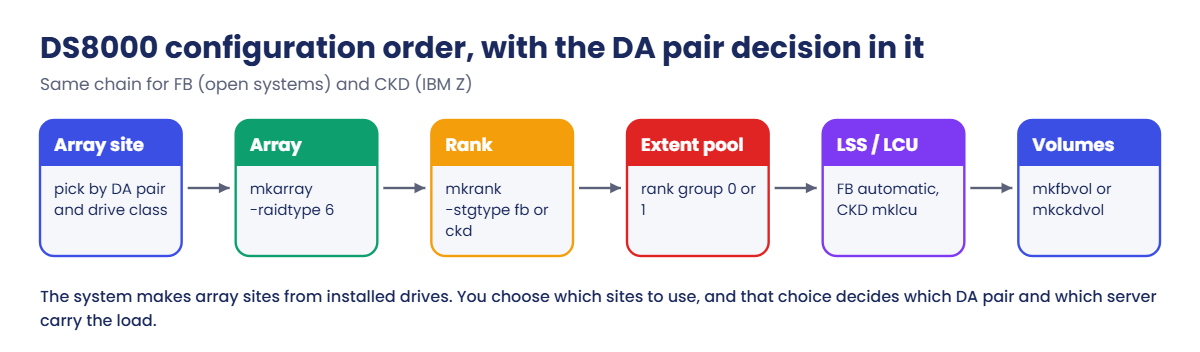
You’ll read the practice DS8A50 the way you would read a new box at work, plan where three arrays go, build them across both DA pairs and both servers, and finish the chain with one FB volume and one CKD volume. At the end a small Python check on your laptop tells you whether the layout is balanced.
Practice shell note: the practice shell is our teaching tool, not IBM software, and real DS CLI output looks very much like this but isn’t identical. Messages marked as practice shell messages are ours. The shell’s DA pair 2 holds both FlashCore Modules and Flash Tier 2 drives so you can try FB and CKD on a small box; a real DS8A00 on Release 10.1 doesn’t mix those in one HPFE pair. All outputs below are what the shell printed.
1Reset and read the hardware
Start the shell in your lab folder, log in, and look at the box from four sides.
Run this:
simctl reset
lsarraysite -l
lsdacard
lsstgencl
lsdrive
You should see this:
SIM0100I simctl: factory state restored (users and passwords kept; use simctl reset -all to reset them too).

Date/Time: 25 October 2026 04:45:20 UTC IBM DSCLI Version: 7.10.10.348 DS: IBM.2107-78SV001
arsite DA Pair dkcap (10^9B) diskrpm State      Array diskclass       encrypt
===============================================================================
S1     0       4800.0        65000   Unassigned -     FlashCoreModule supported
S2     0       4800.0        65000   Unassigned -     FlashCoreModule supported
S3     0       4800.0        65000   Unassigned -     FlashCoreModule supported
S4     0       4800.0        65000   Unassigned -     FlashCoreModule supported
S5     2       4800.0        65000   Unassigned -     FlashCoreModule supported
S6     2       4800.0        65000   Unassigned -     FlashCoreModule supported
S7     2       3840.0        65000   Unassigned -     FlashTier2      supported
S8     2       3840.0        65000   Unassigned -     FlashTier2      supported

ID                           I/O enclosure      Frame State  DA pair Location code         S/N
=====================================================================================================
IBM.1400-1B1-78SV0/R-1-P1-C6 IBM.1400-1B1-78SV0 1     Online 0       U1400.1B1.78SV0-P1-C6 YA30SV0010
IBM.1400-1B2-78SV0/R-1-P1-C6 IBM.1400-1B2-78SV0 1     Online 0       U1400.1B2.78SV0-P1-C6 YA30SV0020
IBM.1400-1B1-78SV0/R-1-P1-C8 IBM.1400-1B1-78SV0 1     Online 2       U1400.1B1.78SV0-P1-C8 YA30SV0012
IBM.1400-1B2-78SV0/R-1-P1-C8 IBM.1400-1B2-78SV0 1     Online 2       U1400.1B2.78SV0-P1-C8 YA30SV0022

ID                    Frame Enclnum Loc   FC Interfaces State  DA pair
======================================================================
IBM.2107-D04-8SV01/R1 1     1       R1-D1 HPFE Gen3     Normal 0
IBM.2107-D04-8SV01/R2 1     2       R1-D2 HPFE Gen3     Normal 0
IBM.2107-D04-8SV02/R1 1     3       R1-D3 HPFE Gen3     Normal 2
IBM.2107-D04-8SV02/R2 1     4       R1-D4 HPFE Gen3     Normal 2

ID                           Storage enclosure  Frame State  Class           Capacity Array Location  Interface Firmware S/N
===============================================================================================================================
IBM.2107-D04-8SV01/R1-P1-D1  IBM.2107-D04-8SV01 1     Normal FlashCoreModule 4800.0   -     R1-P1-D1  NVMe      4.1.2    SVS101
IBM.2107-D04-8SV01/R1-P1-D2  IBM.2107-D04-8SV01 1     Normal FlashCoreModule 4800.0   -     R1-P1-D2  NVMe      4.1.2    SVS102
...
IBM.2107-D04-8SV02/R1-P1-D17 IBM.2107-D04-8SV02 1     Normal FlashTier2      3840.0   -     R1-P1-D17 NVMe      4.1.2    SVS701
(output shortened: 64 drives in all, 32 in each storage enclosure ID)
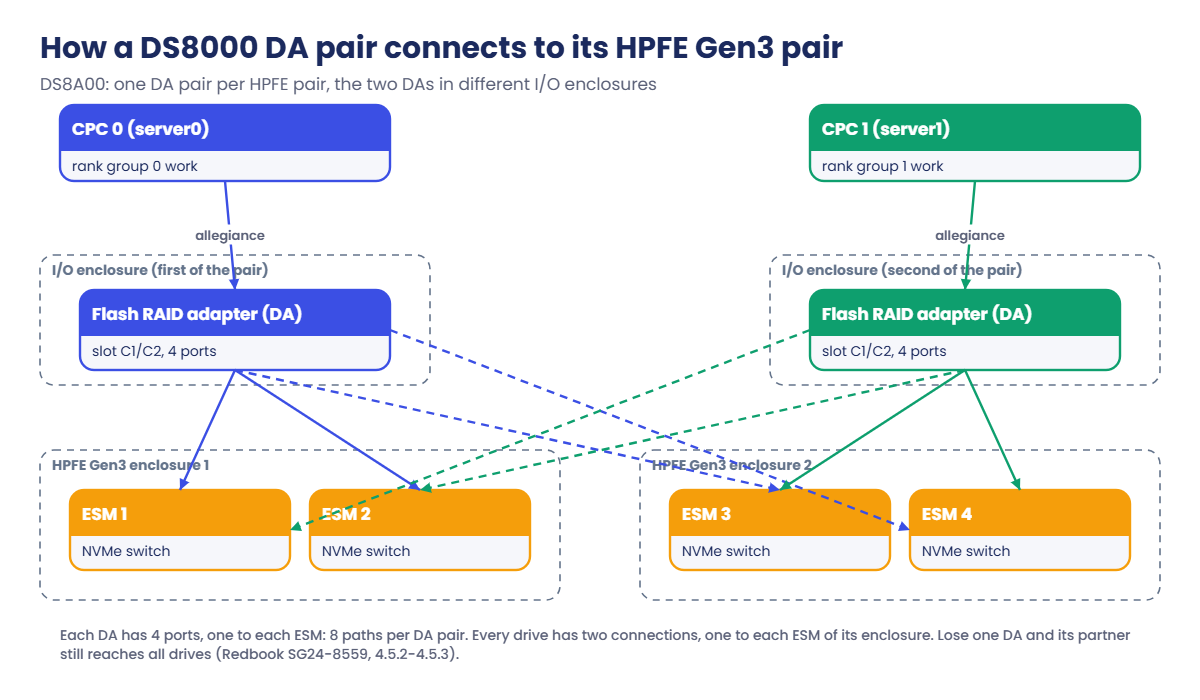
Eight array sites, all Unassigned. S1 to S4 are on DA pair 0 and S5 to S8 on DA pair 2, and lsdacard shows each DA pair as two cards in two different I/O enclosures (1B1 and 1B2). lsstgencl shows which storage enclosures each DA pair serves, and in lsdrive the enclosure ID 8SV01 is the pair behind DA pair 0 while 8SV02 is behind DA pair 2.
✅ Checkpoint: You can say which DA pair owns S1 (0) and S7 (2), and which disk class S7 has (FlashTier2).
2Plan on paper before you type
Write a small table. You want FlashCore Module work on both DA pairs and FB ranks in both rank groups, plus one CKD rank for the mainframe team on the Flash Tier 2 drives.
| Array site | DA pair | Disk class | Storage type | Pool (rank group) |
|---|---|---|---|---|
| S1 | 0 | FlashCoreModule | fb | fcm_fb_0 (0) |
| S5 | 2 | FlashCoreModule | fb | fcm_fb_1 (1) |
| S7 | 2 | FlashTier2 | ckd | ft2_ckd_0 (0) |
Notice the cross-over: the FCM array on DA pair 0 feeds server0, and the one on DA pair 2 feeds server1. If both came from DA pair 0, server balance would look fine while one adapter pair did all the FCM work.
✅ Checkpoint: Your plan has one FCM array on each DA pair and one FB pool in each rank group.
3Build the arrays on two DA pairs
Run this:
lskeygrp
mkarray -raidtype 6 -arsite S1
mkarray -raidtype 6 -arsite S5
mkarray -raidtype 6 -arsite S7
lsarray -l
You should see this:
Date/Time: 25 October 2026 04:45:21 UTC IBM DSCLI Version: 7.10.10.348 DS: IBM.2107-78SV001
ID state      reckeystate reckeydate datakeydate keyprotocol type name
=======================================================================
1  accessible disabled    -          10/01/2026  LOCAL       DAR  DAR_1

CMUC00004I mkarray: Array A0 successfully created.
CMUC00004I mkarray: Array A1 successfully created.
CMUC00004I mkarray: Array A2 successfully created.

Array State      Data   RAIDtype    arsite Rank DA Pair DDMcap (10^9B) diskclass       encrypt
================================================================================================
A0    Unassigned Normal 6 (5+P+Q+S) S1     -    0       4800.0         FlashCoreModule supported
A1    Unassigned Normal 6 (5+P+Q+S) S5     -    2       4800.0         FlashCoreModule supported
A2    Unassigned Normal 6 (5+P+Q+S) S7     -    2       3840.0         FlashTier2      supported
The array IDs come from the system (A0, A1, A2) and don’t match the site numbers, so always read the arsite and DA Pair columns of lsarray -l instead of assuming. Key group 1 is accessible, which matters in the next step.
✅ Checkpoint: lsarray -l shows A0 on DA pair 0 and A1 and A2 on DA pair 2, all RAID 6.
4Create the ranks: two FB, one CKD
Encryption is on in this box (lskeygrp showed key group 1), so every rank must name its key group with -keygrp 1. Leave it out and the shell stops you with a practice shell message, CMUN02805E.
Run this:
mkrank -array A0 -keygrp 1 -stgtype fb
mkrank -array A1 -keygrp 1 -stgtype fb
mkrank -array A2 -keygrp 1 -stgtype ckd
You should see this:
CMUC00007I mkrank: Rank R0 successfully created.
CMUC00007I mkrank: Rank R1 successfully created.
CMUC00007I mkrank: Rank R2 successfully created.
✅ Checkpoint: R0 and R1 are fb ranks and R2 is a ckd rank.
5Pools for rank group 0 and 1
Run this:
mkextpool -rankgrp 0 -keygrp 1 -stgtype fb fcm_fb_0
mkextpool -rankgrp 1 -keygrp 1 -stgtype fb fcm_fb_1
mkextpool -rankgrp 0 -keygrp 1 -stgtype ckd ft2_ckd_0
chrank -extpool P0 R0
chrank -extpool P1 R1
chrank -extpool P2 R2
lsrank -l
You should see this:
CMUC00000I mkextpool: Extent pool P0 successfully created.
CMUC00000I mkextpool: Extent pool P1 successfully created.
CMUC00000I mkextpool: Extent pool P2 successfully created.
CMUC00008I chrank: Rank R0 successfully modified.
CMUC00008I chrank: Rank R1 successfully modified.
CMUC00008I chrank: Rank R2 successfully modified.

Date/Time: 25 October 2026 04:45:22 UTC IBM DSCLI Version: 7.10.10.348 DS: IBM.2107-78SV001
ID Group State  datastate Array RAIDtype extpoolID extpoolnam stgtype exts    usedexts keygrp marray extsize totalLogicalCap(MiB/cyl) usedLogicalCap(MiB/cyl) totalPhysicalCap(MiB/cyl) usedPhysicalCap(MiB/cyl) compressionRatio compressionType
=================================================================================================================================================================================================================================================
R0 0     Normal Normal    A0    6        P0        fcm_fb_0   fb      6372928 0        1      MA1    16MiB   101966848                1024                    22659301                  1024                     1.00             compression
R1 1     Normal Normal    A1    6        P1        fcm_fb_1   fb      6372928 0        1      MA2    16MiB   101966848                1024                    22659301                  1024                     1.00             compression
R2 0     Normal Normal    A2    6        P2        ft2_ckd_0  ckd     1064924 0        1      MA3    21cyl   22363404                 1344                    22363405                  1344                     1.00             none
In lsrank -l the Group column is the rank group: R0 works for server0 and R1 for server1, and the two came from different DA pairs. The CKD rank shows 21cyl extents and its capacity in cylinders, while the FB ranks show 16MiB extents.
✅ Checkpoint: lsrank -l shows R0 in group 0 (P0), R1 in group 1 (P1) and R2 in group 0 (P2, ckd).
6Finish the chain: one FB and one CKD volume
FB volumes go straight in, because the LSS (20 here) is created for you. CKD needs its LCU first; LCU 80 is even, so it pairs with the rank group 0 CKD pool.
Run this:
mkfbvol -extpool P0 -cap 10 -sam ese -name fb_0_#h 2000
mklcu -qty 1 -id 80 -ss 8080
mkckdvol -extpool P2 -cap 3339 -name ckd_#h 8000
You should see this:
CMUC00025I mkfbvol: FB volume 2000 successfully created.
CMUC00017I mklcu: LCU 80 successfully created.
CMUC00021I mkckdvol: CKD Volume 8000 successfully created.
✅ Checkpoint: Volume 2000 (FB) and volume 8000 (CKD, 3,339 cylinders) exist.
7Check the spread with dacheck.py
Save this on your laptop as dacheck.py, in the lab folder next to ds8sim.py. It runs there, not on the DS8000, and talks to the box only through the DS CLI.
A script can’t answer a password prompt, so if security.dat and auto.profile aren’t in your lab folder yet from an earlier lesson, create them first (use your own password both times).
Run this (PowerShell):
python ds8sim.py -hmc1 10.0.0.1 -user admin -passwd YourPassw0rd managepwfile -action add -name admin -pw YourPassw0rd -pwfile security.datThen save these eight lines as auto.profile:
hmc1: 10.0.0.1
username: admin
pwfile: security.dat
devid: IBM.2107-78SV001
banner: off
header: on
format: delim
delim: ,
File dacheck.py:
# dacheck.py: runs on your laptop or jump server, not on the DS8000.
# It talks to the DS8000 only through the DS CLI (auto.profile: banner off, header on, format delim).
# It counts arrays per DA pair (per drive class) and ranks per rank group (per storage type).
import csv, subprocess, sys
from collections import Counter

DSCLI = ["python", "ds8sim.py", "-cfg", "auto.profile"]   # at work: ["dscli", "-cfg", "auto.profile"]

def dscli(*args):
    """Run one DS CLI command and return its rows as dictionaries."""
    out = subprocess.run(DSCLI + list(args), capture_output=True, text=True).stdout
    lines = [l for l in out.splitlines() if l and not l.startswith("SaatVedha") and not l.startswith("CMUC")]
    return list(csv.DictReader(lines))

sites = dscli("lsarraysite", "-l")
arrays = dscli("lsarray", "-l")
ranks = dscli("lsrank", "-l")
warn = 0

print("Arrays per DA pair")
for cls in sorted({s["diskclass"] for s in sites}):
    pairs = sorted({s["DA Pair"] for s in sites if s["diskclass"] == cls}, key=int)
    used = Counter(a["DA Pair"] for a in arrays if a["diskclass"] == cls)
    counts = [used[p] for p in pairs]
    text = "  ".join("DA%s=%d" % (p, used[p]) for p in pairs)
    if len(pairs) > 1 and max(counts) - min(counts) > 1:
        print("  WARN %-16s %s  (put the next array on the quieter DA pair)" % (cls, text)); warn += 1
    elif len(pairs) == 1:
        print("  INFO %-16s %s  (only one DA pair has these drives)" % (cls, text))
    else:
        print("  OK   %-16s %s" % (cls, text))

print("Ranks per rank group (0 = server0, 1 = server1)")
for stg in sorted({r["stgtype"] for r in ranks}):
    grp = Counter(r["Group"] for r in ranks if r["stgtype"] == stg)
    text = "group0=%d  group1=%d  not in a pool=%d" % (grp["0"], grp["1"], grp["-"])
    if abs(grp["0"] - grp["1"]) > 1:
        print("  WARN %-4s %s" % (stg, text)); warn += 1
    else:
        print("  OK   %-4s %s" % (stg, text))

print("Result:", "WARN (%d)" % warn if warn else "balanced")
sys.exit(1 if warn else 0)
The script reads lsarraysite -l to learn which DA pairs hold each disk class, counts the arrays per DA pair from lsarray -l, and counts ranks per rank group from lsrank -l. A gap of more than one array or rank gets a WARN and exit code 1, which a scheduler at work can turn into a ticket.
Run this:
python dacheck.py
echo $LASTEXITCODE
You should see this:
Arrays per DA pair
  OK   FlashCoreModule  DA0=1  DA2=1
  INFO FlashTier2       DA2=1  (only one DA pair has these drives)
Ranks per rank group (0 = server0, 1 = server1)
  OK   ckd  group0=1  group1=0  not in a pool=0
  OK   fb   group0=1  group1=1  not in a pool=0
Result: balanced
0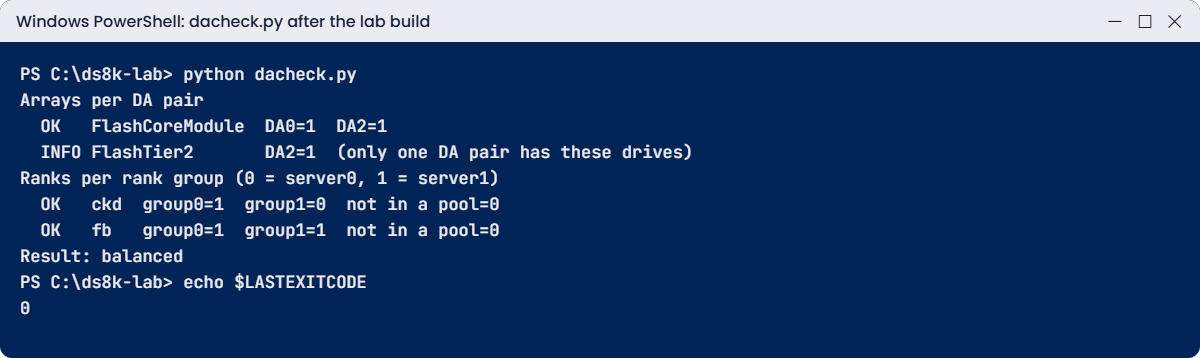
The CKD line says OK with one rank in group 0 and none in group 1, because a gap of one is allowed. When the mainframe team asks for more space, the next CKD rank goes into a rank group 1 pool, and you’ll do that in Break It.
✅ Checkpoint: dacheck.py prints “Result: balanced” and exit code 0.
On macOS or Linux run python3 dacheck.py and change "python" to "python3" in the DSCLI line. At work you swap the DSCLI line for the real dscli and run it from cron or Task Scheduler on the jump server after every capacity change.
Carry on from the lab state. First you’ll make the mistake that hurts slowly (everything on one DA pair), then one the DS CLI stops at once (a CKD rank pushed into an FB pool).
1Break it: a rushed build on DA pair 0
The application team wants more FB space today. You take “the next unassigned sites”, which are S2 and S3, and put both ranks into the pool you used last time.
Run this:
mkarray -raidtype 6 -arsite S2
mkarray -raidtype 6 -arsite S3
mkrank -array A3 -keygrp 1 -stgtype fb
mkrank -array A4 -keygrp 1 -stgtype fb
chrank -extpool P0 R3
chrank -extpool P0 R4
You should see this:
CMUC00004I mkarray: Array A3 successfully created.
CMUC00004I mkarray: Array A4 successfully created.
CMUC00007I mkrank: Rank R3 successfully created.
CMUC00007I mkrank: Rank R4 successfully created.
CMUC00008I chrank: Rank R3 successfully modified.
CMUC00008I chrank: Rank R4 successfully modified.
Every command worked, and that’s the trap. Now run the check from your laptop.
Run this:
python dacheck.py
echo $LASTEXITCODE
You’ll get this:
Arrays per DA pair
  WARN FlashCoreModule  DA0=3  DA2=1  (put the next array on the quieter DA pair)
  INFO FlashTier2       DA2=1  (only one DA pair has these drives)
Ranks per rank group (0 = server0, 1 = server1)
  OK   ckd  group0=1  group1=0  not in a pool=0
  WARN fb   group0=3  group1=1  not in a pool=0
Result: WARN (2)
1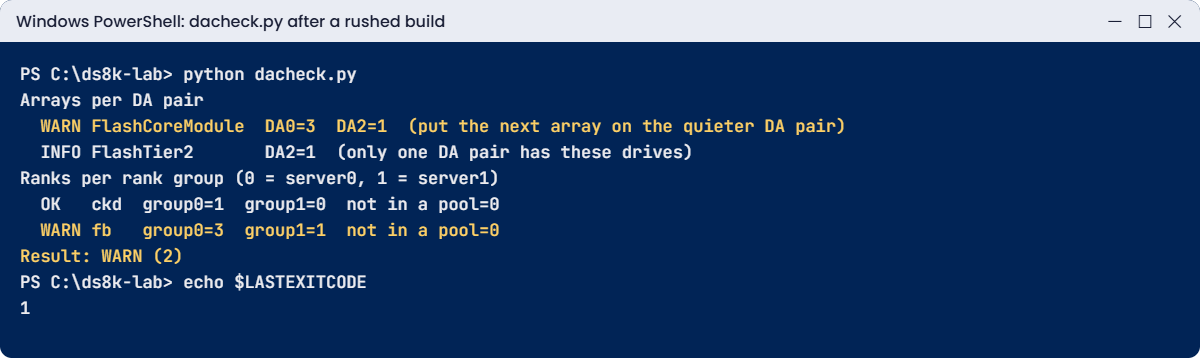
Why: S2 and S3 are both on DA pair 0, so three of the four FCM arrays now hang off one adapter pair, and three of the four FB ranks feed server0. Nothing stopped you, because the DS8000 lets any rank join any pool.
Fix: R4 has no volumes yet, so take it back out, release S3 and build the next array on the quieter DA pair (S6), placing it in the rank group 1 pool.
Run this:
chrank -unassign R4
rmrank -quiet R4
rmarray -quiet A4
mkarray -raidtype 6 -arsite S6
mkrank -array A4 -keygrp 1 -stgtype fb
chrank -extpool P1 R4
python dacheck.py
You should see this:
CMUC00008I chrank: Rank R4 successfully modified.
CMUC00010I rmrank: Rank R4 successfully deleted.
CMUC00006I rmarray: Array A4 successfully deleted.
CMUC00004I mkarray: Array A4 successfully created.
CMUC00007I mkrank: Rank R4 successfully created.
CMUC00008I chrank: Rank R4 successfully modified.

Arrays per DA pair
  OK   FlashCoreModule  DA0=2  DA2=2
  INFO FlashTier2       DA2=1  (only one DA pair has these drives)
Ranks per rank group (0 = server0, 1 = server1)
  OK   ckd  group0=1  group1=0  not in a pool=0
  OK   fb   group0=2  group1=2  not in a pool=0
Result: balanced
The system reused the IDs A4 and R4, but this A4 sits on S6 behind DA pair 2. On a real box, rmrank formats the drives first, so plan for that time before you undo a rank, and never unassign one that holds volumes.
✅ Checkpoint: dacheck.py shows FlashCoreModule DA0=2 DA2=2 and fb group0=2 group1=2.
2Break it: a CKD rank in an FB pool
The mainframe team needs a second CKD rank, so you build one on S8 and, in a hurry, assign it to P1 because “P1 is the rank group 1 pool”.
Run this:
mkarray -raidtype 6 -arsite S8
mkrank -array A5 -keygrp 1 -stgtype ckd
chrank -extpool P1 R5
You’ll get this (the last line is a practice shell message):
CMUC00004I mkarray: Array A5 successfully created.
CMUC00007I mkrank: Rank R5 successfully created.
CMUN02020E chrank: R5: The storage type of rank R5 (ckd) does not match the storage type of extent pool P1 (fb).
Why: a pool has one storage type, set when you create it. P1 is fb, R5 is ckd, and the two can never mix, which is the same reason an FB volume can’t land in a CKD pool.
Fix: make a CKD pool for rank group 1 and put R5 there. That also gives the mainframe its second server.
Run this:
mkextpool -rankgrp 1 -keygrp 1 -stgtype ckd ft2_ckd_1
chrank -extpool P3 R5
python dacheck.py
You should see this:
CMUC00000I mkextpool: Extent pool P3 successfully created.
CMUC00008I chrank: Rank R5 successfully modified.

Arrays per DA pair
  OK   FlashCoreModule  DA0=2  DA2=2
  INFO FlashTier2       DA2=2  (only one DA pair has these drives)
Ranks per rank group (0 = server0, 1 = server1)
  OK   ckd  group0=1  group1=1  not in a pool=0
  OK   fb   group0=2  group1=2  not in a pool=0
Result: balanced
✅ Checkpoint: R5 is in P3 (ckd, group 1) and dacheck.py shows ckd group0=1 group1=1, Result: balanced.
One more classic, for reference only: mkarray -raidtype 5 on a G10 shows a warning (CMUC00536W) and then CMUN81522E, “RAID 5 is not supported by the device adapter pair”. You met that one in the arrays lesson; it’s a DA pair rule too.