
Before you run any command, double-check it
Read every command twice before you press Enter. Check the target: the system or account, the IDs, the names and the sizes. These commands are for learning and were tested in our lab, not on your system. At work, run the read-only list commands first, follow your change process, make sure a backup exists, and ask a second person to check anything that changes or deletes data. You run them at your own risk.
In this lab you’re looking after a small Linux host called saat-host1, which has two thin app volumes (2000, 2001) and one standard database volume (2204). You’ll grow two of them, then reclaim one and delete it cleanly.
Practice shell note: the practice shell is our own teaching tool, not IBM software. Real DS CLI output looks very close to this but isn’t identical. Lines starting with SIM, and the IDs CMUN02039E and CMUN02948E, come from the practice shell, and we’ve cut some unchanged showfbvol fields from the boxes (output shortened).
1Start clean and load the setup script
Save the script below as setup-17.txt in your lab folder (C:\ds8k-lab or ~/ds8k-lab). It builds four RAID 6 arrays, three pools, four volumes and the host, and then logs the host’s two ports in.
setup-17.txt:
# setup-17.txt: pools, volumes and one Linux host for Lesson 17
mkarray -raidtype 6 -arsite S1
mkarray -raidtype 6 -arsite S2
mkarray -raidtype 6 -arsite S7
mkarray -raidtype 6 -arsite S8
mkrank -array A0 -keygrp 1 -stgtype fb
mkrank -array A1 -keygrp 1 -stgtype fb
mkrank -array A2 -keygrp 1 -stgtype fb
mkrank -array A3 -keygrp 1 -stgtype fb
mkextpool -rankgrp 0 -keygrp 1 -stgtype fb FB_0
mkextpool -rankgrp 1 -keygrp 1 -stgtype fb FB_1
mkextpool -rankgrp 0 -keygrp 1 -stgtype fb T2_0
chrank -extpool P0 R0
chrank -extpool P1 R1
chrank -extpool P2 R2
chrank -extpool P2 R3
mkfbvol -extpool p0 -cap 10 -sam ese -name app_#h 2000-2001
mkfbvol -extpool p1 -cap 10 -sam ese -name app_#h 2100
mkfbvol -extpool p2 -cap 15 -name db_#h 2204
mkhost -type "Linux Server" -hostport 10000090FA13B914,10000090FA13B915 saat-host1
chhost -action map -volume 2000,2001,2204 saat-host1
simctl login 10000090FA13B914 I0032
simctl login 10000090FA13B915 I0042
Run this (start the shell, reset, leave, then run the script):
python ds8sim.py   (then: simctl reset, quit)
python ds8sim.py -hmc1 10.0.0.1 -user admin -script setup-17.txt
You should see this (output shortened):
SIM0100I simctl: factory state restored (users and passwords kept; use simctl reset -all to reset them too).
Enter your password:
CMUC00004I mkarray: Array A0 successfully created.
...
SIM0103I simctl: host port 10000090FA13B914 logged in to I0032.
SIM0103I simctl: host port 10000090FA13B915 logged in to I0042.
On macOS and Linux, type python3 instead of python. After that, start the shell again with python ds8sim.py for the next steps.
✅ Checkpoint: the script ends with two SIM0103I lines and no error.
2Look before you change anything
Note down the size of every volume and the free space in every pool, because you’ll compare against these numbers after each change.
Run these:
lsfbvol
lsextpool
You should see this:
dscli> lsfbvol
Date/Time: 24 October 2026 10:44:17 UTC IBM DSCLI Version: 7.10.10.348 DS: IBM.2107-78SV001
Name     ID   accstate datastate configstate deviceMTM datatype extpool cap (2^30B) cap (10^9B) cap (blocks)
============================================================================================================
app_2000 2000 Online   Normal    Normal      2107-900  FB 512   P0      10.0        -           20971520
app_2001 2001 Online   Normal    Normal      2107-900  FB 512   P0      10.0        -           20971520
app_2100 2100 Online   Normal    Normal      2107-900  FB 512   P1      10.0        -           20971520
db_2204  2204 Online   Normal    Normal      2107-900  FB 512   P2      15.0        -           31457280
dscli> lsextpool
Date/Time: 24 October 2026 10:44:17 UTC IBM DSCLI Version: 7.10.10.348 DS: IBM.2107-78SV001
Name ID stgtype rankgrp status availstor (2^30B) %allocated available reserved numvols
======================================================================================
FB_0 P0 fb      0       below  99576             0          6372864   64       2
FB_1 P1 fb      1       below  99576             0          6372864   64       1
T2_0 P2 fb      0       below  35388             0          2264842   128      1
Volume 2204 is 15 GiB in pool P2 (T2_0), and P2 has 2264842 available extents of 16 MiB.
✅ Checkpoint: you know the current size of 2204 and the free extents in P2.
3See where the database volume lives
Run this:
showfbvol -rank 2204You should see this:
dscli> showfbvol -rank 2204
Date/Time: 24 October 2026 10:44:17 UTC IBM DSCLI Version: 7.10.10.348 DS: IBM.2107-78SV001
Name                       db_2204
ID                         2204
extpool                    P2
exts                       960
cap (2^30B)                15.0
volgrp                     V0
sam                        Standard
eam                        rotateexts
realextents                960
==============Rank extents==============
rank extents capacity (MiB/cyl) metadata
========================================
R2   480     7680               yes
R3   480     7680               no
(output shortened)
Look at the last few lines. The 960 extents of 2204 are split evenly, 480 on rank R2 and 480 on R3, because eam is rotateexts, and since the volume is in volume group V0, saat-host1 can see it.
✅ Checkpoint: 2204 shows exts 960, sam Standard, eam rotateexts.
4Grow the database volume from 15 to 30 GiB
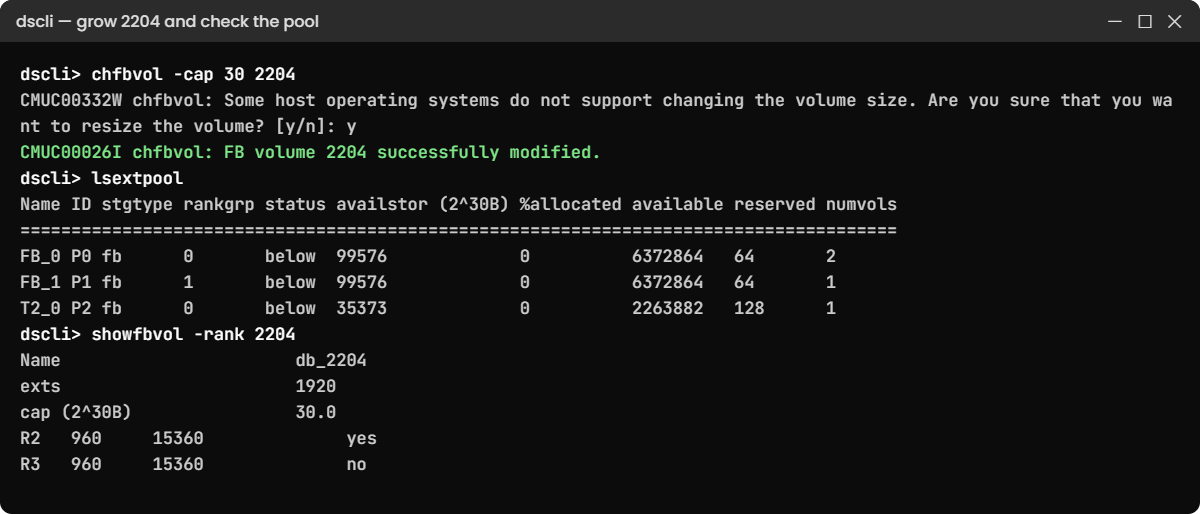
The DS8000 asks you to confirm because some operating systems can’t cope with a disk that changes size. Answer y.
Run this:
chfbvol -cap 30 2204You should see this:
dscli> chfbvol -cap 30 2204
CMUC00332W chfbvol: Some host operating systems do not support changing the volume size. Are you sure that you want to resize the volume? [y/n]: y
CMUC00026I chfbvol: FB volume 2204 successfully modified.
Now check the result:
showfbvol -rank 2204You should see this:
dscli> showfbvol -rank 2204
Date/Time: 24 October 2026 10:44:17 UTC IBM DSCLI Version: 7.10.10.348 DS: IBM.2107-78SV001
Name                       db_2204
ID                         2204
exts                       1920
cap (2^30B)                30.0
cap (blocks)               62914560
realextents                1920
==============Rank extents==============
rank extents capacity (MiB/cyl) metadata
========================================
R2   960     15360              yes
R3   960     15360              no
(output shortened)
The volume now has 1,920 extents. The extra 960 were striped again, so R2 and R3 hold 960 each, and the host stayed mapped the whole time.
✅ Checkpoint: cap (2^30B) shows 30.0 and both ranks show 960 extents.
5See the pool pay for it
Run this:
lsextpoolYou should see this:
dscli> lsextpool
Date/Time: 24 October 2026 10:44:17 UTC IBM DSCLI Version: 7.10.10.348 DS: IBM.2107-78SV001
Name ID stgtype rankgrp status availstor (2^30B) %allocated available reserved numvols
======================================================================================
FB_0 P0 fb      0       below  99576             0          6372864   64       2
FB_1 P1 fb      1       below  99576             0          6372864   64       1
T2_0 P2 fb      0       below  35373             0          2263882   128      1
P2 went from 2,264,842 to 2,263,882 available extents, a drop of 960, which is 15 GiB. A standard volume takes all its new extents in one go.
✅ Checkpoint: P2 lost 960 extents and P0 and P1 are unchanged.
6Grow a thin volume without the prompt
-quiet skips the y/n question, so only use it in scripts, and only after you’ve checked the host.
Run these:
chfbvol -quiet -cap 20 2000
lsfbvol 2000
You should see this:
dscli> chfbvol -quiet -cap 20 2000
CMUC00026I chfbvol: FB volume 2000 successfully modified.
dscli> lsfbvol 2000
Date/Time: 24 October 2026 10:44:17 UTC IBM DSCLI Version: 7.10.10.348 DS: IBM.2107-78SV001
Name     ID   accstate datastate configstate deviceMTM datatype extpool cap (2^30B) cap (10^9B) cap (blocks)
============================================================================================================
app_2000 2000 Online   Normal    Normal      2107-900  FB 512   P0      20.0        -           41943040
Volume 2000 is an ESE volume, so it grew to 20 GiB without taking a single extent from P0. Thin volumes only take extents when the host writes data.
✅ Checkpoint: 2000 shows 20.0 GiB.
7Tell the host about the new size
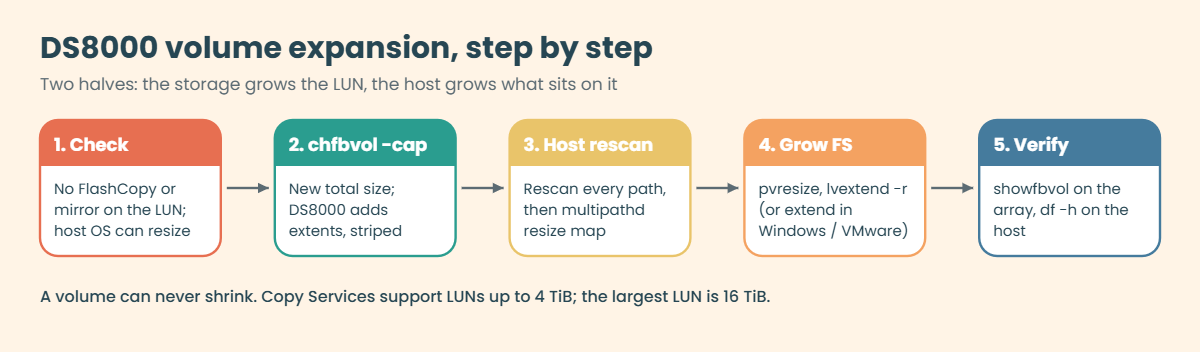
The host keeps seeing the old size until it rescans. On saat-host1 (Ubuntu with multipath, Lesson 15) the steps look roughly like this:
sudo rescan-scsi-bus.sh -s
sudo multipathd resize map mpatha
sudo pvresize /dev/mapper/mpatha
sudo lvextend -r -L +15G /dev/vgdata/lvdb
Rescan every path under the multipath device, not only one, or multipath won’t resize. The -r flag tells lvextend to grow the file system as well.
✅ Checkpoint: you can name the four host steps: rescan, multipath resize, PV resize, LV and file system resize.
8Fill a thin volume, then reclaim it
The app team tells you volume 2001 was a test disk and they’ve finished with it. First, pretend the host wrote 6 GiB to it.
Run these:
simctl write 2001 6
showfbvol 2001
You should see this:
dscli> simctl write 2001 6
SIM0102I simctl: volume 2001 now has 384 allocated extents (6 GiB written).
dscli> showfbvol 2001
Date/Time: 24 October 2026 10:44:17 UTC IBM DSCLI Version: 7.10.10.348 DS: IBM.2107-78SV001
Name                       app_2001
exts                       640
cap (2^30B)                10.0
volgrp                     V0
sam                        ESE
realextents                384
realcap (MiB)              6144
(output shortened)
The volume is 10 GiB (640 extents), but only realextents 384 are in use. Now unmap it and release the space, and note that initfbvol warns you all the data will be lost.
Run these:
chhost -action unmap -volume 2001 saat-host1
initfbvol -action releasespace 2001
You should see this:
dscli> chhost -action unmap -volume 2001 saat-host1
CMUC00531I chhost: The host saat-host1 is successfully modified.
dscli> initfbvol -action releasespace 2001
CMUC00337W initfbvol: Are you sure that you want to free all extents and lose the data associated with the FB volume 2001? [Y/N]: y
CMUC00340I initfbvol: 2001: The command releasespace has completed successfully.
Check it:
showfbvol 2001You should see this:
dscli> showfbvol 2001
Date/Time: 24 October 2026 10:44:17 UTC IBM DSCLI Version: 7.10.10.348 DS: IBM.2107-78SV001
Name                       app_2001
exts                       640
cap (2^30B)                10.0
volgrp                     -
sam                        ESE
realextents                0
realcap (MiB)              0
(output shortened)
realextents is back at 0 and volgrp shows -. The empty 10 GiB volume is still there, so you could map it again if you wanted.
✅ Checkpoint: 2001 shows realextents 0 and volgrp -.
9Delete the volume the safe way
Run these:
rmfbvol -safe 2001
lsfbvol
You should see this:
dscli> rmfbvol -safe 2001
CMUC00027W rmfbvol: Are you sure you want to delete FB volume 2001? [Y/N]: y
CMUC00028I rmfbvol: FB volume 2001 successfully deleted.
dscli> lsfbvol
Date/Time: 24 October 2026 10:44:17 UTC IBM DSCLI Version: 7.10.10.348 DS: IBM.2107-78SV001
Name     ID   accstate datastate configstate deviceMTM datatype extpool cap (2^30B) cap (10^9B) cap (blocks)
============================================================================================================
app_2000 2000 Online   Normal    Normal      2107-900  FB 512   P0      20.0        -           41943040
app_2100 2100 Online   Normal    Normal      2107-900  FB 512   P1      10.0        -           20971520
db_2204  2204 Online   Normal    Normal      2107-900  FB 512   P2      30.0        -           62914560
Since 2001 was in no volume group and had no recent I/O, -safe let it go after the usual CMUC00027W question.
✅ Checkpoint: lsfbvol lists three volumes and 2204 is 30.0 GiB.
Keep the same shell session from the lab. Next you’ll make the two mistakes that do the most damage in real volume work, trying to shrink a disk and deleting one a host is still using.
1Break it: try to shrink the database volume
Someone gave 2204 too much space and wants 10 GiB back, so try setting it to 20 GiB.
Run this:
chfbvol -quiet -cap 20 2204You’ll get this error:
dscli> chfbvol -quiet -cap 20 2204
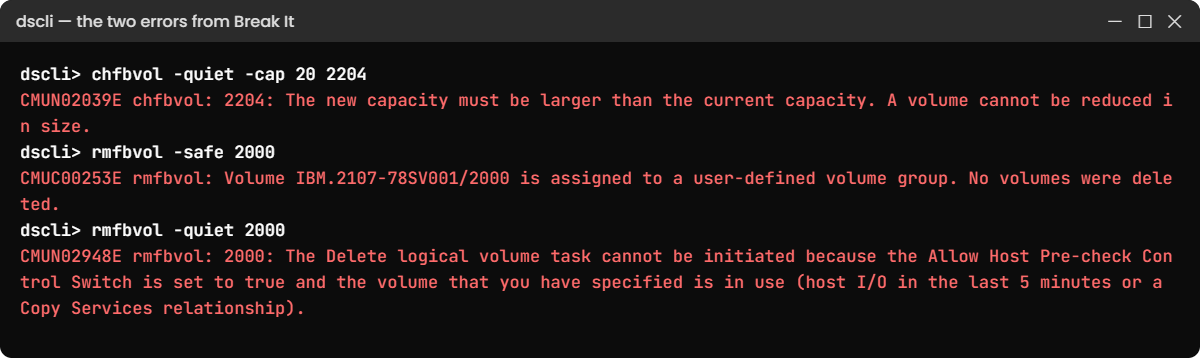
CMUN02039E chfbvol: 2204: The new capacity must be larger than the current capacity. A volume cannot be reduced in size.
Why: a DS8000 volume can only grow. The host’s file system might have data anywhere on the disk, even in the last gigabyte, and the storage has no way of knowing, so IBM blocks shrinking in both the DS CLI and the GUI.
(The message text here is a practice shell message; a real DS8000 refuses too, with its own wording.)
Fix: there’s no shrink. If the space has to come back, the host team moves the data to a new, smaller volume (LVM pvmove, Storage vMotion, a database copy), and you delete the old one using the steps in the next break. Size LUNs from real growth figures so you don’t end up here.
✅ Checkpoint: you can explain why the DS8000 refuses to shrink 2204 and how data really gets onto a smaller LUN.
2Break it: delete a disk the host is using
Volume 2000 is still mapped to saat-host1. Get the host to send it some I/O, then try to delete it, first with -safe and then without any flag.
Run these:
simctl io 2000
rmfbvol -safe 2000
rmfbvol -quiet 2000
You’ll get these errors:
dscli> simctl io 2000
SIM0101I simctl: host I/O recorded on volume 2000 (in use for the next 5 minutes).
dscli> rmfbvol -safe 2000
CMUC00253E rmfbvol: Volume IBM.2107-78SV001/2000 is assigned to a user-defined volume group. No volumes were deleted.
dscli> rmfbvol -quiet 2000
CMUN02948E rmfbvol: 2000: The Delete logical volume task cannot be initiated because the Allow Host Pre-check Control Switch is set to true and the volume that you have specified is in use (host I/O in the last 5 minutes or a Copy Services relationship).
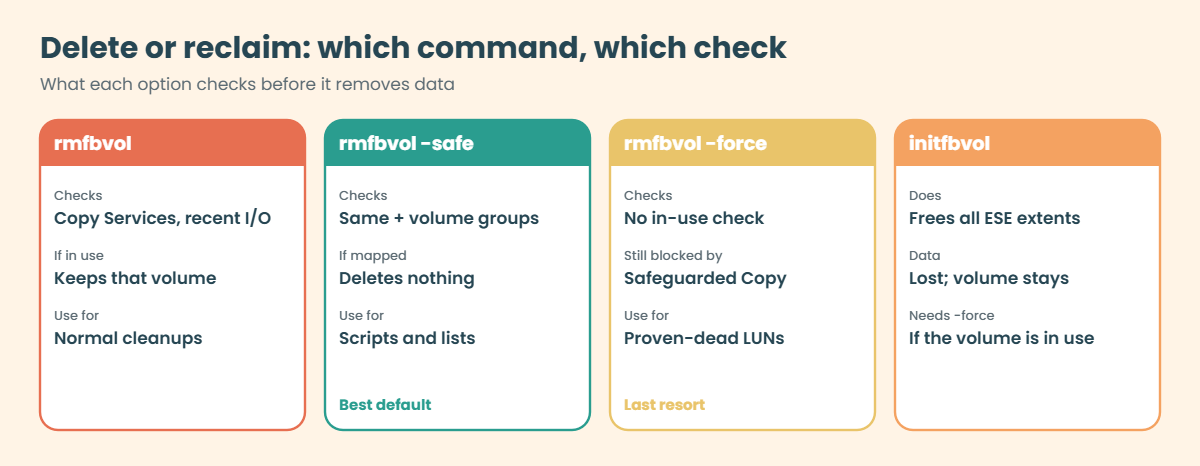
Why: the DS8000 protected you twice. -safe stopped because 2000 is still in the host’s volume group V0 (CMUC00253E, a real IBM message), and without -safe the in-use check stopped it because the volume had host I/O in the last 5 minutes. CMUN02948E is a practice shell message modelled on IBM’s CKD text.
The dangerous move here would be rmfbvol -force 2000. It skips the in-use check and deletes the volume, and the host starts getting I/O errors on a disk that’s suddenly gone. Don’t do it to “save time”.
Fix: go in the right order. The host team stops the application and removes the disk from the OS, then you unmap it, wait for the 5-minute I/O window to pass (in the shell, simctl tick 6 moves the clock forward), check, and delete.
Run these:
chhost -action unmap -volume 2000 saat-host1
simctl tick 6
showfbvol 2000
rmfbvol -safe 2000
lsfbvol
You should see this:
dscli> chhost -action unmap -volume 2000 saat-host1
CMUC00531I chhost: The host saat-host1 is successfully modified.
dscli> simctl tick 6
SIM0112I simctl: clock advanced 6 minutes.
dscli> showfbvol 2000
Date/Time: 24 October 2026 10:50:17 UTC IBM DSCLI Version: 7.10.10.348 DS: IBM.2107-78SV001
Name                       app_2000
exts                       1280
volgrp                     -
sam                        ESE
realextents                0
(output shortened)
dscli> rmfbvol -safe 2000
CMUC00027W rmfbvol: Are you sure you want to delete FB volume 2000? [Y/N]: y
CMUC00028I rmfbvol: FB volume 2000 successfully deleted.
dscli> lsfbvol
Date/Time: 24 October 2026 10:50:17 UTC IBM DSCLI Version: 7.10.10.348 DS: IBM.2107-78SV001
Name     ID   accstate datastate configstate deviceMTM datatype extpool cap (2^30B) cap (10^9B) cap (blocks)
============================================================================================================
app_2100 2100 Online   Normal    Normal      2107-900  FB 512   P1      10.0        -           20971520
db_2204  2204 Online   Normal    Normal      2107-900  FB 512   P2      30.0        -           62914560
volgrp - shows no host can see 2000 now, and the I/O window has passed, so rmfbvol -safe deleted it. On a real system you’d also get the host owner’s confirmation in writing before you answer y.
✅ Checkpoint: lsfbvol shows only 2100 and 2204.