Create FB volumes (mkfbvol)

To create DS8000 FB volumes, you carve the extent pools from Lesson 12 into LUNs that Linux, Windows, VMware and AIX servers can use. It’s all one command, mkfbvol, but there are four choices hiding inside it: which pool, which volume ID (and so which LSS and server), how big, and whether the volume is thin or fully allocated. If you get those right, the hosts in Lesson 14 get balanced storage that behaves the way you expect.

You’ll plan volume IDs with the XYZZ rule, create thin (ESE) volumes on FlashCore Module pools and standard volumes on FlashTier2 pools, name them with the #h trick and check how the extents spread across ranks. After that you break the two rules that catch most new admins out: FCM pools only take thin volumes, and even LSSs belong to rank group 0.

Begin with your Lesson 12 pools, or rebuild them with setup-12.txt.

TimeYou needBy the end you can
60 to 75 minutesThe practice shell, lab.profile and setup-12.txt from Lesson 12Plan FB volume IDs by LSS, create ESE and standard volumes with mkfbvol, read lsfbvol and showfbvol -rank, and fix pool and LSS mismatches

What it is, in one line

An FB volume is a fixed-block LUN made from extents of one extent pool; its four-digit ID decides its LSS and therefore which server owns it, and -sam decides if it is thin (ESE) or fully allocated (standard).

In Simple Words

Flat numbers in a big apartment block

Picture a new apartment block with two wings, east and west. Flats are numbered like 2104, meaning floor 21, flat 04, and the building has one rule: even floors are in the east wing and odd floors in the west wing. When a family moves in, the office gives them a flat number, and if the paper says “floor 20” but someone sends them to the west wing, they’ll never find their flat, so the number and the wing have to match.

Some flats come fully furnished on day one. Others are “furnish as you go”, where the furniture only arrives when the family needs it, and that saves room in the store.

DS8000 volumes are the flats, and the first two digits are the floor (the LSS), with even LSSs living with server0 and odd ones with server1. The furnished flats are standard volumes and the “furnish as you go” flats are thin (ESE) volumes.

Engineer's View

mkfbvol, IDs and allocation rules

The command is mkfbvol -extpool Pn -cap size [-name name] [-sam standard|ese] [-eam rotateexts|rotatevols] [-type ds|ess|blocks] volume_ID.

  • Volume ID XYZZ: X is the address group, XY is the LSS (00 to FE) and ZZ is the volume inside that LSS (00 to FF). So 2104 means LSS 21, volume 04, and you get up to 255 LSSs of 256 volumes each.
  • LSS and server: even LSSs belong to rank group 0 (server0) and odd LSSs to rank group 1 (server1), so a volume in an even LSS has to come from a group 0 pool.
  • Address groups: LSSs 20 to 2F make up address group 2, and the first volume you create in an address group decides whether the whole group is FB or CKD. You don’t create LSSs yourself; the first volume in one creates it.
  • Size: -type ds (the default) works in binary GiB, so -cap 10 is 10,737,418,240 bytes, while -type ess is decimal GB and blocks counts 512-byte blocks. The biggest LUN is 16 TiB, and Copy Services support volumes up to 4 TiB.
  • Allocation: -sam standard takes all the extents when the volume is created. -sam ese is thin, taking extents only as the host writes, and it’s the only kind that pools on FlashCore Modules accept.
  • Spreading: -eam rotateexts (the default on DS8A00) stripes a volume’s extents across every rank in the pool, whereas rotatevols keeps each volume on one rank.
  • Naming: -name erp_#h swaps #h for the volume ID in hex, so every volume in a range gets its own name.

You can grow a volume later with chfbvol -cap but you can’t shrink it (Lesson 17). -t10dif creates T10 DIF volumes if you want end-to-end checksums.

On DS8900F: it’s the same command. The TSE volumes of older systems don’t exist on DS8A00, so thin always means ESE.

How it works, step by step

Creating volumes takes seconds. Planning them is where the effort goes, which is why this list starts with the plan.

1Plan an LSS map

Give each application its own pair of LSSs, one even and one odd, inside an FB address group, for example LSS 20 and 21 for ERP and 22 and 23 for the warehouse. Copy Services also work per LSS, so a tidy map now makes Metro Mirror and FlashCopy much easier later.

2Match pool and LSS

Volumes for even LSSs come from even-ID pools (group 0) and odd LSSs from odd pools (group 1). Split each application half and half so both servers share its I/O.

To create DS8000 FB volumes read the ID: address group, LSS, volume and matching pool

3Choose thin or standard

On FlashCore Module pools you don’t get a choice, it’s -sam ese. On other flash, standard volumes give you fully reserved space, while ESE volumes save capacity but need someone watching the pool, because a thin pool can run out of real space.

4Run mkfbvol with a range

mkfbvol -extpool P0 -cap 100 -name erp_#h -sam ese 2000-2003 creates four 100 GiB thin volumes in LSS 20 in one go, and the DS8000 prints a success line for each one.

5Verify volumes and pools

lsfbvol lists the name, ID, pool and size, and -l adds the allocation method, how many ranks are used and the extent allocation method. lsextpool shows the new volume count and the space taken, and lslss shows the LSSs the volumes created, along with their group.

6Check the spread

showfbvol -rank tells you which ranks hold the volume’s extents, and with rotate extents and more than one rank you’ll see them split across the ranks. On a thin volume, realextents only grows as data gets written.

Standard versus thin ESE FB volumes on DS8A00

7Record the volume plan

Keep a table of ID, name, size, pool, LSS and future host. Lesson 14 maps these volumes to hosts, and a clear table is the thing that stops someone mapping the wrong LUN to the wrong server.

Volume IDsLSSPoolServerType
2000-200320 (even)P0 FCM_0server0ESE 100 GiB
2100-210321 (odd)P1 FCM_1server1ESE 100 GiB
2200-220122 (even)P2 T2_0server0Standard 50 GiB
2300-230123 (odd)P3 T2_1server1Standard 50 GiB

Hands-on lab: create thin and standard FB volumes

Before you run any command, double-check it

Read every command twice before you press Enter. Check the target: the system or account, the IDs, the names and the sizes. These commands are for learning and were tested in our lab, not on your system. At work, run the read-only list commands first, follow your change process, make sure a backup exists, and ask a second person to check anything that changes or deletes data. You run them at your own risk.

You’ll build the volume plan from the table above, with eight thin ERP volumes on the FlashCore Module pools and four standard warehouse volumes on the FlashTier2 pools, split evenly between the two servers.

Practice shell note: the practice shell is our own teaching tool, not IBM software. Real DS CLI output looks very close to this but isn’t identical. Capacity numbers come from the shell’s formulas, simctl write is a practice-only command that pretends a host wrote data, and some messages are the shell’s own. Every output below is what the shell printed.

1Start from the Lesson 12 pools

Run this:

python ds8sim.py -cfg lab.profile
simctl reset
quit
python ds8sim.py -cfg lab.profile -script setup-12.txt
python ds8sim.py -cfg lab.profile
lsextpool

You should see this:

dscli> lsextpool
Date/Time: 24 October 2026 11:27:32 UTC IBM DSCLI Version: 7.10.10.348 DS: IBM.2107-78SV001
Name  ID stgtype rankgrp status availstor (2^30B) %allocated available reserved numvols
=======================================================================================
FCM_0 P0 fb      0       below  199152            0          12745728  128      0
FCM_1 P1 fb      1       below  199152            0          12745728  128      0
T2_0  P2 fb      0       below  17701             0          1132901   64       0
T2_1  P3 fb      1       below  17701             0          1132901   64       0

✅ Checkpoint: Four pools, P0 and P2 in group 0, P1 and P3 in group 1, no volumes.

2Create the thin ERP volumes

Run this:

mkfbvol -extpool P0 -cap 100 -name erp_#h -sam ese 2000-2003
mkfbvol -extpool P1 -cap 100 -name erp_#h -sam ese 2100-2103

You should see this:

dscli> mkfbvol -extpool P0 -cap 100 -name erp_#h -sam ese 2000-2003
CMUC00025I mkfbvol: FB volume 2000 successfully created.
CMUC00025I mkfbvol: FB volume 2001 successfully created.
CMUC00025I mkfbvol: FB volume 2002 successfully created.
CMUC00025I mkfbvol: FB volume 2003 successfully created.
dscli> mkfbvol -extpool P1 -cap 100 -name erp_#h -sam ese 2100-2103
CMUC00025I mkfbvol: FB volume 2100 successfully created.
CMUC00025I mkfbvol: FB volume 2101 successfully created.
CMUC00025I mkfbvol: FB volume 2102 successfully created.
CMUC00025I mkfbvol: FB volume 2103 successfully created.

LSS 20 (even) came from P0 (group 0) and LSS 21 (odd) from P1 (group 1), so half of ERP sits on server0 and half on server1.

✅ Checkpoint: Eight “FB volume … successfully created” lines.

3Create the standard warehouse volumes

Run this:

mkfbvol -extpool P2 -cap 50 -name wh_#h 2200-2201
mkfbvol -extpool P3 -cap 50 -name wh_#h 2300-2301
lsfbvol

You should see this:

dscli> mkfbvol -extpool P2 -cap 50 -name wh_#h 2200-2201
CMUC00025I mkfbvol: FB volume 2200 successfully created.
CMUC00025I mkfbvol: FB volume 2201 successfully created.
dscli> mkfbvol -extpool P3 -cap 50 -name wh_#h 2300-2301
CMUC00025I mkfbvol: FB volume 2300 successfully created.
CMUC00025I mkfbvol: FB volume 2301 successfully created.
dscli> lsfbvol
Date/Time: 24 October 2026 11:27:32 UTC IBM DSCLI Version: 7.10.10.348 DS: IBM.2107-78SV001
Name     ID   accstate datastate configstate deviceMTM datatype extpool cap (2^30B) cap (10^9B) cap (blocks)
============================================================================================================
erp_2000 2000 Online   Normal    Normal      2107-900  FB 512   P0      100.0       -           209715200
erp_2001 2001 Online   Normal    Normal      2107-900  FB 512   P0      100.0       -           209715200
erp_2002 2002 Online   Normal    Normal      2107-900  FB 512   P0      100.0       -           209715200
erp_2003 2003 Online   Normal    Normal      2107-900  FB 512   P0      100.0       -           209715200
erp_2100 2100 Online   Normal    Normal      2107-900  FB 512   P1      100.0       -           209715200
erp_2101 2101 Online   Normal    Normal      2107-900  FB 512   P1      100.0       -           209715200
erp_2102 2102 Online   Normal    Normal      2107-900  FB 512   P1      100.0       -           209715200
erp_2103 2103 Online   Normal    Normal      2107-900  FB 512   P1      100.0       -           209715200
wh_2200  2200 Online   Normal    Normal      2107-900  FB 512   P2      50.0        -           104857600
wh_2201  2201 Online   Normal    Normal      2107-900  FB 512   P2      50.0        -           104857600
wh_2300  2300 Online   Normal    Normal      2107-900  FB 512   P3      50.0        -           104857600
wh_2301  2301 Online   Normal    Normal      2107-900  FB 512   P3      50.0        -           104857600

Leaving out -sam gives you standard (fully allocated) volumes, which FlashTier2 pools allow. You can also see the #h trick at work in the names, with each volume’s own ID in its name.

✅ Checkpoint: 12 volumes, all Online, four of them 50 GiB.
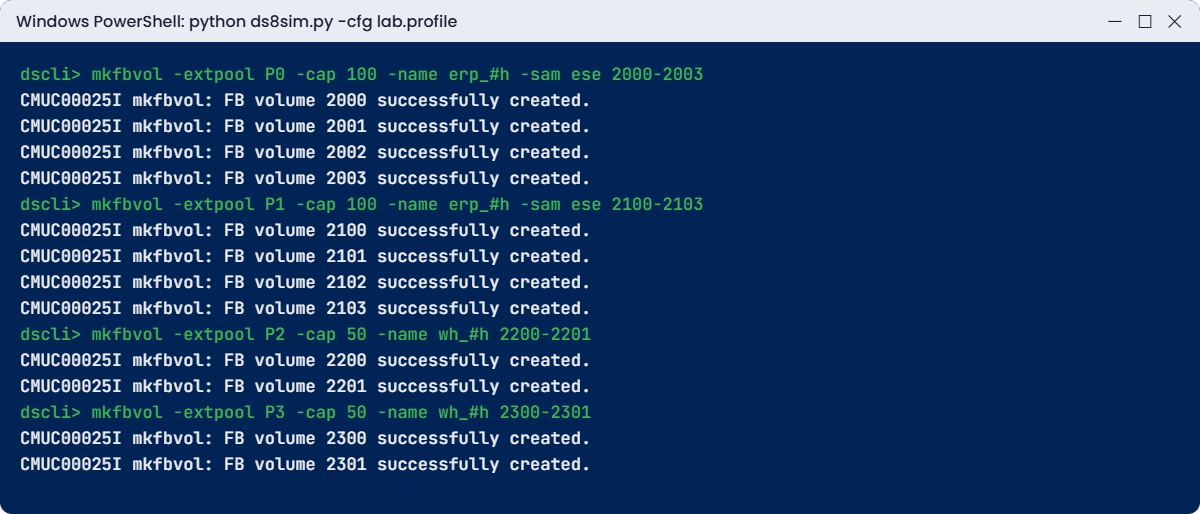
Practice shell mkfbvol creating ESE and standard volumes in four pools
Thin ERP volumes in P0 and P1, standard warehouse volumes in P2 and P3.

4Compare a thin and a standard volume

Run this:

lsfbvol -l 2000 2200

You should see this:

dscli> lsfbvol -l 2000 2200
Date/Time: 24 October 2026 11:27:32 UTC IBM DSCLI Version: 7.10.10.348 DS: IBM.2107-78SV001
Name     ID   accstate datastate configstate deviceMTM datatype extpool sam      captype cap (2^30B) cap (10^9B) cap (blocks) volgrp ranks reqcap (blocks) eam
=====================================================================================================================================================================
erp_2000 2000 Online   Normal    Normal      2107-900  FB 512   P0      ESE      DS      100.0       -           209715200    -      0     209715200       rotateexts
wh_2200  2200 Online   Normal    Normal      2107-900  FB 512   P2      Standard DS      50.0        -           104857600    -      1     104857600       rotateexts

2000 is ESE and uses 0 ranks because nothing has been written to it yet, while 2200 is Standard and already sits on a rank. Both use rotate extents.

✅ Checkpoint: You can read sam, ranks and eam for both volumes.

5Where does a standard volume live?

Run this:

showfbvol -rank 2200

You should see this:

dscli> showfbvol -rank 2200
Date/Time: 24 October 2026 11:27:32 UTC IBM DSCLI Version: 7.10.10.348 DS: IBM.2107-78SV001
Name                       wh_2200
ID                         2200
extpool                    P2
exts                       3200
cap (2^30B)                50.0
ranks                      1
sam                        Standard
eam                        rotateexts
realextents                3200
(output shortened)
==============Rank extents==============
rank extents capacity (MiB/cyl) metadata
========================================
R4   3200    51200              yes

All 3,200 extents of 16 MiB (50 GiB) sit on R4 because it’s the only rank in pool P2. In a pool with several ranks, rotate extents would spread them across all of them.

✅ Checkpoint: realextents equals exts for the standard volume.

6Watch a thin volume grow

simctl write is a practice-only command that pretends a host has written data to a thin volume.

Run this:

simctl write 2000 40
showfbvol 2000

You should see this:

dscli> simctl write 2000 40
SIM0102I simctl: volume 2000 now has 2560 allocated extents (40 GiB written).
dscli> showfbvol 2000
Date/Time: 24 October 2026 11:27:32 UTC IBM DSCLI Version: 7.10.10.348 DS: IBM.2107-78SV001
Name                       erp_2000
ID                         2000
extpool                    P0
exts                       6400
cap (2^30B)                100.0
ranks                      2
sam                        ESE
eam                        rotateexts
realextents                2560
realcap (MiB)              40960
(output shortened)

To the host the volume is still 100 GiB, but only 2,560 real extents (40 GiB) are in use, spread over 2 ranks. That’s thin provisioning doing its job, with the pool only paying for data that was written.

✅ Checkpoint: realextents 2560 and ranks 2 for volume 2000.

7Check LSSs and pools, save the setup

Run this:

lslss
lsextpool

You should see this:

dscli> lslss
Date/Time: 24 October 2026 11:27:32 UTC IBM DSCLI Version: 7.10.10.348 DS: IBM.2107-78SV001
ID Group addrgrp stgtype confgvols subsys
=========================================
20 0     2       fb      4         0xFF20
21 1     2       fb      4         0xFF21
22 0     2       fb      2         0xFF22
23 1     2       fb      2         0xFF23
dscli> lsextpool
Date/Time: 24 October 2026 11:27:32 UTC IBM DSCLI Version: 7.10.10.348 DS: IBM.2107-78SV001
Name  ID stgtype rankgrp status availstor (2^30B) %allocated available reserved numvols
=======================================================================================
FCM_0 P0 fb      0       below  199152            0          12745728  128      4
FCM_1 P1 fb      1       below  199152            0          12745728  128      4
T2_0  P2 fb      0       below  17601             1          1126501   64       2
T2_1  P3 fb      1       below  17601             1          1126501   64       2

Four LSSs were created for you, two per server, all in address group 2. For Lesson 14 you’ll want a setup-13.txt, so copy setup-12.txt, delete its last lsextpool line and add these five lines at the end.

Add to setup-13.txt:

mkfbvol -extpool P0 -cap 100 -name erp_#h -sam ese 2000-2003
mkfbvol -extpool P1 -cap 100 -name erp_#h -sam ese 2100-2103
mkfbvol -extpool P2 -cap 50 -name wh_#h 2200-2201
mkfbvol -extpool P3 -cap 50 -name wh_#h 2300-2301
lsfbvol

✅ Checkpoint: LSSs 20 and 22 are group 0, 21 and 23 group 1.

Break It, Then Fix It

Most first-time mkfbvol commands fail on one of two rules. Break both, read what the message says, then fix it.

1Break it: a standard volume in a FlashCore Module pool

A DBA asks for two 200 GiB volumes, “fully allocated, please”, and you try it in P0.

Run this:

mkfbvol -extpool P0 -cap 200 -name db_#h 2004-2005

You’ll get this error:

dscli> mkfbvol -extpool P0 -cap 200 -name db_#h 2004-2005
CMUN02031E mkfbvol: P0: Only thin provisioned ESE volumes (-sam ese) can be created in an extent pool with FlashCore Module ranks.

Why: P0 is built on FlashCore Module ranks, where IBM only allows thin (ESE) volumes, and without -sam mkfbvol asks for a standard one. (The wording of the message is the practice shell’s, but the rule is IBM’s.)

Fix: add -sam ese. When you explain it to the DBA, tell them it’s because of FCM compression and thin allocation, so the space is protected by pool monitoring instead of by pre-allocation.

Run this:

mkfbvol -extpool P0 -cap 200 -name db_#h -sam ese 2004-2005

You should see this:

dscli> mkfbvol -extpool P0 -cap 200 -name db_#h -sam ese 2004-2005
CMUC00025I mkfbvol: FB volume 2004 successfully created.
CMUC00025I mkfbvol: FB volume 2005 successfully created.

✅ Checkpoint: 2004 and 2005 created as ESE volumes in P0.

Practice shell mkfbvol errors: standard volume in FCM pool and even LSS in odd pool
The two classic mkfbvol errors and their fixes.

2Break it: an even LSS from an odd pool

P0 is getting busy, so a colleague puts the next ERP log volume in P1 but keeps the ERP numbering, 2006.

Run this:

mkfbvol -extpool P1 -cap 100 -name log_#h -sam ese 2006

You’ll get this error:

dscli> mkfbvol -extpool P1 -cap 100 -name log_#h -sam ese 2006
CMUN02030E mkfbvol: 20: Volumes in an even LSS must be created in an extent pool of rank group 0. Extent pool P1 belongs to rank group 1.

Why: 2006 is in LSS 20, an even LSS that server0 owns, while P1 belongs to rank group 1 (server1). The DS8000 won’t let a volume’s LSS and its pool sit on different servers.

Fix: keep the pool and pick an ID in an odd LSS instead, here 2104 in LSS 21.

Run this:

mkfbvol -extpool P1 -cap 100 -name log_#h -sam ese 2104
lsfbvol -extpool P1

You should see this:

dscli> mkfbvol -extpool P1 -cap 100 -name log_#h -sam ese 2104
CMUC00025I mkfbvol: FB volume 2104 successfully created.
dscli> lsfbvol -extpool P1
Date/Time: 24 October 2026 11:27:32 UTC IBM DSCLI Version: 7.10.10.348 DS: IBM.2107-78SV001
Name     ID   accstate datastate configstate deviceMTM datatype extpool cap (2^30B) cap (10^9B) cap (blocks)
============================================================================================================
erp_2100 2100 Online   Normal    Normal      2107-900  FB 512   P1      100.0       -           209715200
erp_2101 2101 Online   Normal    Normal      2107-900  FB 512   P1      100.0       -           209715200
erp_2102 2102 Online   Normal    Normal      2107-900  FB 512   P1      100.0       -           209715200
erp_2103 2103 Online   Normal    Normal      2107-900  FB 512   P1      100.0       -           209715200
log_2104 2104 Online   Normal    Normal      2107-900  FB 512   P1      100.0       -           209715200

✅ Checkpoint: log_2104 sits in P1 next to the other LSS 21 volumes.

This happened at work

Half the LUNs went missing on the insurer’s cluster

An insurance company was moving its claims database onto a new DS8A50. The plan called for 16 volumes of 500 GiB, eight in LSS 30 and eight in LSS 31, so that both servers would share the load.

The engineer wrote the script in a hurry. He ran mkfbvol ... 3000-3007 in the group 0 pool, and for the second half he copied the line and changed only the pool, keeping IDs 3008 to 300F. The DS8000 refused those eight with the LSS and pool mismatch error, but in the rush of the change window he took it for a “pool full” message, pointed the second command at the group 0 pool as well, and it went through.

All 16 volumes landed in LSS 30 on server0, but the Linux team could see all 16 LUNs, so nobody noticed and the database went live. Three weeks later the month-end claims run crawled. When someone finally pulled the performance data, server0 was close to its limit and server1 was almost idle. Fixing it took two weekends: they created eight new volumes in LSS 31 on the group 1 pool, moved half the database files over with the host’s volume manager and removed the old ones.

These days the volume table (ID, LSS, pool, server) goes into the change record, and the team has a rule that any mkfbvol error gets read word by word and pasted into the ticket before anyone tries again.

Common mistakes and troubleshooting

SymptomLikely causeWhat to check / fix
mkfbvol says only ESE volumes allowedPool built on FlashCore ModulesAdd -sam ese
Error about even/odd LSS and rank groupVolume ID LSS and pool on different serversEven LSS with even pool, odd LSS with odd pool
mkfbvol fails in an address groupAddress group already used for CKDCheck lslss / lslcu and use another address group for FB
Host sees a slightly smaller disk than plannedUsed -type ess (decimal GB)Default -type ds is binary GiB, so agree units with the host team
One server much busierAll volumes of an app in even (or odd) LSSsSplit each app over an even and an odd LSS
Thin pool filling faster than expectedESE volumes growing with host writesWatch lsextpool, set thresholds and add ranks
Duplicate or confusing namesNo #h in -nameUse -name app_#h so each ID is in the name

A good habit: before each mkfbvol, say the ID out loud as “LSS XY, even or odd, server 0 or 1″ and check that the pool ID has the same parity.

Interview questions

Click a question to open it. They’re written the way an interviewer would ask them, and under each one you’ll find why they ask it and one way you could answer in your own words.

Fresher level

1. How do you read a DS8000 volume ID like 2104?

Why they ask this: It’s a basic check that you understand addressing.

How you might answer: The ID is XYZZ, so the first two digits, 21, are the LSS and the last two, 04, are the volume inside that LSS, while the first digit, 2, is the address group. LSS 21 is odd, which means the volume belongs to server1 and has to come from a rank group 1 pool.

2. What is the difference between a standard and an ESE FB volume?

Why they ask this: It tests your thin provisioning basics.

How you might answer: A standard volume takes all its extents from the pool as soon as it’s created, whereas an ESE volume is thin and only takes extents when the host writes. On a DS8A00, pools on FlashCore Modules only allow ESE volumes.

2–5 years experience

3. Walk me through creating 8 volumes of 200 GiB for a new Oracle server on a DS8A00 with FCM pools.

Why they ask this: They want to see planning as well as correct syntax.

How you might answer: I’d pick a free LSS pair, say 40 and 41, and check lslss to make sure the address group is FB. Then it’s mkfbvol -extpool P0 -cap 200 -name ora_#h -sam ese 4000-4003 and mkfbvol -extpool P1 -cap 200 -name ora_#h -sam ese 4100-4103. I’d verify with lsfbvol and lsextpool and write the IDs down, so the host mapping in the next step picks up the right volumes.

4. mkfbvol fails saying the volume must be in an extent pool of rank group 0. What happened?

Why they ask this: They’re checking that you read errors instead of guessing.

How you might answer: The volume ID is in an even LSS, which belongs to rank group 0, but I gave it a pool from rank group 1. So either I use a group 0 pool or I move the ID to an odd LSS. I wouldn’t just switch pools without thinking, because that’s how a whole application ends up on one server.

Senior level

5. How would you design LSS and volume layout for a mixed FB and CKD DS8000 that will also use Metro Mirror?

Why they ask this: A senior person has to plan the address space for growth and replication.

How you might answer: I’d reserve address groups per platform, because an address group can only be FB or CKD. Inside the FB groups each application gets an even and odd LSS pair, which splits the I/O and lets me set Copy Services paths and consistency groups per LSS. I’d keep mirrored volumes under 4 TiB and document the map so the DR box uses the same IDs.

6. A team wants standard volumes for “guaranteed space” but the system only has FCM pools. How do you handle it?

Why they ask this: It shows whether you can explain platform rules and manage the risk.

How you might answer: I’d explain that FCM pools only take ESE volumes and that the space safety comes from monitoring: pool thresholds, over-provisioning limits with chextpool -opratiolimit and regular lsextpool checks. If they truly need non-thin volumes, that means FlashTier pools, which is a capacity and cost decision. In my experience most teams are happy with ESE once they’ve seen the alerts and limits.

Quick quiz

Q1. Volume 2300 is in which LSS?

  1. 20
  2. 23
  3. 30
  4. 00
Show answer

B: the first two digits of XYZZ are the LSS, so 23.

Q2. Which server owns volumes in LSS 22?

  1. server1
  2. server0
  3. Both
  4. The HMC
Show answer

B: even LSSs belong to rank group 0, which is server0.

Q3. What does -sam ese create?

  1. A standard volume
  2. A thin provisioned volume
  3. A CKD volume
  4. A FlashCopy target
Show answer

B: ESE volumes only take extents when data is written.

Q4. What does -name app_#h do for range 2000-2003?

  1. Names all volumes app_#h
  2. Adds the hex volume ID to each name
  3. Adds a random number
  4. Fails
Show answer

B: #h turns into the hex ID, so the names run from app_2000 to app_2003.

Q5. Default extent allocation method on DS8A00?

  1. rotatevols
  2. rotateexts
  3. random
  4. single rank
Show answer

B: rotate extents stripes a volume over every rank in the pool.

Quick recap

  • mkfbvol -extpool Pn -cap size -name app_#h [-sam ese] ID or range.
  • Volume ID XYZZ: XY is the LSS, X the address group, ZZ the volume.
  • An even LSS needs a group 0 (even) pool and an odd LSS needs a group 1 (odd) pool.
  • FlashCore Module pools only accept ESE (thin) volumes.
  • The default size unit is binary GiB, and rotate extents spreads volumes over the ranks.
  • Check with lsfbvol -l, showfbvol -rank, lslss and lsextpool.

Next lesson

Lesson 14: Hosts, host ports and volume mapping → Next you define hosts with their WWPNs and map these volumes to them.

Further reading: create DS8000 FB volumes

Want to go deeper into create DS8000 FB volumes? IBM Redbook SG24-8559, section 10.3.5 has the full mkfbvol examples, striping and expansion included, and for the address rules you can go back to LSS, LCU and address groups in the Architecture course.

You can also see the full plan for this course on the IBM DS8000 Implementation course page.

Scroll to Top

This website uses cookies

We use a few cookies to keep this site working. If you allow it, we also use Google Analytics to count visits so we can improve our lessons. You can accept all, deny the optional ones, or choose what to allow.