Network planning and the Management Console
-
Phase 0: Before you start
-
Phase 1: Plan and install
-
Phase 2: Build the storage
-
Phase 3: Copy Services
-
Phase 4: Run it day to day
-
Phase 5: Troubleshooting and career
The DS8000 Management Console is the pair of small servers at the bottom of the rack, called HMCs, that you use to configure, watch and service the storage. Every DS GUI click and every DS CLI command passes through them, and they’re also how the system calls IBM when a part fails, but no host data ever goes through them.
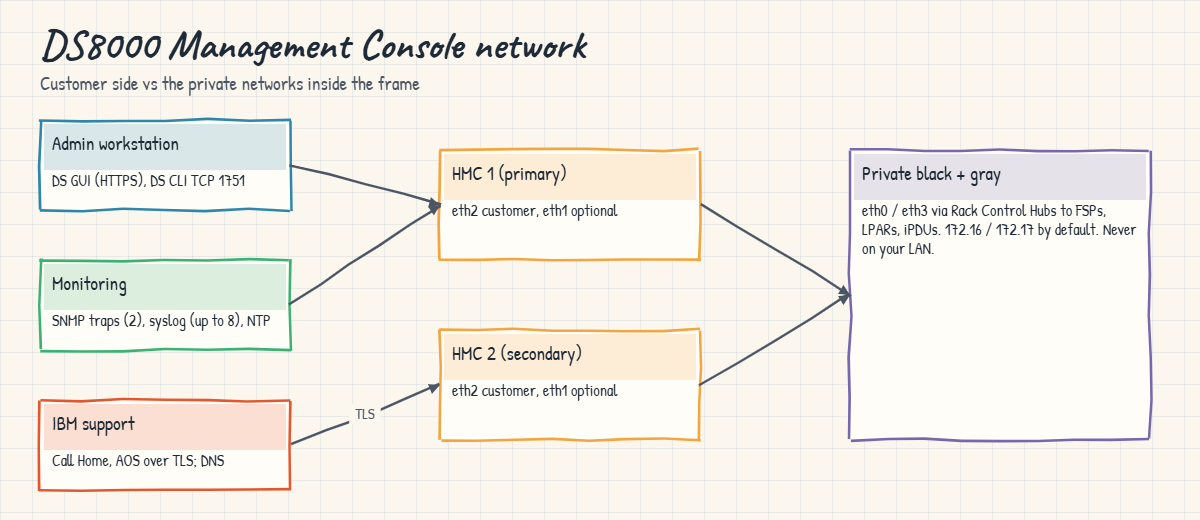
Here you plan the network around the two HMCs: an IP address for each, the gateway, DNS and NTP, firewall openings for the DS CLI, Call Home and remote support, and the trap that catches people out, the internal 172.16 and 172.17 private networks. You’ll also see what each HMC runs and why the second one matters. In the lab you write a small checker that catches HMC network mistakes before they reach the configuration worksheets, and then look at the HMCs, their access settings and the SNMP setup in the practice shell.
| Time | You need | By the end you can |
|---|---|---|
| 70 to 85 minutes | Python 3.8+, and the practice shell with your lab.profile in C:\ds8k-lab | Plan the HMC network and firewall for a DS8000, explain what the two HMCs do, and check HMC access and notification settings with the DS CLI |
What it is, in one line
The DS8000 Management Console is a pair of HMCs that run the DS GUI, DS CLI server, Copy Services Manager and Call Home; you give each one an IP address on your network and open the right firewall paths.
In Simple Words
The school office and the two clerks
Think of a big school. The real work happens in the classrooms, between teachers and students, and nobody carries homework through the school office. The office is where parents call, where the timetable gets changed and where the headmaster phones the repair man when a fan breaks. There are two clerks in there, so if one is off sick the other picks up the phone. The office also needs a phone line to the outside world: if someone cuts it, classes carry on as normal, but nobody can report the broken fan or change the timetable.
A DS8000 is set up like that school. The CPCs and flash drives are the classrooms, the Management Console is the office with HMC 1 and HMC 2 as its two clerks, and your network and firewall are the phone line, so if you plan that line badly the office goes quiet.
Engineer's View
What is inside the HMCs and what they need
Each DS8A00 has two HMCs, 1U each, at the bottom of the base rack (the primary sits above the secondary). Each is an IBM 7063-CR2 Power HMC running Red Hat Linux, with Secure Boot from Release 10. lshmc shows both, with their role, release, management IP, memory and disk.
Each HMC has four Ethernet ports that matter:
- eth0 and eth3: the internal black and gray private networks, through two Rack Control Hubs, to the CPC service processors, the storage partitions and the iPDUs. Never cable these to your network.
- eth2: the primary customer network connection.
- eth1: an optional second customer network, often used to separate internet traffic (Call Home, remote access) from management traffic (DS GUI, DS CLI, Copy Services Manager).
By default the private networks use 172.16.y.z and 172.17.y.z. If your company uses either range anywhere the HMC can reach, the IBM SSR picks one of the optional ranges at install time, and changing it later needs an IBM support request.
On the HMC you’ll find the DS Storage Management GUI, the HMC Web UI (service console), IBM Copy Services Manager, the RESTful API, the DS CLI and the ESSNI server that both DS CLI and the GUI log in to. The old CIM agent has gone, so there are fewer open ports.
For each HMC you plan one IP address, hostname and domain name (IPv4 or IPv6), plus the gateway, DNS, NTP, SNMP trap receivers, email recipients and syslog servers (up to eight). DNS has to resolve esupport.ibm.com, directly or through a proxy, because Call Home doesn’t work with plain IP addresses any more. The DS CLI talks to the HMC on TCP port 1751 and uses TCP 1755 to upload Copy Services Manager packages.
On DS8900F it’s the same two-HMC design with the same planning items, but check the planning guide for the exact HMC model and ports.
How it works, step by step
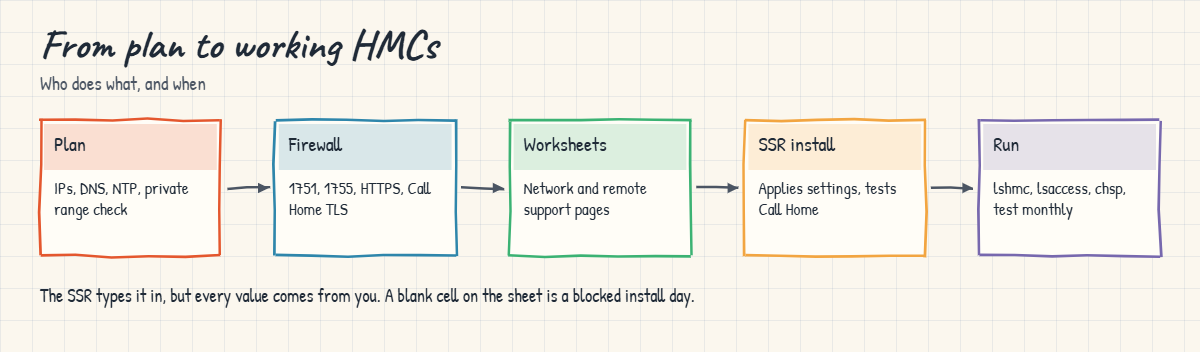
Here’s how the HMC network was planned and built for a telco’s new DS8A50. Most of the work happens on paper weeks before the system arrives, and the IBM SSR types it in on install day.
1Pick the addresses
The network team gives you one IP address per HMC on the management VLAN, along with the netmask, gateway, DNS servers and NTP servers. Keep both HMCs in the same management subnet as their gateway, so a single routing rule covers both.
If you’d rather keep Call Home and remote support traffic off the management VLAN, plan a second customer network on eth1 too.
2Check the private ranges
Ask the network team: “Do we use 172.16.x.x or 172.17.x.x anywhere?” If any network the HMC can reach uses those ranges, they’d clash with the DS8000’s internal black and gray networks, and the SSR has to pick a different range at install time.
3Open the firewall
You need to let three kinds of traffic through:
- Admins to the HMCs: HTTPS for the DS GUI, TCP 1751 for the DS CLI, and TCP 1755 if you update Copy Services Manager from your DS CLI workstation.
- HMCs to IBM: Call Home and remote support (embedded AOS) over TLS, with DNS that resolves
esupport.ibm.comor a proxy that does. - HMCs to your tools: SNMP traps to up to two receivers, email, syslog (up to eight servers), NTP, LDAP and key servers if you use them.
4Fill the worksheets and let the SSR apply them
All of this goes into the configuration worksheets. On install day the SSR sets up the HMC network, hostname, DNS, NTP, routing and remote support from your sheet and tests Call Home. If eth1 or eth2 need changing later, you do it in the HMC Web UI under HMC Management, Change Network Settings.
5Learn what each HMC does after go-live
The two HMCs are dual-active, so you can use either one at any time. HMC 1 normally has the primary role and a few service tasks only run there. A DS CLI or GUI command goes to the first HMC, and if that one doesn’t answer it goes to the second automatically. Any change made on one shows up on the other straight away.
Don’t think of the second HMC as a spare you can do without. It’s the only other way to power the system off safely, to enter an encryption recovery key, and to keep Copy Services management running if HMC 1 fails.
The HMC also has its own separate set of logins. The HMC Web UI (the Service Management Console, which you open from the wrench icon on the GUI login page) uses its own user customer, and IBM tells you to change its default password. Those credentials have nothing to do with your DS GUI and DS CLI users.

Remember from Lesson 1 of the Architecture course that the HMC isn’t in the data path. If both HMCs go down, hosts carry on reading and writing, but you lose management, Call Home and Copy Services control until one comes back, which is why the network and the second HMC deserve some care.
Hands-on lab: plan and check the HMC network
Before you run any command, double-check it
Read every command twice before you press Enter. Check the target: the system or account, the IDs, the names and the sizes. These commands are for learning and were tested in our lab, not on your system. At work, run the read-only list commands first, follow your change process, make sure a backup exists, and ask a second person to check anything that changes or deletes data. You run them at your own risk.
You start by writing the HMC network plan as a small CSV and checking it with Python, the way a careful storage admin checks a worksheet before it goes to IBM. After that you look at the management side of the practice DS8A50: both HMCs, their access settings and the SNMP setup.
Practice shell note: the practice shell is our own teaching tool, not IBM software, and its HMC names, addresses and serial numbers are made up for the lab. Real DS CLI output looks very close to this but isn’t identical. The SNMP error in the break lab (CMUN03060E) is a practice shell message, though the rule behind it, at most two trap addresses, is IBM’s.
1Write the HMC network plan
Save this as hmc-plan.csv in C:\ds8k-lab. The other_networks line lists every network the HMC can reach, separated by semicolons, and you need it to catch clashes with the DS8000 private ranges.
Save this as hmc-plan.csv:
item,value
hmc1_ip,10.20.8.21
hmc2_ip,10.20.8.22
netmask,255.255.255.0
gateway,10.20.8.1
dns,10.20.1.53
ntp,10.20.1.123
other_networks,10.20.0.0/16;192.168.40.0/24
snmp_traps,10.20.5.40;10.20.5.41
syslog,10.20.5.50✅ Checkpoint: hmc-plan.csv has an item,value header and nine rows.
2Write the checker
Save this as hmc_plan.py. It uses Python’s standard ipaddress module to check subnets and overlaps, and the firewall lines it prints come from the Redbook: TCP 1751 and 1755 for the DS CLI, TLS for Call Home and remote support, and traps and syslog for monitoring.
It’s a planning tool that runs on your laptop and checks the plan before any HMC exists. Only the optional --check part talks to the DS8000, through the DS CLI after install, and you’ll use that in step 6.
Save this as hmc_plan.py:
# hmc_plan.py - check a DS8000 HMC network plan (rules from IBM Redbook SG24-8559-01, 5.3 and 6.1-6.5)
# Planning tool: runs on your laptop, not on the DS8000. The plan check needs no DS8000.
# Optional --check (after install) compares the plan with the box through the DS CLI (auto.profile).
import ipaddress, sys
import csv, subprocess
DSCLI = ["python", "ds8sim.py", "-cfg", "auto.profile"] # at work: ["dscli", "-cfg", "auto.profile"]
def dscli(*args):
"""Run one DS CLI command and return its rows as dictionaries."""
out = subprocess.run(DSCLI + list(args), capture_output=True, text=True).stdout
lines = [l for l in out.splitlines() if l and not l.startswith("SaatVedha") and not l.startswith("CMUC")]
return list(csv.DictReader(lines))
args = [a for a in sys.argv[1:] if a != "--check"]
name = args[0] if args else "hmc-plan.csv"
with open(name, newline="") as f:
plan = {r["item"]: r["value"] for r in csv.DictReader(f)}
ip = ipaddress.ip_address
net = ipaddress.ip_network(f"{plan['hmc1_ip']}/{plan['netmask']}", strict=False)
private = [ipaddress.ip_network("172.16.0.0/16"), ipaddress.ip_network("172.17.0.0/16")]
problems = []
print(f"HMC subnet: {net}")
for key in ("hmc2_ip", "gateway"):
if ip(plan[key]) not in net:
problems.append(f"{key} {plan[key]} is not in {net} (the HMC subnet from hmc1_ip)")
if plan["hmc1_ip"] == plan["hmc2_ip"]:
problems.append("hmc1_ip and hmc2_ip are the same; each HMC needs its own address")
why = {"dns": "Call Home needs DNS to resolve esupport.ibm.com",
"ntp": "HMC, hosts and workstations need the same time for error analysis"}
for key in ("dns", "ntp"):
if not plan.get(key):
problems.append(f"{key} is empty: {why[key]}")
nets = [net] + [ipaddress.ip_network(n) for n in plan["other_networks"].split(";") if n]
for n in nets:
for p in private:
if n.overlaps(p):
problems.append(f"{n} overlaps the DS8000 private network {p}; ask the IBM SSR for another range")
traps = [t for t in plan.get("snmp_traps", "").split(";") if t]
if len(traps) > 2:
problems.append(f"{len(traps)} SNMP trap addresses; chsp -snmpaddr takes at most two")
print("Firewall: workstation -> HMCs TCP 1751 (DS CLI), TCP 1755 (CSM install), HTTPS (DS GUI)")
print("Firewall: HMCs -> outside Call Home and AOS remote support over TLS, DNS")
print(f"Firewall: HMCs -> monitoring SNMP traps UDP 162 to {', '.join(traps) or '-'}; syslog 514 to {plan.get('syslog') or '-'}")
print()
if problems:
print("PLAN PROBLEMS:")
for p in problems:
print(" " + p)
else:
print("Plan OK: ready for the configuration worksheets.")
if "--check" in sys.argv: # only after IBM has installed the system
print()
hmcs = dscli("lshmc")
for key, h in zip(("hmc1_ip", "hmc2_ip"), hmcs):
same = h["Management-IP"] == plan[key]
print(f"HMC {h['Name']}: {h['Management-IP']}, plan {key} {plan[key]} -> {'OK' if same else 'DIFFERENT'}")
sp = dscli("showsp")[0]
keys = [k for k in sp if k is not None]
vals = [sp[k] for k in keys] + sp.get(None, [])
extra = len(vals) - len(keys) # SNMPadd is a comma list, so it spills into extra fields
i = keys.index("SNMPadd")
got = sorted(a for a in vals[i:i + 1 + extra] if a != "-")
print(f"SNMP traps on the DS8000: {', '.join(got) or 'none'} -> {'OK' if got == sorted(traps) else 'DIFFERENT from plan'}")✅ Checkpoint: hmc_plan.py is saved next to hmc-plan.csv.
3Check the plan
Run this:
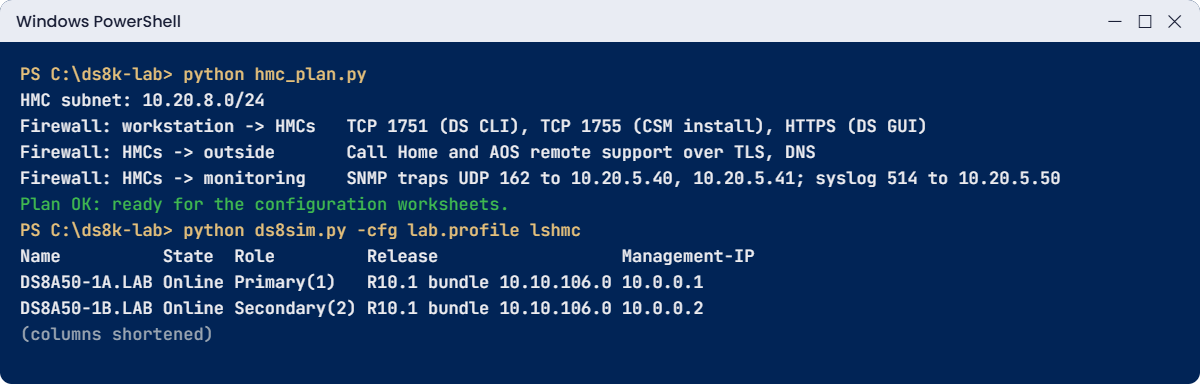
python hmc_plan.pyYou should see this:
HMC subnet: 10.20.8.0/24
Firewall: workstation -> HMCs TCP 1751 (DS CLI), TCP 1755 (CSM install), HTTPS (DS GUI)
Firewall: HMCs -> outside Call Home and AOS remote support over TLS, DNS
Firewall: HMCs -> monitoring SNMP traps UDP 162 to 10.20.5.40, 10.20.5.41; syslog 514 to 10.20.5.50
Plan OK: ready for the configuration worksheets.Both HMCs and the gateway sit in 10.20.8.0/24, DNS and NTP are set, no network touches 172.16 or 172.17, and there are two trap receivers. Those three firewall lines are what you send the network team with the change request.
✅ Checkpoint: The checker says “Plan OK”.
4Look at the two HMCs and their access settings
Start clean in the practice shell and run a short management check as a script. You set up lab.profile and security.dat in Lesson 2.
Run this, then save the script below as dayone-hmc.txt:
python ds8sim.py -cfg lab.profile simctl reset# dayone-hmc.txt - management console checks
lshmc
lsaccess -l
showspRun this:
python ds8sim.py -cfg lab.profile -script dayone-hmc.txtYou should see this (after the one-line notice):
Name State Role Release Management-IP Location-Code Machine-Type Machine-Model Memory Disk
================================================================================================================================
DS8A50-1A.LAB Online Primary(1) R10.1 bundle 10.10.106.0 10.0.0.1 U7063CR2.78SV1DD 7063 CR2 33GB 1TB
DS8A50-1B.LAB Online Secondary(2) R10.1 bundle 10.10.106.0 10.0.0.2 U7063CR2.78SV2DD 7063 CR2 33GB 1TB
hmc cmdline wui modem cim aos rsc vpn
===============================================================
hmc1 enabled enabled disabled disabled enabled enabled disabled
hmc2 enabled enabled disabled disabled enabled enabled disabled
Name IbmStoragePlex
desc -
acct -
SNMP Disabled
SNMPadd -
emailnotify Disabled
emailaddr -
emailrelay Disabled
emailrelayaddr -
emailrelayhost -
numkssupported 4
loginprompt Disabled
promptmessage -
guisuggestions showRead it from the top. lshmc shows two 7063-CR2 HMCs, both online, with HMC 1 primary at 10.0.0.1 and HMC 2 secondary at 10.0.0.2, both on the same R10.1 bundle. If the two releases were different, it would mean a code load is half done.
lsaccess -l shows the DS CLI (cmdline) and the Web UI enabled on both HMCs, with remote support set up through AOS and RSC, and the modem, CIM and VPN columns disabled. Changing any of these is a security decision, made with the chaccess command and usually with your security team watching.
showsp shows that the storage complex has no SNMP traps and no email notification yet, which is what you set up next.
✅ Checkpoint: Both HMCs show Online and SNMP shows Disabled.
5Send SNMP traps to your monitoring servers
Your plan has two trap receivers, and chsp takes them as one comma-separated list with no spaces.
Run this:
python ds8sim.py -cfg lab.profile chsp -snmp on -snmpaddr 10.20.5.40,10.20.5.41
python ds8sim.py -cfg lab.profile showspYou should see this (showsp shortened):
CMUC00040I chsp: Storage complex IbmStoragePlex successfully modified.
Name IbmStoragePlex
desc -
acct -
SNMP Enabled
SNMPadd 10.20.5.40,10.20.5.41CMUC00040I is the real message IBM shows for this command. Keep in mind what this setting covers: Copy Services and storage complex traps only. Hardware serviceable-event traps and Call Home are set up on the HMC itself by the SSR, from your worksheets.
Monitoring gets its own, deeper treatment in Lesson 21.
✅ Checkpoint: showsp shows SNMP Enabled with both trap addresses.
6Check the box against your plan
After install, compare what the DS8000 has with what you planned. Scripts get their own profile, so save auto.profile next to ds8sim.py; it uses the security.dat from Lesson 2.
Save this as auto.profile:
hmc1: 10.0.0.1
username: admin
pwfile: security.dat
devid: IBM.2107-78SV001
banner: off
header: on
format: delim
delim: ,With the banner off, the header on and format delim, the DS CLI prints one header row and then plain comma-separated rows, which a script can read easily.
Run this:
python hmc_plan.py --checkYou should see this:
HMC subnet: 10.20.8.0/24
Firewall: workstation -> HMCs TCP 1751 (DS CLI), TCP 1755 (CSM install), HTTPS (DS GUI)
Firewall: HMCs -> outside Call Home and AOS remote support over TLS, DNS
Firewall: HMCs -> monitoring SNMP traps UDP 162 to 10.20.5.40, 10.20.5.41; syslog 514 to 10.20.5.50
Plan OK: ready for the configuration worksheets.
HMC DS8A50-1A.LAB: 10.0.0.1, plan hmc1_ip 10.20.8.21 -> DIFFERENT
HMC DS8A50-1B.LAB: 10.0.0.2, plan hmc2_ip 10.20.8.22 -> DIFFERENT
SNMP traps on the DS8000: 10.20.5.40, 10.20.5.41 -> OKThe script ran lshmc and showsp for you. The trap receivers match the plan but the HMC addresses don’t, because the practice HMCs answer on 10.0.0.1 and 10.0.0.2. On a real install, DIFFERENT here means the SSR set values other than the ones on your worksheet, and you want to find that out before sign-off.
One small detail: SNMPadd is itself a comma list, so in comma-delimited output it spills into the next fields and the script has to join it back together. At work you can have a scheduler on the jump server run this check every week and mail any DIFFERENT line to the storage team.
✅ Checkpoint: The check shows SNMP traps OK and both HMC lines as DIFFERENT in the lab.
Break It, Then Fix It
HMC network problems hardly ever show up on install day. They turn up weeks later, when Call Home quietly stops working or someone can’t reach the GUI in the middle of an outage, so here you cause three of them on paper and one in the shell.
1Break it: a plan with three classic mistakes
Copy hmc-plan.csv to hmc-plan-v2.csv and make these changes, each one taken from a real project: move HMC 2 onto the next subnet (10.20.9.22), leave the DNS value empty (“we’ll add it later”), and put the lab network 172.16.0.0/12 into other_networks in place of 192.168.40.0/24.
Run this:
python hmc_plan.py hmc-plan-v2.csvYou’ll get this at the bottom:
PLAN PROBLEMS:
hmc2_ip 10.20.9.22 is not in 10.20.8.0/24 (the HMC subnet from hmc1_ip)
dns is empty: Call Home needs DNS to resolve esupport.ibm.com
172.16.0.0/12 overlaps the DS8000 private network 172.16.0.0/16; ask the IBM SSR for another range
172.16.0.0/12 overlaps the DS8000 private network 172.17.0.0/16; ask the IBM SSR for another rangeWhy: with HMC 2 outside the subnet you need extra routing and firewall rules for it, and people usually forget both. With DNS empty the HMC can’t resolve esupport.ibm.com, so Call Home fails and nobody notices. And 172.16.0.0/12 covers both DS8000 private ranges, so it would clash with the black and gray networks inside the frame.
Fix: put HMC 2 back in the same subnet (10.20.8.22) and fill in DNS. For the overlap you can either move the lab network or ask the IBM SSR to set one of the optional private ranges at install time, and you need to settle it before install, because changing the private range later means an IBM support request.
✅ Checkpoint: After the fixes (with 192.168.40.0/24 back in other_networks) the checker says “Plan OK”.

2Break it: three SNMP receivers
The monitoring team has three servers and wants traps sent to all of them.
Run this:
python ds8sim.py -cfg lab.profile chsp -snmp on -snmpaddr 10.20.5.40,10.20.5.41,10.20.5.42You’ll get this error:
CMUN03060E chsp: You can specify at most two SNMP trap addresses, separated by a comma with no spaces.Why: chsp -snmpaddr takes two addresses at most. The message number comes from the practice shell, but the limit is real. A space after the comma fails in the same way, because the list can’t contain spaces.
Fix: send traps to two receivers and let your monitoring tool forward them to the third. For the audit and event log, use syslog instead, since the HMC can forward to up to eight syslog servers.
Run this:
python ds8sim.py -cfg lab.profile chsp -snmp on -snmpaddr 10.20.5.40,10.20.5.41You should see this:
CMUC00040I chsp: Storage complex IbmStoragePlex successfully modified.✅ Checkpoint: showsp shows exactly two SNMP addresses.
This happened at work
Call Home that never called
This was at a mobile operator that put a new DS8000 into its main data centre. The install went fine, the SSR tested Call Home on the day and the system went live. What nobody paid much attention to was that the firewall rules had been opened as a “temporary” change for the install week.
Four months later a flash drive failed on a Sunday. RAID 6 did its job and the array rebuilt onto a spare, so no data was at risk, but no IBM ticket got opened.
It only came out on Wednesday, when the SSR was in for an unrelated job and asked why a failed drive was sitting there waiting for replacement.
When the team dug into it, the temporary firewall rule had expired after 30 days, as the security team’s process said it should, and every Call Home attempt from the HMCs since then had been blocked. On top of that, a second rule change had taken the DNS server off the management VLAN, so even with the rule back the HMC couldn’t resolve the IBM support address.
It went unnoticed for three months because nothing had failed in that time. The risk was real, though: if a second drive in the same array had failed before the replacement, the array would have had no spare protection left.
Fixing it took one change request: a permanent rule for outbound Call Home and remote support, DNS back on the management network, and a monthly test Call Home whose result the storage team checks. The team also got the HMC firewall rules added to the “never temporary” list in the security policy.
Common mistakes and troubleshooting
| Symptom | Likely cause | What to check / fix |
|---|---|---|
| Call Home stopped working weeks after install | Firewall rule expired or DNS removed | Permanent outbound rule; DNS must resolve esupport.ibm.com; test Call Home monthly. |
| Strange network errors after a lab or VPN change | Your network uses 172.16/172.17, clashing with the private ranges | Pick an optional private range with the SSR at install time. |
| DS CLI can’t connect, GUI works | TCP 1751 blocked between workstation and HMC | Open TCP 1751 (and 1755 for CSM updates) from admin workstations. |
| Can’t manage the system while HMC 1 is down | Only hmc1 in profiles; HMC 2 not routed | Route both HMCs, add hmc2 to every DS CLI profile. |
| Logs from host, HMC and DS CLI don’t line up | No NTP, clocks drift | Set NTP on the HMC; keep hosts and workstations on the same time source. |
| Someone cabled eth0 or eth3 to the LAN | Confusing private and customer ports | Only eth2 (and optional eth1) go to your network. |
| HMC Web UI still uses the default password | Separate service login never changed | Change the customer user password in the HMC Web UI at handover. |
Put the HMC firewall rules, DNS and NTP into the run book as permanent items. You’ll need them on the day a part fails, and that’s the worst possible day to be raising a change request.
Interview questions
Click a question to open it. Each one is phrased the way an interviewer would ask it, and under it you’ll see why they ask and one way you could answer in your own words.
Fresher level
1. What is the HMC on a DS8000, and what happens to the hosts if both HMCs go down?
Why they ask this: They want to see if you understand the management path versus the data path, since that’s the most common thing DS8000 beginners mix up.
How you might answer: The HMC is the management console. It runs the DS GUI, the DS CLI server, Copy Services Manager and Call Home, and it’s how the system gets serviced and powered on or off, but it isn’t in the data path.
So if both HMCs go down, hosts keep reading and writing. What we lose is management, Call Home and Copy Services control until one HMC is back.
2. What network information do you need to give IBM for the HMCs?
Why they ask this: They’re checking whether you’ve seen a real worksheet, because missing items delay installs.
How you might answer: For each HMC I’d give an IP address, hostname and domain name, plus the netmask, gateway, DNS and NTP. Then there are the remote support and Call Home settings, SNMP trap receivers, email recipients and syslog servers if we use them.
I’d also check whether we use 172.16 or 172.17 anywhere, because the DS8000 uses those ranges inside the frame.
2–5 years experience
3. Call Home on your DS8000 stopped working. How do you find out why?
Why they ask this: They want to see you troubleshoot in a structured way across storage, network and security teams.
How you might answer: I’d start on the HMC and look at the Call Home test result and the event log for the failure reason. Then DNS, because the HMC has to resolve esupport.ibm.com directly or through a proxy, and plain IP addresses don’t work any more.
After that I’d look at the firewall path from the HMC to IBM for recent changes or expired rules. Once it’s fixed I’d run a test Call Home and confirm IBM received it.
4. Why does a DS8000 have two HMCs if they’re not in the data path?
Why they ask this: They’re checking that you treat the HMC as critical for operations and not as an optional extra.
How you might answer: Because quite a few things only work through an HMC: safe power off and on, entering an encryption recovery key, Copy Services management and all the configuration commands.
The second HMC keeps all of that working when the first one fails or is being serviced, and the DS CLI and GUI fail over to it automatically as long as hmc2 is configured.
Senior level
5. Your security team wants Call Home and remote support traffic separated from admin traffic. How would you design that?
Why they ask this: Senior people design these networks together with the security team, and they want to see that you know what the HMC offers.
How you might answer: Each HMC has two customer-facing Ethernet ports, eth2 and the optional eth1. I’d run DS GUI, DS CLI and Copy Services Manager traffic through one of them on the management VLAN, and put Call Home and AOS remote support through the other on a separate VLAN with tight outbound rules.
I’d make sure DNS works on the Call Home side, document the rules as permanent, and send audit events to syslog so security can see every login and command.
6. During planning, the network team says the company uses 172.16.0.0/12 for a test lab. What do you do and when?
Why they ask this: They want to see that you spot hidden conflicts early and know who can fix them.
How you might answer: That range covers the DS8000’s default private networks, 172.16 and 172.17. I’d raise it before install and ask the IBM SSR to set up one of the optional private ranges during installation.
Changing it afterwards needs an IBM support request, so I’d put it into the worksheet review and the install checklist rather than finding out after go-live.
Quick quiz
Q1. How many HMCs does a DS8A00 base frame include?
- One
- Two
- Three
- Four
Show answer
B — Every DS8A00 has a primary and a secondary HMC at the bottom of the base rack.
Q2. Which HMC Ethernet ports must never be connected to your network?
- eth1 and eth2
- eth0 and eth3
- Only eth2
- None of them
Show answer
B — eth0 and eth3 are the internal black and gray private networks. eth2 (and optional eth1) are for the customer network.
Q3. Which default private ranges does the DS8000 use internally?
- 10.0.0.0 and 10.1.0.0
- 192.168.0.0 and 192.168.1.0
- 172.16.y.z and 172.17.y.z
- 169.254.0.0
Show answer
C — If your network uses them, the SSR configures one of the optional ranges at install.
Q4. What must DNS resolve for Call Home to work?
- ibm.com
- esupport.ibm.com
- www.redbooks.ibm.com
- The HMC hostname only
Show answer
B — DNS resolution of esupport.ibm.com, directly or through a proxy, is required. Plain IP addresses are no longer supported.
Q5. How many SNMP trap addresses can chsp -snmpaddr take?
- One
- Two
- Eight
- Unlimited
Show answer
B — At most two, separated by a comma with no spaces.
Quick recap
- The DS8000 Management Console is two HMCs (7063-CR2, Red Hat Linux) that manage and service the system but never carry host data.
- Plan one IP, hostname and domain name per HMC, plus gateway, DNS, NTP, SNMP, email and syslog.
- Only eth2 (and optional eth1) connect to your network; eth0 and eth3 are the internal black and gray networks.
- Avoid 172.16 and 172.17 clashes; the SSR sets another private range at install time.
- Open TCP 1751 (and 1755) for the DS CLI, HTTPS for the GUI, and outbound TLS with DNS for Call Home and remote support.
- Use both HMCs: hmc2 in every profile, and keep the second HMC healthy for power, encryption recovery and Copy Services.
Next lesson
Lesson 5: Users, roles, LDAP and MFA → You create named users with the right roles, set password rules and plan LDAP and MFA.
Further reading: DS8000 Management Console
For more on the DS8000 Management Console, chapter 6 of IBM’s guide covers the HMC hardware, software, networks and the secondary HMC: IBM Storage DS8A00 Architecture and Implementation Guide (IBM Redbooks). For the hardware side of the HMCs, power and cooling, see Power, cooling and the HMC network in our Architecture course.
You can also see the full plan for this course on the IBM DS8000 Implementation course page.
