
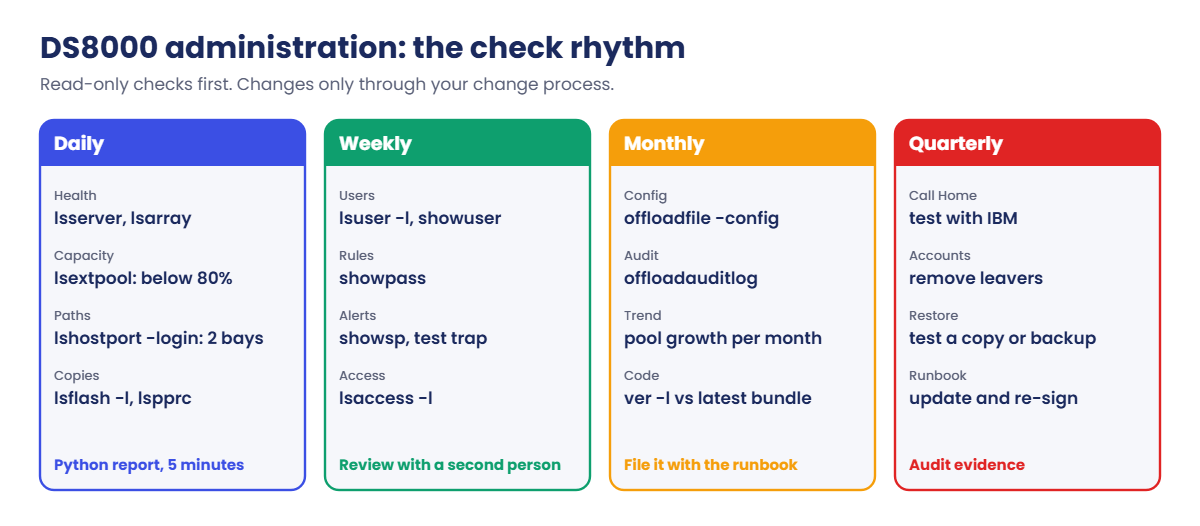

Before you run any command, double-check it
Read every command twice before you press Enter. Check the target: the system or account, the IDs, the names and the sizes. These commands are for learning and were tested in our lab, not on your system. At work, run the read-only list commands first, follow your change process, make sure a backup exists, and ask a second person to check anything that changes or deletes data. You run them at your own risk.
You’re the storage admin for a small ERP system, with a Linux database server erp-db1, a Windows app server win-app1, a pool pair and one FlashCopy that refreshes a copy of the database. You’ll run the checks by hand first so you understand what the script is doing for you.
Practice shell note: the practice shell is our teaching tool, not IBM software, and real DS CLI output is close but not identical. The simctl lines in the setup script are practice-only and log the second host port in through I0052, the way a SAN admin would zone it. The monthly items (offloadfile, offloadauditlog) only run on a real system.
1Load the running system
Reset the shell, do the first login, then save this as setup-26.txt:
# setup-26.txt: a small running system to administer (Lesson 26). Run after simctl reset.
mkarray -raidtype 6 -arsite S1
mkarray -raidtype 6 -arsite S2
mkrank -array A0 -keygrp 1 -stgtype fb
mkrank -array A1 -keygrp 1 -stgtype fb
mkextpool -rankgrp 0 -keygrp 1 -stgtype fb FB_0
mkextpool -rankgrp 1 -keygrp 1 -stgtype fb FB_1
chrank -extpool P0 R0
chrank -extpool P1 R1
mkfbvol -extpool P0 -cap 200 -sam ese -name erp_#h 2000-2001
mkfbvol -extpool P1 -cap 200 -sam ese -name erp_#h 2100
mkfbvol -extpool P0 -cap 200 -sam ese -name erpcopy_#h 2010
mkhost -type "Linux Server" -hostport 10000090FA13B914,10000090FA13B915 erp-db1
mkhost -type "Windows Server" -hostport 21000024FF2D0F86,21000024FF2D0F87 win-app1
chhost -action map -volume 2000,2100 erp-db1
chhost -action map -volume 2001 win-app1
mkflash -record -persist 2000:2010
mkuser -pw Temp1234 -group monitor noc_view
simctl logout 10000090FA13B915
simctl login 10000090FA13B915 I0052
simctl logout 21000024FF2D0F87
simctl login 21000024FF2D0F87 I0052
Run this:
python ds8sim.py   (then: simctl reset -all, quit)
python ds8sim.py -hmc1 10.0.0.1 -user admin -passwd admin -newpasswd Practice1 ver
python ds8sim.py -hmc1 10.0.0.1 -user admin -passwd Practice1 -script setup-26.txt
At the end of the script you should see CMUC00137I for the FlashCopy, CMUC00133I for the user, and four SIM lines for the logins.
✅ Checkpoint: no E messages in the setup output.
2Create the password file and the profile
Run this:
python ds8sim.py -hmc1 10.0.0.1 -user admin -passwd Practice1 managepwfile -action add -pwfile security.dat -name admin -pw Practice1You should see this:
CMUC00206I managepwfile: Record 10.0.0.1/admin successfully added to password file security.dat.Now save this as auto.profile in the same folder:
hmc1: 10.0.0.1
username: admin
pwfile: security.dat
devid: IBM.2107-78SV001
banner: off
header: on
format: delim
delim: ,
The lab profile uses admin to keep things short, but at work you’d point it at a monitor user such as noc_view.
✅ Checkpoint: security.dat and auto.profile sit next to ds8sim.py.
3Run the daily check by hand
Save the eight daily commands as daily-26.txt: lssi, lsserver, lsioenclosure, lsarray, lsextpool, lshost, lshostport -login, lsflash, one per line.
Run this:
python ds8sim.py -hmc1 10.0.0.1 -user admin -pwfile security.dat -script daily-26.txtYou should see this (shortened to the lines you judge):
Date/Time: 24 October 2026 20:00:33 UTC IBM DSCLI Version: 7.10.10.348 DS: IBM.2107-78SV001
ID      Image ID         Image Name   Power Control SFI State
=============================================================
server0 IBM.2107-78SV001 ds8k-g10-lab Online        Online
server1 IBM.2107-78SV001 ds8k-g10-lab Online        Online
Date/Time: 24 October 2026 20:00:33 UTC IBM DSCLI Version: 7.10.10.348 DS: IBM.2107-78SV001
Array State    Data   RAIDtype    arsite Rank DA Pair DDMcap (10^9B)
====================================================================
A0    Assigned Normal 6 (5+P+Q+S) S1     R0   0       4800.0
A1    Assigned Normal 6 (5+P+Q+S) S2     R1   0       4800.0
Date/Time: 24 October 2026 20:00:33 UTC IBM DSCLI Version: 7.10.10.348 DS: IBM.2107-78SV001
Name ID stgtype rankgrp status availstor (2^30B) %allocated available reserved numvols
======================================================================================
FB_0 P0 fb      0       below  99576             0          6372864   64       3
FB_1 P1 fb      1       below  99576             0          6372864   64       1
Date/Time: 24 October 2026 20:00:33 UTC IBM DSCLI Version: 7.10.10.348 DS: IBM.2107-78SV001
WWNN             WWPN             Host     I/O ports ESSIOport
==============================================================
20000024FF2D0F86 21000024FF2D0F86 win-app1 16 (all)  I0032
20000090FA13B915 10000090FA13B915 erp-db1  16 (all)  I0052
20000120FA13B914 10000090FA13B914 erp-db1  16 (all)  I0032
21000024FF2D0F87 21000024FF2D0F87 win-app1 16 (all)  I0052
(lsflash output shortened: 2000:2010 Recording Enabled, Persistent Enabled)
Read it the way the bus driver walks round his bus: both servers Online, both arrays Normal, both pools below threshold, and each host logged in on I0032 and I0052. I0032 is in I/O enclosure 1B2 and I0052 in 1B3, so every host keeps running if one enclosure goes down.
✅ Checkpoint: you can say in one sentence why each block is healthy.
4Run the weekly check
Save ver -l, lsuser -l, showpass, showsp and lsaccess -l as weekly-26.txt and run it the same way.
You should see this (shortened):
Storage Image    LMC         Bundle Version
===========================================
IBM.2107-78SV001 7.10.10.348 10.10.106.0
Name     Group       State  Scope
==================================
admin    admin       active *
noc_view monitor     active PUBLIC
secadmin secadmin    active *
service  ibm_service active *
Password Expiration   365 days
Failed Logins Allowed 5
SNMP           Disabled
SNMPadd        -
hmc  cmdline wui     modem    cim      aos     rsc     vpn
===============================================================
hmc1 enabled enabled disabled disabled enabled enabled disabled
hmc2 enabled enabled disabled disabled enabled enabled disabled
The weekly check has turned something up straight away: SNMP is Disabled, so this system sends no traps at all. A real admin would raise a change to fix it with chsp -snmp on -snmpaddr (see Lesson 21). Passwords that go a whole year without expiring may break your company policy too.
✅ Checkpoint: you noted two weekly findings: SNMP off, and a 365-day password expiry to compare with policy.
5Monthly: export evidence (real system)
On a real DS8000 the monthly part looks roughly like this. The commands follow the Redbook examples, and you run them from DS CLI on your workstation rather than the GUI's embedded DS CLI.
dscli> offloadfile -config c:\ds8k-admin\2026-10
dscli> offloadauditlog -logaddr smc1 c:\ds8k-admin\2026-10\audit.txt
The first one writes productSettings and ICSInstall.history, and the second writes the audit log. Keep both in a folder named after the month.
✅ Checkpoint: your runbook has a monthly folder rule and a named owner.
6Save the daily report script
Save this on your laptop in the lab folder, next to ds8sim.py. It runs there and not on the DS8000.
# daily_report.py: the DS8000 daily check as a short OK/WARN report.
# Runs on your workstation or jump server, not on the DS8000.
# It talks to the DS8000 only through the DS CLI (auto.profile: banner off, header on, format delim).
import csv, subprocess
DSCLI = ["python", "ds8sim.py", "-cfg", "auto.profile"]   # at work: ["dscli", "-cfg", "auto.profile"]

def dscli(*args):
    """Run one DS CLI command and return its rows as dictionaries."""
    out = subprocess.run(DSCLI + list(args), capture_output=True, text=True).stdout
    lines = [l for l in out.splitlines() if l and not l.startswith("SaatVedha") and not l.startswith("CMUC")]
    return list(csv.DictReader(lines))

POOL_WARN = 80          # warn before the pool threshold (default 85) is reached
warnings = 0

def report(ok, area, text):
    global warnings
    if not ok:
        warnings += 1
    print(("OK  " if ok else "WARN") + "  " + area.ljust(9) + text)

servers = dscli("lsserver")
up = [s for s in servers if s["SFI State"] == "Online"]
report(len(up) == 2, "servers", "%d of 2 CPCs online" % len(up))

for a in dscli("lsarray"):
    report(a["Data"] == "Normal", "array", "%s on %s: %s" % (a["Array"], a["arsite"], a["Data"]))

for p in dscli("lsextpool"):
    used = int(p["%allocated"])
    report(used < POOL_WARN and p["status"] == "below", "pool",
           "%s %s: %d%% allocated, status %s" % (p["ID"], p["Name"], used, p["status"]))

encl = {p["ID"]: p["I/O Enclosure"] for p in dscli("lsioport", "-l")}
paths = {}
for h in dscli("lshostport", "-login"):
    if h["Host"] != "-":
        paths.setdefault(h["Host"], set()).add(h["ESSIOport"])
for host, ports in sorted(paths.items()):
    bays = {encl[p] for p in ports}
    report(len(ports) >= 2 and len(bays) >= 2, "paths",
           "%s: %d logins on %s (%d I/O enclosures)" % (host, len(ports), ",".join(sorted(ports)), len(bays)))

for f in dscli("lsflash", "-l"):
    report(f["State"] == "Valid", "flash", "%s: %s" % (f["ID"], f["State"]))

for u in dscli("lsuser"):
    if u["State"] != "active":
        report(False, "user", "%s is %s" % (u["Name"], u["State"]))

print("Result: %s, %d warning(s)" % ("CHECK NEEDED" if warnings else "ALL OK", warnings))
The rules are where the learning is: two CPCs online, arrays Normal, pools under 80% and "below", at least two logins per host across two I/O enclosures, FlashCopy State Valid, and nobody locked out. On macOS or Linux, change "python" to "python3" in the DSCLI line.
✅ Checkpoint: daily_report.py is saved and the DSCLI line matches your system.
7Run the report
Run this:
python daily_report.pyYou should see this:
OK    servers  2 of 2 CPCs online
OK    array    A0 on S1: Normal
OK    array    A1 on S2: Normal
OK    pool     P0 FB_0: 0% allocated, status below
OK    pool     P1 FB_1: 0% allocated, status below
OK    paths    erp-db1: 2 logins on I0032,I0052 (2 I/O enclosures)
OK    paths    win-app1: 2 logins on I0032,I0052 (2 I/O enclosures)
OK    flash    2000:2010: Valid
Result: ALL OK, 0 warning(s)
✅ Checkpoint: nine lines, all OK, result ALL OK.

8Schedule it (at work)
At work a scheduler on the jump server would run it every morning and mail out the result, something like this (you don't need to run it in the lab):
schtasks /create /tn "DS8000 daily report" /sc daily /st 07:00 /tr "cmd /c cd /d C:\ds8k-admin && python daily_report.py > daily.txt"
0 7 * * * cd ~/ds8k-admin && python3 daily_report.py | mail -s "DS8000 daily" storage-team@example.com
The first line is for Windows Task Scheduler and the second is a Linux cron entry. Run the job as a service account that can read the password file, and make sure a WARN line reaches a person and doesn't just land in a folder.
✅ Checkpoint: you know where the job would run, as which user, and who reads the result.
A report is only any good if it turns red when it should, so you’ll cause two real problems and check the script catches each of them.
1Break: fill pool P0 to 90%
The practice-only simctl poolfill pretends other data has filled up the pool, much like a month-end batch that wrote far more than normal.
Run this:
python ds8sim.py -cfg auto.profile simctl poolfill P0 90
python daily_report.py
You should see this:
SIM0109I simctl: extent pool P0 is now 90% allocated (637287 extents available).
OK    servers  2 of 2 CPCs online
OK    array    A0 on S1: Normal
OK    array    A1 on S2: Normal
WARN  pool     P0 FB_0: 90% allocated, status exceeded
OK    pool     P1 FB_1: 0% allocated, status below
OK    paths    erp-db1: 2 logins on I0032,I0052 (2 I/O enclosures)
OK    paths    win-app1: 2 logins on I0032,I0052 (2 I/O enclosures)
OK    flash    2000:2010: Valid
Result: CHECK NEEDED, 1 warning(s)
Why: 90% is past your 80% rule and also past the system’s own 85% threshold, so lsextpool reports exceeded. Every volume here is thin (ESE), which means once the pool is full, the next host write that needs a new extent will fail. Catch it at 80% and you’ve got days to act, but catch it at 100% and you’ve got an outage.
2Fix: add a rank to the pool
The proper fix is more capacity (or moving volumes, see Lesson 27). Save this as addcap-26.txt:
# addcap-26.txt: add one rank to pool P0
mkarray -raidtype 6 -arsite S3
mkrank -array A2 -keygrp 1 -stgtype fb
chrank -extpool P0 R2
lsextpool
Run this:
python ds8sim.py -cfg auto.profile -script addcap-26.txt
python daily_report.py
You should see this:
CMUC00004I mkarray: Array A2 successfully created.
CMUC00007I mkrank: Rank R2 successfully created.
CMUC00008I chrank: Rank R2 successfully modified.
Name,ID,stgtype,rankgrp,status,availstor (2^30B),%allocated,available,reserved,numvols
FB_0,P0,fb,0,below,129449,41,8284737,128,3
FB_1,P1,fb,1,below,99576,0,6372864,64,1
OK    servers  2 of 2 CPCs online
OK    array    A0 on S1: Normal
OK    array    A1 on S2: Normal
OK    array    A2 on S3: Normal
OK    pool     P0 FB_0: 41% allocated, status below
(output shortened: the other lines are OK)
Result: ALL OK, 0 warning(s)
The lsextpool output comes out comma-separated because the profile says format: delim, and that’s what the script reads. At work you’d add a matching rank to P1 too, to keep the two rank groups balanced.
✅ Checkpoint: P0 is back to 41%, status below, and the report says ALL OK.
3Break: port I0052 loses light
Run this:
python ds8sim.py -cfg auto.profile simctl portfail I0052
python daily_report.py
You should see this:
SIM0105I simctl: I/O port I0052 has no light (cable or SFP problem).
OK    servers  2 of 2 CPCs online
OK    array    A0 on S1: Normal
OK    array    A1 on S2: Normal
OK    array    A2 on S3: Normal
OK    pool     P0 FB_0: 41% allocated, status below
OK    pool     P1 FB_1: 0% allocated, status below
WARN  paths    erp-db1: 1 logins on I0032 (1 I/O enclosures)
WARN  paths    win-app1: 1 logins on I0032 (1 I/O enclosures)
OK    flash    2000:2010: Valid
Result: CHECK NEEDED, 2 warning(s)
Why: both hosts still work through I0032 alone and no user notices a thing, and that’s the danger. The next failure on I0032, or any service work on enclosure 1B2, takes both servers down.
Confirm it on the port itself with showioport I0052, which shows State “No light detected” and Logins 0.
4Fix: restore the light, then rerun
At work this means swapping a cable or SFP. You or the SAN team handle the cable, and the IBM SSR comes in if the host adapter part is faulty. In the shell:
python ds8sim.py -cfg auto.profile simctl portfix I0052
python daily_report.py
You should see this:
SIM0106I simctl: I/O port I0052 has light again.
(output shortened: servers, arrays and pools OK)
OK    paths    erp-db1: 2 logins on I0032,I0052 (2 I/O enclosures)
OK    paths    win-app1: 2 logins on I0032,I0052 (2 I/O enclosures)
OK    flash    2000:2010: Valid
Result: ALL OK, 0 warning(s)
✅ Checkpoint: both hosts are back to two logins in two I/O enclosures.