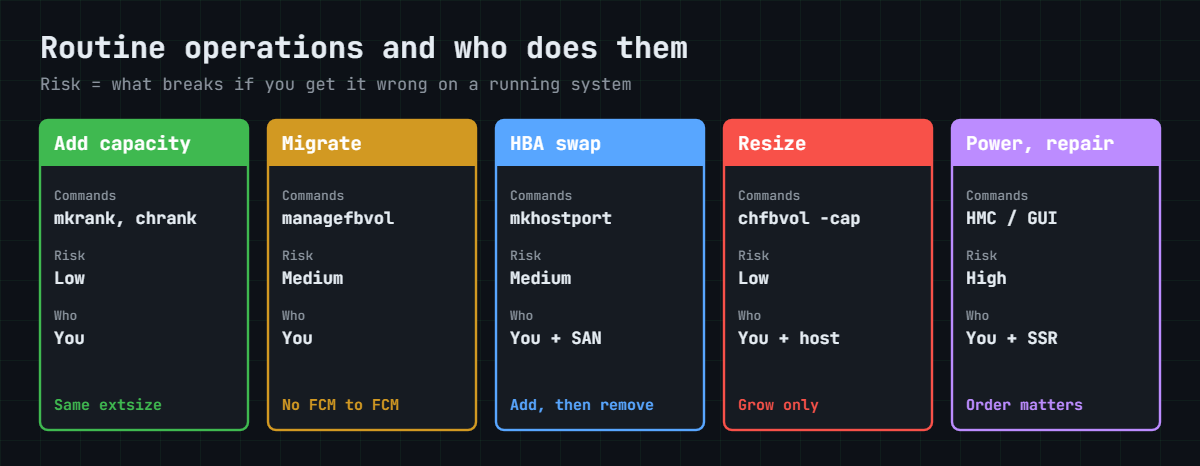
DS8000 operations: capacity, migration, power and service tasks
-
Phase 0: Before you start
-
Phase 1: Plan and install
-
Phase 2: Build the storage
-
Phase 3: Copy Services
-
Phase 4: Run it day to day
-
Phase 5: Troubleshooting and career
DS8000 operations are the routine changes you make on a system that’s already running production: adding capacity, moving a volume, swapping a server’s HBA, growing a LUN, powering the box off for building work, and working with the IBM engineer on repairs. On paper each one is simple, but each also has a step that will take an application down if you do it in the wrong order.
This lesson is a catalogue of those operations, with the exact commands, a risk label and who does what. Lesson 26 was about noticing problems, and this one covers the changes you make in response.
In the lab you carry out three operations on a running practice system and check each one. Break It then walks you into the two errors that catch people most often: growing a volume that has a FlashCopy, and adding a rank with the wrong extent size.
| Time | You need | By the end you can |
|---|---|---|
| 60 to 75 minutes | The practice shell and the setup script below. Lessons 12, 14 and 17 are useful background. | Add capacity to a pool pair, swap a host’s WWPN without losing a path, grow and rename a volume, and plan a safe power-off and power-on |
What it is, in one line
DS8000 operations are the planned changes on a live system (capacity, migration, host ports, volume size, power and service), each done in a fixed order with a check before and after.
In Simple Words
Changing a tyre on a moving school bus
Imagine the school bus has to keep running while you work on it. You can add a seat as long as you bolt it in properly, and you can change one wheel while the others hold the bus up. What you never do is take the old wheel off before the new one is ready, and at the end of the day you never cut the fuel before the driver has parked and switched off the engine.
DS8000 operations work on the same idea. You add the new path before removing the old one, and you remove the copy before stretching the volume.
And you shut down the hosts before the storage, and the storage before the building power.
Engineer's View
What the Redbook says about live changes
Concurrent upgrades. Memory and processor upgrades are concurrent, and you can add processors, cache, host adapters, storage and expansion frames without any disruption (SG24-8559-01, pp. 9, 40 and 53). IBM installs the hardware, and after that you build the arrays, ranks and pools on it.
Volumes. A volume can grow but it can never shrink, and you have to remove any Copy Services relationships before expanding it. The largest LUN is 16 TiB, while Copy Services only work up to 4 TiB (pp. 13 and 15).
Migration. managefbvol -action migstart -extpool Pxx moves a volume to another pool, and you control it with migpause, migresume and migcancel. In Release 10.1 this dynamic volume relocation doesn’t work between two FlashCore Module pools (p. 95).
Power. Power control is done by the HMCs, and you start it from the DS GUI (Actions, Power Off/On), the Service Management web UI or DS CLI. In IBM’s words, “Using the HMC is the only way to safely power on or power off” the system (pp. 134 and 192).
If remote power control is set to manual, the system stays off after a power cut until somebody powers it on from the HMC. Set to automatic, it comes back up by itself (pp. 117 and 256).
Power loss. If both power domains drop for more than about 20 ms, host I/O stops and the NVDIMMs save the NVS contents to flash using BPM power, so no written data gets lost (pp. 117 and 134).
Service. The IBM SSR replaces parts, does Secure Data Overwrite at end of life, and runs the code load unless you’ve chosen customer code load (pp. 136-139 and 402). Replacing a BPM puts one CPC into service mode with a failover (p. 133).
On DS8880 and older. These use battery sets in the DC-UPS instead of the NVDIMM and BPM design, so look up your model’s Redbook for its power sequence. The DS CLI commands in this lab are the same apart from host attachment (Implementation Lesson 28).
How it works, step by step
1Add capacity: new ranks into existing pools
IBM installs the new drives. You then create arrays on the new array sites and ranks with the right key group and extent size, and add them to the existing pools with chrank -extpool.
Add capacity in pairs, one rank per rank group, so both CPCs keep an even share. A pool’s extent size is fixed by its first rank, and every rank you add later has to match it.
2Migrate a volume between pools
When a volume has to move, for example to a pool on bigger drives, use managefbvol -action migstart. The host carries on working while the extents move.
Check two rules before you start. The target pool has to be in the same rank group as the volume’s LSS, and in Release 10.1 you can’t move a volume from one FCM pool to another.
3Swap a host’s HBA (WWPN change)
A new HBA in a server means a new WWPN. Do it one path at a time: the new port logs in, you add it with mkhostport, the server team confirms both paths, and only after that do you remove the old WWPN with rmhostport.
Never remove first and add later, because during that gap the server is running on one path and any other fault takes it down.
4Grow or rename a volume
chfbvol -cap grows a volume and chfbvol -name renames it. Check lsflash and lspprc first, remove any copy relationship, grow the volume, and grow the FlashCopy target as well before you recreate the pair.
After that the host team rescans the disk and grows the file system, and Lesson 17 shows that host side.
5Manage users through their life
Joiners get a named account in the smallest group that does the job (mkuser), movers change group with chuser, and leavers are removed the same day with rmuser.
Go through the list every week with lsuser -l, as you saw in Lesson 26.
6Plan a power-off and power-on
Building work, a UPS replacement or a move all need the DS8000 switched off, and here the order matters more than any command:
- Agree the window with every application owner and the DR team.
- Stop the applications and shut down (or quiesce) the hosts. On IBM Z, vary the devices offline.
- Pause the mirrors on purpose, so the DR copy stays consistent and nobody mistakes the pause for a disaster.
- Power off from the HMC (DS GUI, Actions, Power Off/On) and wait until the HMC shows the system is off.
- Only after that can facilities switch off the iPDU feeds.
Power on goes the other way round: both power domains on, DS8000 on from the HMC, wait for the IML, check lsserver and lsarray, then the SAN, then the hosts, and finally resume the mirrors.
7Work with the IBM SSR on repairs and code loads
Repairs start from Call Home. IBM ships the part and the SSR fits it, usually while the system keeps running. Your job is to check the host paths before the work starts, since one I/O enclosure or one CPC may go into service, and to keep an eye on the system afterwards.
Code loads follow Lesson 20, and encryption key tasks and key server changes follow Architecture Lesson 20.
8Wrap every operation in a change
Every operation gets a short change record covering what and why, the exact commands, a check before, a check after, and how to roll back. Have a second person read the commands before you run them.
Hold on to the before and after outputs, because they’re your proof and also your map if something goes wrong.
Hands-on lab: three live operations on a running system
Before you run any command, double-check it
Read every command twice before you press Enter. Check the target: the system or account, the IDs, the names and the sizes. These commands are for learning and were tested in our lab, not on your system. At work, run the read-only list commands first, follow your change process, make sure a backup exists, and ask a second person to check anything that changes or deletes data. You run them at your own risk.
The ERP system from Lesson 26 is up and running, with erp-db1 (Linux) and win-app1 (Windows), a pool pair and a nightly FlashCopy of volume 2000 to 2010. You’ve got three change tickets waiting: more capacity, a new HBA in win-app1, and a bigger, better-named log volume for the database.
Practice shell note: the practice shell is our teaching tool, not IBM software, and real DS CLI output is close but not identical. CMUC00544I, CMUN02040E, CMUN03023E and CMUN02021E are practice shell messages. The simctl lines stand in for the server and SAN teams (pulling out an HBA or zoning one in).
1Load the running system
Save setup-27.txt, which is setup-26.txt from Lesson 26 minus the mkuser line (pools, four ESE volumes, both hosts, FlashCopy 2000:2010, second paths on I0052). Then make a profile so the commands stay short, and save it as lab.profile:
hmc1: 10.0.0.1
username: admin
pwfile: security.dat
devid: IBM.2107-78SV001Run this:
python ds8sim.py (then: simctl reset -all, quit)
python ds8sim.py -hmc1 10.0.0.1 -user admin -passwd admin -newpasswd Practice1 managepwfile -action add -pwfile security.dat -name admin -pw Practice1
python ds8sim.py -cfg lab.profile -script setup-27.txtThe setup finishes with CMUC00137I for the FlashCopy and four SIM lines for the host logins.
✅ Checkpoint: no E messages, and the password file was created (CMUC00206I).
2Operation 1: add one rank to each pool
IBM has put new drives in array sites S3 and S4. Save this as op1-add-capacity.txt:
# op1-add-capacity.txt: one new rank per rank group (Lesson 27)
lsextpool
mkarray -raidtype 6 -arsite S3
mkarray -raidtype 6 -arsite S4
mkrank -array A2 -keygrp 1 -stgtype fb
mkrank -array A3 -keygrp 1 -stgtype fb
chrank -extpool P0 R2
chrank -extpool P1 R3
lsextpool
lsrankRun this:
python ds8sim.py -cfg lab.profile -script op1-add-capacity.txtYou should see this:
Date/Time: 24 October 2026 20:10:17 UTC IBM DSCLI Version: 7.10.10.348 DS: IBM.2107-78SV001
Name ID stgtype rankgrp status availstor (2^30B) %allocated available reserved numvols
======================================================================================
FB_0 P0 fb 0 below 99576 0 6372864 64 3
FB_1 P1 fb 1 below 99576 0 6372864 64 1
CMUC00004I mkarray: Array A2 successfully created.
CMUC00004I mkarray: Array A3 successfully created.
CMUC00007I mkrank: Rank R2 successfully created.
CMUC00007I mkrank: Rank R3 successfully created.
CMUC00008I chrank: Rank R2 successfully modified.
CMUC00008I chrank: Rank R3 successfully modified.
Date/Time: 24 October 2026 20:10:17 UTC IBM DSCLI Version: 7.10.10.348 DS: IBM.2107-78SV001
Name ID stgtype rankgrp status availstor (2^30B) %allocated available reserved numvols
======================================================================================
FB_0 P0 fb 0 below 219067 0 14020314 128 3
FB_1 P1 fb 1 below 219067 0 14020314 128 1
Date/Time: 24 October 2026 20:10:17 UTC IBM DSCLI Version: 7.10.10.348 DS: IBM.2107-78SV001
ID Group State datastate Array RAIDtype extpoolID stgtype
==========================================================
R0 0 Normal Normal A0 6 P0 fb
R1 1 Normal Normal A1 6 P1 fb
R2 0 Normal Normal A2 6 P0 fb
R3 1 Normal Normal A3 6 P1 fbBecause the script lists the pools before and after, the change record carries its own proof. Each pool went from 99,576 GiB to 219,067 GiB. S3 and S4 hold no spare, so their RAID 6 arrays are 6+P+Q and give more space than S1 and S2. Each pool now has two ranks, still one pool per rank group.
✅ Checkpoint: availstor rose in both pools and lsrank shows R2 in P0 and R3 in P1.
3Operation 2: swap the HBA in win-app1
The server team swaps the HBA behind WWPN 21000024FF2D0F87. The old card comes out, and the new one (WWPN 21000024FF2D1A10) is zoned to I0052 and logs in. In the shell, simctl plays the server and SAN teams:
python ds8sim.py -cfg lab.profile simctl logout 21000024FF2D0F87
python ds8sim.py -cfg lab.profile simctl login 21000024FF2D1A10 I0052Now it’s your turn. Find the new WWPN where it logged in, add it to the host, check both paths, and only then remove the old one:
Run this:
python ds8sim.py -cfg lab.profile lshostport -unknown
python ds8sim.py -cfg lab.profile mkhostport -host win-app1 21000024FF2D1A10
python ds8sim.py -cfg lab.profile lshostport -login
python ds8sim.py -cfg lab.profile rmhostport -quiet 21000024FF2D0F87
python ds8sim.py -cfg lab.profile showhost win-app1You should see this:
Date/Time: 24 October 2026 20:10:17 UTC IBM DSCLI Version: 7.10.10.348 DS: IBM.2107-78SV001
WWNN WWPN ESSIOport
===========================================
21000024FF2D1A10 21000024FF2D1A10 I0052
CMUC00542I mkhostport: The host port 21000024FF2D1A10 is successfully created.
Date/Time: 24 October 2026 20:10:18 UTC IBM DSCLI Version: 7.10.10.348 DS: IBM.2107-78SV001
WWNN WWPN Host I/O ports ESSIOport
==============================================================
20000024FF2D0F86 21000024FF2D0F86 win-app1 16 (all) I0032
20000090FA13B915 10000090FA13B915 erp-db1 16 (all) I0052
20000120FA13B914 10000090FA13B914 erp-db1 16 (all) I0032
21000024FF2D1A10 21000024FF2D1A10 win-app1 16 (all) I0052
CMUC00544I rmhostport: The host port 21000024FF2D0F87 is successfully deleted.
Date/Time: 24 October 2026 20:10:18 UTC IBM DSCLI Version: 7.10.10.348 DS: IBM.2107-78SV001
Name win-app1
Type Windows Server
State Online
Volumes 1
Host ports 2
(output shortened)You took the WWPN from lshostport -unknown and not from a label or an email, so there’s no chance of a typo. win-app1 still has two host ports and two logins, across two I/O enclosures.
✅ Checkpoint: win-app1 shows Host ports 2, and lshostport -login lists 21000024FF2D1A10 on I0052.

4Operation 3: rename and grow the log volume
The DBA wants volume 2100 at 300 GiB, with a name that says what’s on it. First make sure it has no copy relationship (lsflash shows only 2000:2010), and then:
Run this:
python ds8sim.py -cfg lab.profile chfbvol -name erp_logs_2100 2100
python ds8sim.py -cfg lab.profile chfbvol -quiet -cap 300 2100
python ds8sim.py -cfg lab.profile lsfbvol 2100You should see this:
CMUC00026I chfbvol: FB volume 2100 successfully modified.
Date/Time: 24 October 2026 20:10:18 UTC IBM DSCLI Version: 7.10.10.348 DS: IBM.2107-78SV001
Name ID accstate datastate configstate deviceMTM datatype extpool cap (2^30B) cap (10^9B) cap (blocks)
=================================================================================================================
erp_logs_2100 2100 Online Normal Normal 2107-900 FB 512 P1 300.0 - 629145600Without -quiet, DS CLI asks you to confirm first, because some host operating systems can’t cope with a size change (message CMUC00332W in the Redbook). Only use -quiet in a script someone has reviewed. After this the host team rescans and grows the file system.
✅ Checkpoint: 2100 is named erp_logs_2100 and shows 300.0 GiB.
5Migration and power: what the real system adds
Two of these operations need a real DS8000. A volume migration looks roughly like this, following IBM’s syntax. P2 stands for a pool on industry-standard drives in rank group 0, since 2001 sits in even LSS 20 and both lab pools are FCM:
dscli> managefbvol -action migstart -extpool P2 2001
dscli> lsfbvol -l 2001A power-off is done from the DS GUI (Actions, Power Off/On) after you’ve finished the host and mirror steps in the runbook above. Before you begin, take a screenshot of the power control settings so you know whether the system will start up by itself when power comes back.
[Add your screenshot here]
✅ Checkpoint: you can say why the migration target must be a non-FCM pool in rank group 0 here, and which power control mode your system uses.
Break It, Then Fix It
Both of these breaks happen on real systems every month. Neither damages any data, but either one can stop a change halfway through a maintenance window.
1Break: grow a volume that has a FlashCopy
The DBA wants database volume 2000 at 300 GiB as well, so you run the same command you used for 2100:
Run this:
python ds8sim.py -cfg lab.profile chfbvol -quiet -cap 300 2000You should see this:
CMUN02040E chfbvol: 2000: Delete all Copy Services relationships of the volume before you expand it.
Why: 2000 is the source of the nightly FlashCopy to 2010. The Redbook says to remove Copy Services relationships before you expand, because the copy is tracking the old size.
2Fix: remove the pair, grow both volumes, recreate the pair
Run this:
python ds8sim.py -cfg lab.profile rmflash -quiet 2000:2010
python ds8sim.py -cfg lab.profile chfbvol -quiet -cap 300 2000
python ds8sim.py -cfg lab.profile mkflash -record -persist 2000:2010You should see this:
CMUC00140I rmflash: FlashCopy pair 2000:2010 successfully removed.
CMUC00026I chfbvol: FB volume 2000 successfully modified.
CMUN03023E mkflash: 2000:2010: The target volume must be the same type and at least the same size as the source volume.Then a second surprise. The target is still 200 GiB, and a FlashCopy target must be at least as big as its source, so grow that too and then recreate the pair:
python ds8sim.py -cfg lab.profile chfbvol -quiet -cap 300 2010
python ds8sim.py -cfg lab.profile mkflash -record -persist 2000:2010
python ds8sim.py -cfg lab.profile lsfbvol 2000 2010You should see this:
CMUC00026I chfbvol: FB volume 2010 successfully modified.
CMUC00137I mkflash: FlashCopy pair 2000:2010 successfully created.
Date/Time: 24 October 2026 20:10:18 UTC IBM DSCLI Version: 7.10.10.348 DS: IBM.2107-78SV001
Name ID accstate datastate configstate deviceMTM datatype extpool cap (2^30B) cap (10^9B) cap (blocks)
================================================================================================================
erp_2000 2000 Online Normal Normal 2107-900 FB 512 P0 300.0 - 629145600
erpcopy_2010 2010 Online Normal Normal 2107-900 FB 512 P0 300.0 - 629145600Between rmflash and mkflash you have no recovery copy, and the new pair kicks off a full background copy. Plan for that gap in the change and do it right after a good backup.
✅ Checkpoint: both volumes are 300.0 GiB and lsflash shows 2000:2010 again.
3Break: add a rank with the wrong extent size
More drives turn up on S5, and a colleague’s old script creates the rank with large extents:
Run this:
python ds8sim.py -cfg lab.profile mkarray -raidtype 6 -arsite S5
python ds8sim.py -cfg lab.profile mkrank -array A4 -keygrp 1 -stgtype fb -extsize 1GiB
python ds8sim.py -cfg lab.profile chrank -extpool P0 R4You should see this:
CMUC00004I mkarray: Array A4 successfully created.
CMUC00007I mkrank: Rank R4 successfully created.
CMUN02021E chrank: R4: The extent size of the rank (1GiB) does not match the extent size of extent pool P0 (16MiB).Why: a pool’s extent size is set by its first rank, and you can’t mix large and small extents in one pool. Small (16 MiB) extents are the DS8A00 default, so that’s what P0 uses.
4Fix: delete the rank and make it again with the default size
Run this:
python ds8sim.py -cfg lab.profile rmrank -quiet R4
python ds8sim.py -cfg lab.profile mkrank -array A4 -keygrp 1 -stgtype fb
python ds8sim.py -cfg lab.profile chrank -extpool P0 R4You should see this:
CMUC00010I rmrank: Rank R4 successfully deleted.
CMUC00007I mkrank: Rank R4 successfully created.
CMUC00008I chrank: Rank R4 successfully modified.On a real system rmrank formats the drives first, so the array might not be usable straight away. P0 now has three ranks and P1 has two, so at work you’d give the next rank to P1 to even them out.
✅ Checkpoint: lsrank shows R4 in P0, and you have noted that P1 needs the next rank.
This happened at work
The night the timetable lost its disks
A rail operator had to close its operations building for a weekend of electrical work, and the plan said “storage team powers off the DS8000 at 22:00”. The facilities contractor was running ahead of schedule, and at 21:40 he switched off the distribution boards that fed both iPDU domains.
The DS8000 did what it’s designed to do. Host I/O stopped, the NVDIMMs saved the write cache to flash on battery module power, the system went off, and no written data was lost. The timetable and crew-rostering database servers were still running, though, and they lost their disks in the middle of a nightly batch.
On Sunday the order went wrong a second time. Facilities brought the power back and the server team started the hosts straight away, but the DS8000 was set to manual power control and was still off.
The database cluster marked its disks as failed, and the DBAs spent three hours recovering before Monday’s first trains, which ran that morning on a printed timetable.
Root cause: the power plan was built on times, not hand-offs. Nobody had to confirm “storage is off” before the boards were switched off, or “storage is up” before the hosts were started.
Fix: a one-page sequence with named sign-offs: hosts down, mirrors paused, DS8000 off from the HMC, and only then facilities. Power on goes in reverse, with lsserver and lsarray checked before any host starts, and facilities now wait for a phone call from the storage engineer.
Lesson: in a power operation, the order is the whole job, so write it as hand-offs between people instead of times on a clock.
Common mistakes and troubleshooting
| Symptom | Likely cause | What to check / fix |
|---|---|---|
chfbvol refuses to grow a volume | Volume has a FlashCopy or mirror | Check lsflash and lspprc; remove, grow, recreate |
| Trying to make a volume smaller | Volumes can grow but never shrink | Create a smaller volume and copy the data at host level |
chrank -extpool fails | Rank extent size differs from the pool | Recreate the rank with the pool’s extent size |
| Host on one path after an HBA swap | Old WWPN removed before the new one was added | Add first, check lshostport -login, then remove |
| Migration refused between pools | FCM to FCM, or a pool in the other rank group | Pick a non-FCM pool in the same rank group |
| Hosts start but see no disks after power work | Hosts started before the DS8000 finished its IML | Power on storage first; check lsserver before hosts |
Tip: list the state before and after every operation, in the same script. When a change goes wrong at 2 a.m., that “before” output is what you roll back to.
Interview questions
Click a question to open it. They’re worded the way an interviewer would ask them, and under each one you’ll find why they ask it and one way you could answer in your own words.
Fresher level
1. A server is getting a new HBA. Walk me through what you do on the DS8000.
Why they ask this: They want to hear the order, since that’s what keeps the server online.
How you might answer: I’d wait for the new port to log in and read its WWPN from lshostport -unknown. Then I’d add it with mkhostport -host, confirm both logins with lshostport -login and with the server team, and only then remove the old WWPN with rmhostport. Only one path changes at a time.
2. Can you make a DS8000 volume smaller?
Why they ask this: It’s a simple fact check, and it also shows whether you know the safe workaround.
How you might answer: No, chfbvol can only grow a volume. If someone needs less space, I’d create a new, smaller volume, have the host team copy the data across, and delete the old one after a safe period.
2–5 years experience
3. You need to grow a 200 GiB volume that has a nightly FlashCopy. What is your plan?
Why they ask this: They’re testing whether you know Copy Services blocks expansion, and what that costs you.
How you might answer: I’d schedule it straight after a good backup. I’d remove the pair with rmflash, grow the source with chfbvol -cap, grow the target to at least the same size, and recreate the pair with the same flags, for example -record -persist.
I’d also warn the owner that there’s no recovery copy until the new background copy finishes.
4. IBM has installed 32 new drives. How do you add them to existing pools?
Why they ask this: They’re checking you think about balance and extent rules, and not only the commands.
How you might answer: I’d create arrays on the new array sites and ranks with the same key group and extent size as the pools, then give one rank to the even pool and one to the odd pool so both CPCs stay balanced. I’d list lsextpool before and after as proof.
Senior level
5. The building will lose power for a weekend. Write me the storage part of the plan.
Why they ask this: Seniors are judged on the hand-offs between teams more than on commands.
How you might answer: Agree the window, stop the applications, shut down the hosts and pause the mirrors with the DR team. Then power off from the HMC and confirm to facilities before anyone touches the iPDU feeds.
Power on is the reverse: both power domains, DS8000 from the HMC, check lsserver and lsarray, then the SAN, the hosts, and finally resume the mirrors. Each step has a named person who calls the next one.
6. A volume must move to another pool during business hours. What do you check first?
Why they ask this: They’re testing whether you know the limits of live migration on the platform you run.
How you might answer: I’d check the target pool is in the same rank group as the volume’s LSS, and that it isn’t FCM to FCM, which Release 10.1 doesn’t support. I’d also check the target capacity and whether Copy Services are involved, then run managefbvol -action migstart under a change record and keep watching it.
Quick quiz
Q1. What must you do before growing a FlashCopy source volume?
- Nothing
- Remove the FlashCopy relationship
- Reboot the host
- Change the pool threshold
Show answer
B — Copy Services relationships must be removed before you expand a volume.
Q2. In an HBA swap, when do you remove the old WWPN?
- First
- After adding the new WWPN and checking both logins
- Never
- Before the new card is installed
Show answer
B — Add first, check, then remove, so the host never runs on one path.
Q3. Why did chrank refuse rank R4?
- Wrong key group
- The rank used 1 GiB extents and the pool uses 16 MiB
- The pool was full
- RAID 6 not allowed
Show answer
B — A pool cannot mix extent sizes; its first rank decides.
Q4. What is the only safe way to power a DS8A00 off or on?
- Switch off the iPDUs
- Through the HMC (GUI, WUI or DS CLI)
- Unplug the CPCs
- Pull the batteries
Show answer
B — The Redbook states the HMC is the only safe way to power the system on or off.
Q5. Which pool move does Release 10.1 not support?
- FCM pool to FCM pool
- Standard pool to FCM pool
- Within one rank group
- During business hours
Show answer
A — Dynamic volume relocation is not supported between two FCM pools in Release 10.1.
Quick recap
- Add capacity in pairs, one rank per rank group, with the pool’s extent size and key group.
- Migrate with managefbvol -action migstart; same rank group, and not FCM to FCM in Release 10.1.
- HBA swap: add the new WWPN, check logins, then remove the old one.
- Grow only: remove copy relationships, grow source and target, recreate the pair.
- Power off: hosts, mirrors, HMC, then building power. Power on in reverse.
- The IBM SSR does repairs; you protect host paths before and watch the system after.
Next lesson
Lesson 28: Running older DS8000s: DS8870, DS8880 and DS8900F with DS CLI → Next you take these same tasks to older systems, where some commands and names are different.
Further reading: DS8000 operations
Want to go deeper into DS8000 operations? IBM Redbook SG24-8559-01 covers power control on pp. 117 and 134, the HMC role on p. 192, and volume commands in Chapter 10. IBM Documentation: chfbvol lists every flag.
On SaatVedha, Lesson 17: DS8000 volume expansion shows the host side of growing a LUN. You can also see the full plan for this course on the IBM DS8000 Implementation course page.
