Encryption: FDE, local and external key managers
-
Phase 0: Start here
-
Phase 1: The hardware
-
Phase 2: Virtualization
-
Phase 3: Resilience and data protection
-
Phase 4: Generations, models and rack layouts
-
Phase 5: Wrap-up
DS8000 encryption protects the data on the flash drives if a drive gets stolen, sent back for repair or thrown away. Every drive in a DS8A00 already encrypts in hardware, so what you’re really deciding is who holds the keys, and that one decision shapes your whole design.
We’ll go through full disk encryption, the two ways to manage keys (local or external key servers), why encryption has to be planned before the first rank exists, and the one trap that can stop a whole data centre, the encryption deadlock. In the lab you read the licence and key group, build encrypted ranks and pools, and create a security administrator so storage and key duties are split the way auditors expect.
| Time | You need | By the end you can |
|---|---|---|
| 50 to 65 minutes | The practice shell from Lesson 1 in C:\ds8k-lab (or ~/ds8k-lab) | Explain FDE and key management options, use lskeygrp and -keygrp correctly, and spot an encryption deadlock risk in a design |
What it is, in one line
DS8000 encryption means the drives scramble all data in hardware, and a key manager (local in the box, or external servers) decides whether the box can read them.
In Simple Words
A school cupboard with a smart lock
Your school keeps exam papers in a strong cupboard that scrambles every paper the moment it goes inside, so anyone who breaks in or carries the cupboard off only gets scrambled pages. To read the papers the cupboard needs a key, and the school has two choices.
One is to keep the key in a small safe built into the cupboard itself, which is simple and means nobody has to run anywhere, and that’s local key management. The other is to give the key to two trusted people in the office building, and every morning the cupboard rings them and asks for it. That’s external key management, which is stricter and auditors like it.
Now imagine both key keepers lock their own diaries inside that same cupboard. One morning the power goes off and the cupboard locks itself, and the key keepers can’t find their phone numbers because the numbers are in their diaries, inside the cupboard, so nobody can open anything. That silly loop is called an encryption deadlock, and it happens in real data centres.
Engineer's View
How DS8A00 encryption really works
- FDE drives: all DS8A00 flash drives and FlashCore Modules are full disk encryption (FDE) drives and always encrypt internally. Turning encryption “on” means the box starts protecting the drive keys, so a removed drive can’t be read. Since the drive does the work, it’s invisible to hosts, works for IBM Z too and costs no performance.
- Local Key Management: keys are created as a local key group and stored in the encrypted Platform Key Store of the Power9+ CPC partitions. There’s no key server and no extra licence, but you have to choose it when you order the system, because you can’t switch it on later with a licence key.
- External key managers: IBM Guardium Key Lifecycle Manager (GKLM), Gemalto SafeNet KeySecure or Thales Vormetric Data Security Manager. You need at least two key servers, and at least one has to be isolated, with its own hardware and storage that this DS8000 doesn’t encrypt. You can’t mix GKLM with SafeNet or Vormetric, and since the HMCs talk to the key servers, the firewall ports must be open.
- One key group, all or nothing: the DS8A00 supports a single encryption group, carried as an attribute on ranks and extent pools. Decide before the first rank, because enabling encryption later means deleting the whole logical configuration and restoring the data.
- Standards: NIST SP 800-131A mode is on by default, and the drives can comply with FIPS 140-3.
- Two roles: the Security Administrator (secadmin) handles encryption, and an Administrator (admin) has to confirm some secadmin actions during deadlock prevention and recovery. IBM advises having at least two people in each role, and never giving both roles to one person.
Related, but separate: IBM Fibre Channel Endpoint Security encrypts data in flight between IBM Z and the DS8000, and TCT can encrypt data sent to the cloud. Both need external key servers and can be turned on at any time. When drives are retired, the keys are what make cryptographic erase possible.
On DS8900F: it’s the same FDE design and the same key server choices, but check the code level before mixing key server products across generations.
How it works, step by step
Let’s follow DS8000 encryption through one system’s life, from the order form to the day a drive leaves the building.
1At order time: pick local or external keys
You choose Local Key Management when the system is ordered. If you go external, plan for two or more key servers, one of them isolated, plus network routes and firewall ports from both HMCs to the key servers, and get it into the project plan early (the Implementation course covers it in the planning worksheets).
2Before the first rank: create the key group
The security administrator creates the encryption group before any rank exists, and lskeygrp then shows key group 1, its state and whether it uses local (LOCAL) or external key servers.
From then on every mkrank and mkextpool needs -keygrp 1, because the box encrypts everything or nothing.
3Every power-on: get the key, release the drives
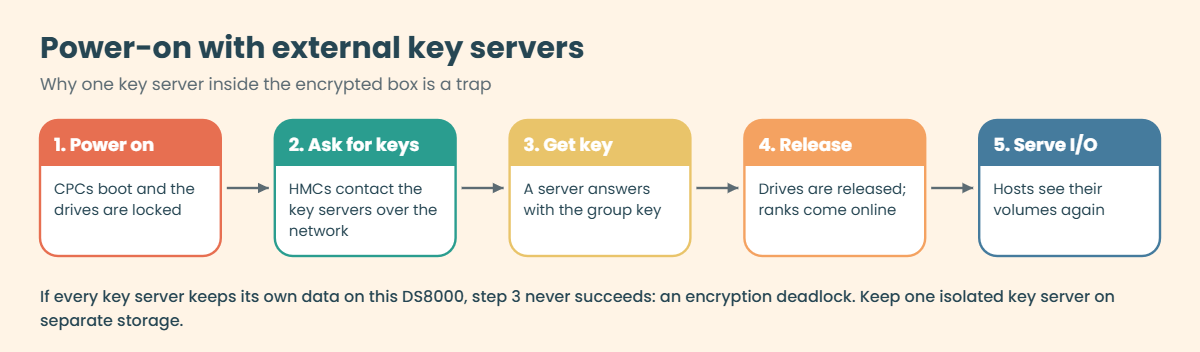
With external key servers, the DS8000 has to reach a key server through the HMCs every time it powers on, and only then are the drives released and the ranks brought online. With local keys the box reads the key from its own key store.
4The deadlock trap
Now picture every key server running as a virtual machine whose disks live on this same DS8000. After a full power outage the DS8000 asks for its key, but the key servers can’t start because their disks are on the locked DS8000, and nobody can open anything. That’s why IBM requires at least one isolated key server on its own hardware and storage. The last safety net is the recovery key, and in a deadlock the HMC is the only place you can enter it, with secadmin and admin working together.
5End of life: cryptographic erase
When a drive fails or the system is retired, the key protects its data rather than a long overwrite, since destroying the key makes the data unreadable. IBM’s secure data overwrite service combines a cryptographic erase with a sanitize block erase and gives you a certificate.
There are two things to take from this story about DS8000 encryption. The first is that encryption is a design decision and not a tick box: you can’t add it to a configured system without rebuilding, and you can’t choose local keys later.
The second is that encryption shifts the risk from “someone steals a drive” to “we lose the keys”. A stolen drive becomes harmless, but a missing key server makes perfectly good data unreadable, so key servers need the same care as the DS8000: two of them, on different sites if you can, backups of the key database and a recovery key procedure you’ve actually tested.
Other parts of the DS8000 encrypt as well. NVDIMMs encrypt the write cache contents when they save them to flash after a power loss, so even the emergency copy is protected. Data in flight is a separate topic, handled by Endpoint Security for IBM Z.
Hands-on lab: build encrypted ranks and split the duties
Before you run any command, double-check it
Read every command twice before you press Enter. Check the target: the system or account, the IDs, the names and the sizes. These commands are for learning and were tested in our lab, not on your system. At work, run the read-only list commands first, follow your change process, make sure a backup exists, and ask a second person to check anything that changes or deletes data. You run them at your own risk.
The practice DS8A50 was “ordered” with Local Key Management and its key group already exists, the same as a real system once the IBM SSR and your security admin finish the setup. You’ll check DS8000 encryption is active, build encrypted storage and split the duties.
Practice shell note: the practice shell is our own teaching tool, not IBM software, and real DS CLI output is similar but not identical. You can’t practise key servers, recovery keys or the deadlock procedure here, because they live on the HMC and the key servers. Some CMU message IDs are ours, and the practice shell page lists them.
1Start clean and check the licences
Start the shell with python ds8sim.py, log in as admin and type simctl reset, then look at the activation keys.
Type this:
lskeyYou should see this:
dscli> lskey
Date/Time: 24 October 2026 11:02:39 UTC IBM DSCLI Version: 7.10.10.348 DS: IBM.2107-78SV001
Activation Key Authorization Level (TB) Scope
============================================================
Base function 100.0 All
Copy services 100.0 All
Encryption Authorization on All
Global mirror (GM) 100.0 All
zHPF on CKD
IBM HyperPAV on CKD
Thin Provisioning on All
Easy Tier on All
z/OS Distributed Data Backup on FB
Local Data-at-Rest Encryption on All
Metro mirror (MM) 100.0 All
Metro/Global mirror (MGM) 100.0 All
Operating environment (OEL) 100.0 All
Parallel access volumes (PAV) on CKD
Point in time copy (PTC) 100.0 All
RMZ Resync 100.0 CKD
Transparent Cloud Tiering on All
z-synergy services on CKDTwo lines matter here. Encryption Authorization on allows encryption with key servers and Local Data-at-Rest Encryption on is the local key option, and both come with the Base Function licence on a DS8A00.
✅ Checkpoint: You can find both encryption lines in lskey.
2Read the key group and the drives
Type these:
lskeygrp
lsarraysite -l -diskclass FlashCoreModuleYou should see this:
dscli> lskeygrp
Date/Time: 24 October 2026 11:02:39 UTC IBM DSCLI Version: 7.10.10.348 DS: IBM.2107-78SV001
ID state reckeystate reckeydate datakeydate keyprotocol type name
=======================================================================
1 accessible disabled - 10/01/2026 LOCAL DAR DAR_1
dscli> lsarraysite -l -diskclass FlashCoreModule
Date/Time: 24 October 2026 11:02:39 UTC IBM DSCLI Version: 7.10.10.348 DS: IBM.2107-78SV001
arsite DA Pair dkcap (10^9B) diskrpm State Array diskclass encrypt
===============================================================================
S1 0 4800.0 65000 Unassigned - FlashCoreModule supported
S2 0 4800.0 65000 Unassigned - FlashCoreModule supported
S3 0 4800.0 65000 Unassigned - FlashCoreModule supported
S4 0 4800.0 65000 Unassigned - FlashCoreModule supported
S5 2 4800.0 65000 Unassigned - FlashCoreModule supported
S6 2 4800.0 65000 Unassigned - FlashCoreModule supportedKey group 1 is accessible, so the box has its key and can read the drives. keyprotocol LOCAL means local key management (a system with key servers shows a different protocol), and type DAR is data at rest. In the array sites, encrypt supported shows the FDE drives.
If the state ever shows anything other than accessible after a power-on, stop and call your security team before touching anything else.
✅ Checkpoint: lskeygrp shows key group 1, state accessible, protocol LOCAL.
3Build encrypted ranks and pools
Every rank and pool now carries the key group, so create two arrays, two ranks and one pool per server.
Type these:
mkarray -raidtype 6 -arsite S1
mkarray -raidtype 6 -arsite S2
mkrank -array A0 -keygrp 1 -stgtype fb
mkrank -array A1 -keygrp 1 -stgtype fb
mkextpool -rankgrp 0 -keygrp 1 -stgtype fb FB_0
mkextpool -rankgrp 1 -keygrp 1 -stgtype fb FB_1
chrank -extpool P0 R0
chrank -extpool P1 R1You should see this:
dscli> mkarray -raidtype 6 -arsite S1
CMUC00004I mkarray: Array A0 successfully created.
dscli> mkarray -raidtype 6 -arsite S2
CMUC00004I mkarray: Array A1 successfully created.
dscli> mkrank -array A0 -keygrp 1 -stgtype fb
CMUC00007I mkrank: Rank R0 successfully created.
dscli> mkrank -array A1 -keygrp 1 -stgtype fb
CMUC00007I mkrank: Rank R1 successfully created.
dscli> mkextpool -rankgrp 0 -keygrp 1 -stgtype fb FB_0
CMUC00000I mkextpool: Extent pool P0 successfully created.
dscli> mkextpool -rankgrp 1 -keygrp 1 -stgtype fb FB_1
CMUC00000I mkextpool: Extent pool P1 successfully created.
dscli> chrank -extpool P0 R0
CMUC00008I chrank: Rank R0 successfully modified.
dscli> chrank -extpool P1 R1
CMUC00008I chrank: Rank R1 successfully modified.✅ Checkpoint: Two ranks and two pools exist, all made with -keygrp 1.
4Prove the ranks are encrypted
Type this:
lsrank -lYou should see this:
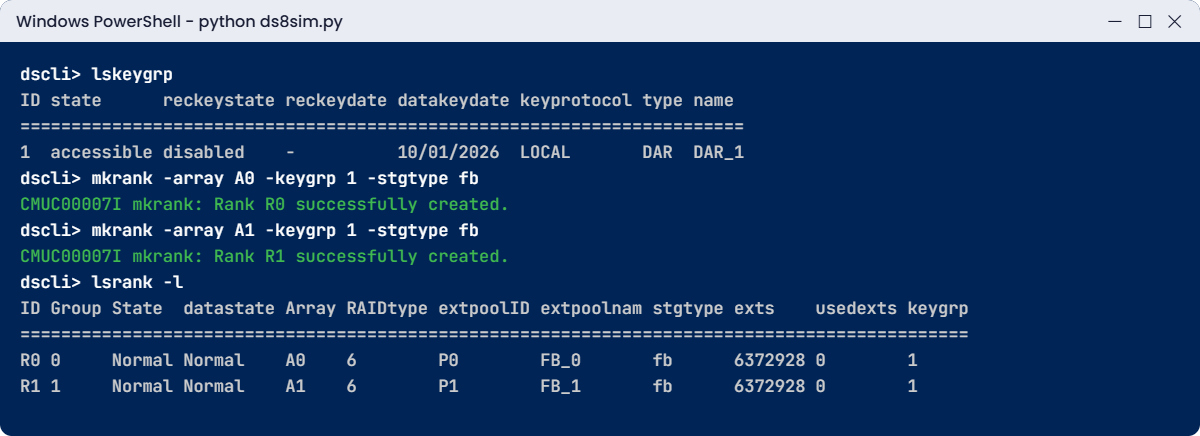
dscli> lsrank -l
Date/Time: 24 October 2026 11:02:39 UTC IBM DSCLI Version: 7.10.10.348 DS: IBM.2107-78SV001
ID Group State datastate Array RAIDtype extpoolID extpoolnam stgtype exts usedexts keygrp
=============================================================================================
R0 0 Normal Normal A0 6 P0 FB_0 fb 6372928 0 1
R1 1 Normal Normal A1 6 P1 FB_1 fb 6372928 0 1
(output shortened: the capacity columns after keygrp are cut)The keygrp column shows 1 on both ranks, and if an auditor asks “is this array encrypted?”, this output is your answer.
✅ Checkpoint: Both ranks show keygrp 1.
5Split the duties: add a security administrator
Encryption shouldn’t hang on a single admin account, so create a personal user in the secadmin group for your security colleague.
Type these:
lsuser
mkuser -pw Secur1ty01 -group secadmin sec_priya
lsuserYou should see this:
dscli> lsuser
Date/Time: 24 October 2026 11:02:39 UTC IBM DSCLI Version: 7.10.10.348 DS: IBM.2107-78SV001
Name Group State
===========================
admin admin active
secadmin secadmin active
service ibm_service active
dscli> mkuser -pw Secur1ty01 -group secadmin sec_priya
CMUC00133I mkuser: User sec_priya successfully created.
dscli> lsuser
Date/Time: 24 October 2026 11:02:39 UTC IBM DSCLI Version: 7.10.10.348 DS: IBM.2107-78SV001
Name Group State
============================
admin admin active
sec_priya secadmin active
secadmin secadmin active
service ibm_service activePriya now handles encryption and admins confirm her critical actions. On a real system you’d give each person their own user, often through LDAP. Type quit when you’re done.
✅ Checkpoint: sec_priya appears in group secadmin.
Break It, Then Fix It
These two DS8000 encryption mistakes turn up on nearly every new system: the wrong person tries the wrong job, and someone forgets the key group.
1Break it: the security admin tries to create a volume
Log in as the new user. The shell forces a password change on first login, as a real DS8000 does (pick any new password with 8+ characters, a letter and a number), and then try a storage task.
Run this, then type the two commands:
python ds8sim.py
lskeygrp
mkfbvol -extpool P0 -cap 50 -sam ese -name hr_db 2000You’ll get this:
SaatVedha DS8000 practice shell — not IBM software. Real DS CLI output looks like this but is not identical.
Enter the primary management console IP address: 10.0.0.1
Enter the secondary management console IP address:
Enter your username: sec_priya
Enter your password:
CMUN00247W Your password has expired. You must change it now.
Enter a new password:
Re-enter the new password:
CMUC00249I Your password was changed successfully.
dscli> lskeygrp
Date/Time: 24 October 2026 11:02:39 UTC IBM DSCLI Version: 7.10.10.348 DS: IBM.2107-78SV001
ID state reckeystate reckeydate datakeydate keyprotocol type name
=======================================================================
1 accessible disabled - 10/01/2026 LOCAL DAR DAR_1
dscli> mkfbvol -extpool P0 -cap 50 -sam ese -name hr_db 2000
CMUN00018E mkfbvol: Unauthorized: Your user group (secadmin) does not have the authority to run this command.Why: secadmin can look at encryption objects but has no rights to create volumes, and that’s deliberate, because if one account could both manage keys and change storage, a single stolen password could do everything. The exact error text is a practice shell message, but a real DS8000 also rejects commands outside your user group.
To fix it, quit and log in as a storage user (admin here, and at work your own op_storage or op_volume account) to create volumes.
As admin, type this:
mkfbvol -extpool P0 -cap 50 -sam ese -name hr_db 2000You should see this:
dscli> mkfbvol -extpool P0 -cap 50 -sam ese -name hr_db 2000
CMUC00025I mkfbvol: FB volume 2000 successfully created.✅ Checkpoint: The volume is created by admin, not by the security user.
2Break it: forget -keygrp, then guess it
Reset the shell and build a rank the way an old unencrypted DS8000 runbook tells you to.
As admin, type these:
simctl reset
mkarray -raidtype 6 -arsite S1
mkrank -array A0 -stgtype fb
mkrank -array A0 -keygrp 2 -stgtype fbYou’ll get these errors:
dscli> simctl reset
SIM0100I simctl: factory state restored (users and passwords kept; use simctl reset -all to reset them too).
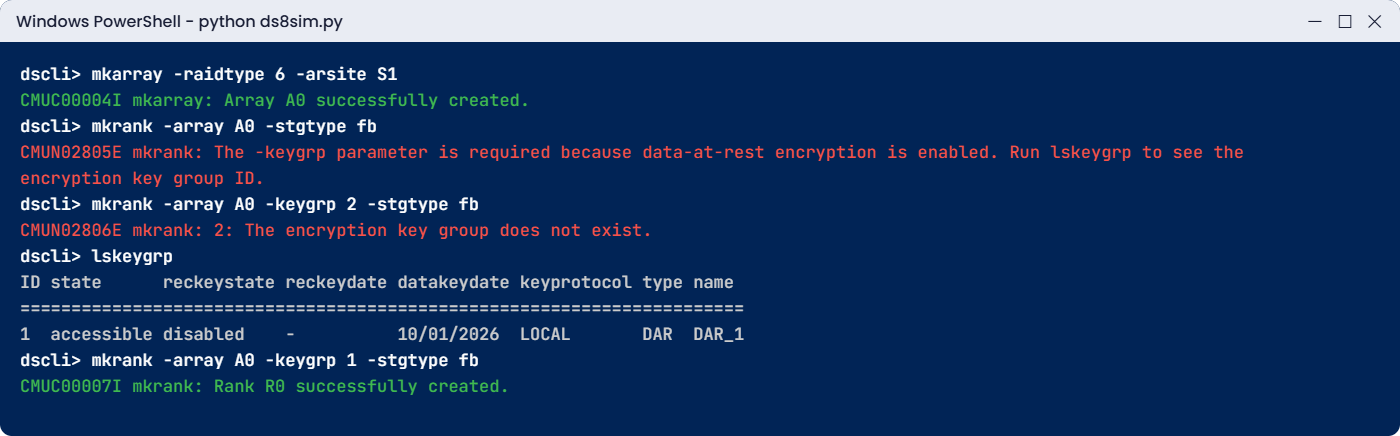
dscli> mkarray -raidtype 6 -arsite S1
CMUC00004I mkarray: Array A0 successfully created.
dscli> mkrank -array A0 -stgtype fb
CMUN02805E mkrank: The -keygrp parameter is required because data-at-rest encryption is enabled. Run lskeygrp to see the encryption key group ID.
dscli> mkrank -array A0 -keygrp 2 -stgtype fb
CMUN02806E mkrank: 2: The encryption key group does not exist.Why: with encryption on, a rank has to join the encryption group, so -keygrp is required, as the Redbook says. The guess of 2 then fails because a DS8A00 has only one key group. Both texts are practice shell messages, but the rule is real.
To fix it, don’t guess. Read the ID from lskeygrp.
Type these:
lskeygrp
mkrank -array A0 -keygrp 1 -stgtype fbYou should see this:
dscli> lskeygrp
Date/Time: 24 October 2026 11:02:40 UTC IBM DSCLI Version: 7.10.10.348 DS: IBM.2107-78SV001
ID state reckeystate reckeydate datakeydate keyprotocol type name
=======================================================================
1 accessible disabled - 10/01/2026 LOCAL DAR DAR_1
dscli> mkrank -array A0 -keygrp 1 -stgtype fb
CMUC00007I mkrank: Rank R0 successfully created.
✅ Checkpoint: Rank R0 is created with -keygrp 1.
This happened at work
The morning the storage stayed locked
A government department ran its citizen records on an encrypted DS8000 with external key servers. To save money, both key servers had been moved into virtual machines on the VMware cluster, whose datastores, of course, lived on that same DS8000. One weekend the building had planned electrical work, so everything was shut down cleanly on Saturday, and when the power came back on Sunday morning the team powered on the DS8000 first, as the runbook said.
The DS8000 came up but the ranks stayed offline, because it was waiting for its key. The key servers were waiting for VMware, and VMware was waiting for its datastores on the DS8000, so three teams sat staring at three consoles with each one waiting on the next.
They got out through the recovery key procedure on the HMC, with the security administrator and an administrator working together and IBM Support on the phone. It took most of Sunday, and the citizen portal opened four hours late on Monday. The fix should have been there from day one: one key server went back onto a small physical server with its own local disks in another room, as IBM requires, and the recovery key was tested and its holders written into the power-on runbook.
Common mistakes and troubleshooting
| Symptom | Likely cause | What to check / fix |
|---|---|---|
| Ranks stay offline after a power-on | DS8000 can’t reach any key server | Check lskeygrp state, the network and firewall from both HMCs to the key servers, and that the isolated key server is running |
| All key servers depend on the DS8000 they serve | Key server VMs stored on the encrypted box | Keep at least one isolated key server on separate hardware and storage |
| mkrank fails asking for -keygrp | Encryption is on; old unencrypted runbook | Use lskeygrp, then add -keygrp 1 to mkrank and mkextpool |
| Team wants to “turn on encryption next quarter” | Encryption group created after ranks exist | Plan it before the logical config, because enabling it later means a rebuild and restore |
| Local keys wanted on an installed system | Local Key Management not chosen at order time | It can’t be activated later by licence, so use external key servers instead |
| One person holds admin and secadmin | Weak role design | Give each person one role, with at least two admins and two secadmins |
| Nobody knows the recovery key steps | Procedure never tested | Write down the recovery key process and test it with both roles present |
A quick DS8000 encryption health habit is to put lskeygrp in your daily check next to lsserver, because you want to know about a key group that isn’t accessible before the next power-on, not during it.
Interview questions
Click a question to open it. Each is phrased the way an interviewer might ask it, and underneath you’ll find why they ask it and one way to answer in your own words.
Fresher level
1. All DS8A00 drives encrypt anyway. So what does “turning on encryption” actually change?
Why they ask this: It catches people who repeat “FDE” without understanding it. They want to hear that the key, not the drive, is what protects the data.
How you might answer: The drives always encrypt internally, but without key management a removed drive could still be used. Once we enable encryption, the drive keys are protected by a key group held either locally in the CPCs or by external key servers.
After that a stolen or returned drive is unreadable, and at end of life we can rely on cryptographic erase.
2. What is the difference between Local Key Management and external key managers?
Why they ask this: They want to see you know both options and their trade-offs, since this comes up in every DS8000 design discussion.
How you might answer: With Local Key Management the keys sit in the encrypted Platform Key Store in the CPCs, so there are no key servers to run and no extra licence, but you have to choose it when the system is ordered.
External key management uses at least two key servers, IBM Guardium Key Lifecycle Manager for example, with one of them isolated. It suits companies with central key policies, and you need it for Endpoint Security and TCT encryption.
2–5 years experience
3. A colleague wants to enable encryption on a DS8000 that is already in production. Walk me through what you tell them.
Why they ask this: It checks you know the all-or-nothing key group rule and can deliver bad news along with a plan.
How you might answer: I’d explain that the DS8A00 has one encryption group and it’s an attribute of every rank and pool, so adding it later means deleting and re-creating the whole logical configuration and restoring the data.
So I’d plan it as a migration, either moving the data to a new encrypted system or emptying the box in phases with Copy Services, rebuilding with -keygrp and moving the data back. Local keys wouldn’t be an option if they weren’t ordered.
4. After a site power-on, lsrank shows ranks not online and lskeygrp is not accessible. What do you check?
Why they ask this: They want calm troubleshooting of the encryption failure everyone dreads.
How you might answer: First I’d check whether the HMCs can reach the key servers (network, firewall ports, DNS) and whether the key servers themselves are up. I’d start with the isolated key server, because it shouldn’t depend on this DS8000.
If every key server is down because they all live on this box, it’s an encryption deadlock, and the security administrator and an administrator enter the recovery key on the HMC with IBM Support. Afterwards I’d fix the design so it can’t happen again.
Senior level
5. Design the key management for a bank with two DS8A00 systems in Metro Mirror.
Why they ask this: Senior people have to design for the availability of keys as well as data, and they want to see key servers treated as critical infrastructure.
How you might answer: If the bank has a central key policy I’d use external key managers, with at least two key servers per site, at least one of them isolated on physical hardware with its own storage, and the HMCs of both DS8000s able to reach servers on both sites.
I’d stick to one product family everywhere, since GKLM can’t be mixed with SafeNet or Vormetric, back up the key database, test the recovery key with both roles, and put the key servers into the power-on order ahead of the storage.
6. How do you set up user roles around encryption so that an audit passes?
Why they ask this: It tests governance thinking, because separation of duties is a common audit finding.
How you might answer: I’d give everyone a personal account, ideally from LDAP, and keep security and storage roles apart, with at least two users in secadmin and at least two in admin and never both roles on one person.
The secadmin users manage the key group and recovery key, the admins confirm their critical actions, and everyday storage work runs under op_storage or op_volume accounts. Then I’d review the audit logs regularly.
Quick quiz
Q1. How many encryption groups does a DS8A00 support?
- One
- Two
- One per extent pool
- Up to 16
Show answer
A: the DS8A00 supports only one encryption group, and every rank and pool uses it.
Q2. When must Local Key Management be chosen?
- Any time with a licence key
- When the system is ordered
- After the first rank
- During each code load
Show answer
B: the Redbook says Local Key Management has to be selected at order time and can’t be activated later by a licence.
Q3. How many external key servers does IBM require for data-at-rest encryption?
- One
- At least two, one isolated
- Exactly three
- None
Show answer
B: you need at least two key servers, and at least one has to be isolated on separate hardware and storage.
Q4. Which DS CLI flag adds a rank to the encryption group?
- -encrypt on
- -keygrp
- -fde
- -secure
Show answer
B: mkrank and mkextpool use -keygrp with the ID that lskeygrp shows.
Q5. Where can the recovery key be entered during an encryption deadlock?
- On any host
- Only on the HMC
- On the key server
- In the DS GUI from a laptop
Show answer
B: the Redbook says the HMC is the only way to enter a recovery key in a deadlock.
Quick recap
- All DS8A00 drives are FDE and always encrypt, and enabling encryption puts the keys under control.
- Keys are either local (Platform Key Store, chosen at order time) or on at least two external key servers, one of them isolated.
- There’s one encryption group, so every rank and pool needs -keygrp and you plan it before the first rank.
- A key server that depends on the DS8000 it serves leads to an encryption deadlock.
- Split duties between secadmin and admin, and remember the recovery key is entered on the HMC.
- lskeygrp showing state accessible is your quick health check.
Next lesson
Lesson 21: Safeguarded Copy and ransomware protection → Next you see how hidden backups that can’t be changed help you recover from ransomware.
Further reading: DS8000 encryption
Want to go deeper into DS8000 encryption? IBM Storage DS8A00 Architecture and Implementation Guide (IBM Redbooks) covers key servers in section 5.3.6 and encryption planning in section 8.3. For the rank and pool steps that need the key group, revisit Lesson 12: Extent pools, rank groups and server affinity.
You can also see the full plan for this course on the IBM DS8000 Architecture course page.
