DS8000 generations: from DS8700 to DS8A00

Here we go through the DS8000 generations, starting with the DS8700 and DS8800 and moving on to the DS8870, DS8880, DS8900F and today’s DS8A00. At work you’ll rarely see only the newest box, because banks, insurers and government offices keep a DS8000 running for many years, so sooner or later you’ll log in to an older one.

The good part is that the core idea hasn’t changed across generations: two servers share the work, every write is protected in two places, and the DS CLI and the logical model look almost the same. What did change a lot is the hardware around that core, and those changes decide what a command can do on the box in front of you.

This lesson opens Phase 4. Over the next four lessons you’ll look at each generation’s rack layout in turn, and after that you’ll put the models side by side.

TimeYou needBy the end you can
45 to 60 minutesThe practice shell with your lab.profile, Python 3 on your laptop, a notebook for the decoding worksheetName each DS8000 generation with its model numbers, say what changed and what stayed, and identify a system from ver -l, lssi and showsi output

What it is, in one line

A DS8000 generation is one hardware family (a base model plus its expansion frames) built on one processor and packaging design; the core two-server design and the DS CLI carry on from one generation to the next.

In Simple Words

Six school buses, one route

Think of a school that has run the same bus route for years and buys a new bus every so often. The first one had a loud engine and small windows, and later ones got a bigger engine, then air conditioning, and finally electric power.

Some things never changed, though. There’s always a driver and a helper, the children still get on at the same stops, and the route card in the driver’s pocket looks the same as ever.

Now suppose a driver who learned on the newest electric bus is asked to take out the old diesel one. Before he leaves he has to check a few things, like where the gears are, how to start it and what it can’t do, because the route is the same but the bus isn’t.

So DS8000 generations are those buses: the two servers are the driver and the helper and the DS CLI is the route card, while the engine, seats and fuel changed with every model.

Engineer's View

Six generations in numbers

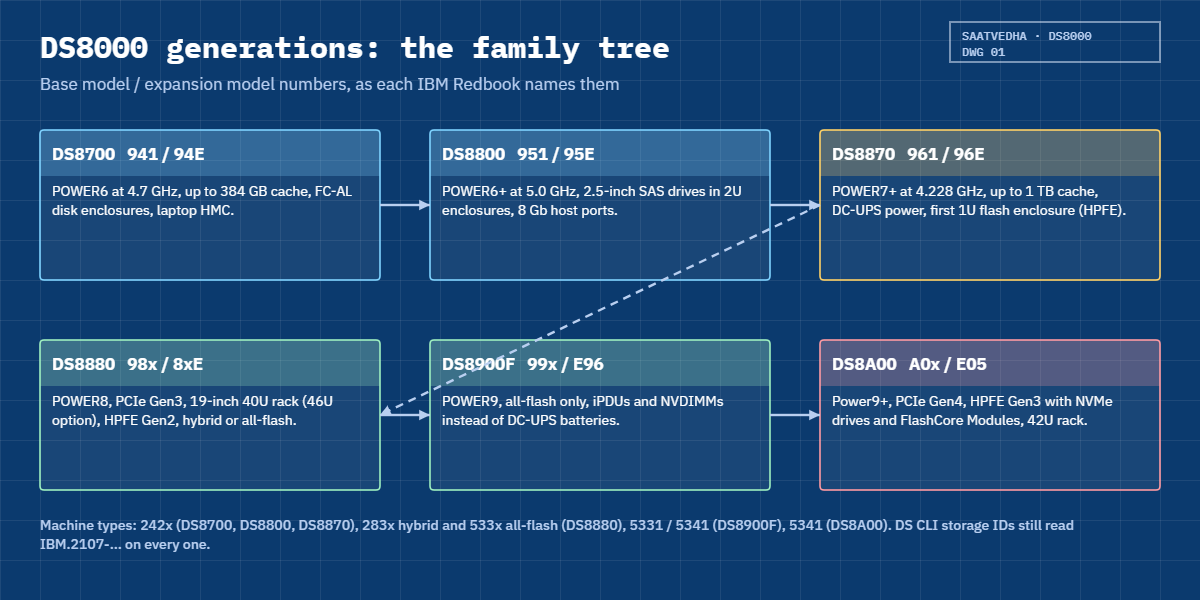
  • DS8700 (941 base, 94E expansion): two POWER6 servers at 4.7 GHz, up to 384 GB cache, up to 1,024 drives in 16-drive FC enclosures, up to 5 frames. IBM’s Redbook calls it the third-generation high-end DS8000.
  • DS8800 (951 / 95E): POWER6+ at 5.0 GHz, 2.5-inch SAS drives in 2U 24-drive enclosures, up to 1,536 drives in 4 frames, 8 Gb host ports. Called the fourth generation.
  • DS8870 (961 / 96E): POWER7+ at 4.228 GHz (earlier units POWER7 at 3.55 GHz), up to 1 TB memory, DC-UPS power with batteries, the first High-Performance Flash Enclosure (HPFE, 1U), 16 Gb host adapters from Release 7.5.
  • DS8880 (984, 985, 986, 988 and 983, expansions 84E to 88E): POWER8, PCIe Gen3, 19-inch 40U racks that can grow to 46U, HPFE Gen2, hybrid (machine type 283x) or all-flash (533x).
  • DS8900F (993, 994, 996, 998, expansion E96): POWER9, all-flash only, iPDUs plus NVDIMMs instead of DC-UPS batteries, 16 and 32 Gb ports, up to 4.3 TB memory.
  • DS8A00 (A00, A01, A05, A08, expansion E05): Power9+, PCIe Gen4, HPFE Gen3 with NVMe drives and FlashCore Modules, 42U racks, up to 4.8 TB memory, machine type 5341. IBM calls it the 10th generation (G10).

Machine types: 242x for DS8700, DS8800 and DS8870 (x is the warranty years), 283x and 533x for DS8880, 5331 and 5341 for DS8900F, 5341 for DS8A00. Through all of them the DS CLI still names the storage image IBM.2107-xxxxxxx.

How it works, step by step

A field engineer would tell the family story one layer at a time, in this order.

1Start with what never changed

Every DS8000 has two central processor complexes (CPCs), server0 and server1, and each one runs its own copy of the storage code. Even-numbered LSSs belong to server0 and the odd ones to server1.

A host write goes into the cache of the owning CPC and into the NVS (non-volatile storage) of the other CPC, and only then does the host hear “done”. If one CPC fails, the other takes over all the LSSs, and you’ll find that design in every Redbook from the DS8700 to the DS8A00.

The logical ladder stays too: array sites become arrays, arrays become ranks, ranks go into extent pools and pools hold volumes. You learned it in Phase 2 and it works on all six generations.

2Follow the processor ladder

The CPCs are IBM Power servers, and each generation went up one step: POWER6, POWER6+, POWER7 and POWER7+, POWER8, POWER9, then Power9+. With faster CPUs and more memory IBM could raise cache and NVS sizes, from 384 GB of cache on a DS8800 to 4.8 TB on a DS8A80.

NVS size follows memory: on the DS8870 it’s 1/32 of CPC memory, and from the DS8880 onwards it’s typically 1/16, with a cap on the biggest systems.

DS8000 generations family tree: DS8700, DS8800, DS8870, DS8880, DS8900F and DS8A00 model numbers

3Watch the back end change

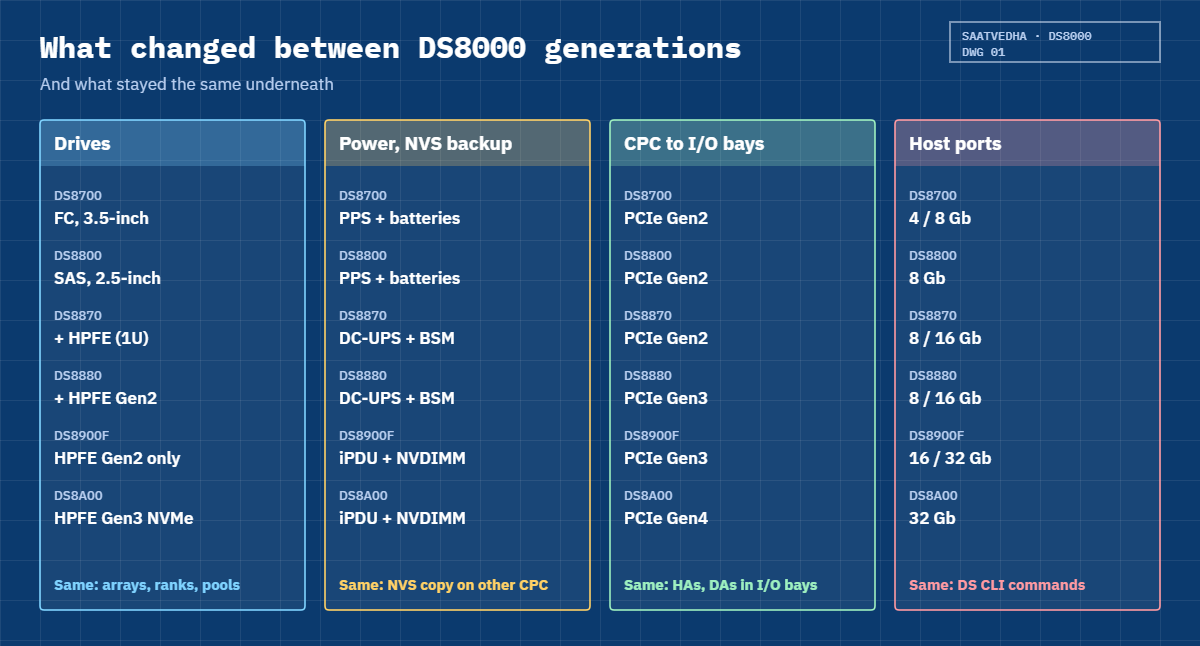
The DS8700 used 3.5-inch Fibre Channel disks in 16-drive enclosures, half at the front and half at the rear. With the DS8800 came 2U enclosures that take either 24 small 2.5-inch SAS drives or 12 large 3.5-inch ones, and the device adapters (DAs) still reached them over switched FC-AL loops.

The DS8870 added a 1U flash enclosure (HPFE) wired straight to the I/O enclosures over PCIe, and the DS8880 brought HPFE Gen2 in 2U pairs that sat beside the old disk enclosures. With the DS8900F spinning disks were gone completely, and the DS8A00 moved on to HPFE Gen3 with NVMe drives and IBM FlashCore Modules.

4Watch the power and NVS protection change

DS8700 and DS8800 frames have primary power supplies (PPS) and battery units, and if power is lost the batteries keep the CPCs running long enough to copy NVS to their internal disks.

On the DS8870 and DS8880, IBM replaced the PPS with DC-UPS units that carry their own battery modules (BSM sets). The DS8900F and DS8A00 got rid of the big batteries altogether: intelligent PDUs (iPDUs) feed the frame, and NVDIMMs with small backup power modules save NVS to flash inside the CPC.

5Watch the racks and consoles change

Frames from the DS8700 up to the DS8870 are about 84.8 cm wide and 193 cm tall, with a power column on the left. From the DS8880 onwards they’re standard 19-inch racks, 64 cm wide: 40U (46U with a top extension) on the DS8880, 40U on the DS8900F and 42U on the DS8A00.

The management console moved around as well. It was a laptop HMC on a slide-out tray on the DS8700, DS8800 and DS8870, a small mini PC under the DC-UPS on the DS8880, two mini PCs in a Management Enclosure on the DS8900F, and on the DS8A00 it’s two 1U Power HMCs at the bottom of the rack.

6Notice what the software added

Each generation came with its own release family: Release 6 on the DS8700 and DS8800, Release 7 on the DS8870, Release 8 on the DS8880, Release 9 on the DS8900F and Release 10 on the DS8A00. You can tell which from the bundle number: 86.x for a DS8800, 87.x for a DS8870, 88.x for a DS8880, 89.x for a DS8900F and 10.x for a DS8A00.

Some commands and options came later. mkhost and mkcluster exist from Release 8.3, and before that you use mkvolgrp and mkhostconnect. Small 16 MiB extents arrived with Release 8.1, and Safeguarded Copy needs Release 8.5 or later.

RAID 5 is normal on a DS8870, needs an RPQ on the DS8880 and DS8900F, and the DS8A00 refuses it.

What changed between DS8000 generations: drives, power, PCIe and host ports

7Identify the box before you touch it

You need three commands to tell which generation you’re facing. ver -l shows the LMC and bundle, lssi -l shows the model (951, 961 or A05, for example), and showsi adds the MTS field with the machine type, such as IBM.5341.

Write those three facts at the top of every change record, and you’ll know which Redbook and which command syntax apply.

GenerationBase / expansion modelsProcessorBundle starts withRedbook
DS8700941 / 94EPOWER676.xSG24-8886
DS8800951 / 95EPOWER6+86.xSG24-8886
DS8870961 / 96EPOWER7+87.xSG24-8085
DS8880984, 985, 986, 988 / 84E to 88EPOWER888.xSG24-8323
DS8900F993, 994, 996, 998 / E96POWER989.xSG24-8456
DS8A00A00, A01, A05, A08 / E05Power9+10.xSG24-8559

Hands-on lab: identify a DS8000 generation

Before you run any command, double-check it

Read every command twice before you press Enter. Check the target: the system or account, the IDs, the names and the sizes. These commands are for learning and were tested in our lab, not on your system. At work, run the read-only list commands first, follow your change process, make sure a backup exists, and ask a second person to check anything that changes or deletes data. You run them at your own risk.

The practice shell is a DS8A50, so it can’t pretend to be a DS8870 or DS8880, but it can teach you the identification habit: read the code level, the model and the machine type, then match them to a generation. You’ll also decode some real values quoted from the older Redbooks.

Practice shell note: the practice shell is our teaching tool, not IBM software. Real DS CLI output looks very much like this but is not identical. Every output below is what the shell really printed. All outputs are from a G10 (DS8A50) system; older generations print different values, quoted in Step 4 with their Redbook pages.

1Reset and read the code level

Run this:

python ds8sim.py -cfg lab.profile
simctl reset
ver -l

You should see this:

dscli> simctl reset
SIM0100I simctl: factory state restored (users and passwords kept; use simctl reset -all to reset them too).
dscli> ver -l
Date/Time: 24 October 2026 19:51:00 UTC IBM DSCLI Version: 7.10.10.348 DS: IBM.2107-78SV001
DSCLI 7.10.10.348
StorageManager 10.2.2507181727
HMC DSCLI 7.10.10.348
==================Version==================
Storage Image    LMC         Bundle Version
===========================================
IBM.2107-78SV001 7.10.10.348 10.10.106.0

LMC 7.10.10.348 with bundle 10.10.106.0 means Release 10.1, so this is a G10 system, and the DS CLI version matches the LMC, which is what you want to see.

✅ Checkpoint: Bundle 10.10.106.0 on IBM.2107-78SV001.

2Read the model and machine type

Run this:

lssi -l
showsi IBM.2107-78SV001

You should see this:

dscli> lssi -l
Date/Time: 24 October 2026 19:51:00 UTC IBM DSCLI Version: 7.10.10.348 DS: IBM.2107-78SV001
Name         ID               Storage Unit     Model WWNN             State  ESSNet
====================================================================================
ds8k-g10-lab IBM.2107-78SV001 IBM.2107-78SV000 A05   5005076303FFF0DD Online Enabled
dscli> showsi IBM.2107-78SV001
Date/Time: 24 October 2026 19:51:00 UTC IBM DSCLI Version: 7.10.10.348 DS: IBM.2107-78SV001
Name             ds8k-g10-lab
desc             SaatVedha practice DS8A50
ID               IBM.2107-78SV001
Storage Unit     IBM.2107-78SV000
Model            A05
WWNN             5005076303FFF0DD
Signature        5a7e-0d5a-8a50-0001
State            Online
NVS Memory       64.0 GB
Cache Memory     832.0 GB
Processor Memory 1015.6 GB
MTS              IBM.5341-78SV000
(output shortened)

Model A05 is the DS8A50 base frame. MTS shows the real machine type, 5341, while the ID still says 2107, and that mix confuses a lot of people. 2107 is the family name the DS CLI has used for every generation; the machine type you order and service is the one in MTS.

The NVS of 64 GB matches the smallest DS8A50 memory option (1,024 GB system memory).

✅ Checkpoint: Model A05, MTS IBM.5341-78SV000, NVS 64.0 GB.

3Look at the servers and consoles

Run this:

lspnode -l
lshmc

You should see this:

dscli> lspnode -l
Date/Time: 24 October 2026 19:51:00 UTC IBM DSCLI Version: 7.10.10.348 DS: IBM.2107-78SV001
ID State  Release Processor       Memory   Location
==============================================================
00 Online R10.1   Power9+ 20-core 512.0 GB U9009.42A.78SV00-P1
01 Online R10.1   Power9+ 20-core 512.0 GB U9009.42A.78SV01-P1
dscli> lshmc
Date/Time: 24 October 2026 19:51:00 UTC IBM DSCLI Version: 7.10.10.348 DS: IBM.2107-78SV001
Name          State  Role         Release                  Management-IP Location-Code    Machine-Type Machine-Model Memory Disk
================================================================================================================================
DS8A50-1A.LAB Online Primary(1)   R10.1 bundle 10.10.106.0 10.0.0.1      U7063CR2.78SV1DD 7063         CR2           33GB   1TB
DS8A50-1B.LAB Online Secondary(2) R10.1 bundle 10.10.106.0 10.0.0.2      U7063CR2.78SV2DD 7063         CR2           33GB   1TB

There are two CPCs with 20 Power9+ cores each, as you’d expect on a DS8A50, and two HMCs of type 7063-CR2, which are the 1U Power HMCs of G10. A DS8870 would show one laptop HMC in the base frame instead. Also, lspnode is one of the G10 hardware list commands, so don’t expect every list command to exist on an older release.

✅ Checkpoint: Nodes 00 and 01 are Online; two 7063 CR2 HMCs.
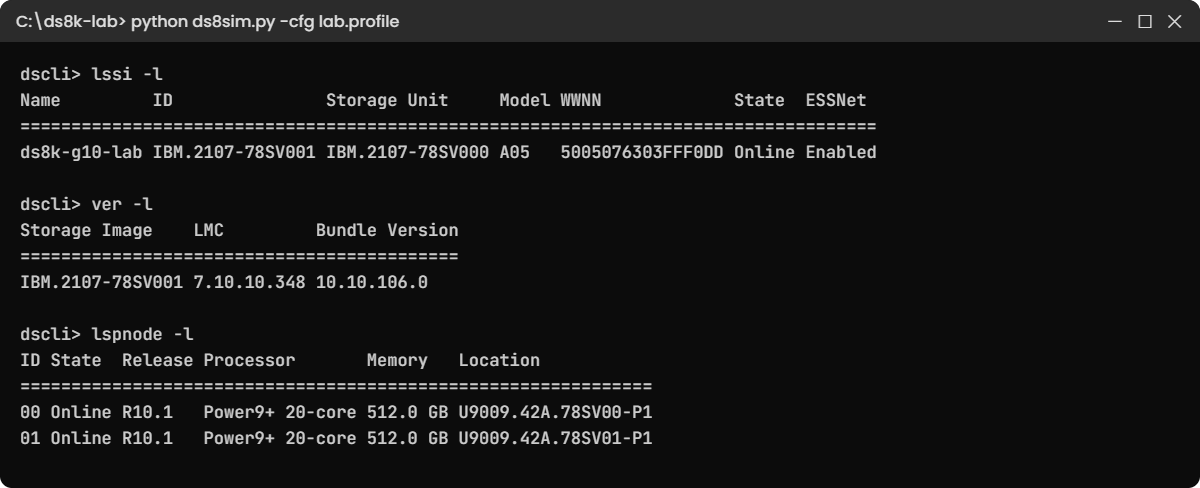
Practice shell lssi -l, ver -l and lspnode -l output on the lab DS8A50
Your lab screen after Steps 1 to 3: model, code level and both CPCs of the practice DS8A50.

4Decode older systems on paper

These lines are quoted from the IBM Redbooks. Before you open the answer key, write down the generation for each one in your notebook.

Clue (as printed in the Redbook)SourceYour answer
lssi line ending: … 951 500507630AFFC29F Online EnabledSG24-8886, p. 237?
ver -l: DSCLI 7.7.50.273, bundle 87.50.109.0SG24-8085, p. 385?
ver -l: DSCLI 7.8.50.474, bundle 88.50.168.0SG24-8323, p. 447?
showsu MTS IBM.5331-75HAL90SG24-8456, p. 77?
Ordered as 2421-961, DS CLI shows 2107-961SG24-8085, p. 80?
lshmc: 7063 CR2, R10.1 bundle 10.10.106.0SG24-8559, p. 167?
Answer key

1: DS8800 (model 951). 2: DS8870 (bundle 87.x, Release 7.5). 3: DS8880 (bundle 88.x, Release 8.5). 4: DS8900F (machine type 5331). 5: DS8870 with a 1-year warranty (2421 = 242x with x = 1). 6: DS8A00 (G10 Power HMC, Release 10.1).

✅ Checkpoint: You got at least five of six right without the key.

5Let a script name the generation

Now let a script do the habit for you. This small Python script lives in the lab folder next to ds8sim.py and runs on your laptop, never on the DS8000. It calls the DS CLI, reads lssi -l and lspnode -l, and looks the model up in a table built from the Redbooks.

It needs an auto.profile that gives comma-separated output. If you made one in another lesson, reuse it; otherwise save these 8 lines as auto.profile (with your own path to security.dat) and store your password once from inside the shell.

File auto.profile:

hmc1: 10.0.0.1
username: admin
pwfile: C:\ds8k-lab\security.dat
devid: IBM.2107-78SV001
banner: off
header: on
format: delim
delim: ,

Run this (inside the shell, once):

managepwfile -action add -name admin -pw <your password> -pwfile C:\ds8k-lab\security.dat
quit

File whatbox.py:

# Runs on your workstation or jump server, not on the DS8000.
# It talks to the DS8000 only through the DS CLI (auto.profile: banner off, header on, format delim).
import csv, subprocess
DSCLI = ["python", "ds8sim.py", "-cfg", "auto.profile"]   # at work: ["dscli", "-cfg", "auto.profile"]

def dscli(*args):
    """Run one DS CLI command and return its rows as dictionaries."""
    out = subprocess.run(DSCLI + list(args), capture_output=True, text=True).stdout
    lines = [l for l in out.splitlines() if l and not l.startswith("SaatVedha") and not l.startswith("CMUC")]
    return list(csv.DictReader(lines))

# Base-frame model number -> (family, processor), from the IBM Redbooks for each generation
MODELS = {
    "941": ("DS8700", "POWER6"),   "951": ("DS8800", "POWER6+"),  "961": ("DS8870", "POWER7 / POWER7+"),
    "984": ("DS8884 / DS8884F", "POWER8"), "985": ("DS8886 / DS8886F", "POWER8"),
    "986": ("DS8886 / DS8886F", "POWER8"), "988": ("DS8888F", "POWER8"), "983": ("DS8882F", "POWER8"),
    "993": ("DS8910F rack-mounted", "POWER9"), "994": ("DS8910F", "POWER9"),
    "996": ("DS8950F", "POWER9"), "998": ("DS8980F", "POWER9"),
    "980": ("DS8880 family, earlier model", "POWER8"), "981": ("DS8880 family, earlier model", "POWER8"),
    "982": ("DS8880 family, earlier model", "POWER8"),
    "A00": ("DS8A10 rack-mount", "Power9+"), "A01": ("DS8A10", "Power9+"),
    "A05": ("DS8A50", "Power9+"), "A08": ("DS8A80", "Power9+"),
}

for si in dscli("lssi", "-l"):
    family, cpu = MODELS.get(si["Model"], ("unknown model", "?"))
    print(f"{si['Name']}  {si['ID']}  model {si['Model']}  ->  {family} ({cpu} family)")
for node in dscli("lspnode", "-l"):
    print(f"  CPC {node['ID']}: {node['Processor']}, {node['Memory']}, {node['State']}")

Run this (in the lab folder, not in the shell):

python whatbox.py

You should see this:

ds8k-g10-lab  IBM.2107-78SV001  model A05  ->  DS8A50 (Power9+ family)
  CPC 00: Power9+ 20-core, 512.0 GB, Online
  CPC 01: Power9+ 20-core, 512.0 GB, Online

At work you’d point DSCLI at the real dscli and loop over every system in your estate. Run it weekly from a jump server and you get a list of which generation and model sits in each data centre, and that’s the list you check before anyone books an engineer.

✅ Checkpoint: The script prints DS8A50 (Power9+ family) and both CPCs Online.

Break It, Then Fix It

Most generation mistakes come from carrying a habit from one box to another, so here you’ll replay two habits from older DS8000s on the G10 practice system.

1Break it: build a RAID 5 array, the DS8870 way

RAID 5 is normal on a DS8870, and the Redbook’s own examples use mkarray -raidtype 5. Try the same thing on the DS8A50. The shell first asks you to accept a warning, so type Y.

Run this:

python ds8sim.py -cfg lab.profile
mkarray -raidtype 5 -arsite S1

You’ll get this error:

CMUC00536W mkarray: The use of RAID 6 over RAID 5 is highly recommended for increased reliability. Please acknowledge that you understand the risks associated with RAID 5.: Are you sure you want to accept the disclaimer above? [Y/N]: Y
CMUN81522E mkarray: RAID 5 is not supported by the device adapter pair.

Why: the DS8A00 supports only RAID 6 and RAID 10, and CMUN81522E is the message IBM shows in the DS8A00 Redbook for this exact attempt. On a DS8880 the same command only gives a warning and needs an RPQ, and on a DS8870 it works without complaint.

Fix: use RAID 6, the default and preferred level on G10.

Run this:

mkarray -raidtype 6 -arsite S1
lsarray

You should see this:

CMUC00004I mkarray: Array A0 successfully created.
dscli> lsarray
Date/Time: 24 October 2026 19:51:25 UTC IBM DSCLI Version: 7.10.10.348 DS: IBM.2107-78SV001
Array State      Data   RAIDtype    arsite Rank DA Pair DDMcap (10^9B)
======================================================================
A0    Unassigned Normal 6 (5+P+Q+S) S1     -    0       4800.0
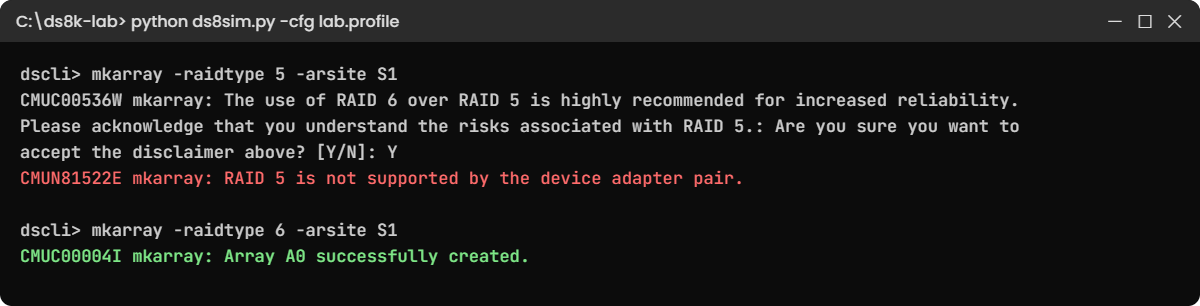
RAID 5 refused on DS8A00 with CMUN81522E, RAID 6 array created
The RAID 5 refusal and the RAID 6 fix in the practice shell.

✅ Checkpoint: A0 is RAID 6 (5+P+Q+S) on S1.

2Break it: an old host type name

Say an old runbook from a DS8880 creates a Linux host connection with host type LinuxRHEL. Run it here and see what happens.

Run this:

mkhostconnect -wwname 10000090FA13B914 -hosttype LinuxRHEL web1

You’ll get this error:

CMUN00010E mkhostconnect: Invalid value for -hosttype: LinuxRHEL. Run lshosttype.

Why: DS8880 and older releases used host type names like LinuxRHEL, LinuxSuse and Win2012, while DS8900F and DS8A00 use generic names such as Linux and Windows. (The message text comes from the practice shell, but a real DS8A00 rejects the old name too.)

Fix: ask the box which names it knows.

Run this:

lshosttype -type scsimap256
mkhostconnect -wwname 10000090FA13B914 -hosttype Linux web1
lshostconnect

You should see this:

Date/Time: 24 October 2026 19:51:25 UTC IBM DSCLI Version: 7.10.10.348 DS: IBM.2107-78SV001
HostType   Profile              AddrDiscovery LBS
=================================================
AppleOSX   Apple - OSX          LUNPolling    512
Linux      Linux Server         LUNPolling    512
VMWare     VMWare               LUNPolling    512
Windows    Windows Server       LUNPolling    512
(output shortened)
CMUC00012I mkhostconnect: Host connection 0001 successfully created.
dscli> lshostconnect
Date/Time: 24 October 2026 19:51:25 UTC IBM DSCLI Version: 7.10.10.348 DS: IBM.2107-78SV001
Name ID   WWPN             HostType Profile      portgrp volgrpID ESSIOport
===========================================================================
web1 0001 10000090FA13B914 Linux    Linux Server 0       -        all

On a G10 system you’d normally use mkhost -type "Linux Server" instead, and the volume-group method stays for compatibility. The bigger point isn’t about one flag: before you reuse a script, run ver -l and lssi -l and make sure it was written for that generation.

✅ Checkpoint: web1 exists with HostType Linux.

This happened at work

Museum day at the state bank

A contractor had spent two years working on new DS8A50 systems when a state co-operative bank booked him for one evening to add 8 TB for the loan system on “the DS8000”. He turned up with a tested G10 runbook built around mkhost, RAID 6 and small extents.

What he found in the computer room was a DS8870, model 961, on Release 7.5. His first command, mkhost, was rejected because host objects only came in with Release 8.3, the ranks were RAID 5 on 1 GiB extents, and the GUI looked nothing like the one he knew. Later he joked that it felt like a museum day.

He did the sensible thing and stopped. The two-hour change window closed with nothing changed and the capacity add slipped by a week, so for those seven days the loan system’s pool sat above its alert threshold and the night batch team kept an eye on it by hand.

When the team looked back, the cause was plain enough: the work order only said “DS8000”. Nobody had asked for the model or code level, so the runbook had been written for the wrong generation.

A week later he came back with a DS8870 runbook: mkfbvol into the existing pool, chvolgrp -action add for the host’s volume group, and a check with showvolgrp. Since then the bank keeps the output of lssi -l and ver -l for every storage system in its asset register, and every work order quotes the model and bundle.

Common mistakes and troubleshooting

SymptomLikely causeWhat to check / fix
A command from your runbook is rejectedRunbook written for a newer release (mkhost needs R8.3+)ver -l; use mkvolgrp and mkhostconnect on older releases
RAID 5 refused with CMUN81522EDS8A00 has no RAID 5Use RAID 6 (or RAID 10)
Host type rejectedOld names like LinuxRHEL on DS8900F or DS8A00lshosttype; use Linux or Windows
Machine type in your notes does not match the IDID shows IBM.2107 on every generationRead MTS in showsi for the real machine type
Small extents option missingRelease older than 8.1Only 1 GiB FB extents before Release 8.1
Wrong Redbook used for planningGeneration not identifiedMatch model and bundle to the table in Step 7
Safeguarded Copy not offeredRelease older than 8.5Check ver -l before promising it

Make it a habit: never type a change on a DS8000 you haven’t identified in the last five minutes. Running lssi -l and ver -l takes ten seconds.

Interview questions

Click a question to open it. Each one is worded the way an interviewer would ask it, and underneath you’ll see why they ask and one way you could answer in your own words.

Fresher level

1. Name the DS8000 generations you know, from oldest to newest, with one thing that changed in each.

Why they ask this: They want to see that you know the family exists beyond the model you used.

How you might answer: I’d go oldest first. DS8700 (941) on POWER6 with FC disks, then DS8800 (951) with 2.5-inch SAS enclosures, DS8870 (961) on POWER7+ with DC-UPS power and the first 1U HPFE, DS8880 (98x) on POWER8 with PCIe Gen3 and HPFE Gen2, DS8900F (99x), which is all-flash on POWER9 with NVDIMMs, and now DS8A00 (A0x) on Power9+ with NVMe HPFE Gen3.

2. You log in to a DS8000 you have never seen. How do you find out which generation it is?

Why they ask this: They check you identify before you act.

How you might answer: First I run ver -l for the LMC and bundle, lssi -l for the model and showsi for the MTS. Bundle 87.x with model 961 is a DS8870, and 10.x with A05 is a DS8A50. I put those three facts into the change record before I do anything else.

2–5 years experience

3. Walk me through what stayed the same from DS8700 to DS8A00, and why that matters to an admin.

Why they ask this: They want the architecture constant, not a list of models.

How you might answer: The two CPCs still share the work, with even LSSs on server0 and odd ones on server1, and a write sits in the owning CPC’s cache and the other CPC’s NVS before the host gets its acknowledgement. The ladder of arrays, ranks, pools and volumes hasn’t changed either.

So my troubleshooting logic carries over. What I have to re-check for each generation is the syntax: host objects, extent sizes, RAID levels and encryption flags.

4. A colleague wants to reuse a DS8A00 provisioning script on a DS8880 at Release 8.2. What would you check?

Why they ask this: Practical release awareness.

How you might answer: mkhost and mkcluster need Release 8.3, so on 8.2 I’d switch to mkvolgrp and mkhostconnect. Host types use names like LinuxRHEL there, and the encryption flag is -encryptgrp on the DS8880 instead of -keygrp. RAID 6 is still the default, but RAID 5 exists by RPQ. I’d run the script in read-only mode first and compare it against the DS8880 Redbook.

Senior level

5. How did NVS protection change across the generations, and what does that mean during a site power cut?

Why they ask this: They test deep RAS knowledge.

How you might answer: From DS8700 to DS8880 it’s batteries, first next to the primary power supplies and later inside the DC-UPS units, and they keep the CPCs alive while NVS is dumped to the CPC internal disks. DS8900F and DS8A00 use NVDIMMs with small backup power modules instead, so NVS gets saved to flash on the module.

During a power cut the effect for me is the same either way: host I/O stops, modified data is saved, and the system needs a controlled power-on. What changes is what the field engineer replaces and how long the batteries are rated for.

6. Your company runs a DS8870, two DS8880s and a new DS8A50. How would you organise operations so people don’t mix them up?

Why they ask this: They want process thinking at estate level.

How you might answer: I’d keep an asset register with the model, MTS and bundle for each box, refreshed by a weekly script that runs lssi -l and ver -l from the jump server. Runbooks would be versioned per generation, every change record would have to quote the bundle, and I’d link the right Redbook to each system, because figures and command options differ.

Quick quiz

Q1. Which base model belongs to the DS8870?

  1. 951
  2. 961
  3. 986
  4. A05
Show answer

B — 961 is the DS8870 base frame; 96E is its expansion.

Q2. A bundle version starting with 88 means which generation?

  1. DS8800
  2. DS8870
  3. DS8880
  4. DS8900F
Show answer

C — 88.x bundles are Release 8 on DS8880.

Q3. What does the DS CLI storage image ID show on every generation?

  1. IBM.5341
  2. IBM.2107
  3. IBM.242x
  4. IBM.283x
Show answer

B — IDs read IBM.2107-xxxxxxx; the real machine type is in MTS.

Q4. Which generation first replaced DC-UPS batteries with NVDIMMs?

  1. DS8870
  2. DS8880
  3. DS8900F
  4. DS8A00
Show answer

C — DS8900F introduced iPDUs, NVDIMMs and backup power modules.

Q5. On which system is RAID 5 refused?

  1. DS8800
  2. DS8870
  3. DS8880
  4. DS8A00
Show answer

D — DS8A00 supports RAID 6 and RAID 10 only.

Quick recap

  • Six generations: DS8700 (941), DS8800 (951), DS8870 (961), DS8880 (98x), DS8900F (99x), DS8A00 (A0x).
  • Constant: two CPCs, cache plus NVS on the partner CPC, even and odd LSSs, arrays to volumes, DS CLI.
  • Changed: processors (POWER6 to Power9+), drives (FC disks to NVMe flash), power (PPS to DC-UPS to iPDU and NVDIMM), racks (84.8 cm to 19-inch 40U, 46U, 42U).
  • Identify first: ver -l (bundle), lssi -l (model), showsi (MTS).
  • Syntax follows the release: mkhost from R8.3, small extents from R8.1, Safeguarded Copy from R8.5, no RAID 5 on G10.
  • Scripts run on your laptop or jump server and talk to the box only through the DS CLI.

Next lesson

Lesson 23: DS8870 architecture and rack layout → You open up a DS8870 frame by frame: power column, DA pairs, HPFEs and DC-UPS.

Further reading: DS8000 generations

Want to go deeper into DS8000 generations? One Redbook per generation: SG24-8886 (DS8700 and DS8800), SG24-8085 (DS8870), SG24-8323 (DS8880), SG24-8456 (DS8900F) and SG24-8559 (DS8A00).

See the original drawings:

  • DS8700 and DS8800 side by side: SG24-8886, Figure 1-1 on page 4 (PDF page 26).
  • DS8870 Enterprise Class and All-Flash base frames: SG24-8085, Figure 1-1 on page 4 (PDF page 24).
  • DS8884 40U rack and DS8886 46U rack: SG24-8323, Figure 1-1 on page 4 (PDF page 22).
  • DS8950F base frame with labels: SG24-8456, Figure 1-3 on page 7 (PDF page 27).
  • DS8A50 base frame with labels: SG24-8559, Figure 1-3 on page 4 (PDF page 22).

For the building blocks behind all of them, revisit Lesson 1 of this course. You can also see the full plan for this course on the IBM DS8000 Architecture course page.

Scroll to Top

This website uses cookies

We use a few cookies to keep this site working. If you allow it, we also use Google Analytics to count visits so we can improve our lessons. You can accept all, deny the optional ones, or choose what to allow.