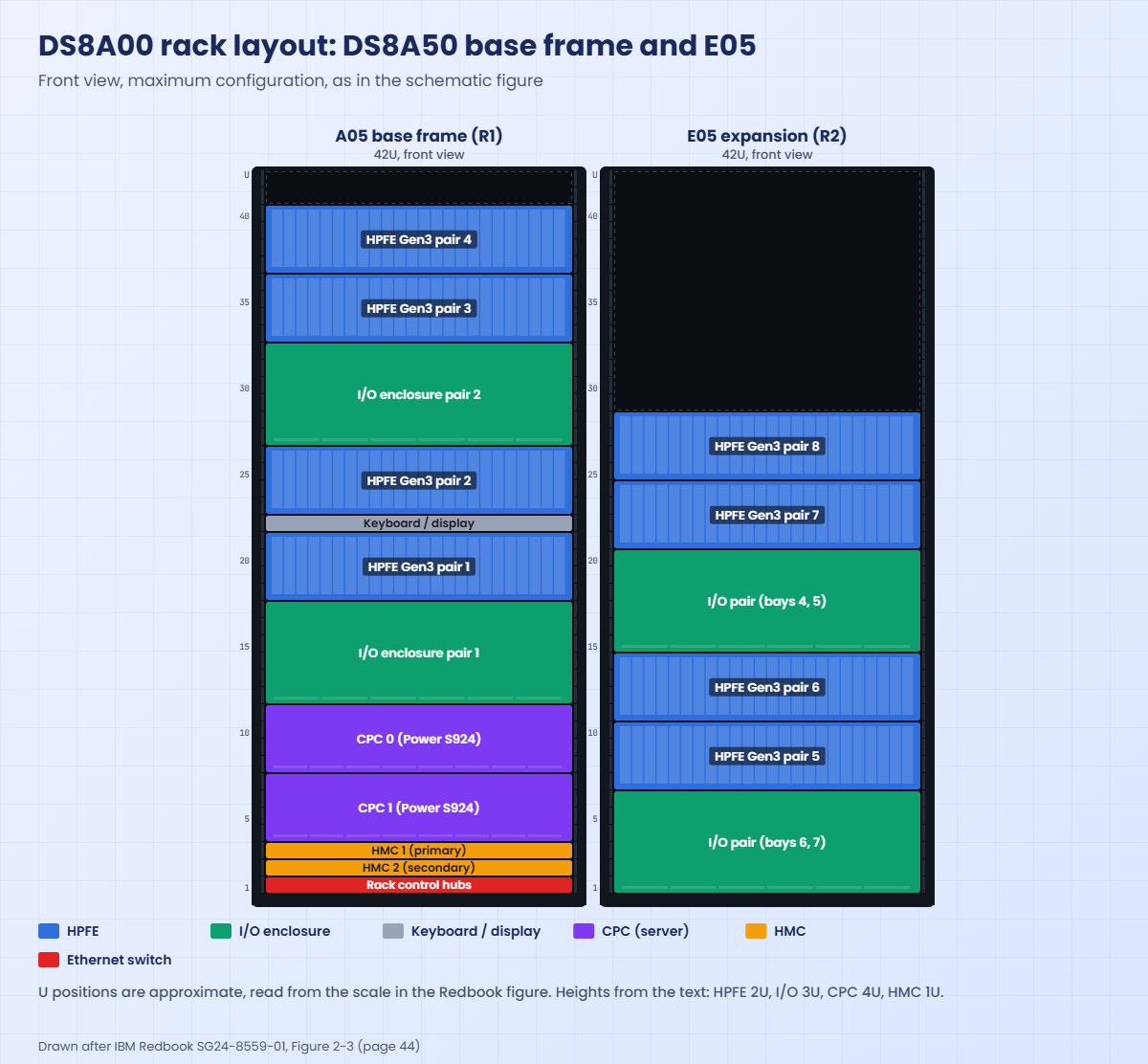
DS8A00 rack layout: where every part sits
-
Phase 0: Start here
-
Phase 1: The hardware
-
Phase 2: Virtualization
-
Phase 3: Resilience and data protection
-
Phase 4: Generations, models and rack layouts
-
Phase 5: Wrap-up
The DS8A00 rack layout shows where every part of a DS8A10, DS8A50 or DS8A80 sits: which U holds the HMCs, where the CPCs are, and which shelves are I/O enclosures and which are HPFE Gen3 flash enclosures. You’ll need it the day an IBM engineer asks you to meet them at the rack, when you plan cabling, and when a drive fails and somebody has to find it.
We’ll walk the 42U base frame from the bottom up and then the E05 expansion frame. You’ll pick up the location codes printed on the parts (R1-F08, R1-XI3, XC1, HMC1), the two power domains at the rear, and why the Redbook’s own drawings show the parts in slightly different orders.
After that you map the practice shell’s hardware lists to the rack, track down a failed drive, and let a small script on your laptop print a text rack map from DS CLI output.
| Time | You need | By the end you can |
|---|---|---|
| 60 to 70 minutes | The practice shell, lab.profile, Python 3 and the DS8A00 Redbook (SG24-8559) open in a browser | Draw the DS8A50 base and E05 frames with U positions, read location codes like R1-F08-D8, and turn DS CLI output into a rack map |
What it is, in one line
A DS8A00 base frame is a 42U rack with the HMCs and rack control hubs at the bottom, two CPCs above them, and I/O enclosure pairs and HPFE Gen3 pairs stacked up to the top, with every part named by a location code such as R1-F08 or R1-XI3.
In Simple Words
A library with numbered shelves
A big library has tall bookcases, with a number on top of each case, a letter on each shelf and a place number for each book. “Case 1, shelf F8, book 8” sends you straight to one book, even if you’ve never been in that library before.
The heavy things go at the bottom, like the librarian’s desk and the computers, and the lighter shelves of books go higher up. A second bookcase next to the first holds more books but no desk. Now imagine reading the map from the back of the bookcase, where left becomes right, and if you forget that you’ll pull a book from the wrong side.
A DS8A00 works the same way: the rack is the case, the location code is the shelf label and the drive slot is the book’s place, and the front and rear views are mirror images.
Engineer's View
The DS8A00 frames in numbers
From IBM Redbook SG24-8559-01 (Release 10.1), Chapter 2 and Chapter 5.
- Models: DS8A80 = 5341-A08 and DS8A50 = 5341-A05 (base frames, each can take one E05 expansion frame). DS8A10 = 5341-A01 (single racked frame) or 5341-A00 (rack-mount, goes into your own EIA-310-D rack).
- Rack: 19-inch, 600 x 1050 mm, 42U for every model. With casters and covers it’s about 204 cm high, 62 cm wide and 124 cm deep. Air flows front to rear and nothing leaves through the top.
- Unit heights: HPFE Gen3 enclosure 2U (24 x 2.5-inch NVMe drives), always in pairs, so 4U per pair. I/O enclosure 3U, in pairs, so 6U per pair. CPCs: two 4U Power S924 servers on A08 and A05, two 2U Power S922 servers on A01 and A00. HMCs: two 1U Power HMCs (7063-CR2). Keyboard and display: 1U tray, reached from the front.
- Base frame holds up to four HPFE Gen3 pairs and two I/O enclosure pairs. The first I/O pair comes by default.
- E05 holds up to four HPFE Gen3 pairs, two I/O enclosure pairs (bays 4 to 7) and one iPDU pair. No CPC, HMC or keyboard.
- Power: iPDUs hang vertically at the rear sides, two per side: R1E21 and R1E23 on the left (green domain), R1E22 and R1E24 on the right (yellow domain), seen from the rear.
- Service space: at least 121.92 cm (48 in) in front and 76.2 cm (30 in) behind.
On DS8900F: 40U racks, and the HMCs live inside a 2U Management Enclosure instead of being separate 1U units.
How it works, step by step
Walk the DS8A00 rack layout the way an engineer reads it, from the floor up. The management parts and servers sit low and the flash shelves fill the top.
1Bottom: rack control hubs and HMCs
The very bottom 1U is reserved for two rack control hubs, which are the black and gray private network switches. The Redbook text calls them two 10-port hubs but its model tables say two 8-port switches, so treat this as a point where text and tables differ and check your own system.
Above the hubs sit the two 1U HMCs, HMC1 (primary) above HMC2 (secondary), and the network cables for both HMCs plug in at the rear of the base rack.
2Next: the two CPCs
Above the HMCs are the two CPCs, XC1 on top and XC2 below. On a DS8A50 or DS8A80 each one is a 4U Power S924, so together they take 8U, while on a DS8A10 they’re 2U Power S922 servers. On the A05 drawing each CPC has four power supplies, labelled E1 to E4 and fed from both power domains.
3Middle: I/O enclosures, flash and the keyboard
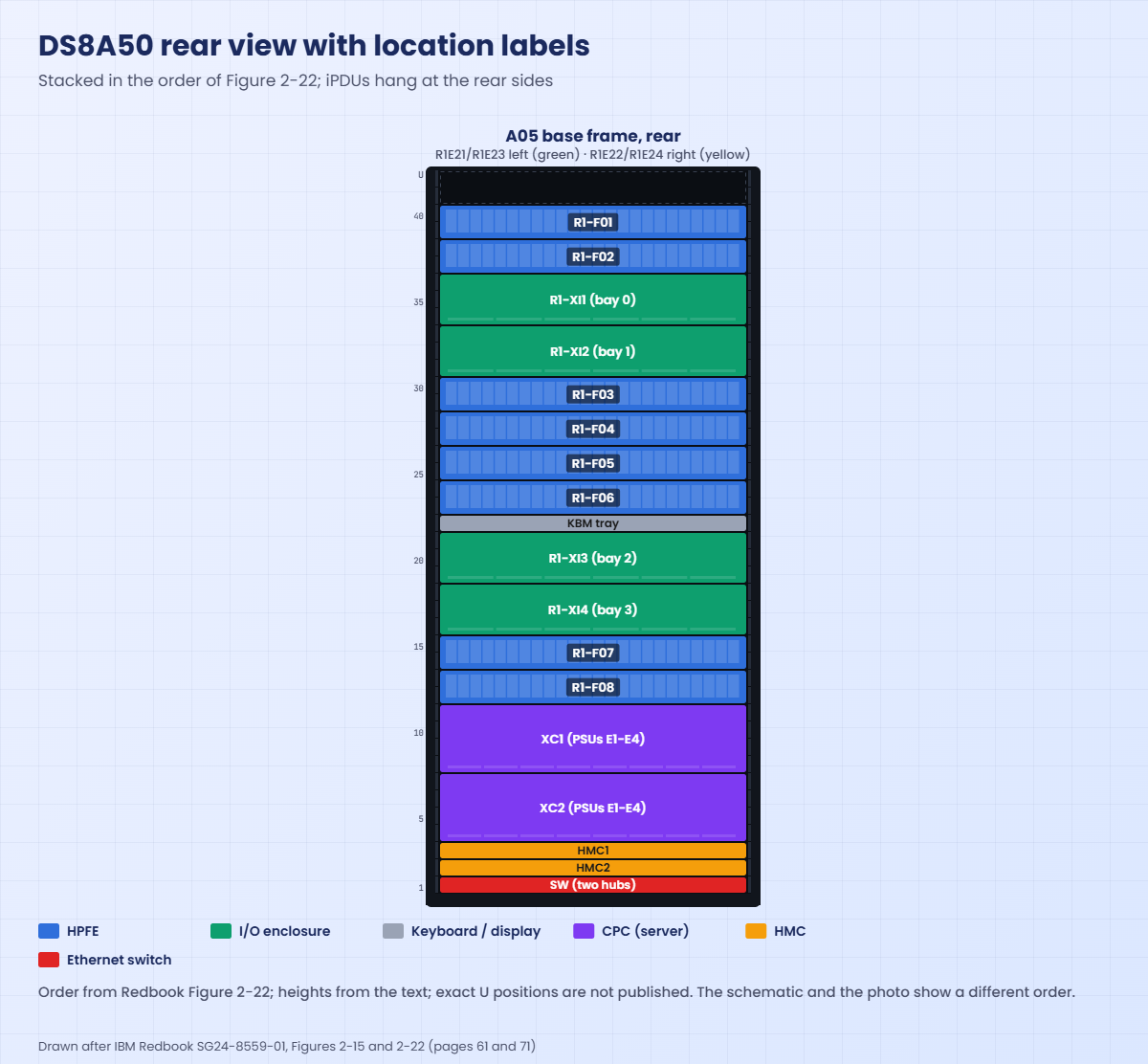
Above the CPCs the rack alternates between I/O enclosure pairs and HPFE Gen3 pairs. In the rear view with location labels (Figure 2-22), the order from the top is R1-F01 and F02, R1-XI1 and XI2, R1-F03 to F06, the keyboard tray, R1-XI3 and XI4, and then R1-F07 and F08 just above the CPCs.
The I/O enclosures are named XI1 to XI4 and the I/O bays inside them are bays 0 to 3, with the upper pair (XI1, XI2) as bays 0 and 1 and the lower pair (XI3, XI4) as bays 2 and 3.
4Top: the last flash shelves and spare space
The top HPFE pairs only turn up in larger configurations. In a minimum system everything above the keyboard tray is empty, because all you get is the HMCs, hubs, CPCs, one I/O pair, one HPFE pair and the keyboard, and even in the maximum schematic the top two U stay empty.
5Three drawings, three orders
This is where the DS8A00 rack layout gets messy. The Redbook shows the base frame three ways and they don’t agree on the order: the schematic (Figure 2-3, page 44) puts one I/O pair straight above the CPCs, the rear power drawing (Figure 2-22, page 71) puts flash pair F07 and F08 there, and the photo (Figure 1-3, page 4) puts the keyboard between two HPFE pairs.
So never plan a repair from a U number in a drawing. The parts carry printed location labels, and the label always wins. The rack drawings in this lesson follow the schematic for the front and Figure 2-22 for the rear labels, and they say so.
6Location codes, read left to right
Read a code like R1-F08-D8 as rack 1, flash enclosure F08, drive slot D8, and R2 would be the E05 expansion rack. XI is an I/O enclosure, XC a CPC, E1 to E4 a power supply and R1E21 an iPDU. When IBM support or a service event names a part, it uses this form, and you go and find the label on the part instead of a position you counted.
7The E05 expansion frame and the other models
From the bottom, the E05 stacks an I/O enclosure pair, HPFE pairs 5 and 6, a second I/O pair, HPFE pairs 7 and 8, and then empty space above about U28 (schematic). It’s cabled to the base CPCs with copper PCIe cables up to 2 m (feature AB00) or optical cables up to 20 m (feature AB01), one cable set per I/O pair.
The DS8A10 A01 uses the same slot pattern in a single frame with smaller CPCs. The A00 rack-mount goes into your own rack, and if you order it with a DS8A00 rack, the placement is done at the data centre.
Power domains: seen from the rear, the left iPDUs are green and the right ones are yellow. The left PSU of each part goes to green and the right PSU to yellow, and the left-domain iPDUs report to the gray hub while the right-domain ones report to the black hub.
Hands-on lab: map the practice DS8A50 to its rack
Before you run any command, double-check it
Read every command twice before you press Enter. Check the target: the system or account, the IDs, the names and the sizes. These commands are for learning and were tested in our lab, not on your system. At work, run the read-only list commands first, follow your change process, make sure a backup exists, and ask a second person to check anything that changes or deletes data. You run them at your own risk.
You’ll read the practice DS8A50’s hardware, place each part in the rack and chase a failed drive to its enclosure, and then a script on your laptop prints the same map for you.
Practice shell note: the practice shell is our teaching tool, not IBM software. Real DS CLI output looks very much like this but is not identical. The hardware column names come from IBM’s 10.1 command reference, but the values (IDs such as 1B1, location values such as R1-D1) are the shell’s own. On a real DS8A00 the location column carries the real labels, such as R1-F07. Messages starting with SIM are practice-shell messages.
1List the flash enclosures
Run this:
python ds8sim.py -cfg lab.profile
simctl reset
lsstgenclYou should see this:
dscli> simctl reset
SIM0100I simctl: factory state restored (users and passwords kept; use simctl reset -all to reset them too).
dscli> lsstgencl
Date/Time: 24 October 2026 19:58:51 UTC IBM DSCLI Version: 7.10.10.348 DS: IBM.2107-78SV001
ID Frame Enclnum Loc FC Interfaces State DA pair
======================================================================
IBM.2107-D04-8SV01/R1 1 1 R1-D1 HPFE Gen3 Normal 0
IBM.2107-D04-8SV01/R2 1 2 R1-D2 HPFE Gen3 Normal 0
IBM.2107-D04-8SV02/R1 1 3 R1-D3 HPFE Gen3 Normal 2
IBM.2107-D04-8SV02/R2 1 4 R1-D4 HPFE Gen3 Normal 2Four enclosures make two HPFE Gen3 pairs. The ID before the slash (8SV01, 8SV02) names the pair, and the DA pair column tells you which flash RAID adapter pair drives it, 0 or 2. In the rack each pair is two 2U shelves, one above the other.
✅ Checkpoint: You see two HPFE pairs: 8SV01 on DA pair 0 and 8SV02 on DA pair 2.
2Find the I/O enclosures and the adapters that drive the flash
Run this:
lsioenclosure
lsdacardYou should see this:
dscli> lsioenclosure
Date/Time: 24 October 2026 19:58:51 UTC IBM DSCLI Version: 7.10.10.348 DS: IBM.2107-78SV001
ID Frame State Host adapters Device adapters Location code S/N
========================================================================================
IBM.1400-1B1-78SV0 1 Online 1 2 U1400.1B1.78SV0 YE10SV0001
IBM.1400-1B2-78SV0 1 Online 1 2 U1400.1B2.78SV0 YE10SV0002
IBM.1400-1B3-78SV0 1 Online 2 0 U1400.1B3.78SV0 YE10SV0003
IBM.1400-1B4-78SV0 1 Online 0 0 U1400.1B4.78SV0 YE10SV0004
dscli> lsdacard
Date/Time: 24 October 2026 19:58:51 UTC IBM DSCLI Version: 7.10.10.348 DS: IBM.2107-78SV001
ID I/O enclosure Frame State DA pair Location code S/N
=====================================================================================================
IBM.1400-1B1-78SV0/R-1-P1-C6 IBM.1400-1B1-78SV0 1 Online 0 U1400.1B1.78SV0-P1-C6 YA30SV0010
IBM.1400-1B2-78SV0/R-1-P1-C6 IBM.1400-1B2-78SV0 1 Online 0 U1400.1B2.78SV0-P1-C6 YA30SV0020
IBM.1400-1B1-78SV0/R-1-P1-C8 IBM.1400-1B1-78SV0 1 Online 2 U1400.1B1.78SV0-P1-C8 YA30SV0012
IBM.1400-1B2-78SV0/R-1-P1-C8 IBM.1400-1B2-78SV0 1 Online 2 U1400.1B2.78SV0-P1-C8 YA30SV0022Both DA pairs have one adapter in 1B1 and one in 1B2, so the two halves of each pair sit in different I/O enclosures, each owned by a different CPC. That’s IBM’s rule and the shell follows it. Treat the four enclosures as the base frame’s bays 0 to 3 (XI1 to XI4 on a real rack); 1B3 and 1B4 don’t hold any device adapters here.
✅ Checkpoint: DA pair 0 and DA pair 2 each have one card in 1B1 and one in 1B2.
3Place the CPCs and HMCs
Run this:
lspnode
lshmcYou should see this:
dscli> lspnode
Date/Time: 24 October 2026 19:58:52 UTC IBM DSCLI Version: 7.10.10.348 DS: IBM.2107-78SV001
ID State Release Processor Memory Location
==============================================================
00 Online R10.1 Power9+ 20-core 512.0 GB U9009.42A.78SV00-P1
01 Online R10.1 Power9+ 20-core 512.0 GB U9009.42A.78SV01-P1
dscli> lshmc
Date/Time: 24 October 2026 19:58:52 UTC IBM DSCLI Version: 7.10.10.348 DS: IBM.2107-78SV001
Name State Role Release Management-IP Location-Code Machine-Type Machine-Model Memory Disk
================================================================================================================================
DS8A50-1A.LAB Online Primary(1) R10.1 bundle 10.10.106.0 10.0.0.1 U7063CR2.78SV1DD 7063 CR2 33GB 1TB
DS8A50-1B.LAB Online Secondary(2) R10.1 bundle 10.10.106.0 10.0.0.2 U7063CR2.78SV2DD 7063 CR2 33GB 1TBNode 00 and node 01 are the two CPCs, labelled XC1 and XC2 on the rack, 4U each and just above the HMCs. The Primary(1) HMC is HMC1, mounted above the Secondary(2) HMC near the floor.
✅ Checkpoint: You can point at XC1, XC2, HMC1 and HMC2 on the rack drawing.
4Chase a failed drive to its shelf
Make one array and then ask the shell to fail a drive in it. This is a practice control, not a DS CLI command.
Run this:
mkarray -raidtype 6 -arsite S1
simctl drivefail S1
lsdrive -l
lsarrayYou should see this:
dscli> mkarray -raidtype 6 -arsite S1
CMUC00004I mkarray: Array A0 successfully created.
dscli> simctl drivefail S1
SIM0110I simctl: drive IBM.2107-D04-8SV01/R1-P1-D1 failed. Array A0 is rebuilding onto a spare (about 10 simulated minutes; use simctl tick).
dscli> lsdrive -l
Date/Time: 24 October 2026 19:58:52 UTC IBM DSCLI Version: 7.10.10.348 DS: IBM.2107-78SV001
ID Storage enclosure Frame State Class Capacity Array Location Interface Firmware S/N
===============================================================================================================================
IBM.2107-D04-8SV01/R1-P1-D1 IBM.2107-D04-8SV01 1 Failed FlashCoreModule 4800.0 A0 R1-P1-D1 NVMe 4.1.2 SVS101
(output shortened: 64 drives in total)
dscli> lsarray
Date/Time: 24 October 2026 19:58:52 UTC IBM DSCLI Version: 7.10.10.348 DS: IBM.2107-78SV001
Array State Data RAIDtype arsite Rank DA Pair DDMcap (10^9B)
==========================================================================
A0 Unassigned Rebuilding 6 (5+P+Q+S) S1 - 0 4800.0Read the failed line from left to right. It’s storage enclosure 8SV01, which step 1 told you is the pair on DA pair 0, and array A0 is rebuilding onto a spare. On a real DS8A00 the Location column would read something like R1-F08-D8, and the service engineer would walk to the shelf labelled R1-F08 and find slot 8.
✅ Checkpoint: You traced the failed drive to storage enclosure 8SV01 and DA pair 0, and A0 shows Rebuilding.
5Print a rack map from your laptop
Save this script as rackmap.py in the lab folder next to ds8sim.py. It runs on your laptop, not on the DS8000, and it only reads. Store your password in a password file first, so the script never has to type it.
Run this (use your own password):
python ds8sim.py -hmc1 10.0.0.1 -user admin -passwd YOURPASSWORD managepwfile -action add -name admin -pw YOURPASSWORD -pwfile security.datYou should see this:
CMUC00206I managepwfile: Record 10.0.0.1/admin successfully added to password file security.dat.Save as auto.profile:
hmc1: 10.0.0.1
username: admin
pwfile: security.dat
devid: IBM.2107-78SV001
banner: off
header: on
format: delim
delim: ,
File rackmap.py:
# Runs on your workstation or jump server, not on the DS8000.
# It talks to the DS8000 only through the DS CLI (auto.profile: banner off, header on, format delim).
import csv, subprocess
DSCLI = ["python", "ds8sim.py", "-cfg", "auto.profile"] # at work: ["dscli", "-cfg", "auto.profile"]
def dscli(*args):
"""Run one DS CLI command and return its rows as dictionaries."""
out = subprocess.run(DSCLI + list(args), capture_output=True, text=True).stdout
lines = [l for l in out.splitlines() if l and not l.startswith("SaatVedha") and not l.startswith("CMUC")]
return list(csv.DictReader(lines))
enclosures = dscli("lsstgencl")
if not enclosures:
raise SystemExit("No storage enclosures came back. Run 'lsstgencl' by hand and check auto.profile.")
drives, ioencs = dscli("lsdrive", "-l"), dscli("lsioenclosure")
hacards, dacards = dscli("lshacard"), dscli("lsdacard")
print("FLASH ENCLOSURE PAIRS")
pairs = {}
for e in enclosures:
p = pairs.setdefault(e["ID"].split("/")[0], {"locs": [], "da": e["DA pair"]})
p["locs"].append(e["Loc"])
for box, p in pairs.items():
mine = [d for d in drives if d["Storage enclosure"] == box]
bad = [d["Location"] + " " + d["State"] for d in mine if d["State"] != "Normal"]
print(" %s enclosures %s DA pair %s drives %d problems: %s"
% (box, " + ".join(p["locs"]), p["da"], len(mine), ", ".join(bad) or "none"))
print("I/O ENCLOSURES (in list order)")
for io in ioencs:
ha = [h["ID"].split("-")[-1] for h in hacards if h["I/O enclosure"] == io["ID"]]
da = [d["ID"].split("-")[-1] + "/pair " + d["DA pair"] for d in dacards if d["I/O enclosure"] == io["ID"]]
print(" %s HA: %-6s DA: %s" % (io["ID"], " ".join(ha) or "-", " ".join(da) or "-"))
Run this:
python rackmap.pyYou should see this:
> python rackmap.py
FLASH ENCLOSURE PAIRS
IBM.2107-D04-8SV01 enclosures R1-D1 + R1-D2 DA pair 0 drives 32 problems: R1-P1-D1 Failed
IBM.2107-D04-8SV02 enclosures R1-D3 + R1-D4 DA pair 2 drives 32 problems: none
I/O ENCLOSURES (in list order)
IBM.1400-1B1-78SV0 HA: C1 DA: C6/pair 0 C8/pair 2
IBM.1400-1B2-78SV0 HA: C3 C4 DA: C6/pair 0 C8/pair 2
IBM.1400-1B3-78SV0 HA: C5 DA: -
IBM.1400-1B4-78SV0 HA: - DA: -
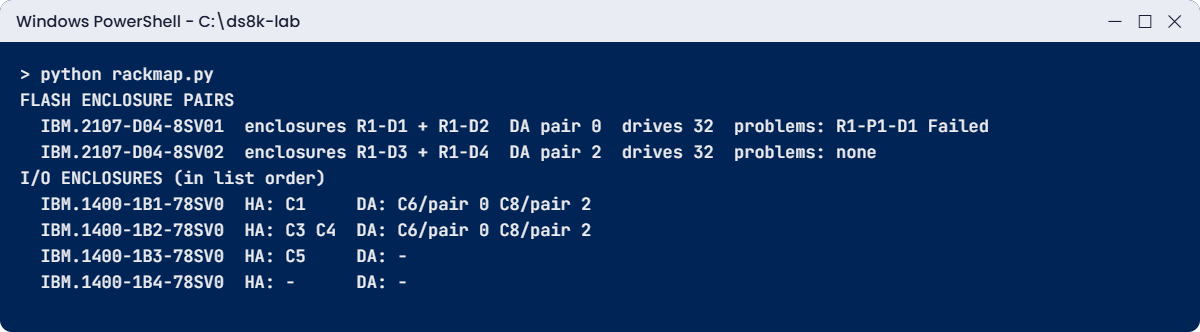
Now one screen shows each HPFE pair with its shelves, its DA pair and any drive that isn’t Normal, plus each I/O enclosure with its host adapter and device adapter slots. At work you can have a scheduler on the jump server run this every morning and mail it to the team, and the rack map in your runbook never goes stale.
✅ Checkpoint: The script prints both HPFE pairs, flags R1-P1-D1 Failed, and lists four I/O enclosures.
6Fill in the rear location map
Open Figure 2-22 on page 71 (PDF page 73) of the DS8A00 Redbook and cover the labels, then write the location code for each shelf from the top down.
| From the top | Part | Your label |
|---|---|---|
| 1-2 | HPFE Gen3 pair | ______ |
| 3-4 | I/O enclosure pair | ______ |
| 5-8 | Two HPFE Gen3 pairs | ______ |
| 9 | Keyboard tray | KBM tray |
| 10-11 | I/O enclosure pair | ______ |
| 12-13 | HPFE Gen3 pair | ______ |
| 14-15 | Two CPCs | ______ |
| 16-17 | Two HMCs | ______ |
| 18 | Rack control hubs | ______ |
Answer key:
| From the top | Labels |
|---|---|
| 1-2 | R1-F01, R1-F02 |
| 3-4 | R1-XI1, R1-XI2 (bays 0 and 1) |
| 5-8 | R1-F03, R1-F04, R1-F05, R1-F06 |
| 10-11 | R1-XI3, R1-XI4 (bays 2 and 3) |
| 12-13 | R1-F07, R1-F08 |
| 14-15 | XC1 above XC2 |
| 16-17 | HMC1 above HMC2 |
| 18 | SW (two hubs side by side) |
✅ Checkpoint: You placed all eight flash shelves, four I/O enclosures, both CPCs and both HMCs.
Break It, Then Fix It
Here are two mistakes that make a rack-map script either lie or stop, and both tend to happen in the first week a team automates.
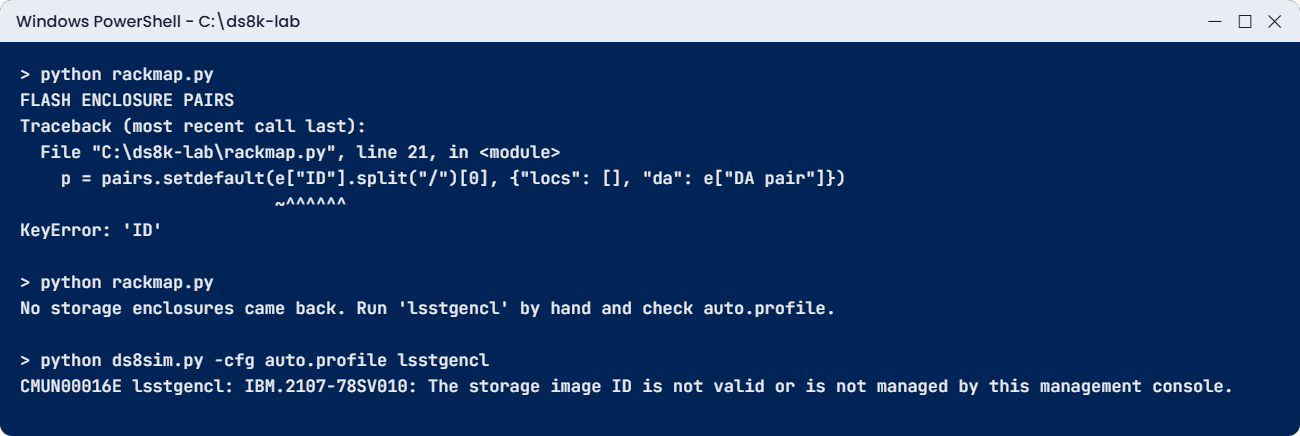
1Break it: a profile without delimited output
A teammate “tidies” auto.profile and deletes the last two lines, format: delim and delim: ,. Do the same thing yourself and run the script.
Run this:
python rackmap.pyYou’ll get this:
> python rackmap.py
FLASH ENCLOSURE PAIRS
Traceback (most recent call last):
File "C:\ds8k-lab\rackmap.py", line 21, in <module>
p = pairs.setdefault(e["ID"].split("/")[0], {"locs": [], "da": e["DA pair"]})
~^^^^^^
KeyError: 'ID'Why: without delimited format the DS CLI prints its normal space-padded table, so the csv reader sees one long header and finds no column called ID. Nothing was wrong with the script; the profile was the problem.
Fix: put format: delim and delim: , back in auto.profile and run the script again.
You should see this:
> python rackmap.py
FLASH ENCLOSURE PAIRS
IBM.2107-D04-8SV01 enclosures R1-D1 + R1-D2 DA pair 0 drives 32 problems: R1-P1-D1 Failed
IBM.2107-D04-8SV02 enclosures R1-D3 + R1-D4 DA pair 2 drives 32 problems: none
I/O ENCLOSURES (in list order)
IBM.1400-1B1-78SV0 HA: C1 DA: C6/pair 0 C8/pair 2
IBM.1400-1B2-78SV0 HA: C3 C4 DA: C6/pair 0 C8/pair 2
IBM.1400-1B3-78SV0 HA: C5 DA: -
IBM.1400-1B4-78SV0 HA: - DA: -✅ Checkpoint: The rack map prints again with both HPFE pairs.
2Break it: the wrong serial in devid
Someone copies the serial off a sticker and types 78SV010 instead of 78SV001 in the devid line. Make that change and run the script.
Run this:
python rackmap.pyYou’ll get this:
> python rackmap.py
No storage enclosures came back. Run 'lsstgencl' by hand and check auto.profile.The script stops on purpose, because an empty list must never look like an empty rack. Run the command by hand to see the real reason.
Run this:
python ds8sim.py -cfg auto.profile lsstgenclYou’ll get this:
> python ds8sim.py -cfg auto.profile lsstgencl
CMUN00016E lsstgencl: IBM.2107-78SV010: The storage image ID is not valid or is not managed by this management console.Why: the storage image ID in the profile doesn’t exist on this HMC. (This message wording is the practice shell’s.) Fix: copy the ID from lssi rather than from a label, put IBM.2107-78SV001 back in devid and run the script again.
You should see this:
> python rackmap.py
FLASH ENCLOSURE PAIRS
IBM.2107-D04-8SV01 enclosures R1-D1 + R1-D2 DA pair 0 drives 32 problems: R1-P1-D1 Failed
IBM.2107-D04-8SV02 enclosures R1-D3 + R1-D4 DA pair 2 drives 32 problems: none
I/O ENCLOSURES (in list order)
IBM.1400-1B1-78SV0 HA: C1 DA: C6/pair 0 C8/pair 2
IBM.1400-1B2-78SV0 HA: C3 C4 DA: C6/pair 0 C8/pair 2
IBM.1400-1B3-78SV0 HA: C5 DA: -
IBM.1400-1B4-78SV0 HA: - DA: -✅ Checkpoint: devid is IBM.2107-78SV001 and the rack map prints.
This happened at work
The cord that was on the other side
A colocation company hosted a regional payments firm’s DS8A50. One night the HMC reported a failed power supply on flash enclosure R1-F05, the yellow-side supply E2, and the system carried on fine on the green-side supply, as it’s designed to.
IBM scheduled the part swap for the morning and asked the site’s remote-hands engineer to check that the yellow power cord was seated properly.
The engineer printed the front-view drawing from the runbook and went round to the rear of the rack. He found the right height, but from the rear left and right are swapped, so the side the front drawing called yellow was the green side in front of him.
He unplugged and re-seated the cord he thought was yellow, but it was the green cord of R1-F05, the only working feed that enclosure had, and the shelf went dark. For about six minutes the payments firm’s batch jobs saw I/O errors, until the cord was back in and the system recovered.
It came down to a rear task done with a front drawing, and a cord picked by side instead of by label. The runbook now has a rear view with the printed location codes (R1-F05-E1, R1-F05-E2) and the rule “match the label, then touch”, and remote hands read the label aloud on the phone before any cord is moved.
Common mistakes and troubleshooting
| Symptom | Likely cause | What to check / fix |
|---|---|---|
| Wrong cord or part touched at the rear | Front drawing used at the rear, left and right swapped | Use a rear view; from the rear, green iPDUs are left, yellow are right |
| Engineer counts to the wrong shelf | Drawing from another figure or model | Match the printed location label (R1-F07), never a counted U |
| Cannot find the HMCs | Looking for a Management Enclosure as on DS8900F | DS8A00 HMCs are 1U units at the bottom, HMC1 above HMC2 |
| E05 cables do not reach | Copper set (AB00) with frames apart | Frames side by side, or order optical AB01 (up to 20 m) |
| Rack map script shows nothing | Wrong devid or HMC in auto.profile | Run the command by hand; copy the ID from lssi |
| KeyError in a DS CLI script | Profile lost format: delim | Restore format: delim and delim: , in the profile |
| No space for a new HPFE pair | Base frame already holds four pairs | Plan an E05 (A08 or A05 only); DS8A10 cannot expand |
Make it a habit: keep two printed drawings of your DS8A00 rack layout in the runbook, front and rear, each with the real location labels from your own rack, and photograph the rack after every hardware change.
Interview questions
Click a question to open it. Each one is worded the way an interviewer would ask it, and underneath you’ll see why they ask and one way you could answer in your own words.
Fresher level
1. Where are the HMCs in a DS8A50 rack, and how do you tell the primary?
Why they ask this: A simple layout question that shows whether you have stood at a real rack.
How you might answer: They’re two 1U units at the bottom of the base frame, just above the rack control hubs, and the primary, HMC1, is mounted above the secondary, HMC2. If you run lshmc it shows the roles as Primary(1) and Secondary(2).
2. What does the location code R1-F08-D8 tell you?
Why they ask this: They check that you can turn a support message into a place on the floor.
How you might answer: R1 is rack 1, which is the base frame, F08 is flash enclosure 8, an HPFE Gen3 shelf, and D8 is the drive slot in that shelf. If it said R2, that would mean the E05 expansion frame.
2–5 years experience
3. A field engineer will replace an iPDU on the yellow side. Walk me through what you check first.
Why they ask this: They want to see power-domain thinking and safe change habits.
How you might answer: From the rear, I’d confirm the yellow iPDUs are on the right, R1E22 and R1E24. Then I’d make sure every part has a healthy green-side supply, because the green domain carries the whole frame during the swap. The Redbook says to check that all PSU input LEDs are solid green before you remove a partner iPDU.
I’d also let the host teams know about the window, even though it should be non-disruptive, and keep the HMC event log open while the work is going on.
4. How would you automate an always-current rack map?
Why they ask this: They test practical automation outside the box.
How you might answer: I’d have a script on the jump server run DS CLI with a profile set to delimited output and a password file. It reads lsstgencl, lsdrive -l, lsioenclosure, lshacard and lsdacard and joins them on enclosure IDs.
It prints each HPFE pair with its DA pair and any drive that isn’t Normal, and each I/O enclosure with its adapters. If a list comes back empty it stops loudly, so an empty answer can never look like an empty rack.
Senior level
5. Our runbook rack drawing does not match what the engineer sees. How do you fix this for good?
Why they ask this: A senior should know the Redbook figures differ and design a process, not just redraw once.
How you might answer: First I’d accept that the Redbook itself shows three orders, in the schematic, the rear power view and the photo, so our source of truth has to be our own rack labels and not a book figure.
I’d photograph the front and rear, build our drawing from the printed labels and add it to the runbook with the date and serial, and make every rack task start with reading the label aloud. A DS CLI rack map from the jump server sits next to it and gets refreshed after each hardware change.
6. You must add capacity to a DS8A50 whose base frame is full. What do you plan?
Why they ask this: They want the frame rules, the cabling and the floor all in one answer.
How you might answer: The base frame holds four HPFE Gen3 pairs and two I/O pairs, so the next step is one E05. That adds up to four HPFE pairs and two I/O pairs, bays 4 to 7, plus one more iPDU pair with two power cords.
I’d check there’s floor space next to the base frame for copper PCIe (2 m), or else order optical cables (AB01, 20 m), one set per I/O pair, and I’d plan host adapter placement in the new bays so the paths spread across frames.
Quick quiz
Q1. What sits at the very bottom of a DS8A50 base frame?
- HPFE Gen3 pair 1
- Rack control hubs, with the HMCs just above
- The CPCs
- The keyboard tray
Show answer
B — 1U at the bottom is reserved for the rack control hubs; the two 1U HMCs are above them.
Q2. How tall is one DS8A00 I/O enclosure?
- 2U
- 3U
- 5U
- 8U
Show answer
B — Each I/O enclosure is 3U, so a pair takes 6U.
Q3. Seen from the rear, which side has the green power domain?
- Left
- Right
- Top
- Bottom
Show answer
A — Left-rear iPDUs (R1E21, R1E23) are green; right-rear are yellow.
Q4. What does XC1 label?
- An I/O enclosure
- A CPC
- An iPDU
- A flash enclosure
Show answer
B — XC1 and XC2 are the two CPCs.
Q5. Which models can take an E05 expansion frame?
- A00 and A01
- A05 and A08
- Only A01
- All models
Show answer
B — Only the DS8A50 (A05) and DS8A80 (A08) take one E05.
Quick recap
- DS8A00 racks are 42U, 600 x 1050 mm; A08 and A05 can add one E05; A01 is single-frame; A00 goes in your rack.
- Bottom up: rack control hubs, HMC2, HMC1, XC2, XC1, then I/O and HPFE pairs, keyboard tray in the middle.
- HPFE Gen3 = 2U per enclosure, 4U per pair; I/O enclosure = 3U, 6U per pair.
- Location codes: R1-F01 to F08 flash, R1-XI1 to XI4 I/O, XC1/XC2 CPCs, HMC1/HMC2, R1E21 to R1E24 iPDUs, drive R1-F08-D8.
- From the rear, green iPDUs are left and yellow are right; front and rear views are mirror images.
- The Redbook figures disagree on order: trust the printed label, not a counted U.
- A small DS CLI script on your laptop can keep a live rack map.
Next lesson
Lesson 27: How DS8000 parts connect: CPCs, I/O bays, adapters and enclosures → You follow every cable inside a DS8000, from CPC to I/O bay to adapter to enclosure, across five generations.
Further reading: DS8A00 rack layout
Want to go deeper into DS8A00 rack layout? IBM Redbook SG24-8559-01, DS8A00 Architecture and Implementation Guide (Release 10.1).
See the original drawings: Figure 1-3 on page 4 (PDF page 22) for the labelled photo, Figure 2-2 on page 42 (PDF page 44) and Figure 2-3 on page 44 (PDF page 46) for the A08 and A05 with E05, Figure 2-4 on page 45 (PDF page 47) for the A01, Figure 2-5 on page 47 (PDF page 49) for the A00, Figure 2-15 on page 61 (PDF page 63) for the rear bay numbers, Figure 2-22 on page 71 (PDF page 73) for the rear location labels and Figure 2-25 on page 75 (PDF page 77) for the KVM, HMCs and hubs.
For what each part does, revisit Inside the frame: the main hardware parts in this course. You can also see the full plan for this course on the IBM DS8000 Architecture course page.
